Quick answer: a home services CRM is the system that remembers every customer between visits: who called, which estimate is still open, whose service is due, who has not paid and who has not been asked for a review. For an owner-led trade business of 1 to 20 people, Zoye is our first pick because an AI works those follow-ups for you. Jobber, Housecall Pro, ServiceTitan, Service Fusion, Kickserv and HubSpot fit other shapes, and the guide by trade below sends you to the deeper article for your work.
Key takeaways (October 2026)
- The 2011 Harvard Business Review study of reply speed found that only 37% of companies answered a web enquiry within an hour, and that a reply within the hour was nearly 7 times as likely to qualify the lead as one sent an hour later.
- The trades are large and growing: the US Bureau of Labor Statistics counts about 821,000 electrician jobs, 510,600 plumbing jobs and 440,900 HVAC jobs in 2025.
- Of the six rivals reviewed here, ServiceTitan publishes no price at all; entry prices for the rest run from $29 a month (Jobber Core, billed yearly, 1 user) to $208 a month (Service Fusion Starter, billed yearly, unlimited users).
- Every trade shares the same five leaks: slow first replies, estimates that go cold, recurring visits nobody books, reviews nobody asks for, and notes that never travel from the van to the office.
- Zoye is not a dispatch, GPS or route-optimization tool and not a POS. It runs enquiries, estimates, recurring visits, invoices and WhatsApp updates, with an AI that operates them.
What every home-service business has in common
Every business that sends people into homes sells the same way: a customer has a problem or a plan, asks two or three companies, and hires the one that answers, quotes clearly and shows up. The trade changes the details, not the pattern. Five moments decide whether a job is won, and they look alike in a heating company, a plumbing shop or a pest route.
That is why this page exists. Each trade has its own article with its own specialists, and the guide further down sends you there. First, the shared ground.
1. The emergency call rewards whoever answers first
Burst pipes, dead furnaces, tripped panels, a leaking roof after a storm, wasps in the kitchen: urgent work is the easiest sale in the trades because the customer has already decided to buy. They have not decided from whom. They call down a list until someone picks up or replies.
The research on this is old but has never been contradicted. In the 2011 Harvard Business Review study "The Short Life of Online Sales Leads", an audit of 2,241 US companies found that 23% never answered a web enquiry at all, and the average reply among those that did took 42 hours. An analysis of 1.25 million leads in the same study found that replying within an hour made a company more than 60 times as likely to qualify the lead as waiting 24 hours or longer. In home services the useful window is shorter still, because the homeowner with water on the floor will not wait an hour.
A CRM cannot answer the phone while you are on a ladder. What it can do is make sure a written enquiry gets a reply in seconds, and that every missed call becomes a named lead with a callback task instead of a number in a call log.
2. Estimates go cold quietly
The second leak is slower and costs more. A replacement system, a rewire, a new roof, a bathroom repipe or a year of pest service is a considered purchase. The customer compares, asks a partner, checks financing and waits. Most estimates are not lost to a competitor; they simply expire because nobody asked again.
The fix is unglamorous: every estimate needs a status, a value and a date, and a rule that follows up at set intervals until the answer is yes or no. A good home services CRM makes "estimates older than seven days with no reply" a list you can see, not a memory you hope to have.
3. Seasonal and recurring work is the steady income
Most home-service trades have a second income stream that does not depend on emergencies. ENERGY STAR advises a cooling check every spring and a heating check every fall. The US Environmental Protection Agency estimates that household leaks can waste more than 9,300 gallons of water per home a year, which gives plumbers a reason for annual checks. Pest control runs on quarterly or monthly visits, cleaning on weekly or fortnightly ones, and electrical contractors sell inspection and maintenance contracts to landlords and small businesses.
All of these share one property: the visit only happens if someone books it. Recurring work needs a list of customers on a plan, the date of their last visit, the date of the next one and a reminder that goes out before the busy season fills the calendar.
4. Reviews and referrals are the cheapest marketing
A homeowner choosing between three unknown companies reads reviews and asks neighbours. Both depend on the same habit: asking every satisfied customer, at the same moment, every time. Owners who ask only when they remember collect reviews from the customers they happened to like, which is a small and random share.
Referrals need the same discipline in reverse. When a new customer says "my neighbour recommended you", that source belongs on the record, so you can thank the neighbour and see which streets and which partners actually send work.
5. The crew and the office see different halves of the job
The technician knows what they found in the attic and what they recommended. The office knows who called, what was quoted and what is unpaid. In most small companies the two halves meet in a text thread, a whiteboard or the owner's head. When a technician recommends a replacement and nobody in the office hears about it, the estimate never gets written.
A home services CRM has to let the person in the van add to the record in seconds, ideally by voice, and let the office see it without asking.
What a home services CRM has to do: 8 tests
A home services CRM must turn every enquiry into a record, keep estimates and recurring visits on dated lists, send follow-ups and reminders automatically, take input from the van by voice or message, and attach invoices to the same customer. Score any tool on these eight tests during a trial, with your own customers.
- One list for every source. Calls, web forms, Facebook and Instagram, WhatsApp and referrals land in one place with the source recorded.
- First reply in seconds for written enquiries, with the questions you would ask on the phone.
- Estimates with status, value and age, and a follow-up rule that runs until there is an answer.
- Recurring plans with dates: last visit, next visit, renewal, and a live list of who is due.
- Booking from the message, so a customer picks a time and it lands on the calendar with a reminder.
- Review and referral habits built into the job close, not left to memory.
- Field input without typing: a voice note or a photo from the job updates the right record.
- Invoices on the same record, with a payment link and a polite chase when they go overdue.
Dispatch boards, GPS tracking, route optimization and flat-rate pricebooks are field service features. They matter for companies that move many trucks a day; our guide to field service management software for small business covers that category.
Which CRM fits your trade and team size
Choose by trade first, because each trade leaks in a different place, then by team size, because that decides how the bill grows. The table routes you to the deeper article for your trade, where we compare the specialists built for it. Below it, a short guide by headcount covers the price shape that suits a crew of one, five or twenty.
| Trade | Where it usually leaks | Specialists worth comparing | Our trade guide |
|---|---|---|---|
| Heating and cooling | Emergency calls in heat waves, replacement quotes, maintenance agreements | ServiceTitan, FieldEdge, Successware | CRM for HVAC |
| Plumbing | Night-time leaks, water heater estimates, review requests | Workiz, Kickserv, Housecall Pro | CRM for plumbers |
| Electrical | Estimates, permits and inspections, maintenance contracts | Simpro, Tradify, Fergus | CRM for electricians |
| Roofing | Storm-season surges, inspection photos, insurance-claim paperwork | AccuLynx, JobNimbus, Roofr, Leap | CRM for roofers |
| Pest control | Recurring service schedules, renewals, review requests | GorillaDesk, Jobber | CRM for pest control |
| Cleaning | Recurring bookings, crew schedules, late payments | Jobber, Housecall Pro | CRM for cleaning business |
| General contracting and renovation | Long estimates, project handoff, change orders | Buildertrend, Jobber | CRM for contractors |
| Solar | Site screening, long sales cycle, referrals after install | Design and proposal tools | CRM for solar installers |
By team size:
- Solo or owner plus one. Price per user matters less than time. You need instant replies, estimate follow-up and invoices from your phone. Jobber Core, Housecall Pro Basic and Zoye Almost Free all start under $60 a month, but check what each entry plan leaves out: Jobber's automatic quote follow-ups start on Connect, and Zoye's entry plan has no automations.
- 3 to 8 people. This is where per-user pricing starts to bite. Jobber adds $29 a month per extra user, Housecall Pro's Essentials covers 5 users and Max 8, Kickserv includes 5 users on Start and 10 on Run, and Zoye Starter covers 10 members at one price.
- 10 to 25 people with an office. You probably need dispatch as well as follow-up. Service Fusion's unlimited users take headcount out of the decision, ServiceTitan targets companies with call-takers and dispatchers, and Zoye Growth or Scale can run the customer side next to either.
If your trade is not listed, the pattern still holds: find the leak first, then the tool. Handyman, garage door, landscaping, pool and appliance repair businesses mostly share the plumbing and cleaning profiles above.
The 7 best home services CRMs in 2026
These seven cover the realistic choices for a trade business working in homes: one AI operator for the customer side, four field service platforms with different pricing shapes, one enterprise platform and one general CRM. Each starts with the limitation to check, then the October 2026 price from the vendor's page and the business it suits.
1. Zoye: one record per customer, and an AI that works the follow-up
The limitation first: Zoye is not a dispatch tool and not a POS. There is no dispatch board, no GPS tracking, no route optimization, no flat-rate pricebook and no card terminal at the door. If your morning starts with assigning fifteen technicians to a map, keep a field service app for that, and use Zoye next to it for everything before and after the visit.
Zoye is an AI Business Operator: one workspace in which CRM and contacts, tasks, deals, calendar, documents, lists, bookings, packages, Chats, team, budget and invoices, reports, workflow automations, WhatsApp automations, Facebook and Instagram, email tracking and the AI Notetaker are already linked, plus an AI that operates them for you. A deal knows its contact, its tasks, its files and its invoices. The features page lists every tool, and any you do not use can be hidden. Mapped onto the five shared leaks, it works like this.
The first reply. A website form, a Facebook lead ad, an Instagram comment or message, or a click-to-chat link becomes a lead with its source. The new-lead WhatsApp message goes out once per person, and the qualification bot asks your questions (what is happening, how urgent, what address, when is someone home) and writes the answers into the lead's fields. For a call you missed, a voice note such as "missed call from the lady on the hill, no hot water, call back after four" is enough for Zoye to create the lead and the callback task.
Estimates. Ask Zoye to draft the estimate as a document from your site notes and attach it to a deal with its value. A follow-up rule nudges the customer after the days you choose and again later, on WhatsApp or email, and stops when they reply. Our guide on how to automate follow-ups covers the timings.
Recurring work. Keep plan customers in a smart audience that stays live as records change, so "plan customers with no visit booked this season" is always current. A scheduled WhatsApp broadcast, personalized per customer and paced so replies do not swamp the office, opens the booking window. Customers pick a time from your Booking list and reminders go out automatically. Prepaid plans can be sold through Packages with a payment link, with each visit counted off on the customer's card.
Reviews and referrals. A rule that runs when a job is marked done and paid sends a short thank-you with your review link, and skips anyone who replied with a complaint so you can call them first. The referral source sits on every contact, and reports show which sources bring paid work.
The crew and the office. Technicians add to the record from WhatsApp: a voice note, a photo of a data plate, a PDF. Zoye reads them and updates the right customer. Everyone sees the same record, and Chats keeps Instagram and Facebook messages and comments together with the WhatsApp conversations Zoye has with your leads, with assignment and team notes.
You never have to open a builder for any of this. Explain the routine to Zoye the way you would explain it to a new office manager, whether in the app, in a WhatsApp chat, in Slack or as a voice note. Zoye writes the rule, reads it back to you in plain English and holds it until you approve. Each run is logged and can be undone.
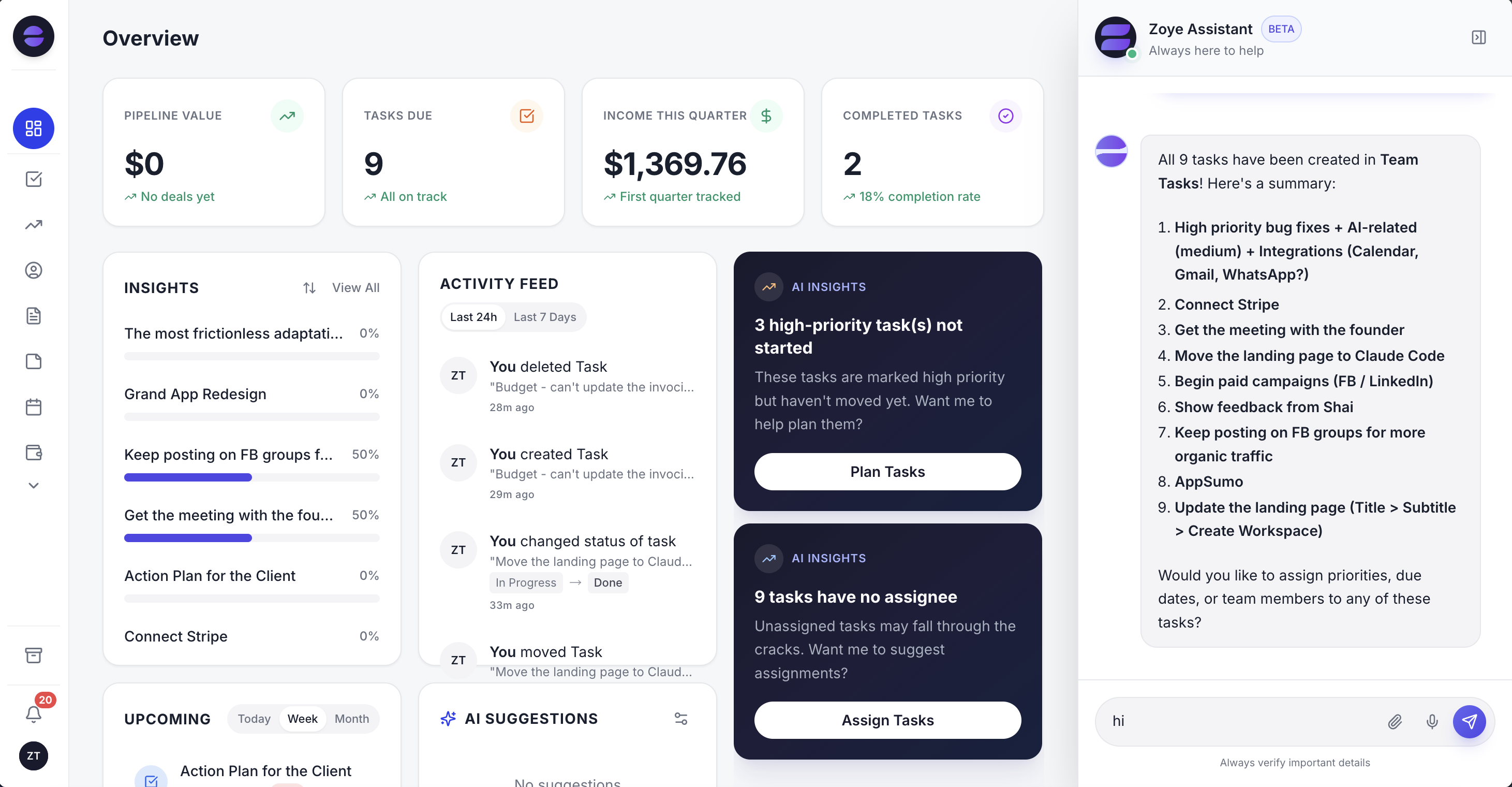
The Zoye overview: open pipeline, tasks due, income this quarter and suggested automations on one screen, so the owner sees what slipped before the crew leaves in the morning.
More honest limits: Zoye is not an accounting ledger, so your books stay in your accounting software. E-signatures are coming soon, so a signed estimate today still means a separate signing step. Connecting your own business WhatsApp number is also coming soon; today Zoye holds WhatsApp conversations with your leads through the official WhatsApp Business Platform.
Pricing (as of October 2026): Zoye is priced per plan with a member allowance, not per technician. Almost Free costs $5 a month, or $4 billed yearly, for 1 member with the core tools, 15 AI prompts a month and the Google integrations, and has no automations. Starter is $29 a month ($23 yearly) for 10 members and 5GB. Growth is $59 ($47) for 20 members and 10GB and includes workflow automations, WhatsApp automations with 250 messages a month and Meta automations. Scale is $119 ($95) for 100 members and 25GB, and Customize is quoted. See the pricing page.
Best for: owner-led home-service businesses of 1 to 20 people in any trade, where jobs slip between the enquiry and the paid invoice rather than on the road.
2. Jobber: the broad home-service app, priced by team size
Jobber covers quotes, scheduling, invoicing, payments and a client hub, and serves dozens of trades. The limitation is how features follow the plan: automatic quote and invoice follow-ups start on Connect, two-way SMS on Grow, and below Plus the Marketing Suite and AI Receptionist cost extra.
Pricing (as of October 2026): one user on Core costs $29 per month with yearly billing, or $49 month to month. Connect starts at $99 yearly ($139 monthly), Grow at $149 ($199), and Plus at $399 per month billed yearly with 5 users included. Every additional user adds $29 a month. Marketing Suite runs $99 a month and AI Receptionist $29. Our Jobber alternatives guide works through the tiers.
Best for: small crews in mixed trades that want one polished field app and fit cleanly into one of its user bands.
3. Housecall Pro: reviews in every plan, service plans at the top
Housecall Pro offers scheduling, dispatch, estimates, invoicing, online booking and review tools, with review management included on every plan. The limitation for recurring work is placement: Recurring Service Plans sit on Max, and add-ons such as CSR AI, Pipeline and Voice show no price.
Pricing (as of October 2026): Basic $59 a month billed yearly ($79 monthly) for 1 user, Essentials $149 ($189) for 5 users, Max $299 ($329) for 8 users, plus $35 a month per user beyond that on Max. The 14-day trial gives access to Max without a card. More in our Housecall Pro alternatives guide.
Best for: residential crews of 2 to 8 that want reviews and online booking built in and can justify Max once service plans matter.
4. ServiceTitan: the platform for companies with a call center
ServiceTitan is built for large residential and commercial trade companies with call-takers, dispatchers, sales technicians and a finance office. The limitation is transparency and fit: there are no prices on the page, and the depth is overhead for a team of four.
Pricing (as of October 2026): Starter, Essentials and The Works, each marked "Request Pricing", described as per-technician pricing. Customizable memberships appear only on The Works. Ask for onboarding fees and contract length in writing.
Best for: established companies with many technicians, a membership program to run at scale and staff to administer the system.
5. Service Fusion: unlimited users at a fixed price
Service Fusion includes unlimited users on every plan, which suits companies with office staff, apprentices and seasonal helpers who all need a login. The limitation is the starting point: the cheapest plan costs several times a one-user plan elsewhere, and recurring invoicing waits until Pro.
Pricing (as of October 2026): Starter $208 a month billed yearly or $245 monthly, Plus $325 or $382, Pro $533 or $627, unlimited users, no contract. GPS fleet tracking is an add-on with no listed price.
Best for: home-service companies with eight or more people logging in, who want headcount out of the pricing conversation.
6. Kickserv: generous user bundles at a low entry price
Kickserv covers jobs, estimates, invoices, reminders and reports, and bundles users generously: five on the entry plan. The limitation is depth: dispatch mapping and GPS check-ins begin on Run, and review requests and online booking do not appear among the plan features on its pricing page.
Pricing (as of October 2026): three plans by user count: Start at $60 a month with 5 users, Run at $119 with 10, Scale at $199 with 20. Annual billing takes 20% off, and every plan has a 30-day trial. Start includes automated email and text reminders and QuickBooks Online.
Best for: budget-minded crews of 3 to 10 that want estimates, jobs and reminders with more seats per dollar.
7. HubSpot: a general CRM for marketing-led companies
HubSpot is a sales and marketing CRM with pipelines, email, forms and reporting. The limitation for trades is everything after the sale: no technician scheduling, no service plan object and no field app, so the work itself runs in another tool.
Pricing (as of October 2026): there are free tools to begin with. Paid Starter seats list from $20 a month, and some offers bring that to about $7. Sales Hub Professional costs $90 a seat on yearly billing or $100 monthly, and a one-time $1,500 onboarding fee applies.
Best for: larger home-service brands with an in-house marketing team that already keep a separate field service platform.
Want to see it in action?
See Zoye catch a new lead, answer on WhatsApp and set up the follow-up, all from one message.
See How It WorksHome services CRMs compared
The table lines up the seven on what each is built for, the lowest published price as of October 2026, how users are counted and how recurring work is handled. Card processing fees, add-ons and WhatsApp message charges from Meta sit outside every figure.
| Tool | Built for | Lowest published price (Oct 2026) | How users are counted | Recurring work | Dispatch and GPS |
|---|---|---|---|---|---|
| Zoye | Enquiries, estimates, recurring visits, invoices, WhatsApp | $5/mo (1 member, no automations); $29/mo for 10 members | Members per plan (1, 10, 20, 100) | Live plan lists, scheduled reminders, Booking list, Packages | No |
| Jobber | Mixed home-service crews | $29/mo billed yearly (Core, 1 user) | Bands by team size, +$29 per user | Client reminders from Connect | Scheduling and routing |
| Housecall Pro | Residential crews | $59/mo billed yearly (Basic, 1 user) | 1, 5, 8 users, +$35 on Max | Recurring Service Plans on Max | Yes, employee GPS from Essentials |
| ServiceTitan | Large trade companies | Not published | Per technician | Customizable Memberships on The Works | Yes |
| Service Fusion | Teams with many logins | $208/mo billed yearly | Unlimited users | Recurring invoicing on Pro | Yes, GPS as an add-on |
| Kickserv | Budget crews | $60/mo (Start, 5 users) | 5, 10, 20 users | Automated reminders from Start | Dispatch mapping from Run |
| HubSpot | Marketing-led sales teams | Free tools; Starter from $20 per seat | Per seat | No | No |
An illustrative week in a seven-person repair company
To see how the five leaks close in practice, picture a company that does plumbing and heating repairs: the owner, four technicians, one apprentice and one person in the office, running Zoye next to a shared calendar in the first cold week of autumn. This is an illustration, not a customer story.
Monday. A cold night turns into a busy morning. Website and Facebook enquiries arrive while the phone is engaged; each gets a WhatsApp reply within seconds and three questions about the boiler, the address and access. By nine, the office has twelve leads sorted by urgency instead of twelve voicemails. Two calls that rang out are logged by the owner by voice note between jobs.
Tuesday. A technician finds a cracked heat exchanger and recommends a replacement. He sends Zoye a photo of the data plate and a voice note with two options. Zoye drafts the estimate, attaches it to a new deal on the customer's record and shows the follow-up rule for approval: a nudge on Friday and another the following Thursday.
Wednesday. The owner opens the plan list. Thirty-one customers on the annual service plan have no autumn visit booked. She approves a scheduled WhatsApp message to that live list, paced across two days, offering slots from the Booking list for the next three weeks. By evening, eleven have picked a time and dropped off the list.
Thursday. Six jobs closed this week are paid. The review rule sends each customer a short thank-you with the review link. One replies that the radiator is still noisy, so the rule skips the review link and the office books a return visit. A new customer mentions that a neighbour sent them, and the source goes on the record.
Friday. Tuesday's estimate has no reply, so the first follow-up goes out and asks whether the customer wants to talk through the options. Two invoices from last month are overdue and get their polite chase with a payment link. The owner asks Zoye on WhatsApp how many estimates are open and what they are worth, and gets the figure from live data before she starts the van.
Nobody in this week kept a spreadsheet, and nothing waited for the owner to remember it.
See what Zoye can do for you
CRM, deals, tasks and your Instagram, Facebook and WhatsApp automations in one workspace. Just ask Zoye and it sets any of it up for you.
Explore FeaturesMessaging customers on WhatsApp: the rules that apply
Many home-service customers answer WhatsApp faster than email, which makes it a good channel for booking windows, arrival notes and payment links. It has rules. On the official WhatsApp Business Platform you can reply freely within 24 hours of the customer's last message; after that, only an approved template can restart the conversation.
As of October 2026, Meta's developer documentation states that billing has been per delivered template message since 1 July 2025, priced by category and the recipient's country. From 1 October 2026, service messages are free up to 1,000 per business number each month. Marketing templates carry a charge every time, and utility templates that go out while a service window is open are billable again from that same date. Rates vary by country and change only at the start of a quarter, so check Meta's rate card. Our WhatsApp Business API pricing guide explains the categories, and WhatsApp appointment reminders has wording for visit reminders.
In Zoye, every WhatsApp automation is off until you switch it on and confirm consent, messages outside the 24-hour window use an approved template automatically, every outbound message includes an opt-out, and a STOP reply is honoured across the workspace.
How to move a home-service business onto a new CRM
Plan the move for a quiet fortnight, never the first heat wave or freeze. Export customers, list every open estimate and every plan customer with dates, import, rebuild the follow-up rules, and keep the old tool until open jobs have closed. Done this way, nothing in progress gets lost.
- Export your customers with phone numbers, emails, addresses and any tags that mark plan customers or the trade they bought.
- List open work: each open estimate with value and date, each recurring plan with last visit, next visit and renewal date, and each unpaid invoice.
- Import. Zoye imports from Trello, Monday.com or a spreadsheet, and you can send Zoye a CSV, a PDF or a screenshot to pull records out of it, so even a printed list of plan customers can become records you check.
- Rebuild the rules by describing them: estimate follow-ups at 3 and 10 days, plan reminders 30 days before the season, review requests after paid jobs, overdue invoice chases. Approve each one.
- Run both for two weeks, then switch fully once open jobs have closed in the old system.
Ready to hand off the busywork?
Zoye brings AI-powered CRM, task management, and automation into one workspace.
Get StartedThe short version
Every home-service trade loses work in the same five places: the first reply, the cold estimate, the recurring visit nobody booked, the review nobody asked for, and the gap between the van and the office. Start with the trade guide in the table above, then pick the tool that closes your biggest leak.
If you dispatch many trucks, shortlist ServiceTitan or Service Fusion and compare quotes. If you want one field app with a public price, compare Jobber, Housecall Pro and Kickserv at your exact headcount. If your jobs slip in follow-up, import twenty real customers into Zoye, send five real estimates and one plan reminder, and count what came back by the end of the trial.