
Quick answer: pest control is a subscription business that happens to drive a van. The best CRM for it is the one that keeps every recurring customer on cycle, renews agreements before they lapse and asks for the review while the customer still remembers the visit. For owner-led companies that lose money on follow-up rather than on routes, Zoye is our pick, on Growth at $59 a month ($47 billed yearly) for up to 20 members, the plan that includes the automations. For route-heavy operations, PestPac, FieldRoutes, ServiceTitan and GorillaDesk are the pest specialists, and only GorillaDesk publishes prices.
Key takeaways (October 2026)
- According to the Bureau of Labor Statistics, pest control workers held about 108,700 jobs in 2025, with 6% growth projected from 2025 to 2035 and about 13,700 openings a year; evening and weekend work is common.
- Three of the six rivals here (PestPac, FieldRoutes and ServiceTitan Pest Control) publish no prices at all and quote after a demo; GorillaDesk, Jobber and HubSpot list theirs.
- GorillaDesk prices by schedule, not by user: $49, $99 or $149 a month for one route, with unlimited office, sales and crew users.
- A company with 300 quarterly customers runs 1,200 scheduled visits a year, about 100 a month, before a single new lead or callback. That volume is why reminders and renewals cannot live in someone's head.
- Zoye is not routing, dispatch or chemical-use recordkeeping software. It is the operator for enquiries, estimates, service agreements, renewals, bookings, review requests, invoices and WhatsApp.
How a pest control company earns money, and where it leaks
A pest control company earns most of its revenue from recurring service agreements, usually quarterly or bimonthly general pest plans, plus annual termite plans and seasonal one-off jobs. It leaks money when a visit slips off cycle, when an agreement lapses quietly, when an estimate goes unanswered and when a happy customer is never asked for a review.
The difference from most trades is that the first sale is only the start. A plumber may never see a customer again. A pest company wants to see the same house four times a year, every year, and its value is the number of active agreements on the books. That changes what software has to remember.
The initial service is a trial, the agreement is the sale
Most residential customers call with a problem: ants in the kitchen, wasps under the eaves, droppings in the garage. The first visit fixes it. The money is in what happens next, when the technician or the office offers a recurring plan. If nobody makes that offer in writing, or nobody follows up on it a few days later, the customer pays once and drifts away until the next infestation, when they may call someone else.
Quarterly cycles drift without a system
A quarterly plan sounds simple: one visit every three months. In practice customers reschedule, go on holiday, skip a visit when they see no bugs and forget to rebook. Each slip pushes that account a few weeks off cycle. Multiply by a few hundred accounts and the calendar fills with gaps in one month and overflow in the next. The office needs to see, every week, which customers are due and not yet booked.
Renewals are where the real churn hides
Annual termite plans, monitoring agreements and prepaid general pest plans all carry a renewal date. Customers rarely cancel on purpose. They simply let the date pass because nobody reminded them, then sign with whoever knocks on the door in spring. A renewal that is asked for 30 days ahead is a short conversation. A lapsed one is a new sale.
Seasonal surges bury the office
Warm months bring calls about ants, mosquitoes and stinging insects; cooler months push rodents indoors. Every company has its peak weeks, and the Bureau of Labor Statistics notes that evening and weekend work is common in the occupation. Peak weeks are exactly when the phone rings during a treatment, voicemails stack up and estimates go out late or not at all.
Re-services and reviews decide the reputation
Many companies promise a free re-service if pests come back between visits. A callback that is logged and booked fast keeps the customer; one that waits a week turns into a bad review. The reverse is also true: a satisfied customer asked for a review the same day is the cheapest marketing a local service company can get, and the moment passes within a few days.
Where the money leaks, in one list
- Initial-service customers who were never offered, or never followed up on, a recurring plan.
- Quarterly accounts that drifted off cycle because a skipped visit was never rebooked.
- Agreements and termite plans that lapsed because the renewal date sat in a spreadsheet.
- Estimates for larger jobs (exclusion work, termite treatments, commercial accounts) with no follow-up after the first week.
- Missed calls during peak weeks that never got a callback.
- Re-service requests that waited too long and became complaints.
- Finished, paid visits with no review request.
None of these is a routing problem. They are memory and follow-up problems, and that is the work a CRM exists for.
What a pest control CRM has to do: a 9-point checklist
A CRM for pest control must hold every customer's agreement with its frequency and dates, show which recurring visits are due and unbooked, send booking messages, visit reminders and renewal reminders automatically, follow up on estimates and ask for reviews after paid jobs. Routing and chemical records are separate jobs. Score any tool on these nine points during a trial.
- Every enquiry becomes a record. Calls, website forms, Facebook and Instagram messages and comments, WhatsApp and door-to-door sign-ups land in one list with their source.
- The agreement lives on the customer. Plan type, frequency (monthly, bimonthly, quarterly, annual), start date, last service date, next due date and renewal date.
- A live "due and unbooked" list. Customers whose next visit falls within the coming weeks and has no booking, updating as visits are booked.
- Booking from the message. The customer picks a slot from the reminder, and the visit lands on the calendar against their record.
- Visit reminders. A message the day before, so nobody is surprised when the technician knocks, and pets and gates are sorted.
- Renewal reminders. A first message about a month before the end date and a second closer to it, with the reply logged on the record.
- Estimate follow-up. A rule that nudges after a few days and again later, and stops when the customer answers.
- Re-service tracking. A callback request becomes a task with an owner and a due date, linked to the account.
- Review requests and invoice chasing. A thank-you with a review link after a paid service, and a polite chase when an invoice goes overdue.
Route optimization, technician GPS, material tracking and bait station mapping are a different category: field service and pest-specific platforms. If those are on your list, read our field service management software for small business guide alongside this one, which focuses on keeping customers, not on moving vans.
The 7 best CRMs for pest control in 2026
These seven cover the real choices for a pest control company: one AI operator for the customer relationship, three pest-specific platforms, one route-priced app built for recurring work, one general field service app and one general CRM. For every tool you get the catch first, then what the vendor's own pricing page said in October 2026, then the kind of company it fits.
1. Zoye: service agreements, renewals and review requests on one record
The limitation comes first: Zoye is not dispatch, routing or chemical-use recordkeeping software. There is no route optimization, no dispatch board, no technician GPS, no material or application log and no bait station mapping. A company with several vans and compliance paperwork should keep a pest-specific platform for those jobs and can run Zoye beside it.
What Zoye does is keep the relationship moving between treatments. Zoye is an AI Business Operator: one workspace with CRM and contacts, tasks, deals, calendar, documents, bookings and packages, team, budget and invoices, reports, workflow automations, WhatsApp automations, Facebook and Instagram, email tracking and the AI Notetaker, already linked to each other, plus an AI that operates them for you. Every tool is listed on the features page. For a pest control company it maps onto the leaks above like this.
From enquiry to first treatment. A form on your site, a Facebook lead ad, an Instagram comment or a click-to-chat link creates a lead with its source. The new-lead WhatsApp message goes out once per person, and the qualification bot asks what you would ask on the phone (which pest, where in the house, how long it has been going on, any pets or children at home) and writes each answer into the lead's fields. The office opens a lead that already says "rodents in the garage, two weeks, dog at home".
Turning the first visit into an agreement. When the technician closes the initial service, a short voice note from the van ("ant job done at the yellow house, offer the quarterly plan, follow up Thursday") is enough. Zoye logs the visit, drafts the plan offer as a document, attaches it to a deal and shows you the follow-up rule before anything is sent.
Quarterly cycles. A plan can be kept on the customer as a package, with visits included, visits remaining and the renewal point, so the record shows where the account stands at a glance. A smart audience of "quarterly customers due in the next three weeks with no visit booked" stays live as records change. A scheduled WhatsApp broadcast to that audience, personalized per customer and paced so the replies arrive in manageable batches, offers times from your Booking list. As customers pick slots, the visits land on the calendar and they drop off the list, and visit reminders go out automatically.
Renewals. Each agreement carries its renewal date. A rule messages the customer about a month ahead with the date and what the plan covers, follows up a week before, and creates a task for the office if there is still no answer. Our guide on how to automate follow-ups covers the timing patterns that work for most service businesses.
Re-services and reviews. A customer who writes "the ants are back" in WhatsApp lands in Chats with the whole history on the card, and a callback task goes to the right technician. When a visit is marked done and paid, a rule sends a thank-you with your review link and skips anyone with an open re-service, so you call them first instead of asking an unhappy customer for stars.
Invoices. Each invoice is attached to the account it belongs to. Customers can pay from a link sent inside the WhatsApp conversation, through Stripe (or Grow in Israel), straight into your business account, and a ready-made recipe chases invoices that pass their due date. Our WhatsApp payment reminders guide has wording that keeps the tone friendly.
None of this needs a builder. You explain the routine to Zoye in the app, on WhatsApp, in Slack or as a voice note, the way you would brief a new office manager. Zoye builds the rule, reads it back in plain English and waits for your approval. Every run is logged and can be reversed.
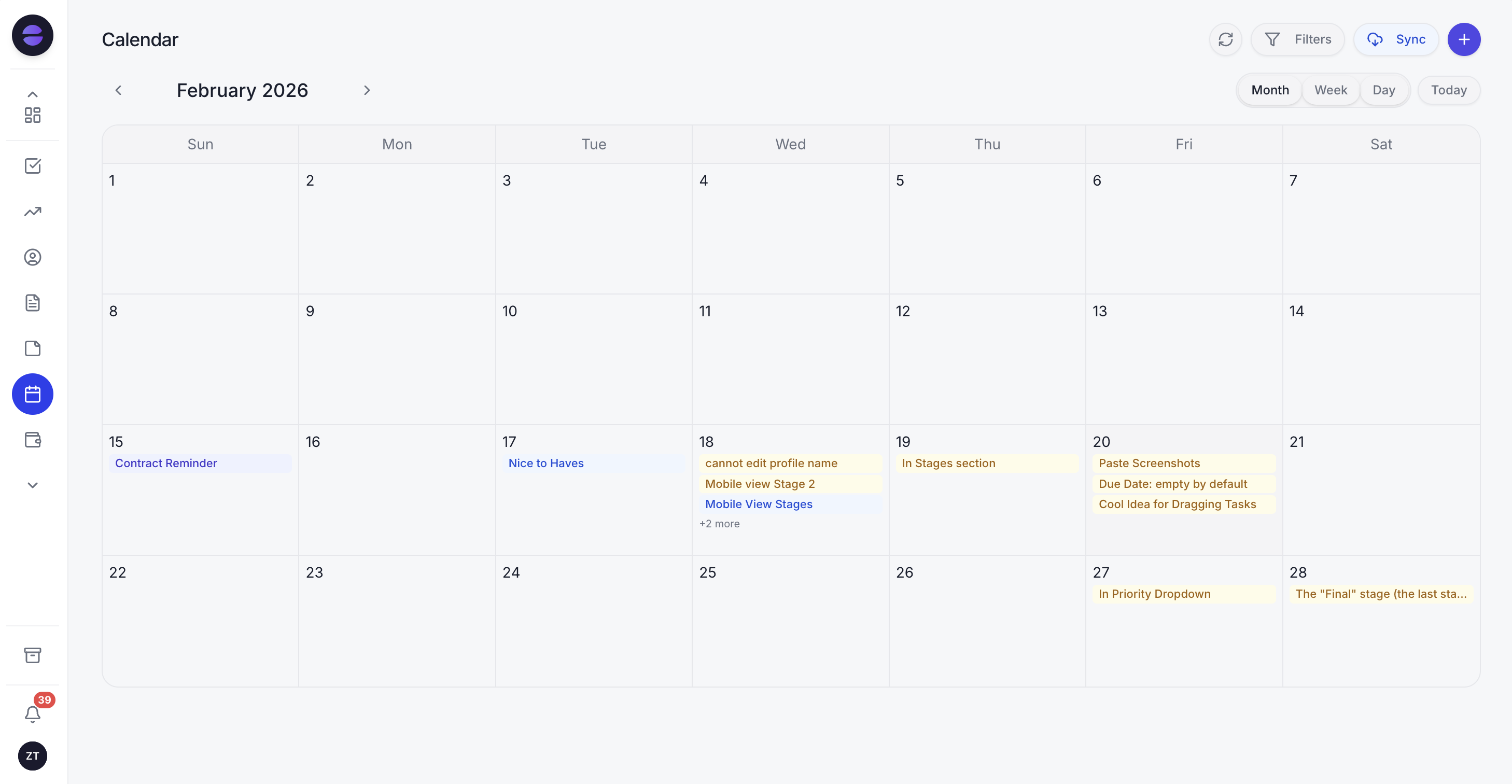
A week of quarterly treatments in the Zoye calendar: each visit was booked from a reminder and sits on the customer's agreement record.
Two more things Zoye does not do: keep your books (use your accounting software for the ledger) or take card payments at the door like a point-of-sale terminal. On WhatsApp, connecting your own business number is coming soon. For now Zoye runs WhatsApp conversations with your leads on the official WhatsApp Business Platform, and Chats puts them in one inbox with Instagram and Facebook messages and comments, with assignment, team notes, quick replies and every chat saved on the contact card.
Pricing (as of October 2026): Zoye charges per workspace plan with a member allowance, not per technician or per route. Almost Free costs $5 a month ($4 billed yearly) for 1 member, covering the core tools, 15 AI prompts a month and the Google integrations, with no automations. Starter, at $29 a month or $23 on yearly billing, gives 10 members and 5GB of storage. Growth is $59 ($47 yearly) with 20 members and 10GB, Scale is $119 ($95 yearly) with 100 members and 25GB, and Customize is priced on request. Every plan is on the pricing page.
Best for: owner-led pest control companies of 1 to 20 people that live on recurring agreements, talk to customers on WhatsApp and lose more accounts to missed renewals and slipped cycles than to inefficient routes.
2. PestPac by WorkWave: the long-standing pest platform with an accounting depth
PestPac is one of the oldest names in pest control software, sold under the WorkWave brand. It covers customer management, scheduling and routing, termite inspections, billing and accounting, with commercial and multi-branch features on the higher plans. The limitation is transparency: the pricing page lists three packages and no figures, asking you to speak with a consultant.
Pricing (as of October 2026): not published. Small Business includes customer management, basic scheduling and routing, termite inspection, a mobile app, billing and payments, basic accounting and a customer portal. Professional adds smart scheduling and route optimization, IPM and multi-unit support, digital forms, general ledger export, customer communications, lead management and marketing automation. Enterprise adds multi-branch management, auditor reports and API integrations.
Best for: established pest companies with commercial accounts, termite work and an office that wants accounting and compliance reporting inside the same system.
3. FieldRoutes (formerly PestRoutes): pest and lawn software, a ServiceTitan company
FieldRoutes is the platform formerly known as PestRoutes; pestroutes.com now redirects to fieldroutes.com, and ServiceTitan announced its acquisition of FieldRoutes in January 2022. It offers route optimization, a technician app, automated reminders, lead management and a customer payment portal. The limitation is that there is no number to compare: both plans carry a "Request Pricing" button.
Pricing (as of October 2026): two plans, Growth for small businesses and Corporate for scaling, both quoted. The page says the monthly subscription depends on the number of active customers, without listing rates. Both plans list the same core features, including route optimization, automated communication and reminders, and lead management.
Best for: pest and lawn companies with several routes that want a pest-built system and are comfortable with a demo-led sale. ServiceTitan's own pest page says smaller pest businesses with less complex needs are typically a better fit for FieldRoutes than for ServiceTitan.
4. ServiceTitan Pest Control: recurring services for larger operations
ServiceTitan's pest control product leads with recurring services management: agreements built from templates with renewals tracked in one place, route building around stops per technician, skills and zones, and chemical logging in the field app that feeds audit-ready reports. The limitation is scale and price visibility: it is built for larger operations and the price comes only after a demo.
Pricing (as of October 2026): not published. The pest page states that pricing is per technician. The general pricing page shows Starter, Essentials and The Works, each with a "Request Pricing" button, and lists customizable memberships only on The Works. Marketing Pro, Scheduling Pro and Dispatch Pro are separate Pro products.
Best for: multi-branch or fast-growing pest companies with an office team, commercial accounts and the budget for a sales-led rollout.
5. GorillaDesk: priced per route, with reminders on every plan
GorillaDesk is built for recurring route businesses such as pest control and lawn care, and it is the only pest-focused tool here with a public price list. The limitation is that the bill follows your vans, and some of the features that matter most for retention (online booking, review generation, GPS) start on the middle plan.
Pricing (as of October 2026): Basic $49 a month, Pro $99 and Growth $149, each including one schedule, with unlimited admin, manager, sales and crew users on every plan. Extra schedules cost $50 each on Pro; on Basic, routes 2 and 3 are $50 each and later routes $30; on Growth, the second route is $100 and later ones $50. Yearly billing gives one month at no charge. A local texting number is $5 a month and text credits start at $50 for 1,000 messages. There are no setup fees or contracts. Automated appointment confirmations and reminders by email and SMS and material tracking are on Basic; online booking, review generation and GPS device tracking start on Pro. Our Housecall Pro alternatives guide works through GorillaDesk's schedule math in more detail.
Best for: pest companies with one to five routes that want reminders, routing and material tracking in one app at a published price.
6. Jobber: a general home-service app with team-size pricing
Jobber is a polished field service app with quotes, scheduling, invoicing, payments and a client hub, used across many home-service trades. The limitation for pest control is that it is not pest-specific, so there is no termite inspection or material tracking, and its follow-up features climb with the plan: automated quote follow-ups and client reminders start on Connect, two-way SMS on Grow.
Pricing (as of October 2026): for 1 user, Core costs $29 a month on yearly billing or $49 month to month. Connect starts at $99 yearly or $139 monthly and Grow at $149 or $199. Plus starts at $399 a month billed yearly and includes 5 users. Each additional user adds $29 a month. At the time of writing the page also shows a new-customer promotion on annual plans that ends October 30. Our Jobber alternatives comparison covers the user bands.
Best for: small pest crews that also do other home services and want one general field app with a published price.
7. HubSpot: a general CRM for marketing-led companies
HubSpot is a general sales and marketing CRM with pipelines, email, forms and reporting. The limitation for pest control is everything after the sale: there is no recurring service schedule, no route, no technician app and no agreement built around visits, so the service side needs another tool.
Pricing (as of October 2026): you can begin with HubSpot's free tools. Paid Starter seats list from $20 a month each, with some offers bringing that to about $7. Sales Hub Professional costs $90 a seat per month on yearly billing, or $100 monthly, and adds a one-time $1,500 onboarding fee.
Best for: larger pest companies with an in-house marketing team running campaigns, paired with a pest platform for operations.
Want to see it in action?
See Zoye catch a new lead, answer on WhatsApp and set up the follow-up, all from one message.
See How It WorksPest control CRMs compared side by side
This table compares the seven on what each is built for, the lowest published price as of October 2026, how recurring service is handled and whether routing is included. Card processing, text credits beyond those listed and Meta's WhatsApp message charges sit outside every figure shown.
| Tool | Built for | Lowest published price (Oct 2026) | Recurring service and renewals | Routing and GPS |
|---|---|---|---|---|
| Zoye | Enquiries, agreements, renewals, bookings, reviews, WhatsApp | $5/mo (1 member) and $29/mo (10 members), no automations; $59/mo for 20 members with automations (Growth) | Agreements and packages on the customer, live due lists, renewal rules | No |
| PestPac | Established pest companies, commercial and termite work | Not published | Customer management and scheduling on every package | Basic routing; optimization from Professional |
| FieldRoutes | Pest and lawn route businesses | Not published (by active customers) | Automated reminders on both plans | Route optimization on both plans |
| ServiceTitan Pest Control | Larger and multi-branch operations | Not published (per technician) | Recurring services with template agreements and tracked renewals | Yes |
| GorillaDesk | Recurring route businesses | $49/mo (Basic, 1 schedule) | Reminders on Basic; review generation from Pro | Routing on Basic; GPS from Pro |
| Jobber | General home-service crews | $29/mo billed yearly (Core, 1 user) | Client reminders from Connect | Scheduling and routing |
| HubSpot | Marketing-led sales teams | Free tools; Starter from $20 per seat | No | No |
The service year in numbers: why reminders have to run automatically
A recurring pest business runs on arithmetic, not on memory. A quarterly agreement means four visits a year, a bimonthly one six, and each visit needs a booking, a reminder and an invoice. Do the sums for your own book of accounts before you choose software, because the volume, not the technology, decides how much automation you need.
Here is an illustrative book of business, not a benchmark:
| Plan type | Active accounts | Visits per account per year | Scheduled visits per year |
|---|---|---|---|
| Quarterly general pest | 300 | 4 | 1,200 |
| Bimonthly general pest | 60 | 6 | 360 |
| Annual termite plan | 80 | 1 | 80 |
| Total | 440 | 1,640 |
That is roughly 137 scheduled visits a month before any new lead, callback or one-off job. If each visit needs one booking message and one reminder the day before, that is around 3,280 customer messages a year for scheduling alone. Add 80 termite renewals and every quarterly agreement that renews annually, and working through renewals by hand could fill several office days a year.
The surge makes it harder. If a third of the year's new enquiries arrive in a few peak weeks, those are the same weeks in which recurring visits are due. An office that handles scheduling by hand will drop something, and it is usually the quiet recurring customer, who does not complain, but does not renew either.
This is why the checklist above puts a live due-and-unbooked list and renewal rules at the top. Once those run automatically, the people in the office can spend peak weeks on new calls, estimates and the customers who actually need a conversation.
An illustrative week in a four-person pest control company
Here is how the pieces fit together in one busy week. It is an illustration, not a case study: an owner who still runs a route, two technicians and one office coordinator, about 400 recurring accounts, running Zoye next to a routing app at the start of the warm season.
Monday. The live list shows 62 quarterly customers due in the next three weeks with no visit booked. The coordinator approves a scheduled WhatsApp broadcast to that list, paced across Monday and Tuesday, each message using the customer's name and offering slots from the Booking list. By the evening, 25 have picked a time and moved off the list.
Tuesday. Ant calls start. Website enquiries and Facebook lead ad forms come in as leads, and the qualification bot collects the pest, the location in the house and whether pets are at home. One commercial enquiry for a small restaurant kitchen needs an estimate; the owner sends a voice note from his route asking Zoye to create the deal, draft the estimate from his notes and follow up Friday.
Wednesday. Eleven annual termite plans renew next month. The renewal rule sends each one a message with the end date and what the plan covers. Seven reply to renew; two ask questions, which arrive in Chats with the full history on the card; two do not answer and get a task for a phone call next week.
Thursday. A customer from last quarter writes that ants are back in the kitchen. The message lands in Chats, a re-service task goes to the technician who did the last visit, and the slot is confirmed the same day. That customer is automatically excluded from the review request until the re-service is done.
Friday. The restaurant estimate has no reply and the follow-up goes out as planned. Four initial-service customers from Monday get a written offer for a quarterly plan. Thirty-one completed and paid visits from the week get a thank-you with the review link, and one invoice from three weeks ago gets its polite chase with a payment link in the chat.
By the end of the week nobody has opened a spreadsheet, and every recurring customer is either booked, renewing or on someone's task list. That is the job a CRM for pest control has to do.
See what Zoye can do for you
CRM, deals, tasks and your Instagram, Facebook and WhatsApp automations in one workspace. Just ask Zoye and it sets any of it up for you.
Explore FeaturesWhatsApp reminders and the rules Meta applies
Most pest control messages are short and practical: your treatment is due, here are three times, the technician arrives tomorrow, your plan renews next month. WhatsApp suits them because customers open it, but on the official platform there are rules about when you may write and what each message costs.
Through the WhatsApp Business Platform you can reply freely for 24 hours after a customer's last message. Outside that window, a conversation can only be reopened with a template approved by Meta, which is how booking messages and renewal reminders usually go out. As of October 2026, Meta's developer documentation says per-message billing has applied since 1 July 2025, by message category and the recipient's country. Since 1 October 2026 each business phone number gets 1,000 free service messages a month, and utility templates sent inside an open customer service window are charged again. Marketing templates are always charged. Rates differ by country and change only at the start of a quarter, so check Meta's rate card rather than any figure quoted in an article. Our WhatsApp Business API pricing guide explains the categories in more depth, and our guide to WhatsApp appointment reminders has reminder wording you can adapt.
In Zoye, each WhatsApp automation stays off until you switch it on and confirm you have consent. Messages outside the 24-hour window use an approved template automatically, every outbound message carries an opt-out, and a STOP reply is respected across the whole workspace, so a customer who opts out of renewal reminders does not then receive a seasonal broadcast.
How to move your recurring accounts into a CRM
Plan the move around your service cycle, not around a quiet weekend. Export customers with their agreement details, rebuild the next due date for every account, import, set up the reminder and renewal rules, and run the old system alongside until every account has completed one cycle on the new one.
- Export customers and agreements. Pull a CSV with names, phone numbers, emails, service addresses, plan type, frequency, last service date and renewal date. If your current software keeps these in separate reports, export each one.
- Calculate the next due date. For each recurring account, add the frequency to the last service date. Accounts that are already overdue go straight to a callback list.
- Import. Bring the spreadsheet into Zoye (imports from Trello and Monday.com work too; Jira, Notion and ClickUp imports are coming soon). Records that only exist on paper or in an old system's PDF reports can be sent to the assistant as a PDF, CSV or screenshot; it pulls out the customers and you review them before they are saved.
- Rebuild the rules. Describe what should happen: booking messages to quarterly customers three weeks before their due date, a visit reminder the day before, renewal messages 30 and 7 days before the end date, a review request after every paid visit, an estimate follow-up after 3 and 10 days. Zoye shows each rule and waits for your approval.
- Keep routing where it is. If you use a routing app today, keep it. Zoye takes the customer side, and the two can run together.
- Run both for one cycle. For a quarterly business that means about three months, after which every account has been booked at least once from the new system.
Ready to hand off the busywork?
Zoye brings AI-powered CRM, task management, and automation into one workspace.
Get StartedWhich CRM should a pest control company choose?
Choose by where your accounts are slipping. If routing many vans and keeping compliance records are the hard part, get quotes from PestPac, FieldRoutes and ServiceTitan, or start with GorillaDesk if you want a published price. If the routes work and the losses are missed renewals, drifting quarterly cycles and unanswered estimates, start with Zoye.
A few common shapes:
- A solo operator with a full phone and a notebook of quarterly customers: Zoye for enquiries, agreements, renewals, reminders and invoices; a dispatch board would sit unused.
- One to three routes and an office coordinator: GorillaDesk for routes and material tracking, or Zoye if follow-up is the pain, or both together, with GorillaDesk's unlimited office users and Zoye's 20-member Growth plan, which includes the automations, covering the whole team.
- A growing company adding commercial accounts: PestPac or FieldRoutes, with the onboarding cost and contract terms in writing before you sign.
- A multi-branch operation with a call center: ServiceTitan Pest Control or PestPac Enterprise, with Zoye only if a separate team handles retention and renewals.
Whatever you test, test it on your own accounts. Import fifty real recurring customers, send one round of booking messages and one batch of renewal reminders, and count how many were booked and renewed by the end of the trial. If renewals and reminders are the part you want handled, book a Zoye demo and bring the list of agreements that lapsed last year.