
Quick answer: the best CRM for an HVAC business is the one that remembers the customer between visits: the replacement quote that is still open, the maintenance agreement that renews in March, the furnace that is due a fall check. For small teams that lose money on follow-up rather than routing, Zoye is our pick from $29 a month for 10 members. For dispatcher-led companies, ServiceTitan, FieldEdge and Successware are the specialists, all on quoted pricing.
Key takeaways (October 2026)
- ENERGY STAR recommends a cooling check every spring and a heating check every fall, so an HVAC customer base has two natural booking windows a year that a CRM should fill before the rush.
- According to the Bureau of Labor Statistics, there were 440,900 HVAC mechanic and installer jobs in 2025, with 11% growth projected from 2025 to 2035, with overtime common in peak heating and cooling seasons, which is exactly when follow-up slips.
- Three of the seven rivals here (ServiceTitan, FieldEdge and Successware) publish no prices; Housecall Pro, Jobber, Service Fusion and HubSpot do.
- Maintenance agreement features sit high in some price lists: Housecall Pro lists Recurring Service Plans on Max ($299 a month billed yearly) and ServiceTitan lists Customizable Memberships only on The Works.
- Zoye is not a dispatch, GPS or route-optimization tool. It is the operator for calls, quotes, agreements, tune-up bookings, invoices and WhatsApp updates.
How an HVAC business wins work and where it leaks
An HVAC company earns most of its money from three streams: urgent repairs, system replacements and recurring maintenance. Each one has its own follow-up problem. Repairs leak when calls go unanswered in a heat wave, replacements leak when a big quote goes quiet, and maintenance leaks when nobody books the spring visit in time.
Seen from the office, the year has a rhythm that most general CRMs ignore. Demand peaks twice, in the first hot weeks and the first cold ones, and drops in between. According to the Bureau of Labor Statistics, HVAC technicians often work evenings, weekends and overtime during peak heating and cooling seasons, and may be on call for emergencies. That is the moment when an owner has the least time to type notes into software, and the moment when most leads arrive.
Emergency calls come in bunches
A no-cooling call on the first scorching day of summer is the easiest sale an HVAC company gets, as long as someone answers. The trouble is that twenty of them arrive in the same afternoon. The phone rings while the owner is on a roof, voicemails pile up, and a homeowner with a hot house calls the next company on the list within minutes. A CRM for HVAC has to catch every one of those calls as a lead with a name, a number and the problem, even when nobody can pick up, and has to make the callback list obvious at the end of the job.
Replacement quotes are large and slow
Replacing a system is a considered purchase. The homeowner wants options (repair versus replace, a standard unit versus a high-efficiency heat pump), checks financing, asks a neighbour and sometimes waits for the next breakdown to decide. A replacement quote can sit open for weeks. Without a rule that follows up at set intervals, the quote dies quietly, and the company that called back on day three and day ten wins the job.
Maintenance agreements are the steady income
Agreements (also sold as memberships or service plans) give a customer two visits a year, priority scheduling and usually a repair discount. For the business they smooth the seasonal curve and keep the customer from shopping around when the system finally fails. They only work if the visits actually get booked and the agreement gets renewed before it lapses, which means a list of agreement customers, the date of their last visit and their renewal date must be visible at a glance.
Seasonal tune-ups fill the quiet weeks
ENERGY STAR's maintenance checklist advises having a contractor check the cooling system in the spring and the heating system in the fall, and notes that contractors get busy once the hot and cold seasons arrive. For an HVAC business that is a planning tool: reminders sent in late winter and late summer turn shoulder-season weeks into booked visits. The same checklist recommends inspecting or changing air filters once a month, which gives a reason for a light reminder in between.
Where the money leaks, in one list
- Missed calls during a heat wave or cold snap that never get a callback.
- Repair visits where the technician recommends a replacement and nobody sends the quote.
- Replacement quotes with no follow-up after the first week.
- Agreement customers whose spring or fall visit was never scheduled.
- Agreements that lapse because the renewal date lived in a spreadsheet.
- One-off customers who were never offered an agreement.
- Finished jobs with no review request and no invoice chase.
None of these is a dispatch problem. They are memory problems, and memory is the job of a CRM.
What an HVAC CRM has to do: a 10-point checklist
A CRM for an HVAC company must capture every call and enquiry as a lead, hold the equipment and visit history on the customer, track quotes and agreements with dates, send seasonal reminders and follow-ups automatically, and work from a phone in a crawl space. Everything else is a bonus. Use this list to score any tool on a trial.
- Every enquiry becomes a record. Calls, web forms, Facebook and Instagram messages, WhatsApp and referrals land in one list with the source attached.
- Equipment on the customer. Model, serial, install date and the photos from the last visit, kept with the person and the address.
- Quotes with a status. Open, sent, accepted, lost, each with the value and the date, so a quote that is ten days old is visible.
- Automatic quote follow-up. A rule that nudges the homeowner after a few days and again after a couple of weeks, on the channel they answer.
- Agreements with dates. Start date, included visits, last visit and renewal date on every agreement customer.
- Live lists. "Agreement customers with no spring visit booked" should be a list that updates as visits are booked, not a report you rebuild.
- Seasonal reminders. Cooling reminders before spring and heating reminders before fall, sent to the right list and paced so the calendar does not flood.
- Booking from the message. Customers pick a time from the reminder, and the visit lands on the calendar with a reminder the day before.
- Invoices and payment chasing. The invoice on the same record as the job, and a polite chase when it goes overdue.
- Hands-free updates. A voice note or a quick message from the van should be enough to log the visit, book the next one and send the invoice.
If you also need dispatch boards, GPS and a flat-rate pricebook, those are field service features. Our guide to field service management software for small business covers that category; this article stays on the customer side.
The 8 best CRMs for HVAC in 2026
These eight cover the realistic choices for a heating and cooling business: one AI operator for the customer side, three HVAC specialists built for dispatcher-led companies, three field service apps with published prices and one general CRM. Each entry starts with the limitation to check, then the October 2026 price from the vendor's own page and the team it suits.
1. Zoye: maintenance agreements, tune-up reminders and quote follow-up
Start with what Zoye is not: it is not a dispatch tool. There is no dispatch board, no GPS tracking of trucks, no route optimization and no flat-rate pricebook. A company that sends ten technicians across a service area every morning should keep a field service app for that part, and can run Zoye next to it.
What Zoye covers is the part of an HVAC business that lives between visits. Zoye is an AI Business Operator: one workspace in which CRM and contacts, tasks, deals, calendar, documents, budget and invoices, reports, workflow automations, WhatsApp automations, Facebook and Instagram, email tracking, the AI Notetaker and team are already linked to each other, plus an AI that operates them for you. The features page shows each one. For a heating and cooling company, the work splits like this.
Calls and enquiries. A website form, a Facebook lead ad, an Instagram comment or a WhatsApp message lands as a contact with its source. The new-lead WhatsApp message goes out once per person, and the lead qualification bot can ask the questions you would ask on the phone (what is the system doing, how old is it, is anyone at home today) and write the answers straight into the lead's fields. When you come down from the roof, the callback list is already sorted.
Equipment and visit history. Every customer record carries the deal, the tasks, the files and the invoices, so the photos from the last visit, the install date and the notes sit with the person. You can send Zoye a photo or a PDF and the assistant reads it, so a picture of the unit's label taken in the attic can become the model and serial on the record.
Replacement quotes. Ask the assistant to draft the quote as a document from your site notes, attach it to the deal and set the follow-up. A rule then nudges the homeowner after the number of days you choose and again later if there is still no answer, and the deal moves stage when they say yes. Our guide on how to automate follow-ups lists the timings most service businesses use.
Maintenance agreements. Keep the agreement on the customer and on a deal, with its renewal date and included visits. A smart audience of agreement customers stays live as records change, so "agreement customers with no spring visit booked" is always current. A scheduled WhatsApp broadcast to that audience, personalized per customer and paced so replies do not swamp the office, opens the spring booking window in February and the fall window in August.
Tune-up bookings. One Booking list holds the times you offer. Customers pick a slot in the chat, the visit lands on the calendar against their record, and reminders go out automatically. For the reminder wording itself, see our guide to WhatsApp appointment reminders.
Invoices and payment. The invoice sits on the job's record, a payment link goes out in the WhatsApp chat (Stripe, or Grow in Israel) with the money landing in your own account, and the overdue-invoice chase is one of the shipped automation recipes.
You set all of this up by describing what should happen, in the app, on WhatsApp, by voice note or in Slack. Zoye builds the rule, shows it to you in plain English and waits for your approval before anything runs, and every run is logged and reversible. From the van, a voice note such as "close the furnace repair at the corner house, send the invoice and put them on the October tune-up list" is enough.
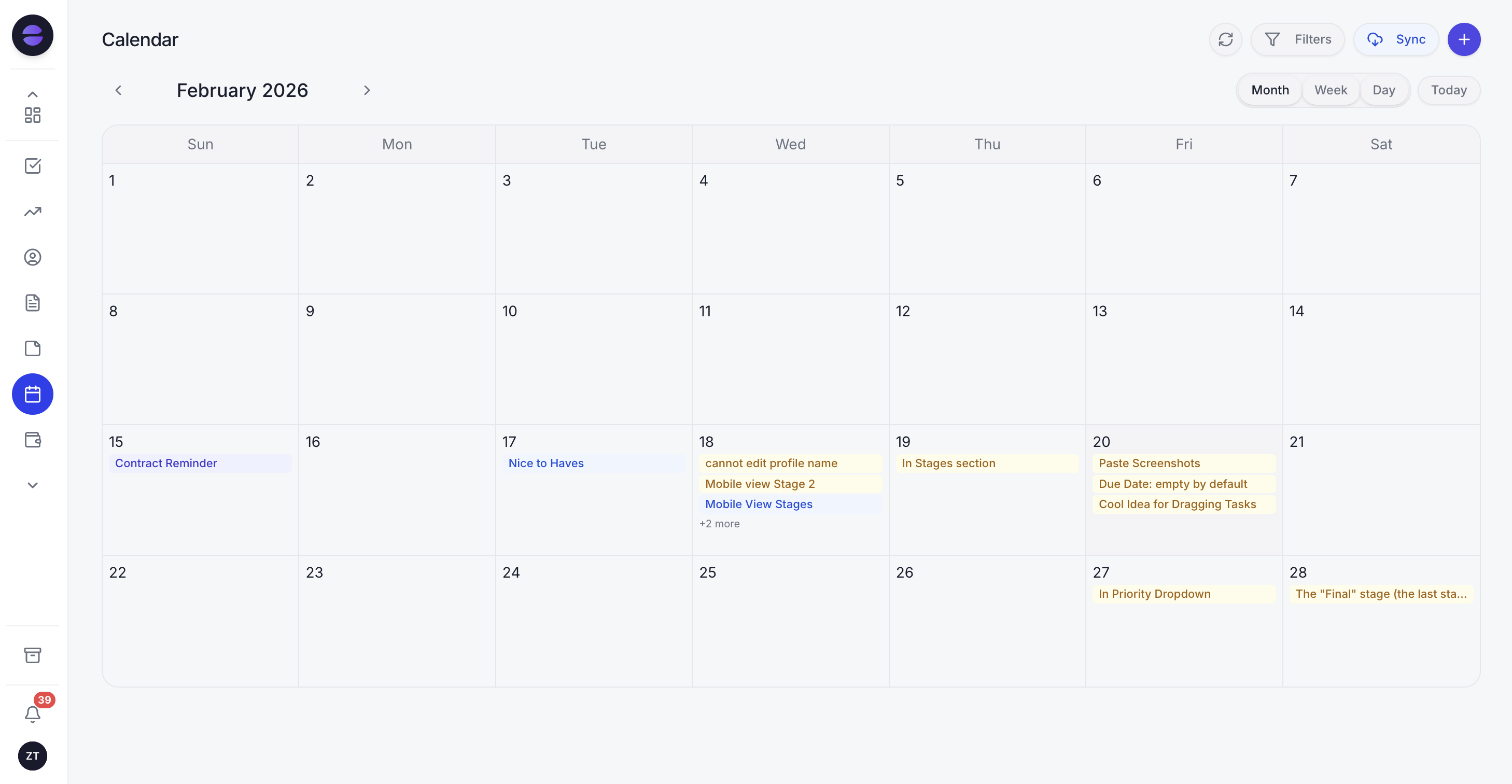
Spring tune-ups in the Zoye calendar, each one booked from a reminder and tied to the agreement customer's record.
Honest limits beyond dispatch: Zoye is not an accounting ledger, so the books stay in your accounting software, and it is not a point-of-sale system. Connecting your own business WhatsApp number is coming soon; today Zoye holds the WhatsApp conversations with your leads through the official WhatsApp Business Platform, and Chats keeps those alongside Instagram and Facebook messages and comments in one inbox, with assignment, team notes and every chat saved on the contact card.
Pricing (as of October 2026): Zoye is priced per workspace plan, not per technician. Almost Free is $5 a month ($4 billed yearly) for 1 member, with the core tools, 15 AI prompts a month and the Google Calendar, Gmail and Drive integrations, and no automations. Starter is $29 a month ($23 yearly) with 10 members, Growth $59 ($47) with 20 members, Scale $119 ($95) with 100 members, and Customize is quoted. Details are on the pricing page.
Best for: owner-led HVAC teams of 1 to 20 that sell maintenance agreements, quote replacements and talk to customers on WhatsApp, and that lose more to slow follow-up than to routing.
2. ServiceTitan: the platform for large residential HVAC companies
ServiceTitan is the best-known name in HVAC software, built for companies with call-takers, dispatchers, a sales team for replacements and a finance office. The limitation is fit and transparency: there is no price on its pricing page, and for a team of three the depth tends to become overhead.
Pricing (as of October 2026): three tiers, Starter, Essentials and The Works, each marked "Request Pricing". The page describes per-technician pricing. Dispatching, scheduling, call booking, invoicing and a pricebook appear on every tier, mobile estimates and payroll management from Essentials, and customizable memberships, advanced reporting and commission tracking only on The Works.
Best for: established HVAC companies with many technicians, a membership program to manage at scale and an office team to run the system.
3. FieldEdge: HVAC dispatch with service agreements and QuickBooks
FieldEdge focuses on residential and commercial service contractors, with dispatching, service agreements, flat-rate pricing and a two-way QuickBooks link. The limitation is that you cannot see a price or try it first: plans carry a "Request Pricing" button, add-ons say "Call for Pricing", and the FAQ states that FieldEdge does not offer a free trial.
Pricing (as of October 2026): Select, Premier and Elite, all quoted. Select includes basic service agreements, single-option quotes and 2 mobile app licenses; Premier and Elite add advanced service agreements and multi-option quotes, with 4 and 6 mobile licenses. QuickBooks Online and Desktop integration and the flat-rate pricebook are on all three.
Best for: HVAC and plumbing companies that live in QuickBooks, present good-better-best options on the kitchen table and want an onboarding team.
4. Successware: trade software with built-in accounting
Successware targets small and medium-sized trade companies in HVAC, plumbing, electrical and related services, with dispatching, marketing tools and an integrated accounting feature. The limitation is visibility: its website has no pricing page and no published figures, only a request for a live demo.
Pricing (as of October 2026): not published; contact the vendor for a quote after a demo.
Best for: established trade companies that want dispatch and accounting in the same system and are ready for a sales-led setup.
5. Housecall Pro: published prices with service plans on the top tier
Housecall Pro is a home-service platform with scheduling, dispatch, estimates, invoicing, online booking and review tools, used widely by small HVAC crews. The limitation for an agreement-led business is plan placement: the pricing page lists Recurring Service Plans for maintenance agreements on Max, and its add-ons (CSR AI, Pipeline, Voice, Campaigns and others) carry no listed price.
Pricing (as of October 2026): Basic $59 a month billed yearly ($79 monthly) with 1 user, Essentials $149 ($189) with 5 users, and Max $299 ($329) with 8 users plus $35 a month per additional user. Flat-rate pricing and employee GPS start on Essentials. The 14-day trial gives access to Max with no card required. Our Housecall Pro alternatives guide covers the plan math in more depth.
Best for: HVAC crews of 2 to 8 that want a full field service app with a published price and are ready for Max once agreements matter.
6. Jobber: team-size pricing with follow-ups from Connect
Jobber is a mature field service app with quotes, scheduling, invoicing, payments and a client hub. The limitation is how the bill grows: plans are tied to team size, automated quote follow-ups and client reminders begin on Connect, two-way SMS on Grow, and marketing, pipeline and AI receptionist tools are add-ons below Plus.
Pricing (as of October 2026): Core $29 a month billed yearly or $49 monthly for 1 user; Connect from $99 yearly or $139 monthly; Grow from $149 or $199; Plus from $399 billed yearly for 5 users; extra users $29 a month each. Marketing Suite is $99 a month, AI Receptionist $29 and Pipeline $49. More detail in our Jobber alternatives comparison.
Best for: small HVAC teams that want a polished field app and whose headcount fits neatly in one of Jobber's user bands.
7. Service Fusion: unlimited users at a fixed plan price
Service Fusion includes unlimited users on every plan, which suits an HVAC company with office staff, apprentices and seasonal helpers. The limitation is the entry price: the cheapest plan costs several times a per-user starter plan, so it only pays off once several people need logins.
Pricing (as of October 2026): Starter $208 a month billed yearly or $245 monthly, Plus $325 or $382, Pro $533 or $627, all with unlimited users.
Best for: HVAC companies with eight or more people who log in and want headcount out of the pricing decision.
8. HubSpot: a general CRM with strong marketing
HubSpot is a general sales and marketing CRM with pipelines, email, forms and reporting. The limitation for HVAC is everything after the sale: there is no technician scheduling, no service agreement object built for maintenance visits and no field app, so you would add other tools for the work itself.
Pricing (as of October 2026): free tools to start; Starter from $20 per seat a month at list (about $7 a seat on some offers); Sales Hub Professional $90 per seat a month billed yearly or $100 monthly, plus a $1,500 onboarding fee.
Best for: larger HVAC companies with an in-house marketing team running campaigns, which keep a separate field service tool for operations.
Want to see it in action?
See Zoye catch a new lead, answer on WhatsApp and set up the follow-up, all from one message.
See How It WorksHVAC CRMs compared side by side
The table puts all eight on one footing: what each is built for, the lowest published price as of October 2026, how it handles maintenance agreements, and whether it does dispatch. Card processing fees and Meta's WhatsApp message charges sit outside every price shown.
| Tool | Built for | Lowest published price (Oct 2026) | Maintenance agreements | Dispatch and GPS |
|---|---|---|---|---|
| Zoye | Calls, quotes, agreements, tune-up bookings, WhatsApp | $5/mo (1 member, no automations); $29/mo for 10 members | Agreement on the customer and deal, live lists, scheduled reminders | No |
| ServiceTitan | Large residential HVAC companies | Not published (per technician) | Customizable Memberships on The Works | Yes |
| FieldEdge | HVAC and plumbing contractors | Not published | Basic on Select, advanced on Premier and Elite | Yes |
| Successware | Small and mid-sized trade companies | Not published | Ask the vendor | Yes |
| Housecall Pro | Home-service crews | $59/mo billed yearly (Basic, 1 user) | Recurring Service Plans on Max | Yes, employee GPS from Essentials |
| Jobber | Home-service crews | $29/mo billed yearly (Core, 1 user) | Client reminders from Connect | Scheduling and routing |
| Service Fusion | Teams with many users | $208/mo billed yearly (unlimited users) | Check the plan pages | Yes, GPS as an add-on |
| HubSpot | Marketing-led sales teams | Free tools; Starter from $20 per seat | No | No |
An illustrative week in a five-person HVAC company
Here is how the pieces fit in a typical week. Treat it as an illustration, not a case study: an owner, three technicians and one person in the office, running Zoye next to a calendar, during the first hot week of the year. The point is to show where each follow-up happens without anyone remembering it.
Monday. The temperature jumps and the phone starts at 7 a.m. Calls the office cannot take roll to voicemail, and website and Facebook enquiries come in as leads. The new-lead WhatsApp message goes to each one, and the qualifying questions come back with answers: no cooling, system about 14 years old, someone home after 3. By lunch the office has a callback list ranked by urgency, and every lead has a contact record.
Tuesday. A technician finds a failed compressor on an old unit and recommends replacement. From the van he sends a voice note: "quote a replacement for the family on the hill, two options, standard and heat pump, and follow up Friday." The assistant drafts the document from his notes, attaches it to a new deal and shows the follow-up rule for approval.
Wednesday. The owner checks the agreement list. Forty agreement customers have no spring visit booked yet. She approves a scheduled WhatsApp broadcast to that live list, paced over two days, offering three weeks of tune-up slots from the Booking list. As people pick times, they drop off the list.
Thursday. Two agreements renew next month. The renewal rule sends each customer a short message with the renewal date and what the plan includes. One replies with a question, which lands in Chats with the whole history on the card, so the office answers in a minute.
Friday. The replacement quote from Tuesday has no reply. The follow-up goes out as planned, asking whether the homeowner wants to talk through financing. A one-off repair customer from Monday gets a message offering a maintenance agreement, and three finished jobs get their invoices with a payment link in the chat. An invoice from two weeks ago that is still unpaid gets its polite chase.
By the weekend, the owner has spent her time on roofs and on two sales visits, and the office has not built a single spreadsheet. That is the job a CRM for HVAC should do.
See what Zoye can do for you
CRM, deals, tasks and your Instagram, Facebook and WhatsApp automations in one workspace. Just ask Zoye and it sets any of it up for you.
Explore FeaturesWhatsApp, reminders and what Meta charges
Most HVAC reminders are short and time-sensitive: a tune-up slot, a technician on the way, an invoice due. WhatsApp suits them because customers read it, but it has rules. Through the official WhatsApp Business Platform you can reply freely for 24 hours after the customer's last message; outside that window, only an approved template can open the conversation again.
As of October 2026, Meta's developer documentation says WhatsApp has billed per delivered template message since 1 July 2025, by message category and recipient country, and that since 1 October 2026 each business phone number gets 1,000 free service messages a month. Marketing templates are always charged, and utility templates sent inside an open customer service window are charged again from the same October date. Rates differ by country and Meta changes them only at the start of a quarter, so check Meta's rate card rather than a figure from an article. Our WhatsApp Business API pricing guide explains the categories.
In Zoye, every WhatsApp automation is off until you turn it on and confirm consent, messages outside the 24-hour window use an approved template automatically, every outbound message carries an opt-out, and a STOP reply is honoured across the workspace.
How to move your HVAC customer list into a CRM
Moving takes a quiet week if you plan it around open work. Export the customers, record every open quote and agreement with its dates, import everything, rebuild the reminder rules and keep the old system until open jobs have closed. Do it in the shoulder season, never in the first heat wave.
- Export customers. Most field service apps and spreadsheets export a CSV with names, phone numbers, emails and addresses. Include tags that mark agreement customers.
- List open quotes and agreements. Note each open replacement quote with its value and date, and each agreement with its start, renewal and last visit.
- Import. Zoye imports from Trello, Monday.com or a spreadsheet, and the assistant can pull records out of a CSV, a PDF or a screenshot you send it, so even a printed agreement list can become records you review. Jira, Notion and ClickUp imports are coming soon.
- Rebuild the rules. Describe the follow-ups you want: replacement quote chased after 3 and 10 days, renewal reminder 30 days before the date, spring and fall tune-up broadcasts to the agreement list. Zoye shows each rule and waits for your approval.
- Run both side by side. Keep the old system for a couple of weeks while open jobs finish, then switch fully.
Ready to hand off the busywork?
Zoye brings AI-powered CRM, task management, and automation into one workspace.
Get StartedWhich CRM should an HVAC company choose?
Choose by where the money leaks. A dispatcher-led company with a membership program and many trucks should get quotes from ServiceTitan, FieldEdge and Successware. A crew that wants one field app with a public price should compare Housecall Pro, Jobber and Service Fusion at its exact headcount. A team losing work between the call and the invoice should start with Zoye.
A few typical shapes:
- A solo technician with a phone full of WhatsApp messages: Zoye for enquiries, quotes, agreements and invoices; a dispatch board would sit unused.
- A crew of 3 to 8 with a growing agreement base: Housecall Pro Max or Jobber for the field side, or Zoye if the follow-up is what hurts, or both together.
- A company with office staff and seasonal helpers: Service Fusion, so the extra logins do not raise the bill.
- A 25-technician company with a call center: ServiceTitan or FieldEdge, with the renewal price and onboarding terms in writing.
Whatever you test, test it on your own season. Import twenty real customers, send five real replacement quotes and one tune-up reminder to your agreement list, and count what got booked and answered by the end of the trial. If the follow-up is the part you want handled, book a Zoye demo and bring the quote that went quiet last month.