
Quick answer: the best CRM for roofers depends on whether your bottleneck is production or follow-up. For measurements, estimates and crew production, AccuLynx, JobNimbus, Roofr and Leap are built for roofing, and ServiceTitan fits large companies with an office team. If you lose jobs because storm leads wait for a callback and claim jobs sit untouched for weeks, Zoye is the stronger fit, with 20 members on Growth for $59 a month ($47 billed yearly), the plan that includes the automations.
Key takeaways (October 2026)
- Only 2 of the 5 roofing-specific platforms here publish prices: Roofr (Starter at $0 plus $19 per measurement report, Scale at $349 a month monthly) and Leap (Essential $79, Team from $298, Premium from $750 with 6 users).
- AccuLynx, JobNimbus and ServiceTitan quote after a conversation; JobNimbus at least shows its tiers by team size (up to 3, 10 and 19 users, then Enterprise).
- Supplement tracking is not universal: on AccuLynx's plan page it appears on Elite only, not on Pro.
- After a storm, the first 72 hours decide most of the season's work: a CRM should reply in minutes, ask the same qualifying questions every time and book inspections into fixed slots.
- Zoye is not a measurement, material ordering or dispatch tool. It is the operator for storm-week enquiries, inspection photo records, claim paperwork follow-up, invoices and WhatsApp updates.
How roofing work flows, and why storms break ordinary CRMs
Roofing has a sales cycle unlike most trades: long quiet spells, then a hailstorm or windstorm that produces weeks of enquiries in a few days, many of them tied to an insurance claim that takes months to settle. A roofing CRM has to absorb the spike, keep the photos with the job and keep chasing paperwork long after the excitement fades.
Most general CRMs assume a steady trickle of leads that move through a pipeline at a similar pace. Roofing breaks both assumptions. Below is the shape of the work for a typical residential roofing company, followed by the places where money quietly leaks.
The storm spike
When a storm passes through your area, enquiries arrive from every direction at once: website forms, Facebook lead ads, Instagram comments, WhatsApp messages, phone calls, door knocks and referrals from last year's customers. Homeowners contact several roofers in the same afternoon. The company that answers first and books a time usually gets the inspection, and the inspection usually decides who gets the job.
The trouble is that the spike lands on the same few people who are already up on roofs. Callbacks pile up, a notebook of addresses turns into three notebooks, and by the time someone works through the list a week later, half of those homeowners have signed with someone faster.
Inspection photos are the job's evidence
On a roofing job, photos are not decoration. They show the homeowner what you found, they support an insurance claim, they prove the condition of the roof before work started and they protect you if a dispute comes up after the build. A typical inspection produces dozens of pictures: each slope, the ridge, flashing, vents, gutters, soft spots in the decking and close-ups of individual hits.
If those photos live on one estimator's phone camera roll, the job depends on that phone. A CRM should keep every picture on the customer's record and the job, findable by anyone on the team, months later.
Two pipelines: retail and insurance
A retail job is simple: inspect, quote, follow up, sign, build, invoice. An insurance job adds stages you do not control: the homeowner files a claim, an adjuster inspects, the insurer issues an estimate, you compare it with your own scope, you may send a supplement for items that were missed, and payment often arrives in more than one instalment. Many roofing companies run both kinds of work, so the CRM needs two pipelines with different stages, sharing one customer list.
Claim paperwork has a long tail
The fast part of an insurance job is the inspection. The slow part is everything after it: waiting for the adjuster's appointment, waiting for the insurer's estimate, waiting for a decision on a supplement, waiting for the final payment once the work is complete. Each wait needs a reminder, and each reminder needs an owner. A job with no next step and no date is a job that is going to stall.
A quick and necessary caution: rules on what a roofing contractor may say or do in a homeowner's insurance claim differ from place to place, and some areas regulate this closely. This article covers tracking the paperwork in a CRM, in general terms. It is not legal or insurance advice; check with your local licensing body or a qualified adviser before you change how you handle claims.
Where the money leaks
Put those four patterns together and the leaks are predictable:
- Slow first reply in storm week. Leads that waited a day for a callback have often booked another roofer.
- Inspections that never become a quote. The estimator measured the roof, then got pulled into the next storm job.
- Quotes that go quiet. The homeowner is comparing three numbers and nobody asked them on day four.
- Claim jobs with no next step. The adjuster came, the estimate never got chased, and the job sat for six weeks.
- Final payments not collected. The build is done, the last instalment depends on paperwork nobody sent.
- Past customers forgotten. Last year's customers are the best source of referrals and the first people to call after the next storm, and nobody contacts them.
The roofing CRM checklist: 9 questions to ask in every demo
The right roofing CRM answers yes to most of the questions below for your company's size and job mix. Ask them in every demo, ask for the answer on your plan level, and ask for prices in writing when the vendor does not publish them. A tool that fails the first three will struggle in storm season.
- How fast can it reply to a new lead, and on which channels? Website forms, Facebook and Instagram, WhatsApp and phone should all land in one list with the source recorded.
- Can it ask qualifying questions without a person? Address, roof age, visible damage, whether a claim is already open and the best time to visit.
- How are inspection slots booked? Look for set times customers can pick from, with reminders sent before the visit.
- Where do photos go? Every picture should sit on the customer and the job, not on a phone.
- Does it support two pipelines? Retail and insurance work need different stages.
- Can it track claim paperwork as dated steps? Claim number, adjuster appointment, insurer estimate, supplement, final payment, each with an owner and a due date.
- What chases a quiet quote or a stalled claim? A rule that fires after a set number of days, not someone's memory.
- How does the bill grow? Per user, per role, per report, per plan with a member allowance, plus add-ons.
- What happens to past customers? Can you reach them in one personalised message after the next storm, and ask for referrals once a job is paid?
If measurements, material ordering and crew production are as important to you as the sales side, add three more questions about aerial measurement integrations, supplier ordering and crew scheduling. Those are where the roofing-specific platforms earn their price.
The 8 best CRMs for roofers in 2026
These eight cover the realistic options for a roofing company in 2026: one AI operator for the sales and paperwork side, four roofing-specific platforms, one enterprise trades platform and two general tools that roofers often try first. Each entry leads with the limitation to check, then the October 2026 price from the vendor's own page.
1. Zoye: storm-week intake, photo records and claim follow-up
Zoye calls itself an AI Business Operator. In practice that means thirteen linked tools under one login (contacts, deals, tasks, the calendar, documents, invoices and budget, reports, the automations for workflows, WhatsApp and Facebook and Instagram, email tracking, team and the AI Notetaker) and an AI that does the clicking for you. The features page walks through each tool.
The limitation first: Zoye is not a roofing production platform. It does not order aerial measurements, it has no material ordering or supplier integrations, it has no estimating pricebook, and it has no crew dispatch, GPS tracking or route planning. A company that depends on those should keep a roofing platform and can run Zoye beside it.
What Zoye takes over is the work that decides whether an enquiry becomes a paid roof. For a roofing company, that splits into five jobs.
Storm-week intake. A website form, a Facebook lead ad, an Instagram comment or a WhatsApp message becomes a lead with its source. If the new-lead WhatsApp message is switched on for that source, the homeowner hears back in seconds, once per person, however many times they fill in a form. The lead qualification bot then asks your questions (the address, how old the roof is, what damage they can see, whether they have opened a claim, the best day for a visit) and writes each answer into a field on the lead. Facebook and Instagram messages and story replies get an instant answer too, and anything the bot should not handle goes to a person with the whole chat on the lead's card. Instead of a stack of callbacks, you start the day with a sorted list.
Inspection bookings. One Booking list holds your inspection slots. The homeowner picks a time in the chat, the visit lands on the calendar against their record, and reminders go out automatically before the appointment. For reminder wording that keeps no-shows down, see our guide to WhatsApp appointment reminders.
Photos and documents on the job. Upload inspection photos and reports to the job's documents so they sit with the customer, the deal and the tasks, and anyone in the workspace finds them later. You can also send Zoye a photo or a PDF from the roof or the truck: it reads it, so a picture of a homeowner's handwritten details becomes a contact, and an insurer's estimate PDF can be summarized into a note with its dates and totals on the deal for you to check.
Claim paperwork as dated steps. An insurance job is a task with subtasks for each step you track: claim number recorded, adjuster appointment, insurer estimate received, supplement sent, decision received, final paperwork sent. Each subtask has an owner and a due date, and when every one is done the parent task closes automatically. The shipped "deal stale for 7 days" rule flags any claim job that has not moved, so a job waiting on paperwork reaches its owner instead of disappearing.
Getting paid and asked back. Invoices sit on the job's record. A payment link goes out in the WhatsApp chat (Stripe, or Grow in Israel), the money lands in your own account, and the deal moves stage when it is paid. The overdue-invoice chase is a shipped recipe. A smart audience of past roof customers stays live as records change, so after the next storm a scheduled, personalized WhatsApp broadcast can offer them an inspection before the phones start ringing.
None of these rules needs a builder screen. Tell Zoye what you want to happen, typed in the app, sent on WhatsApp or Slack, or spoken as a voice note; she drafts the trigger and the steps, reads the finished rule back to you, and nothing starts until you approve it. Each run leaves a log entry you can undo. Coming down a ladder, a voice note like "move the corner house to supplement sent, remind me Friday if the insurer has not answered, and book their gutter quote for next week" is enough.
Reports show where the week came from. The leads funnel by stage, leads by source and new leads over time make a storm spike visible on one screen, and the executive summary writes up what needs attention.
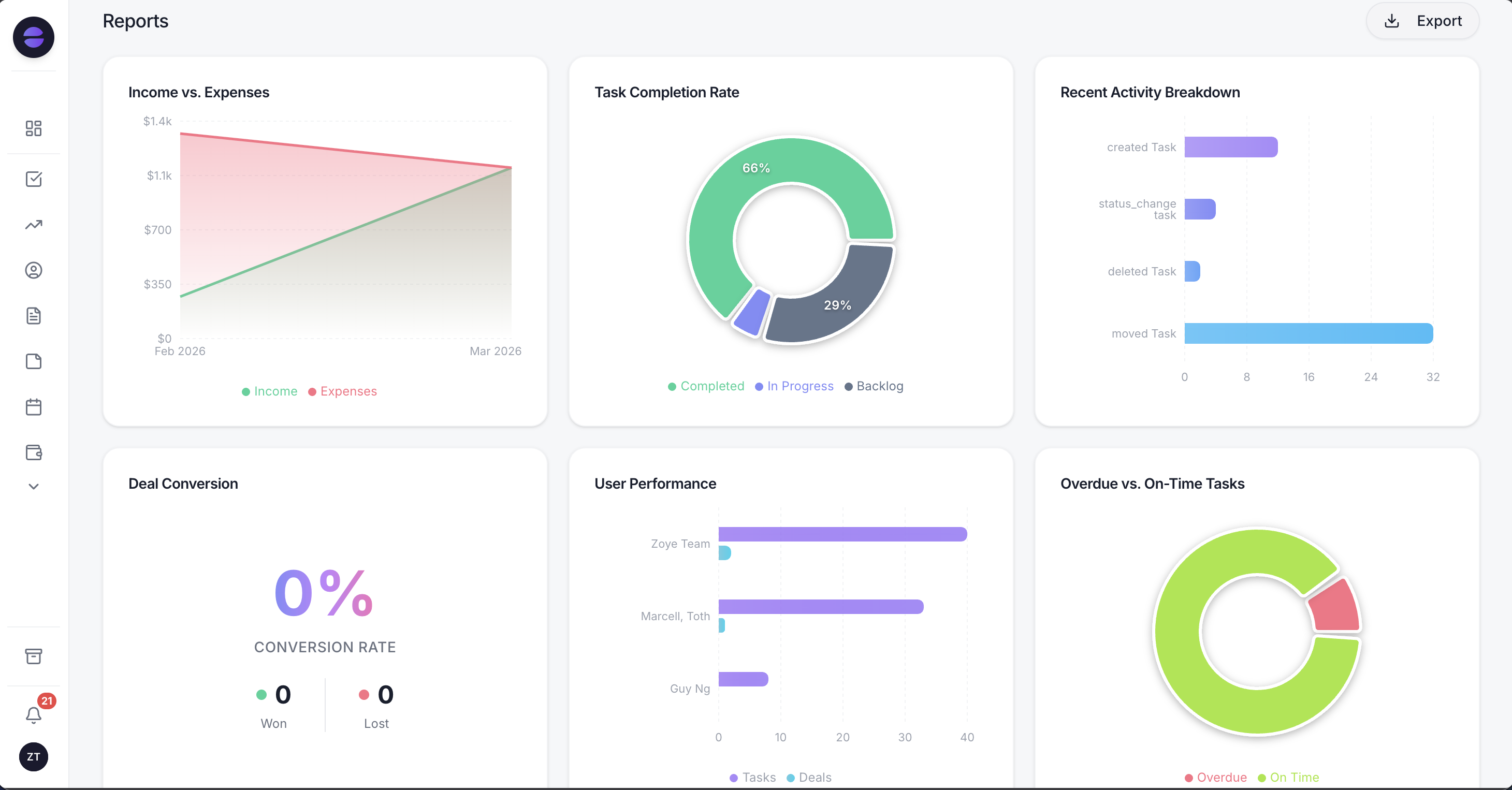
Zoye reports: a storm week shows up as a spike in new leads over time, and leads by source tells you which channel brought the paying jobs.
Customer messages run on the official WhatsApp Business Platform, with consent confirmation, approved message templates for first contact and for anything more than 24 hours after the customer's last reply, and an opt-out on every outbound message. The details are on the WhatsApp automations page. Connecting your own business WhatsApp number is coming soon, pending WhatsApp approval; today Zoye holds the WhatsApp conversations with your leads, and Chats keeps those alongside Instagram and Facebook messages and comments in one inbox, with assignment, team notes, quick replies and every chat saved on the contact card.
Other honest limits: Zoye is not an accounting ledger and not a point-of-sale system. Its invoices feature tracks and chases what customers owe; your books stay in your accounting software.
Pricing (as of October 2026): Zoye charges per workspace plan with a member allowance, not per estimator or per report. Almost Free is the entry plan at $5 a month, or $4 on yearly billing: one member, the core tools, the Google integrations and 15 AI prompts each month, without automations. Starter costs $29 a month ($23 yearly) and covers 10 members with 5GB. Growth is $59 ($47) for 20 members and 10GB, and adds workflow automations, WhatsApp automations with 250 messages a month, Meta automations and lead sync from forms. Scale is $119 ($95) for 100 members and 25GB, and Customize is quoted. See the pricing page.
Best for: owner-led roofing companies of 1 to 20 people whose customers message on WhatsApp and social media, who lose more jobs to slow storm-week replies and stalled claim paperwork than to measurement or routing.
2. AccuLynx: the established roofing platform, quote-only
AccuLynx is one of the best-known roofing business platforms, covering sales, production and the back office. The limitation to check is pricing transparency: its plan options page lists two plans, Pro and Elite, with no prices, and the Get Pricing button leads to a request form for a custom quote.
The plan comparison is still useful. As of October 2026, photo and video management and storage and aerial measurement ordering are included on both Pro and Elite, but supplement tracking is included only on Elite. A customer portal is listed among the additional tools you can add to a plan, not in the plan table itself. Text messaging, document automation, payments, crew management, financing and custom reporting appear on the pricing page as solutions.
Pricing (as of October 2026): not published; custom quote for Pro and Elite after a pricing request.
Best for: established residential roofing companies that do a lot of insurance work and want measurements, production and supplements in one system, and who will negotiate a package.
3. JobNimbus: tiers by team size, prices on request
JobNimbus is a CRM and project management tool popular with roofing and exterior contractors. Its limitation is the same opacity in a different shape: the pricing page explains the tiers clearly but shows no dollar figures, and describes an account-based price for the CRM plus role-specific project management pricing for admin, sales and field team members.
Pricing (as of October 2026): four tiers with no published prices. Essentials covers up to 3 users with 3 project boards and 10 active automations a month; Pro up to 10 users, 5 boards and 30 automations; Premium up to 19 users, unlimited boards and 100 automations; Enterprise is for 20 or more users. Estimates, invoices, payments, financing and QuickBooks are listed on every tier. The page lists a 14-day trial with no card required, says there are no required setup fees, and offers monthly or annual agreements.
Best for: roofing teams of 3 to 19 that want boards and automations sized to the team, and are comfortable with a role-based quote.
4. Roofr: measurements first, with published plans
Roofr started with roof measurement reports and grew into proposals, job boards and payments. The limitation is that the sales side is built around its measurement and proposal flow: automation counts are capped by plan (5 on Starter, 10 on Essentials, 25 or more on Scale), and the AI Receptionist and Instant Estimator are paid add-ons.
Pricing (as of October 2026): Starter is $0 a month with $19 measurement reports (24-hour delivery), one basic job board, 10 trial proposals, invoices and work orders, and unlimited users. Essentials is $249 a month billed monthly or $209 billed yearly, with $13 reports delivered in 2 hours or less and unlimited proposals. Scale is $349 monthly or $299 yearly, adding crew management, job costing, QuickBooks and role-based permissions. A Measure+ plan starts at $109 a month. Add-ons include Instant Estimator ($149 monthly, $125 yearly) and AI Receptionist ($99 monthly, $85 yearly). Every plan includes unlimited users.
Best for: roofers who buy a steady volume of measurement reports and want proposals and payments in the same place, with a price they can read before calling anyone.
5. Leap: in-home sales and signed contracts
Leap focuses on the in-home sales appointment: estimates, pricing presented on a tablet and contracts signed on the spot. The limitation is the contract and the per-user cost on the team plans: every plan is a one-year contract paid monthly, and additional users on Team cost $99 a month each.
Pricing (as of October 2026): Essential is $79 a month for a single user, with a 14-day trial and 5 digital signatures. Team starts at $298 a month including the first user, plus $99 a month per additional user. Premium starts at $750 a month with 6 users, adding discount controls, in-app pricing and remote signatures. Enterprise is priced through sales.
Best for: roofing companies that sell in the kitchen, present good, better and best options and want the contract signed during the visit.
6. ServiceTitan: the platform for large roofing operations
ServiceTitan's roofing product is aimed at larger companies with call-takers, estimators, production managers and a finance team. The limitation for a small crew is scale and price opacity: there are no figures on the page, and the depth that helps a 40-person company becomes overhead for a crew of four.
The roofing page is strong on insurance work. It describes integrations with EagleView, GAF QuickMeasure and Hover for measurements, a two-way Xactimate sync that transfers line items and photos, claims tracking, supplementing and digital change orders, good, better and best estimate templates, and financing through seven partners.
Pricing (as of October 2026): not published; ServiceTitan says booking a demo is the way to get tailored pricing.
Best for: established roofing companies with an office team, heavy insurance volume and the budget for an enterprise rollout.
7. Jobber: the home-service generalist
Jobber is a mature home-service platform with quotes, scheduling, invoices, online payments and a client hub. The limitation for roofers is fit: it has no roofing measurement integrations or claim stages built in, and its follow-up automation sits above the entry plan.
Pricing (as of October 2026): priced by team size. Core is $29 a month billed yearly or $49 monthly for 1 user; Connect starts at $99 yearly or $139 monthly and adds automatic quote and invoice follow-ups; Grow starts at $149 or $199 and adds two-way SMS; Plus starts at $399 billed yearly for 5 users. Extra users are $29 a month each. Our Jobber alternatives guide breaks the tiers down.
Best for: roofers who also do gutters, siding and repairs on a regular service rhythm, and want one generalist field tool.
8. HubSpot: a general sales CRM you shape to roofing
HubSpot is a general CRM with pipelines, email, forms, reporting and strong marketing tools. The limitation is that nothing in it knows what a roof is: there are no measurement integrations, no claim stages and no crew tools, so you build the pipeline yourself and add other tools for production.
Pricing (as of October 2026): Starter from $20 per seat a month (offers sometimes bring it to about $7), and Sales Hub Professional at $90 per seat a month billed yearly or $100 monthly, plus a $1,500 onboarding fee.
Best for: larger roofing companies with a marketing team that runs campaigns and wants detailed attribution, and who will pay for setup.
Want to see it in action?
See Zoye catch a new lead, answer on WhatsApp and set up the follow-up, all from one message.
See How It WorksRoofing CRMs compared: price, users, photos and claims
The table puts all eight tools on one footing as of October 2026: the lowest published price, how the bill grows, and whether photos and claim or supplement work are handled. Card processing, measurement reports beyond any included in a plan, and Meta's WhatsApp charges are separate in every case.
| Tool | Built for | Lowest published price (Oct 2026) | Bill grows with | Photos on the job | Claim or supplement tracking |
|---|---|---|---|---|---|
| Zoye | Enquiries, follow-up, claim paperwork, WhatsApp | $5/mo (1 member) and $29/mo (10 members), no automations; $59/mo for 20 members with automations (Growth) | Plan with member allowance | Yes, documents on the record | As dated tasks and subtasks |
| AccuLynx | Established roofing companies | Not published | Custom quote | Yes, photo and video storage | Supplement tracking on Elite only |
| JobNimbus | Roofing and exterior teams | Not published | Tier by team size (3, 10, 19, 20+), roles | Yes | Through boards and automations |
| Roofr | Measurement-led roofers | $0/mo plus $19 per report | Plan tier, reports, add-ons | Yes | Not a listed feature |
| Leap | In-home sales | $79/mo (1 user) | $99 per added user on Team, one-year contract | Yes | Not a listed feature |
| ServiceTitan | Large roofing operations | Not published | Custom quote | Yes, synced with Xactimate | Claims tracking and supplementing |
| Jobber | Home-service generalists | $29/mo billed yearly (Core, 1 user) | Team-size tier, $29 per extra user | Yes, job photos | No roofing claim stages |
| HubSpot | Marketing-led sales teams | $20 per seat (Starter) | Seats, onboarding | Attachments only | You build it |
Two patterns stand out. First, the roofing platforms that handle supplements most deeply are also the ones that hide their prices, so budget a sales cycle into the decision. Second, the price models differ enough that the cheapest tool changes with your shape: a crew of eight that orders 30 reports a month pays very differently on Roofr, Leap and Zoye.
A storm week in an illustrative six-person roofing company
To make the comparison concrete, here is an illustrative week, not a real customer: a residential roofer with an owner, two estimators, an office coordinator and a two-person repair crew, in the week after a hailstorm. The numbers are examples chosen to show the workflow, not industry statistics.
Sunday night. The storm passes. By morning, 38 enquiries have arrived: 14 website forms, 11 Facebook lead ads, 6 Instagram comments and DMs, 5 WhatsApp messages and 2 voicemails. Each written enquiry has had a reply within seconds, and 29 homeowners have already answered the qualifying questions. The coordinator calls the two voicemails and the nine who did not answer.
Monday. The owner opens the lead list sorted by visible damage and roof age. The 12 homeowners who reported leaks inside the house get the first inspection slots. The rest pick times from the Booking list in the chat, and the calendar fills for the next six working days without a single phone call back and forth.
Tuesday. The estimators inspect 9 roofs. Photos go into each job's documents from the truck, with a voice note per house ("hail hits on the north and west slopes, two cracked vent boots, homeowner opening a claim tonight"). The notes become activities on the right records, and every homeowner opening a claim gets an insurance task with its subtasks dated.
Wednesday. Retail quotes go out for 4 roofs. A rule chases any quote with no answer after 4 days with a short WhatsApp check-in and creates a call task after 8. Two of Monday's homeowners ask "when are you coming?" in the chat, and the coordinator answers from Chats with the inspection time already on their card.
Thursday. An adjuster appointment is booked for three of Tuesday's claim jobs, each one added as a dated subtask. The owner asks Zoye, "how many storm leads came from Facebook and how many have an inspection booked?" and gets the figure from live data.
Friday. The stale-deal rule flags two claim jobs from a storm six weeks earlier: one waiting on the insurer's estimate, one where the final paperwork was never sent. Both reach the owner's task list with the history on the record. One invoice from last month gets its automatic reminder; it is paid through the link in the chat on Saturday, and the deal moves to paid.
By the end of the week, every enquiry has an owner, a next step and a date. Nothing in that week required a measurement integration, which is the point: for many small roofers, the expensive losses happen in the conversation, not on the roof.
See what Zoye can do for you
CRM, deals, tasks and your Instagram, Facebook and WhatsApp automations in one workspace. Just ask Zoye and it sets any of it up for you.
Explore FeaturesPhotos, paperwork and WhatsApp: what to set up first
Three rules do most of the work for a small roofing company: an instant reply with qualifying questions for every new lead, a chase for any quote or claim job that has not moved in a set number of days, and a reminder before every inspection. Set those up before storm season, not during it, and test them with your own phone.
The first reply. Speed matters most in the first hours after a storm, when homeowners contact several companies. A reply that asks for the address, the roof's age, the visible damage, whether a claim is open and the best visiting time lets you sort the list before you call anyone. Our guide to the WhatsApp lead qualification bot explains how to keep it short enough that people finish it.
The chase. Pick the number of days, the channel and who gets the task when the chase does not work. Our guide on how to automate follow-ups lists timings that work for quotes; for claim jobs, a longer interval (7 to 10 days) suits the pace of insurers.
WhatsApp rules and costs. Every customer message opens a 24-hour customer service window on the official WhatsApp Business Platform. Inside it you can write anything; once it closes, you need a template that Meta has approved to start talking again, which matters when a claim job goes quiet for three weeks. Meta's developer documentation, checked in October 2026, says template messages have been billed per delivery since 1 July 2025, priced by category and by the country of the person receiving them. Since 1 October 2026, each business phone number also gets 1,000 service messages a month without charge. Rates can only change on the first day of a quarter, and they differ by country, so look up Meta's rate card for your market instead of trusting a number quoted in a blog. Our WhatsApp Business API pricing guide explains each category. The WhatsApp Business app, by contrast, caps broadcast lists at 256 contacts and only reaches people who saved your number, which is too small for a storm list.
Photos and consent. Tell homeowners you are taking photos of their property and what they will be used for, keep them on the job record rather than personal phones, and follow your local privacy rules. If a customer asks for their photos, you should be able to find them in seconds.
How to switch roofing CRMs without losing open jobs
Switch between storms, never during one, and plan the move around open work: every signed job in production, every open claim and every unpaid invoice needs a home in the new system before you cancel the old one. Most small roofing companies can move in a quiet week.
- Export customers and jobs. Ask your current vendor which exports your plan allows (customers, jobs, invoices, photos) and who can run them. Photos often need a separate download.
- List open claims. For each insurance job, record the stage, the claim number, the last document received and the next expected step.
- Import into Zoye. Zoye imports from Trello, Monday.com or a spreadsheet, and Zoye can extract records from a CSV, a PDF or a screenshot you send it, so a screenshot of an open-claims list becomes records you can review. Jira, Notion and ClickUp imports are coming soon.
- Rebuild the rules. Describe the reply, the chase and the reminder you want; Zoye shows each rule and waits for your approval.
- Run both for one cycle. Keep the old account until every open job has closed in one system or the other, then cancel.
If you plan to keep a roofing platform for measurements and production, decide which system owns the customer record and stick to it, so nobody updates two places.
Ready to hand off the busywork?
Zoye brings AI-powered CRM, task management, and automation into one workspace.
Get StartedWhich CRM should a roofing company choose?
Choose by the part of the job that costs you most. For measurements, proposals and production, compare Roofr and Leap on published prices, and AccuLynx, JobNimbus and ServiceTitan on written quotes. For storm-week replies, photo records, claim follow-up and WhatsApp, choose Zoye, alone or next to a roofing platform.
A few common shapes:
- A solo roofer or a two-person repair crew: most leads arrive by phone and WhatsApp, measurements are occasional. Zoye Growth or Roofr Starter, depending on whether follow-up or reports matter more.
- A crew of 5 to 10 doing mostly retail re-roofs: Leap for in-home sales or Roofr Essentials for reports and proposals, with Zoye if quotes are going quiet.
- A storm-restoration company with heavy insurance work: AccuLynx Elite, JobNimbus or ServiceTitan for supplements and production, with a written renewal price.
- A roofer who also does gutters, siding and repairs year round: Jobber or Zoye, depending on whether you need a dispatch view.
- Any size, losing jobs between enquiry and invoice: Zoye, because the leak is in the conversation.
Whatever you shortlist, test it against your own storm list: import 20 real past enquiries, run them through the reply and the chase, and count how many would have been booked. If the follow-up is the part you want handled, book a Zoye demo and bring the claim job that stalled last season.