
Quick answer: the best Jobber alternative depends on what you are replacing. For a like-for-like field-service app with scheduling and dispatch, look at Housecall Pro, Workiz, FieldPulse, Kickserv or ServiceM8, and at ServiceTitan once you run an office team. If what keeps costing you money is the quote nobody chased and the customer who never heard back, Zoye is the stronger fit, with 20 members on Growth for $59 a month ($47 billed yearly), the plan that includes the workflow and WhatsApp automations.
Key takeaways (October 2026)
- Jobber now prices by team size: Core is listed for 1 user at $49 a month monthly or $29 billed annually, and Connect, Grow and Plus come in 5, 10 and 15 user versions, with extra users at $29 a month each.
- The automation most owners ask for sits on the middle plans: quote and invoice follow-ups start on Connect ($139 a month monthly), two-way SMS and custom workflows on Grow ($199).
- Three add-ons cost extra below Plus: Marketing Suite $99, AI Receptionist $29 and Pipeline $49 a month, so a Grow team adding all three pays $177 a month on top of the plan.
- Three of the six rivals here (ServiceTitan, Workiz and FieldPulse) do not publish prices; you need a sales call to get a number.
- Zoye is not a dispatch, GPS or route-optimization tool. It is the operator for quotes, follow-ups, jobs as tasks, invoices and WhatsApp customer updates.
Why people look for a Jobber alternative
Most owners who start searching for a Jobber alternative are not unhappy with the job board. They are reacting to the bill: Jobber's October 2026 pricing ties each plan to a team size, puts follow-ups and two-way texting on the middle tiers, and sells marketing, pipeline and receptionist tools as monthly add-ons. The total grows faster than the crew.
Jobber deserves credit first. It is a mature home-service platform with online booking, quotes, invoices with online payments, a client hub and a large app marketplace, and its pricing page offers a 14-day trial of the Grow plan with no card required. Many crews run on it happily for years. The reasons to look elsewhere are specific, and every figure below comes from Jobber's own pricing page as of October 2026.
The price follows your team size
Jobber's page asks how big your team is ("just me", 2-5, 6-10, 11-15, 16 or more) and shows plan cards for 1, 5, 10 and 15 users. Core appears only as a 1-user plan. Connect costs $139 a month for 1 user on monthly billing, $199 with 5 users included, $299 with 10 and $399 with 15. Grow runs $199, $299, $399 and $499 for the same sizes, and Plus starts at $499 with 5 users and reaches $699 with 15. Any user beyond the included count costs $29 a month.
The practical effect shows up when you hire. A five-person crew on Connect pays $199 a month on monthly billing. Hire a sixth person and the choice is either $228 (the 5-user plan plus one extra user) or the 10-user card at $299. Neither figure is unreasonable, but the cost of the software now moves every time the crew does, and a seasonal helper costs the same $29 as a full-time technician.
The useful automation sits on the middle plans
Core covers online booking, quotes, invoices and payments. The parts that stop work from slipping start one tier up: Connect adds automated client reminders, automatic quote and invoice follow-ups, QuickBooks Online sync and time tracking. Two-way SMS, job costing and custom workflow automations start on Grow. So the owner who mainly wants "chase the quote if they go quiet" is looking at Connect, at $139 a month for one person on monthly billing, not the $49 Core plan.
Add-ons stack on top
Marketing Suite is $99 a month, AI Receptionist $29 and Pipeline $49, each as an add-on below the Plus plan, which includes all three. A Grow customer who wants review requests and campaigns, a lead pipeline and an answering assistant adds $177 a month to the plan price. Card payments run 2.9% plus 30 cents, tap to pay 2.7% plus 30 cents and bank payments 1%, with instant payouts another 1%. None of that is hidden, but it belongs in the comparison.
Promotional prices are not the price you renew at
In October 2026, Jobber advertised first-year discounts of up to 40% on annual prepaid plans for new customers, with the offer ending on 30 October. Core billed annually showed $21 a month for 12 months, then $29; Connect showed $70, then $99. Budget on the "then" figure, because that is what year two costs.
Who should stay on Jobber: a crew that uses the dispatch board, the client hub and the mobile app every day, and whose team size sits comfortably inside one of the user bands. Switching a working field-service setup has a real cost. Leave when the bill or the gaps are larger than that cost.
What to look for in a Jobber alternative
Start from the jobs you actually do every week, not from a feature grid. A good replacement covers your booking and quoting flow, keeps follow-ups going without someone remembering, reaches customers on the channel they answer, and has a price you can predict when the team changes. Check these eight points before you book any demo:
- How the bill grows. Per user, per technician, per job, or per plan with a member allowance. Work out the price at your current size and at two more people.
- Published prices. Can you see the number without a sales call? If not, ask for the renewal price in writing.
- Quote follow-up. Does the tool chase an unanswered quote automatically, on which plan, and through which channel?
- Customer channel. Email and SMS are standard. If your customers reply on WhatsApp, check whether the tool works there through the official WhatsApp Business Platform.
- Dispatch and GPS. If you route several vans a day, this is non-negotiable and narrows the list fast. If you run one or two crews from a calendar, it may not matter.
- Invoices and payments. Card fees, payment links, and whether a paid invoice updates the job and the customer record.
- Add-ons. List every module you would turn on in year one (marketing, reviews, phone, AI answering) and price them in.
- Getting data out. What exports exist for clients, quotes, jobs and invoices, and who is allowed to run them.
If you want the wider category view first, our guide to field service management software for small business covers the whole market. This article stays on the switch away from Jobber.
The 7 best Jobber alternatives in 2026
These seven cover the realistic routes away from Jobber: one operator for quotes, follow-ups and WhatsApp, five field-service apps that replace the job board directly, and one enterprise platform. Each entry starts with the limitation to check, then the October 2026 price from the vendor's own page and the business it suits.
1. Zoye: the operator for quotes, follow-ups and WhatsApp updates
Zoye takes a different route from every other tool on this list, so the limitation comes first: Zoye is not a field-service dispatch tool. It has no dispatch board, no GPS tracking of technicians, no route optimization and no pricebook. If your day depends on moving four vans around a map, keep a field-service app for that part.
What Zoye replaces is the work around the job that most crews do badly: answering the enquiry fast, getting the quote out, chasing it when it goes quiet, confirming the visit, sending the invoice and collecting the money. Zoye is an AI Business Operator: one workspace with thirteen tools that already link to each other (CRM and contacts, tasks, deals, calendar, documents, budget and invoices, reports, workflow automations, WhatsApp automations, Facebook and Instagram, email tracking, AI Notetaker and team), plus an AI that operates them for you. The features page lists all of them.
For a service business, that looks like this:
- Enquiries become records. A lead from your website form, a Facebook lead ad, an Instagram comment or WhatsApp lands as a contact with its source, and the new-lead WhatsApp message goes out once per person.
- Quotes live on the deal. Ask the assistant to draft the quote as a document from your site notes, attach it to the deal, and let a follow-up rule chase it after a set number of days if the customer has not answered.
- Jobs run as tasks. Each job is a task with an owner, a due date, subtasks for the steps and the customer, deal and files linked to it. The calendar and one Booking list handle visits, with times offered in the chat and reminders sent automatically.
- Invoices and payment. The invoice sits on the same record. A payment link goes out in the WhatsApp chat (Stripe, or Grow in Israel), the money goes to your own account, and a paid deal moves stage automatically. The overdue-invoice chase is one of the shipped automation recipes.
- Updates on WhatsApp. Confirmations, "on our way" messages and follow-ups reach customers on the channel they read, through the official WhatsApp Business Platform, with consent confirmation, approved templates outside the 24-hour window and an opt-out on every outbound message.
You change any of this by describing what should happen, in the app, on WhatsApp, by voice note or in Slack. Zoye builds the rule, shows it in plain English and waits for your approval before anything runs; every run is logged and reversible. From the van, a voice note like "mark the boiler job done, send the invoice and book the annual check for next October" is enough.
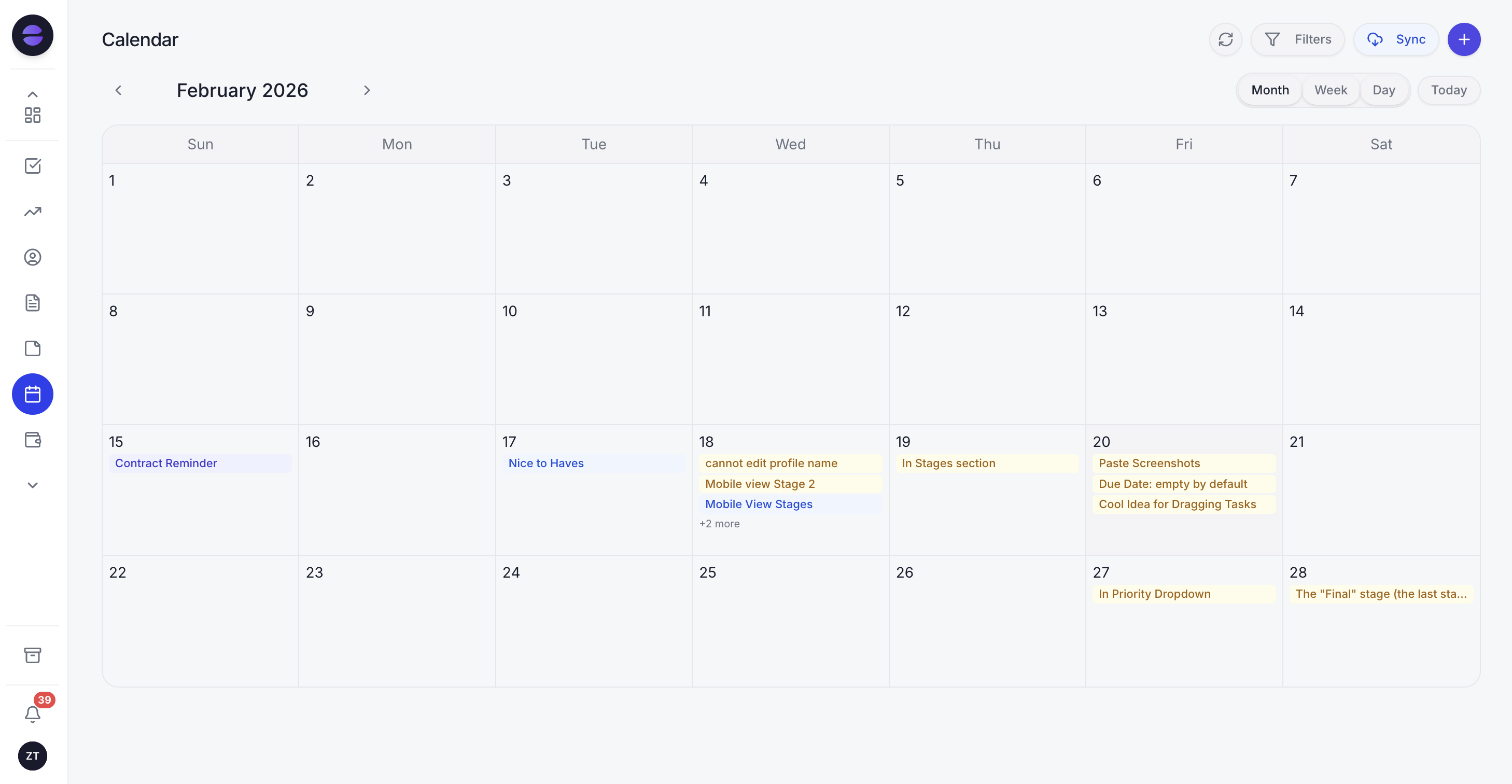
Visits in the Zoye calendar are linked to the customer, the deal and the job task, and the reminder for each one is already queued.
Honest limits beyond dispatch: Zoye is not an accounting ledger, so your bookkeeping stays in your accounting tool. Connecting your own business WhatsApp number is coming soon; today Zoye holds the WhatsApp conversations with your leads through the official Platform, and Chats keeps those plus Instagram and Facebook messages and comments in one inbox with assignment and notes.
Pricing (as of October 2026): Zoye charges per workspace plan, not per technician. Almost Free is $5 a month ($4 billed yearly) for 1 member, with the core tools, 15 AI prompts a month and the Google integrations, and no automations. Starter is $29 a month ($23 yearly) with 10 members, Growth $59 ($47) with 20, Scale $119 ($95) with 100, and Customize is quoted. See the pricing page.
Best for: owner-led crews of 1 to 20 whose customers message on WhatsApp, who lose more money to unchased quotes and late invoices than to routing, and who want an assistant to do the chasing.
2. Housecall Pro: the closest like-for-like swap
Housecall Pro covers the same ground as Jobber (scheduling, dispatch, estimates, invoices, online booking and payments) with a polished mobile app. The limitation to check is the add-on list: Pipeline, marketing campaigns, the CSR AI assistant, voice, payroll and vehicle GPS are listed as add-ons without prices on the pricing page, so the full cost only appears in a sales conversation.
Pricing (as of October 2026): Basic $59 a month billed yearly ($79 monthly) with 1 user, Essentials $149 ($189) with 5 users, and Max $299 ($329) with 8 users and $35 a month per additional user. Employee GPS tracking starts on Essentials. A 14-day trial of Max needs no card.
Best for: home-service crews of 2 to 8 who want a direct Jobber replacement with strong online booking. Our crm for contractors guide covers where it fits against trade CRMs.
3. ServiceTitan: the platform for an office-run operation
ServiceTitan is built for larger HVAC, plumbing and electrical companies with dispatchers, call-takers and a finance team. The limitation is scale and opacity: there are no prices on the pricing page, and for a crew of three the depth becomes overhead rather than help.
Pricing (as of October 2026): three tiers (Starter, Essentials and The Works), each marked "Request Pricing". ServiceTitan describes its model as per-technician pricing and quotes after a conversation. Mobile estimates and payroll are not included on Starter.
Best for: established trades businesses with an office team, many technicians and a need for payroll, memberships and deep reporting in one system.
4. Workiz: phone-heavy service pros
Workiz targets fast, high-volume work such as locksmiths, appliance repair, garage doors and junk removal, with scheduling, dispatch and invoicing plus its own phone and answering products. The limitation is the same as ServiceTitan's: its pricing page shows "Request pricing" for every plan.
Pricing (as of October 2026): Standard, Pro and Ultimate plans, with 5, 10 and 30 automations respectively, all with prices on request. Genius Phone, Genius Answering and Genius Marketing are sold separately. The FAQ mentions a 7-day trial with no card and says an annual plan can save "$400+".
Best for: call-driven businesses where answering every ring and booking it in a minute decides the month.
5. FieldPulse: seat-based with premium modules
FieldPulse offers scheduling, dispatch, estimates, invoicing and a pricebook for trades. The limitation is pricing transparency: its page says FieldPulse is seat-based with pricing "built around what your team needs", and gives no figures. Engage, Operator AI, Chat AI, Fleet Tracking, Pricebook, Payments, Financing and Custom Forms are listed as premium products.
Pricing (as of October 2026): not published; custom quote after a demo. Engage uses line and license-based pricing, per the page.
Best for: growing trade companies that want a configurable field-service platform and are comfortable negotiating a package.
6. Kickserv: published bundles with users included
Kickserv is a straightforward job management tool with estimates, scheduling, invoicing and QuickBooks integration. Its limitation is depth: it is simpler than Jobber on marketing and AI, and QuickBooks Desktop sync costs extra on the Run plan.
Pricing (as of October 2026): Start $60 a month with 5 users, Run $119 with 10 users, Scale $199 with 20 users, and 20% off with an annual subscription. Each plan has a 30-day trial. QuickBooks Online is included; QuickBooks Desktop is $50 a month on Run.
Best for: crews of 5 to 20 that want a plain job tool with a published price that does not move with every hire.
7. ServiceM8: priced by jobs, unlimited users
ServiceM8 charges by the number of jobs a month, not by people, which makes it the cleanest answer to Jobber's user tiers. The limitation is the job cap: once you outgrow the allowance you move up a plan, and the add-ons on its pricing page (recurring jobs, proposals, forms, asset management, job costing and others) have no listed prices.
Pricing (as of October 2026, US-dollar page): a free plan with 1 user and 30 jobs a month, Starter $29 (50 jobs), Growing $79 (150 jobs), Premium $149 (500 jobs) and Premium Plus $349 (1,500 jobs, then 20 cents a job), all with unlimited users on the paid plans. ServiceM8 Phone starts at $19 a month. The trial runs 14 days.
Best for: small crews with lots of people and a predictable job count, especially trades that already work on iPhones and iPads.
Want to see it in action?
See Zoye catch a new lead, answer on WhatsApp and set up the follow-up, all from one message.
See How It WorksJobber alternatives compared side by side
The table puts Jobber and the seven alternatives on the same footing: what each is built for, the lowest published price as of October 2026, what makes the bill grow, and whether it handles dispatch and GPS. Card processing and Meta's WhatsApp charges are separate in every case.
| Tool | Built for | Lowest published price (Oct 2026) | Bill grows with | Dispatch and GPS |
|---|---|---|---|---|
| Jobber | Home-service crews | $29/mo billed yearly, $49 monthly (Core, 1 user) | Team-size tier, $29 per extra user, add-ons | Scheduling and routing; GPS through partners |
| Zoye | Quotes, follow-ups, invoices and WhatsApp | $5/mo (1 member, no automations); $59/mo for 20 members with automations | Plan with member allowance | No |
| Housecall Pro | Home-service crews | $59/mo billed yearly (Basic, 1 user) | Plan tier, $35 per extra user on Max, add-ons | Yes, employee GPS from Essentials |
| ServiceTitan | Large trades companies | Not published | Technicians | Yes |
| Workiz | Phone-heavy service pros | Not published | Plan tier, add-ons | Yes |
| FieldPulse | Growing trade companies | Not published | Seats, premium modules | Yes, fleet tracking as a module |
| Kickserv | Small crews wanting simple bundles | $60/mo (Start, 5 users) | Plan tier (5, 10, 20 users) | Scheduling and dispatch |
| ServiceM8 | Crews with a steady job count | $29/mo (Starter, 50 jobs) | Jobs per month | Scheduling and dispatch |
What a crew of six really pays
Prices only mean something at your team size. Take an owner with five technicians, so six people need logins, who wants automatic quote follow-ups and online booking. Using each vendor's published October 2026 list price before card fees, the monthly bill changes a lot from tool to tool.
- Jobber Connect: the 5-user plan plus one extra user is $199 + $29 = $228 a month on monthly billing, or $149 + $29 = $178 at the regular annual price. On Grow, for two-way SMS, it becomes $328 monthly or $258 annually. Adding Marketing Suite, AI Receptionist and Pipeline puts another $177 on either.
- Housecall Pro: Essentials includes 5 users and the page lists an extra-user price only on Max, so a sixth person most likely means Max at $299 billed yearly ($329 monthly), with room for 8. Confirm with sales.
- Kickserv Run: 10 users for $119 a month, about $95 with the 20% annual discount.
- ServiceM8: users do not matter; at up to 150 jobs a month it is $79, at up to 500 jobs $149.
- ServiceTitan, Workiz, FieldPulse: ask for a written quote for six seats, including the renewal price.
- Zoye Growth: 20 members for $59 a month ($47 billed yearly), the plan that includes the workflow and WhatsApp automations, without dispatch or GPS.
The fair reading: if the six people need a dispatch board and live locations, compare Jobber against Housecall Pro, Kickserv and ServiceM8. If the office side (quotes, follow-ups, invoices, customer messages) is the part that hurts, Zoye costs a fraction of a field-service tier, and some crews run both: the field app for routing, Zoye for the customer conversation and the chasing.
See what Zoye can do for you
CRM, deals, tasks and your Instagram, Facebook and WhatsApp automations in one workspace. Just ask Zoye and it sets any of it up for you.
Explore FeaturesQuotes, follow-ups and WhatsApp: the part dispatch tools leave to you
Field-service apps are built around the visit. The money is often lost before and after it: a quote that sat unanswered for two weeks, a customer who asked "when are you coming?" on WhatsApp and got no reply, an invoice that nobody chased. A Jobber alternative should be judged on that loop as much as on the calendar.
Three things decide whether follow-up actually happens:
- It runs without a person remembering. A rule fires on a quote that has had no answer for a set number of days, on a visit that is tomorrow, on an invoice that is overdue. Our guide to how to automate follow-ups walks through the rules most service businesses need.
- It reaches the customer where they reply. In many markets that is WhatsApp rather than SMS or email. Through the official WhatsApp Business Platform, a business can reply freely for 24 hours after the customer's last message; outside that window, only an approved template can restart the conversation.
- It knows the cost. As of October 2026, Meta's developer documentation says WhatsApp has billed per delivered template message since 1 July 2025, by category and the recipient's country, and since 1 October 2026 each business number gets 1,000 free service messages a month. Meta changes rates only at the start of a quarter, so check Meta's current rate card rather than a figure copied from an article. Our WhatsApp Business API pricing guide explains the categories.
For appointment confirmations and payment nudges specifically, see WhatsApp appointment reminders and WhatsApp payment reminders.
How to switch from Jobber without losing work in progress
Plan the move around open work, not around the export button. Finish or record every open quote, scheduled visit and unpaid invoice, export your clients, import them into the new tool, then rebuild the follow-up rules before you cancel. Most small crews can switch over a quiet week.
- Export clients. Jobber's help centre says an admin can export the client list from the Clients page (More Actions, then Export Clients) as CSV or vCard, filtered by tag if you like. CSV files hold up to 1,500 rows each, and client export is available on select plans, so check yours first.
- Capture open work. Save open quotes, upcoming visits and unpaid invoices as files or a spreadsheet, and check your account's reports for what else you can download.
- Import into Zoye. Zoye imports from Trello, Monday.com or a spreadsheet, and the assistant extracts records from a CSV, a PDF or a screenshot you send it, so a screenshot of an open-invoice list becomes records you can review. Jira, Notion and ClickUp imports are coming soon.
- Rebuild the rules. Describe the follow-ups you want (quote chase after 3 days, reminder the day before a visit, overdue-invoice chase after 7 days). Zoye shows each rule and waits for your approval.
- Run both for a week. Keep the old account until every open job has closed in one system or the other.
Ready to hand off the busywork?
Zoye brings AI-powered CRM, task management, and automation into one workspace.
Get StartedWhich Jobber alternative should you choose?
Choose by the job you need done. For a direct replacement with dispatch and GPS, Housecall Pro is the closest match, Kickserv the simplest published bundle, ServiceM8 the best answer to per-user pricing, and ServiceTitan, Workiz or FieldPulse the options once you will take a sales call. For quotes, follow-ups, invoices and WhatsApp updates, choose Zoye.
A few typical shapes:
- A solo operator with a phone full of WhatsApp enquiries: the dispatch board is irrelevant, the follow-up is everything. Zoye fits, and so does Jobber Core if you only need quotes and invoices.
- A crew of 3 to 8 with two vans: Housecall Pro or Kickserv for the job board, with the user math done at your size plus two.
- A crew with many part-time helpers: ServiceM8, because helpers do not add to the bill.
- A 30-technician company with dispatchers: ServiceTitan or FieldPulse, with a written renewal quote.
- Any size, losing work between quote and invoice: Zoye, alone or next to the field app you keep for routing.
Whatever you shortlist, test it on your own week: import twenty real customers, send five real quotes and let the tool chase them. At the end of the trial, count the quotes that got an answer and the invoices that got paid. If the chasing is the part you want handled, book a Zoye demo and bring one quote that went quiet last month.