
Quick answer: customer database software gives every customer one shared, up-to-date record that several people can trust at the same time. Before you compare tools, decide what to store (eight field groups cover most businesses), what to leave out, and how duplicates and consent will be handled. Then pick by team size and by where your customer conversations actually happen.
Key takeaways (October 2026)
- Free tiers are real but tight: HubSpot's free CRM covers 2 users and 1,000 contacts, Zoho Bigin's free plan 1 user and 500 records, and Airtable's Free plan 1,000 records per base.
- For a five-person team billed yearly, list prices run from about $35 a month (Bigin Express at $7 per user) to about $100 a month (HubSpot Sales Hub Starter or Airtable Team at $20 per seat).
- monday CRM starts at $12 per seat billed yearly with a 3-seat minimum; Less Annoying CRM is $15 per user on one plan with a 30-day trial.
- Under the EU GDPR, a request to see, correct or delete personal data normally has to be answered within one month, extendable by two further months for complex cases.
- Eight field groups (identity, contact, consent, source, stage, history, value, tags) are enough for most small businesses; every extra field needs a person who keeps it current.
What is customer database software, and how is it different from a CRM?
Customer database software stores one record per customer that the whole team reads and edits: identity, contact details, consent, source, stage and history. A CRM is the same database plus the work around it, such as deals, tasks, reminders and automations. For a small business the two usually arrive in one tool, and the database part decides whether the rest works.
The distinction matters when you shop. Airtable is a database you turn into a CRM by building tables and views. Pipedrive is a pipeline first, with contacts hanging from deals. HubSpot, Zoho and Zoye give you contacts, companies and deals already linked.
Whatever you choose, the record itself decides the outcome. A contact card that is stale, missing consent or split across three duplicates breaks every follow-up, which is why this guide covers fields and hygiene before tools. For follow-ups, service and account management, see our guide to customer management software; this article stays on the data.
When does a spreadsheet stop working as a customer database?
A spreadsheet stops working as a customer database when more than one person needs to change it during the day, when customer details arrive from several channels, or when someone asks you to show or delete everything you hold on them. Any one of those turns a tidy file into a source of conflicting versions.
A shared sheet is a sensible start, and our CRM Excel template lays out a workable one.
Three practical tests tell you it is time to move:
- The concurrency test. Two people edit the same customer in one week and a change is lost, or someone works from a downloaded copy. Databases log changes per field; sheets mostly do not.
- The channel test. Customers reach you through a form, Instagram, WhatsApp and email. If each one is typed in by hand, the sheet runs a day behind the inbox and the newest leads are missing.
- The request test. A customer asks what you hold about them, or to be deleted. In a sheet they may sit in four tabs and two old exports; in a database you open one record.
None of these is about size: 300 customers can fail all three tests, while a solo owner with 3,000 rows may be fine for another year.
What should a customer database store?
A customer database should store what you need to identify a customer, reach them legally, understand where they came from, see where they stand and know what they are worth. In practice that is eight field groups. Each field should answer a question someone on the team asks at least monthly; if nobody asks it, the field will rot.
| Field group | Typical fields | The question it answers | Who keeps it current |
|---|---|---|---|
| Identity | Full name, company, role, a unique record ID | Who exactly is this, and is it the same person as that other record? | Whoever creates the record |
| Contact | Email, mobile in international format, preferred channel, language | How do we reach them in the way they prefer? | Updated on every new message or form |
| Consent | Marketing yes or no per channel, date, how it was given, opt-out date | May we send this person promotions, and can we prove it? | Set at capture, changed only by the customer's action |
| Source | First source (form, ad, referral, walk-in, import), campaign if known | Which channels bring customers who actually buy? | Set once at capture, never overwritten |
| Stage | Lead, qualified, customer, past customer, lost, with a reason | Where does this relationship stand today? | The record owner |
| History | Messages, calls, meetings, notes, files, all dated | When did we last talk, and what was promised? | Logged as it happens, ideally automatically |
| Value | Deals won, total spent, open quotes, unpaid invoices | Who matters most, and who owes us money? | Linked from deals and invoices, not typed |
| Tags | A short controlled list: product interest, segment, language | Who should get this update or offer? | The owner, from a fixed list only |
A few notes on getting these right:
Identity needs a key. Names repeat and emails change, so let the software assign an ID and use email and phone only to match.
Phone numbers go in international format. A plus sign, country code and number with no spaces makes duplicates visible; one number saved three ways looks like three people.
First source is written once. If each new form overwrites it, you lose the fact that tells you which marketing works.
Value is calculated, not typed. A hand-kept "total spent" is wrong within a month; link it to deals and invoices.
Tags come from a short list. Free text turns into "VIP", "vip" and "V.I.P." within weeks. Agree on ten to fifteen tags and what each means.
What should you not store in a customer database?
Do not store anything you would struggle to justify if the customer asked why you have it. That rules out payment card numbers, passwords, scans of identity documents, health or other sensitive details you do not strictly need, and personal opinions about the customer. Store less, and what you store becomes easier to protect and keep accurate.
A practical exclusion list for a small business:
- Card numbers and bank logins. Your payment provider holds card data; the database needs the payment status and the invoice.
- Passwords and access codes. Never in a note or attachment; use a password manager.
- Identity document scans. If a rule requires an ID check, record that it happened and when, and keep a scan only where the rule demands it.
- Sensitive details you do not use. Health, religion and similar categories carry stricter rules in many places. If a service truly needs one, limit who sees it.
- Opinions. "Difficult client" may one day be read by that client through an access request. Write facts instead: "asked for a discount on 3 quotes".
- Pasted email threads. Sync or link the conversation; pasted copies go stale.
- Data kept just in case. If no workflow uses a field, drop it.
Old records need a rule too: decide how long you keep past customers and lost leads, for example two or three years after the last contact unless your country or sector requires otherwise, then archive or delete on schedule.
How do you keep a customer database clean?
Keep a customer database clean with four habits: one matching rule for duplicates, fixed lists instead of free text, an owner on every record, and a short monthly review. Add consent records you can prove, and a way to answer access and deletion requests quickly. Clean data is a routine, not a one-off project.
Duplicates
Duplicates come from the same person writing on two channels, an import run twice or a mistyped email. Apply one matching order everywhere, imports included:
- Same email address, case ignored: same person.
- Same mobile number in international format: same person.
- Same full name and same company: probably the same person, check before merging.
When merging, keep the oldest first source and combine the histories. Catching a duplicate at entry is far cheaper than a quarterly clean-up.
Fixed lists and required fields
Stage, source, owner and tags should be dropdowns. Require only name, one contact method, source and owner at creation; requiring twelve fields produces "n/a" typed to get past the form.
Ownership and the monthly review
Every record has one named owner. Once a month the owner spends twenty minutes on records with no stage, leads untouched for 30 days, flagged duplicates and bounced emails, then fixes, merges or archives them.
Consent you can prove
For each marketing channel (email, SMS, WhatsApp), store whether the person agreed, when and how: a form checkbox, a chat reply, a signed sheet. An opt-out overrides everything and should block sending in every connected tool. Imported contacts get no marketing until you know they agreed.
Rights requests, in general terms
Many privacy laws give people rights over their data. Under the EU's GDPR, Articles 15 to 21 cover access, correction, erasure, restriction, portability and objection, and Article 12 says a request normally has to be answered within one month, which can be extended by two further months when requests are complex or numerous. Other countries have their own rules and timelines.
Your database should make three things fast: finding everything about one person, exporting it readably, and deleting or anonymising it while keeping what the law says you must retain, such as invoices. This is general information, not legal advice.
Want to see it in action?
See Zoye catch a new lead, answer on WhatsApp and set up the follow-up, all from one message.
See How It WorksThe 8 best customer database software tools in 2026
The eight below range from an AI Business Operator that keeps records current from chats to suites, a pipeline CRM, a flexible database and two simple per-user CRMs. Prices come from each vendor's own page, as of October 2026.
1. Zoye - for teams whose customer records should update from their conversations
Zoye is not a blank database you design from scratch, and it is not a mass email marketing tool. If you want to model any data structure with linked tables and formulas, Airtable below is more flexible.
Zoye is an AI Business Operator. Contacts sit in the same workspace as deals, tasks, the calendar, documents, invoices, reports, automations, email tracking and the AI Notetaker, every record linked to the others, and the AI works inside the business on all of them. For a customer database, the record stops being a form someone must remember to fill in. Leads arriving from Facebook and Instagram lead forms, comments, DMs and website forms become contacts with their source saved. A repeat commenter is matched to the contact they already are instead of becoming a second record.
Each contact carries its full history (messages, files, tasks, meetings, deals) on one card. You set your own fields and stages, and the assistant adds a field or filters a list when you ask, in the app, on WhatsApp, by voice note, in Slack or in Claude. Imports do not create duplicates. Consent is treated as a fact the customer gives: the assistant can never mark consent for you, and contacts imported from a spreadsheet are never auto-messaged. The AI Notetaker turns meeting commitments and corrected details into record updates you approve.
Zoye has WhatsApp conversations with your leads on the official WhatsApp Business Platform, and Chats brings Instagram and Facebook messages and comments together with those WhatsApp conversations, each saved on the contact. Connecting your own business WhatsApp number is coming soon.
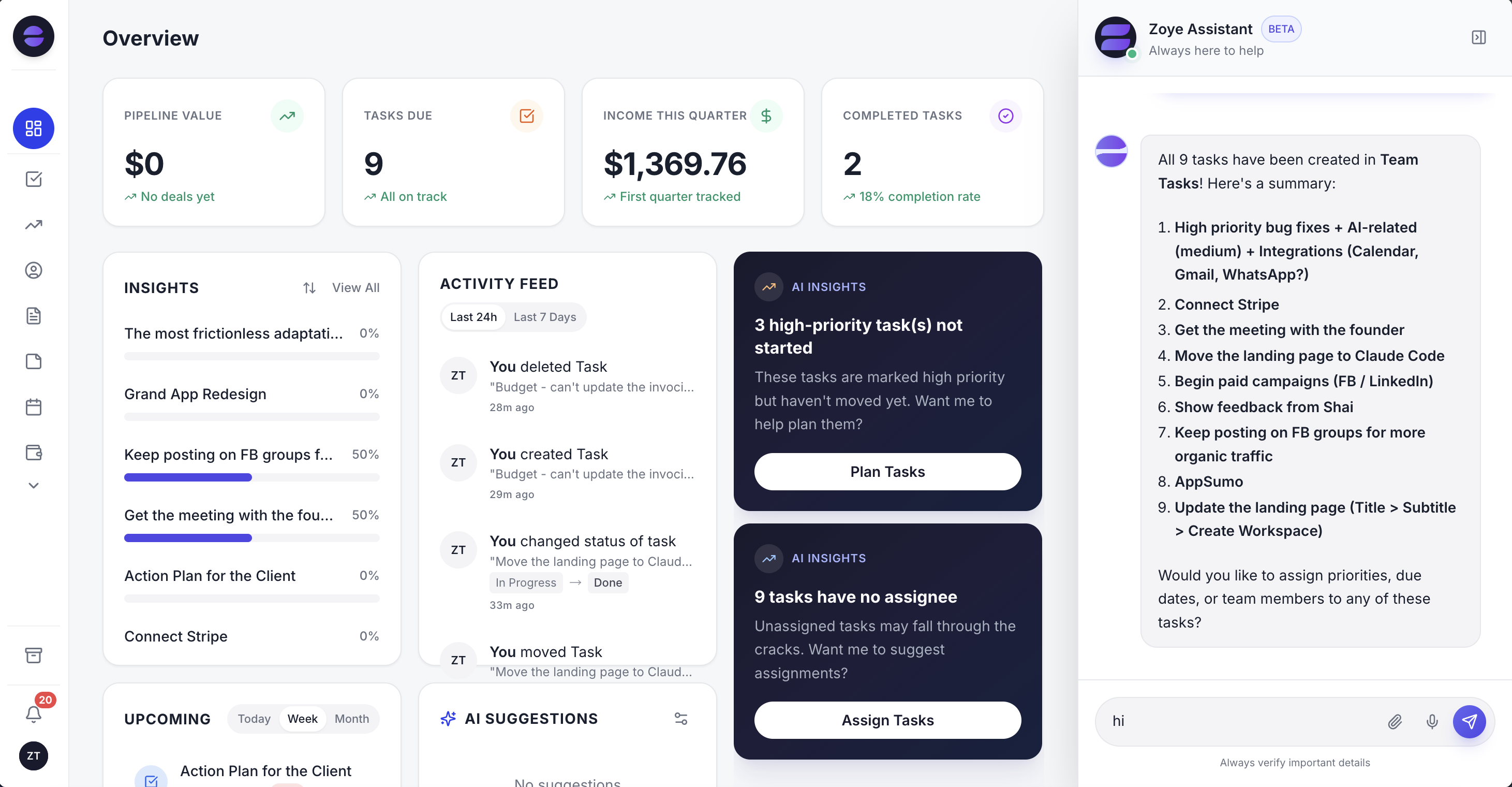
The overview reads straight from the customer records: new contacts by source, open deals by stage and the follow-ups due today.
Limits: Jira, Notion and ClickUp imports are coming soon (Trello, Monday.com and spreadsheets work today); connecting your own business WhatsApp number is coming soon; Zoye is not an accounting ledger and not a helpdesk ticketing suite.
Pricing (as of October 2026): plans are priced per workspace, not per seat. The entry plan, Almost Free, costs $5 monthly or $4 on yearly billing, holds a single member and gives the core tools, 15 AI prompts a month and the Google integrations; automations are not part of it. Starter costs $29 monthly ($23 a month billed yearly) and holds 5 members; Growth costs $59 ($47) for 10; Scale costs $119 ($95) for 30; Customize is priced on request. See the pricing page for each plan's contents.
Best for: small teams whose customers arrive through WhatsApp, Instagram, Facebook and forms, and who want the database to keep up without retyping.
2. HubSpot - the free contact database that grows into a suite
HubSpot's free CRM is the most common first step away from a spreadsheet, with contacts, companies, deals and email tracking. The catch comes with growth: per-seat editions and a steep jump to Professional.
Pricing (as of October 2026): the free CRM covers up to 2 users and 1,000 contacts. Sales Hub Starter is from $20 per seat a month (around $7 on some offers). Professional is $100 per seat monthly or $90 on an annual commitment, plus a required $1,500 onboarding fee. Our HubSpot vs Zoho comparison goes deeper.
Best for: teams that expect to add HubSpot's marketing tools later.
3. Zoho CRM and Zoho Bigin - the low-cost pair
Zoho sells two products here. Bigin is a simple pipeline CRM for small teams, with record limits per plan. Zoho CRM is the full, highly configurable suite. Both are inexpensive per user; the cost is setup time, because Zoho's breadth rewards people who enjoy configuring software.
Pricing (as of October 2026): Bigin is free for 1 user and 500 records; Express is $7 per user a month billed yearly ($9 monthly) with 50,000 records, Premier $12 ($15) with 100,000, and Bigin 360 $18 ($21) with 1 million. Zoho CRM has a free edition for up to 3 users, then Standard $14 and Professional $23 per user billed yearly ($20 and $35 monthly), per Zoho's US price list.
Best for: budget-conscious teams willing to invest a few days in setup.
4. Pipedrive - the pipeline-first CRM
Pipedrive organises everything around deals moving through stages, and it does that very well. The contact database is solid but secondary: it exists to serve the pipeline. Full email sync, automations and sequences start above the entry plan.
Pricing (as of October 2026): Lite $14, Growth $39, Premium $59 and Ultimate $79 per seat a month billed yearly, or $24, $49, $79 and $99 monthly. Pipedrive's pricing page blocks automated reading, so confirm the current figures there. See our Pipedrive alternatives for who outgrows it.
Best for: sales-led teams whose main question is "which deals close this month?"
5. monday CRM - for teams already on monday.com
monday CRM puts contacts and deals on the same boards that monday.com teams use for projects, with familiar views and automations. Plans cap active contacts and deals, and the seat minimum makes it less suited to a solo owner.
Pricing (as of October 2026): Basic $12, Standard $17 and Pro $28 per seat a month billed yearly ($18, $25 and $41 monthly), with a 3-seat minimum and a 14-day trial. The plans allow 1,000, 10,000 and 100,000 active contacts and deals respectively. Our monday.com alternatives guide covers the wider platform.
Best for: teams that already run their work in monday.com.
6. Airtable - the flexible database you shape yourself
Airtable is a true relational database with a spreadsheet face. You can model customers, orders and anything else exactly as you like, with linked records and many views. The trade-off: you are the architect, so duplicate handling, consent logic and reminders are yours to build.
Pricing (as of October 2026): Free with 1,000 records per base, Team $20 per seat a month billed yearly with 50,000 records per base, Business $45 with 125,000, and Enterprise Scale on quote, per Airtable's pricing page and plan overview. Our Airtable alternatives review explains when teams move on.
Best for: teams with unusual data and someone who enjoys building.
7. Capsule - a tidy contact manager with clear contact caps
Capsule focuses on contacts, companies and a sales pipeline, with a calm interface and plans defined by how many contacts you store. It suits small teams who want an organised address book with history more than a large suite.
Pricing (as of October 2026): a free plan for 2 users, 250 contacts and 1 pipeline. Paid plans are Starter (30,000 contacts), Growth (60,000), Advanced (120,000) and Ultimate. Capsule's pricing page loads the per-user prices by currency in the browser, and we could not read the figures reliably, so check them on the page before budgeting.
Best for: small teams that want a clean contact manager and simple pipeline.
8. Less Annoying CRM - one plan, one price
Less Annoying CRM keeps things deliberately simple: contacts, notes, tasks, calendar and pipelines, with support included and one price for everyone. It has fewer automations and integrations than the suites above.
Pricing (as of October 2026): $15 per user a month plus tax, with unlimited contacts (its FAQ suggests staying below about 50,000 as a rule of thumb), 25GB of storage per user and a 30-day trial with no card.
Best for: owners who want a no-surprises CRM and do not need advanced automation.
Customer database software compared
The table puts the eight side by side on the questions that matter for a database: entry price, free tier, record or contact limits and how the bill grows. Prices are list prices billed yearly unless stated, before tax, as of October 2026 from each vendor's page.
| Tool | Entry paid price | Free tier | Record or contact limits | Bill grows with | 5 people, billed yearly |
|---|---|---|---|---|---|
| Zoye | $5/mo for 1 member; $29/mo for up to 5 | No | Storage per plan (1GB to 25GB) | Plan, not seats | $23/mo (Starter) |
| HubSpot | From $20/seat (Starter) | 2 users, 1,000 contacts | Edition limits | Seats, edition jumps | About $100/mo |
| Zoho Bigin | $7/user (Express) | 1 user, 500 records | 50,000 to 1 million records | Seats, records | About $35/mo |
| Zoho CRM | $14/user (Standard) | Up to 3 users | Edition limits | Seats, edition | About $70/mo |
| Pipedrive | $14/seat (Lite) | No | Plan limits | Seats, add-ons | About $70/mo |
| monday CRM | $12/seat (Basic), 3-seat minimum | No | 1,000 to 100,000 active contacts and deals | Seats, contacts | About $60/mo |
| Airtable | $20/seat (Team) | 1,000 records per base | 50,000 to 125,000 records per base | Seats, records | About $100/mo |
| Capsule | Shown by currency on its page | 2 users, 250 contacts | 30,000 to 120,000 contacts | Seats, contacts | Check the page |
| Less Annoying CRM | $15/user | No (30-day trial) | Unlimited (about 50,000 suggested) | Seats | $75/mo |
Almost every tool charges per seat, so the last column doubles when the team does, and free tiers are capped on records, the thing a database grows in. Budget for the tier you will need in a year.
See what Zoye can do for you
CRM, deals, tasks and your Instagram, Facebook and WhatsApp automations in one workspace. Just ask Zoye and it sets any of it up for you.
Explore FeaturesHow to build a customer database in 7 steps
Build a customer database by deciding the questions it must answer, choosing fields and fixed lists to match, cleaning your existing data, importing a test batch, then going live with clear ownership and a monthly review. A small business can do this in two or three working days, most of it spent cleaning.
- Write down five questions, such as who has gone 30 days without contact, which source brought last quarter's customers, who may receive the newsletter, which quotes are open and who owes money. Every field must serve one.
- Pick fields from the eight groups and drop anything no question needs.
- Fix the lists: five or six stages with clear entry rules, the sources and the tags, and who may change them.
- Gather and clean. Pull every list you have, normalise phones, lowercase emails, merge duplicates and mark where consent is unknown.
- Import a test batch of about 20 awkward rows (two people at one company, a missing email, a long note) and check each field.
- Import the rest and reconcile row counts, then spot-check ten records against the source.
- Go live with rules: owner and source on every new contact, the first monthly review booked, the old sheet set to read-only.
The last step is the one people skip: a sheet left editable "for now" gives you two half-true databases for months.
How to migrate your customer data without losing records
Migrating customer data safely means exporting everything, mapping each column to a field, testing with a small batch, importing the rest, checking counts, and only then freezing the old tool. In Zoye, spreadsheets, Trello boards and Monday.com boards import today, and the assistant can extract records from a CSV, PDF or screenshot.
Export completely. Save each tab, or export contacts, companies, deals and notes separately, plus attachments you must keep. Check that custom fields and activity dates are included; some default exports leave history out.
Map before you import. Make a two-column list: old column, new field. Anything without a home, such as a consent date or a lost reason, becomes a custom field rather than being dropped. In Zoye you can ask the assistant to add the field before the import.
Use the right path for each source.
- A spreadsheet or CSV: import it directly; Zoye's imports do not create duplicates.
- Trello or Monday.com boards: import them directly into Zoye, where they become tasks and pipelines.
- A PDF, a printed list or a screenshot: send it to the assistant, which extracts the records and files them for you to check.
- Jira, Notion or ClickUp: direct imports are coming soon; until then, export to CSV first.
Respect consent during the move. Bring the consent fields across with the data. Contacts imported from a spreadsheet are never auto-messaged by Zoye, which protects you from sending a campaign to people who never agreed to receive it.
Freeze, then delete. Keep the old tool read-only for a month, then delete the old copies so personal data does not live in two places.
Ready to hand off the busywork?
Zoye brings AI-powered CRM, task management, and automation into one workspace.
Get StartedWhich customer database software should you choose?
Choose by team size, by where customers reach you and by how much setup you are willing to do. A solo owner with a simple list can stay on a free tier for a while; a growing team needs per-record history, ownership and consent in one place; a team that sells in chat apps needs records that update from those chats.
- Solo, under 500 customers, tight budget: Bigin's free plan or HubSpot's free CRM, until the record or user cap bites.
- Want one simple price per person and little setup: Less Annoying CRM at $15 per user.
- Low per-seat cost and happy to configure: Zoho CRM or Bigin.
- Sales pipeline first: Pipedrive.
- Already running work in monday.com: monday CRM, minding the 3-seat minimum.
- Unusual data and a builder on the team: Airtable.
- An organised address book with a pipeline: Capsule.
- Customers arrive on WhatsApp, Instagram, Facebook and forms, and you want records to stay current from those conversations: Zoye Growth at $59 a month ($47 billed yearly) for up to 10 members, the plan that includes the WhatsApp and Meta automations.
Whatever you pick, the database is only as good as the habits around it. Set the fields, fix the lists, give every record an owner and keep the monthly review. If your customers already talk to you in chat apps, book a Zoye demo and bring a sample of your current list to test the import.