
Quick answer: ManyChat is a visual flow builder for people who want to script every message of an Instagram or Messenger campaign; Chatfuel has turned into an AI agent that holds the conversation for you, with WhatsApp near the centre. Pick ManyChat for control over each step, Chatfuel for less building and more AI, and look at a third kind of tool if the real problem is what happens to the lead after the chat.
Key takeaways (October 2026)
- ManyChat is priced on active contacts: a free tier for 25, then from $14 a month for 250, $29 for 2,500, $69 for 7,500 and $139 for 25,000 billed yearly ($17, $39, $99 and $199 month to month), with a per-contact charge above each allowance.
- Chatfuel Business is $18 a month billed yearly ($216 a year) with $20 of AI credits a month; Agency S is $90 a month billed yearly with $100 of credits for up to 3 businesses.
- Chatfuel's documentation says its current products are built around AI automations, not the flow builder; ManyChat still centres on the canvas.
- Meta's rules bind both equally: a 24-hour reply window on Instagram and Messenger, up to 7 days after a click-to-message ad, and one private reply per comment within 7 days.
- Whichever tool sends them, WhatsApp messages are billed by Meta per delivery (since 1 July 2025); since 1 October 2026 the first 1,000 service messages each month on every business number cost nothing.
Chatfuel figures are from its pricing page in October 2026. ManyChat's figures are from its own pricing page in October 2026 and match our October 2026 review of Instagram automation tools. Check both live pages before you buy.
ManyChat vs Chatfuel at a glance
ManyChat and Chatfuel both automate conversations on Meta's channels, but in 2026 they answer different questions. ManyChat asks you to draw the conversation; Chatfuel asks you what result you want and lets its AI write the conversation. The table below sets the two side by side, with Zoye as the third option this article covers at the end.
| Dimension | ManyChat | Chatfuel | Zoye |
|---|---|---|---|
| Core idea | Visual flow builder for chat marketing | AI agent (Fuely AI) that runs the chat | Business workspace where chats become leads, deals and tasks |
| How you build | Drag blocks and connect them on a canvas | Describe the outcome; flows are legacy | Describe what should happen; Zoye shows the rule and waits for approval |
| Yes, the flagship channel | Yes (DMs, comments, Reels, story replies) | Yes (comments, DMs, story replies, lead ads) | |
| Messenger | Yes | Yes | Yes, through the same Page connection |
| Yes, an extra channel | Yes, a central channel | WhatsApp conversations with leads; connecting your own number is coming soon | |
| Other channels | Not confirmed on vendor page | TikTok and a website chat widget, per its docs | In-app, WhatsApp, Slack and Claude for the owner |
| AI | AI step inside flows, included from Pro | AI-first, metered by AI credits | Answers DMs in your brand voice, hands over to a person with the whole chat |
| Pricing basis | Active contacts | Yearly plan plus a credit wallet | Team size, not contacts |
| Entry price (Oct 2026) | Free for 25 contacts, then from $14/mo | $18/mo billed yearly, free trial | $5/mo Almost Free (core tools, no automations) |
| Where the lead lives | Subscriber with tags | Contact in Chatfuel's CRM and Kanban board | Contact record with deals, tasks, invoices and calendar |
If you only read one row, read "How you build". It decides more about your week than any price does.
What ManyChat and Chatfuel each are in 2026
ManyChat is a chat marketing platform built around a visual canvas, strongest on Instagram comment-to-DM campaigns. Chatfuel started as a block-based bot builder and has since repositioned as an AI agent: its documentation now says new automations are built by describing the outcome to Fuely AI rather than drawing a flow. Same category name, different working style.
ManyChat became the default name in Instagram automation by making the comment-to-DM mechanic easy: someone comments a keyword under a Reel, gets a DM with a link, and lands on a list you can message again inside Meta's rules. Its strength is the builder and the ecosystem around it. There are templates, agency playbooks and tutorials for nearly every campaign shape, so a marketer can copy a pattern that already worked for someone else and adapt it in an afternoon.
Chatfuel took a different path. Its homepage now leads with an AI agent that "replies, qualifies, books, and follows up on WhatsApp, Instagram, and Facebook", and its April 2024 launch post introduced Fuely AI as an autonomous agent built on OpenAI's models. The documentation goes further: a page titled "Why there is no Flows button" explains that the absence is deliberate and that Chatfuel's current products are built around AI automations. You give Fuely AI a knowledge base and per-channel or per-post instructions, and it handles the wording and branching.
That split matters because it changes who does the work. In ManyChat, you are the author of every branch. In Chatfuel, you are closer to an editor, checking what the AI said and tuning the instructions.
Channels: Instagram, Messenger, WhatsApp and the rest
Both tools cover the three Meta channels: Instagram, Facebook Messenger and WhatsApp. ManyChat treats Instagram as its home and WhatsApp as an addition; Chatfuel puts WhatsApp near the centre and its docs also list TikTok and a website chat widget. Meta's own rules, not the tool, decide what either can send.
Instagram. Both handle DMs, keyword replies, comment-to-DM and story replies. ManyChat's comment campaigns are its best-known feature. Chatfuel's documentation covers automating DMs, comment replies, Reels and story replies through Fuely AI. Either way, Meta requires an Instagram Business or Creator account linked to a Facebook Page through an approved app, and a comment can receive one private reply, sent within 7 days of the comment, according to Meta's Messenger Platform policy. Our guide to Instagram comment to DM automation walks through that mechanic step by step.
Messenger. Both automate Messenger conversations on a Facebook Page. Meta's standard window is 24 hours after the person's last message; after a first message that follows a click-to-Messenger ad, the window can last up to 7 days. If you want to see what a Page can do with Meta's own tools before paying anyone, read our Facebook Messenger automation guide.
WhatsApp. This is where the two differ most in emphasis. Chatfuel's pricing page lists bulk WhatsApp campaigns, WhatsApp conversion tracking to the Meta Pixel and WhatsApp-to-CRM sync, and says Meta's message charges are drawn from the same wallet as your AI credits, so you see one bill. ManyChat supports WhatsApp as a channel next to Instagram and Messenger, with its strongest templates still built for Instagram. On any provider, Meta has billed per delivered message since 1 July 2025, charges marketing templates on every delivery, and since 1 October 2026 gives each business number 1,000 free service messages a month. Rates differ by country, so check Meta's rate card rather than any single figure; our WhatsApp Business API pricing explainer covers the categories.
Everything else. Chatfuel's documentation lists TikTok comment replies and DMs plus a website chat widget. Third-party reviews in 2026 report that ManyChat also connects TikTok, Telegram, SMS and email, with the number of channels depending on the plan, but ManyChat's own site blocked our check, so confirm that on its pricing page before you rely on it.
If Instagram campaigns are the whole job, both cover you. If WhatsApp is where your customers actually buy, Chatfuel's emphasis is closer to your reality, though it is worth asking whether a WhatsApp conversation should end inside a chat tool at all. Our Facebook and Instagram automations page shows how Zoye handles the Meta side.
Builder style: a canvas you draw or an outcome you describe
ManyChat gives you a visual canvas where every message, button and condition is a block you place and connect. Chatfuel now asks you to describe what you want, then lets Fuely AI decide the wording and the path, with flows kept for existing bots and a few setups. One gives control and predictability; the other gives speed and less upkeep.
ManyChat's canvas. You start from a trigger (a keyword, a comment on a specific post, a story reply, a link), then add message blocks, buttons, conditions, delays and actions such as tagging a subscriber or setting a field. The result is completely predictable: the bot says exactly what you wrote, in the order you drew it. That predictability is why brands with legal review, giveaways with strict rules or a precise funnel prefer it. The cost shows up later. Every new question a customer asks is a new branch, every price change means opening several flows, and a team that runs ten campaigns ends up maintaining a small maze.
Chatfuel's describe-the-outcome model. You load a knowledge base (prices, opening hours, policies, links), set instructions per channel, per post or per ad, and tell the AI what a good result looks like: a booked call, a collected phone number, a sale. Chatfuel's docs describe an AI Co-Worker that configures the automation from that description; it cannot build or edit legacy flows, and users are told to describe the outcome instead. The upside is that an unexpected question gets an answer rather than a dead end. The downside is less certainty about the exact words, so the first weeks need someone reading transcripts.
What this means in practice. Picture a typical 4-person online shop running a seasonal promotion. In ManyChat, someone spends an afternoon drawing the keyword flow, the discount message, the follow-up after 23 hours and the tag for buyers, and the campaign then behaves identically for everyone. In Chatfuel, the same shop writes the promotion details into the knowledge base and instructs the AI to share the code and answer sizing questions, which is faster to launch but needs spot checks for answers that drift from the offer. Neither is wrong; they suit different temperaments.
Want to see it in action?
See Zoye catch a new lead, answer on WhatsApp and set up the follow-up, all from one message.
See How It WorksAI features: an AI step versus an AI-first product
ManyChat adds AI on top of its flows: an AI step can answer or interpret inside a conversation you designed, included from the Pro plan upward. Chatfuel is AI-first: Fuely AI runs the whole conversation from your knowledge base and instructions, and usage is metered through monthly AI credits. The difference is whether AI is a feature in your flow or the flow itself.
ManyChat AI. Our October 2026 review of WhatsApp AI agents describes ManyChat's AI features, such as an AI step inside flows, as part of the paid plans, and ManyChat's pricing page settles the detail: in October 2026, AI is included from Pro upward with no separate add-on, while Free and Essential do not include it. In daily use, the AI step is best at understanding a free-text reply and routing it to the right branch, or answering a question you did not anticipate before returning to the script.
Chatfuel AI. Chatfuel builds everything around Fuely AI. Business includes $20 of AI credits a month and Agency S $100, as of October 2026. Because WhatsApp fees come from the same wallet, a busy month spends credits on two things at once: AI replies and Meta's per-message charges. Chatfuel's pricing page also notes that usage limits apply and points to a separate limits page, so read it before you size a campaign. The homepage cites customer outcomes such as 8,000 leads a month for one business, but these are testimonials, not audited benchmarks.
The WhatsApp AI rule both must follow. Since 15 January 2026, Meta's WhatsApp Business Solution Terms bar general-purpose AI chatbots, where the AI itself is the product, from the Business Platform. AI that serves a business's own customers with support, bookings, sales or qualification is allowed. Both ManyChat and Chatfuel sit on the allowed side when used for a business, but it is a reason to keep your bot focused on your offer rather than answering anything at all.
Disclosure. Meta recommends telling people they are talking to an automated system at the start of a chat, after a long gap and when switching from a person back to a bot, and some laws require it. That applies whichever tool writes the message.
Pricing at 250, 2,500, 7,500 and 25,000 contacts
ManyChat's price rises with active contacts, from $14 a month for 250 to $139 for 25,000 billed yearly ($17 to $199 month to month) as of October 2026, plus a per-contact charge above each allowance. Chatfuel's listed price stays at $18 a month billed yearly regardless of audience size, but AI credits and WhatsApp fees come from one wallet, so real cost follows usage. Here is how that plays out.
| Audience in a month | ManyChat (Oct 2026) | Chatfuel (Oct 2026) | What drives the bill |
|---|---|---|---|
| Up to 25 contacts | Free plan | Free trial, then Business | Testing the mechanic |
| 250 contacts | Essential, from $14/mo billed yearly ($17 monthly) | Business, $18/mo billed yearly | Similar entry cost |
| 2,500 contacts | Pro, from $29/mo billed yearly ($39 monthly) | Business, $18/mo billed yearly + any credit top-ups | ManyChat: contact tier; Chatfuel: AI usage |
| 7,500 contacts | Business, from $69/mo billed yearly ($99 monthly) | Business, $18/mo billed yearly + any credit top-ups | AI replies and WhatsApp fees decide Chatfuel's real cost |
| 25,000 contacts | Advanced, from $139/mo billed yearly ($199 monthly) | Business or Agency S ($90/mo yearly, $100 credits) + top-ups | Volume of AI conversations and template sends |
A few honest caveats sit behind that table.
ManyChat's figures are "from" prices. They are the yearly-billing prices published on ManyChat's page in October 2026; month to month the same tiers cost $17, $39, $99 and $199. Going past an allowance adds a charge per extra contact, from $0.10 on Essential down to $0.004 on Advanced month to month, and the lineup changed during 2026.
Chatfuel's figures are yearly. The pricing page shows Business at $18 a month billed as $216 a year and Agency S at $90 a month billed as $1,080 a year, with no separate monthly price displayed. There is no free plan; every plan starts with a free trial, and the page says no card is needed for it. Contact and conversation limits are not stated on the pricing page itself.
Meta's charges sit outside both. Instagram and Messenger messages carry no per-message fee from Meta. WhatsApp does: marketing, utility and authentication templates are charged per delivery by country, service replies beyond the 1,000 free per number each month are charged since 1 October 2026, and utility templates sent inside an open service window are charged again from that date. One free entry point remains. When a person taps a click-to-WhatsApp ad inside the Android or iOS app and you reply in time, Meta opens a window of up to 7 days during which marketing, utility, authentication and service messages carry no charge.
Two illustrative budgets. A solo creator whose Reels bring around 2,000 engaged people a month would sit on ManyChat Pro at $29 a month billed yearly ($39 month to month), or Chatfuel Business at $18 a month billed yearly if the $20 of credits cover the AI replies. A typical 8-person shop selling over WhatsApp, reaching about 6,000 people a month with a weekly offer, would look at ManyChat Business from $69 a month billed yearly ($99 month to month) plus Meta's template fees, or Chatfuel Business plus credit top-ups and the same Meta fees from the wallet. In the second case, the deciding number is not the plan price but how many template messages you send.
Our best ManyChat alternatives guide covers more tools if contact-based pricing is your main reason for comparing.
See what Zoye can do for you
CRM, deals, tasks and your Instagram, Facebook and WhatsApp automations in one workspace. Just ask Zoye and it sets any of it up for you.
Explore FeaturesWhere the lead ends up after the chat
ManyChat stores each person as a subscriber with tags and custom fields, and most teams connect it to a CRM through an integration. Chatfuel now ships its own CRM, a Kanban board for leads, team chat assignment and integrations with Google Sheets, Zapier and Stripe. In both, the conversation is the centre; sales follow-up, invoices and the calendar usually live in other software.
This is the question buyers ask last and regret first. A comment campaign that collects 600 email addresses is a marketing win. Turning those 600 people into booked calls, quotes, payments and repeat orders is an operations job, and it happens in whichever system your team actually opens every morning.
ManyChat keeps a subscriber record per person with tags, custom fields and the conversation. For many creators that is enough, because the sale happens on a checkout page. For a business with a sales step, the subscriber has to travel to a CRM through an integration, and someone has to keep that connection working when fields change.
Chatfuel has moved closer to the sale. Every plan includes a shared team inbox and a CRM, its docs describe assigning chats to teammates and a Kanban board, and the pricing page lists automatic lead scoring, in-chat selling and automatic meeting booking. That covers more of the path than ManyChat does out of the box. It is still a chat platform first, so deals, tasks, invoices and the rest of your operations usually sit elsewhere.
If your business ends at "send the link", either tool is complete. If it ends at "a person follows up, sends a quote and gets paid", factor the second system into the comparison.
Meta's rules apply the same way to both
No tool can bend Meta's messaging policy, so ManyChat and Chatfuel face identical limits: replies inside a 24-hour window, up to 7 days after a click-to-message ad, one private reply per comment within 7 days, no cold outreach, and a Human Agent tag reserved for people, not bots. Choosing either tool changes the builder, not the rules.
- No cold messages. A bot can only write to someone who messaged you, commented, replied to a story or clicked an ad. Buying a list and messaging it is not possible on the official platform.
- The 24-hour window. After a person's last message, you can reply freely, including promotional content, for 24 hours. After a click-to-Messenger or click-to-Instagram ad, that window may last up to 7 days.
- Human Agent tag. It lets a human, not a bot, reply within a separate 7-day period, requires Meta's App Review, and is not an automation loophole.
- Retired tags. Most legacy message tags have been retired, so sending updates outside the window is narrower than older tutorials suggest.
- Response time and disclosure. Meta's policy expects bots to respond within 30 seconds and recommends disclosing automation.
- Unofficial tools. Browser automation and unofficial bots risk action blocks and account restrictions. Both ManyChat and Chatfuel use Meta's official platform, which is the main reason to pay for either over a cheap script.
Who should pick ManyChat and who should pick Chatfuel
Pick ManyChat if you want exact control over every message, run Instagram comment campaigns as your main growth engine and value a huge library of templates and tutorials. Pick Chatfuel if you would rather describe outcomes than draw flows, sell through WhatsApp, or manage several client accounts and want AI to answer questions you did not script.
Choose ManyChat if:
- Instagram comment-to-DM and story campaigns are the core of your marketing.
- You need every message approved word for word, for brand, legal or giveaway reasons.
- You like copying proven funnels from templates and agency playbooks.
- Your audience is small enough that the active-contact tiers stay comfortable, or the revenue per contact justifies the bigger tiers.
Choose Chatfuel if:
- You do not want to maintain a canvas of branches and are happy to supervise an AI instead.
- WhatsApp is a main sales channel and you want bulk campaigns and Meta fees on one bill.
- You run an agency with up to 3 client businesses and want Agency S with a dedicated account manager.
- You also need TikTok replies or a website chat widget in the same tool.
Look at a third option if:
- The chat is only the start and the real work is follow-up, quotes, bookings and payments.
- Several people on your team handle the leads that the bot collects.
- You would rather pay for your team than for the size of your audience.
The third option: Zoye, where the chat becomes a lead you can work
Zoye is not another flow canvas. You describe what should happen on Instagram, Facebook or WhatsApp, Zoye builds the rule, shows it to you in plain words and waits for your approval before anything runs. Every person who comments, messages or fills in a lead form becomes a contact in the same workspace where your deals, tasks, invoices and calendar live.
The ManyChat versus Chatfuel choice is really a choice about how you build conversations. Both leave a second question open: what happens to the person once the chat ends? Zoye starts from that second question.
How it works on the Meta side. One Page connection covers both Facebook and Instagram. A comment can trigger a public reply plus a private DM within seconds, firing on a keyword, on one post or on every comment. Direct messages and story replies get an immediate answer too: tappable buttons, an attached file like a menu or brochure, or a written reply that sounds like your brand. Questions Zoye should not handle are passed to a teammate, and the full conversation sits on the lead's card. Instant Form lead ads arrive as contacts with fields mapped and the campaign and ad name saved, and a repeat commenter is matched to the existing contact instead of being duplicated.
How you build it. You tell Zoye what you want, in the app, on WhatsApp, in Slack or through the Claude connector, for example "when someone comments PRICE on the new post, reply publicly, send the price list by DM and create a follow-up task for the owner". Zoye turns that into a real trigger, conditions and actions, shows you the finished rule, and nothing runs until you approve it. A visual builder exists if you want to adjust details, but you are never forced to open it. Setup follows four guided steps: connect the Page, route leads to a workspace, build the auto-DM and test it by commenting on your own post.
What happens after the chat. The lead is an ordinary Zoye contact, so the follow-up runs in the same place: an owner, a stage, a task with a date, a booking, an invoice. The Chats inbox holds Instagram and Facebook messages and comments plus WhatsApp conversations with your leads, with assignment, team notes and quick replies, and every chat is saved on the contact. If Meta rejects a send or a Page loses a permission, you are told the reason instead of seeing a false confirmation. On WhatsApp, Zoye runs on Meta's official Business Platform; connecting your own business number is coming soon.
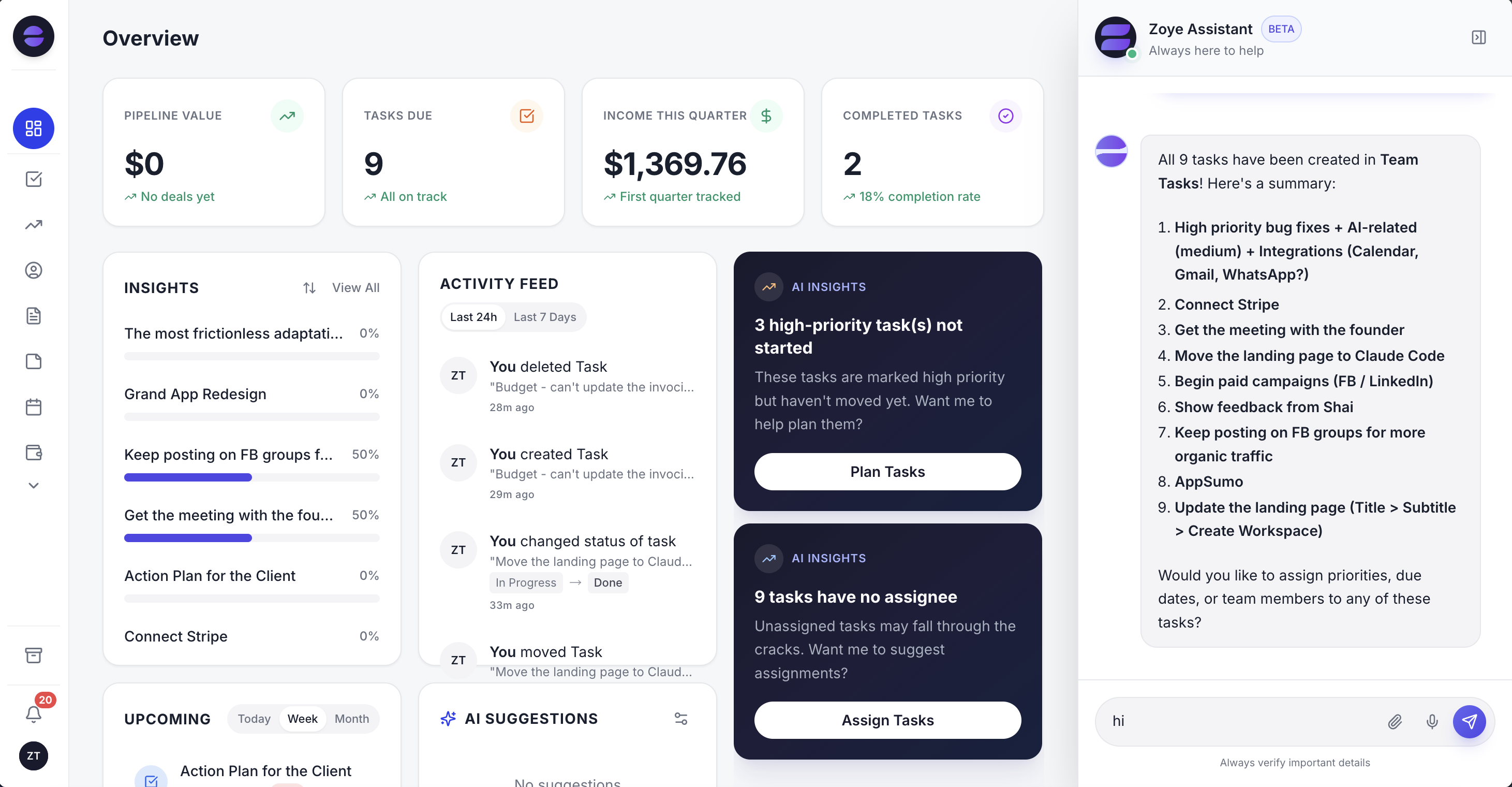 The overview puts new leads from comments and DMs next to the deals and tasks they turned into, so follow-up is never a separate tool.
Pricing. Zoye's plans, as of October 2026: Almost Free at $5 a month, or $4 on yearly billing, gives 1 member the core tools, 15 AI prompts a month and the Google integrations; it does not include automations, so the comment and DM features described here are not in it. Starter costs $29 a month ($23 yearly) and covers up to 10 members, Growth $59 ($47) up to 20, Scale $119 ($95) up to 100, and Customize is priced on request. Zoye charges for your team, not for how many people commented this month. The pricing page shows what each plan includes.
Honest limits. Zoye is not a ManyChat-style flow canvas for designing dozens of nested branches, not a post scheduler, and it does not run ads; it captures and works the leads your posts and ads produce. It does not cover TikTok or a website chat widget. If your business is a creator funnel that ends at a checkout link, ManyChat or Chatfuel is the lighter choice.
Ready to hand off the busywork?
Zoye brings AI-powered CRM, task management, and automation into one workspace.
Get StartedThe verdict
ManyChat and Chatfuel are no longer the same product with different logos. ManyChat is the builder for people who want to author every message, with Instagram as home. Chatfuel is the AI agent for people who want results without drawing flows, with WhatsApp close to the centre. Price differences are small at the start and depend on contacts or AI usage as you grow.
Make the decision in three steps. First, decide whether you want to write the conversation or supervise it; that alone usually picks the tool. Second, price your real month, not the entry plan: count engaged contacts for ManyChat, AI conversations and WhatsApp template sends for Chatfuel, and add Meta's fees for WhatsApp on either. Third, follow one lead past the chat. If the path ends at a link, you are done. If it runs through a quote, a booking, a task and an invoice, the chat tool is only half of the system.
If your leads should become customers your team follows up on in one place, book a Zoye demo and bring one real campaign: we will build the rule with you, show it, and you approve it before it runs.