Most Facebook Pages that run any automation at all run the same one: a greeting that fires when someone messages the Page, followed by silence until a person gets round to the inbox. The automation answered. Nobody followed up. A day later the window to reply freely has closed, and the person who asked about prices on Tuesday evening is now a name in an inbox nobody can write to without them writing first.
That is the real shape of Messenger automation in 2026. The tools are mature and the rules are clear, but the rules are built around time. Everything a business can do in Messenger depends on who started the conversation, when they last wrote, and how they arrived. Automate without understanding that clock and you get a bot that is polite for thirty seconds and useless for the rest of the week.
This article covers the Messenger half of Meta's messaging story: what you can actually automate, the 24-hour and 7-day windows, the Human Agent tag, the disclosure and response-time rules, what the retirement of most message tags means for anyone who used to send re-engagement blasts, and the part almost every setup gets wrong, which is turning a chat into a lead record. It sits under our Facebook and Instagram automations page. Meta's policy details were checked against Meta's developer documentation in October 2026, and Meta revises that documentation often, so treat dates and limits as current rather than permanent.
The short version
If you only read one section, read this one.
- You can automate the first response to anyone who starts a conversation, plus the next steps inside that conversation: answers, buttons, files, qualification questions and a handoff to a person.
- You cannot start conversations. Messenger lets a business message people who messaged it or engaged with it, by commenting, clicking an ad or replying to a story. There is no cold outreach.
- The clock is 24 hours from the person's last message. A conversation started from a Click-to-Messenger ad can stay open for up to 7 days.
- A comment earns one private reply, sent within 7 days of the comment. If the person answers, the normal window opens.
- Bots must disclose that they are bots where the law requires it, and Meta recommends doing it always. Bots are expected to respond within 30 seconds.
- Most legacy message tags are gone, so broadcasts to old contacts are no longer a reliable tactic.
- The conversation is not the asset. The contact record, with source, consent and next step, is. Capture it while the window is open.
Everything below is the detail behind those seven lines.
What you can automate in Messenger
Messenger automation is not one feature. It is six separate entry points, each with its own trigger and its own limits, and a good setup treats them differently.
Instant replies when someone messages the Page. The most common automation and the easiest to get wrong. A greeting that says "thanks, we will be in touch" buys a few seconds of goodwill and nothing else. A useful first reply tells the person what the bot can do right now, gives them two or three buttons for the questions you hear every day, and states plainly when a human will see the chat.
FAQs with buttons. Opening hours, prices, delivery areas, booking links, what to bring to a first appointment. Buttons beat free text for these because the person does not have to guess how to phrase the question, and the answer is the same every time. Keep the menu short. Four good buttons are better than twelve that scroll.
Comment-to-Messenger private replies. When someone comments on a Page post, the Page can send one private message in reply, within 7 days of the comment. The person sees a reference to the comment they left, so the message lands in context rather than out of nowhere. This is the mechanism behind every "comment GUIDE and we will send it to you" post. One message per comment is the rule, so that message has to earn a reply. If the person answers, the standard 24-hour window opens and the conversation can continue. Our guide to Instagram comment to DM automation covers the trigger-word side of this pattern in more detail.
Click-to-Messenger ad conversations. An ad whose button opens a chat instead of a landing page. These people arrived with intent and a specific offer in mind, so the first reply should reference that offer, not a generic welcome. They also get the longest window: after their first message, Meta's policy allows the conversation to stay open for up to 7 days.
Story replies and visitor posts. Someone replies to a Page story, or posts on the Page itself. Both are signals of interest that usually get lost because they arrive somewhere nobody watches closely. A story reply in particular is a warm, low-effort message that deserves the same instant answer as a direct message.
Handoff to a human. The automation that matters most and gets built least. Any question that needs judgement, a complaint, a custom quote or a nervous buyer should move to a person cleanly, with the whole conversation visible, and the bot should stop talking once a human has taken over. A bot that keeps interrupting a human conversation is worse than no bot.
The clock: 24 hours, 7 days, and the Human Agent tag
Every Messenger strategy is really a strategy for working inside windows. Meta's Messenger Platform policy sets them out, and they are worth knowing precisely.
The standard window is 24 hours. It starts when the person sends a message and restarts every time they send another. Inside it, the business can send anything relevant, including promotional content. Outside it, the business cannot send a normal message until the person writes again.
Click-to-Messenger ads extend the window to up to 7 days. After a person's first message following one of these ads, the conversation can stay open for up to a week. That matters for anything with a considered purchase: a quote that takes two days to prepare, a booking that depends on someone checking their calendar, a product the person wants to discuss with a partner first.
Private replies have their own 7-day rule. The one private message a comment earns has to be sent within 7 days of the comment. It is a single message, not a window. Only a reply from the person opens a real conversation.
The Human Agent tag is for humans. It lets a real person reply to a conversation within a separate 7-day period, so a support case that cannot be resolved in 24 hours is not cut off mid-thread. It needs a permission granted through Meta's App Review, and it exists for human support. Using it to send automated follow-ups or promotions is a policy breach, not a clever workaround, and it is the kind of misuse that gets a Page's messaging restricted.
The practical lesson is that the clock rewards speed and planning. Everything you need from the person, the details, the consent, the next step, should be asked for while the window is open, not after.
Bots must say they are bots, and answer fast
Two policy rules shape how a Messenger bot should sound.
Disclosure. Meta's policy requires automated experiences to tell people they are talking to an automated service where the law requires it, and recommends doing it everywhere. The disclosure belongs at three moments: the start of a conversation, after a long gap, and whenever a chat moves from a human back to automation. It does not need to be heavy. "Hi, I'm the automated assistant for the shop, I can answer most questions now or pass you to the team" is honest, short and sets expectations better than a bot pretending to be a person called Jess.
Responsiveness. The same policy expects bots to respond within 30 seconds. That is a technical bar, but it is also a design hint. A bot that has to call three slow systems before answering will feel broken, so the first reply should be immediate and simple, with heavier work happening afterwards.
There is a commercial reason to welcome both rules. People forgive a bot that admits what it is and hands over gracefully. They do not forgive one that wastes their time pretending.
What retired message tags mean for re-engagement blasts
For years, a familiar Messenger tactic was to build a large list of everyone who had ever messaged the Page and send them updates long after the conversation had gone cold. Much of that relied on message tags, labels that let a business send specific kinds of messages outside the standard window.
Meta has narrowed those tags steadily, and most legacy message tags have now been retired. The direction is consistent: outside the window, the business needs a reason the person agreed to, not a label the business chose.
What this means in practice:
- A list of past Messenger contacts is not a broadcast list. Treat it as history, not as an audience you can reach on demand.
- Re-engagement has to be earned inside the window. If you want to tell someone about next month's offer, ask during the live conversation whether they want to hear about it, and on which channel.
- Any opt-in product Meta offers for recurring messages has its own rules. Read the current terms for the specific product before building around it, and do not assume a tactic from two years ago still works.
- Workarounds are a risk to the Page. Misusing the Human Agent tag, or using unofficial tools that automate a personal account, can lead to restrictions on the very Page you rely on for leads.
None of this makes Messenger less useful. It makes it a channel for live conversations, which is what it was always best at, and it moves long-term follow-up to channels where the person has explicitly agreed to hear from you.
Want to see it in action?
See Zoye catch a new lead, answer on WhatsApp and set up the follow-up, all from one message.
See How It WorksThe capture problem: a Messenger chat that never becomes a lead
Here is the failure that costs more than any policy mistake. A person messages the Page, asks a good question, gets a good answer, says they will think about it, and goes quiet. The conversation sits in the Page inbox. It has no owner, no source, no stage, no follow-up date, and no link to anything else the business knows about that person.
Two weeks later, the same person fills in a form on the website. They are now a lead, with no memory of the Messenger chat attached. A month later they comment on a post and get the same welcome as a stranger.
This is the capture problem, and it is not solved by better bot copy. It is solved by treating every Messenger conversation as an event on a contact record.
That means, at minimum:
- A contact exists from the first message, with the source recorded: direct message, comment, story reply or a named Click-to-Messenger ad.
- The conversation is visible on that contact, so whoever picks it up next sees what was asked and answered.
- Repeat contacts are matched, not duplicated. The person who commented in March and messaged in May is one person with two touchpoints.
- Qualification answers land in fields, such as budget, service, location or timeline, where filters, assignment rules and reports can use them.
- An owner and a next step are assigned before the window closes, so a quiet conversation becomes a task, not a forgotten thread.
When this layer is missing, every other Messenger automation is decorating a leak. When it is present, even a simple bot becomes a lead source you can measure. The same logic applies to form submissions, which is the subject of our guide to Facebook lead ads to CRM.
Moving a Messenger lead to WhatsApp, with consent
Messenger windows close. Many businesses, especially those selling services, prefer to continue the conversation on WhatsApp, where customers are used to talking with businesses and where follow-up is less dependent on the customer writing first. Doing that well comes down to consent.
Ask inside the window. While the Messenger conversation is still open, offer to continue on WhatsApp and say why: a quote, a booking confirmation, photos, a reminder.
Collect the number and a clear yes together. The answer has to be recorded on the contact with when and how it was given. WhatsApp's Business Platform expects an opt-in before a business messages someone, and you want to be able to show it.
Start with an approved template. The first business-initiated WhatsApp message, and anything sent more than 24 hours after the customer's last reply, has to use a template Meta has approved. Make that first message reference the Messenger conversation so it does not feel like a stranger writing.
Never scrape and send. Copying a phone number someone mentioned in passing and messaging it without asking is exactly the kind of message that gets reported, and reports affect the quality of your WhatsApp number.
Done this way, the move is a service to the customer, not a trick on them, and it gives you a channel that does not go silent after a day.
See what Zoye can do for you
CRM, deals, tasks and your Instagram, Facebook and WhatsApp automations in one workspace. Just ask Zoye and it sets any of it up for you.
Explore FeaturesA practical setup sequence
A small business can get a sound Messenger setup running in a few focused steps. The order matters more than the tooling.
- List the ten questions you answer most often. These become your buttons and your instant answers. If a question needs a human every time, it becomes a handoff, not an FAQ.
- Write the first reply with disclosure built in. Say it is automated, say what it can do now, say when a person will see the chat.
- Decide what triggers a handoff. Keywords such as complaint or refund, a request for a custom quote, any question the bot cannot match, or a person simply asking for a human.
- Set up comment-to-Messenger on one post first. Pick a post with a clear offer, write a private reply that earns an answer, and test it by commenting yourself.
- Match the first reply to each Click-to-Messenger ad. A person who clicked an ad about a spring offer should hear about the spring offer.
- Connect the capture layer before you scale. Every conversation creates or updates a contact with source, answers, owner and next step.
- Plan the move to a consented channel. Decide which conversations should be offered WhatsApp or email follow-up, and how the consent is recorded.
- Review weekly. Which entry points produce contacts, which produce customers, and where conversations stall.
A typical illustration: a ten-person home services business runs Click-to-Messenger ads for seasonal maintenance. The bot discloses itself, asks for the postcode and the type of job, offers three time slots, and asks whether the person would like the quote on WhatsApp. A human reviews the quote request the same morning. Nothing in that flow is clever. It simply never lets the window close on an unanswered question.
Ready to hand off the busywork?
Zoye brings AI-powered CRM, task management, and automation into one workspace.
Get StartedHow Zoye handles Messenger automation
Zoye is an AI Business Operator: one workspace whose tools already link to each other, from CRM and tasks to calendar, invoices and reports, plus an assistant that operates them for you. Facebook and Instagram is one of those tools, and it exists so that a Messenger conversation becomes part of the business rather than a thread in an inbox.
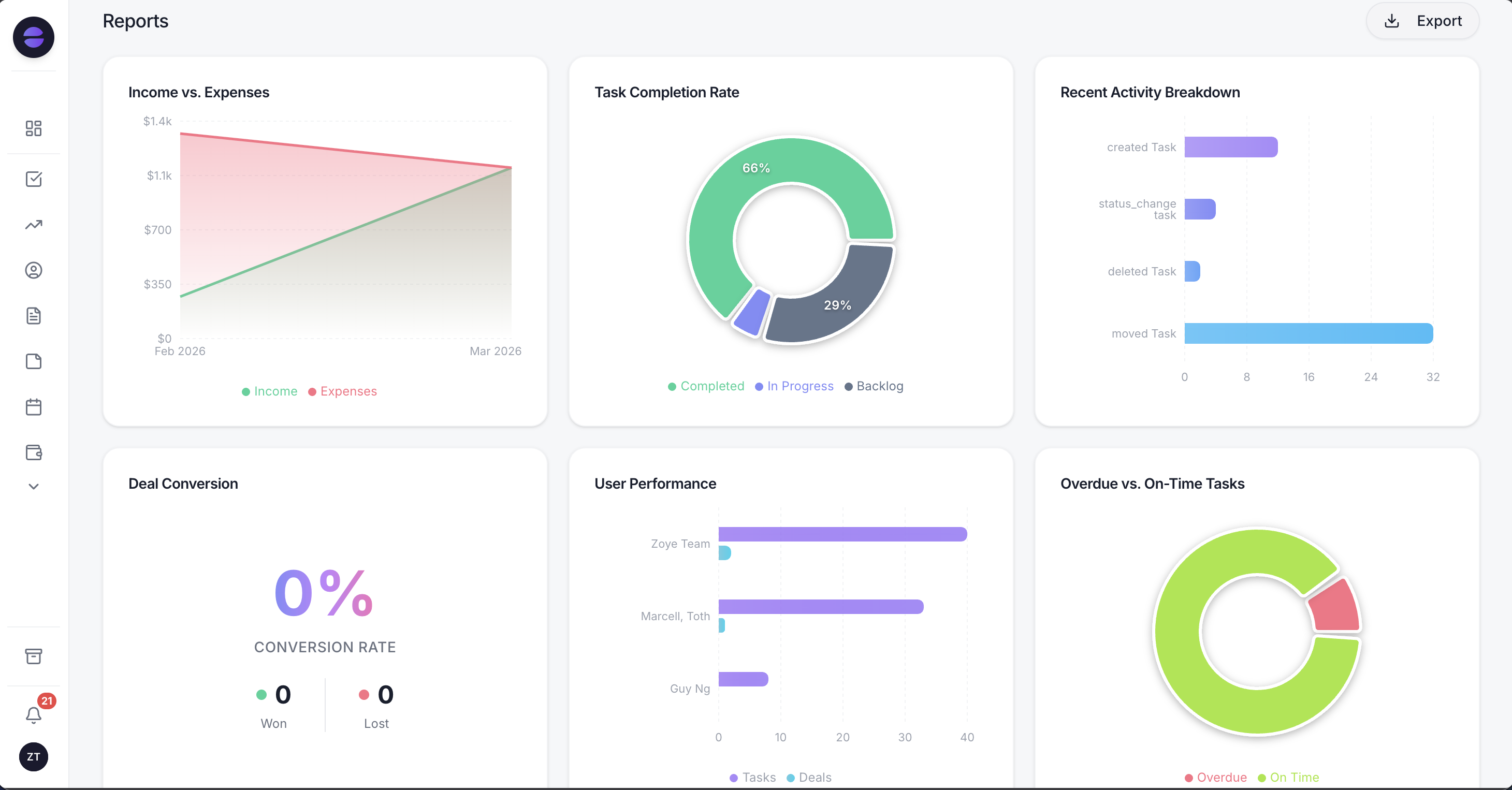
Because every Messenger conversation is saved on a contact with its source, reports can show which entry point actually produces customers.
When someone messages your Facebook Page or Instagram account, or replies to a story, Zoye answers right away: buttons to tap, a file, or a reply in your brand's voice. Anything it should not answer is handed to a human, with the whole chat on the lead's card. A comment can trigger a public reply and a private message within seconds, firing on a keyword, on one post, or on every comment. Repeat commenters are matched to the contact they already have, with the comment text and its link kept on the record. One Page connection covers both Facebook and Instagram, and per-Page routing sends each Page's leads to the right workspace.
Setup follows four guided steps: connect the Page, route leads to a workspace, build the auto-reply, and test it live by commenting on your own post. You need a Page you admin, and an Instagram Business or Creator account linked to it if you want Instagram too. To create or change a rule, you describe what should happen to the assistant, in the app, on WhatsApp, in Slack or in Claude. Zoye builds the rule, shows it to you, and waits for your approval before anything runs. If Meta rejects a message or a Page loses a permission, you hear the reason instead of a false confirmation.
A Meta lead is an ordinary Zoye lead, so everything else fires on it automatically. The WhatsApp welcome, sent on the official Business Platform with consent confirmed, templates handled and the 24-hour rule respected. The qualifying questions that write answers into fields. Owner assignment, follow-up tasks, audiences and pipeline reports alongside every other source.
Two limits, stated plainly. Zoye does not run your ads; it captures and works the leads your ads produce. And it is not a flow canvas you have to wire node by node: a visual builder exists, but you are never forced to open it.
Pricing: Almost Free $5 a month ($4 billed annually) for 1 team member and 1GB, Starter $29 ($23), Growth $59 ($47), Scale $119 ($95), and Customize on quote. See pricing for what each plan includes.
Best for: small businesses and agencies that get leads through Facebook and Instagram messages and want every conversation to end up as a contact with an owner and a next step.
Messenger works best as the first minute, not the whole relationship
Messenger automation is at its best in the first minute of a conversation: instant, honest about being automated, useful, and quick to hand over to a person. Its rules push long-term follow-up elsewhere, and that is not a weakness if the business captures the contact, the source and the consent while the window is open.
See how every Messenger, comment and story reply conversation lands as a real contact with its next step attached. Explore Zoye's Facebook and Instagram automations and see pricing for the plan that fits.
For more context, see our guides to Facebook lead ads to CRM, Instagram comment to DM automation, and the best ManyChat alternatives.