Quick answer: the best CRM for a distributor is the one that knows when each account should order again, tells the right rep before the order is late, and keeps the WhatsApp messages, quotes and price lists of every shop owner on one record. For a distribution or wholesale business of up to 20 people, Zoye does that with an AI assistant doing the follow-up, on Growth at $59 a month ($47 billed yearly) for up to 20 members, the plan that includes the workflow and WhatsApp automations. Stock, purchasing and EDI stay in your ERP or inventory system.
Key takeaways (October 2026)
- US merchant wholesalers held an estimated $965.7 billion of inventory at the end of August 2026, up 6.6% on a year earlier, according to the Census Bureau's advance report of 30 September 2026. Money sitting in stock makes every missed reorder more expensive.
- McKinsey's B2B Pulse research finds buyers split their time roughly in thirds between in-person, remote and digital self-service channels, and 41% still prefer in-person contact with a new supplier. Rep visits and WhatsApp both matter.
- Of the six rivals reviewed here, Repsly publishes no prices and asks for a 12-month contract paid upfront; the per-seat entry prices run from $14 (Zoho CRM, Pipedrive) to $25 (Salesforce Starter Suite).
- Reorder reminders work best as dated tasks created when an order is logged, with intervals set by account tier.
- Zoye is not an inventory, ERP or EDI system. It runs accounts, reorders, rep visits, quotes, price lists and WhatsApp conversations next to the system that holds your stock.
How a distributor sells, and where reorders slip
A distributor's revenue is mostly repeat revenue: the same few hundred accounts ordering the same lines every week or month. Sales are won by being present at the right moment, with the right price, through whichever channel the buyer uses. Revenue leaks when an account quietly stops ordering and nobody notices for six weeks.
That is the difference between a distributor and most businesses that buy a CRM. A consultancy or an agency mostly hunts for new clients. A distributor mostly farms an existing book: shops, restaurants, workshops, contractors, clinics or resellers who already buy from you and could buy more, or could drift to a competitor who visits more often. New accounts matter, but a small, steady slip in reorders across the whole book usually costs more than a slow month of prospecting.
The money behind that slip is large. The Census Bureau's advance economic indicators report for August 2026 put end-of-month inventories at merchant wholesalers at $965.7 billion, up 0.7% from July and 6.6% from August 2025. When stock is bought ahead of demand, an account that stops reordering leaves that stock on your shelves.
Buyers have also changed how they want to be served. McKinsey's B2B Pulse research describes a "rule of thirds": business buyers spread their time evenly across in-person meetings, remote contact such as calls and messaging, and digital self-service. The same work found that 41% prefer in-person channels when dealing with a new supplier and 40% when buying something for the first time. In practice, a distributor needs reps who visit, a phone that answers and a fast written channel, which for many shop owners is WhatsApp.
The leaks, in an illustrative eight-person distributor
Picture a distributor with three field reps, two inside sales people, a warehouse lead, an office manager and an owner who still handles the biggest accounts. Typical leaks look like this:
- The silent account. A shop that ordered every two weeks has not ordered in five. The ERP shows the gap, but only if someone runs the report, and nobody does until the quarterly review.
- The order in a rep's phone. A shop owner sends a photo of a handwritten list on WhatsApp at 7 in the morning. The rep is driving, forgets, and the shop buys from the van that came by at noon.
- The quote that went quiet. A new restaurant group asked for prices on forty lines. The quote went out by email, it was opened twice, and nobody called.
- The visit with no notes. A rep hears that a customer is unhappy with delivery times, says "I'll pass it on", and the information dies in the car.
- The old price list. A customer orders from a PDF that is two price changes out of date, and the invoice causes a dispute.
None of these are stock problems. Your ERP did its job each time. Each leak happened in the conversation around the order, which is where a CRM belongs.
ERP, inventory, EDI or CRM: which system does what
Distribution software comes in four families. The ERP or inventory system holds stock, purchasing, pricing rules, orders and invoices. EDI exchanges orders and invoices electronically with large trading partners. A CRM holds the relationship: who to call, which quotes are open, what was said and what happens next. Most distributors need an ERP first and a CRM next.
| Question | ERP / inventory | EDI | CRM |
|---|---|---|---|
| How many cases of a line are in stock? | Yes, the core job | No | No (Zoye has no stock levels) |
| What did this account order last month? | Yes | For EDI partners | A summary on the account, or a link to the ERP |
| Which accounts should have reordered by now? | Only if someone runs a report | No | Yes, as dated tasks and alerts |
| Which quotes are open, and who follows up? | Rarely | No | Yes |
| Which rep visits which account, and what happened? | No | No | Yes, visits, notes and next steps |
| What did the shop owner send on WhatsApp? | No | No | Yes, on the account record |
| Send a large retailer an electronic invoice | Yes | Yes | No |
| Who gets the new price list, and did they open it? | Holds the prices | No | Sends it, tracks it, follows up |
If your stock counts are wrong or orders are keyed twice, fix the ERP or inventory side first; our guide to inventory management software for small business covers that choice. If stock is under control and the leak is reorders, quotes and follow-up, the CRM is where to look. For a business wondering whether one suite can do both, our Odoo alternatives guide covers the trade-off between an ERP and a lighter customer operator.
Reorder reminders: turn order history into a calendar
A reorder reminder is a dated task that appears before an account's next expected order, not after it is missed. Set each account's typical interval from its order history, create the reminder whenever an order is logged, and alert the account owner if the date passes with no order. That one habit catches most silent accounts.
How to set it up in any CRM:
- Find each account's rhythm. Export the last six months of orders per account from your ERP and note the typical gap between orders. A cafe might order weekly, a hardware shop every two weeks, a clinic monthly.
- Store the interval on the account. A custom field such as "reorder every (days)" with values like 7, 14, 30 or 60.
- Log the order date. Either the rep logs a won order on the account, or the ERP export updates a "last order" field once a week.
- Create the reminder from the order. When an order is logged, a task is created for the account owner, due a day or two before the next expected order.
- Escalate the miss. If the due date passes with no new order, the task turns overdue and the owner, or the sales manager for top accounts, gets an alert.
A reminder cadence that fits many distributors:
| Account rhythm | Reminder lands | Channel | What the rep says |
|---|---|---|---|
| Weekly | 1 day before the usual order day | WhatsApp message | "Same as last week, or any changes?" |
| Every 2 weeks | 2 days before | WhatsApp or call | Last order summary plus one new line worth trying |
| Monthly | 3 to 4 days before | Call or visit | Order review, slow movers, upcoming price change |
| Seasonal or project-based | 2 to 3 weeks before the season | Visit or email | Preseason quote with quantities from last year |
Two refinements make it work better. First, count a missed reorder from the account's own rhythm, not a fixed 30 days: a weekly customer who skips two orders is already a lost month. Second, record why an order was skipped (closed for holidays, stocked up, trying a competitor, cash flow), because "trying a competitor" needs a different response from "closed for two weeks".
For the wording of reminder messages, our guide to automating follow-ups covers cadences and templates that carry over with little change.
Account tiers: decide who gets your reps' time
Account tiers decide how much attention each customer gets. Rank accounts by revenue and potential, usually into A, B and C, then give each tier its own visit frequency, reorder cadence and contact channel. Without tiers, reps spend their week with the friendliest accounts, not the most valuable ones.
A simple tiering for a small distributor:
| Tier | Typical share | Visit rhythm | Reorder contact | Owner |
|---|---|---|---|---|
| A (top accounts) | Top 10 to 20% of accounts by revenue | Every 1 to 2 weeks | Personal call or message before every expected order | Senior rep or owner |
| B (growth accounts) | Next 30% | Every 3 to 4 weeks | Message before every expected order | Field rep |
| C (small or occasional) | Remaining 50 to 60% | Quarterly or on request | Scheduled message to the whole tier | Inside sales |
| Prospects | Shops not yet buying | As planned | Quote follow-up | Assigned rep |
The shares above are a common starting point, not a rule: use your own revenue data. Whatever split you choose, store the tier as a field on the account so you can filter by it, report on it and build rules from it. Review tiers every quarter. An account that grows should move up and get more visits; one that shrinks should move down before it eats a rep's Tuesday.
Tiers also make broadcast messages safer. A new price list, a holiday delivery schedule or a product recall should reach the right accounts, and only them. A list built from a live filter on the tier field stays correct as accounts move between tiers, which a spreadsheet of phone numbers does not.
Rep visit routines that leave a record
A rep visit is only useful if the next person can see what happened. Plan visits from the account tiers, log each one with three facts (what was ordered or promised, what the customer raised, what happens next), and turn every promise into a task with a date. A visit with no record is a cost with no memory.
A weekly routine for a field rep:
- Monday: plan the week. Pull the A and B accounts due for a visit, plus every account whose reorder is overdue. Group them by area in your own route planner or map; a CRM shows who needs a visit, while route optimisation is a separate tool.
- Each visit: three facts. Ordered or promised, issues raised, next step. A voice note in the car is enough if the CRM turns it into notes and tasks.
- Same day: confirm in writing. Send the shop owner a short message with what was agreed, so the order and any promise are on the record for both sides.
- Friday: close the loop. Every promise from the week is either done or has a new date. Overdue reorders get a call.
What a sales manager should be able to see without asking: visits per rep per week, accounts not visited in their tier's rhythm, overdue reorders by rep and the reasons for skipped orders. If getting those numbers means a meeting, the routine is not recorded.
Want to see it in action?
See Zoye catch a new lead, answer on WhatsApp and set up the follow-up, all from one message.
See How It WorksWhatsApp order intake from shop owners
Many shop owners already order on WhatsApp: a photo of a handwritten list, a voice note from behind the counter, a forwarded message with quantities. The order is real, but it lives in one rep's phone. The fix is to bring every order message onto the account's record, confirm it in writing and key it into the order system the same day.
A workable intake routine:
- One place for order messages. Messages from accounts land where the whole team can see them, linked to the account, not only in a personal phone.
- Read and structure. A photo or voice note becomes a list of lines and quantities that a person checks before anything is entered.
- Enter the order where it belongs. The ERP or inventory system gets the order; the CRM records that it was placed, its value and the next reorder date.
- Confirm back. The shop owner gets a short written confirmation with the lines, the delivery day and anything out of stock.
- Hand over the exceptions. Price disputes, complaints and credit questions go to a named person with the full chat visible.
The rules Meta sets for WhatsApp shape how this works. According to Meta's developer documentation, as of October 2026 a business can reply freely within 24 hours of a customer's last message; outside that window, only approved message templates can be sent. Since 1 October 2026, each business phone number gets 1,000 free service messages a month, with service messages beyond that charged, and utility templates sent inside an open customer service window are charged again. Rates vary by country, so check Meta's rate card rather than any figure quoted second-hand. On the WhatsApp Business app, broadcast lists are capped at 256 contacts and only reach people who saved your number. Our WhatsApp Business API pricing guide explains the categories.
Two practical rules for distributors: ask accounts to agree to receive messages before you send price lists or reminders, and give every outgoing message an easy way to opt out. Our guide to connecting WhatsApp to a CRM walks through the setup choices.
Quotes and price lists without the version mess
A quote for a distributor is usually a list of lines, quantities and prices for a new account or a large order. Treat each quote as a deal with a value and a follow-up date, attach the quote document, and keep one current price list per tier. Most disputes start with an old PDF.
What to keep straight:
- Prices live in the ERP. Tier pricing, customer-specific prices and promotions are rules in your order system. The CRM records which price list an account gets and when it was sent, not the price of every line.
- One current file per price list. When prices change, the new file replaces the old one on the record, with the date. Reps send from the record, never from their downloads folder.
- Every quote is a deal. Value, lines summarized, decision date, owner. A quote with no follow-up date is a quote you will forget.
- Follow up on a cadence. Day 2: confirm it arrived. Day 7: answer questions or adjust quantities. Day 14: offer a smaller trial order. Day 30: close it with a reason.
- Watch the opens. If a quote email was opened four times this morning, call this afternoon.
Price increases deserve their own plan: tell A accounts personally, send B and C accounts a dated notice to the list built from their tier, and log objections on the account so the next visit addresses them.
Wholesalers and manufacturers: the same CRM, different stress points
Wholesalers, distributors and manufacturers that sell direct share the same core need: repeat orders from a known book of accounts. The differences are in where the pressure sits. Wholesalers fight on price and speed, distributors on coverage and service, and manufacturers on long quotes, samples and dealer networks.
- A CRM for wholesalers should be fast for high-volume, low-touch accounts: tier filters, scheduled messages to whole tiers, quick reorder confirmations and a clear view of who has gone quiet. Wholesale buyers often order from a phone between other jobs.
- A CRM for distributors adds field reps, visit routines, principal or brand reporting and more product questions. Account tiers and visit records carry more weight.
- A CRM for manufacturers selling to dealers or trade customers leans on quotes, samples, specification questions and longer decisions. Each opportunity often involves engineering or production, so tasks across the team matter as much as the pipeline. Production planning and bills of materials stay in the manufacturing or ERP system.
The checklist below covers all three. Weight the items by where you lose the most.
What a distributor CRM must do: a 10-point checklist
Test every tool against these ten points before a demo. A tool that misses three of them will push your reps back to their phones and a spreadsheet within a quarter.
- Accounts with tiers, as a field you can filter, report and build rules on.
- Reorder reminders created from logged orders, with intervals per account.
- Rep visits logged with notes, next steps and dates, from a phone.
- WhatsApp and email conversations on the account record, visible to the team.
- Quotes as deals with value, documents, decision date and follow-up.
- Price lists stored per tier, sent from the record, with opens tracked.
- Messages to a whole tier with consent and opt-out handled.
- Reports on overdue reorders, visits per rep and quote win rate.
- Imports from your ERP export or spreadsheet without a consultant.
- Predictable cost for your team today and with three more reps.
If your answer to "where do orders live?" is "nowhere yet", add an eleventh point: you need an order and inventory system first, and Zoye is not one.
The 7 best CRMs for distributors in 2026
These seven cover the realistic choices for a small or mid-sized distribution business: one AI operator for the customer side, four general CRMs, one retail execution platform for field teams and one CRM that sits inside an ERP. Each entry starts with its limitation, then the October 2026 price from the vendor's own page.
1. Zoye: the operator for reorders, rep visits and WhatsApp orders
The limitation first: Zoye is not an inventory, ERP or EDI system. It does not track stock levels or warehouses, raise purchase orders, manage lots or landed costs, exchange EDI documents with retailers, plan routes or keep an accounting ledger. Its invoices are simple invoices with payment links, so tax invoices, credit notes and statements stay in your ERP or accounting system. A distributor keeps that system and runs Zoye beside it.
What Zoye takes over is the customer side, where reorders are won or lost. Zoye is an AI Business Operator: connected tools in one workspace, from contacts, companies, deals and tasks to the calendar, documents, invoices, reports, automations, WhatsApp, Facebook and Instagram, email tracking and the AI Notetaker, with an AI assistant that operates them. Every tool is listed on the features page.
Mapped to a distribution business:
- Accounts with tiers and rhythms. Each customer is a company record with its contacts, its tier and its reorder interval as custom fields. Filter, group and report by tier just by asking.
- Reorder reminders you describe once. Tell Zoye what should happen ("when an order for an A account is logged, create a check-in task for its owner due 12 days later, and alert the sales manager if it is overdue") and Zoye builds the rule, shows it in plain English and waits for your approval before anything runs. Triggers include a stage moving, a field changing, a due date passing and fixed schedules such as every Monday at 08:00.
- Rep visits from the car. A voice note on WhatsApp ("visited the corner shop, ordered the usual plus two cases of the new line, wants Thursday delivery, complained about the last driver") becomes a visit note, a logged order and a task for the warehouse lead. Several requests in one note are handled together.
- Order photos into records. Forward a shop owner's photo of a handwritten list or a PDF order to Zoye and it extracts the lines for you to check, then files them on the account. The order itself is still entered in your ERP.
- Quotes and price lists on the record. Each quote is a deal with its value, documents and decision date; email tracking shows when the buyer opened it, and a stale-deal rule creates the follow-up. Price lists sit on the account as documents, with Google Drive kept in sync.
- Messages to a whole tier. Smart audiences built from the tier field stay live as accounts move, and scheduled WhatsApp broadcasts send the new price list or holiday schedule with each buyer's name and pacing, after you confirm.
- Answers from live data. "Which A accounts have not ordered in their usual rhythm?" or "how many visits did each rep log this week?" get real figures, in the app, on WhatsApp or in Slack.
- Meetings that become tasks. For calls with large buyers or principals on Zoom, Google Meet or Teams, the AI Notetaker joins as a visible participant, transcribes with speaker labels and turns commitments into tasks after your approval.
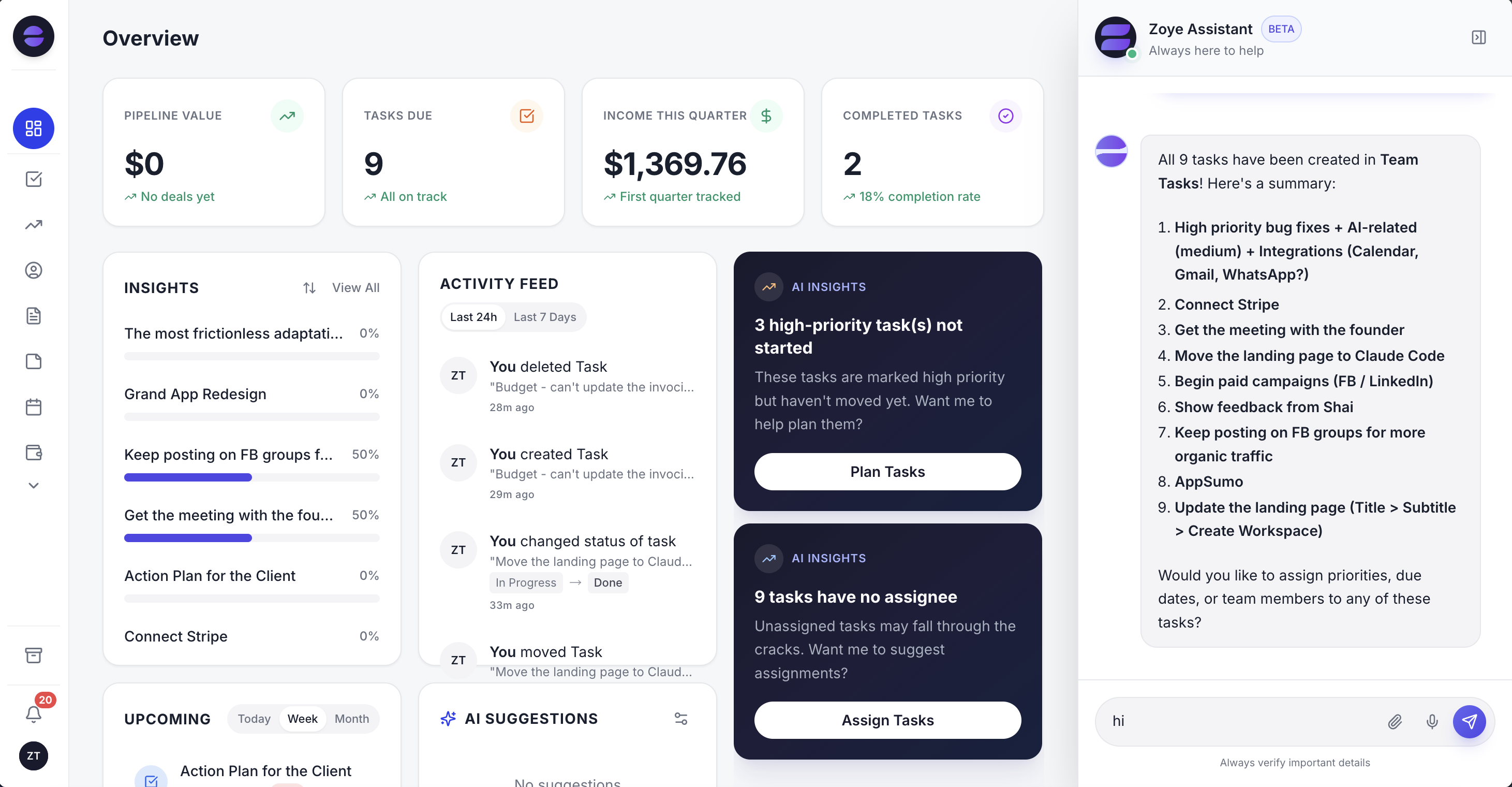
The Zoye overview: open quotes, overdue reorder check-ins and the week's visits on one screen.
Customer messages on WhatsApp go through Meta's official business platform. Each automation asks you to confirm the customer agreed to hear from you, anything sent more than 24 hours after a customer's last reply uses an approved template automatically, and every outgoing message carries an opt-out. Connecting your own business WhatsApp number to Zoye is coming soon. Today Zoye runs WhatsApp conversations with your leads, and Chats keeps them in one inbox beside Instagram and Facebook messages and comments, each thread with an owner, team notes and quick replies, and every chat saved on the contact. More on the WhatsApp automations page.
Pricing (as of October 2026): Zoye prices per workspace plan with a member allowance, not per rep. Almost Free costs $5 a month or $4 on yearly billing for 1 member, with the core tools, 15 AI prompts a month and Google integrations, and it has no automations. Starter at $29 ($23 yearly) covers 10 members with 5GB. Growth at $59 ($47) covers 20 members with 10GB and adds workflow automations and WhatsApp automations with 250 messages a month. Scale at $119 ($95) covers 100 members with 25GB, and Customize is quoted. See the pricing page.
Best for: distributors, wholesalers and small manufacturers of up to about 20 people who already have an order and stock system and lose money in reorders, quotes and WhatsApp messages that never reach a record.
2. Zoho CRM: configurable, cheap per seat, part of a bigger family
Zoho CRM is a deep, customizable CRM with low per-user prices, and Zoho also sells inventory, books and a whole suite, so a distributor can stay with one vendor. The limitation is effort: reorder logic, tiers and visit routines are yours to build from fields, workflows and add-on apps, and the best results usually mean connecting several Zoho products.
Pricing (as of October 2026, Zoho's US price list): a free edition for up to 3 users, then Standard $14, Professional $23, Enterprise $40 and Ultimate $52 per user per month billed annually, or $20, $35, $50 and $65 billed monthly. Zoho's page shows local currency by region, so confirm the figure for yours.
Best for: distributors with someone who enjoys configuring software and who may add Zoho Inventory or Zoho Books later. Our Zoho CRM alternatives guide covers why people leave it.
3. HubSpot: strong pipeline and email, priced per seat
HubSpot gives you contacts, deals, email tracking, meetings and reporting, with a free CRM for up to 2 users. The limitation for distributors is that it is built for new-business pipelines and marketing: reorder rhythms, tiers and visit routines have to be assembled from properties and workflows, and automation worth having starts at the Professional tier with an onboarding fee.
Pricing (as of October 2026): the free CRM covers up to 2 users. Sales Hub Starter from $20 per seat a month (about $7 on some offers). Professional is $90 per seat billed yearly or $100 monthly, plus a required $1,500 onboarding fee, and Enterprise starts at $150 per seat with a $3,500 onboarding fee.
Best for: distributors with an inside sales team chasing new accounts and a marketing plan to match. HubSpot vs Pipedrive compares the two most common picks.
4. Pipedrive: a clear pipeline for new accounts
Pipedrive is a sales CRM built around a visual pipeline and activity reminders. The limitation is that it thinks in deals, not accounts: it is good at moving a quote to a signed account, less good at the repeat orders that follow, and full email sync and automations start on Growth rather than the entry plan.
Pricing (as of October 2026): Lite $14, Growth $39, Premium $59 and Ultimate $79 per seat per month billed annually, or $24, $49, $79 and $99 billed monthly. Pipedrive's pricing page blocks automated access, so confirm current figures there before you buy.
Best for: a distributor focused on opening new accounts, with reorders handled elsewhere. See our Pipedrive alternatives.
5. Salesforce Starter Suite: a first step into a large platform
Salesforce Starter Suite bundles sales, service and email marketing basics in one entry package from the largest CRM vendor. The limitation is the climb: industry-specific features and deeper automation sit in higher editions priced several times higher, and most distributors who outgrow Starter need a partner to configure the next step.
Pricing (as of October 2026): Starter Suite $25 per user per month, Pro Suite $100 per user per month billed annually, and the Sales Cloud editions above that at $195 and $395 per user per month, with Max on request. A trial is offered.
Best for: distributors that expect to grow into Salesforce's wider platform and have budget for configuration. Our Salesforce alternatives guide covers lighter routes.
6. Repsly: retail execution for field teams
Repsly is built for field teams working in retail: rep scheduling, workday tracking, visit data, shelf audits and, on its Grow plan, ordering with a product catalog and sales documents. The limitation is focus and commitment: it is aimed at brands and their field teams in stores, it is not a general quote-and-pipeline CRM, and its pricing is hidden behind a sales call.
Pricing (as of October 2026): not published. The pricing page lists Core, Grow, Scale and Flex plans with "Book a meeting" buttons instead of prices, states that all contracts require a 12-month minimum commitment with annual upfront payment, and sells ShelfScan as a paid add-on.
Best for: distributors and brands whose reps spend their days in retail stores and need visit, audit and order-taking data more than a sales pipeline.
7. Odoo CRM: the CRM inside an ERP
Odoo CRM is one app in a suite that also covers sales, inventory, purchasing, invoicing and accounting on one database, which is attractive for a distributor that has no ERP yet. The limitation is that the moment you add a second app the free plan ends, and getting the suite configured properly is a project with its own budget.
Pricing (as of October 2026): One App Free is free for unlimited users when CRM is your only app. Installing a second app moves you to Standard, listed at $13.50 per user per month billed yearly, a discount valid for 12 months for the initial users; the page shows $16.90 after that. Custom is $25.50 on the same basis, then $32.00. Odoo's Success Packs of implementation hours start at $458.82. Our Odoo alternatives guide breaks the costs down.
Best for: a distributor ready to replace spreadsheets and an old order system with one ERP, and willing to invest time or a partner to set it up.
See what Zoye can do for you
CRM, deals, tasks and your Instagram, Facebook and WhatsApp automations in one workspace. Just ask Zoye and it sets any of it up for you.
Explore FeaturesDistributor CRM options side by side
The table puts the seven options on one footing: what each is built for, the lowest published price as of October 2026, what makes the bill grow and how each handles reorders, rep visits and stock. For every option, payment fees and Meta's per-message WhatsApp charges come on top.
| Tool | Built for | Lowest published price (Oct 2026) | Bill grows with | Reorder reminders | Rep visits | Stock and orders |
|---|---|---|---|---|---|---|
| Zoye | Accounts, reorders, quotes, WhatsApp | $5/mo (1 member, no automations); $59/mo for 20 with automations | Plan with member allowance | Rules create dated tasks | Voice notes, tasks, calendar | No, stays in your ERP |
| Zoho CRM | Configurable general CRM | $14 per user/mo billed yearly (Standard) | Users, edition, other Zoho apps | Build with workflows | Build with fields and add-ons | Separate Zoho Inventory |
| HubSpot | New-business pipeline and marketing | $20 per seat/mo (Starter) | Seats, onboarding fee | Build with workflows (Professional) | Activities and tasks | No |
| Pipedrive | Visual sales pipeline | $14 per seat/mo billed yearly (Lite) | Seats, add-ons | Activity reminders | Activities | No |
| Salesforce Starter | Entry to a large platform | $25 per user/mo | Users, editions, partners | Build in higher editions | Basic | No |
| Repsly | Retail execution for field teams | Not published (12-month minimum) | Plan, add-ons | Not the focus | Yes, the core job | Ordering on Grow |
| Odoo CRM | CRM inside an ERP | Free for one app; $13.50 per user/mo after | Users, apps, implementation | Build with activities | Basic | Yes, with Inventory and Sales |
An illustrative week at a nine-person distributor
Here is how the pieces fit in one week at an illustrative distributor with three field reps, two inside sales people, a warehouse lead, an office manager, a sales manager and an owner. It serves about 300 accounts: 40 in tier A, 90 in tier B and the rest in tier C. Zoye is the tool shown; the habits work in any CRM.
Monday, 08:00. The scheduled Monday rule lists every account whose reorder check-in falls this week: 52 in total. Each rep sees their own list, with the A accounts at the top. The sales manager asks Zoye, "which A accounts are more than a week past their usual order?" and gets four names with owners.
Monday, 11:30. A rep finishes a visit and sends a voice note: the account wants weekly instead of fortnightly deliveries and asked about a new product line. Zoye updates the reorder interval, logs the visit, creates a quote deal for the new line and a task for the inside sales team to price it.
Tuesday, 07:10. A shop owner sends a photo of a handwritten order. The inside sales person forwards it to Zoye, checks the extracted lines, keys the order into the ERP and sends a confirmation with the delivery day. The order is logged on the account and the next check-in task is created for 13 days later.
Wednesday. The price increase notice goes out. The owner calls the 40 A accounts over two days; the B and C tiers get a scheduled WhatsApp message from a live tier audience after the office manager confirms the send. Three accounts reply with objections, which land on their records for the next visit.
Thursday. The restaurant group quote from last week reaches day 7. The stale-deal rule creates a call task and email tracking shows the buyer opened the quote twice that morning. The rep calls, adjusts two quantities and wins the account.
Friday. The weekly report shows 46 of the 52 reorders placed, four with a reason logged (two closed for a holiday, one stocked up, one trying a competitor) and two still open with calls booked for Monday. The "trying a competitor" account goes to the owner.
Nothing in this week is unusual. The difference is that every reorder, visit and quote had a name and a date.
How to switch without disrupting orders
Switch the customer side, not the order system. Keep the ERP running untouched, export accounts and recent orders, set tiers and reorder intervals, rebuild the reminder rules and move reps over one week at a time. A small distributor can do it in two to three weeks.
- Export accounts and contacts from your ERP, current CRM or the reps' spreadsheets, with each account's last order date and typical interval.
- Import into Zoye. A spreadsheet imports directly. For messy sources, send the assistant a CSV, a PDF customer list or a screenshot and it extracts records for you to review.
- Set tiers and intervals as fields, using six months of order history.
- Rebuild the habits as rules: reorder check-ins from logged orders, overdue alerts for A accounts, stale-quote follow-ups and the Monday visit list. Zoye shows every rule before it runs.
- Bring reps over one at a time, starting with the one who already writes everything down. Their week becomes the template for the others.
- Keep the ERP as the system of record for stock, orders, pricing and invoices. A weekly export of last order dates keeps the reorder fields current.
If you serve trade customers on job sites, our CRM for contractors guide covers the other side of that relationship, and CRM for small business covers the basics for a first CRM.
Ready to hand off the busywork?
Zoye brings AI-powered CRM, task management, and automation into one workspace.
Get StartedWhich option fits your distribution business
Choose by where you lose the most. If it is stock, purchasing and orders, start with an ERP such as Odoo, or Zoho with its inventory app. If your reps live in retail stores, look at Repsly. If it is reorders, quotes and WhatsApp messages that never reach a record, choose Zoye next to the system you already have.
Some common shapes:
- A two- or three-person wholesaler taking most orders on WhatsApp and the phone: reorder reminders and a shared record matter more than anything else. Zoye Growth covers the team at $59 a month ($47 billed yearly), the plan that includes the reminder rules and WhatsApp automations.
- A distributor with five to fifteen people and field reps: Zoye for accounts, tiers, visits, quotes and reorders, beside the ERP that holds stock and pricing.
- A distributor without any ERP yet: decide the order and stock system first. Odoo or Zoho with its inventory app can cover both sides at the price of setup time.
- A brand or distributor whose reps audit shelves in stores: Repsly for visit and audit data, with a CRM for the quote pipeline if you sell to new accounts.
- A manufacturer selling through dealers: a pipeline-first CRM such as Zoye, Pipedrive or HubSpot for quotes and samples, with production in the ERP.
Test your shortlist on a real fortnight: load 30 accounts with their tiers and last order dates, five open quotes and one week of WhatsApp orders, then see which reorders the tool flags before you do. To try that on your own accounts, book a Zoye demo and bring one account that went quiet last quarter.