A WhatsApp broadcast can be the highest-converting message a small business sends all month, or the fastest way to get its number blocked. The difference is not the tool. It is whether you follow the rules Meta has built around WhatsApp to protect the one thing that makes the channel valuable: people actually read their WhatsApp messages, because it is not full of spam.
Most owners get this wrong on their first try. They export a list of every number they ever spoke to, load it into a bulk-sender, and blast a promotion to all of them at once. It feels efficient. Then the reports come in: dozens of people block the number, a handful report it as spam, WhatsApp quietly drops the account's quality rating, and within a week the messaging limits shrink or the number is banned outright. The broadcast that was supposed to bring in sales instead cost the business its main channel.
This guide walks through how to run WhatsApp broadcasts the right way in 2026: what a broadcast actually is, the Meta rules you cannot skip, how to build a genuine opt-in list, how to get a template approved, how to segment and pace your sends, templates you can adapt, how to measure results, and how to stay far away from a ban. Done properly, a broadcast is a permission-based conversation starter, not a megaphone.
Pricing reflects published rates as of July 2026; check each vendor's pricing page for current figures.
What a WhatsApp broadcast actually is (and what it is not)
A broadcast is a single message sent to many recipients at once, where each person receives it as a private one-to-one chat, not a group. Nobody sees the other recipients, and replies come back to you individually. That privacy is exactly what makes broadcasts feel personal and convert well.
It is worth being precise, because there are two very different ways to send one.
The free WhatsApp Business app broadcast list. Built into the app, capped at 256 contacts, and with one important catch: your message only reaches people who have saved your number in their phone. It is fine for a small, warm list of existing customers who already know you. It does not scale, it has no templates, no analytics, and no opt-in management.
The WhatsApp Business Platform (the API). This is the official route for real broadcasting at scale. There is no 256 cap, you send pre-approved message templates, and you get delivery and read data. In exchange, you accept Meta's full rulebook: opt-in, template approval, quality ratings, and per-message pricing. Every serious broadcasting tool, including Zoye, is built on this.
What a broadcast is not is a bulk-SMS free-for-all. WhatsApp is a permission channel by design. Treating it like a cold-email blast is the single most common reason accounts get banned.
The Meta rules that keep you compliant
Before you send anything, internalise the handful of rules that govern WhatsApp broadcasting. They are not fine print. Break them and you lose the channel.
Opt-in is mandatory. You may only send marketing broadcasts to people who gave clear, specific consent to hear from your business on WhatsApp. The opt-in has to name WhatsApp and your business, and it cannot be buried or pre-ticked. No opt-in means no broadcast, full stop.
Marketing messages need an approved template. Outside a 24-hour customer-service window, any business-initiated message must use a message template that Meta has reviewed and approved in advance. You cannot free-type a promotion to a cold list. More on approval below.
Your number carries a quality rating. WhatsApp watches how recipients react. Blocks, reports, and ignored messages push your rating down; engaged replies keep it high. A low rating shrinks your messaging limits and can get the number flagged or banned. The rating is the scoreboard for whether you are broadcasting responsibly.
Messaging limits are tiered and earned. New API numbers start at 1,000 unique recipients per 24 hours and scale up (to 10,000, 100,000, and unlimited) as you send consistently to a healthy, engaged audience. You grow the limit by sending well, not by paying to skip it.
Every opt-out must be honoured instantly. If someone asks to stop, replies "stop", or blocks you, they come off the list immediately and permanently. Respecting that is both the rule and the thing that keeps your quality rating alive.
The honest summary: WhatsApp is generous with reach for businesses that respect the recipient, and ruthless with businesses that spam. Every rule above exists to protect the inbox, and staying on the right side of them is what keeps the channel working.
Want to see it in action?
See Zoye catch a new lead, answer on WhatsApp and set up the follow-up, all from one message.
See How It WorksHow to build an opt-in list the right way
A compliant, engaged opt-in list is the foundation everything else rests on. The good news is that a smaller list of people who genuinely want to hear from you beats a huge cold list every time, on both compliance and results.
Ask at the moments people already want to connect. The best opt-ins come at checkout, at booking, after a support chat, or on a thank-you page. "Want appointment reminders and offers on WhatsApp? Reply YES" converts far better than a generic banner.
Make the consent specific and honest. Tell people exactly what they are signing up for and roughly how often: reminders, order updates, occasional offers. Never pre-tick the box, never bundle it into unrelated terms, and never assume that because someone messaged you once they agreed to marketing.
Use a click-to-WhatsApp entry point. A "Message us on WhatsApp" button on your site, ads, or Instagram profile starts the relationship on the channel itself and captures a clean opt-in when they message first.
Keep proof of consent. Record when and how each person opted in. If a recipient ever disputes it, or Meta asks, you want the answer on file. A system that logs the opt-in against the contact record does this automatically.
Never buy or scrape numbers. A purchased list is the fastest route to mass blocks and a banned number. There is no version of bought data that is worth losing your WhatsApp presence over.
Getting your message template approved
For marketing broadcasts on the API, your message has to be a template that Meta approves before you can send it. Approval usually takes anywhere from a few minutes to a day, and templates get rejected for predictable reasons, so write them to pass the first time.
Structure it cleanly. A template has an optional header, a body, and optional buttons (like "Book now" or "Stop promotions"). Keep the body clear and specific to one purpose.
Use variables for personalisation. Templates support merge fields, written as numbered or named placeholders. For example: Hi \{first_name\}, your \{service\} is booked for \{date\}. The variables get filled per recipient at send time, which is what makes a broadcast feel one-to-one.
Avoid the things that get templates rejected. Do not write vague or misleading content, do not use aggressive all-caps or excessive emojis, do not make unsupported claims, and make sure the category (marketing, utility, or authentication) matches what the message actually does. Miscategorising a promotion as a utility message is a common rejection reason.
Give recipients a way out inside the message. A "Stop promotions" quick-reply button both meets the spirit of the rules and protects your quality rating by giving unhappy recipients an exit that is not the block button.
Once approved, you reuse the template as often as you like, filling the variables per send. Build a small library of approved templates for your recurring campaigns so you are never waiting on approval when you want to send.
Segmentation: send less, to the right people
The single biggest lever on broadcast results, and on staying compliant, is relevance. A message that matters to the recipient gets replies and keeps your rating high. A message blasted to everyone gets blocks. Segmentation is how you make every broadcast relevant.
Segment by relationship. New leads, active customers, and lapsed customers need different messages. A win-back offer aimed at someone who bought last week is noise; the same offer to someone who has not returned in six months is welcome.
Segment by behaviour. People who asked about a specific service, booked a certain package, or clicked a previous offer are a natural audience for a related message. The tighter the match, the better the response.
Segment by timing. Appointment reminders, renewal nudges, and seasonal offers are all time-based segments. Sending them to exactly the people they apply to, at the right moment, is far more effective than a monthly blast to the whole list.
Suppress the wrong people. Just as important as who you include is who you exclude: people who just bought the thing you are promoting, anyone who opted out, and anyone who has not engaged in a long time and might report you. Trimming the audience protects your rating.
The instinct to reach everyone at once is exactly backwards. The businesses that keep WhatsApp working for years send fewer, sharper broadcasts to well-chosen segments.
See what Zoye can do for you
CRM, deals, tasks and your Instagram, Facebook and WhatsApp automations in one workspace. Just ask Zoye and it sets any of it up for you.
Explore FeaturesHow often to broadcast without fatiguing your list
Frequency is where good intentions go wrong. Send too rarely and people forget who you are and why they opted in; send too often and you train them to block you. There is no universal number, but there are sound principles.
Let value set the cadence. If every message is genuinely useful (a real offer, a relevant reminder, actual news), you can send more often without complaints. If you are broadcasting just to stay visible, you are already sending too much.
A sensible default for most small businesses is one to four marketing broadcasts a month, plus the transactional messages (reminders, confirmations) people expect. Watch your metrics and adjust.
Never surprise people with a frequency they did not agree to. If the opt-in said "occasional offers," honour that. A sudden jump to twice a week feels like a bait-and-switch and drives blocks.
Watch the opt-out and block rate as your speed limit. If a broadcast produces a spike in people leaving, that is the list telling you to slow down or send something more relevant. Treat those numbers as a live speedometer, not an afterthought.
Broadcast templates you can adapt
Here are patterns for the most common broadcast types. Adapt the wording to your brand and get each approved as a template. The \{placeholders\} are merge fields filled per recipient.
Appointment reminder (utility)
Hi \{first_name\}, this is a reminder that your \{service\} is on \{date\} at \{time\}. Reply CONFIRM to keep it or RESCHEDULE if you need a new time.
New offer to existing customers (marketing)
Hi \{first_name\}, thanks for being a customer. This week only, \{offer\} for our regulars. Reply YES to claim it or tap Stop promotions to opt out.
Win-back for lapsed customers (marketing)
Hi \{first_name\}, we have missed you at \{business_name\}. Here is \{incentive\} to welcome you back. Want to book? Just reply and we will sort a time.
Restock or availability alert (marketing)
Good news \{first_name\}: \{product\} is back in stock. Reply if you would like us to set one aside for you.
Renewal or repeat-service nudge (utility)
Hi \{first_name\}, your \{service\} is due for renewal around \{date\}. Reply BOOK and we will get you in the calendar.
The common thread: every template is short, personal, gives one clear next step, and (for marketing) offers an easy way out. That is what keeps recipients replying instead of reporting.
How to measure whether a broadcast worked
A broadcast you cannot measure is a guess. The API gives you the data to know what actually happened, so track it every time.
Delivery rate tells you how many messages reached a phone. A low delivery rate is an early warning that your list has stale or wrong numbers.
Read rate is WhatsApp's superpower: most messages get opened, and read rates far above email are normal. A sudden drop signals list fatigue or a bad send time.
Reply rate is the number that matters most for a small business, because replies are conversations and conversations are sales. A broadcast that gets read but never replied to is a message that did not give people a reason to respond.
Conversion is the real scoreboard: bookings made, offers claimed, revenue attributed. Tie the broadcast to what it produced, not just to opens.
Opt-out and block rate is your safety gauge. A small, steady rate is normal. A spike means the message or the frequency was wrong, and it is a direct threat to your quality rating.
The point of measuring is to send better next time: keep the segments and templates that drive replies and bookings, retire the ones that drive blocks.
Ready to hand off the busywork?
Zoye brings AI-powered CRM, task management, and automation into one workspace.
Get StartedAvoiding blocks, bans, and quality-rating drops
Everything above rolls up into one goal: keep recipients happy enough that they never report you. A few habits protect your account.
Only message opted-in, engaged contacts. This is the whole game. Clean lists almost never get banned.
Warm up gradually. A brand-new number that suddenly blasts thousands of messages looks like spam. Build volume over time as your rating and messaging tier grow.
Front-load value, not the hard sell. People forgive a message that helps them and punish one that only takes. Lead with the useful part.
Make opting out easy. A visible "stop" option means unhappy people leave quietly instead of blocking and reporting, which is far worse for your rating.
React to your quality rating. If it slips to medium or low, stop broadcasting, tighten your segments, and send only your most engaged contacts until it recovers. Ignoring a falling rating is how numbers get banned.
None of this is complicated. It is the same principle throughout: WhatsApp rewards businesses that respect the inbox and removes the ones that abuse it.
How Zoye handles WhatsApp broadcasts for you
Doing all of the above by hand, choosing the segment, exporting the right contacts, filling the template, sending, then tracking replies across a dozen conversations, is exactly the kind of work that never quite gets done in a busy business. Zoye is the AI Business Operator that runs it for you, so a broadcast turns into booked work instead of a task on your list.
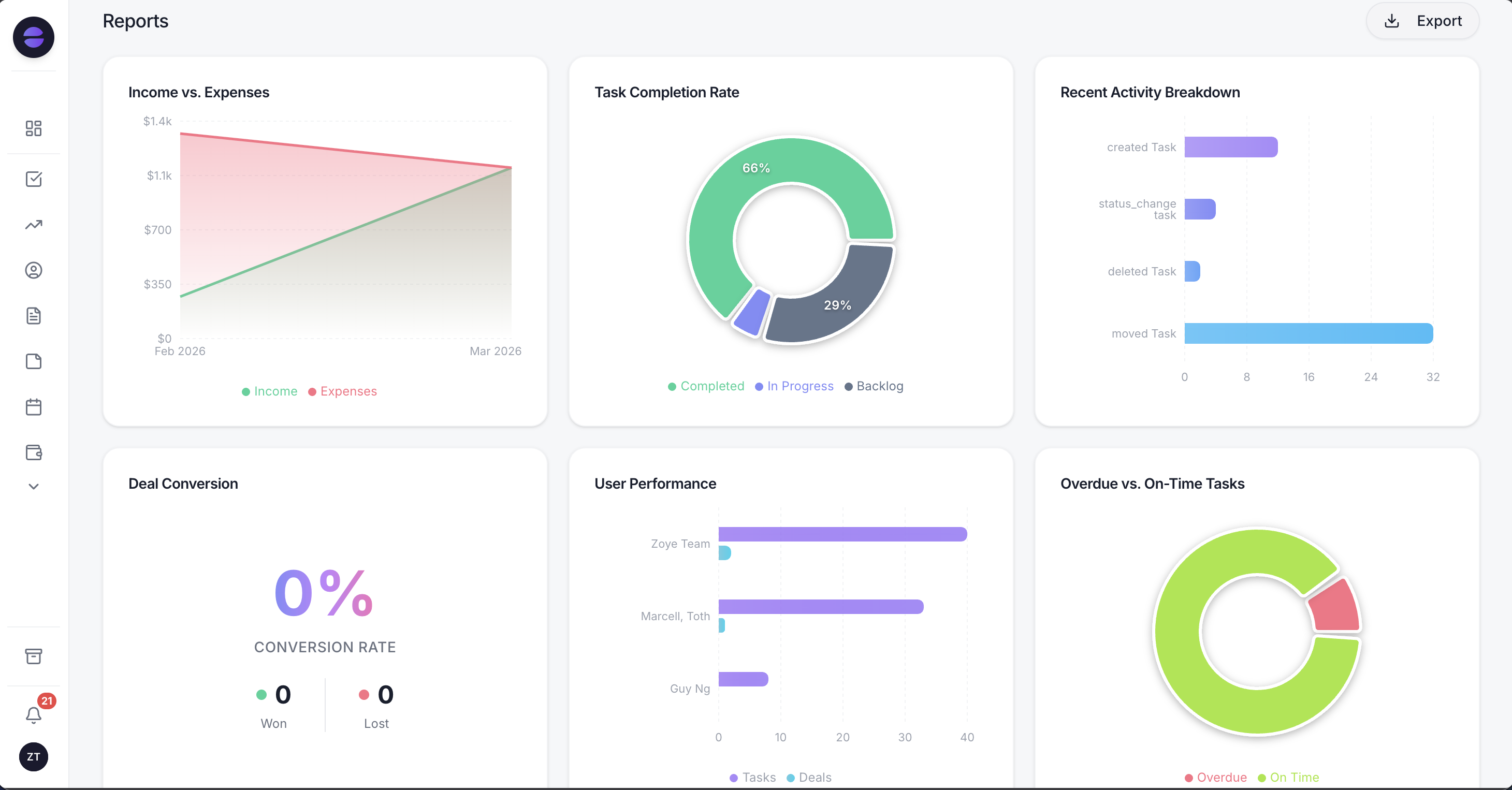 Zoye turns each broadcast into tracked results: who received it, who replied, and what it produced, all in one view.
Here is how it works in practice. Zoye centralises your contacts and customer conversations, so your opt-in list, the consent record, and the full history live in one place instead of scattered across a phone and a spreadsheet. You describe the campaign to Zoye, "send this week's offer to customers who booked in the last three months but not this week," and it assembles that exact segment for you, suppressing the people who should not receive it. You never build a filter by hand.
The same goes for the setup itself. Just ask Zoye to "set up the broadcast for this week's offer to every lead tagged spa, scheduled for Thursday at 10," and it picks the audience by stage, source or tag, prepares the message and shows it to you before anything goes out, now or at the time you chose.
Because Zoye runs on the same permission-based principles the rules require, it works from your opted-in audience and your approved templates, fills the merge fields per recipient, and sends. Then it does the part that most broadcast tools skip entirely: it handles the replies. When someone answers the broadcast, Zoye captures them as a lead or updates the contact, drafts a reply, books the appointment, or sets the follow-up, so the conversation the campaign started actually goes somewhere. A broadcast is only valuable if the replies get worked, and Zoye works them.
You also get the measurement without building a report. Zoye tracks delivery, replies, and what each broadcast produced, and surfaces it in reports you can read at a glance, so you learn which segments and messages drive bookings and which to retire. And because you run Zoye by talking to it, from the dashboard, WhatsApp, or Slack, you can tell it "remind me to follow up with anyone who replied but did not book" and it wires that up itself, no flow-builder, no technical setup.
Pricing: Almost Free at $5 per month for 1 member with the core tools. Starter from $29 per month (10 members). Growth from $59 per month (20 members).
Best for: Owners and small teams who want WhatsApp broadcasts sent to the right people, within the rules, with the replies worked into real bookings instead of a one-way blast.
Why teams pick Zoye
A few themes come up consistently.
It keeps you compliant by design. Your opt-in list, consent record, and approved templates live in one place, and the operator sends to opted-in, well-chosen segments, which is exactly what keeps your number healthy.
It turns broadcasts into conversations that convert. Zoye does not stop at hitting send. It captures replies, books the client, and chases the follow-up, so the campaign produces revenue instead of just impressions.
It runs on conversation, not setup screens. You describe the segment and the message, and Zoye builds the audience, sends, and reports back. A non-technical owner never has to learn a broadcasting tool.
Try Zoye with your team. The entry plan is Almost Free, with the core tools.
For more context, see how to sell on WhatsApp, our guide to WhatsApp marketing for small business, and automated WhatsApp customer service.
See the automations Zoye ships for this, and how each one stays inside WhatsApp's rules, on the WhatsApp Automations page.