
Quick answer: the best CRM for an architect is the one that keeps fee proposals moving, turns every design phase and client approval into a dated step, and keeps consultants on the same record as the client. For a practice of up to 20 people, Zoye does that with an AI assistant doing the follow-up, from $29 a month for 10 members. If what you need is timesheets, earned fees and project accounting, look at Monograph, BQE Core or Deltek Ajera, often alongside a CRM.
Key takeaways (October 2026)
- Proposals matter more when contracts are scarce: in the AIA/Deltek Architecture Billings Index for September 2026, inquiries rose to 53.2 while the value of newly signed design contracts fell to 43.7 (below 50 means decline).
- Most practices are small: the AIA's 2024 Firm Survey counts more than 19,000 US architecture firms, about 75% with fewer than 10 employees and 28% sole practitioners.
- Two of the six rivals reviewed here, BQE Core and Deltek Ajera, publish no prices; Monograph shows a $45 to $490 a month calculator range and sells its Pipeline module as an add-on.
- Design phases, approvals and permits work best as tasks with owners and dates linked to the commission, in any tool.
- Zoye is not a time-billing or project-accounting system for architecture firms. It runs the proposal pipeline, follow-ups, phases, approvals, consultants, documents and invoices.
How an architecture practice wins work and where it slips
An architecture practice sells long, uncertain commissions through proposals, then delivers them in phases that each need a client decision. Work is lost in the gaps: an enquiry answered late, a fee proposal nobody followed up, an approval that sits for three weeks while the programme slips. A CRM earns its place by closing those gaps.
The market makes the proposal stage harder. The AIA's September 2026 billings report, published on 21 October 2026, put the Architecture Billings Index at 44.7, down from 47.2 in August. Inquiries kept growing at 53.2, but the value of newly signed design contracts dropped to 43.7. In plain terms, clients are still asking, and fewer of them are signing. The practices that win are the ones that answer well and follow up properly.
Practices are also small. The AIA's 2024 Firm Survey summary found more than 19,000 firms in the United States, about 75% of them with fewer than 10 employees: 28% sole practitioners, 32% with two to four people and 15% with five to nine. In a firm that size, the principal who designs is usually also the person who writes proposals, chases approvals and calls the structural engineer.
The proposal pipeline, stage by stage
A typical fee-proposal pipeline for a small practice has seven stages. Name yours to match how you work, but keep them few:
- Enquiry. A homeowner, developer, institution or repeat client gets in touch, often with a vague brief and a site.
- First meeting or site visit. You learn the budget, the timeline, the decision-makers and whether you want the job.
- Proposal in preparation. Scope, phases, fee basis (percentage of construction cost, fixed fee per phase or hourly) and exclusions.
- Proposal sent. With a decision date agreed, not hoped for.
- Negotiation. Scope trimmed, phases split, fee revised. Often two or three versions.
- Won. Signed agreement, retainer requested, commission set up.
- Lost or parked. With a reason, so you learn which work you actually win.
Where the fees leak
Typical leak points in an illustrative five-person studio look like this:
- The enquiry nobody owned. A web form arrives on a Friday, everyone assumes someone else replied, and the client books a competitor on Monday.
- The proposal sent into silence. A fixed-fee proposal for a house extension goes out, the client goes quiet, and nobody follows up because it feels pushy.
- The approval that stalls a phase. Schematic design is finished, the client has not signed off, and the team keeps working at risk on design development.
- The consultant who missed a date. The structural input for the permit set arrives late because nobody confirmed the deadline in writing.
- The fee stage nobody invoiced. A phase closed weeks ago, but the invoice waits until someone remembers.
Every one of those leaks has the same shape: the next step lives in a person's head or inbox, not on a shared record with a date.
CRM, project accounting or both?
Architecture software splits into two families. Project accounting and time-billing systems track hours, earned fees per phase, invoices and profitability after the commission is signed. A CRM tracks the people and the decisions: enquiries, proposals, approvals, consultants and follow-ups. Many practices need both, and a small one can start with whichever leaks most.
| Question | Project accounting / time billing | CRM |
|---|---|---|
| Who might hire us next? | Rarely | Yes, the core job |
| Which fee proposals are open, and for how much? | Some (Monograph, BQE) | Yes |
| Who follows up, and when? | Rarely | Yes, tasks and rules |
| How many hours went into design development? | Yes, the core job | No (Zoye has no timesheets) |
| Is this phase over budget on fees? | Yes | No |
| Has the client signed off on schematic design? | Sometimes | Yes, as a dated approval task |
| What did we agree with the MEP engineer? | Rarely | Yes, on the consultant's record and meeting notes |
| Invoice the phase that just closed | Yes, from time and fee data | Yes, a simple invoice from the commission record |
If your biggest worry is fee overruns, start with a project accounting system. If it is proposals that go nowhere and approvals that drift, start with a CRM. Our guide to CRM versus project management software covers the general version of this choice.
Fee proposals: a follow-up cadence that does not feel pushy
Most fee proposals are not lost to a cheaper firm. They are lost to silence. A follow-up cadence agreed in advance turns chasing into a professional habit: confirm the decision date when you send the proposal, then make each contact useful, not a reminder that you are waiting.
A cadence that suits most residential and small commercial proposals:
| Day | What you send | Why it works |
|---|---|---|
| 0 | Proposal plus a one-line summary of scope, phases and fee, and the decision date you agreed | Makes the decision easy to forward to a partner or board |
| 3 | A short check that it arrived and an offer to walk through it | Catches proposals sitting in a spam folder |
| 7 | One useful question or idea about the site or brief | Shows thinking, not chasing |
| 14 | An option: phase the work, reduce scope or start with a feasibility study | Gives a hesitant client a smaller first yes |
| 30 | A polite close-out: you will hold the fee until a date, then park it | Often prompts the real answer |
Three habits make this hold up:
- Version proposals on the record. Each revision is a document attached to the same deal, with the fee and date, so nobody quotes from an old version.
- Record the reason for every loss. Fee, timing, chose another firm, project cancelled. After a year, those reasons tell you which work to pursue.
- Track opens, not guesses. If the proposal email was opened four times yesterday, today is the day to call.
For wording ideas, our follow-up email templates apply to proposals with little change.
Design phases as tasks: from concept to construction administration
A commission moves through phases that each end with a client decision, and many also wait on a permit or a consultant. The reliable way to run that in any CRM is one parent task per phase, with subtasks for deliverables, consultant inputs and the client approval, each with an owner and a date.
A phase structure that fits many commissions (rename to match your own agreements):
- Concept and brief. Measured survey, brief confirmed, concept options. Last subtask: client chooses a direction.
- Schematic design. Plans, sections, massing, an early cost check. Last subtask: written sign-off on schematic design.
- Design development. Materials, structure and services coordinated with consultants. Last subtask: design freeze agreed.
- Permits and approvals. Planning or building permit application, responses to comments, permit issued. Each authority request is its own subtask with a response date.
- Construction documents. Drawings and specifications for tender. Last subtask: issue for tender or construction.
- Bidding or tender. Contractor questions, addenda, bid review, recommendation.
- Construction administration. Site visits, contractor queries, change requests, payment certificates, punch list, completion.
Three rules keep the structure honest:
- Approvals are gates, not notes. The client's sign-off is the last subtask of each phase. The next phase does not open until it is done, or until you have decided in writing to proceed at risk.
- Every authority request gets a date. When a permit reviewer asks for more information, log it as a subtask with the response deadline and the person responsible.
- Closing a phase prompts the invoice. If your fee is staged by phase, the invoice is part of closing the phase, not a job for the end of the month.
This is the same logic whether you run residential extensions or a small school. The phase names change; the habit does not.
Client approvals and the documents behind them
An approval is only useful if you can find it later. Store each sign-off as a document or message on the client record, linked to the phase it closes, with the date and the drawing set it refers to. When a client asks why the kitchen moved, the answer should take one search, not an afternoon in old email threads.
What to keep for every approval:
- What was approved: the drawing set or document version, by name and date.
- Who approved it: the person with authority, which is not always the person in the meetings.
- How: a signed document, an email or a written chat message. Verbal approvals should be confirmed in writing the same day.
- What changed afterwards: later client requests logged as change requests, so additional fees have a paper trail.
Clients increasingly answer on WhatsApp faster than by email. A message such as "Approved, go ahead with option B" is a valid written record if it is saved on the client's record and not lost in one person's phone.
Want to see it in action?
See Zoye catch a new lead, answer on WhatsApp and set up the follow-up, all from one message.
See How It WorksConsultants: the third party in every commission
Most commissions involve consultants: structural, mechanical and electrical, civil, landscape, sometimes an acoustics or fire specialist. They are contacts in your CRM like any client, linked to each commission they work on, with their own deliverables as subtasks and their own fee proposals tracked.
Practical ways to handle consultants:
- One contact, many commissions. The structural engineer you use on every job is one contact linked to every project, so you can see their whole workload with you.
- Their deadlines are your subtasks. "Structural calculations for the permit set" is a subtask under the permits phase, owned by you, with the consultant named, so a late input surfaces before the submission date.
- Coordination meetings get notes. A recorded coordination call with clear action items prevents the "I thought you were doing that" conversation two weeks later. Our guide to AI meeting notes covers how that works.
- Their fees affect yours. If you carry consultants under your agreement, their fee proposals sit on the same deal as yours.
Nine questions to ask before you choose
Before any demo, write down how your practice wins and runs commissions, then test each tool against these nine points. A tool that fails three of them will push your team back to spreadsheets and email folders within a quarter.
- Can it run a fee-proposal pipeline with stages, values, decision dates and a reason for every loss?
- Does it follow up automatically when a proposal goes quiet, or at least create the task?
- Can each phase be a task with subtasks, including the client approval as a gate?
- Can consultants be contacts linked to several commissions at once?
- Do documents and approvals live on the client record, versioned and searchable?
- Can it record meetings and turn agreed actions into tasks?
- Can it send invoices and take payment by link?
- Does it work from a phone and by voice, for the principal who is on site half the week?
- Is the price predictable for your team now and with two more people?
If your answer to "how do we bill?" is hourly against phase budgets, add a tenth: does it handle timesheets and earned fees? Zoye does not, and that is the clearest reason to pair a CRM with a time-billing system.
The 7 best CRMs for architects in 2026
These seven cover the realistic options for a small or mid-sized practice: one AI operator for the client side, three architecture and engineering platforms built around time, fees and project accounting, one professional services platform, and two general sales CRMs. Each entry starts with its limitation, then the October 2026 price from the vendor's own page.
1. Zoye: the operator for proposals, phases and client approvals
The limitation first: Zoye is not a time-billing or project-accounting system for architecture firms. It has no timesheets, no earned-fee or work-in-progress reports, no utilization or multiplier tracking and no accounting ledger. It does not draw, model or produce contract forms. A firm that bills hourly against phase budgets should keep a dedicated system for that side.
What Zoye takes over is the client side that decides whether a commission is won and runs smoothly. Zoye is an AI Business Operator: connected tools in one workspace, from contacts, deals and tasks to the calendar, documents, invoices, reports, automations, WhatsApp, Facebook and Instagram, email tracking and the AI Notetaker, with an AI that operates them for you. Each tool is on the features page.
Mapped to an architecture practice:
- A proposal pipeline you can read at a glance. Each enquiry becomes a deal with its value, fee basis and decision date. Proposal versions sit on the deal as documents, and email tracking shows when the client opened the proposal.
- Follow-ups you describe once. Tell Zoye what should happen ("if a fee proposal has no answer after 7 days, create a call task for the principal and draft a check-in message") and Zoye builds the rule, shows it in plain English and waits for your approval before anything runs.
- Phases as tasks with approval gates. A won commission carries one task per phase with subtasks for deliverables, consultant inputs and the client sign-off, each with an owner and a date. A date passing triggers an alert to the owner, and when every subtask is done the parent phase closes automatically.
- Consultants on the same record. Structural, services and landscape consultants are contacts linked to every commission they work on, with their inputs as dated subtasks.
- Meetings that become tasks. For client and coordination calls on Zoom, Google Meet or Teams, the AI Notetaker joins as a visible participant, transcribes with speaker labels, summarizes decisions and turns commitments into tasks on your approval.
- The principal's phone as the office. A voice note from site ("schematic approved by the client, open design development and ask the structural engineer for loads by the 20th") updates the record, opens the phase and creates the task. A PDF brief or a photo of a business card becomes a record you can check.
- Approvals and documents in one place. Sign-offs, drawing issue notes and change requests attach to the client and the commission, with Google Drive kept in sync. E-signatures inside Zoye are coming soon.
- Staged fees billed on time. Invoices sit on the commission record. A payment link sent in the client's WhatsApp chat goes through Stripe straight to your account, and the deal moves to paid automatically.
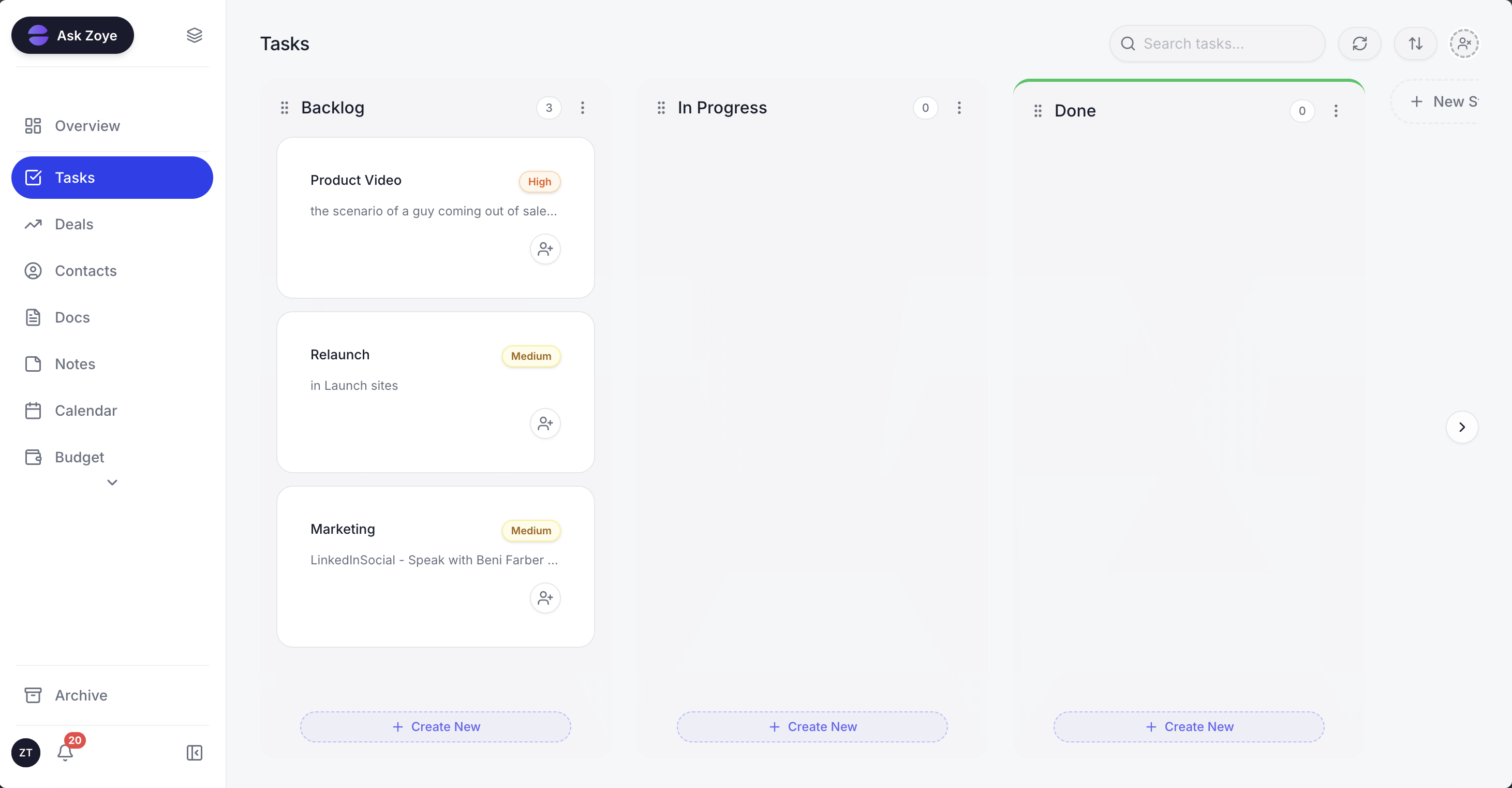
Phases on the Zoye task board: each commission's concept, schematic, permit and construction administration steps move across with an owner and a date.
Client messages on WhatsApp go through Meta's official business platform. Each automation asks you to confirm the client agreed to hear from you, anything sent more than 24 hours after a client's last reply uses an approved template, and every outgoing message lets the client opt out. Linking your practice's own WhatsApp number is coming soon. For now Zoye runs the WhatsApp conversations with your leads, and the Chats inbox sets them beside Instagram and Facebook messages and comments, each thread with an owner and internal notes.
Pricing (as of October 2026): Zoye prices per workspace plan with a member allowance, not per architect. Almost Free costs $5 a month or $4 on yearly billing for one person, with the core tools, 15 AI prompts a month and Google integrations, and it has no automations. Starter at $29 ($23 yearly) covers 10 members with 5GB. Growth at $59 ($47) covers 20 members with 10GB and adds workflow automations and WhatsApp automations with 250 messages a month. Scale at $119 ($95) covers 100 members with 25GB, and Customize is quoted. See the pricing page.
Best for: sole practitioners and studios of up to about 20 people whose losses come from unchased proposals, slow approvals and consultant coordination, either alone or next to a time-billing system.
2. Monograph: project management and fees built for architects
Monograph is designed for architecture and engineering firms, with project planning by phase, staffing, time tracking, invoicing and fee reporting. The limitation for business development is that its plan covers project delivery: the pricing page says Pipeline is offered separately as an add-on, so the proposal side costs extra and the price is not shown upfront.
Pricing (as of October 2026): no named public plans. The pricing page shows a calculator that returns $45 to $490 a month depending on how many employees you enter, and states that the plan includes the core features (forecasting, reports, staffing) while Pipeline is an add-on. Exact figures come from a demo.
Best for: small and mid-sized practices that want phase budgets, time and fees in one architect-specific tool and are willing to add Pipeline or a separate CRM.
3. BQE Core: time, billing and accounting modules
BQE Core targets professional services firms, including architects and engineers, with time and expense tracking, billing and project management, plus optional Accounting, CRM, HR and Payroll modules. The limitation is opacity: nothing on the pricing page has a number, and the CRM is a separate module.
Pricing (as of October 2026): not published. The page describes "per-user pricing", offers a Foundations package and lists each add-on module with a "Request Quote" link.
Best for: firms of 10 or more that want time, billing and accounting in one system and will budget for a quote and implementation.
4. Deltek Ajera: project accounting for small A&E firms
Deltek describes Ajera as project management and accounting software for small architecture and engineering firms, linking project management with project-based accounting, billing and scheduling. The limitation is that it is an accounting-first system: business development is not its focus, and pricing is not public.
Pricing (as of October 2026): not published. Ajera's page offers a demo request rather than a price list; any figure you see elsewhere is a third-party estimate, so ask Deltek for a written quote including implementation.
Best for: small A&E firms that need full project accounting and are ready for a structured rollout.
5. Productive: professional services management with a sales pipeline
Productive covers projects, budgeting, resource planning, time tracking, invoicing and a sales pipeline for agencies and professional services firms. The limitation for architects is that it is built around agency-style budgets and billable time, not design phases and permits, and per-user pricing grows with every seat.
Pricing (as of October 2026): per user, with a default view of 10 users. The page listed Essential at $10 to $12 and Professional at $25 to $29 per user a month depending on the billing toggle, and its own figures were not fully consistent, so confirm at checkout. Ultimate is quoted after a demo. A 14-day trial is offered, and yearly billing advertises savings of up to 17%.
Best for: multidisciplinary studios that already run like an agency, with retainers and billable hours, and want pipeline and resourcing in one place.
6. HubSpot: a general CRM you shape for a practice
HubSpot gives you pipelines, email, meetings and reporting, with a free CRM tier for up to two users. The limitation is that nothing is built for architecture: no phases, no approvals, no consultant links, so you assemble them from custom properties and tasks, and workflow automation only arrives with the Professional tier.
Pricing (as of October 2026): Sales Hub Starter from $20 per seat a month (about $7 on some offers), Professional $90 per seat billed yearly or $100 monthly plus a $1,500 onboarding fee, and Enterprise $150 per seat with a $3,500 onboarding fee.
Best for: larger practices with a business development lead who already uses HubSpot for marketing. Our HubSpot alternatives guide covers lighter options.
7. Pipedrive: a clean sales pipeline, nothing more
Pipedrive is a focused sales CRM with a clear visual pipeline and activity reminders. The limitation is that it stops at the sale: once a proposal is won, phases, approvals and consultants need another tool, and full email sync and automation start on the second plan.
Pricing (as of October 2026): Lite from $14 per seat a month billed yearly, Growth $39 per seat billed yearly or $49 monthly, with higher plans above that. Pipedrive's pricing page blocks automated access, so confirm current figures there before you buy.
Best for: a principal or business development lead who wants only a proposal pipeline and already runs delivery elsewhere. See Pipedrive alternatives.
See what Zoye can do for you
CRM, deals, tasks and your Instagram, Facebook and WhatsApp automations in one workspace. Just ask Zoye and it sets any of it up for you.
Explore FeaturesArchitect CRM options side by side
The table puts the seven options on one footing: what each is built for, the lowest published price as of October 2026, what makes the bill grow, and how proposals, phases and time are handled. For every option, payment-processing fees and Meta's per-message WhatsApp charges come on top.
| Tool | Built for | Lowest published price (Oct 2026) | Bill grows with | Proposal pipeline | Phases and approvals | Timesheets and earned fees |
|---|---|---|---|---|---|---|
| Zoye | Proposals, phases, approvals, consultants | $5/mo (1 member, no automations); $29/mo for 10 | Plan with member allowance | Yes, with follow-up rules | Tasks with approval subtasks | No |
| Monograph | A&E project delivery and fees | $45 to $490/mo calculator range | Firm size, Pipeline add-on | Add-on | Phase planning | Yes |
| BQE Core | Time, billing, accounting | Not published | Users, modules | CRM module | Projects and phases | Yes |
| Deltek Ajera | Project accounting for small A&E firms | Not published | Quote | Not the focus | Projects and schedules | Yes |
| Productive | Agencies and professional services | About $10 per user/mo (Essential) | Users | Yes | Budgets and tasks | Yes |
| HubSpot | General sales and marketing CRM | $20 per seat/mo (Starter) | Seats, onboarding fee | Yes | Custom properties | No |
| Pipedrive | Sales pipeline | $14 per seat/mo billed yearly (Lite) | Seats, plans | Yes | No | No |
Two weeks in an illustrative six-person studio
Here is how the pieces fit over two weeks in an illustrative practice: two principals, three architects and one office manager, with a mix of house extensions, one small school project and a retail fit-out. Zoye is the tool shown, but the habits carry to any CRM.
Week 1, Monday. The weekly view shows eleven open fee proposals with a combined illustrative value of $310,000, three of them past their decision date. One principal asks the assistant, "which proposals over $20,000 have had no reply for a week?" and gets three names with owners.
Week 1, Tuesday. A homeowner fills in the website enquiry form at 9 in the evening. The lead lands as a new deal with the source recorded, and a task appears for the principal to call in the morning.
Week 1, Thursday. The school's facilities manager approves schematic design by email. The office manager saves it on the commission, the phase closes, design development opens, and the staged invoice goes out with a payment link.
Week 1, Friday. A coordination call with the structural and services engineers runs on Teams. The AI Notetaker records it, and four commitments (loads by the 20th, plant room size confirmed, revised sections, a fire strategy question) become tasks after one approval.
Week 2, Monday. The planning authority asks for additional drainage information on the retail fit-out. It is logged as a subtask under permits with a ten-day response date and the civil engineer named.
Week 2, Wednesday. A fixed-fee proposal reaches day 14 with no answer. The follow-up rule creates a task with a drafted message offering a feasibility study as a first stage. The client replies the same afternoon and asks for the smaller scope.
Week 2, Friday. One proposal is marked lost on fee, one is parked until spring, two are won. The reasons are on the record, ready for the quarterly review of which work the studio actually wins.
Nothing in this fortnight is unusual. The difference is that every next step had a name and a date.
Moving your practice to a new CRM
Plan the move around live commissions, not the export file. List open proposals, live phases and pending approvals first, bring contacts across, rebuild the follow-up rules and keep the old system readable until every open item has a new home. A small practice can usually do it in a quiet week.
- List open work. Proposals with values and decision dates, commissions with their current phase and next approval, and consultants on each.
- Export contacts from your current tool, email or phone as a spreadsheet.
- Import into Zoye. A spreadsheet imports directly, as do boards from Trello and Monday.com. Jira, Notion and ClickUp imports are coming soon. For messier sources, send the assistant a PDF of a fee schedule or a photo of the office whiteboard and it extracts records for you to review.
- Rebuild the habits: the proposal follow-up cadence, phase templates with approval gates, permit response dates and overdue-invoice reminders. Zoye shows every rule before it runs.
- Keep your time-billing system if you have one. Zoye runs the client side next to it, and nothing about your timesheets needs to move.
If your practice also does interiors, the CRM for interior designers guide covers procurement-heavy studios, and the CRM for consultants guide covers advisory-style engagements.
Ready to hand off the busywork?
Zoye brings AI-powered CRM, task management, and automation into one workspace.
Get StartedWhich option fits your practice
Choose by where your practice loses the most. If it is fee overruns and unbilled hours, start with Monograph, BQE Core or Deltek Ajera. If it is a pure sales pipeline, Pipedrive or HubSpot will do. If it is proposals, approvals, consultants and the follow-up between them, choose Zoye, alone or beside a time-billing system.
Some common shapes:
- A sole practitioner with enquiries arriving by phone, email and WhatsApp: proposal follow-up and approvals matter more than timesheets. Zoye fits, and Almost Free covers one person if you do not need automations yet.
- A studio of 3 to 10 people billing fixed fees per phase: Zoye for the pipeline, phases and invoices, with a time tracker only if you want profitability per phase.
- A practice of 10 to 30 billing hourly: Monograph or BQE Core for time and fees, with Zoye or HubSpot alongside for business development.
- A firm that runs like an agency with retainers and billable hours across disciplines: Productive, with the per-seat math done at your size plus two.
Test any shortlist on a real fortnight: load twenty contacts, eight open proposals, two live commissions with their phases and one pending approval, then see what the tool reminds you about without being asked. To see that on your own commissions, book a Zoye demo and bring one proposal that went quiet and one approval that stalled.