
Quick answer: the right Odoo alternative depends on whether you need an ERP at all. If you hold stock, run production or want accounting and sales in one database, look at Zoho One, ERPNext or Dolibarr. If you run a service business that bought Odoo to handle customers, quotes, tasks and follow-ups, Zoye is the better fit: up to 20 members on Growth for $59 a month ($47 billed yearly), the plan that includes the workflow and WhatsApp automations, no implementation project.
Key takeaways (October 2026)
- Odoo Standard is listed at $13.50 per user per month billed yearly and Custom at $25.50 on the US-dollar pricing page, but both are 12-month discounts for the initial users; the page shows $16.90 and $32.00 after that.
- One App Free really is free for unlimited users, but installing a second app moves you to Standard, and adding Studio or a second company moves you to Custom.
- Implementation is a separate bill: Odoo's own Success Packs range from $458.82 to $15,000 (25 hours cost $2,040 for a new customer), and companies above 50 employees are sent to partners whose rates are not published.
- Two rivals here, ERPNext and Dolibarr, are open source under GPL-3.0; three (Zoho One, monday.com and HubSpot) charge per user or seat.
- Zoye is not an ERP, inventory system or accounting ledger. It is the operator for the customer side: leads, deals, tasks, invoices, follow-ups and WhatsApp.
Why people look for an Odoo alternative
People rarely leave Odoo because the software is weak. They leave because the bill is per user and rises after year one, because the second app ends the free plan, and because getting it configured properly is a project with its own budget. A small service team often discovers it bought an ERP when it needed a customer operator.
Odoo deserves real credit first. It is one of the broadest business suites available: CRM, sales, invoicing, accounting, inventory, manufacturing, HR, website, eCommerce and point of sale share one database, and the apps genuinely talk to each other. The Community edition is open source, the hosted plans include unlimited email support and upgrades, and for a business that sells physical products it can replace five or six separate tools. Every figure below comes from odoo.com as of October 2026, using the US-dollar version of the pages.
The headline price is a first-year discount
Odoo's pricing page shows Standard at $13.50 per user per month billed yearly and $16.90 billed monthly, with $16.90 and $21.10 shown beside them and a note that "the discount is valid for 12 months, for initial users ordered." Custom shows $25.50 yearly and $32.00 monthly, with $32.00 and $40.00 beside them. In plain terms, year two costs about 25% more than year one, and users added after the initial order do not get the discount. Budget on the second figure.
"Paying user" is broader than it sounds
Odoo's FAQ defines a paying user as anyone with access to the backend to create, view or edit documents, and gives examples: an employee who only reports expenses or timesheets, a third-party accountant working on your finances, and even an employee record in the HR app with no linked user. Customers and suppliers using the portal are free. For a service team, the accountant and the part-time helper usually end up on the bill. Odoo does offer a Light User license at $5.90 for limited roles, but only through a quote from an Odoo advisor.
One App Free stops at the second app
The free plan is generous: any single app, unlimited users, hosted on Odoo Online, with the apps it depends on included. The catch is in the upgrade rule on the same page. Installing one more app moves the whole database to Standard, and installing Studio or adding a company moves it to Custom. A team that starts with CRM and then wants invoicing and project management is on a per-user plan from that moment.
Implementation is its own budget line
"Implementation services" appear in the list of what the plans do not include. Odoo sells Success Packs of consulting hours: Starter (4 hours) at $458.82, Basic (25 hours) at $2,400, Standard (50 hours) at $4,200, Custom (100 hours) at $7,500 and Pro (200 hours) at $15,000, with 15% off a new customer's first pack. According to the same page, Odoo reports a 98% implementation success rate with a Success Pack against 65% without one. That is a fair argument for buying help, and also a clear signal that Odoo expects most customers to need it. Above 50 employees, Odoo points you to a partner, and partner day rates are set by each partner rather than published on odoo.com.
Community is a different product from the hosted plans
Odoo's edition comparison marks a long list of features as Enterprise only: comprehensive accounting, the mobile apps, Helpdesk, Field Service, Planning, Appointments, Sign, Documents, Subscriptions, Marketing Automation and Studio, plus support, version upgrades and hosting. Community still covers CRM, sales, invoicing, inventory, manufacturing, project and website, which is a lot. But a service business that counts on helpdesk, appointments or field service will not find them in the free download.
Hosting, credits and custom code add up
Odoo Online hosting is included, with unmetered storage up to 100GB. Odoo.sh hosting for custom modules is not included on Custom, and neither are in-app purchase credits for SMS, contact auto-complete, lead generation and AI bill scanning, or the maintenance of custom code. Success Pack customizations carry "extra monthly charges" for maintaining extra modules or lines of code, per the pack page.
Who should stay on Odoo: a business that holds stock, manufactures, runs a webshop or needs accounting and operations in one database, and has the time or the partner to configure it. For that business, Odoo is often cheaper than the separate tools it replaces. Leave when you are paying ERP prices to manage customers.
What to look for in an Odoo alternative
Start by naming the job Odoo was hired for. If it was stock, production or books, you need another ERP. If it was customers, quotes, follow-ups and team tasks, you need something you can run in a week without a consultant. Then check these eight points before booking a demo:
- ERP or operator. List the apps you actually opened last month. Inventory, MRP and accounting mean ERP; CRM, project, invoicing and calendar mean you have more choice.
- How the bill grows. Per user, per seat, per employee, flat bundles with a user allowance, or per workspace plan. Price your current size and two more hires.
- Year-two price. Ask for the renewal price, not the introductory one.
- Setup effort. Can a non-technical owner configure it, or does it need a partner? Ask for the number of hours a typical rollout takes.
- Who counts as a user. Accountants, part-timers and people who only log time.
- Customer channels. Email is standard. If your customers reply on WhatsApp, check whether the tool works there through the official WhatsApp Business Platform.
- Automation without a builder. Can you describe a follow-up rule and have it built, or must someone learn a workflow editor?
- Getting data out. Export formats for contacts, deals, invoices and tasks, and whether you can download a full backup.
For the wider picture of suites in this space, our guide to the best all-in-one CRM software compares eleven of them. This article stays focused on the move away from Odoo.
The 7 best Odoo alternatives in 2026
These seven cover the realistic exits: one operator for service businesses that never needed an ERP, three per-user suites and CRMs, one flat-priced bundle, and two open-source ERPs. Each entry opens with the limitation to check, then the October 2026 price from the vendor's own page and the business it suits.
1. Zoye: the customer operator for service teams that bought an ERP
Start with what Zoye is not, because it matters more here than anywhere: Zoye is not an ERP. It has no inventory, no warehouse, no manufacturing or MRP, no point of sale and no accounting ledger. If any of those run your business, keep an ERP for them and read on only for the customer side.
Many service businesses, though, installed Odoo for something else: a place where every lead, quote, job and invoice lives together, so nothing falls through. Zoye is built for exactly that. It is an AI Business Operator: one workspace with thirteen tools that already link to each other (CRM and contacts, tasks, deals, calendar, documents, team, budget and invoices, reports, workflow automations, WhatsApp automations, Facebook and Instagram, email tracking and AI Notetaker), plus an AI that operates them for you. The full list is on the features page.
What changes compared with an Odoo rollout:
- No configuration project. The tools arrive connected. A deal already knows its contact, tasks, files and invoices, and any tool you do not need can be hidden per workspace or per person and brought back later.
- You describe, Zoye builds. Tell the assistant what should happen ("when a quote has had no answer for four days, remind the owner and send the customer a follow-up") in the app, on WhatsApp, by voice note or in Slack. Zoye builds the trigger, conditions and actions, shows the rule in plain English and waits for your approval before anything runs. Every run is logged and reversible.
- The assistant does the data entry. Send a CSV, a PDF or a screenshot and it extracts the records. A voice note with three requests becomes three actions. A photo of a business card becomes a contact.
- Meetings feed the records. The AI Notetaker joins Zoom, Google Meet and Teams calls, then writes the summary, decisions and action items with owners and dates, and proposes CRM updates you approve with one tap.
- Customers on the channels they use. Website forms, Facebook lead ads and Instagram comments arrive as leads with their source. Chats keeps Instagram and Facebook messages and comments and your WhatsApp conversations with leads in one inbox, with assignment, team notes and quick replies. Six WhatsApp automations (new-lead message, qualification bot, live audiences, scheduled broadcasts, template approval, click-to-chat capture) run on the official WhatsApp Business Platform, all off by default and all confirming before they send.
- Invoices and payment. Invoices sit on the deal. A payment link goes out in the chat (Stripe, or Grow in Israel), the money lands in your own account, and the deal moves stage when it is paid.
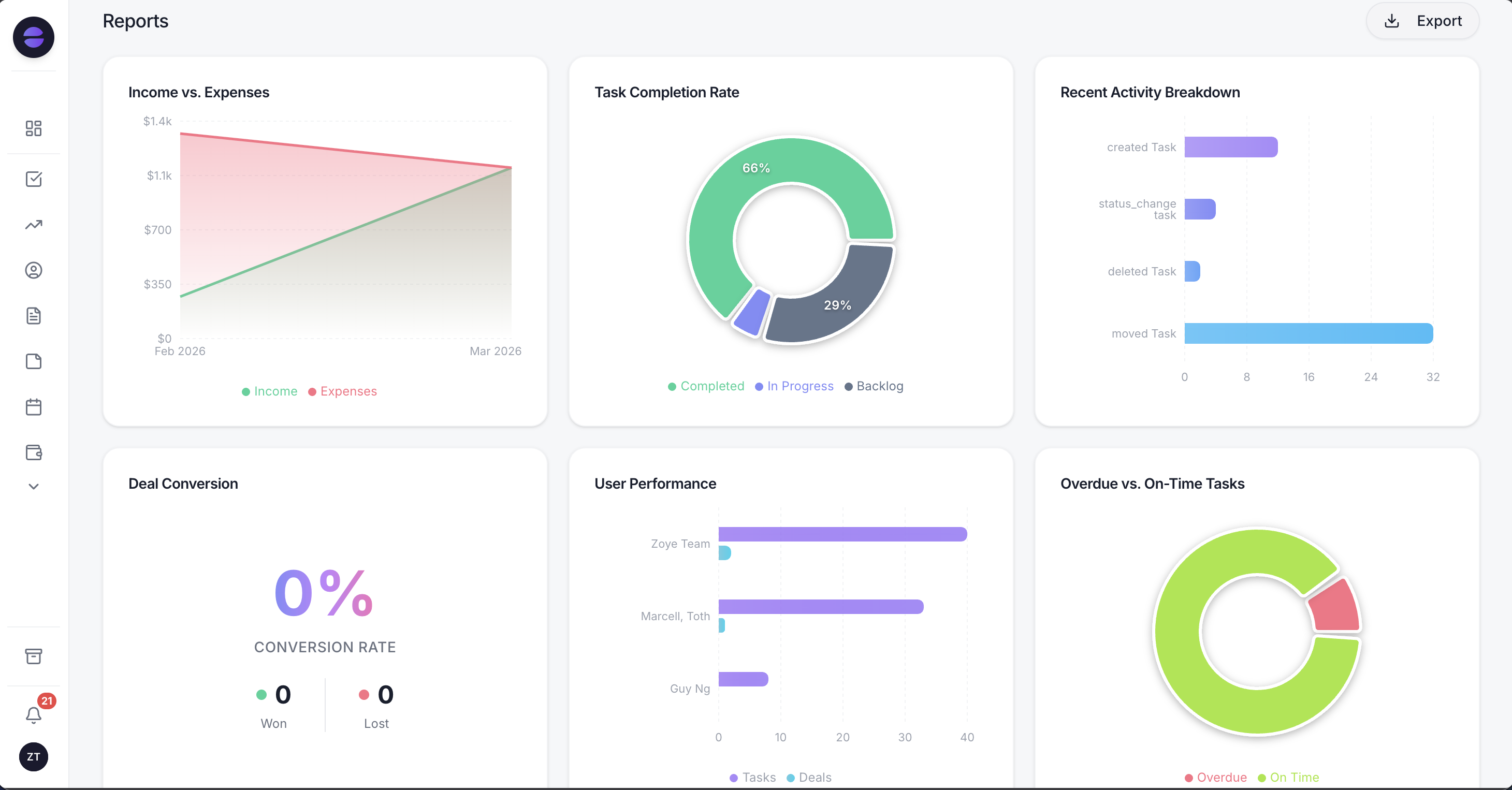
Zoye reports read from the same records the team works in, so pipeline, workload and unpaid invoices are current without an export.
Honest limits beyond the ERP gap: Zoye does not keep your books, so your accountant keeps working in accounting software (or, if you like Odoo's accounting, in Odoo's single free app). Connecting your own business WhatsApp number is coming soon; today Zoye holds WhatsApp conversations with your leads through the official Platform. Notes, the collaborative docs module, is still rolling out.
Pricing (as of October 2026): Zoye charges per workspace plan, not per user. Almost Free is $5 a month ($4 billed yearly) for 1 member with the core tools, 15 AI prompts a month and the Google integrations, without automations. Starter is $29 a month ($23 yearly) with 10 members and 5GB, Growth $59 ($47) with 20 members and 10GB, Scale $119 ($95) with 100 members and 25GB, and Customize is quoted. Details on the pricing page.
Best for: service businesses of 1 to 20 people that sell time and expertise, whose real work is leads, quotes, jobs, invoices and follow-ups, and who want an assistant to run them instead of an ERP to configure.
2. Zoho One: the closest suite-for-suite swap
Zoho One bundles more than 40 Zoho apps, including CRM, Books, Inventory, Desk, Projects and People, under one license, which makes it the nearest like-for-like replacement for Odoo's breadth. The limitation is licensing: the cheaper plan requires you to license every employee, and the apps, while connected, are separate products with their own settings to learn.
Pricing (as of October 2026): $37 per employee per month billed annually ($45 monthly) on all-employee pricing, which requires licensing all employees, or $90 per user per month billed annually ($105 monthly) on flexible-user pricing. Our Zoho alternatives guide covers the suite in more depth.
Best for: businesses that want ERP-style coverage (books, inventory, HR) from one vendor and are prepared to license the whole staff.
3. Bitrix24: flat bundles with a user allowance
Bitrix24 combines CRM, tasks, projects, chat, video calls, a website builder and a product catalog, and prices by plan rather than by person. The limitation is density: the interface packs in a great deal, the most useful automation (sales automation, task automation, RPA) is listed from Professional, and it does not replace an accounting system.
Pricing (as of October 2026): a free plan for 1 to 2 users, Basic at $49 a month billed annually ($69 monthly) for 5 users, Standard at $99 annually ($144 monthly) for 50 users, Professional at $199 annually ($289 monthly) for 100 users, and Enterprise from $399 annually for 250 users. Vibe+ versions with more AI capacity cost more. See our Bitrix24 alternatives for the detail.
Best for: teams of 10 to 50 that want a broad collaboration and CRM bundle at a fixed monthly price and can live with a busy interface.
4. monday.com: boards and automation, not an ERP
monday.com is a flexible work-management platform: boards, timelines, dashboards and automations that a team can shape to almost any process, with monday CRM as a separate product. The limitation for Odoo leavers is scope: there is no accounting, inventory or invoicing core, and automation volume is capped by plan.
Pricing (as of October 2026): work management Basic $9, Standard $12 and Pro $19 per seat per month billed annually, with plans starting from 3 seats and a free plan for up to 2 seats. Standard includes 250 automation actions a month and Pro 25,000. monday CRM is Basic $12, Standard $17 and Pro $28 per seat billed annually. A 14-day Pro trial is available. Our monday.com alternatives guide compares it with lighter tools.
Best for: project-heavy teams that want to design their own workflows visually and keep finance elsewhere.
5. HubSpot: CRM-first, priced per seat
HubSpot is the reference CRM for inbound marketing and sales, with a free tier, polished email and pipeline tools, and a large app marketplace. The limitation is the shape of the bill: seats are charged per person, and the higher tiers carry onboarding fees. It is a CRM and marketing platform, not an ERP.
Pricing (as of October 2026): free for up to 2 users. Starter from $20 per seat per month (about $7 on some offers). Sales Hub Professional is around $100 per seat per month billed monthly ($90 annually) plus a $1,500 onboarding fee.
Best for: marketing-led sales teams that want best-in-class email and pipeline tooling and accept per-seat growth.
6. ERPNext: the open-source ERP without a per-user fee
ERPNext, built by Frappe, is the most direct open-source answer to Odoo: accounting, inventory, manufacturing, CRM, projects and HR in one system, GPL-3.0 licensed with no paid edition held back. The limitation is the same one that drives people away from Odoo: an ERP still needs setting up. Frappe does not implement directly and works through more than 200 certified partners.
Pricing (as of October 2026): free to self-host. On Frappe Cloud, a hosted site starts at $5 a month and servers at $20 a month, with dedicated tiers from $125 a month; Frappe states you "pay only for what you use, and not per user." Product warranty and priority support plans are listed without public prices. There is a 14-day trial.
Best for: product businesses that need a real ERP, want to avoid per-user licensing and have a partner or an in-house technical person.
7. Dolibarr: the lightweight open-source ERP and CRM
Dolibarr is a long-standing open-source ERP and CRM covering proposals, orders, invoices, stock, projects, interventions, HR and double-entry accounting, with modules you switch on as needed. The limitation is polish and ecosystem: it is simpler and plainer than Odoo, and much of its extension market comes from third-party modules.
Pricing (as of October 2026): free to download under GPL-3.0 (version 24.0.2 on dolibarr.org). DoliCloud, the hosted offer, lists Basic at €14 per user per month and Premium from €45 a month, each with a 30-day trial and no card required.
Best for: small product or trade businesses that want a modest ERP, often self-hosted, at a very low software cost.
Want to see it in action?
See Zoye catch a new lead, answer on WhatsApp and set up the follow-up, all from one message.
See How It WorksOdoo alternatives compared side by side
The table puts Odoo and the seven alternatives on one footing: what each is built for, the lowest published paid price as of October 2026, what makes the bill grow, and whether it covers inventory and accounting. Implementation, hosting for custom code and payment fees are extra in every case where they apply.
| Tool | Built for | Lowest published paid price (Oct 2026) | Bill grows with | Inventory and accounting |
|---|---|---|---|---|
| Odoo | Full ERP for product and service businesses | $13.50/user/mo billed yearly, first 12 months (Standard) | Users, plan switch on second app, implementation | Yes (full accounting on paid plans) |
| Zoye | Customer operator for service teams | $5/mo (1 member, no automations); $29/mo for 10 members | Plan with member allowance | No |
| Zoho One | Suite of 40+ apps from one vendor | $37/employee/mo billed annually (all employees) | Every employee or every user | Yes, through Zoho Books and Inventory |
| Bitrix24 | CRM and collaboration bundle | $49/mo billed annually (Basic, 5 users) | Plan tier (5, 50, 100, 250+ users) | Product catalog; no accounting |
| monday.com | Visual work management | $9/seat/mo billed annually, 3-seat minimum | Seats, automation actions | No |
| HubSpot | CRM and marketing | From $20/seat/mo (Starter) | Seats, tiers, onboarding fees | No |
| ERPNext | Open-source ERP | $5/mo hosted site on Frappe Cloud, or self-host | Hosting size, partner time | Yes |
| Dolibarr | Lightweight open-source ERP and CRM | €14/user/mo on DoliCloud, or self-host | Users on DoliCloud, modules | Yes |
What a 10-person service team really pays
List prices only mean something at your size. Take a 10-person service business (seven staff, two part-time helpers and an external bookkeeper who needs access) that wants contacts, deals, projects, invoicing and follow-up automation. Using each vendor's published October 2026 prices before tax, hosting extras and payment fees, the monthly software bill looks like this:
| Option | Monthly software cost for 10 people | One-off setup to plan for |
|---|---|---|
| Odoo Standard, billed yearly | $135 in year one, $169 after the discount | Basic Success Pack, $2,040 for a new customer (25 hours) |
| Odoo Standard, billed monthly | $169 in year one, $211 after | Same |
| Zoho One, all-employee, annual | $370 | Self-setup or a Zoho partner |
| Bitrix24 Standard, annual | $99 (covers up to 50 users) | Self-setup |
| monday.com Standard, annual | $120 | Self-setup |
| HubSpot Starter | About $200 at $20 a seat | Self-setup |
| ERPNext on Frappe Cloud | From $5 to $20 for hosting | Partner implementation, price on request |
| Dolibarr on DoliCloud Basic | €140 | Self-setup or an integrator |
| Zoye Growth | $59 ($47 billed yearly) | None required |
The fair reading: if that business holds stock or wants the books in the same system, the honest comparison is Odoo against ERPNext, Dolibarr and Zoho One, and Odoo's first-year price is competitive once you include what it replaces. If the team sells time and expertise, most of what it pays Odoo for is the customer side, and an operator costs a fraction of a per-user ERP. Some teams keep Odoo's single free app for accounting and run customers, pipeline and follow-ups in Zoye.
See what Zoye can do for you
CRM, deals, tasks and your Instagram, Facebook and WhatsApp automations in one workspace. Just ask Zoye and it sets any of it up for you.
Explore FeaturesERP or operator: which one does your business need?
An ERP is built around goods and ledgers: stock levels, purchase orders, bills of materials, journal entries. An operator is built around people and promises: who asked for what, who owes a reply, which quote is waiting, which invoice is late. Most small service businesses need the second and buy the first.
A quick test. Answer yes or no to each:
- Do you track physical stock across locations or suppliers?
- Do you manufacture or assemble anything?
- Does your accountant need the general ledger inside the same system as your sales?
- Do you sell through a webshop that has to update inventory automatically?
Two or more yeses: you need an ERP, and Odoo, ERPNext, Dolibarr or Zoho One belong on your list. For a stock-first view of the market, see our guide to inventory management software for small business.
Mostly no: your bottlenecks are almost certainly response time, follow-up and visibility, not stock. That is where software rollouts quietly fail, as our piece on why CRM implementations fail explains: the system is configured, then nobody keeps it updated. An operator closes that gap by doing the updating. Zoye files the meeting notes, creates the follow-up task, drafts the quote, chases the overdue invoice and sends the WhatsApp reminder, with your approval on the rules.
If WhatsApp is part of that picture, know the costs. As of October 2026, Meta's developer documentation says the WhatsApp Business Platform has billed per delivered template message since 1 July 2025, by category and recipient country, and since 1 October 2026 each business number gets 1,000 free service messages a month. Rates change only at the start of a quarter, so check Meta's rate card rather than a number copied from a blog. Our WhatsApp Business API pricing guide walks through the categories.
How to switch from Odoo without losing work in progress
Plan the move around open work, not around the export button. Export contacts, open deals, unpaid invoices and active tasks, import them, rebuild the follow-up rules, and keep Odoo read-only until every open item is closed in one system or the other. A small service team can usually do it in a quiet week.
- Take a full backup. Odoo's pricing FAQ says Odoo Online customers can download a backup of the database at any time from the control center. Do this first, before you change anything.
- Export the records you will keep using. Odoo's documentation describes the steps: open a list view, select the records, choose Actions, then Export, pick the fields and download Excel or CSV. Saved export templates help if you repeat the job. Large exports can time out, so work in batches.
- Decide what stays. If you use Odoo's accounting, you can keep it as your one free app, or move the books to your accountant's software. Stock and manufacturing data should go to another ERP, not to Zoye.
- Import into Zoye. Zoye imports from Trello, Monday.com or a spreadsheet, and the assistant extracts records from a CSV, a PDF or a screenshot you send it, so even a screenshot of an open-invoice list becomes records you can review before saving. Jira, Notion and ClickUp imports are coming soon.
- Rebuild the rules by describing them. Quote follow-up after four days, reminder before a booked call, overdue-invoice chase after seven days, onboarding tasks when a deal is won. Zoye shows each rule and waits for your approval.
- Run both for two weeks. Keep Odoo available until the last open deal and invoice have closed, then downgrade or cancel. Our guide to tool sprawl in small business covers how to retire the old subscriptions cleanly.
Ready to hand off the busywork?
Zoye brings AI-powered CRM, task management, and automation into one workspace.
Get StartedWhich Odoo alternative should you choose?
Choose by the job Odoo was doing. For a full ERP without per-user fees, ERPNext; for a lighter open-source ERP, Dolibarr; for one-vendor coverage, Zoho One; for a flat-price collaboration bundle, Bitrix24; for visual project work, monday.com; for marketing-led selling, HubSpot. For a service business that bought an ERP to manage customers, choose Zoye.
A few typical shapes:
- A product business with stock and a webshop: stay on Odoo, or compare ERPNext and Zoho One on year-two pricing and partner quotes.
- A 5-person service team using only CRM, projects and invoicing in Odoo: you are paying ERP prices for operator work. Zoye fits, for $29 a month for the whole team.
- A 30-person company that likes everything in one vendor's ecosystem: Zoho One, priced against Odoo Standard at your real user count after the discount ends.
- A technical founder who wants to own the code: ERPNext or Dolibarr, self-hosted, with honest time set aside for maintenance.
- A team that lives in WhatsApp and loses deals between messages: Zoye, alone or next to the accounting tool you already use.
Whatever you shortlist, test it on a real week rather than a demo script: import thirty real contacts, put five live deals in, and see whether the follow-ups happen without anyone remembering them. If you want to see what that looks like with an assistant doing the chasing, book a Zoye demo and bring the one process your current setup never quite handled.