
Quick answer: shared inbox software lets a small team answer customer messages from one list, with every conversation owned by one person, private notes for colleagues, a warning before two people reply to the same customer, and the history saved on the customer's record. For a team of 2 to 15, pick the tool by the channel your customers use first, then by how the bill grows when you hire.
Key takeaways (October 2026)
- A Microsoft 365 shared mailbox holds up to 50 GB without a license but supports a maximum of 25 users and has no real assignment, according to Microsoft's documentation.
- Email-first inboxes cluster at $24 to $25 per user a month on annual billing (Missive Productive, Help Scout Standard, Hiver Growth, Gmelius Growth).
- WhatsApp is where prices split: Front needs Professional at $65 a seat plus a 20% admin fee on Meta's charges, respond.io starts at $79 a month for 5 users, Trengo at EUR 299 a month for 10 users.
- Meta bills WhatsApp per delivered message since 1 July 2025, and since 1 October 2026 each business number gets 1,000 free service messages a month.
- Zoye Growth is $59 a month ($47 a month billed yearly) for up to 10 members, with the inbox, the WhatsApp and Meta automations, the CRM, deals, tasks and bookings in one plan.
What is shared inbox software?
Shared inbox software collects customer messages from one or more channels into a single list a whole team works from. Each conversation gets an owner, a status and a private discussion thread, so customers get one answer and the team sees at a glance what is still waiting and who has it.
The search terms overlap more than vendors admit. A team inbox usually means the same thing with fewer features. A unified inbox stresses channel count: email, chat, WhatsApp and social messages in one view. An omnichannel inbox adds the promise that a customer who wrote on Instagram and then emailed is recognised as one person. A shared email inbox is the oldest form: a hello@ address worked by several people.
In a small business nobody answers messages full time, so without a shared system the same failures repeat: two people quote different prices to one customer, nobody answers because everyone assumed someone else would, and the last conversation lives in one person's phone.
The five jobs every shared inbox must do
A shared inbox earns its price through five jobs: one owner per conversation, a warning before a second reply goes out, internal notes beside the thread, a view of who has waited longest, and the history on the customer record. A tool missing two of these is a shared login, not a shared inbox.
1. Assignment. Each conversation needs exactly one owner, set by hand, by rule or by rotation, with the name visible in the list. Trial test: can a new teammate tell who is handling a customer without asking?
2. Collision detection. Two people opening the same conversation is normal; two people sending replies is the problem. Look for a marker that someone else is viewing or typing, or at least a clear owner that keeps others out. Help Scout calls it collision detection, Hiver calls it collision alerts.
3. Internal notes. Notes the customer never sees, with mentions that alert a colleague, replace the side chat where someone asks "did anyone reply to her?". When the owner is off, the next person reads the notes and carries on.
4. Response targets. Support departments call these SLAs. A small team rarely needs formal SLA policies, but it does need to sort by waiting time and snooze a conversation until a set hour. Escalation rules are usually a help desk feature.
5. History on the customer record. In most email-first tools the inbox shows a contact panel, and the real record lives in a separate CRM linked by integration. In tools built around a CRM, the conversation sits on the same record as deals, tasks and invoices. The more often a reply turns into a sale or a booking, the more the second model pays off.
Anyone selling over chat needs a sixth job: channel rules. WhatsApp, Instagram and Facebook limit when a business can reply, so the inbox should show whether a conversation is still open before anyone types a long answer.
Shared mailbox vs shared inbox tool vs help desk
A shared mailbox is an email account several people can open; a shared inbox tool adds ownership, notes and rules across channels; a help desk turns every message into a numbered ticket with formal service levels. Teams of 2 to 15 usually need the middle option, and many buy a help desk years before they use its features.
Most teams start with what their email provider already includes. Microsoft's documentation for Microsoft 365 says a shared mailbox stores up to 50 GB without its own license, supports a maximum of 25 users, and cannot stop members deleting messages. Google Workspace offers a Collaborative Inbox through Google Groups; Google's help centre says members can assign a conversation, mark it complete or duplicate, and filter by assignment status. Both suit a quiet email address. Neither covers WhatsApp or Instagram, and neither knows the customer beyond the thread.
| Shared mailbox | Shared inbox software | Help desk | |
|---|---|---|---|
| Typical examples | Microsoft 365 shared mailbox, Google Groups Collaborative Inbox | Front, Help Scout, Missive, Hiver, Gmelius, respond.io, Trengo, Zoye | Freshdesk, Zendesk |
| What a message becomes | An email in a folder | A conversation with an owner and a status | A numbered ticket with priority and SLA |
| Assignment | None (Microsoft) or basic (Google Groups) | Built in, by hand or by rule | Built in, with queues and escalation |
| Collision warning | No | Usually | Yes |
| Channels | Email only | Email plus chat, WhatsApp and social, depending on the tool | Email, web forms, chat; messaging often on higher plans |
| Customer record | The email thread | Contact panel or a full CRM record, depending on the tool | Contact and organisation, ticket history |
| Best for | One low-volume address | Teams of 2 to 15 answering personal conversations | Dedicated support teams with formal targets |
Move up from a mailbox once a second person answers regularly, and to a help desk when someone's full-time job is support and response times are promised in writing.
Which channels should one inbox cover?
One inbox should cover every channel where customers start a conversation more than a few times a week. For most small businesses in 2026 that means email plus WhatsApp, Instagram or Facebook, and the messaging channels bring Meta's own rules on billing and reply windows, which apply whatever inbox you use.
Count last month's new conversations by channel first: many email-first tools treat messaging as an add-on, and many chat tools treat email the same way.
What Meta's developer documentation says, as of October 2026:
- WhatsApp billing: per delivered message since 1 July 2025, by category and the recipient's country. Since 1 October 2026 each business number gets 1,000 free service messages a month, and utility templates inside an open window are charged again. Check Meta's rate card for your market.
- Reply window: free-form replies are allowed for 24 hours after the customer's last message; after that, only an approved template can reopen the chat. When a chat begins from a click-to-WhatsApp ad tapped in the Android or iOS app and you answer in time, messages stay free for up to 7 days.
- Instagram and Messenger: replies within 24 hours of the person's message, and one private reply to a comment within 7 days of it.
- Business app limits: the WhatsApp Business app runs on one phone plus up to four linked devices, shows every chat to everyone and cannot assign one, so a team inbox on WhatsApp runs on the Business Platform. Our guide to WhatsApp Business with multiple users explains the switch.
What differs between tools is the fee added on top of Meta's charges, and which plan you need before WhatsApp appears at all.
Want to see it in action?
See Zoye catch a new lead, answer on WhatsApp and set up the follow-up, all from one message.
See How It WorksThe 9 best shared inbox tools for small teams in 2026
These nine cover every realistic shape of shared inbox for 2 to 15 people: a workspace where the inbox and the CRM share one record, three email-first inboxes, two Gmail add-ons, two messaging-first platforms and a help desk. Each entry gives the trade-off first, then the October 2026 price from the vendor's own page.
1. Zoye - the chat inbox and the business behind it, for one plan price
Zoye fits small teams whose customers start on Instagram, Facebook or WhatsApp and whose chats end in a booking, a payment or a follow-up. The limit first: email is not part of Zoye's Chats inbox, so a team that lives in long email threads is better served by Front, Missive or Help Scout.
Zoye is an AI Business Operator: one workspace where the CRM, deals, tasks, calendar, bookings, invoices and automations link to each other, with an assistant that works them alongside you. Its inbox, Chats, is shown on the team inbox page:
- One live list for the chat channels. Instagram and Facebook messages, comments on your posts, story replies and mentions, and the WhatsApp conversations Zoye has with your leads, filterable by channel. Earlier conversations can be brought in when you connect.
- Ownership and notes. Assign a chat to a teammate and everyone sees who has it, so a customer never gets two answers or none. Notes with mentions stay hidden from the customer.
- Quick replies, snooze and done. Saved answers go out in two taps; snoozed and finished chats leave the list until they need a person.
- Comments in the same place. Answer in public, send the commenter one private reply, or hide the comment. Zoye always asks before deleting anything.
- The history on the contact. A new person becomes a contact, a returning one is matched to the same card with their deals, tasks and bookings. Chats also shows whether the 24-hour reply window is still open.
- An assistant that works the inbox. Ask Zoye in the app, on WhatsApp, in Slack or in Claude who is still waiting, and it answers from live data, assigns chats or replies to one. Automations can answer comments and messages by your rules, and nothing runs until you approve the rule.
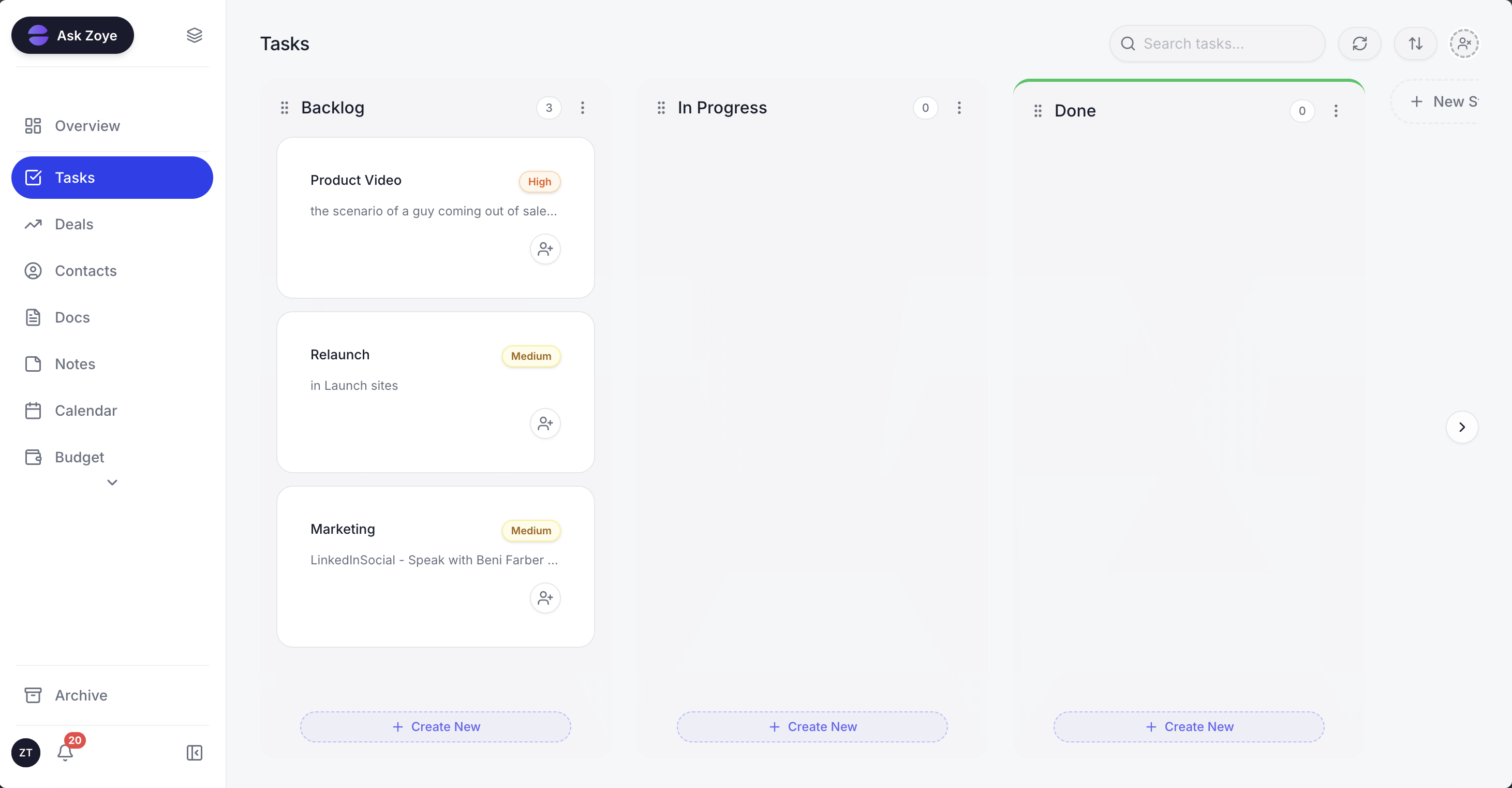
When a reply in Chats promises something, the follow-up becomes a task with an owner and a due date on the board.
Email works differently: Zoye reads, drafts and sends through each person's own Gmail, and emails sent from Zoye show opens and clicks on the contact. That helps sales follow-ups, but it is not a support@ mailbox several people triage together. Other limits: connecting your own business WhatsApp number is coming soon, as is TikTok; there are no formal SLA policies, CSAT surveys or public help centre; and Instagram connects through its linked Facebook Page. To move in, import a spreadsheet or bring work from Trello or Monday.com; Jira, Notion and ClickUp imports are coming soon.
Pricing (as of October 2026): the $5 Almost Free plan ($4 on yearly billing) is a single-member plan with the core tools, 15 AI prompts a month and the Google integrations, without automations, so it is not a team inbox. For a team, Starter costs $29 a month or $23 yearly and covers up to 5 members with 5GB and the core tools, also without automations; Growth, the plan that includes the WhatsApp and Meta automations, is $59 or $47 for up to 10 members with 10GB; Scale is $119 or $95 for up to 30 members with 25GB; Customize is quoted. See the pricing page.
Best for: teams of 2 to 15 selling through Instagram, Facebook and WhatsApp, where the person answering also quotes, books and collects.
2. Front - the most complete collaborative email inbox
Front built the category: email threads you can assign, discuss internally, draft together and route by rule. The trade-off is the seat model and the plan split, with WhatsApp only on Professional and above. Our Front app alternatives guide does the full seat math.
Pricing (as of October 2026, Front's pricing page): the Starter seat is $25 a month on annual billing, capped at 10 seats and a single channel type such as email, Front Chat or SMS. Professional runs $65 a seat and Enterprise $105. WhatsApp, on Professional and Enterprise, costs Meta's charges plus a 20% admin fee; Copilot adds $20 a seat on Starter and Professional, and Autopilot starts at $0.05 a conversation.
Best for: email-heavy teams of 8 or more who will use shared drafts, rules and analytics daily.
3. Help Scout - the friendliest email-first inbox
Help Scout keeps conversations looking like email, with saved replies, workflows, collision detection and a knowledge base called Docs. The trade-off: per-user pricing, and outside Meta's 24-hour window only text-only utility templates on WhatsApp. Standard already includes WhatsApp, Instagram and Messenger. More in our Help Scout alternatives.
Pricing (as of October 2026, Help Scout's pricing page): Free for up to 5 users, 1 inbox and 100 contacts a month. Standard $25 per user per month billed annually (up to 25 users), Plus $45, Pro $75 (minimum 10 users). The Envoy AI agent is $0.75 per resolution.
Best for: email-first teams of 3 to 25 that want a help centre and light WhatsApp replies.
4. Missive - team email with WhatsApp and no messaging markup
Missive feels like a personal email app with shared inboxes, chat inside each thread, assignment and shared drafts, plus WhatsApp, SMS and social accounts. The trade-off: Starter stops at 5 users and leaves out rules and integrations. Its documentation says it connects directly to the WhatsApp Business Platform with no fee of its own.
Pricing (as of October 2026, Missive's pricing page): Starter $14 per user per month billed yearly ($18 monthly), up to 5 users; Productive $24 ($30), up to 50 users; Business $36 ($45). A 30-day trial, no free plan.
Best for: teams of 3 to 15 who want email and WhatsApp side by side at a low seat price.
5. Hiver - shared inboxes without leaving Gmail
Hiver turns Gmail labels into shared inboxes with assignment, notes and collision alerts, and higher plans add SLAs, CSAT surveys and a customer portal. The trade-off: it depends on Gmail, and WhatsApp was not listed on its pricing page in October 2026.
Pricing (as of October 2026, Hiver's pricing page): on annual billing a user costs $25 a month on Growth, $55 on Pro and $85 on Elite; paid monthly, those become $35, $65 and $95. Every plan includes AI agents.
Best for: Google Workspace teams whose customer work is almost all email.
6. Gmelius - shared inboxes and request boards inside Gmail
Gmelius adds shared inboxes, labels, rules and kanban boards to Gmail, plus AI that drafts and sorts. The trade-off: the entry plan, Meli, has no shared inboxes, and the pricing page does not mention WhatsApp.
Pricing (as of October 2026, Gmelius's pricing page): Meli $19 per user per month billed annually; Growth $25 ($33 monthly), up to 50 users, with unlimited shared inboxes and boards; Pro $40 ($50). A 7-day trial of Growth.
Best for: Gmail teams that track each request as a card and do not need WhatsApp.
7. respond.io - a messaging-first inbox for support and sales
Respond.io brings WhatsApp, Instagram, Messenger, email and other channels into one inbox with routing workflows, and AI agents from Growth. The trade-off: the bill grows with users and monthly active contacts, and the customer record stays in the inbox unless you connect a CRM. See our respond.io alternatives.
Pricing (as of October 2026, respond.io's pricing page): Starter $79 a month billed yearly or $99 monthly with 5 users; Growth $159 or $199 with 10 users; Advanced $279 or $349. Extra users cost $12, $20 or $24 a month by plan; Starter lists unlimited monthly active contacts, while Growth and Advanced start with 1,000.
Best for: teams of 5 or more running sales and support mostly on WhatsApp and Instagram.
8. Trengo - an omnichannel inbox priced per team
Trengo combines email, WhatsApp, live chat, voice and social channels in one inbox with assignment and notes, sold as a plan with users included. The trade-off: euro pricing, a fixed conversation allowance and a surcharge on AI-handled conversations.
Pricing (as of October 2026, Trengo's pricing page): Boost EUR 299 a month billed annually (EUR 349 monthly) with 10 users and 500 conversations, then EUR 15 per extra 100 on yearly billing; Pro EUR 499 (EUR 599) with 20 users and 1,500 conversations. Extra users EUR 25 to EUR 50; AI conversations EUR 0.25 to EUR 0.30 each.
Best for: teams of 8 to 20 answering email and WhatsApp all day.
9. Freshdesk Omni - when the inbox should become a ticket queue
Freshdesk Omni, the multichannel edition of Freshworks' help desk, turns email, chat and messaging into tickets with priorities, SLA policies and reports. The trade-off for a small team is the ticket model itself, plus per-agent AI and, per Freshworks' WhatsApp help article, a 20% markup on Meta's WhatsApp cost. Our Freshdesk alternatives guide covers the reverse move.
Pricing (as of October 2026, Freshworks' pricing page): Growth $29, Pro $79 and Enterprise $119 per agent per month billed annually. Freddy AI Copilot is $29 per agent on Pro and Enterprise; Freddy AI Agent costs $49 per 100 sessions after the first 500. No free plan is listed, only a 14-day trial.
Best for: teams with at least one full-time support person and written response-time promises.
Shared inbox software compared
The table lines the nine tools up on what decides a small team's choice: strongest channel, entry price, what the bill grows with, WhatsApp handling and where the customer's history lives. List prices from each vendor's page as of October 2026, billed annually, before Meta's message charges.
| Tool | Strongest channel | Entry price for a team | Bill grows with | Customer history | |
|---|---|---|---|---|---|
| Zoye | Instagram, Facebook, WhatsApp lead chats | $59/mo Growth ($47 a month billed yearly), up to 10 members | Plan and team size | Lead chats today, own number coming soon | Contact card with deals, tasks, bookings, invoices |
| Front | $25/seat (Starter, one channel type) | Seats | Professional+, Meta cost + 20% | Contact panel, CRM via integration | |
| Help Scout | $25/user (Standard) | Users | From Standard, utility templates only outside 24h | Customer profile, CRM via integration | |
| Missive | $24/user (Productive) | Users | Native, no Missive fee | Contact, CRM via integration | |
| Hiver | Gmail | $25/user (Growth) | Users | Not listed on pricing page | Gmail contacts |
| Gmelius | Gmail | $25/user (Growth) | Users | Not mentioned | CRM integrations on Pro |
| respond.io | WhatsApp, Instagram, Messenger | $79/mo (Starter, 5 users) | Users and active contacts | Core channel | Contact in the inbox |
| Trengo | Email and WhatsApp | EUR 299/mo (Boost, 10 users) | Plan and conversations | Native | Contact in the inbox |
| Freshdesk Omni | Tickets across channels | $29/agent (Growth) | Agents and AI sessions | Growth+, Meta cost + 20% | Contact and company |
What a shared inbox costs a team of 4, 8 and 12
Per-user prices look close until you price a real team that needs email and WhatsApp together. Each tool below is priced on the cheapest plan covering both (or marked email only), billed annually as of October 2026, before Meta's charges. At 12 people the monthly bill runs from under $50 to almost $800.
| Tool and plan | 4 people | 8 people | 12 people |
|---|---|---|---|
| Front Professional (WhatsApp needs it) | $260 | $520 | $780 |
| Help Scout Standard | $100 | $200 | $300 |
| Missive Productive | $96 | $192 | $288 |
| Hiver Growth (email only) | $100 | $200 | $300 |
| Gmelius Growth (email only) | $100 | $200 | $300 |
| respond.io Starter (5 users + $12 each extra) | $79 | $115 | $163 |
| Trengo Boost (10 users included) | EUR 299 | EUR 299 | EUR 299 + 2 extra users |
| Freshdesk Omni Growth | $116 | $232 | $348 |
| Zoye Growth (chat channels; email via Gmail) | $47 | $47 | $47 |
For email alone, the email-first tools sit within a few dollars of each other. WhatsApp moves the bill: the $65 tier on Front, a 20% markup on Freshdesk, no markup on Missive. Flat-priced tools win when everyone needs access, which is normal in a small business. If a tool keeps history only in the inbox, add the CRM you will still need.
See what Zoye can do for you
CRM, deals, tasks and your Instagram, Facebook and WhatsApp automations in one workspace. Just ask Zoye and it sets any of it up for you.
Explore FeaturesHow to set up a shared inbox in one week
A team of 2 to 15 can switch in five working days: count channels, agree who owns what, connect one channel at a time, write the replies you send every week, then run in parallel before turning off the old habits. The rules you agree on matter more than any setting.
Day 1: count. Last month's conversations by channel and type, and everyone who answers today, occasional helpers included.
Day 2: agree ownership. One page, three rules: who gets new enquiries by default, that the owner replies until they hand over in a note, and how long a customer may wait before someone else steps in. A single target, such as a first reply within one business hour, is enough for most small teams.
Day 3: connect channels one by one. Start with the busiest, confirm messages land on the right contact, then add the next. If you are moving a WhatsApp number from the Business app to the Business Platform, chat history generally does not travel with it, so check the current options with your provider first.
Day 4: write saved replies. Fifteen to twenty short answers in your real voice (hours, prices, booking, payment) cover most repeat questions.
Day 5: rules and switch. Add only the routing rules the team will use weekly, run both ways of working for a few days, then turn off business-channel notifications on personal phones.
In Zoye, that week means connecting your Facebook Page (the linked Instagram account comes with it), importing contacts, and describing the routing you want, for example "give new Instagram messages to whoever is on the front desk and remind them if nobody answers within two hours". Zoye builds the rule, shows it in plain words and waits for your approval.
Ready to hand off the busywork?
Zoye brings AI-powered CRM, task management, and automation into one workspace.
Get StartedWhich shared inbox should a small team choose?
Choose by where customers write first and what has to happen after the reply. Email-led teams compare email-first inboxes on features; chat-led teams compare messaging tools on WhatsApp fees; teams whose chats turn into sales, bookings and follow-ups need the conversation and the customer record to be one thing.
- Mostly email, want a help centre: Help Scout.
- Mostly email, long threads with several people: Front, or Missive for a lower seat price.
- Gmail team, email only: Hiver for support features, Gmelius for request boards.
- Email and WhatsApp equally, about ten people: Trengo, or Missive for Meta's charges with no markup.
- WhatsApp and Instagram first, CRM already in place: respond.io.
- Full-time support staff and written response-time promises: Freshdesk Omni.
- Instagram, Facebook and WhatsApp first, and chats that should end in a booking, a payment or a task: Zoye Growth at $59 a month ($47 billed yearly) for up to 10 members.
Trial your shortlist on your busiest channel for two weeks and track two numbers: how long the oldest unanswered conversation waits each day, and how many conversations ended with a next step owned by a named person. To weigh help desks and AI agents too, read our customer service software for small business guide. Keeping the promises made in chat is covered in WhatsApp for customer service.
If your customers already write to you on Instagram, Facebook and WhatsApp, book a Zoye demo and bring a week of real conversations to test against.