
Quick answer: customer service software for a small business comes in three kinds: a help desk that turns messages into tickets, a shared inbox where a team answers conversations together, and an AI agent that answers, books and hands over. A business with 1 to 15 people rarely needs all three. Choose by where customers write, how many people answer, and what should happen after the reply.
Key takeaways (October 2026)
- Help desks price per agent: Freshdesk Growth is $19, Zendesk Suite Team $55 and Help Scout Standard $25 per agent a month on annual billing; LiveAgent Starter is $15.
- AI is usually a second meter: Zendesk charges $1.50 to $2.00 per automated resolution beyond the allowance, Help Scout's Envoy $0.75 per resolution, Gorgias $0.90 to $1.00 per automated interaction.
- Five agents on a typical help desk cost about $75 to $275 a month before AI; Zoye charges per plan, $59 a month ($47 billed yearly) for up to 10 members on Growth, the plan with the WhatsApp and Meta automations.
- On WhatsApp, Meta has billed per delivered message since 1 July 2025, and each business number gets 1,000 free service messages a month from 1 October 2026.
- A working setup takes about one week if you start from last month's real messages.
What is customer service software for a small business?
Customer service software is where your team receives, answers and tracks what customers ask. For a small business it must collect messages from every channel customers use, show who handles each one, keep the history on the customer's record, and stop anything waiting unanswered while everyone is busy.
A help desk built for a 40-person support department and a WhatsApp agent that books appointments both fit that definition, and both are sold to small businesses with the same promise. Three facts decide which one you need:
- Where messages start. Count last month's messages by channel: email, website chat, WhatsApp, Instagram, Facebook, phone.
- How many people answer. An owner answering between jobs, three people sharing the load, or someone whose whole day is support.
- What the reply leads to. A fix and a closed ticket, or a quote, a booking, a payment and a follow-up next week.
The three kinds: help desk, shared inbox and AI agent
The three kinds of customer service software solve different problems. A help desk organizes requests into a queue with statuses, owners and deadlines. A shared inbox lets a few people answer the same conversations without stepping on each other. An AI agent answers and acts within rules you approve, and passes the rest to a person.
Help desk and ticketing system
A help desk converts every email, chat or form into a ticket with a status (new, open, pending, solved), a priority, an assignee and often a service-level target such as "first reply within 4 hours". Rules route tickets by topic, a knowledge base answers customers before they write, and reports show volume and response time by agent.
That structure pays off when support is a department with promised response times and a manager watching the backlog. Its price is upkeep: statuses, views and routing rules need maintaining, and the "can I book for Thursday?" message gets a ticket number when it should have become a sale.
Shared inbox
A shared inbox keeps messages as conversations rather than tickets. Several people see the same list, assign a conversation, leave internal notes and reply from one place, with no SLA engine and no ticket lifecycle to learn. It fits teams of two to ten where answering customers is part of everyone's day, and it struggles when nobody owns the inbox. Our guide to shared inbox software compares the inbox-only tools in depth, so this article does not repeat that list.
AI agent
An AI agent reads the incoming message, answers from information you gave it, asks the questions you would ask, and then does something: books a time, sends a payment link, updates the customer's record, or hands the conversation to a person with the whole history attached. Good agents ask before anything risky and keep a log of what they did.
For a business of 1 to 15 people this is often the most useful kind, because small-business messages mix service and sales: the question about a price should end in a booking, not a closed ticket. If you are weighing an AI answer against a person on a chat widget, chatbot vs live chat walks through that trade-off. The limit: an AI agent is not a queue manager and will not give you an SLA report by agent.
Which kind does a 1-15 person business need?
Most businesses under 15 people need a shared inbox plus an AI agent, not a full help desk. A help desk earns its cost when you promise response times, when support is someone's whole job, or when one request travels between several people for days. The table below maps common situations to the kind of tool that fits.
| Your situation | Kind that fits | Why | Tools to start with |
|---|---|---|---|
| 1-3 people, most messages on WhatsApp and Instagram, many end in a booking or sale | AI agent with a shared inbox | Answers and books while you work, hands over the rest | Zoye |
| 2-10 people, mostly email, no promised response time | Shared inbox | Assignment and notes without ticket upkeep | Help Scout, LiveAgent Starter |
| 3-15 people, one or two do support full time, response targets promised | Help desk | Queue, SLAs and reports by agent | Freshdesk, Zendesk, Zoho Desk |
| Online store, questions are about orders, returns and shipping | Ecommerce help desk | Order data inside the ticket | Gorgias |
| Most questions start on the website | Website chat with AI | Answers visitors where they already are | Tidio, LiveAgent |
| Sales and marketing already run on HubSpot | Help desk inside the CRM | One customer database | HubSpot Service Hub |
| Service-heavy and sales-heavy at the same time | AI agent and CRM, help desk later | The reply and the record are the same thing | Zoye, then a help desk if a queue appears |
A common mistake: a five-person business sets up a help desk and finds half its "tickets" are prospects asking for a price.
Want to see it in action?
See Zoye catch a new lead, answer on WhatsApp and set up the follow-up, all from one message.
See How It WorksThe 9 best customer service software tools for small business in 2026
Nine tools cover the realistic range: one AI agent with a team inbox and CRM, six help desks, a website chat tool and an ecommerce help desk. Prices come from each vendor's pricing page as of October 2026.
1. Zoye - an AI agent and team inbox for businesses where service and sales mix
Zoye is an AI Business Operator: one workspace with CRM, deals, tasks, calendar, bookings, invoices and reports, run by an assistant in the web app, on WhatsApp, in Slack and in Claude. For customer service, what matters is Chats and the automations around it.
- Chats, one inbox. Instagram and Facebook messages, comments on your posts, and the WhatsApp conversations Zoye has with your leads arrive in one place. Your team assigns chats, leaves notes for each other and replies from there, and every conversation is saved on the contact's card. The team inbox page shows it in detail.
- Answers right away. When someone sends your Page or Instagram account a DM or replies to a story, Zoye answers with buttons to tap, a file, or a reply in your brand's voice. Anything it should not answer goes to you, with the whole chat on the lead's card, and you can take over any conversation by hand at any time.
- Replies that lead somewhere. WhatsApp automations (all off by default, all confirming before they send) include a new-lead message, a qualifying bot that writes answers into the contact's fields, and scheduled broadcasts. Times come from one Booking list with automatic reminders, and a payment link can go out in the chat (Stripe, or Grow in Israel).
- Ask who is waiting. Ask "which customer chats are still waiting for a reply?" and Zoye lists them, longest wait first.
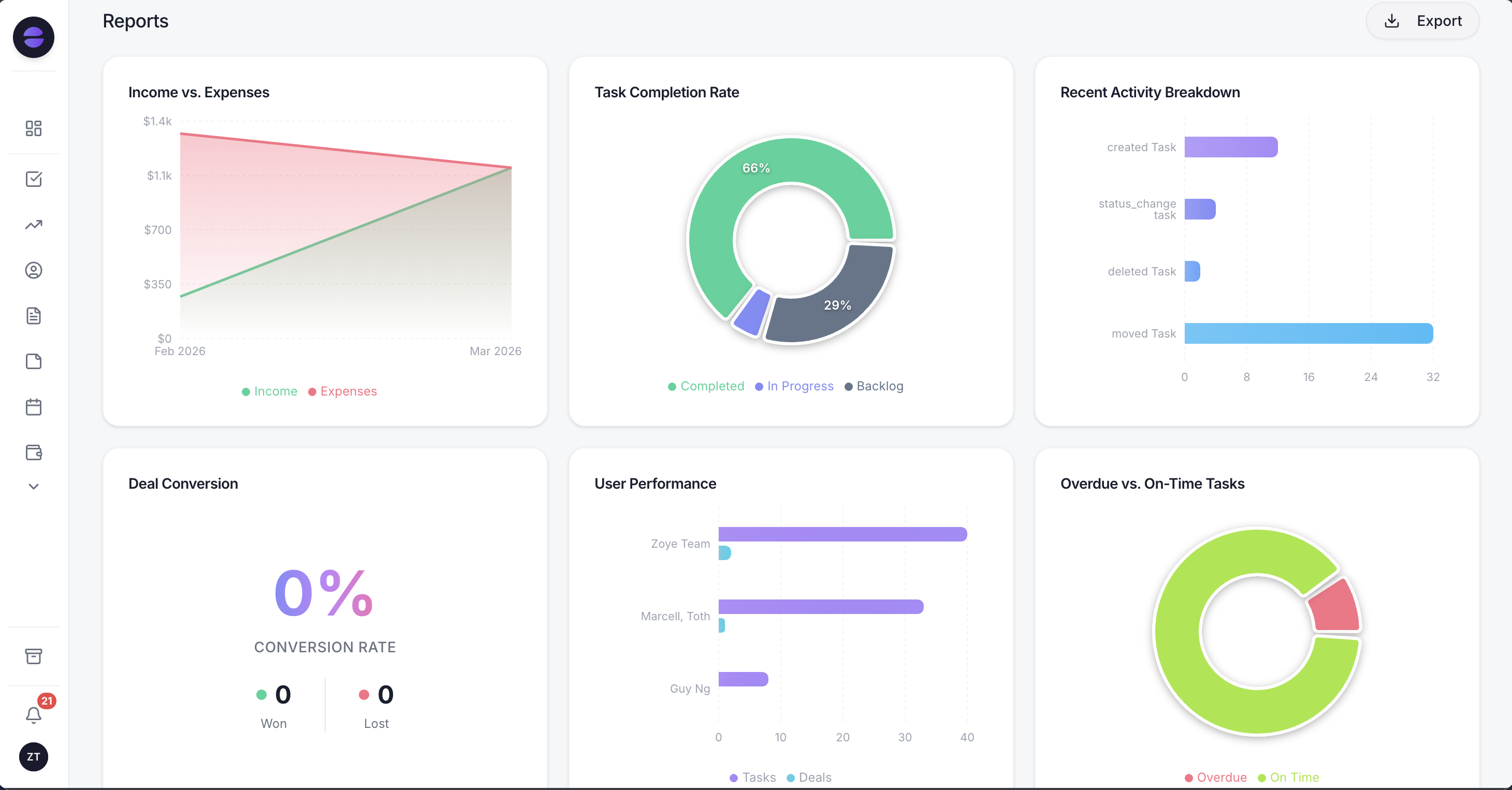
Reports show where conversations came from and which stage they reached, and Zoye can write a plain summary of what needs attention next.
Honest limits: Zoye is not a ticketing suite. It has no ticket statuses, no SLA timers, no escalation queues, no customer portal and no public knowledge base, and it does not offer a website chat widget. Email goes out from your connected mailbox, with opens and clicks tracked on the contact, but there is no shared email ticket queue. Connecting your own business WhatsApp number is coming soon; today Zoye holds the WhatsApp conversations with your leads on the official WhatsApp Business Platform. TikTok in Chats is coming soon too.
Pricing (as of October 2026): Zoye prices the workspace, not each agent. The entry plan, Almost Free, is $5 a month or $4 on yearly billing, for a single member, with the core tools, 15 AI prompts a month and the Google integrations; it does not include automations. A team of up to 5 pays $29 a month on Starter ($23 a month billed yearly), up to 10 pays $59 on Growth ($47), up to 30 pays $119 on Scale ($95), and Customize is quoted. AI is not charged per resolution. The pricing page lists what each plan includes.
Best for: teams of 1 to 15 whose customers write on WhatsApp, Instagram and Facebook, and whose answers should turn into bookings, payments and follow-ups.
2. Freshdesk - the mainstream help desk with separate AI bills
Freshdesk is a mature ticketing system with automations, a customer portal and solid reporting. For a small team the catch is the number of meters: seats, a separate messaging edition, and AI sold twice.
Pricing (as of October 2026): Growth $19, Pro $55 and Enterprise $89 per agent a month, billed annually. Freshdesk Omni, the edition built for messaging channels, costs $29, $79 and $119. Freddy AI Copilot is $29 per agent a month on Pro and Enterprise, and Freddy AI Agent costs $49 per 100 sessions after the first 500. Freshworks' help article says it applies a 20% markup to WhatsApp costs billed by Meta. The pricing page shows a 14-day trial and no free plan. Our best Freshdesk alternatives review covers the full bill.
Best for: a growing team with one or two people on support full time and response targets to meet.
3. Zendesk - the reference help desk, priced for scale
Zendesk is the help desk others are measured against: routing, macros, SLAs, a help centre and deep reporting. For small teams the Suite plans are the real start, because the cheapest plan leaves out messaging channels.
Pricing (as of October 2026): on annual billing, Support Team is $19 per agent a month and Suite Team $55, with Suite Professional at $115; monthly billing raises these to $25, $69 and $149. Suite Enterprise is sold through sales. Each agent brings 5 included automated resolutions a month on Team plans (10 on Professional); beyond that Zendesk charges $1.50 per resolution committed or $2.00 pay as you go. Copilot costs $50 per agent a month, billed yearly, from Professional. See our Zendesk alternatives for lighter options.
Best for: a support team expected to grow past 10 agents, where a standard platform pays off.
4. Help Scout - the friendliest email-first help desk
Help Scout feels like email rather than a ticket system, so a non-specialist team adopts it quickly. It keeps a help centre next to the inbox, has a real free plan, and added WhatsApp in 2026.
Pricing (as of October 2026): Free for up to 5 users with 1 inbox and 100 contacts a month. Standard $25 per user a month, Plus $45 and Pro $75 (minimum 10 users), on annual billing. Envoy, the AI agent, costs $0.75 per resolution. Our Help Scout alternatives review has the details.
Best for: email-heavy teams of 2 to 10 who want structure without a steep setup.
5. Zoho Desk - the budget help desk with depth
Zoho Desk gives full ticketing at a low per-agent price, with a free edition and links to the rest of the Zoho suite. The catch is a busy interface that rewards patient configuration.
Pricing (as of October 2026): Zoho shows prices in local currency by region. The page we loaded today displayed Indian rupees: Express ₹420, Standard ₹800, Professional ₹1,400 and Enterprise ₹2,400 per user a month billed annually, with a Free edition for 3 users and a 15-day trial on paid plans. We could not load US-dollar figures directly, so check the price in your currency.
Best for: cost-conscious teams that want real ticketing and already use other Zoho apps.
6. HubSpot Service Hub - ticketing for teams already on HubSpot
HubSpot's support product adds ticketing, a portal for customers and a help centre to the HubSpot CRM, so a support reply and a sales note land on the same record. Costs climb sharply at Professional, which also charges a one-time onboarding fee.
Pricing (as of October 2026): a free tier for up to 2 users; Starter shown at $7 or $20 per seat a month depending on billing; Professional $90 per seat a month billed annually ($100 monthly) plus a $1,500 onboarding fee; Enterprise $150 per seat plus $3,500 onboarding.
Best for: companies already running sales or marketing on HubSpot.
7. Tidio - website chat with an AI meter
Tidio is a website chat widget with an inbox behind it and Lyro, an AI agent that answers from your support content. It prices conversations rather than seats.
Pricing (as of October 2026): Free with 50 billable conversations, Starter $24.17 a month for 100, Growth from $49.17 for 250 or more, and Plus from $300 a month plus usage. A billable conversation is one where a human agent replies. Lyro starts at $32.50 a month for 50 AI conversations. The best Tidio alternatives piece covers how those meters add up.
Best for: online businesses whose customers start on the website.
8. Gorgias - the help desk for online stores
Gorgias brings Shopify, BigCommerce, Magento and WooCommerce order data into each ticket, so an agent can refund or edit an order from the conversation. It prices tickets, not seats.
Pricing (as of October 2026): Starter $10 a month for 50 tickets (monthly billing), Basic $50 billed annually or $60 monthly for 300 tickets, Pro $300 or $360 for 2,000 tickets, Advanced $750 or $900 for 5,000, and Enterprise on quote. Extra tickets cost $0.36 to $0.40 each, and the AI Agent costs $0.90 per automated interaction on annual contracts or $1.00 monthly. Gorgias's page showed a second, conflicting set of figures in its page data, so confirm at sign-up.
Best for: ecommerce stores where most questions are about orders.
9. LiveAgent - many channels for a modest seat price
LiveAgent combines email ticketing, live chat, a call centre and social channels, and does not charge for AI: you connect your own AI provider and pay it for usage.
Pricing (as of October 2026, LiveAgent's pricing page, checked today): Starter $15 per agent a month billed annually ($19 monthly) for up to 5 agents, with email, live chat and a chatbot but no social channels and no SLA rules. Team $29 ($35) for up to 15 agents adds Facebook, Instagram, WhatsApp, Telegram, Viber and the call centre. Business $49 ($59) has no team-size limit. Every plan starts with a 30-day trial; there is no free plan.
Best for: small teams that want phone, email, chat and social in one classic help desk at a modest price.
Customer service software compared
The nine tools split on one line: whether the bill grows with seats, with volume, or with neither. Seat pricing is predictable for a fixed team, volume pricing suits seasonal stores, and a workspace plan suits a business where many people answer now and then.
| Tool | Kind | Entry paid price (Oct 2026) | Bill grows with | AI pricing | WhatsApp, Instagram |
|---|---|---|---|---|---|
| Zoye | AI agent, team inbox, CRM | $59/mo Growth ($47 a month billed yearly), up to 10 members | Plan | No per-resolution charge | Yes (own number coming soon) |
| Freshdesk | Help desk | $19/agent (Growth) | Agents, AI sessions | Copilot $29/agent; $49 per 100 sessions | Omni edition; Meta cost + 20% |
| Zendesk | Help desk | $55/agent (Suite Team) | Agents, resolutions | $1.50 to $2.00 per resolution | Suite plans |
| Help Scout | Email-first help desk | $25/user (Standard) | Users | Envoy $0.75 per resolution | WhatsApp since 2026 |
| Zoho Desk | Help desk | ₹420/user (Express) | Users | Zia from Professional | Check by plan |
| HubSpot Service Hub | Help desk in a CRM | $7 to $20/seat (Starter) | Seats, onboarding | HubSpot credits | Pro and Enterprise |
| Tidio | Website chat + AI | $24.17/mo for 100 conversations | Conversations | Lyro from $32.50 for 50 | Integrations listed |
| Gorgias | Ecommerce help desk | $10/mo for 50 tickets | Tickets, AI interactions | $0.90 to $1.00 per interaction | Check with vendor |
| LiveAgent | Help desk | $15/agent (Starter) | Agents | Bring your own AI provider | Team plan and up |
What customer service software costs at 2, 5 and 10 agents
For a small business the honest comparison is the monthly bill at your team size, not the headline price. The figures below are illustrative: list prices as of October 2026, annual billing where offered, the entry plan that includes the channels named, and no AI usage, WhatsApp message charges, taxes or onboarding fees.
| Tool and plan used | 2 agents | 5 agents | 10 agents | Assumption |
|---|---|---|---|---|
| Zoye Growth | $47 | $47 | $47 | Up to 10 members per workspace, with the WhatsApp and Meta automations; $59 billed monthly |
| Freshdesk Growth | $38 | $95 | $190 | Email-centred edition; Omni from $29 per agent |
| Zendesk Suite Team | $110 | $275 | $550 | Suite needed for messaging channels |
| Help Scout Standard | $50 | $125 | $250 | Free plan covers up to 5 users with limits |
| Zoho Desk Express | ₹840 | ₹2,100 | ₹4,200 | Rupee pricing shown; user limits vary by plan |
| HubSpot Service Hub Starter | $14 to $40 | $35 to $100 | $70 to $200 | Range depends on billing term |
| LiveAgent Team | $58 | $145 | $290 | Team plan includes social channels; Starter is $15 |
| Tidio Growth | from $49.17 | from $49.17 | from $49.17 | Priced on 250+ conversations, not seats |
| Gorgias Basic | $50 | $50 | $50 | 300 tickets a month, not seats |
Three things move these numbers more than the seat price:
- AI usage. A team of five on Zendesk Suite Team gets 25 automated resolutions a month included. If the AI resolves 300 conversations, the other 275 add $412.50 to $550 at $1.50 to $2.00 each. Help Scout's Envoy at $0.75 per resolution would add $225 for the same 300.
- Messaging fees. Any tool on the official WhatsApp Business Platform passes on Meta's per-message charges for templates, and some add a markup on top, 20% according to Freshworks' own help article on WhatsApp.
- Volume swings. Ticket and conversation pricing is cheap in a quiet month and expensive in a busy one. A store on Gorgias Basic that receives 600 tickets in December pays for 300 extra at $0.36 to $0.40 each, about $108 to $120 on top.
See what Zoye can do for you
CRM, deals, tasks and your Instagram, Facebook and WhatsApp automations in one workspace. Just ask Zoye and it sets any of it up for you.
Explore FeaturesHow to set up customer service software in a week
A small business can have a working setup in about a week of part-time effort: start from last month's real messages, connect the busiest channel, decide owners, write your most common answers, and test with real people before switching over.
Day 1: read last month. Scroll back through a month of email, WhatsApp, Instagram and Facebook messages and sort them into three piles: standard questions, requests that need a person, and sales enquiries. The pile sizes point to a help desk, an inbox or an agent.
Day 2: connect the busiest channel first. For Instagram and Facebook that means a Business or Creator account linked to a Facebook Page you admin. For WhatsApp, a provider on the official WhatsApp Business Platform; unofficial tools that drive WhatsApp Web put the number at risk. Add the second channel only once the first works.
Day 3: owners and handover. Decide who gets which conversations: by channel, by topic or by turn. Write down what happens when the owner is away. If you use an AI agent, decide exactly what it may answer and what it must hand to a person, and write the line it says when it hands over.
Day 4: the 20 answers. Write the 20 answers you give most often (prices, availability, booking, payment, changes), short and in your own words. They become saved replies in a help desk or the source an AI agent answers from.
Day 5: what happens after the reply. For each type of request, decide the next step: a booking, a quote, a payment link, a task for a teammate, or a closed conversation. This is the step most small businesses skip, and it is where most lost revenue sits.
Day 6: test with real people. Ask two or three people outside the team to message you with real questions, including an awkward one and a complaint. Read every reply and every handover. Fix the source answer rather than patching single replies.
Day 7: switch on. Turn the setup on for all customers and read ten conversations end to end at the end of the week. Our guide to WhatsApp for customer service covers the window rules on that channel.
Ready to hand off the busywork?
Zoye brings AI-powered CRM, task management, and automation into one workspace.
Get StartedWhich customer service software should a small business choose?
Choose the kind before the brand. A business of 1 to 15 people usually needs a shared inbox and an AI agent, and only adds a help desk when support becomes a department with promised response times. Within each kind, compare the bill at your real team size, including AI and messaging fees.
- Customers on WhatsApp, Instagram and Facebook, and replies that should become bookings, payments or follow-ups: Zoye, Growth at $59 a month ($47 billed yearly) for up to 10 members.
- Email-first support from a small team that wants structure without heavy setup: Help Scout, free for up to 5 users or $25 per user on Standard.
- A support function with response targets and room to grow: Freshdesk from $19 per agent, or Zendesk Suite Team at $55 per agent for a standard platform.
- Real ticketing on a tight budget: Zoho Desk, free for 3 users, or LiveAgent Starter at $15 per agent.
- Already on HubSpot for sales: Service Hub, so both teams share one database.
- Questions that start on the website: Tidio, priced on conversations.
- An online store: Gorgias, with order data in every ticket.
For the first month, track one number: the longest time a customer waited for a first useful reply each week. If it falls, the tool is doing its job; if it does not, change the owners and handovers before you change the software.
Want to see how Zoye handles your own mix of service and sales messages? Book a demo and bring a few real customer questions from last week.