
Quick answer: a chatbot for small business earns its keep when it does five jobs, not one: it answers repeat questions, captures who is asking, qualifies them, books or takes payment, and hands over to a person with the whole conversation attached. Pick the tool by where your customers actually write first (your website, WhatsApp or Instagram), then by what the bill does in a busy month.
Key takeaways (October 2026)
- Entry prices for the 9 tools below run from $0 (tawk.to's core chat) to $95 a month (Crisp Essentials, flat for up to 10 agents); AI usage is often a separate meter, for example Tidio's Lyro from $32.50 a month for 50 AI conversations and Intercom's $0.99 per Fin outcome.
- On WhatsApp, Meta bills per delivered message since 1 July 2025, and from 1 October 2026 each business number gets 1,000 free service messages a month.
- On Instagram and Messenger, a bot may reply within 24 hours of a person's message, or up to 7 days after they write following a click-to-Instagram or click-to-Messenger ad.
- Meta has barred general-purpose AI chatbots from the WhatsApp Business Platform since 15 January 2026; business-specific AI for your own customers is allowed.
- A first version can be live in about one week if you start from your 20 most common questions.
What should a chatbot do for a 1-10 person business?
For a team of one to ten people, a chatbot has to do five jobs: answer repeat questions, capture the asker's details, qualify them with a few questions, move them to a booking or a payment, and hand over to a human with context. A bot that only does the first job saves minutes; one that does all five wins customers while the team is busy.
Large companies buy chatbots to deflect tickets. A small business has a different problem: the same three people sell, deliver and answer messages, so a question that arrives during a job either waits for hours or interrupts the work. The chatbot is there to keep the conversation moving until a person is free, and to make sure nothing is lost when they are.
Here is what each job looks like in practice.
- Answer the repeat questions. Opening hours, prices or price ranges, delivery areas, what is included, how long it takes. Most small businesses find that 15 to 25 questions cover the bulk of their inbox. These answers should be written by you and kept short.
- Capture the person. Name, phone or email, and what they asked about, saved as a contact rather than left in a chat log. Without this step, a chat that goes quiet is a lead you cannot follow up.
- Qualify. Two or three questions that tell you whether this is a real buyer and how urgent it is: what they need, when, and a rough budget or size. Our guide to a WhatsApp lead qualification bot goes deeper on which questions convert.
- Book or take payment. Offer real free times from your calendar, or send a payment link, inside the chat. Every extra step ("call us to book", "email us for a quote") loses people.
- Hand over well. When the bot is unsure, the customer is upset, or the deal is large, a person takes over and sees everything said so far. The customer should never have to repeat themselves.
What a small business chatbot should not do is just as useful to decide early. It should not invent prices or promises it was not given. It should not message people who never contacted you. And it should not hide that it is automated: Meta's messaging policy expects bots to say they are automated where the law requires it and recommends doing so at the start of a conversation.
Where do your customers start the conversation?
Count where last month's messages began before you compare any tool: the website chat bubble, WhatsApp, Instagram DMs and comments, or Facebook. Each channel has its own rules, costs and best-fit tools, and a chatbot built for the wrong front door solves the smaller problem.
The website. A chat widget on your site has no platform rules beyond your own privacy notice, and you can answer any visitor at any time. This is where Tidio, Crisp, LiveChat, tawk.to, Intercom and HubSpot started. The limit is reach: a website widget only talks to people who are already on your site, and many visitors leave before typing anything.
WhatsApp. For many small businesses this is where buyers prefer to talk. A chatbot needs the official WhatsApp Business Platform (the API); the free WhatsApp Business app offers greeting messages, away messages and quick replies, but not a real bot. The Platform rules, as of October 2026 from Meta's developer documentation:
- You can reply freely within 24 hours of the customer's last message. Outside that window, only pre-approved templates can be sent.
- Meta charges per delivered message by category and country since 1 July 2025. Since 1 October 2026, each business phone number gets 1,000 free service messages a month, and utility templates sent inside an open window are charged again.
- A conversation that starts from a click-to-WhatsApp ad opened in the Android or iOS app, answered in time, opens a window of up to 7 days in which messages are free.
- Since 15 January 2026, general-purpose AI assistants, where the AI itself is the product, are not allowed. A business-specific AI that serves your own customers (support, bookings, sales, qualification) is.
Meta's rate card lists the per-message prices by country; check it for your market rather than relying on a figure from a blog. Our WhatsApp Business API pricing guide walks through the categories.
Instagram and Facebook. Customers DM you, reply to your stories and comment on your posts. Meta's Messenger Platform policy, as of October 2026: a bot can reply within 24 hours of the person's message; after a first message that follows a click-to-Messenger or click-to-Instagram ad, the window can last up to 7 days. A comment can get one private reply, sent within 7 days of the comment. You cannot cold-message anyone who has not engaged. Instagram automation needs a Business or Creator account linked to a Facebook Page through an approved Meta app; unofficial bots that drive the app risk action blocks. Our guide to Instagram comment-to-DM automation covers that mechanic in full.
If your messages split evenly between two channels, choose a tool that handles both in one inbox. Two separate bots means two places to check and two sets of answers that drift apart.
Rule-based bot, AI chatbot or AI agent?
There are three kinds of chatbot a small business can buy in 2026. A rule-based bot follows buttons and branches you draw. An AI chatbot writes answers from your content. An AI agent also takes actions, such as booking, updating the contact and creating a follow-up task, under rules you approve.
| Type | How it answers | Good at | Weak at | Typical tools |
|---|---|---|---|---|
| Rule-based bot | Buttons and fixed branches you build | Predictable flows, menus, collecting a few fields | Anything off-script; every new question is a new branch | ManyChat flows, Tidio Flows, HubSpot bots |
| AI chatbot | Generates replies from your help content | Varied questions, long tail, any time of day | Acting on records; can sound sure when it is wrong | Tidio Lyro, Intercom Fin, Crisp AI, LiveChat AI agent |
| AI agent | Replies and acts in your systems, with approvals | Booking, payment links, updating the contact and deal | Needs clear rules and limits before it goes live | Zoye, Wati Astra (quoted separately) |
For most small businesses, a hybrid works best: a few buttons for the common paths (prices, booking, talk to a person), AI for everything else, and a clear handover. The full comparison, including how each type fails, is in AI agent vs chatbot.
Want to see it in action?
See Zoye catch a new lead, answer on WhatsApp and set up the follow-up, all from one message.
See How It WorksThe 9 best chatbots for small business in 2026
These nine cover the realistic options for a team of one to ten: a messaging-first AI operator, four website chat tools, an AI support platform, a CRM with a bot builder, a WhatsApp broadcast platform and an Instagram flow builder. Each entry gives the trade-off first, then the October 2026 price from the vendor's own page.
1. Zoye - for small teams whose chats should end in a booking, a payment or a follow-up
Zoye is not a website chat widget and not a helpdesk with SLA timers or a knowledge base. If a bubble on your website that answers from help articles is all you need, Tidio, Crisp or tawk.to below is closer.
Zoye is an AI Business Operator: one workspace where the CRM, deals, tasks, calendar, documents, invoices, reports, workflow automations, WhatsApp automations, Facebook and Instagram, email tracking and the AI Notetaker already link to each other, with an AI that operates them. That changes what the chatbot can do. When a customer asks a question, the answer, their details, their qualifying answers, the booking and the follow-up task all land on the same contact record.
On WhatsApp, Zoye runs on the official WhatsApp Business Platform and holds the conversations with your leads there; connecting your own business WhatsApp number is coming soon. Six WhatsApp automations are available, all off by default and all asking for confirmation before anything sends: a new-lead message with a switch per source, a qualifying bot that writes answers into contact fields, live smart audiences, scheduled broadcasts with pacing, template approval handled for you, and click-to-chat capture for your website. Zoye can offer times from one Booking list with automatic reminders and send a payment link in the chat (Stripe, or Grow in Israel), moving the deal when it is paid. The agent on WhatsApp page shows how this works for you and for your customers.
On Instagram and Facebook, one Page connection covers both. Zoye answers DMs and story replies right away with buttons, a file or a reply in your brand's voice, and can post a public reply plus a private DM when someone comments a keyword. Lead-ad form submissions become contacts with the campaign and ad name saved. Chats is one inbox for Instagram and Facebook messages and comments plus the WhatsApp conversations with your leads, with assignment, team notes and quick replies. Anything Zoye should not answer is handed to a person with the whole chat on the lead's card.
You do not draw flows to set this up. Describe what should happen, in the app, on WhatsApp or in Slack, and Zoye builds the rule, shows it to you, and waits for your approval before it runs. Every run is logged and reversible, and if Meta rejects a message you are told why rather than shown a false "sent".
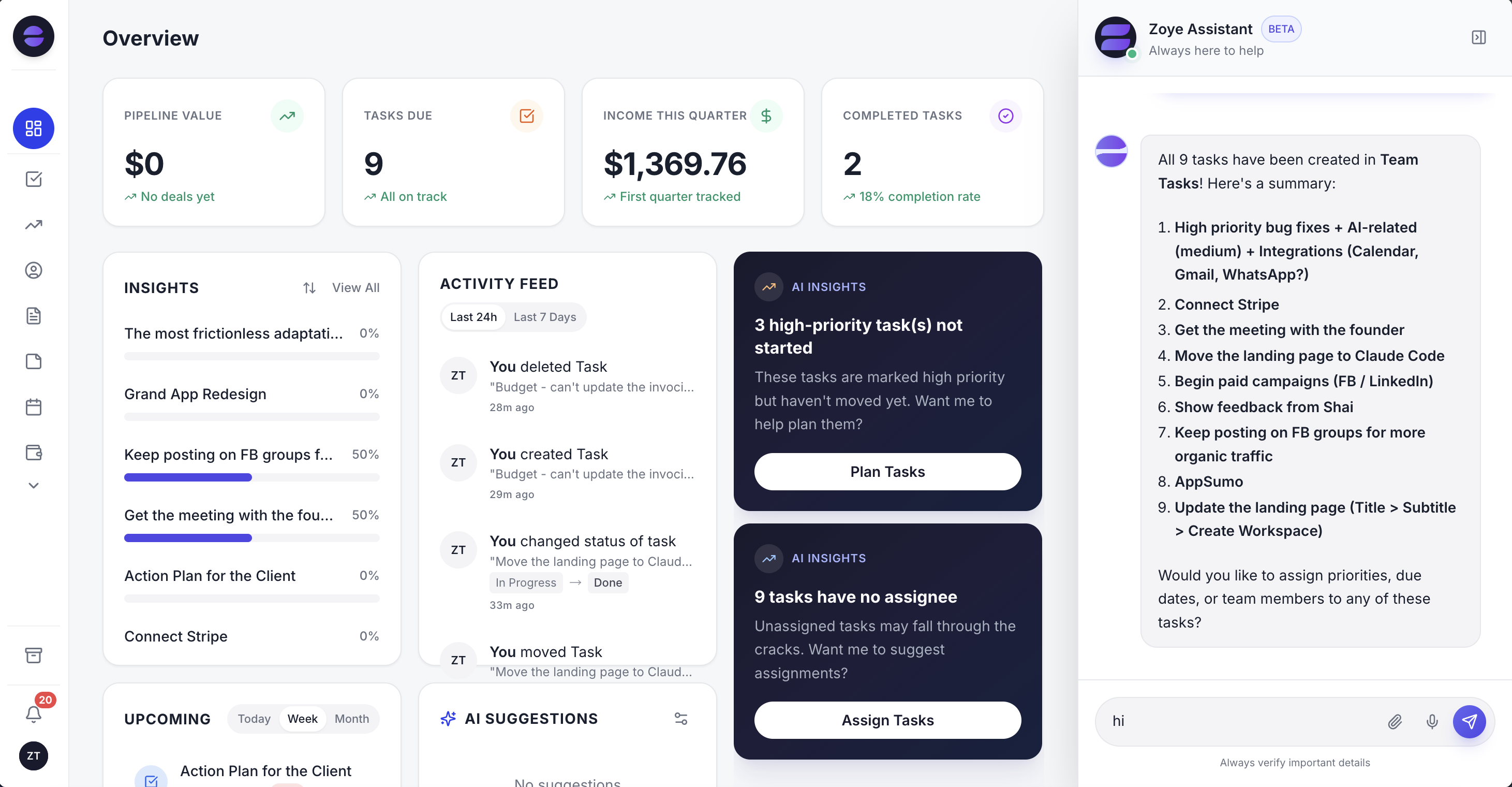
The overview shows which conversations turned into deals and tasks this week, so nobody has to scroll a chat app to find the next step.
Limits: no website chat widget (a click-to-chat button and QR code send website visitors to WhatsApp instead), no help-centre deflection, and Zoye does not run ads; it captures and works the leads ads produce.
Pricing (as of October 2026): Almost Free costs $5 a month ($4 billed yearly) for 1 member and covers the core tools, 15 AI prompts a month and the Google integrations, but not automations, so the chatbot features above are not part of it. Starter is $29 a month ($23 yearly) for up to 10 members, Growth $59 ($47) for up to 20, Scale $119 ($95) for up to 100, and Customize is quoted. AI is not billed per conversation or per resolution. The pricing page lists what each plan includes.
Best for: teams of one to ten whose customers write on WhatsApp, Instagram and Facebook, and who want each chat to end in something done.
2. Tidio - the friendly website widget with a separate AI meter
Tidio is a popular first chatbot for online stores: a clean widget, a shared inbox, Flows for rule-based automation and the Lyro AI Agent. The trade-off is that the bill has three meters: human conversations, AI conversations and Flows reach.
Pricing (as of October 2026): Free with 50 billable conversations, Starter at $24.17 a month for 100, Growth from $49.17 for 250 or more, Plus from $300 a month plus usage, and Premium on request. The Lyro AI Agent starts at $32.50 a month for 50 AI conversations, with self-serve limits from 50 to 1,000 a month, and Flows from $24.17 a month for 2,000 visitors reached. Tidio's Lyro page cites a 75% average resolution rate. Our best Tidio alternatives review covers who outgrows it.
Best for: stores with steady website traffic and repeat pre-sale questions.
3. Crisp - flat price per workspace, with messaging apps on the mid plan
Crisp prices per workspace rather than per conversation, which makes a busy month predictable. Its omnichannel inbox, with WhatsApp Business and Instagram DMs, starts on Essentials.
Pricing (as of October 2026): Free for 2 agents and 100 customer profiles with no AI credits. Mini is $45 a month for 4 agents with $5 of AI credits (Crisp estimates around 90 automated conversations). Essentials is $95 a month for 10 agents with $25 of credits (around 450 conversations). Plus is $295 a month for 20 or more agents with $75 of credits.
Best for: small teams that want the website and messaging apps in one inbox at a flat price.
4. tawk.to - the zero-budget website chat
tawk.to gives away its live chat, ticketing and knowledge base and earns from extras. It is the honest answer to "we cannot pay for a chatbot yet". The trade-off is that messaging apps are not there yet and AI is an add-on.
Pricing (as of October 2026): core product free with a "Powered by tawk.to" label; branding removal $29 a month; AI Assist has a free tier for low volume and paid plans from $29 a month; hired human agents at $1 an hour. A Messaging product is in beta, and WhatsApp and Instagram are not named on the pricing page.
Best for: a small site that needs a widget and an FAQ today.
5. Intercom - the strongest AI agent, priced per outcome
Intercom's Fin is one of the most capable support AI agents, answering from your help content and running workflows. The trade-off is two meters: seats and outcomes.
Pricing (as of October 2026): Essential at $29 per seat a month, shown at $19 for new customers. Advanced is $85 and Expert $132 per seat a month. Fin costs $0.99 per outcome on every plan. Copilot is $29 per agent a month billed yearly or $35 monthly. WhatsApp is pay-as-you-go per conversation, and Instagram is not mentioned on the pricing page.
Best for: small support teams with a solid help centre, where a high AI resolution rate is worth paying for.
6. LiveChat - polished website chat with AI resolutions bundled
LiveChat is a mature agent workspace with an AI agent included in each plan. The trade-off is per-user pricing, and WhatsApp and Instagram appear as marketplace integrations rather than in the plan table.
Pricing (as of October 2026): Essential is $19 per user a month billed yearly ($25 monthly) with 10 AI resolutions a month; Growth is $79 per user yearly ($99 monthly) with 200. Extra resolutions cost $49.50 per 50.
Best for: teams that staff website chat during business hours.
7. HubSpot - a chatbot builder inside a CRM you may already use
HubSpot's live chat and conversational bots start on its free tier and log chats to HubSpot's free CRM. AI replies come from the Breeze Customer Agent, which runs on HubSpot credits. The trade-off is that the jump from Starter to Professional is steep.
Pricing (as of October 2026): live chat on the free tier with HubSpot branding; conversational bots with limited features on Free and Starter. Service Hub Starter is shown at $7 or $20 per seat a month depending on billing, with 500 credits. Professional is $90 per seat a month on an annual commitment or $100 monthly, plus a $1,500 onboarding fee and 3,000 credits. Enterprise is $150 per seat with a $3,500 onboarding fee. The Customer Agent's per-conversation credit cost is not listed on the pricing page.
Best for: teams already running sales on HubSpot.
8. Wati - WhatsApp broadcasts with a no-code bot builder
Wati is a well-known WhatsApp Business Platform tool built around a shared inbox, broadcasts and a chatbot builder. Its Growth inbox also takes Facebook, Instagram and a website widget, and its Astra product builds AI agents for web, WhatsApp and voice.
Pricing (as of October 2026): Growth $59 a month billed yearly for 3 users with 250 AI Co-pilot credits, Pro $119 a month billed yearly for 5 users (extra users $39 each) with 500 credits, Business on quote. Astra AI agents are "priced separately" and the pricing page shows no figure, and Meta's message charges come on top.
Best for: marketing-led teams whose WhatsApp work is mostly campaigns.
9. ManyChat - Instagram and Messenger flows for marketers
ManyChat is the best-known flow builder for Instagram comment-to-DM and story-reply campaigns. The trade-off is pricing by active contacts, so a post that goes well raises the bill, and a subscriber is a chat identity with tags rather than a customer record.
Pricing (as of October 2026): ManyChat's pricing page lists the same figures as our October 2026 review of Instagram automation tools: a free tier for 25 active contacts, Essential from $14 a month billed yearly ($17 month to month) for 250, Pro from $29 ($39) for 2,500, Business from $69 ($99) for 7,500 and Advanced from $139 ($199) for 25,000, each with a per-contact charge above the allowance. AI is included from Pro. Check the live page before budgeting.
Best for: creators and marketers running Instagram campaigns at volume.
Small business chatbots compared
The table puts the nine tools side by side on what decides fit for a small team: the front door each one is built for, the entry paid price, how AI is charged and whether WhatsApp and Instagram are part of it. All prices are from the vendors' own pages as of October 2026.
| Tool | Built for | Entry paid price | AI charged by | ||
|---|---|---|---|---|---|
| Zoye | Chats that end in bookings, payments and tasks | $59/mo Growth, up to 20 members | Plan allowance, not per conversation | Official Platform (own number coming soon) | Yes, in Chats |
| Tidio | Website widget | $24.17/mo Starter | Lyro from $32.50/mo for 50 conversations | Listed on all plans | Listed on all plans |
| Crisp | Flat-price inbox | $45/mo Mini | AI credits per plan | From Essentials ($95) | From Essentials ($95) |
| tawk.to | Free website chat | $29/mo branding removal | AI Assist from $29/mo | Not named | Not named |
| Intercom | AI support | $29/seat Essential | $0.99 per Fin outcome | Pay-as-you-go | Not listed |
| LiveChat | Website chat | $19/user/mo yearly | 10 or 200 resolutions, then $49.50 per 50 | Marketplace | Marketplace |
| HubSpot | CRM with chat | $7 to $20/seat Starter | HubSpot credits | Up to 1,000 messages a month on higher tiers | Not listed |
| Wati | WhatsApp campaigns | $59/mo yearly Growth | Co-pilot credits; Astra quoted | Core channel | In the Growth inbox |
| ManyChat | Instagram and Messenger flows | From $14/mo billed yearly, $17 monthly (250 contacts) | Included from Pro, no add-on | Second channel | Core channel |
What does a small business chatbot cost per month?
For a typical small team, a working chatbot costs between nothing and about $250 a month in software, plus Meta's message fees if WhatsApp is involved. The meter matters more than the sticker: seats, AI conversations, outcomes or contacts can each turn a cheap plan into an expensive one.
Here is an illustrative month for a 2-person business with 150 chats handled by AI and 60 that need a person, using list prices as of October 2026. These are estimates, because each vendor counts a conversation, an outcome or a resolution differently.
- Tidio: Starter at $24.17 covers 100 human conversations, so 60 fits. Lyro starts at $0.65 per conversation at the entry step, and Tidio's Lyro page says conversations start from $0.50, so 150 AI conversations land around $75 to $98. Roughly $100 to $122 a month before Flows.
- Intercom Essential: 2 seats at $29 is $58, plus up to 150 Fin outcomes at $0.99 ($148.50). Up to about $207.
- LiveChat Growth: 2 users at $79 yearly is $158 with 200 AI resolutions, which covers the month.
- Crisp: Mini's credits cover about 90 automated chats, so 150 points to Essentials at $95, which also adds WhatsApp and Instagram.
- tawk.to: $0 for chat; from $29 if you add AI Assist and outgrow its free tier.
- Wati Growth: $59 a month billed yearly, plus Meta's per-message charges, with Astra AI agents quoted separately.
- Zoye Growth: $59 a month ($47 billed yearly) for up to 20 members, the plan that includes the WhatsApp and Meta automations, with contacts, deals, bookings, payment links and tasks in the same plan; WhatsApp messages carry Meta's charges as with any Platform tool, and the pricing page shows the AI allowance per plan.
Two hidden costs show up in most small business budgets. The first is Meta: every WhatsApp tool passes on Meta's per-message charges, although service replies inside the 24-hour window fall under the 1,000 free service messages per number each month since October 2026. The second is your own time: a rule-based bot with 40 branches needs someone to keep it current, which is a cost even when the tool is cheap. For a fuller breakdown by build type, see our guide to a free WhatsApp chatbot and where free plans stop.
See what Zoye can do for you
CRM, deals, tasks and your Instagram, Facebook and WhatsApp automations in one workspace. Just ask Zoye and it sets any of it up for you.
Explore FeaturesHow to set up a chatbot in one week
A small business can launch a useful chatbot in about a week by starting from real questions, not from a flowchart. Spend the first days on content, connect one channel, add qualification and booking, then test with real messages before switching it on for everyone.
Day 1 and 2: collect the questions. Scroll back through the last month of WhatsApp, Instagram and email. Write down every question asked more than twice, with the answer you actually gave. Most teams stop at 20 to 25. Add the things the bot must never say, such as discounts it cannot offer.
Day 3: connect one channel. Start where most of your messages arrive. For Instagram and Facebook, that means a Business or Creator account linked to a Page you admin. For WhatsApp, a provider on the official Business Platform. Our step-by-step on how to create a WhatsApp chatbot covers the WhatsApp side.
Day 4: qualification and booking. Pick the two or three questions that sort buyers from browsers. Decide what happens after: offer times, send a quote, or hand over. If the tool can write answers into the contact record, make sure each answer has a field.
Day 5: the handover. Decide who gets a chat the bot cannot handle, how they are told, and how fast they should answer. Write the line the bot says when it hands over, and make it honest about the wait.
Day 6 and 7: test with real messages. Have two or three people outside the team message the bot with real questions, including awkward ones. Read every reply. Fix wrong answers in the source content rather than patching single replies.
After launch, read 20 conversations a week for the first month. Look for questions the bot answered badly, places where people dropped off, and handovers that took too long. Each one is a small fix.
Common chatbot mistakes that cost small businesses customers
Most chatbot failures in small businesses come from the setup, not the software: a bot that hides the human, asks too many questions, guesses at prices or keeps messaging people who have gone quiet. Each of these is avoidable with a rule you set on day one.
- No visible way to reach a person. Put "talk to a person" in the first message and honour it. A customer trapped in a loop leaves and tells others.
- Too many questions before any help. Answer first, qualify second. Three questions is plenty for most small businesses.
- Invented answers. An AI chatbot that is not given a price will sometimes make one up. Give it your real prices or ranges, and a line to say when it does not know.
- Breaking Meta's rules. Messaging people outside the 24-hour window without an approved template, cold-messaging people who never contacted you, or using an unofficial WhatsApp or Instagram bot can get a number or account restricted.
- Chats that die in the inbox. If the conversation is not tied to a contact and a follow-up, the lead is gone when the chat scrolls away.
- Never reviewing the transcripts. The first month of chats is the cheapest market research you will get.
Ready to hand off the busywork?
Zoye brings AI-powered CRM, task management, and automation into one workspace.
Get StartedWhich chatbot should a small business choose?
Choose by where your customers write first and by what has to happen after the chat, not by the longest feature list. A website-led store should start with a widget, a support team with a help centre should look at an AI support platform, and a small team selling through WhatsApp and Instagram should pick a tool where the chat and the customer record are the same thing.
- Customers mostly on your website, small budget: tawk.to to start, Tidio or Crisp when you want AI.
- Website plus WhatsApp and Instagram at a flat price: Crisp Essentials at $95 a month.
- A support team with a strong help centre: Intercom, budgeted per Fin outcome.
- Already on HubSpot: its chat and bots, then the Customer Agent if the credits make sense.
- WhatsApp campaigns first: Wati.
- Instagram comment campaigns at volume: ManyChat, sized by active contacts.
- Customers on WhatsApp and Instagram, and chats that should end in a booking, a payment or a follow-up: Zoye Growth at $59 a month ($47 billed yearly) for up to 20 members, the plan that includes the WhatsApp and Meta automations.
Whichever you pick, run a two-week trial on one real channel and count outcomes, not chats: bookings made, payments received, follow-ups with an owner and a date. That number tells you whether the chatbot is working for the business or just talking.
If your customers already message you on WhatsApp and Instagram, book a Zoye demo and bring a week of real conversations to test against.