An Instagram auto reply is a direct message your business account sends automatically when someone writes, taps a suggested question, replies to a story or comments on a post. Meta gives professional accounts a few built-in options at no cost, DM automation tools add keyword and story triggers, and an AI agent can read the message and answer the actual question.
Key takeaways (October 2026)
- Instagram's built-in frequently asked questions hold up to 4 questions, and Meta Business Suite adds an instant reply, an away message and up to 5 suggested answers, all on Business or Creator accounts only.
- Every automated reply runs inside a 24 hour window after the person's last message, or up to 7 days after a first message from a Click-to-Instagram-Direct ad.
- A comment can trigger exactly 1 private reply to that commenter, within 7 days of the comment, according to Meta's developer documentation.
- The API caps a text DM at 1,000 bytes and offers up to 13 tappable quick reply buttons, so short replies with buttons outperform long paragraphs.
- The real gap is not the first reply but what happens after it: who answers the follow-up question, and where the lead is saved.
Most accounts treat Instagram auto replies as one switch. They are really three layers, each with different rules, and mixing them up is how a business ends up with a cheerful "thanks for your message!" that answers nothing, or an automation that quietly stops after one message. This guide walks through the native tools, the DM automation triggers, the rules Meta enforces, six tools that do the job, and twelve replies you can adapt today. The Meta details were checked against Meta's developer documentation and its help pages in October 2026.
The three layers of an Instagram auto reply
An Instagram auto reply can come from three places: the fixed tools Meta builds into the app and Meta Business Suite, a DM automation tool connected through Meta's API that reacts to keywords, stories and comments, or an AI agent that reads each message and answers from your own information. They differ in how much the reply knows.
Layer 1: native replies. Fixed text you write once. The frequently asked questions shown to people who open a chat with you, an instant reply to a first message, an away message, and saved replies that a person inserts by hand. They know nothing about who is writing.
Layer 2: DM automation. A tool connected to your account through Meta's official messaging API watches for triggers: a keyword in a DM, a reply to a story, a comment on a post, a tap on a button. It sends a prepared message or a short flow of messages. It knows which trigger fired, and sometimes a tag or two.
Layer 3: an AI agent. The same API connection, but instead of matching a trigger to a script, the agent reads what the person wrote, checks your services, prices and calendar, and answers. When it should not answer, it hands the chat to a person.
The layers stack rather than compete. Plenty of accounts keep the native FAQ questions on, run a keyword automation for one campaign, and let an agent handle everything that does not match. Our Facebook and Instagram automations page shows how those pieces fit together in one setup.
Instagram's built-in auto replies, as of October 2026
Instagram's own auto reply tools are the frequently asked questions in chats, saved replies, and the inbox automations in Meta Business Suite: an instant reply to a first message, an away message, suggested answers to common questions and, on desktop, custom keyword responses. They cost nothing and need a Business or Creator account.
Meta moves menu names around between app versions, so if a label below reads slightly differently on your phone, look for it under Tools in your messages or under Inbox automations in Meta Business Suite.
Frequently asked questions in chats
According to Instagram's Help Center, a professional account can add up to 4 frequently asked questions. They appear when someone starts a chat with you, and each one can carry an automated answer that sends when the person taps it. You set them from your messages: open the inbox, find Tools, then Frequently asked questions. Two details from the Help Center matter in practice: if a business account has not written its own questions, Instagram may display suggested ones based on the account type, and a question tapped by a new person lands in your Requests rather than your main inbox.
On the developer side, the same idea is called ice breakers. Meta's documentation allows up to 4 ice breaker questions per locale, with one default locale required, and notes they are not shown on desktop. If you use a DM tool, it will usually manage these for you.
Saved replies
Saved replies are not automatic. They are texts you store once and insert into any chat with a shortcut, and Meta lists them among its messaging tools for professional accounts and Meta Business Suite. They are the right tool for the questions that need a human glance before sending: a custom quote, a delivery problem, a refund.
Instant reply and away message in Meta Business Suite
Meta Business Suite's inbox covers Facebook and Instagram messages in one place. According to Meta's Business Help Center, an instant reply sends a customised message to the first message someone sends your business, and an away message answers when you have set yourself away. Meta also offers recommended automated responses for up to 5 frequently asked questions. Custom keyword responses, where a word in the message triggers a set answer, are available on the desktop version of Business Suite only, and when a keyword response and an away message both match, Meta sends the away message.
AI auto replies for creators
Instagram's Help Center also describes AI auto replies for professional accounts that have built a creator AI in Meta AI Studio, answering a chosen audience such as people you do not follow. The page says the feature is being introduced gradually, so it may not appear on your account. It is aimed at creators answering fans, not at businesses that need prices, bookings and lead records handled.
Where the native tools stop
Native Instagram auto replies are one fixed text per situation. They cannot answer a question that is not on the list, cannot use a name or an order, cannot follow up when someone goes quiet, cannot route a chat to the right teammate and cannot save the person as a lead. For a small account with predictable questions that may be fine.
Here is what you notice once messages pick up:
- The fourth question is never the one people ask. With 4 FAQ slots and 5 suggested answers, everything else waits for a person.
- Stories and comments are outside them. The native tools answer DMs. A story reply asking "how much?" or a comment saying "info" gets nothing.
- No memory. The person who asked about prices in March and booked in May is two unrelated chats.
- No ownership. In a shared inbox nobody knows who is answering, so two people answer or nobody does.
- No follow-up. After the instant reply, if the person goes quiet, nothing else happens.
- No record. The conversation never becomes a contact with a source, a stage and a next step.
Want to see it in action?
See Zoye catch a new lead, answer on WhatsApp and set up the follow-up, all from one message.
See How It WorksThe four triggers behind Instagram DM automation
Instagram DM automation runs on four kinds of trigger: a keyword or any message in a DM, a reply to one of your stories, a comment on a post or Reel, and a tap on a suggested question or button. Each one opens a different kind of conversation, and each has its own limits under Meta's rules.
1. A DM, with or without a keyword. Someone writes "PRICE", or "hi, do you ship?", and the automation answers. Keyword rules are predictable; an agent handles the messages that match no keyword, which in most inboxes is the majority.
2. A story reply. Story replies arrive as DMs, so they open the same 24 hour window. A story that ends with "reply YES for the list" is a clean trigger because the person chose to write to you.
3. A comment. The automation can post a public reply under the comment and send one private message to the commenter. This is the "comment GUIDE and I will send it" pattern. The mechanics, the 7 day limit and how to write that one message are covered in our guide to Instagram comment to DM automation, so we will not repeat them here.
4. A tap. FAQ questions, ice breakers and quick reply buttons all send a message on the person's behalf, which counts as them writing to you. Buttons are the most underused trigger: they turn "what would you like to know?" into three choices a thumb can hit.
Meta's rules for automated Instagram DMs
Automated Instagram DMs are allowed on Business and Creator accounts connected to a Facebook Page through an app Meta has approved, and only to people who engaged first. Replies run inside a 24 hour window from the person's last message, up to 7 days after a Click-to-Instagram-Direct ad, and one private reply per commenter within 7 days.
The details, from Meta's developer documentation and messaging policy as of October 2026:
- Account and access. A Business or Creator account linked to a Facebook Page, connected through an approved Meta app. Message access for connected tools must be switched on in Instagram's message settings.
- The 24 hour window. Your automation can answer, including with promotional content, for 24 hours after the person's last message. Each new message from them restarts it.
- Ads extend it. After a first message from a Click-to-Instagram-Direct ad, the window may last up to 7 days from that message.
- Private replies. One message to the commenter, sent within 7 days of the comment. On an Instagram Live, only while the broadcast is running. Follow-ups need the person to reply first. Meta also caps private replies to post and reel comments at 750 per hour per Instagram account.
- Requests folder. A first message to someone who does not follow you lands in their Requests. Meta's API also stops returning requests that have been inactive for 30 days.
- Message limits. Text must be 1,000 bytes or less. Images can be PNG or JPEG up to 8MB, with up to 10 in one message; audio, video and PDF files can be up to 25MB.
- Quick reply buttons. Up to 13 per message, each title up to 20 characters, and not shown on desktop. Buttons that ask for a phone number or email are disabled on Instagram.
- Human Agent tag. A separate 7 day period in which a person, not a bot, can reply, and it needs App Review approval. It is for slow human answers, not for stretching an automation.
- Disclosure and speed. Meta recommends that bots say they are automated at the start, after a long gap, or when switching from a person to a bot, and some laws require it. Bots are expected to respond within 30 seconds.
- No cold outreach. Most legacy message tags that once allowed messages outside the window have been retired. Following someone, or them following you, does not open a conversation.
What gets accounts limited is everything outside this list: bots that log in with your password, follow and like in bulk, scrape follower lists, or send DMs to people who never wrote to you.
Native replies, DM automation or an AI agent: the comparison
The three options differ in what triggers the reply, what the reply knows and what happens afterwards. Native tools answer a first message with fixed text, DM automation adds keywords, stories and comments, and an AI agent answers whatever was asked and saves the person as a lead.
| Native tools (Instagram + Business Suite) | DM automation tool | AI agent with a lead record | |
|---|---|---|---|
| Triggers | First message, FAQ tap, away status, keyword on desktop | DM keywords, story replies, comments, buttons | Any message, story reply, comment or button |
| Answers questions not on the list | No | Only if a keyword matches | Yes, from your own information |
| Comment to DM | No | Yes, one private reply per commenter | Yes, one private reply per commenter |
| Follow-up inside the 24 hour window | No | Yes, by flow | Yes, by reading the reply |
| Hands over to a person | Manually | By rule or tag | Yes, with the whole chat on the lead |
| Saves the person as a lead | No | As a subscriber in the tool | Yes, with source, owner and next step |
| Cost | No charge | Usually priced on contacts | Depends on the product |
| Best for | Low volume, fixed questions | Campaigns and creators | Businesses selling through DMs |
See what Zoye can do for you
CRM, deals, tasks and your Instagram, Facebook and WhatsApp automations in one workspace. Just ask Zoye and it sets any of it up for you.
Explore FeaturesSix Instagram DM automation tools in 2026
Six tools cover most needs: Meta's own native tools at no cost, ManyChat for flow building, Inrō for light Instagram-first automation, Chatfuel for AI-led conversations, respond.io for teams sharing an inbox, and Zoye for turning every DM into a followed-up lead. Prices below are from each vendor's page as of October 2026.
Meta's native tools. FAQ questions, instant reply, away message, suggested answers and desktop keyword responses, all at no charge. Best for low volume and fixed questions.
ManyChat. The established DM flow builder, with keyword, story and comment triggers and a mature template library. ManyChat's pricing page, as of October 2026, lists a free plan for 25 active contacts; Essential starts at $14 a month billed yearly ($17 month to month) for 250 active contacts, Pro at $29 ($39) for 2,500, Business at $69 ($99) for 7,500 and Advanced at $139 ($199) for 25,000, with AI included from Pro. Going past an allowance adds a charge per extra contact, so a Reel that performs raises the bill.
Inrō. An Instagram-first DM tool that runs on Meta's official API with a simpler setup. As of October 2026: a free plan capped at 100 activated contacts a month and Pro from 12.99 euros a month, priced by monthly activations.
Chatfuel. Instagram, Messenger and WhatsApp automation with AI agents. As of October 2026, Business is $18 a month billed yearly with $20 of AI credits a month, so cost follows how much the AI talks.
respond.io. A multichannel shared inbox for several agents. As of October 2026, Starter is $99 a month on monthly billing or $79 billed yearly, with unlimited monthly active contacts listed.
Zoye. Comments, DMs and story replies answered automatically and saved as leads in the same workspace as deals, tasks, calendar and invoices; more on it below.
For the full field, including scheduling tools that are often mislabelled as automation, see our best Instagram automation tools guide, and if contact-based pricing is your reason for looking, the ManyChat alternatives comparison.
12 Instagram auto reply templates, by trigger
These twelve replies are written for the triggers above and fit the API's limits: short, one clear next step, and buttons where a choice helps. Replies 1 to 4 work as native FAQ answers or an instant reply, 5 to 9 as automation for keywords and stories, and 10 to 12 need a tool that knows the person's record.
Where a reply uses {name} or another field, the value has to come from a record, so it only works in a connected tool. Buttons are shown in square brackets.
Native: FAQ answers and instant replies
1. "What do you offer?" (FAQ answer). We help small teams with [your service in five words]. The quickest way to see if it fits is our price sheet or a short call. Which would you like? [Price sheet] [Book a call]
2. "Where do I start?" (FAQ answer). Most people start with [entry offer]. It takes about [time] and you will know by the end whether the full service is worth it. Want the details here in the chat?
3. Instant reply to a first message. Thanks for writing to [business name]. A person reads every message and replies within [time]. If you send what you need and roughly when, the first answer can be a real one.
4. Away message on a busy day. We are fully booked with clients today, so replies are slower than usual. Your message is saved and you will hear from us before [time] tomorrow.
Automation: keywords and story replies
5. Keyword PRICE in a DM. Here is our current price sheet: [link]. Prices depend on [the one variable], so tell us that and we will confirm an exact figure. [Get an exact price] [Just browsing]
6. Story reply to a "reply YES" story. Great, here it is: [link or file]. One quick question so we send you the right next thing: is this for you or for a team? [Just me] [A team]
7. Story reply with an emoji or reaction. Glad that one landed. We post a new [topic] tip every [day]. Want us to send the full version of today's here? [Yes please] [No thanks]
8. Keyword BOOK. Happy to book you in. Which suits you better? [This week] [Next week] [Not sure yet]. We will send times that are actually free.
9. A message that matches no keyword. Thanks, a person from the team will read this shortly. Meanwhile, these are the three things people ask most: [Prices] [Availability] [How it works]
Record-aware: needs a connected tool
10. Returning customer. Hi {name}, good to hear from you again. Is this about your [last service or order], or something new? [My last order] [Something new]
11. Follow-up after a quiet day (inside the 24 hour window). Hi {name}, still happy to help with {topic}. Would two options with prices make it easier to decide? Reply STOP and we will not message again.
12. Handover to a person. Thanks {name}, I am handing this to {owner}, who looks after {topic} and can see this whole chat, so there is no need to repeat anything. They will reply here soon.
Reply 11 only works while the window is still open, so the follow-up has to happen within 24 hours of the person's last message. Reply 12 is only honest if the person taking over really sees the chat history; check that before you promise it.
Setting up an Instagram DM bot in one afternoon
You can set up a working Instagram DM bot in an afternoon: switch to a professional account, write the native FAQ answers, connect an automation tool through Meta's login, build one keyword reply and one story reply, add a handover rule, then test from a second account as a follower and as a non-follower.
- Confirm the account. Business or Creator, linked to a Facebook Page you admin, with message access for connected tools switched on.
- Read your last 50 DMs. List the five questions that come up most and the ones that always need a person.
- Fill the native layer. Write the 4 FAQ questions and answers and an instant reply in Meta Business Suite.
- Connect a tool through Meta's own login screen. If a tool asks for your Instagram password, stop.
- Build one keyword reply and one story reply. Use buttons where a choice helps; keep text well under the 1,000 byte limit.
- Decide what goes to a person. Complaints, refunds, custom quotes and anything the bot is unsure about.
- Decide where the lead lands. A contact with the source, an owner and a next step, or at least a tag you will actually look at.
- Test twice. From a second account that follows you and one that does not, so you see both the inbox and the Requests behaviour.
Ready to hand off the busywork?
Zoye brings AI-powered CRM, task management, and automation into one workspace.
Get StartedMistakes that make Instagram auto replies backfire
Instagram auto replies backfire when they promise a person and none comes, answer a different question than the one asked, hide that they are automated, send a wall of text the phone truncates, or try to reach people who never wrote. Each mistake is avoidable with a rule or a test.
- "We will get back to you" with nobody watching. An automated reply raises expectations. If no one answers the follow-up within the window, the person is worse off than with no reply.
- The keyword trap. "Info" or "price" inside an ordinary sentence fires the wrong flow. Choose trigger words people do not use by accident, and add a catch-all for everything else.
- Pretending to be a person. Say it is an automated assistant and that a person can take over. It costs nothing and avoids complaints.
- Long first messages. On a phone the preview shows a line or two. Lead with the answer, then the button.
- Welcome DMs to new followers. A follow is not a conversation, and tools that promise this are working outside Meta's rules.
- No record. If the person who asked about prices does not exist anywhere after the chat ends, the automation produced activity, not a lead. Our guide to getting leads from Instagram covers the capture side in depth.
How Zoye answers Instagram DMs and saves every lead
Zoye is an AI Business Operator: one workspace with thirteen connected tools, including CRM and contacts, deals, tasks, calendar, documents, invoices and Facebook and Instagram automations, plus an assistant that operates them in the app, on WhatsApp, in Slack and through the Claude connector. On Instagram, Zoye answers people and then makes sure the conversation becomes work someone follows up.
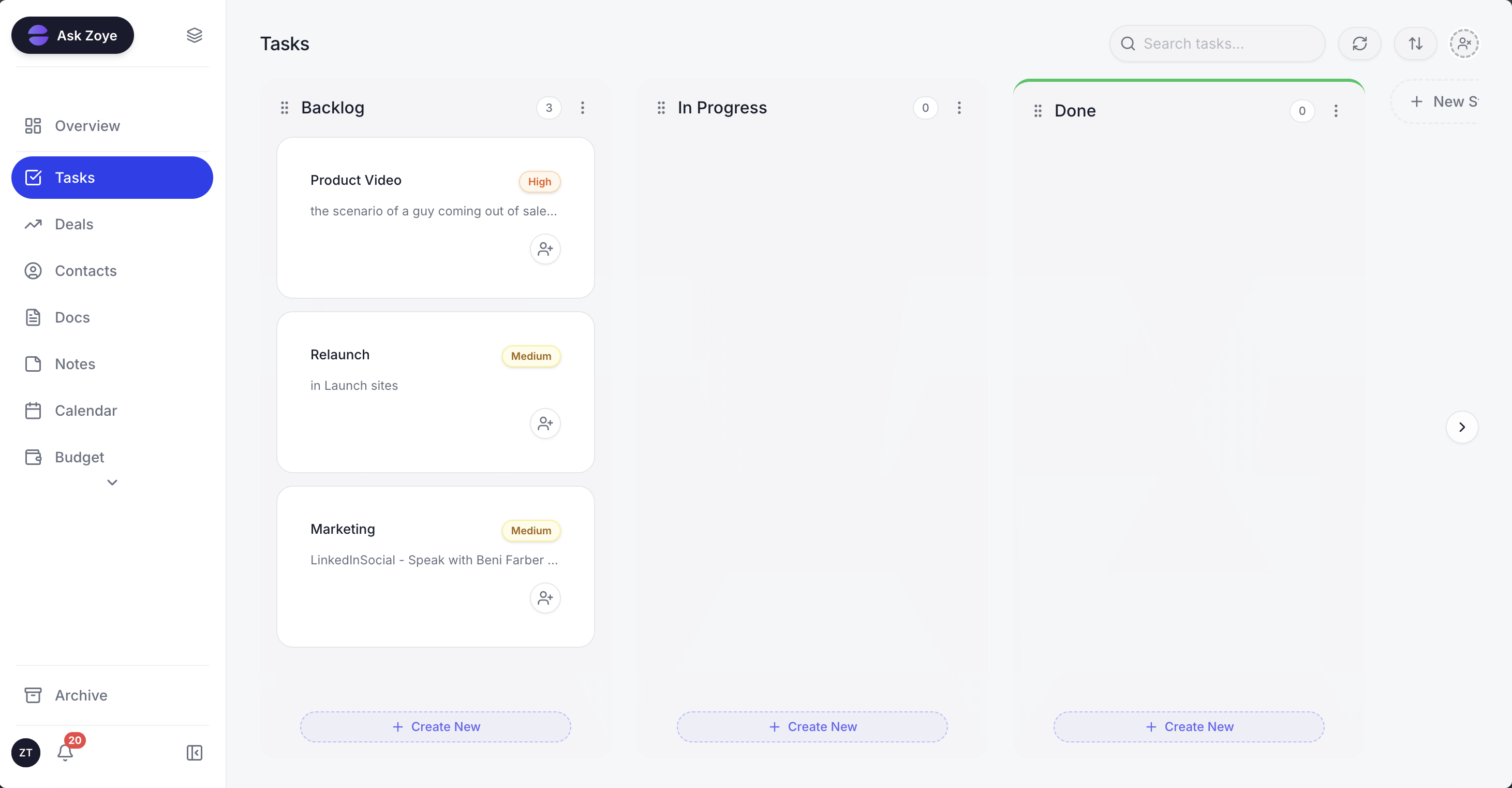
Each Instagram conversation that needs a person turns into a task with an owner, next to the rest of the team's work.
Connecting one Facebook Page brings in its linked Instagram account too. A new DM or a reply to one of your stories gets an immediate answer from Zoye: tappable buttons, a file like the current price sheet, or a reply in the tone your brand uses. Anything it should not answer is handed to a person on your team, with the whole chat on the lead's card. Comments on a post or Reel can get a public reply plus a private DM within seconds, firing on a keyword, on one post or on every comment, and Instant Form lead ads arrive as contacts with the campaign and ad name saved.
The person becomes an ordinary Zoye contact, matched to an existing record if they have been in touch before rather than duplicated. From there the rest of the workspace applies: an owner is assigned, a follow-up task appears, the WhatsApp welcome can fire, and the lead shows up in your reports next to every other source. Your team works these conversations in Chats, one inbox for Instagram and Facebook messages and comments plus WhatsApp conversations, with assignment, team notes, quick replies and every chat saved on the contact card.
Getting started takes four guided steps. You connect the Page, pick the workspace its leads go to, set up the automatic DM, and then comment on one of your own posts to watch it fire. Later changes work the same way: describe what should happen, for example "when someone replies to a story asking for prices, send the price list and create a call task for tomorrow", and Zoye builds the rule, lays it out in plain English and waits until you approve it. There is a visual builder for people who like one; nobody is required to use it. If Meta rejects a message or the Page loses a permission, you are told the reason, never shown a false confirmation.
Honest limits: Zoye is not a ManyChat-style flow canvas, not a post scheduler and not a helpdesk ticketing suite, and it does not run ads; it captures and works the leads your content and ads produce.
Pricing (monthly, or per month when paid yearly): Almost Free is $5 or $4 for 1 team member and 1GB, and covers the core tools, 15 AI prompts a month and the Google integrations; it does not include automations. Starter is $29 or $23 for 10 team members and 5GB, Growth $59 or $47 for 20 and 10GB, Scale $119 or $95 for 100 and 25GB, and Customize is quoted. See pricing for which plans include the Instagram automations.
Best for: small businesses that sell through Instagram DMs and want every message answered, every lead saved and every follow-up owned.
Start with the reply people actually need
A good Instagram auto reply either answers the question or tells the person exactly what happens next. Switch on the native FAQ and instant reply today, add one keyword and one story trigger when campaigns start, and move to an agent when the questions outgrow your list.
Write your four FAQ answers this week using templates 1 to 4. When you want DMs, story replies and comments answered and turned into leads with owners and tasks, see how it works on our Facebook and Instagram automations page.
Related reading
For more context, see Instagram comment to DM automation, the best Instagram automation tools, how to get leads from Instagram, and WhatsApp auto reply.