
Most event planners do not lose business because they are bad at events. They lose it in the gaps between messages. An enquiry arrives on a Friday night and gets answered on Monday, by which point the couple has booked someone else. A deposit invoice goes out and quietly ages past due because nobody chased it. A vendor confirmation slips, a final payment is forgotten until the week of the event. The events themselves are flawless. The admin around them leaks money.
That is the real job a CRM has to do for an event planner: hold every enquiry, booking, deposit, vendor, and timeline in one place, and make sure the follow-up actually happens. Most tools in this category are good at the storing part and quiet on the doing part. They give you a tidy pipeline and a place to file contracts, then leave every reminder, every chase, and every first reply for you to send at 11pm between events.
This guide compares the 7 best CRMs for event planners in 2026, ranked for the way event and wedding businesses actually run: enquiry-heavy, deposit-driven, deadline-bound, and mostly conducted over WhatsApp and email. The tool at the top is the one that does not just store the work but does it for you.
Pricing reflects published rates as of July 2026; check each vendor's pricing page for current figures.
Why event planners are rethinking their CRM in 2026
Four shifts are pushing planners away from the software they bought and stopped using.
The enquiry now arrives as a message, not a form. Couples, corporate clients, and party hosts message on WhatsApp and Instagram before they ever fill in a contact form. A CRM that only ingests web forms misses the first and most important touch. The planners winning bookings in 2026 are the ones who reply within minutes on the channel the client actually used.
Deposits and final payments are where the money leaks. An event business lives on the deposit that secures the date and the balance that clears before the day. Both need chasing, on time, politely, more than once. Doing that by hand across a dozen live events is exactly the task that gets dropped when you are busy, which is always.
Coordination has too many moving parts to hold in your head. Venue, caterer, florist, photographer, entertainment, transport, plus the client and their timeline. A booking-first tool files the contract but does not keep the vendor thread and the payment status and the run-sheet in one connected view.
Owners want the software to do the work, not just record it. The category is moving from tools you operate to an operator that works for you. Instead of logging in to see what to chase, planners increasingly want the system to capture the lead, send the reply, chase the deposit, and flag only what needs a human decision.
The 7 best CRMs for event planners in 2026
1. Zoye - the operator that captures leads and chases deposits itself
Zoye is the strongest choice for event planners because it is not a filing cabinet you have to remember to open. It is an AI Business Operator that runs the admin side of your event business: it captures every enquiry, replies fast, chases deposits and final payments on schedule, and keeps vendors and timelines in one place, so you can spend your hours on the events instead of the follow-up.
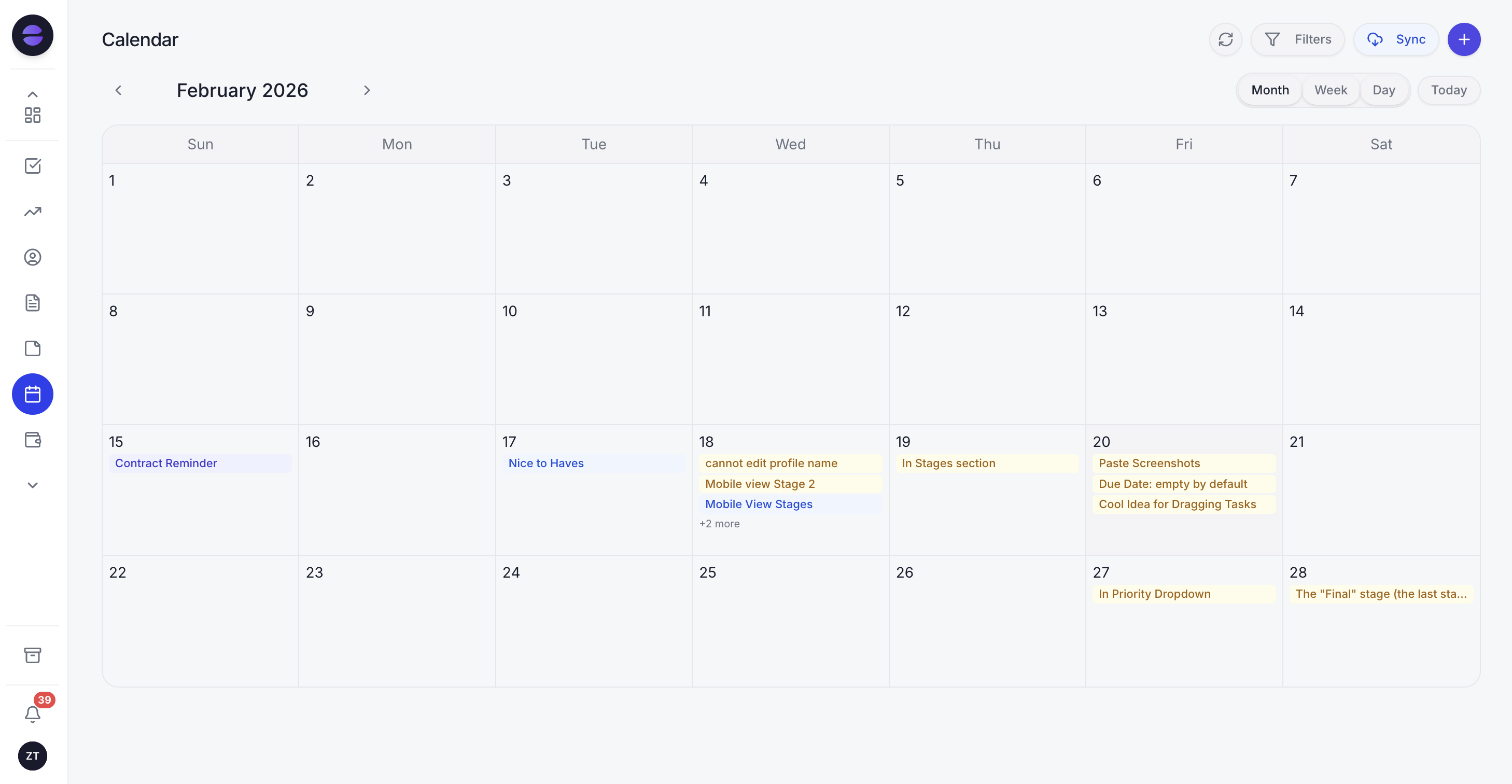 Every booking, site visit, and payment deadline lands on one calendar, and the Zoye Assistant handles the follow-up around each one.
Start with lead capture, because that is where bookings are won or lost. Zoye centralises WhatsApp, Instagram, your enquiry forms, and email into one inbox, and turns each new enquiry into a lead automatically. The assistant can draft or send the first reply the moment a message lands, so a couple who messages at 9pm gets a warm, on-brand response before they move on to the next planner on their list.
Then the deposit and payment chasing, the part every planner dreads. Because Zoye is an operator rather than a passive database, it sends the deposit reminder that secures the date, the gentle follow-up if it goes unpaid, and the final-payment nudge before the event, all on the cadence you set, over WhatsApp or email. It tells you when a client replies or pays and only pulls you in when a real decision is needed.
Underneath the assistant sits a full workspace built for how event businesses actually operate. A CRM holds every client, vendor, and enquiry with full history. A calendar keeps bookings, site visits, tastings, and payment deadlines in one view. Task boards track each event from enquiry to wrap-up. Budget tracking keeps deposits, balances, and vendor costs straight per event. Reports pull bookings, revenue, and outstanding payments into one dashboard so you can see the month at a glance. It all lives in one place instead of a spreadsheet, a booking tool, an inbox, and an invoicing app that never talk to each other.
The other quiet advantage is that you can build automations just by asking for them. Tell Zoye "when someone enquires about a wedding, send the welcome message, create a lead, and remind me to follow up in two days if they go quiet" and it builds that flow, no template library to learn. Over WhatsApp too, so you can run the business from your phone between site visits.
Pricing: Almost Free from 5 dollars per month (4 dollars per month billed annually) for 1 member with the core tools, cancel or upgrade anytime. Starter from 29 dollars per month (10 members). Growth from 59 dollars per month (20 members).
Best for: Solo and small event or wedding planners who want the software to capture leads, chase deposits, and coordinate for them instead of just storing it all.
2. HoneyBook - the booking-first tool for creative businesses
HoneyBook is popular with event and wedding professionals for its polished client experience: branded proposals, contracts, and invoices in one flow. For planners who mainly need a clean booking and payment pipeline, it is a comfortable fit.
The trade-off is that HoneyBook is built around the project file, not around proactive follow-up. It stores the enquiry and the invoice, but the chasing, the fast first reply, and the WhatsApp-first lead capture are still on you.
Pricing: Paid plans typically start around 29 to 39 dollars per month; check HoneyBook's pricing page for current figures.
Best for: Creative and event businesses that want branded proposals and contracts in one place.
3. Dubsado - the customisable client-workflow tool
Dubsado is the power-user's choice among booking tools, with deep customisation of forms, workflows, and canned emails. Planners who enjoy configuring their own process can build a tailored client journey.
The trade-off is exactly that configuration burden. Dubsado rewards time spent setting it up, and its automations run on templates you build and maintain rather than an assistant that adapts. Lead capture from messaging channels is limited.
Pricing: Paid plans typically start around 20 to 40 dollars per month; check Dubsado's pricing page for current figures.
Best for: Detail-oriented planners who want to hand-build their own workflows.
4. Aisle Planner - the wedding-specific planning suite
Aisle Planner focuses tightly on wedding professionals, with design tools, checklists, and timelines built for the wedding workflow. For planners who want wedding-native features out of the box, it speaks the right language.
The trade-off is breadth. It is strong on wedding planning artifacts but thinner as a general CRM for a mixed event business, and the lead-capture and payment-chasing side is not its focus.
Pricing: Paid plans typically start around 20 to 40 dollars per month; check Aisle Planner's pricing page for current figures.
Best for: Dedicated wedding planners who want wedding-specific planning tools.
Want to see it in action?
See Zoye catch a new lead, answer on WhatsApp and set up the follow-up, all from one message.
See How It Works5. HubSpot - the general CRM with a free tier
HubSpot is a capable general-purpose CRM with a well-known free tier and a deep feature set. An event planner can adapt its pipelines and deals to track enquiries and bookings.
The trade-off is that HubSpot is built for generic sales teams, not event businesses. There is nothing wedding or event native about it, the useful automation lives in paid tiers that climb quickly, and you do the work of bending a sales CRM into an event tool.
Pricing: Free CRM tier available. Paid Marketing and Sales tiers scale up quickly per seat; check HubSpot's pricing page for current figures.
Best for: Planners comfortable configuring a general CRM to fit event work.
6. Pipedrive - the simple sales pipeline
Pipedrive is a clean, affordable sales-pipeline CRM that is easy to learn. For a planner who mainly wants a visual pipeline of enquiries moving toward booked, it does that one job well.
The trade-off is that a pipeline is all it really is. There is no vendor coordination, no event-native calendar, no deposit-chasing built for events, and no messaging-first capture. You get a tidy board and little of the surrounding work.
Pricing: Paid plans typically start around 14 to 24 dollars per user per month; check Pipedrive's pricing page for current figures.
Best for: Planners who want a simple visual enquiry pipeline and nothing more.
7. Spreadsheets - the free starting point most planners outgrow
A well-built spreadsheet is where nearly every planner starts, and for a first few events it works. It is free, flexible, and familiar.
The trade-off shows up the moment volume grows. A spreadsheet cannot reply to an enquiry, cannot remind a client about a deposit, cannot centralise WhatsApp, and cannot tell you which final payments are overdue this week. It is a record, not an operator, and the follow-up it does not do is exactly the follow-up that loses bookings.
Pricing: Free.
Best for: Brand-new planners running their first handful of events before the admin outgrows a sheet.
Best CRM for wedding and event planners who live on WhatsApp
If your enquiries and client conversations happen mostly on WhatsApp, most tools on this list are a poor fit, because they were designed around web forms and email. HoneyBook, Dubsado, and Aisle Planner all assume the client comes through a form; the messaging thread where the real conversation happens lives outside the system.
Zoye is built the other way around. It centralises WhatsApp alongside your forms and email, captures each message as a lead, and the assistant can draft or send the first reply so a hot enquiry never sits unanswered while you are on site. For a planner who runs the business from their phone between venues, that is the difference between catching a booking and reading about it too late. If you want to go deeper on selling and coordinating over chat, see how to sell on WhatsApp and this guide to WhatsApp broadcasts done right.
How to choose a CRM for your event business
Three questions narrow the field fast.
1. Where do your enquiries actually come from? If most arrive as messages on WhatsApp or Instagram, you need a tool that captures and replies on those channels, not just a form-and-email CRM. That points to Zoye. If nearly all your work comes through a website form, a booking-first tool like HoneyBook can serve.
2. Do you want to do the follow-up, or have it done? If you are happy to set reminders and send every deposit chase yourself, a booking tool or general CRM will hold the data. If you want the deposits and final payments chased for you on schedule, you want an operator, not a database.
3. How mixed is your event work? A pure wedding planner might value Aisle Planner's wedding-native tools. A planner juggling weddings, corporate events, and parties needs one flexible workspace that adapts to each event type, which favours an all-in-one like Zoye.
See what Zoye can do for you
CRM, deals, tasks and your Instagram, Facebook and WhatsApp automations in one workspace. Just ask Zoye and it sets any of it up for you.
Explore FeaturesMigrating to an operator-first setup
Moving off a spreadsheet or a half-used booking tool sounds daunting, but for most planners the active data set is small: your live enquiries, your booked events with their dates and deposit status, and your regular vendors. That is what you carry forward, not years of dead leads.
The pragmatic path is to bring across only what is active. Export your current enquiries and booked events, import the live ones, and add your vendor list. In Zoye, the assistant helps here too: describe how you work, the stages an enquiry moves through, and the reminders you want, and it sets up the pipeline and the follow-up flows with you rather than leaving you to build them from a blank template. Most planners are running their first automated deposit chase the same afternoon.
The mindset shift matters more than the data move. On a spreadsheet you are the engine, remembering every reply and every chase. With an operator, you set the rules once and the system carries the follow-up, surfacing only the decisions that genuinely need you. For a broader view of getting organised as a small service business, see the guides to a CRM for small business and the easiest CRM for small business.
Why event planners pick Zoye
A few themes come up again and again.
The follow-up finally happens. Deposits, final payments, and enquiry replies get chased on time without the planner remembering, which is exactly the leak that costs bookings and revenue.
The first reply is fast. Enquiries arrive on WhatsApp and get a warm, immediate response, so hot leads do not cool while you are running an event.
One workspace holds the whole business. Clients, vendors, calendar, tasks, budgets, and reports live together instead of scattered across a booking tool, an inbox, a spreadsheet, and an invoicing app.
It scales with you. Solo planner today on the entry plan, a small team next year on the same workspace, no migration, no relearning.
Try Zoye for your event business. The entry plan, Almost Free, starts at just 5 dollars per month with the core tools, for 1 member, and you can cancel or upgrade anytime.
For more context, see the guides to a CRM for small business, the easiest CRM for small business, how to sell on WhatsApp, and running WhatsApp broadcasts the right way.