
Maybe you have already bought a CRM. You set it up over a weekend, imported your contacts, felt organised for about two weeks, and then quietly stopped opening it. The tool is still there, still billing you, still half-empty. The leads kept coming in over WhatsApp and email, and keeping the CRM accurate turned into a second job nobody had time for.
If that is you, the problem was never that you picked the wrong CRM. The problem is that almost every CRM makes YOU do the work. It is a filing cabinet that only stays useful if you feed it every day: log the call, add the note, update the stage, set the reminder, send the follow-up. Skip a few days and it drifts out of date, and an out-of-date CRM is one you stop trusting, which is the same as one you stop using.
So the honest question is not "which CRM has the most features" or even "which has the cleanest interface." It is "which one will I actually still be using in six months." This guide ranks the easiest CRMs for small business in 2026 with that single test in mind. It covers genuinely simple tools that lower the learning curve, and it starts with the one that removes the maintenance entirely.
Pricing reflects published rates as of November 2026; check each vendor's pricing page for current figures.
Why "easy" CRMs still end up abandoned
Four things quietly kill CRM adoption in a small business, and none of them are about how pretty the software looks.
"Easy to use" usually means "easy to set up," not "easy to keep up." A clean onboarding flow gets you to an empty-but-tidy CRM in an afternoon. That is the easy part. The hard part is the next 180 days of manual upkeep, and that is where every simple CRM feels exactly as heavy as a complicated one, because the daily work is the same: you type in what happened.
Data entry is the real tax. Every lead that comes in is a record you have to create. Every conversation is a note you have to write. Every deal that moves forward is a stage you have to drag. For a busy owner doing five other jobs, this is the first thing to slip, and once records are stale the whole system loses its point.
Follow-up depends on your memory. A CRM can remind you to follow up, but you still have to act on the reminder, and you still have to write the message. The leads that go cold are almost never the ones you decided to drop. They are the ones you meant to get back to and forgot. Simpler software does not fix a memory problem.
Your customers are on WhatsApp, and the CRM is not. If your customers message you on WhatsApp and in DMs, those conversations have no stages, no reminders, and no shared record. Copying those conversations into a CRM by hand is the least likely task in the world to actually get done, so the most important channel stays completely outside the system.
The takeaway: the easiest CRM is not the one with the fewest buttons. It is the one that does the capturing, updating, and following up for you, so that "keeping it current" is not a task you can fall behind on.
The easiest CRMs for small business in 2026
1. Zoye - the CRM you run by asking
Zoye is the easiest option for one specific reason: you do not maintain it. Instead of a database you keep feeding, Zoye is an AI Business Operator you just talk to, and it does the work a CRM normally makes you do yourself.
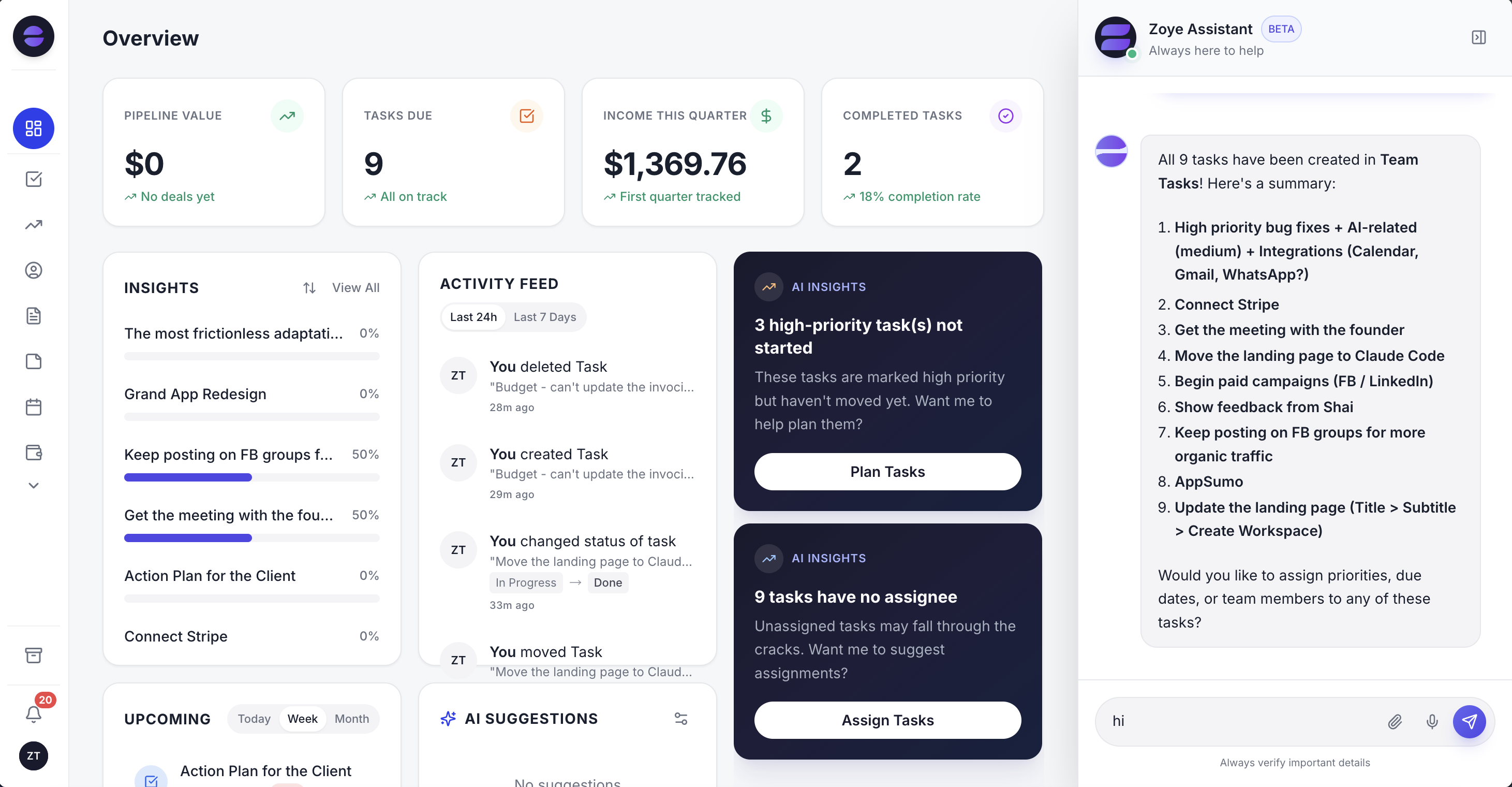 The Zoye Overview puts your key numbers, suggested automations, tasks, deals and what is coming up in one place.
Here is what "operates itself" means in practice. A lead comes in through your Zoye WhatsApp link or a form (form lead capture comes with Growth and Scale), and Zoye creates the record for you and files it in the right place. As the conversation continues, the record stays current automatically: the chat sits on the contact's card and the last-contacted date updates with each interaction. On Starter and above, Zoye also suggests updates to the record, and you approve them in one tap. When a deal goes quiet, Zoye flags it in your daily digest (Starter and above) and can draft the follow-up for you to approve, so nothing sits cold because you forgot; automatic follow-up rules come with Growth. You never open a blank contact form and type; you tell Zoye what happened, or it already knows because the message came through a connected channel.
Zoye does not just suggest, it executes. You can ask it to "add this new client and remind me to call them Thursday," "chase everyone who asked for a quote and hasn't replied," or "set up an automatic welcome message for new WhatsApp leads." Zoye handles each one, and for an automation like that welcome message, it builds the rule, shows it to you, and the rule runs automatically after you approve it. Building an automation is a request, not a canvas of nodes you have to design and maintain. Automations come with Growth ($59 per month, or $47 per month billed yearly), and connecting your own business WhatsApp number to Zoye is coming soon. You can run the whole thing by talking to it, including over WhatsApp, which matters because that is where small business conversations actually happen.
Because there is no busywork to fall behind on, Zoye is the CRM that survives a busy month. The records are current because the assistant suggested the updates and you approved them, not because you found an hour on Sunday to reconcile them. For a non-technical owner, that is the difference between a tool you abandon and one you keep.
Zoye is more than customer records, too. Tasks, a calendar, budget, and reports live in the same workspace, so the follow-up you promised a client shows up next to the deal it belongs to and the invoice it will become. But the reason it belongs at the top of an "easiest CRM" list is simpler than the feature breadth: it takes over most of the maintenance instead of just streamlining it.
Pricing: Almost Free from $5 per month ($4 per month billed yearly) for 1 member with the core tools, cancel or upgrade anytime. Starter from $29 per month (5 members). Growth from $59 per month (10 members). Automations and WhatsApp follow-ups start on Growth.
Best for: Small business owners who have abandoned a CRM before and want one that stays current without becoming a second job.
Want to see it in action?
See Zoye catch a new lead, answer on WhatsApp and set up the follow-up, all from one message.
See How It Works2. Pipedrive - the simple sales pipeline
Pipedrive is one of the most genuinely easy sales CRMs, built around a clean visual pipeline that a non-technical owner can understand in minutes. If your business is deal-driven and you like seeing cards move from stage to stage, it is a pleasant tool to work in.
The limitation is the one that applies to this whole category: Pipedrive is still software you operate. Its meeting tool can suggest CRM updates for you to approve after a call, but you still add the contacts and move the deals yourself, and its automation, which starts on the Growth plan, is something you set up and maintain. It makes the manual work tidier; it does not remove it.
Pricing: Paid plans start around $14 per seat per month billed annually; check Pipedrive's current pricing.
Best for: Owners who want a clean visual pipeline and do not mind keeping it updated by hand.
3. HubSpot Free - the free starting point
HubSpot's free CRM is an easy first CRM for small businesses because there is no cost to begin and the free plan already covers contact and deal tracking. For an owner testing whether a CRM helps at all, it is a low-risk way to start.
The catch is twofold. The free tier gives you the basics, and the useful marketing and automation features sit in paid tiers that climb quickly as you grow. More to the point, the free tier is still a system you feed manually (keeping the CRM up to date with AI starts on the paid Starter plan), so the abandonment risk is unchanged: free does not make the daily upkeep any lighter.
Pricing: Free tier available; paid Starter tiers scale up from there. Check HubSpot's current pricing.
Best for: Owners who want a no-cost way to try contact and deal tracking before committing.
4. Less Annoying CRM - the deliberately minimal option
Less Annoying CRM lives up to its name. It strips the category down to contacts, a simple pipeline, calendar, and notes, at one flat low price, with free email and phone support for everyone. For a solo owner who found other CRMs overwhelming, its restraint is the whole appeal.
Its strength is also its ceiling. It deliberately leaves out complex features, so apart from synced emails and calendar events, the follow-ups and data entry are firmly your job. It is a simpler place to do the work, but it is still you doing all of it.
Pricing: A single flat per-user monthly price; check Less Annoying CRM's current pricing.
Best for: Solo owners who want the least complicated contact manager and are happy to keep it updated themselves.
See what Zoye can do for you
CRM, deals, tasks and your Instagram, Facebook and WhatsApp automations in one workspace. Just ask Zoye and it sets any of it up for you.
Explore Features5. Folk - the modern, lightweight CRM
Folk is a design-forward CRM that feels closer to a clean spreadsheet than a heavy sales suite. It is good at pulling in contacts from LinkedIn and email and at flexible, relationship-style tracking, which suits agencies, consultancies, and network-driven businesses.
The trade-off is that Folk's lightness comes from leaving the heavy lifting to you. It helps you organise relationships elegantly and offers an AI follow-up assistant, but automated email sequences only come with the Premium plan, and it is still a system you organise yourself. It is a nicer surface for the same daily task.
Pricing: Paid plans per seat per month; check Folk's current pricing.
Best for: Agencies and networkers who want an elegant, flexible contact hub.
6. Streak - the CRM inside Gmail
Streak lives directly inside Gmail, turning your inbox into a lightweight pipeline. For owners who run everything out of email and do not want to switch tabs to a separate app, that closeness to where the work happens is a real advantage.
The limitation is that it is tied to Gmail and to email as the primary channel, and while its AI can autofill deal fields, you still add threads to pipelines, move deals, and set your own follow-ups, with trigger-based automations only on Pro+. It also does little for a business whose conversations happen on WhatsApp rather than email.
Pricing: As of November 2026, Streak's free plan covers email tools only (tracking, snippets, mail merge) and does not include CRM pipelines; CRM starts on Pro at $49 per user per month billed annually ($59 billed monthly). Check Streak's current pricing.
Best for: Gmail-centric owners who want pipeline tracking without leaving their inbox.
Easiest CRM if you never want to do data entry
If the reason you abandoned your last CRM was the endless typing, this is the deciding factor, and it splits the list cleanly. Pipedrive, HubSpot Free, Less Annoying CRM, Folk, and Streak all reduce friction in how you enter data, but they still expect you to enter it. Someone has to create the contact, write the note, and update the stage.
Zoye takes over that step instead. Because leads arrive through connected channels and the assistant suggests the updates, the "data entry" is a byproduct of the conversation rather than a task on your list. You can also just tell Zoye what happened and it files everything correctly. For an owner whose real problem is that records go stale, this is the difference that actually matters, more than any interface polish.
Easiest CRM that actually follows up for you
Following up is where deals are won and where they quietly die. Every CRM on this list can store a reminder. The difference is who acts on it.
With the simpler tools, unless you set up their paid automation, a follow-up reminder is a notification that still needs you to open the record, decide what to say, write it, and send it. When you are busy, that chain breaks at the first link. Zoye closes the loop: it flags the deals that have gone quiet and drafts the follow-up on the channel the customer uses, including WhatsApp; once you approve a follow-up rule, it runs automatically (automations come with Growth). Persistence stops depending on your memory and your free time, which is exactly why leads stop leaking. If you want to go deeper on where leads leak and how to plug each gap, that is a topic worth its own read.
How to pick a CRM you will actually keep using
Three questions will tell you more than any feature comparison.
1. Why did the last one get abandoned? Be honest. If it was the data entry and the forgotten follow-ups, a simpler interface will not save you, because the daily work is identical. You need a system that does the capturing and chasing, not a lighter version of the same manual model.
2. Where do your customers actually talk to you? If the answer is WhatsApp and DMs, any CRM that lives only in email or in a web tab will always be one copy-paste behind reality. Pick something that meets the conversation where it happens.
3. Who is going to maintain it? In a small business, the honest answer is usually "me, when I get a minute," which means the answer is really "nobody, reliably." A CRM that keeps itself current is the only kind that survives that reality.
If your answers point at "I keep abandoning CRMs because maintaining them is a job I do not have time for," then the easiest CRM is not the simplest-looking one. It is the one that operates itself.
Why small businesses pick Zoye
Here is what changes compared with the simple CRMs above.
It stays current with little effort. The records are accurate because the assistant suggests the updates and you approve them, not because you found time to reconcile them, so the CRM does not drift into the untrusted-and-abandoned state.
It follows up for you. On the Growth plan, quiet leads get surfaced and chased through follow-up rules you approve, so speed and persistence no longer depend on remembering.
You run it by talking to it. No node canvases, no field configuration, no weekend of setup. You describe what you want, including over WhatsApp, and for an automation Zoye builds the rule, shows it to you and runs it automatically after you approve it.
It grows without a migration. The same workspace that runs a solo business runs a small team, so you never outgrow it and start over.
If you want a CRM your whole team will actually use, start with the one that keeps itself current from the conversations you already have. Almost Free is $5 per month (or $4 per month billed yearly), and it is yours to cancel or upgrade the day you outgrow it.
Ready to hand off the busywork?
Zoye brings AI-powered CRM, task management, and automation into one workspace.
Get StartedFor more context, see our guide to a CRM for small business, what a CRM is and how it works, and the best CRM for lawyers.