
Quick verdict: pick Zapier if the people building automations are not technical, the flows are short, and you need a mainstream app connected today. Pick n8n if someone on the team is comfortable with JSON and APIs, the flows are long or AI-heavy, or you want the option to run the software on your own server. The billing unit decides most of the bill: Zapier charges per action step, n8n per whole run.
Key takeaways (November 2026)
- Zapier Professional starts at $19.99 a month billed annually ($29.99 monthly) for 750 tasks; the free plan gives 100 tasks and two-step Zaps only (Zapier pricing page).
- n8n Cloud Starter is 20 euros a month billed annually for 2,500 executions, and Pro is 50 euros for 10,000 executions (n8n pricing page).
- A five-step workflow running 1,000 times a month costs $89 a month on Zapier (5,000-task tier, annual) and 20 euros on n8n Cloud Starter; at 10,000 runs it is $289 against 50 euros.
- Self-hosted n8n has no licence fee, but a modest server plus daily backups is about $15.60 a month on DigitalOcean, plus your upkeep time.
- Zapier connects 9,000+ apps; n8n lists 2,000+ integrations plus a generic HTTP Request node.
Who should pick Zapier, and who should pick n8n?
Zapier suits a team where the person building automations is an owner or an operations lead, not a developer, and where most flows link two or three popular apps. n8n suits a team with at least one technical builder, flows of five steps or more, AI agent experiments, or a need to keep data on infrastructure it controls.
Zapier was built for people who do not want to think about APIs: pick a trigger app, pick an action app, map a few fields, switch it on. Its strength is how little you need to know. Its limitation is the meter, which counts every successful action step, so the bill rises with the length of each flow as well as with volume.
n8n was built for people who are happy to see the plumbing: a canvas of nodes, data passed between them as JSON, and JavaScript or Python where a node falls short. Its strength is control and a billing unit that ignores flow length. Its limitation is that you are expected to understand each node, more so when you self-host.
A quick test: name the person who will repair a broken flow at the end of a long day. If that person would describe themselves as non-technical, Zapier will cost more in money and less in stress. If that person writes code for fun, n8n will reward them. If nobody on the list wants the job, read the last section before buying either.
Zapier vs n8n at a glance
Zapier is the easier, broader and more expensive per step of the two; n8n is the cheaper, more flexible and more technical one, with a self-hosted route Zapier does not offer. The table puts the facts that drive the decision side by side, using each vendor's own pages as of November 2026.
| Zapier | n8n | |
|---|---|---|
| Billing unit | Task: each successful action step | Execution: one full workflow run, any number of steps |
| Entry paid price (November 2026) | Professional $19.99/month billed annually, $29.99 monthly, 750 tasks | Cloud Starter 20 euros/month billed annually, 2,500 executions |
| Next step up | Team $69/month billed annually at 2,000 tasks, 25 seats | Cloud Pro 50 euros/month billed annually, 10,000 executions |
| Free tier | 100 tasks a month, two-step Zaps, 15-minute polling | No free cloud plan; a trial with 1,000 executions; self-hosted Community Edition |
| Self-hosting | Not offered | Yes: Community Edition, Business and Enterprise |
| Integrations | 9,000+ apps | 2,000+ integrations, plus the HTTP Request node |
| AI | Zapier Agents (billed in activities), Copilot, AI steps priced by model tier | AI Agent node with model, tool and memory nodes, human review for tool calls |
| Error handling | Autoreplay of failed runs on paid plans, Zap history | Error workflows with the Error Trigger node, Stop and Error node |
| Learning curve | Low: a linear step editor | Medium to high: nodes, expressions, JSON |
| Support | Email on Professional; live chat from the 2,000-task tier | Forum on Starter, Pro and Business; email and dedicated support with an SLA on Enterprise |
Two caveats. n8n shows cloud prices in euros; billed annually Starter is 20 euros and Pro 50 euros, billed monthly they are 24 and 60 euros (annual saves 17 percent). And Zapier Professional includes one seat, so a team sharing flows is really comparing n8n with Zapier Team.
How does Zapier's task pricing compare with n8n's executions?
Zapier counts a task each time an action step completes successfully, so a flow with four actions uses four tasks per run. n8n counts one execution per production run of the whole workflow, whether it has three nodes or thirty. The longer your flows, the wider the gap between the two bills.
Zapier's definition, from its pricing page in November 2026: tasks are used when a Zap "successfully moves data or completes an action for you automatically". Triggers, polling and built-in tools such as Formatter, Filter and Paths do not count, and failed actions are not charged. The catch is that some actions cost more than one task, depending on the AI model tier, code runtime and connector type, and a single Zapier MCP tool call costs 2 tasks.
When you run out, Zapier gives you a choice. With pay-per-task switched on, Zaps keep running and the extra tasks are billed at a higher per-task rate that depends on your plan and billing cycle, up to a ceiling of three times your plan's task limit. With it switched off, Zaps pause until the next cycle. If a paused Zap means a lead never gets a reply, that setting matters more than the plan price.
n8n's definition, from its pricing page: "An execution is a single run of your entire workflow." Its documentation adds what does not count: runs you start from the editor while building or testing, sub-workflows called from a parent (only the parent counts), runs of an error workflow, and polling triggers that find no new data. Testing a flow twenty times while you build it is therefore free on n8n, and Zapier does not charge tasks for testing steps in its editor either.
The practical rule: count the action steps in your typical flow. One or two actions per run, and the two meters stay close. Five or more, and n8n's unit is several times cheaper for the same work, before you even consider self-hosting. For a wider look at billing units across Make, Power Automate and others, see our guide to the best workflow automation software.
What do Zapier and n8n cost at 100, 1,000 and 10,000 runs a month?
For a five-step workflow (one trigger plus four actions), Zapier costs $19.99, $89 and $289 a month billed annually at 100, 1,000 and 10,000 runs, while n8n Cloud costs 20, 20 and 50 euros. Self-hosted n8n costs roughly $15.60 to $31.20 a month in server fees, plus the hours someone spends looking after it.
These figures are illustrative. Our assumptions:
- The workflow: a new web form entry triggers it, then four actions run: create the contact in a CRM, add a row to a spreadsheet, send a confirmation email, post a note in the team chat. No filters, no loops, no AI steps.
- Zapier: 4 tasks per run. We picked the smallest Professional tier that covers the volume, at the annual price, with monthly billing in brackets, from Zapier's pricing page in November 2026.
- n8n Cloud: 1 execution per run, annual price from n8n's pricing page in November 2026, in euros as n8n lists them. We have not converted currencies.
- n8n self-hosted: a DigitalOcean Basic Droplet with daily backups (30 percent of the Droplet price), from DigitalOcean's pricing page in November 2026. Server size is our own assumption.
| Runs per month | Zapier tasks used | Zapier Professional (annual, monthly in brackets) | n8n Cloud (annual) | n8n self-hosted server |
|---|---|---|---|---|
| 100 | 400 | $19.99 (750-task tier; $29.99) | 20 euros (Starter) | $15.60 (2 GiB Droplet + backups) |
| 1,000 | 4,000 | $89 (5,000-task tier; $133.50) | 20 euros (Starter) | $15.60 (2 GiB Droplet + backups) |
| 10,000 | 40,000 | $289 (50,000-task tier; $433.50) | 50 euros (Pro, exactly at the 10,000 quota) | $31.20 (4 GiB Droplet + backups) |
Three things the table does not show. First, if your flow has a single action, Zapier's numbers drop sharply: 1,000 runs need 1,000 tasks (the 1,500-task tier at $39 a month billed annually) and 10,000 runs need the 10,000-task tier at $129. Short flows are where Zapier competes on price.
Second, n8n's 10,000-run row sits exactly on the Pro quota with no headroom. n8n's pricing page lists a larger Pro size: Pro 50k, at 1,450 euros a year billed annually (about 121 euros a month) or 145 euros billed monthly, for 50,000 executions. After the Pro sizes, the next published plan, Business at 667 euros a month billed annually for 40,000 executions, is self-hosted only. A business growing past 10,000 runs on n8n Cloud should plan the step to Pro 50k before it happens rather than after.
Third, a team plan changes the Zapier side. If two or more people need to share Zaps and connections, Zapier Team starts at $69 a month billed annually for 2,000 tasks and is $399 at 50,000 tasks, while n8n's cloud plans already include unlimited users.
Want to see it in action?
See Zoye catch a new lead, answer on WhatsApp and set up the follow-up, all from one message.
See How It Worksn8n Cloud or self-hosted: what does running it yourself really cost?
Self-hosting n8n removes the subscription and replaces it with a server bill, backups, updates, security patching and someone's time. A small server costs about $12 to $24 a month on DigitalOcean before backups. The bigger cost is upkeep: n8n's own comparison page says technical expertise is required for installation and configuration.
The server. n8n's hosting documentation offers a one-line setup script for Linux or macOS, a Docker Compose setup for production, and guides for AWS, Azure, Google Cloud, DigitalOcean, Hetzner, Heroku and OpenShift. Installing through npm is meant for development and is deprecated from n8n 3.0. On DigitalOcean in November 2026, a Basic Droplet costs $6 a month for 1 GiB of memory, $12 for 2 GiB and $24 for 4 GiB, with weekly backups at 20 percent of the Droplet price or daily backups at 30 percent.
The upkeep. Somebody has to apply n8n updates, update Docker and the operating system, renew certificates, watch disk space as execution logs grow, test that backups restore, and notice when the instance is down. As an illustrative assumption, budget two to four hours a month for a single small instance; that is not a published benchmark, and the first month usually takes longer. Multiply your number of hours by what an hour of that person's time is worth and add it to the server bill. That total is the honest price of "free".
Security. A self-hosted automation server holds the keys to everything it connects: CRM tokens, email accounts, payment tools. Patching it promptly is part of the job, as are locking down who can reach the editor and keeping credentials encrypted. On n8n Cloud, n8n runs the infrastructure; n8n's own page recommends Cloud for people without technical expertise because it is "fully managed, no setup or maintenance required."
The licence, in general terms. n8n's Community Edition is published under the Sustainable Use License. Per n8n's documentation in November 2026, you may use or modify it "only for your own internal business purposes or for non-commercial or personal use", and you may offer paid consulting such as building workflows for clients. What you may not do without a separate agreement is make n8n available to your own customers so they can connect their accounts and build workflows. Files with ".ee." in their names fall under the n8n Enterprise License instead, and self-hosted Business and Enterprise features need a licence key that checks in with n8n's server daily. n8n calls its model fair-code and says it does not call itself open source. If your plan involves putting n8n in front of your customers, read the licence page and ask n8n.
| Cost line | n8n Cloud | n8n self-hosted |
|---|---|---|
| Software | 20 euros (Starter) or 50 euros (Pro) a month, billed annually | No licence fee for the Community Edition |
| Server and backups | Included | From about $7.80 (1 GiB + daily backups) to $31.20 (4 GiB + daily backups) a month on DigitalOcean |
| Updates and patching | n8n | You |
| Uptime and monitoring | n8n | You |
| Execution limits | 2,500, 10,000 or 50,000 a month | Community Edition: limited only by your server |
| Who it fits | Teams without a server person | Teams with one, or with data that must stay in-house |
Which has more integrations, and does catalog size matter?
Zapier has the larger catalog: 9,000+ apps as of November 2026, against the 2,000+ integrations n8n's integrations page advertises. Catalog size matters most when your stack includes niche tools. n8n narrows the gap with its HTTP Request node, which can call almost any app that has an API.
Zapier's breadth is its moat: a niche booking tool or a newly launched SaaS product is far more likely to have a ready-made Zapier connector. Zapier marks some of these as premium apps, which its pricing page describes as available only on paid plans, and the free plan cannot use webhooks.
n8n's catalog covers the mainstream well: Google Workspace, Microsoft 365, Slack, the major CRMs, databases and AI model providers. Where a node is missing, the HTTP Request node and webhooks reach an app's API directly, which shifts work onto the builder: API docs, authentication, paging and JSON mapping by hand.
The honest test: list the five apps your first workflows must touch and check each on both catalogs. If all five have native n8n nodes, catalog size is irrelevant. If two exist only on Zapier, the cheaper meter may not survive the extra build time.
Zapier Agents vs the n8n AI Agent node: which is better for AI workflows?
n8n is the stronger choice for builders who want to design AI agents step by step, choosing the model, tools, memory and approval points themselves. Zapier is the faster choice for teams who want an agent that acts across their apps without wiring it, but its agents are billed in a separate unit called activities.
Zapier. Zapier Agents work with live data sources and take actions in the apps you have connected to Zapier. As of November 2026 they are billed in activities, separate from tasks: Zapier defines an activity as "any billable action that your agent takes", such as using a trigger, answering from a knowledge source or running an action. The free allowance is 400 activities a month, and the Pro agents plan includes 1,500 activities from about $33.33 a month billed annually. Inside ordinary Zaps, AI steps are priced by model tier, so an AI-heavy Zap can spend more than one task per step.
n8n. n8n's AI Agent node builds an agent on the canvas: you connect a chat model, at least one tool sub-node and, if needed, memory. The node chooses which connected tool to call based on the task. n8n's documentation also describes human review for tool calls: you mark a tool as needing approval, the workflow pauses and asks a reviewer through a channel such as Slack, email or the n8n chat, and the tool runs only if approved. Because n8n bills per execution, an agent that calls ten tools in one run is still one execution, although the AI model usage is paid for separately, through your own provider key or n8n's prepaid Gateway credits.
The catch on both sides: an AI agent you build is an AI agent you maintain. n8n gives you more control over each piece; Zapier gives you fewer pieces to look after.
See what Zoye can do for you
CRM, deals, tasks and your Instagram, Facebook and WhatsApp automations in one workspace. Just ask Zoye and it sets any of it up for you.
Explore FeaturesWhat happens when a run fails? Error handling compared
Zapier retries failed runs automatically through Autoreplay on paid plans and shows each run in Zap history. n8n lets you design the failure path yourself: an error workflow, started by the Error Trigger node, can alert someone, log the problem or try a fallback. Zapier is easier to recover from; n8n is easier to make robust.
On Zapier, Autoreplay is available on Professional, Team and Enterprise, not on the free plan. Zapier's help centre says it "will automatically replay any Zap run with an errored status", with exceptions such as runs that were safely halted and some human-in-the-loop steps. Failed actions do not use tasks. The weakness is control: you see the error and the retry, but designing a different path for a specific failure means building it into the Zap with Paths, which the free plan does not include.
On n8n, each workflow can name an error workflow in its settings. When an execution fails, that workflow starts with the Error Trigger node and receives the failed execution's ID, its URL, the error message, the stack trace and the last node that ran. One error workflow can serve many workflows, for example by posting a Slack alert. The Stop and Error node lets you fail a run on purpose when the data is wrong, so a bad record never reaches your CRM. Runs of an error workflow do not count as executions.
Zapier hides most of the failure handling; n8n hands you the tools, and a builder who skips the error workflow learns about failures from customers.
Is n8n better than Zapier? Who should pick which
n8n is better than Zapier for technical builders, long multi-step flows, AI agent work and anyone who needs self-hosting. Zapier is better for non-technical teams, short flows across many mainstream or niche apps, and anyone who values a working connection today over the lowest possible bill. Size the decision by the builder, not the feature list.
Pick Zapier when:
- The builder is an owner or an ops person who does not write code.
- Most flows have one or two actions, so the task meter stays small.
- Your stack includes niche apps that only Zapier connects natively.
Pick n8n Cloud when:
- Someone on the team is comfortable with expressions, JSON and API docs.
- Flows have five or more steps, loops or AI agent nodes.
- Several people need to build, since cloud plans include unlimited users.
Pick n8n self-hosted when:
- You have a person who already runs servers and has time for one more.
- Data must stay on infrastructure you control.
- Your use fits the Sustainable Use License's internal business terms.
Pick neither when most of what you want to automate is your own customer work: following up leads, moving deals, creating tasks after a meeting, chasing a late invoice. A connector tool moves copies of that data between apps, and you still own every flow. If you are still shortlisting, our guides to the best Zapier alternatives and the best Make.com alternatives cover the wider field.
Ready to hand off the busywork?
Zoye brings AI-powered CRM, task management, and automation into one workspace.
Get StartedThe third option: describe the outcome to Zoye instead of building a flow
Zoye is an AI Business Operator that works inside your business: the CRM, deals, tasks, calendar, documents and invoices live in one workspace, and automations run on those records directly. You describe what should happen, Zoye builds the rule and shows it to you in plain words, and a rule that messages other people stays off until you switch it on.
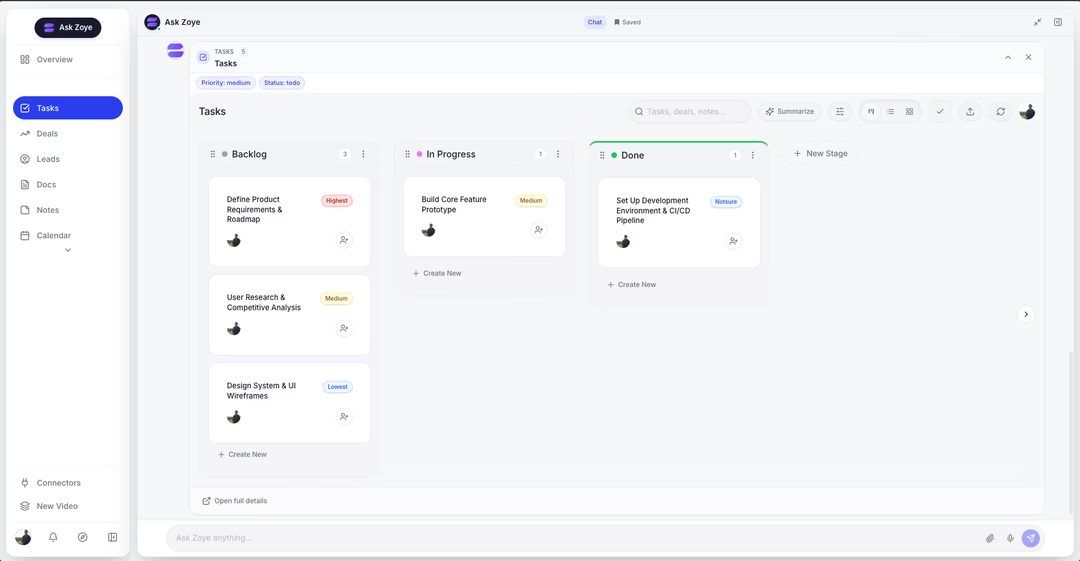 Zoye's task board, opened from the chat: the same records an approved automation rule creates, assigns and moves
Here is how the same kind of job looks. Instead of mapping a form trigger to four actions, you tell Zoye, in the app, on WhatsApp or in Slack: "when a new lead comes in from the website, send the first reply and create a follow-up task due tomorrow." Zoye turns that into a real trigger, conditions and actions and shows you the finished rule. Because it messages people, it stays off until you switch it on, and you can ask for a change first. Every run is logged with what fired, what changed and what it sent, and its record changes can be undone (a message that already went out cannot be recalled).
With the records in one place, there is no server to patch, and a step that asks Zoye to write or decide uses your monthly AI prompts. Triggers include a record being created, a field or stage changing, a date such as a due date arriving, a record going quiet for a set number of days, a schedule, or a Facebook or Instagram comment. That covers the familiar jobs: an instant follow-up when a lead arrives, a nudge when a deal has gone quiet, tasks when a deal reaches a stage, and a reminder when a task falls due.
The honest limits. Zoye is not a Zapier-scale integration catalog: it does not connect to thousands of outside apps, and if your job is moving data between two SaaS tools you plan to keep, Zapier or n8n is the right tool. Zoye is also not a self-hosted builder; it runs as a hosted service, so it does not answer a requirement to keep everything on your own servers. It connects to Google Calendar, Gmail and Google Drive, and it imports from Trello, Monday.com and spreadsheets.
Pricing, as of November 2026. Almost Free is $5 a month ($4 a month billed yearly) for 1 member with the core tools and 15 AI prompts a month, and Starter is $29 a month ($23 a month billed yearly) for up to 5 members; neither includes automations. Automations start on Growth at $59 a month ($47 a month billed yearly) for up to 10 members, and Scale is $119 a month ($95 a month billed yearly) for up to 30. The pricing page shows what each plan includes, and the automations page shows the rules in more detail.
The bottom line on Zapier vs n8n
Choose Zapier when the builder is not technical and the flows are short; choose n8n when the builder is technical and the flows are long, AI-heavy or need to stay on your own server. Run your own five-step workflow through both meters before you commit, because the billing unit decides the bill.
If neither tool's job is really your job, and what you want is leads answered, deals moving and tasks created without building anything, book a Zoye demo and describe the first rule you would want running.
Related reading
- The best Zapier alternatives
- The best workflow automation software
- The best Make.com alternatives
- How to automate follow-ups