
Quick answer: Make is cheaper than Zapier for almost every multi-step workflow. As of November 2026, a 6-step workflow that runs 1,000 times a month costs $11 a month on Make Core in the UK, Germany and Israel ($12 for US visitors) and $89 on Zapier Professional, both billed annually. Zapier earns the higher price with a gentler editor, roughly two and a half times as many apps and more forgiving recovery when a run fails. Pick Make if someone on the team enjoys building logic; pick Zapier if the person building is also the person running the business.
Key takeaways (November 2026)
- Zapier bills tasks: one per successful action step, with triggers, filters and Paths not counted. Make bills credits: one per module action, the trigger included, with routers, filters and error handlers not counted.
- At 1,000 runs of a 6-step workflow: $89 a month on Zapier (5,000 tasks) against $11 on Make Core (10,000-credit tier, the price shown in the UK, Germany and Israel; $12 for US visitors), annual billing. At 10,000 runs: $289 against $65 ($72 in the US).
- Make's scheduled triggers spend a credit on every check, even an empty one: a 15-minute schedule can use up to 2,880 credits a month before any data moves. Zapier does not charge for polling.
- Zapier connects 9,000+ apps; Make lists 3,500+. Zapier's Free plan allows only two-step Zaps; Make's Free plan gives 1,000 credits and 2 active scenarios.
- Make keeps a failed run for retry only if you switch on incomplete executions for that scenario; Zapier's Autoreplay retries errored runs on every paid plan.
Prices are in US dollars from each vendor's pricing page in November 2026. Make's price list depends on the visitor's country: we quote the list Make shows in the UK, Germany and Israel and add the higher US figures next to the main ones, while visitors in some countries, such as Hungary, see lower prices. Confirm prices before you buy.
Quick verdict: Zapier for reach and ease, Make for logic and price
Zapier is the safer choice for a non-technical owner who needs common apps connected this week and values a clean editor over the lowest bill. Make is the better choice for anyone comfortable with data structures who runs branching or high-volume workflows, because it charges a fraction of Zapier's price for the same work.
Pick Zapier if:
- the person building has never mapped a JSON field and does not want to learn;
- you need an app that only Zapier supports;
- your flows are short, so the task meter stays small;
- you want failed runs replayed automatically.
Pick Make if:
- your workflows branch, loop over line items or reshape data;
- volume runs to thousands of runs a month, where Zapier's price climbs steeply;
- someone on the team will own the scenarios and read execution logs.
Pick neither if most of what you want automated is your own customer work: answering leads, moving deals, creating tasks, chasing invoices. That case has its own section below.
Zapier vs Make side by side (November 2026)
Zapier and Make solve the same problem, moving data between apps when something happens, with different billing units and different editors. The table below lines up the facts that matter to a small team, taken from both vendors' pricing pages and help centers in November 2026.
| Zapier | Make | |
|---|---|---|
| Billing unit | Task: each successful action step | Credit: each module action, trigger included |
| Not billed | Triggers, polling, Filter, Formatter, Paths, Delay, Looping tool | Routers, filters, error handler modules |
| Free plan | 100 tasks a month, two-step Zaps only, 15-minute polling | 1,000 credits a month, 2 active scenarios, 15-minute minimum interval |
| Entry paid plan | Professional: $19.99/month billed annually ($29.99 monthly) for 750 tasks | Core: $11/month billed annually ($16 monthly) for 10,000 credits in the UK, Germany and Israel; $12 ($16 monthly) for US visitors |
| Team plan | Team: from $69/month billed annually for 2,000 tasks, 25 seats | Teams: from $36/month billed annually for 10,000 credits in the UK, Germany and Israel ($38 for US visitors), team roles |
| Fastest schedule | 2 minutes on Professional, 1 minute on Team | 1 minute on every paid plan |
| Workflow size and run time | Up to 100 steps per Zap | 40-minute maximum run on paid plans (5 on Free) |
| Integrations | 9,000+ apps | 3,500+ apps, plus custom apps |
| Branching and loops | Paths (10 branches, 3 levels deep), Looping up to 500 iterations | Routers, iterators, aggregators, subscenarios |
| Failed runs | Autoreplay on paid plans, optional error handler branch | Error handler modules, incomplete executions if switched on |
| AI | Copilot, Zapier Agents billed in activities, AI steps by model tier | Maia, Make AI Agents (beta), AI Toolkit billed by tokens |
| Learning curve | Low: a linear list of steps | Medium: a visual canvas with bundles and mapping |
| Support | Email; live chat from the 2,000-task tier | Customer support on every plan (90 days on Free); 24/7 on Enterprise |
What is the difference between a Zapier task and a Make credit?
A Zapier task is one action step that completed successfully; the trigger that starts the Zap is not counted. A Make credit is one module action, and the trigger module counts as one too, including every scheduled check that finds nothing. So a workflow built from standard actions uses at least one more Make credit than Zapier tasks per run.
Zapier's rule. Zapier's pricing page says tasks are used "when a Zap successfully moves data or completes an action for you automatically". Triggers, polling, failed actions and built-in tools such as Formatter, Filter, Paths, Delay, Looping, Digest and Storage are not counted. Some actions do cost more than one task: AI steps vary by model tier, and a single Zapier MCP tool call costs 2 tasks.
Make's rule. Make's pricing page says each action a scenario performs uses credits, that "most actions consume 1 credit", and that some features running on Make's AI Provider may use more. Reading, searching, creating, updating, deleting, transforming, aggregating and iterating data all count. The router module and the error handler modules (Rollback, Break, Resume, Commit, Ignore) do not, and Make's Academy adds that a bundle passing through a filter is not charged either. The Make Code app is metered separately at 2 credits per second of execution time.
The polling trap. Make's help center defines an operation as "a single module run to process data or check for new data", and a trigger that checks for new rows is one operation per check. In practice, a scenario scheduled every 15 minutes runs 2,880 checks in a 30-day month, and each one uses a credit whether or not anything new turned up. At a 1-minute schedule the same scenario can use up to 43,200 credits a month, more than Make's 40,000-credit tier, for a trigger that may fire a few dozen times a day. Zapier does not count polling at all, so this cost has no Zapier equivalent. The fix on Make is to use an instant trigger (a webhook) wherever the app offers one, and to schedule the rest no more often than the business needs.
When the allowance runs out. Make stops scenarios and queues incoming webhooks until you add credits, sold in bundles of 1,000 or 10,000 (automatic top-ups of 10,000 on Core, Pro and Teams). Zapier lets you choose between pausing Zaps and pay-per-task, which bills extra tasks at a higher rate (1.25 times your plan's normal task cost on annual plans) until your total reaches three times your plan's task limit.
Is Make cheaper than Zapier? Two workflows at 1,000 and 10,000 runs
Yes. On both workflows below and at both volumes, Make Core costs between about 12% and 23% of the Zapier Professional price, billed annually. The gap in dollars is widest on long workflows at high volume, even though Zapier's price per task falls faster than Make's price per credit as the tiers rise. These ratios use the prices Make shows in the UK, Germany and Israel. US visitors see a higher Make list, so the gap is a little narrower there: $12 instead of $11 at 10,000 credits and $72 instead of $65 at 80,000.
The figures are illustrative. Our assumptions:
- The 3-step workflow: a trigger plus two actions, for example a new form entry creates a contact and posts a message to the team chat. Zapier uses 2 tasks per run; Make uses 3 credits.
- The 6-step workflow: a trigger plus five actions, for example a new order looks up the customer, updates their record, adds a row to a sheet, sends a confirmation email and alerts the team. Zapier uses 5 tasks per run; Make uses 6 credits.
- Both start from an instant trigger, so there are no empty polling checks on Make. No loops and no AI steps.
- We picked the smallest tier that covers the volume on Zapier Professional and Make Core, with the annual price first and the month-to-month price in brackets, from each vendor's pricing page in November 2026. Make Core prices are the ones Make shows in the UK, Germany and Israel; US visitors see $12 ($16) at 10,000 credits and $72 ($97) at 80,000.
| Workflow and volume | Zapier tasks | Zapier Professional | Make credits | Make Core (UK, Germany, Israel) |
|---|---|---|---|---|
| 3-step, 1,000 runs | 2,000 | $49 (2,000-task tier; $73.50) | 3,000 | $11 (10,000-credit tier; $16); US $12 ($16) |
| 3-step, 10,000 runs | 20,000 | $189 (20,000-task tier; $283.50) | 30,000 | $37 (40,000-credit tier; $46) |
| 6-step, 1,000 runs | 5,000 | $89 (5,000-task tier; $133.50) | 6,000 | $11 (10,000-credit tier; $16); US $12 ($16) |
| 6-step, 10,000 runs | 50,000 | $289 (50,000-task tier; $433.50) | 60,000 | $65 (80,000-credit tier; $81); US $72 ($97) |
Four things move these numbers in practice.
Free plans fit very different workloads. Zapier's Free plan allows only two-step Zaps, so the 3-step workflow cannot run on it at all; a two-step version gets 100 runs a month. Make's 1,000 free credits cover about 333 runs of the 3-step workflow, within the limit of 2 active scenarios.
Shared workspaces cost more on both. If two or more people need to edit the same automations, compare team plans. The 6-step workflow at 10,000 runs costs $399 a month on Zapier Team (50,000 tasks, billed annually) against $203 on Make Teams (80,000 credits). Make Pro, which adds priority execution and full-text log search but not team roles, is $107 at that tier. Both Make figures are the prices shown in the UK, Germany and Israel; US visitors pay more, with Pro starting at $21 instead of $20 and Teams at $38 instead of $36.
Loops multiply both meters. Add a step that goes through 10 order lines and creates a row for each, and Zapier bills that action 10 times per run while Make bills every module after the iterator once per line. The two models end up close; the difference is that Zapier caps a loop at 500 iterations and keeps Looping off its Free plan.
Schedules and AI tilt the comparison back toward Zapier. A Make scenario that polls every few minutes, or sends long prompts through Make's AI Provider, can use far more credits than the table shows, so run a real week on Make's Free plan and read the credit counter first.
What the table cannot show is time. Make saves about $224 a month on the 6-step workflow at 10,000 runs, and that saving shrinks quickly if the person maintaining the scenarios bills by the hour. At the US price of $72 for Make Core, the saving is about $217.
Want to see it in action?
See Zoye catch a new lead, answer on WhatsApp and set up the follow-up, all from one message.
See How It WorksLinear Zaps or a visual canvas: which builder fits the way you think?
Zapier lists steps from top to bottom, which most people can read on the first day. Make places modules on a canvas connected by lines, which takes longer to learn but shows branching, loops and data reshaping far more clearly. Choose the editor that matches your most complex workflow, not your simplest one.
How Zapier handles logic. A Zap is a trigger followed by actions, and Zapier adds logic as special steps. Paths split a Zap into up to 10 branches per path group, nested up to 3 levels deep. Looping by Zapier repeats the following actions for each item in a list, up to 500 times, with one looping step per Zap and no nested loops. Paths and Looping are on paid plans only. A Zap can hold up to 100 steps, and Copilot can draft the first version from a plain description, which lowers the start-up cost for beginners.
How Make handles logic. A Make scenario is a set of modules that pass bundles of data along. A router sends bundles down several routes, each with its own filter. An iterator splits an array, such as the lines of an order, into separate bundles, and an aggregator gathers them back into one. Subscenarios let one scenario call another. Make's help center shows why this matters for the bill: when a trigger returns 10 bundles, each following module runs 10 times, so one trigger and three modules come to 31 operations in a single run.
What that means in practice. Picture an order that goes one way if paid, another if pending, and creates one inventory row per line. In Make, that is a router with two routes and an iterator, visible on one screen. In Zapier, it is a Paths step with a Looping step inside one branch, which works but reads like a nested outline. For a simple "new lead, add to sheet, notify me" flow, Zapier is quicker to set up.
The learning curve is the real cost of the canvas. Make expects you to understand data types, arrays and mapping. People who think that way find it liberating; people who do not often build something that passes the test record and breaks on the first real one.
What happens when a run fails? The debugging tax on each side
Both tools log every run and show you where it failed. The difference is what happens automatically afterwards. Zapier retries errored runs for you on paid plans; Make keeps failed runs for repair only if you have switched that on per scenario, and gives you finer error-handling modules that someone has to design.
On Zapier. Zap history lists every run with the data each step received and returned. Autoreplay, included on Professional, Team and Enterprise, replays errored runs automatically, and failed actions do not use tasks. For more control, custom error handling (also on paid plans) adds an alternative branch that runs when a specific step fails, for example to alert someone or write the failure to a sheet. Zapier's help center lists two trade-offs: once a Zap with an error handler is published, Autoreplay turns off for that Zap, and you cannot manually replay individual step runs that have error handlers, only the entire run.
On Make. Error handler modules attach to a module and decide what happens on failure: Rollback, Break, Resume, Commit or Ignore, none of which use credits. Incomplete executions are Make's safety net: when a scenario fails, the unfinished run is stored so you can fix the mapping and resume it. Make's help center states that this option is off by default, so a team that never ticked "Store incomplete executions" in scenario settings loses failed runs instead of parking them. Storage for them scales with your plan, at 10 MB per 10,000 credits up to 2 GB. Execution logs stay for 7 days on Free and 30 days on paid plans (60 on Enterprise), and full-text log search starts on Pro.
The debugging tax. Neither bill shows the hours. Estimate them for your own setup: count the failed runs in a typical month, multiply by the minutes it takes someone to open the run, find the cause, fix it and replay it, and put a price on those minutes. As an illustrative example, 12 failures a month at 20 minutes each is four hours, which on many teams costs more than the subscription. Make's failures tend to take longer to diagnose because scenarios carry more logic; Zapier's take longer to prevent because handling has to be bolted onto a linear flow.
On either tool, the tax falls when every workflow has a named owner who receives its error emails, when incomplete executions (Make) or Autoreplay (Zapier) stay on for anything touching customers or money, and when you test with an incomplete record, such as an empty phone field, before switching a workflow on.
See what Zoye can do for you
CRM, deals, tasks and your Instagram, Facebook and WhatsApp automations in one workspace. Just ask Zoye and it sets any of it up for you.
Explore FeaturesPlan limits that decide it: active workflows, intervals and run time
The limits most likely to force an upgrade are the number of active workflows and the polling interval on Make's Free plan, and seats on Zapier. Make Free allows 2 active scenarios; Zapier Free allows two-step Zaps only. On paid plans Make runs every minute on every tier, while Zapier needs Team for 1-minute polling.
| Limit (November 2026) | Zapier | Make |
|---|---|---|
| Active workflows | Unlimited Zaps on every plan, bounded by tasks | 2 active scenarios on Free; unlimited on Core and above |
| Polling or schedule interval | 15 min Free, 2 min Professional, 1 min Team and Enterprise | 15 min Free, 1 min Core and above |
| Single run | Up to 100 steps per Zap | 5 minutes on Free, 40 minutes on paid plans |
| File size | Not listed on the pricing page | 5 MB Free, 100 MB Core, 250 MB Pro, 500 MB Teams |
| Seats | 1 on Free and Professional, 25 on Team | Team roles on Teams and Enterprise |
| Run history | Zap history on every plan; audit log on Team and Enterprise | 7 days Free, 30 days paid, 60 days Enterprise |
For a small team, two consequences follow. Make Free is a fair testing ground, but 2 active scenarios rarely carry a real business. And Zapier Professional is a one-seat plan, so once a second person needs to edit Zaps, compare Zapier Team with Make Core or Teams.
Apps, AI and teams: where is each one ahead?
Zapier is ahead on breadth, with more than 9,000 apps against Make's 3,500+, and on an AI agent product that can run actions in those apps. Make is ahead on team plans, which start far lower, and lets every paid plan connect its own AI model key. Most small teams should decide on apps first.
App catalog. Check your three most important apps in both directories, down to the specific triggers and actions, because an app can appear in both with very different depth. Both tools can call any public API through a webhook or HTTP step, and Make lets an organization build custom apps, but every custom connection is one more thing to maintain.
AI features. Zapier offers Copilot for building Zaps (a daily message limit on Free, unlimited on paid plans), AI steps priced by model tier, Canvas for mapping processes, and Zapier Agents, which are billed separately in activities: 400 a month on the free allowance and 1,500 on the Pro agents plan from about $33.33 a month billed annually. Make offers Maia, which builds automations and agents through conversation, Make AI Agents (in beta), an AI Toolkit billed by tokens, AI Web Search (beta) and an MCP server; its AI features can run on Make's AI Provider on every plan or, on paid plans, on your own model key. In both tools, an AI step is still a step you build, test and pay for.
Team plans. Zapier Team adds 25 seats, shared workspaces, SAML single sign-on and 1-minute polling from $69 a month billed annually for 2,000 tasks. Make Teams adds team roles and shared scenario templates from $36 a month billed annually for 10,000 credits in the UK, Germany and Israel, or $38 for US visitors. For a team of three to five that shares automations, Make is markedly cheaper, and Zapier is markedly easier for the colleagues who only need to read a Zap.
A third option: skip the flow and describe the outcome to Zoye
Zapier and Make both assume the work lives in other apps and your job is to wire them together. If the work you want automated is your own, such as answering leads, moving deals or chasing an unpaid invoice, there is a shorter route: keep those records in one workspace and describe the result instead of building a flow.
That is how Zoye works. Zoye is an AI Business Operator that works inside your business: CRM and contacts, deals, tasks, calendar, documents and invoices sit in one workspace and already link to each other, so an automation does not have to carry data from one app to the next. You tell Zoye what should happen, in the web app, on WhatsApp or in Slack. Take a rule like "when a deal has not moved for 7 days, raise its priority, ping the owner and add a follow-up task": Zoye turns it into a trigger, conditions and actions, shows you the finished rule in plain words, and nothing runs until you approve it.
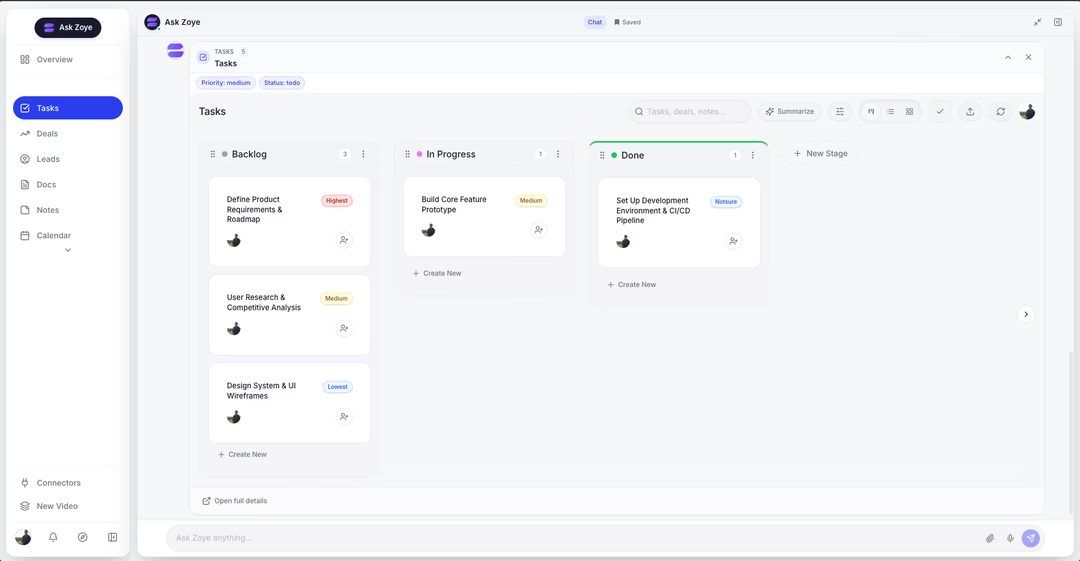 The Zoye task board: follow-up tasks that an approved rule created land here with an owner and a priority, ready for the team
Afterwards, each run is logged with what fired, what changed and what was sent, and its record changes can be undone (a message that already went out cannot be recalled). If a run fails, you are told why. Triggers include a record being created, a field or stage changing, a due date arriving, a schedule, and a Facebook or Instagram comment. Actions include creating and updating records, assigning people, sending email or WhatsApp messages and notifying your team, and on Scale an outbound webhook can send contact events to another tool. You can change a rule later by asking again, and the visual builder is there if you want to inspect it, though you never have to open it.
Plain rule steps have no per-run fee; a step that asks Zoye to write or decide uses your monthly AI prompts, and WhatsApp sends count toward your monthly messages. Zoye is priced per plan: Almost Free at $5 a month, Starter at $29, Growth at $59 and Scale at $119, or $4, $23, $47 and $95 per month billed yearly. Almost Free and Starter do not include automations, which start on Growth; the pricing page shows what each plan covers.
The honest limit: Zoye is not a Zapier-scale integration catalog. If your job is syncing two outside systems with no customer or team work around them, Zapier or Make is the better fit. If your records live in Trello, Monday.com or a spreadsheet today, Zoye imports them; Jira, Notion and ClickUp imports are coming soon. To see the rules people start with, look at Zoye's workflow automations or our guide on how to automate follow-ups.
Ready to hand off the busywork?
Zoye brings AI-powered CRM, task management, and automation into one workspace.
Get StartedZapier or Make: five questions that settle it
Answer these five questions in order and stop at the first clear answer. Most small teams are decided by question one or two, because app coverage and who builds matter more than price per run.
- Are all your key apps, with the triggers and actions you need, in both catalogs? If one is only on Zapier, pick Zapier.
- Who will build and fix the workflows? A non-technical owner should start on Zapier. Someone who enjoys data mapping will get more from Make.
- How long and how frequent are your workflows? Short flows at low volume cost little on either. Five or more steps at thousands of runs a month favour Make by a wide margin.
- Do your workflows branch or loop? If yes, Make's canvas keeps them readable; Zapier's Paths and Looping work but stack up quickly.
- Is the work really app-to-app? If most of it is leads, deals, tasks and invoices, consider whether those records should live in one place where the rules run on them directly.
If you are still comparing the wider market, our guides to the best Zapier alternatives and the best Make.com alternatives cover other builders, and Zapier vs n8n covers the self-hosted route.
If your shortlist exists because leads, deals and follow-ups keep slipping, book a Zoye demo and bring the first rule you would want running; we will show it built, explained and waiting for your approval.