
Quick verdict: pick ActiveCampaign if email automation is the job and you want deep, branching sequences at a mid-range price that rises with your list. Pick HubSpot if you want a CRM first, a no-cost start for up to 2 users and a marketing layer to grow into, knowing that its serious automation sits in Professional at $90 per seat a month billed yearly, plus a required one-time onboarding fee. If most of your customers reply on WhatsApp, Instagram or Facebook rather than by email, neither tool is doing the real work, and the third option below deserves ten minutes.
Key takeaways (November 2026)
- ActiveCampaign Plus costs $49 a month billed yearly at 1,000 contacts, $145 at 5,000 and $189 at 10,000, with unlimited actions per automation; its Pipelines CRM is a paid add-on.
- HubSpot's free tools cover 2 users and 1,000 contacts with a monthly allowance of branded email sends; Starter is $20 per seat a month at list, and Professional is $90 per seat a month billed yearly, plus a required one-time onboarding fee.
- HubSpot's current plans charge HubSpot Credits for the emails you send instead of a contact tier; ActiveCampaign counts every contact, unsubscribed included, on accounts created on or after 3 November 2025.
- According to Google's sender guidelines, anyone sending more than 5,000 messages a day to Gmail accounts needs SPF, DKIM and DMARC and a spam rate under 0.3%, so domain setup matters more than the logo on the tool.
- ActiveCampaign offers a 14-day trial without a card and a 30-day money-back promise; HubSpot's free tools have no time limit.
All vendor prices below are in US dollars, from each vendor's own pricing and checkout pages as of November 2026, before tax. Check both pages before you buy, because promotional prices change often.
Quick verdict: who should pick HubSpot and who should pick ActiveCampaign?
ActiveCampaign fits a small team whose revenue comes from email sequences: welcome series, launches, nurture flows and re-engagement. HubSpot fits a team that sells through a pipeline and wants contacts, deals, tasks and marketing in one database from day one. Decide which part you cannot live without: the email engine or the CRM.
The longer version comes down to four situations:
- Pick ActiveCampaign if you send more than one automated sequence, want if/else branching, goals and wait steps without paying enterprise prices, and your list is under roughly 10,000 contacts. At that size its Plus and Pro plans include a fixed monthly email allowance, while HubSpot Professional adds credits for every email you send.
- Pick HubSpot if your team lives in the pipeline, several people work the same contacts and deals, and email means a newsletter plus a few simple follow-ups. You can grow into Professional later.
- Pick HubSpot Professional only if you need both deep automation and a full CRM in one system and you can budget $90 per seat a month billed yearly, the required onboarding fee and credits for the emails you send.
- Pick neither if your leads mostly write on WhatsApp or Instagram and the email list is an afterthought; see the third option below.
HubSpot vs ActiveCampaign side by side (November 2026)
The table compares HubSpot's plans with ActiveCampaign's marketing plans on what decides value for a small team: how the bill grows, how far automation goes and what you get for the CRM. Figures come from each vendor's pricing pages in November 2026.
| HubSpot | ActiveCampaign | |
|---|---|---|
| Entry paid price | Starter $20 per seat a month at list; $7 a seat billed yearly on a limited-time 65% discount | Starter $15 a month billed yearly for 1,000 contacts |
| No-cost tier | Free tools: 2 users, 1,000 contacts, a monthly send allowance with HubSpot branding | None; 14-day trial without a card |
| Bill grows with | Seats, edition, HubSpot Credits for email sends and workflow actions | Contact tier, plan, extra seats, add-ons |
| Who counts as a contact | No contact tier; contacts count toward a record capacity (25,000 on Starter, 250,000 on Professional) | All contacts on accounts created from 3 November 2025 |
| Monthly email sends | No fixed limit on paid editions; each send uses HubSpot Credits | 10x contacts (Starter, Plus), 12x (Pro), 15x (Enterprise) |
| Automation depth | Starter: simple automation; Professional: up to 2,000 workflows | Starter: 5 actions per automation; Plus and up: unlimited actions |
| CRM | Built in, the core of the product | Contacts included; deals and pipelines in a paid add-on (not on Starter) |
| Landing pages and forms | Builder starts at no cost | Landing pages from Plus; Starter has standard and inline forms only |
| Reporting | 30 dashboards on Starter, 350 from Professional; custom reports from Professional | Basic on Starter; revenue on Plus; attribution and conversion tracking on Pro |
| Learning curve | Easy start, steep at Professional | Moderate; the automation builder rewards practice |
| Integrations | Over 2,000 apps | Over 1,000 apps; Salesforce and Dynamics sync on Enterprise |
| Support | Email and chat on Starter; phone from Professional | Email and chat; priority from Pro; account team on Enterprise |
| One-time fees | Required onboarding on Professional and Enterprise | None stated ("no setup costs") |
In one line: HubSpot sells the CRM cheaply and the automation expensively, and ActiveCampaign does the opposite. Buy the one where the half you need most is the cheap half.
Which has deeper email automation?
ActiveCampaign has the deeper email automation below HubSpot's Professional edition. From the Plus plan ($49 a month billed yearly at 1,000 contacts) you get unlimited actions per automation, branching, goals and wait steps. HubSpot's comparable branching workflows start in Professional, which costs $90 per seat a month billed yearly plus onboarding, and each workflow action uses HubSpot Credits.
ActiveCampaign was built around its automation builder. You start from a trigger (a form submitted, a tag added, a link clicked, a page visited, a date reached), then add waits, if/else splits, business goals, and actions that tag, score or notify. The pricing page lists more than 950 ready automation recipes and more than 250 email templates. Starter allows only 5 actions per automation, which is enough for a short welcome series and not much more. Plus removes that cap. Pro adds predictive sending, which times each email to the hour a contact usually opens, and conditional content, which shows different blocks to different contacts inside one email. Active business goals also climb by plan: 15 on Starter, 25 on Plus and 200 on Pro and Enterprise.
HubSpot splits automation more sharply by edition. Starter offers simple automation, including automations created directly from your records. Real branching workflows arrive in Professional, with up to 2,000 workflows for 300 teams, behavioral events and lead scoring, and Enterprise keeps the same workflow limit. HubSpot's advantage at that level is reach: a Professional workflow can update deals and companies and create tasks, not only work on contacts, because everything lives in the same CRM.
Take one common sequence: a lead downloads a guide, gets a follow-up email two days later, and either clicks the pricing link (a salesperson gets a task) or moves to a slower nurture track after a quiet week.
- On ActiveCampaign Plus, the whole sequence fits in one automation. Creating a deal for the salesperson needs the Pipelines add-on; a notification email to the salesperson does not.
- On HubSpot Starter, you are limited to simple automation; HubSpot lists advanced automation and its workflows from Professional.
- On HubSpot Professional, it fits in one workflow and the task lands on the right deal record.
Verdict: ActiveCampaign gives more automation per dollar for any team under the HubSpot Professional budget. HubSpot Professional catches up and then reaches further into the CRM, at $270 a month for three seats against $205 for ActiveCampaign Pro at 5,000 contacts, before onboarding and the credits each email uses.
Which has the better CRM for a small team?
HubSpot has the better CRM, and it is not close. Contacts, companies, deals, tasks, meetings and email tracking are the core of HubSpot and start at no cost for 2 users. ActiveCampaign includes contact profiles, tags and lists on every plan, but deals, pipelines, account records and lead scoring sit in a paid Pipelines add-on that Starter cannot use.
HubSpot's free tools hold up to 1,000 contacts, and a free account stores up to 3,000 records across all object types, according to HubSpot's CRM page and product catalog in November 2026. For a team of two tracking deals, that is a genuinely useful start. The pinch comes as the team or the database grows: the free tier stops at 2 users, and every extra person needs a paid seat.
ActiveCampaign treats the CRM as an extension of the marketing account. The Pipelines add-on, sold on Plus, Pro and Enterprise and priced in the checkout, adds pipelines, deal and account records and lead scoring. A larger add-on, Sales Engagement, adds automated one-to-one email and win probability. It suits a team whose deals start in email automations, and feels thinner than HubSpot for teams that live in the CRM all day.
Verdict: if more than two people work deals every day, HubSpot's CRM is the safer base. If one or two people handle deals that come out of email campaigns, ActiveCampaign Plus with Pipelines is enough.
Want to see it in action?
See Zoye catch a new lead, answer on WhatsApp and set up the follow-up, all from one message.
See How It WorksWhat do HubSpot and ActiveCampaign cost at 1,000, 5,000 and 10,000 contacts?
At 1,000 contacts ActiveCampaign Plus costs $49 a month billed yearly for one seat, and two seats of HubSpot Starter cost $40 a month at list. At 5,000 and 10,000 contacts ActiveCampaign publishes every tier ($145 and $189 on Plus), while HubSpot no longer prices by contact: you pay per seat, and each email you send uses HubSpot Credits.
Assumptions for this illustration: a two-person team, every contact gets your emails at least monthly, yearly billing shown per month, US dollars, before tax, and no SMS or WhatsApp add-ons. ActiveCampaign figures come from its pricing page and checkout in November 2026; HubSpot figures from its pricing page in November 2026.
| Setup (2 people) | 1,000 contacts | 5,000 contacts | 10,000 contacts |
|---|---|---|---|
| ActiveCampaign Starter, 1 seat included (2nd seat priced at checkout) | $15 | $79 | $149 |
| ActiveCampaign Plus, 1 seat included (2nd seat priced at checkout) | $49 | $145 | $189 |
| ActiveCampaign Pro, 3 seats included | $79 | $205 | $375 |
| HubSpot free tools | $0 | Over the 1,000-contact limit | Over the limit |
| HubSpot Starter, 2 seats at list | $40 + email credits | $40 + email credits | $40 + email credits |
| HubSpot Professional, 2 seats | $180 + email credits | $180 + email credits | $180 + email credits |
| HubSpot Enterprise, 2 seats | $350 + email credits | $350 + email credits | $350 + email credits |
A few notes keep the table honest:
- ActiveCampaign's base prices by tier (per month, billed yearly): Starter $15 at 1,000 contacts, $79 at 5,000 and $149 at 10,000; Plus $49, $145 and $189; Pro $79, $205 and $375; Enterprise $145, $375 and $589. Plus includes 1 seat, Pro 3 and Enterprise 5. Starter allows at most 2 users and 25,000 contacts.
- HubSpot's current plans replace contact tiers with credits. HubSpot says that on its flexible seats-and-credits pricing you pay for the emails you actually send rather than a tier of marketing contacts. Starter includes 5,000 credits a month, Professional 10,000 and Enterprise 15,000, HubSpot's rate sheet charges 15 credits per email for the first 10,000 sends, and extra credits cost $0.01 each. Estimate your monthly sends before you commit.
- HubSpot's Starter price varies. The pricing page shows Starter at $7 a seat a month billed yearly on a limited-time 65% discount from the $20 list price, for up to 10 users. With the promotion, two seats cost $14 a month.
- HubSpot Professional is priced per seat. The page lists $90 per seat a month billed yearly for Professional and $175 for Enterprise. HubSpot's onboarding page says onboarding is required with Professional and Enterprise purchases, as a one-time fee.
Over a first year, ActiveCampaign Pro at 5,000 contacts costs $2,460 billed yearly. Two seats of HubSpot Professional cost $2,160 a year ($90 x 2 x 12) and Enterprise $4,200, in both cases before the onboarding fee and any credits beyond the included allowance.
There is one place where HubSpot can come out cheaper: large databases you rarely email. HubSpot charges credits for the emails you send rather than for the contacts you store, so a 10,000-contact CRM that emails 1,000 newsletter subscribers pays for those 1,000 sends, within a record capacity of 25,000 on Starter. On a new ActiveCampaign account, all 10,000 count, whether active, unsubscribed or bounced, according to ActiveCampaign's help center. Cleaning out contacts you will never email again is the simplest saving on either tool.
For a wider look at the money side of email platforms, our ActiveCampaign alternatives guide prices eight other options at 2,500 contacts.
Which is better for email deliverability?
Neither tool guarantees the inbox. Deliverability depends mostly on your domain setup, your list quality and your sending habits. Both let you send from your own authenticated domain on paid plans. ActiveCampaign adds a spam check on every plan, inbox previews from Plus and predictive send times on Pro; HubSpot offers a dedicated IP add-on and lets you authenticate your own sending domain from Starter.
The rules that matter most come from mailbox providers. Google's sender guidelines say every sender must use SPF or DKIM, and anyone sending more than 5,000 messages a day to Gmail accounts must use SPF, DKIM and DMARC together, support one-click unsubscribe and keep the spam rate reported in Postmaster Tools below 0.3%. Google's ongoing advice is to stay under 0.1%. These rules took effect on 1 February 2024 and apply on any platform.
Where the tools differ is in the help they give you before you hit send:
- ActiveCampaign: a spam check on every plan, inbox preview and testing (5 previews a month on Plus and Pro, unlimited on Enterprise, none on Starter), predictive sending on Pro and Enterprise, and transactional email for receipts and password resets sold as a separate add-on.
- HubSpot: free-tier emails carry HubSpot branding; Starter lets you connect and authenticate your own sending domain. HubSpot sells a Dedicated IP add-on for senders who consistently send a high volume of email each month. A/B testing appears on HubSpot's email marketing page.
Send limits differ too (see the table above): ActiveCampaign Starter or Plus at 1,000 contacts allows 10,000 emails a month, while HubSpot's paid editions have no fixed limit and charge credits for each send.
Verdict: a slight edge to ActiveCampaign for small senders because the testing tools come earlier and cheaper. On both, authenticate your domain on day one and remove contacts who have not opened in six months.
Landing pages, forms and reporting: where do they differ?
HubSpot gives you landing pages and forms at no cost to start and stronger dashboards as you climb editions. ActiveCampaign keeps landing pages for Plus and above, limits Starter to standard and inline forms, and puts revenue attribution on Pro. For simple lead capture HubSpot starts cheaper; for email revenue reporting ActiveCampaign gets there sooner.
Landing pages and forms. HubSpot's landing page builder belongs to its Content Hub and starts at no cost, with a free form builder alongside, according to its product page. ActiveCampaign includes landing pages and site messages from Plus; Starter has no landing pages and only standard and inline forms.
Reporting. HubSpot scales dashboards by edition: 30 on Starter and 350 on Professional and Enterprise. Custom reports start on Professional, with up to 3,500, and multi-touch revenue attribution comes with Professional and Enterprise. ActiveCampaign's Starter gives site and link tracking plus automation, contact and campaign reports. Plus adds custom event tracking and sales, revenue and ecommerce reporting. Pro adds conversion tracking and revenue attribution. Custom reporting is an add-on on Plus and Pro and included on Enterprise.
In short, HubSpot reports are strongest where the deals live, and ActiveCampaign reports are strongest where the automations live.
Learning curve and integrations: which is easier to live with?
HubSpot is easier on day one and harder at Professional, which is why it requires paid onboarding there. ActiveCampaign has a moderate learning curve that is mostly about designing automation logic well. On integrations HubSpot lists over 2,000 apps and ActiveCampaign over 1,000; both connect to the common tools a small business already uses.
Learning curve. HubSpot's free and Starter tools feel like a tidy CRM with email attached; a first email can go out the same afternoon. Professional brings workflows and lead scoring that take real time to set up, which the required onboarding acknowledges. ActiveCampaign's builder is visual and the recipes help, but a good automation still needs someone to think through every branch: what happens if a contact is in two sequences, when someone should exit, what counts as a goal. Plan a few hours a week in the first month on either tool.
Integrations. HubSpot's CRM page cites more than 2,000 apps; ActiveCampaign's site cites over 1,000. Both cover the usual email, ecommerce, forms, payments and meeting tools. ActiveCampaign keeps premium CRM integrations (Salesforce, Microsoft Dynamics) for Enterprise. HubSpot's WhatsApp channel needs Marketing Hub or Service Hub Professional or Enterprise; our HubSpot WhatsApp integration guide covers the limits. ActiveCampaign sells WhatsApp and SMS as add-ons.
If you are weighing HubSpot against a bigger enterprise tool rather than ActiveCampaign, our HubSpot vs Marketo comparison covers that decision.
See what Zoye can do for you
CRM, deals, tasks and your Instagram, Facebook and WhatsApp automations in one workspace. Just ask Zoye and it sets any of it up for you.
Explore FeaturesThe third option: Zoye for conversations and follow-ups
Start with the limit: Zoye is not an email newsletter platform. There is no newsletter designer and no inbox-preview tooling, so if email newsletters are your main revenue channel, keep HubSpot or ActiveCampaign for them. Zoye covers a different job: the WhatsApp, Instagram and Facebook conversations and the follow-ups that turn them into customers.
Zoye is an AI Business Operator: one workspace where the CRM, deals, tasks, calendar, documents, invoices, reports and automations already link to each other, plus an AI that works in the business with you. Instead of opening a builder, you describe the job, in the app, on WhatsApp or in Slack. For example: "When someone comments 'price' on our latest Instagram post, reply publicly, send them the price list by DM and create a follow-up task for tomorrow." Zoye turns that into a real rule with a trigger, conditions and actions, shows you the finished rule in plain words, and a rule that messages other people or spends money is created switched off until you turn it on. A visual builder exists if you want it, and every run is logged with what fired and what changed.
On the conversation side, Zoye offers six WhatsApp automations on the official WhatsApp Business Platform, all off until you switch them on, and each one is shown to you for approval before it starts: a new-lead message per lead source, a qualifying bot that writes answers into CRM fields, audiences that stay live as records change, scheduled broadcasts with merge fields and a delivery report, Meta template approval handled for you, and click-to-chat capture. Facebook and Instagram comments get a public reply and a private DM, DMs and story replies are answered, and anything Zoye should not answer goes to a person. Chats brings Instagram and Facebook messages and comments together with the WhatsApp conversations Zoye has with your leads, and every chat is saved on the contact card. Connecting your own business WhatsApp number is coming soon. The full list is on the features page.
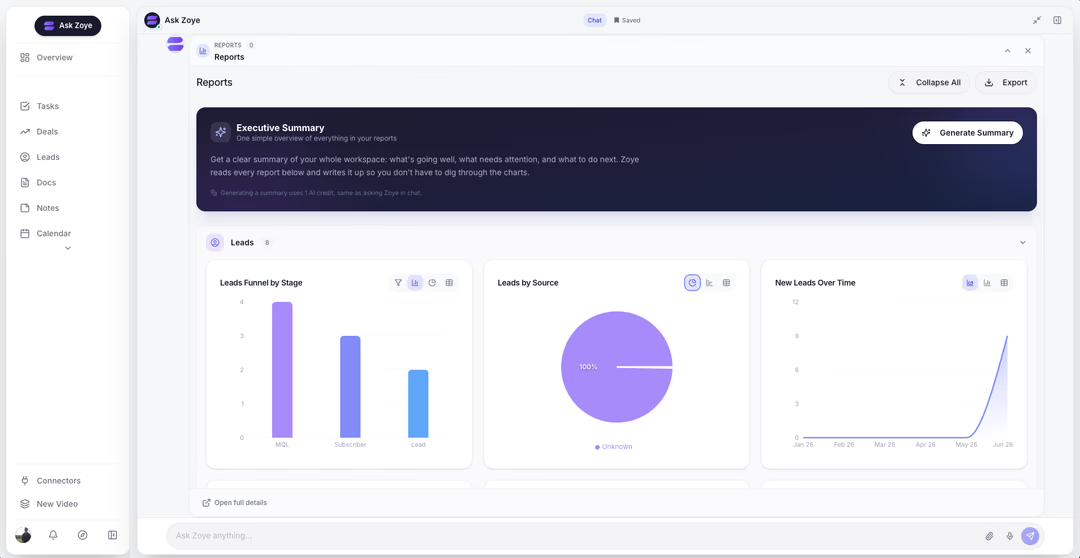
Zoye's reports read the same records your chats and follow-ups update, so you see deals won and follow-ups done, not just opens and clicks.
Pricing (November 2026): Zoye charges per plan, with a set number of team members on each, not for contacts, so the bill is the same at 1,000, 5,000 or 10,000 contacts. Almost Free is $5 a month ($4 a month billed yearly) for one member with the core tools and no automations. Above it sit Starter at $29 a month or $23 a month billed yearly (up to 5 members), Growth at $59 or $47 a month billed yearly (10 members), Scale at $119 or $95 a month billed yearly (30 members) and Customize on quote. The comment, DM and WhatsApp automations and workflow rules start on Growth. See the pricing page for what each plan includes.
The other honest limits: Zoye is not a Zapier-scale integration catalog, and it does not run ads (it captures and works the leads ads produce). Moving in works from Trello, Monday.com or a spreadsheet today (Jira, Notion and ClickUp imports are coming soon), and you can also hand the assistant a CSV, PDF or screenshot to turn into records.
A team can keep ActiveCampaign or HubSpot for the newsletter and let Zoye handle the chats and the follow-ups they create. Our guide to marketing automation for small business explains how to split those jobs without paying twice.
Ready to hand off the busywork?
Zoye brings AI-powered CRM, task management, and automation into one workspace.
Get StartedHow to choose between HubSpot and ActiveCampaign in one afternoon
You can decide in about three hours with your own data. Count where your customers reply, price both tools at today's list size and at double, and test your three most important automations in ActiveCampaign's trial and HubSpot's free tools. The tool that runs those three with less effort is your answer.
- Count your replies by channel (30 minutes). Look at the last 50 customer conversations. If most came through WhatsApp, Instagram or Facebook, an email platform solves the smaller problem.
- Count your contacts honestly (30 minutes). Export your list and split it into people you email at least monthly and everyone else. On HubSpot you pay credits only for the emails you send to the first group; on a new ActiveCampaign account, both groups count.
- Price both at today's size and at twice that (30 minutes). Use the table above for ActiveCampaign, estimate HubSpot's credits for your monthly sends, and add every seat and any onboarding fee.
- Build your three must-have automations (90 minutes). Build the same three sequences in an ActiveCampaign trial and in HubSpot's free tools, and note every plan limit you hit.
- Decide. If the automations matter most and the budget is tight, ActiveCampaign wins. If the pipeline matters most and the automations are simple, HubSpot wins. If neither tool touched the conversations your customers actually start, look at the third option.
If your customers start the conversation on WhatsApp, Instagram or Facebook, book a Zoye demo and bring a week of real chats to test the follow-ups against.
Related reading
- Best ActiveCampaign alternatives
- HubSpot vs Marketo
- Marketing automation for small business
- Best AI CRM alternatives to HubSpot