Quick answer: a client onboarding checklist turns the first 30 days with a new client into five stages with an owner and a date on each step: signed, welcome, kickoff, first win and the 30-day check-in. Copy the master list below, then the version for your kind of business, and automate the repetitive steps (task list, welcome, reminders) while keeping the kickoff and the first-win conversation personal.
Key takeaways (October 2026)
- Onboarding has 5 stages: signed, welcome, kickoff, first win and a check-in around day 30. Each one ends with a concrete thing done.
- Send the welcome within 1 business day of signing and ask for every document and login in one message, with a date.
- Below are 5 copy-ready checklists: service business, agency, consultant or coach, trade and home services, and an accountant-style professional firm.
- On WhatsApp, a free-form welcome can only go out within 24 hours of the client's last message; outside that window the WhatsApp Business Platform requires an approved template.
- Automate the steps that repeat for every client and keep 3 moments personal: the kickoff, the first-win message and any reply to a worried client.
What is a client onboarding checklist?
A client onboarding checklist is the written list of steps a business takes between "yes, let's go" and the point where the client feels the work is under way. It names each step, who owns it, what you need from the client and when it is due, so a new client gets the same careful start whether you are busy or not.
Most small businesses already have an onboarding process; it just lives in one person's head and changes with how full the week is. One client gets a warm welcome and a clear plan the same day. The next, signed in a busy fortnight, waits five days for a reply and starts to doubt the decision. A written checklist makes the good version the default, lets someone other than the seller run the start, and gives you a first draft of the automation: nobody can automate a process that was never written down.
If you are writing several procedures at once, our SOP template shows how to turn any recurring process into a one-page document with an owner and a review date. This article is the onboarding procedure in full.
The 5 stages of the client onboarding process
The client onboarding process has five stages: signed, welcome, kickoff, first win and the 30-day check-in. Each stage has a single goal and a clear "done when" test, so you always know where a client stands. The table gives the overview; the sections after it list what happens inside each stage.
| Stage | When | Goal | Done when |
|---|---|---|---|
| 1. Signed | Day 0 | Agreement, payment and records in place | Agreement signed, first invoice sent, client record created |
| 2. Welcome | Within 1 business day | Client knows what happens next and what you need | Welcome sent with next steps and a document request with a date |
| 3. Kickoff | Usually days 3 to 7 | Shared plan with goals, dates and owners | Kickoff held, notes and action items sent the same day |
| 4. First win | Usually weeks 2 to 3 | Client sees early, concrete progress | One visible result delivered and named as such |
| 5. 30-day check-in | Around day 30 | Catch problems early, confirm the fit | Check-in held, feedback recorded, next review booked |
Stage 1: Signed
The client has said yes; now make it official and findable. Save the signed agreement where the team can find it, send the first invoice or deposit request (work that starts before the money is settled tends to stay unsettled), update the client's record with contact and billing details, and move the deal to won.
Stage 2: Welcome
The welcome is the client's first experience after paying you. Send it within one business day and answer the three questions every new client has: who is looking after me, what happens next, and what do you need from me? Put the whole document and access request in it, as one list with a date.
Stage 3: Kickoff
The kickoff is a meeting of 30 to 60 minutes that turns the agreement into a plan: goals in the client's words, first deadlines, the people on both sides and how you will communicate. Send the written summary and action items the same day, while everyone remembers what they agreed.
Stage 4: First win
The first win is a small, visible result that proves the client chose well: a first draft, a fixed problem, a completed first visit, one month of clean books. Plan it at the kickoff, deliver it early and name it: "This is done, and here is what it means for you." It is the cheapest way to earn trust in the weeks when clients form their opinion.
Stage 5: The 30-day check-in
Around day 30, ask how it is going, in a short call or message with two or three real questions rather than a survey nobody answers. You hear about small irritations (slow replies, unclear invoices) while they are still small. Note the answers on the client's record and book the next review.
The master client onboarding template
The master client onboarding template is a single list that works for almost any small service business: about 20 steps grouped by the five stages, each with an owner. Copy it into whatever you use to run work, then delete the steps that do not apply and add the two or three that are specific to your trade.
Stage 1: Signed (day 0)
- Agreement or proposal signed and saved on the client's record. Owner: whoever sold the work.
- First invoice or deposit request sent, with the payment due date. Owner: whoever handles billing.
- Client record created or updated: main contact, billing contact, phone, email, preferred channel.
- Deal moved to won, with the value and start date filled in.
- Internal owner for the client named and told.
Stage 2: Welcome (within 1 business day)
- Welcome message sent on the client's preferred channel (template below).
- One combined request for documents, access and answers, with a due date.
- Kickoff times offered, or the kickoff booked if a time was already agreed.
- Onboarding questionnaire sent, only with questions not already answered at intake.
Stage 3: Kickoff (usually days 3 to 7)
- Agenda sent a day before: goals, first deadlines, people, communication.
- Missing documents checked before the call, and raised at the start of it.
- Notes taken, with decisions and action items, each with an owner and a date.
- Summary and action items sent to the client the same day.
- First win agreed and put on the calendar.
Stage 4: First win (usually weeks 2 to 3)
- First visible result delivered.
- Short message naming the result and what comes next.
- Any open item from the kickoff closed or rescheduled with a reason.
Stage 5: 30-day check-in (around day 30)
- Check-in call or message held with two or three real questions.
- Feedback written on the client's record.
- Next review date booked.
- Onboarding marked complete, and anything that went wrong added to the checklist for the next client.
Want to see it in action?
See Zoye catch a new lead, answer on WhatsApp and set up the follow-up, all from one message.
See How It WorksClient onboarding checklists by business type
Each type of business has a different first win and a different list of things to collect, so the master template needs a short local version. Below are five copy-ready checklists. They assume the master steps above (record, invoice, owner) and add only what is specific to that kind of work.
| Business type | Collect first | Typical first win | Biggest onboarding risk |
|---|---|---|---|
| Service business | Preferred times, address or meeting place, payment method | First appointment delivered on time | Client forgets the first booking |
| Agency | Brand assets, logins, approval contact | First draft or quick fix delivered | Waiting weeks for access |
| Consultant or coach | Goals in the client's words, current numbers, schedule | First session with a written action plan | Vague goals that cannot be measured |
| Trade and home services | Site access, photos, decisions on materials | Site visit or first stage completed as promised | Missed access window or unclear scope |
| Accountant-style professional firm | Prior records, identity documents, system logins | First period reconciled or first filing prepared | Documents trickling in one at a time |
Service business checklist
For businesses that sell sessions, visits or appointments, onboarding is mostly about the first booking going smoothly.
- Confirm the package or plan the client bought, and how many sessions or visits it includes.
- Ask for preferred days and times, and book the first two appointments, not just the first.
- Send directions, a meeting link or the address where the service happens, plus anything to bring.
- Explain your cancellation and rescheduling rules in two sentences.
- Set an automatic reminder for the day before each appointment.
- After the first appointment, send a short note with what was done and the next date.
- At day 30, ask whether the schedule still works and whether they want to change anything.
Agency client onboarding checklist
Agencies lose the first weeks to access requests. The fix is to ask for everything in one list and to agree a single approver.
- Name one approver on the client side and one account lead on yours.
- Request brand assets in one go: logo files, fonts, colours, tone guidelines, past work they liked.
- Request access to every account you need, with the level of access, and test each login the day it arrives.
- Agree how feedback is given (one consolidated round, by a set day) and how many rounds are included.
- Share the first month's plan as a list the client can see, with what is waiting on them.
- Deliver a quick fix or first draft inside two weeks, even if the main project is longer.
- At day 30, review results against the goals agreed at kickoff, not against impressions.
Consultant or coach onboarding checklist
For consultants and coaches, the work is only as good as the goals. Onboarding exists to make them specific.
- Send the onboarding questionnaire before the first session, limited to what the intake did not cover.
- Ask for the client's current numbers or starting point, so progress can be shown later.
- Agree the session rhythm and book the first three sessions now.
- Explain how to reach you between sessions and how fast you reply.
- After session one, send a written action plan with two or three commitments and dates.
- Check the commitments before the next session and open with them.
- At day 30, compare the starting point with where the client is now, in their own terms.
If you run a consulting practice, our guide to the best CRM for consultants covers the tools that keep proposals, retainers and renewals in one place.
Trade and home services checklist
For trades, onboarding happens partly on site. The checklist protects the access window and the scope.
- Confirm the scope in writing, including what is not included.
- Agree the start date, working hours and how the team gets in (key, code, someone at home).
- Ask for photos of the area before the visit, so the right materials and tools arrive.
- List the decisions the client must make (finishes, colours, models) and the date each one is needed.
- Send a message the day before with who is coming, the time window and a phone number.
- After the first visit, send photos of the work done and the next step.
- At day 30, or at the end of a short job, ask for feedback and, if they are happy, a review.
Accountant-style professional firm checklist
For firms that handle records, filings or compliance, onboarding is mostly a document chase with deadlines. Structure is everything here.
- Complete identity and engagement checks your profession requires before starting work.
- Send one document list covering prior records, statements, identity documents and system logins, with a due date.
- Explain how to send documents securely, and which channel not to use for sensitive files.
- Note every deadline that applies to this client on the calendar, with a reminder well before each.
- Confirm who on the client side answers questions and how fast they reply.
- Deliver the first reconciled period or first prepared filing and explain what it shows.
- At day 30, review what is still missing and agree a monthly routine for sending records.
Client welcome email and WhatsApp templates
A client welcome email should thank the client in one line, name their contact person, list the next three steps with dates and ask for everything you need by a named day. The WhatsApp version is shorter: the same next step and request, written to be read on a phone. Copy the templates below and replace the parts in braces.
Welcome email template
Subject: Welcome, {client name}: your next three steps
Hi {client name},
Thank you for choosing {business name}. I am {your name}, and I will be your main contact while we get started.
Here is what happens next:
- {date}: kickoff call to agree goals, first deadlines and who does what. Pick a time here: {booking link}.
- {date}: we start the first piece of work, {first deliverable}.
- {date}: you see the first result and we decide the next step together.
To start on time, we need the following by {due date}:
- {document or access 1}
- {document or access 2}
- {document or access 3}
You can reply to this email or message me on {channel} between {hours}. I reply within {reply time}.
Looking forward to working together, {your name}
WhatsApp welcome message template
Hi {client name}, welcome to {business name}! I am {your name}, your contact from here on. Next step: a short kickoff call. Pick a time here: {booking link}. To start on time, could you send {document 1} and {document 2} by {due date}? Reply here any time, I answer within {reply time}.
Two WhatsApp rules matter for welcome messages. On the official WhatsApp Business Platform, you can send a free-form message only within 24 hours of the client's last message to you. If the client has not written to you in the last 24 hours, the first message has to be an approved template, so write your welcome as a template and get it approved before you need it. And only message clients who gave you their number for this purpose. Our guide to WhatsApp message templates explains how approval works.
Kickoff confirmation
Hi {client name}, confirmed: kickoff on {date} at {time}, {meeting link or place}. We will agree goals, first dates and who does what, in about 45 minutes. If you can, have {item} ready. See you then.
First-win message
Hi {client name}, quick update: {first deliverable} is done. What it means for you: {one-line benefit}. Next we move on to {next step}, planned for {date}. Any questions, just reply here.
30-day check-in message
Hi {client name}, we are a month in. Could you answer two quick questions? 1. What is working well so far? 2. What would you change? If a short call is easier, pick a time here: {booking link}.
The onboarding questionnaire: ask only what you will use
An onboarding questionnaire collects what you need to deliver the work, after the client has signed. The rule is simple: ask only questions whose answers change what you do, and never ask again what the client already told you at intake. Ten good questions beat thirty that nobody reads.
Before the client signs, you used an intake process to decide whether you can help and what it will cost. Our guide to the client intake form covers those questions by business type. After signing, the questionnaire picks up where the intake left off. Here is a short version that fits most service work:
- What does success look like for you in three months, in your own words?
- What have you already tried, and what happened?
- Who else on your side should we keep informed, and how?
- Which days and times are best for meetings or visits?
- How do you prefer to hear from us: email, WhatsApp or phone?
- Is there anything we must not do, say or change?
- Which deadlines or dates matter to you in the next 90 days?
- Who approves work and payments on your side?
Keep the answers on the client's record, not in an email thread; anything useful for every future project belongs in a field.
The documents-and-access chase
The documents-and-access chase is where most onboarding delays come from: the work cannot start because a file, a login or a decision has not arrived. Ask for everything in one list with a due date, confirm what arrived the same day, and remind on a fixed schedule rather than when you happen to notice.
| Day | What you send | Tone |
|---|---|---|
| Day 0 or 1 | One complete list of documents and access, with a due date | Clear and friendly |
| Due date minus 2 days | Short reminder listing only what is still missing | Helpful |
| Due date | "Here is what we still need to start on {date}" | Direct |
| Due date plus 3 days | Message or call from the client's main contact, offering help | Personal |
| Due date plus 7 days | Agree a new start date in writing | Firm and fair |
Three habits make the chase shorter. Tick items off in front of the client: "We have 4 of 6, thank you; still missing {item 5} and {item 6}" gets a faster reply than "please send the remaining documents". Test every login the day it arrives, because a broken password found on day 10 costs ten days. And if the start date moves because something is missing, say so in writing; it is fair to both sides and usually brings the document. Tell the client where to send sensitive files, and never ask for them over a channel you would not want them stored on.
See what Zoye can do for you
CRM, deals, tasks and your Instagram, Facebook and WhatsApp automations in one workspace. Just ask Zoye and it sets any of it up for you.
Explore FeaturesThe automated version: what to automate, what stays personal
Automate the steps that are the same for every client: creating the onboarding task list, sending the welcome, offering kickoff times, reminding about missing documents and scheduling the check-in. Keep the moments that build trust personal: the kickoff conversation, the first-win message and any reply to a client who sounds unhappy.
| Step | Automate | Keep personal |
|---|---|---|
| Onboarding task list when a deal is won | Yes | |
| Welcome message from an approved template | Yes, reviewed once | Add one personal line when you can |
| Offering kickoff times | Yes | |
| The kickoff conversation | Yes | |
| Kickoff notes and action items | Drafted automatically | Checked before sending |
| Missing-document reminders | Yes, on the schedule above | The call after the due date |
| First-win message | Yes | |
| Overdue onboarding tasks | Reminder to the owner | |
| 30-day check-in | Booked and prompted automatically | The conversation itself |
The rule of thumb: automate the reminders, not the relationship. A message that would read the same for every client should not depend on someone's memory; one that depends on what this client said or feels should come from a person.
How client onboarding works in Zoye
Zoye is an AI Business Operator, an agent that does the work in your business across the client's contact, the deal, tasks, the calendar, documents and invoices. You describe what should happen when a client signs, in the app, on WhatsApp or in Slack, for example: "When a deal moves to won, create the onboarding tasks, offer kickoff times and send the welcome." Zoye turns that into a trigger, conditions and actions, shows you the finished rule in plain words, and nothing runs until you approve it. Every run is logged with what fired, what changed and what was sent.
Several onboarding steps match recipes Zoye already runs in real workspaces. Won deal onboarding creates the onboarding task list, books the kickoff and sends the welcome email when a deal moves to won. Overdue tasks, chased reminds the owner when a step slips past its due date. Tasks close automatically moves the parent task to done when every subtask is finished, so a client's onboarding is marked complete the moment the last step is ticked. Meetings arrive prepared creates a prep task and attaches the last notes on that contact before the kickoff.
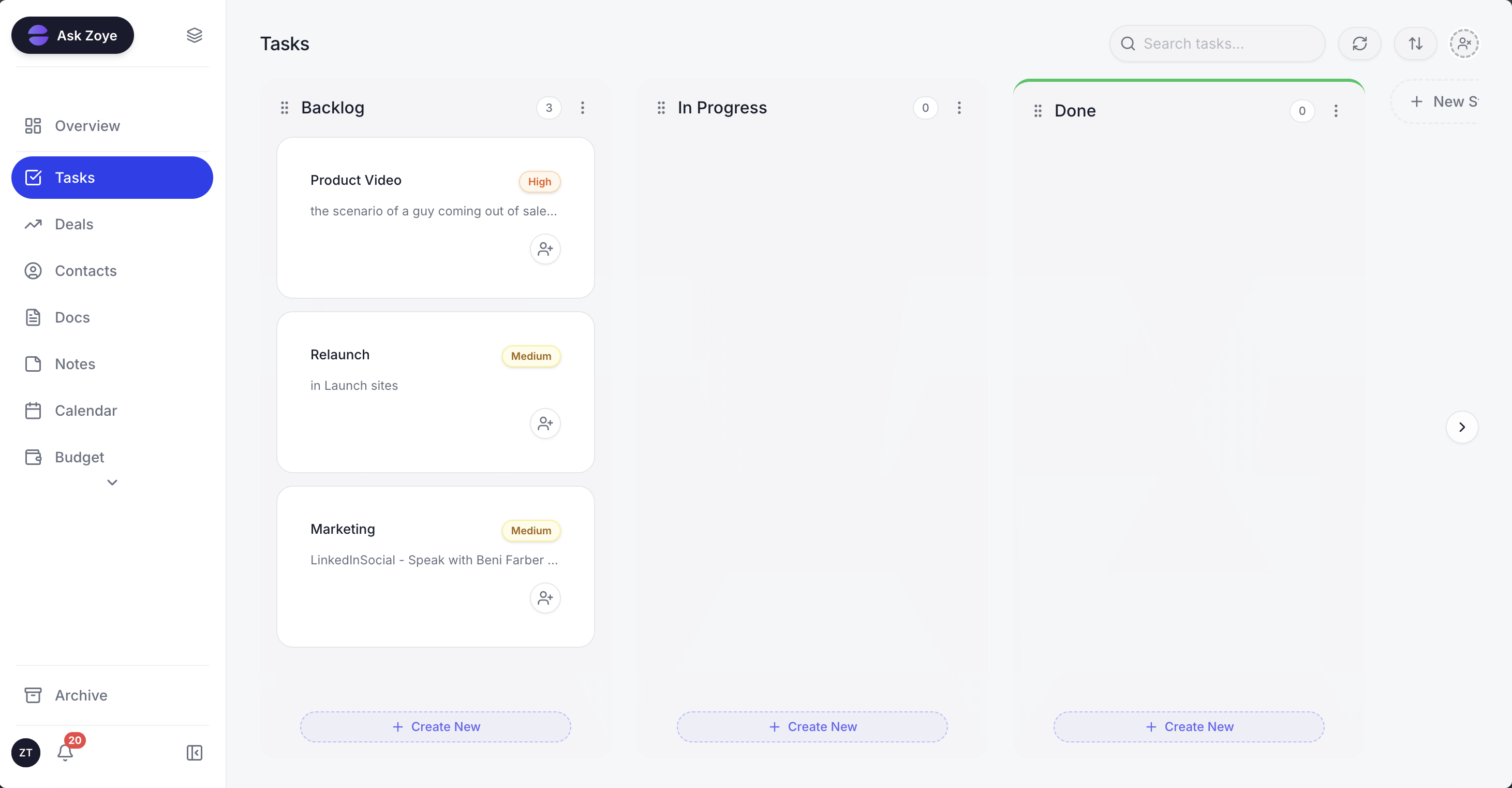
Each new client's onboarding steps sit on the task board with an owner and a date, so anyone on the team can see what is waiting on whom.
For the kickoff itself, the AI Notetaker joins Zoom, Google Meet or Teams as a visible participant, then produces a summary, the decisions made and action items with owners and dates; commitments become tasks when you approve them. Zoye has no forms product: onboarding questions can be asked in a chat, and the answers are written to fields on the client's record, which you can extend with your own custom fields. Payment links can be sent in the chat. Zoye runs on the official WhatsApp Business Platform and holds the conversations with your leads; connecting your own business WhatsApp number is coming soon. E-signatures are already available: you send a document to sign from Zoye, and the signed copy is saved on the client's record. If your current onboarding lives in Trello, Monday.com or a spreadsheet, you can import it today; Jira, Notion and ClickUp imports are coming soon.
Pricing (as of October 2026): the onboarding automations above are not part of Almost Free ($5 a month, or $4 on a yearly plan, for 1 member and the core tools). On Starter, $29 monthly or $23 a month paid yearly, up to 5 people share the workspace; Growth fits 10 people at $59 ($47 a month billed yearly), Scale fits 30 at $119 ($95 a month billed yearly), and Customize is priced on request. See the pricing page for each plan's details.
Ready to hand off the busywork?
Zoye brings AI-powered CRM, task management, and automation into one workspace.
Get StartedHow do you know your onboarding works?
Your onboarding works when three things are true: the welcome goes out within a business day for every client, the work starts on the planned date because documents arrived in time, and the 30-day check-in brings no surprises. Track those three for your next five clients and you will see where the process leaks.
Keep three notes per client: days from signing to welcome (target: one or less), planned versus actual start date with the reason for any gap, and one sentence from the day-30 conversation. The reason for a late start is usually the same missing item, and that item belongs higher up in your welcome message. Each time onboarding goes wrong, add the line that would have prevented it; each time a step proves pointless, delete it.
Start with one list this week
Pick the checklist for your business type, merge it with the master template and use it on the next client who signs. Write the welcome once, as a template, so it is ready before you need it. After two or three clients, the steps you repeated word for word are the ones to automate. The goal is a short, reliable process: a fast welcome, a clear plan, an early result and a moment for the client to say how it is going.
If you want those repeat steps to run when a deal is won, with your approval on every rule, book a Zoye demo and bring your current onboarding list.