Quick answer: an SOP template is a one-page layout for writing down how a recurring job gets done, so anyone on the team can do it the same way. A good one has seven parts: purpose, scope, owner, trigger, steps, done-when and a review date. Below you will find the blank template, a 30-minute way to fill it in, and 12 finished SOPs a small business can copy today.
Key takeaways (October 2026)
- Seven parts make an SOP usable: purpose, scope, owner, trigger, steps, done-when and review date. Leave one out and people start guessing.
- Keep each procedure to 5-10 numbered steps on one page. Past about 12 steps you are usually looking at two procedures.
- A first draft takes about 30 minutes when you write it while doing the job, not from memory.
- The 12 templates below cover the jobs where small teams most often lose a customer or a payment, from lead intake to month-end close.
- Review every SOP at least every 6 months, and in the same week anything in the process changes.
What is an SOP?
An SOP, or standard operating procedure, is a short written instruction for a job the business does again and again, so it is done the same way whoever does it. It names the owner, the event that starts the job, the steps in order and how you know it is finished. It turns a habit in one person's head into a process.
Large companies write SOPs for audits. A small team needs them because the person who knows how a job works is usually the busiest one, and when they are away the job stops.
An SOP is not a policy and not a job description. A policy states the rule ("refunds within 14 days of purchase"); an SOP says how the work happens ("when a refund request arrives, check the purchase date on the order, then..."). The test: hand the page to a new team member. If they finish the job without asking you anything, the SOP is done.
The 7 parts of a good SOP template
Every useful SOP answers seven questions: why the job exists, where it starts and stops, who owns it, what event starts it, which steps to take in which order, what finished looks like, and when someone checks the page again. The table shows each part with a sample line you can adapt.
| Part | The question it answers | Sample line |
|---|---|---|
| Purpose | Why does this job exist? | "So every new enquiry has a reply and an owner the same working day." |
| Scope | Where does it start and stop, and what is left out? | "From first message to booked call. Existing clients are out of scope." |
| Owner | Who is accountable, and who covers? | "Owner: {role}. Cover: {backup role}." |
| Trigger | Which event starts it? | "A message, call or form entry from someone not yet in the contact list." |
| Steps | What happens, in order? | 5-10 numbered steps, each opening with a verb. |
| Done when | How do we know it is finished? | "Contact saved, owner set, next step dated." |
| Review date | When is the page checked again? | "Next review: {date}, or sooner if a tool changes." |
Four writing rules keep an SOP in use:
- Name a role, not a person. "Whoever covers the inbox this week" survives a resignation.
- Open every step with a verb. Check, send, save, move, book. A step without a verb is a note.
- Make done-when visible. "Invoice marked paid" can be checked. "Client is happy" cannot.
- Park the exceptions at the end, so the main path reads straight through.
SOP format: the blank one-page template
The best SOP format for a small business is a single page: a header block with title, purpose, scope, owner and trigger, then a numbered step list, a done-when line, a short exceptions note and a review date. Copy the blank version below into the tool your team already opens every day, so the steps sit next to the work.
SOP: {name of the job}
- Purpose: {one sentence on why this job matters}
- Scope: starts when {first moment}, ends when {last moment}. Not covered: {exclusions}
- Owner: {role}. Cover: {backup role}
- Trigger: {the event that starts it}
- Steps: 1. {verb + action + where it happens} 2. {next action} 3. {and so on, 5-10 in total}
- Done when: {something anyone can check}
- Exceptions: if {situation}, then {what to do instead}
- Review date: {date}. Last changed by: {role}
Where an SOP document lives matters as much as its content: keep it beside the records it touches, not in a drive nobody opens.
How to write an SOP in 30 minutes
To write an SOP in 30 minutes, do the job once while noting each action, cut the notes down to the steps that matter, add the owner, trigger and done-when line, then test the page on a colleague. Writing from memory skips the step everybody forgets, usually the one that matters most.
Minutes 0-5: pick one job and write the trigger. Choose something weekly that hurts when it goes wrong. A procedure without a clear starting event never gets used.
Minutes 5-15: do the job and narrate it. Do it for real and jot down every action, including the small ones: which screen you open, what you copy, who you tell. Expect 15 to 25 rough lines.
Minutes 15-22: cut and order. Merge tiny actions, delete the obvious, keep 5-10 steps that each open with a verb. Rare branches move to the exceptions line.
Minutes 22-27: fill the header. Purpose, scope with a start and an end, owner and cover by role, a checkable done-when, and a review date six months out.
Minutes 27-30: hand it over. Ask someone who does not normally do this job to follow the page next time without asking you anything. Every question they ask is a missing line.
Want to see it in action?
See Zoye catch a new lead, answer on WhatsApp and set up the follow-up, all from one message.
See How It Works12 SOP templates for a small business
These 12 SOP examples cover the recurring jobs where small businesses most often lose a customer, a payment or an afternoon. Each follows the seven-part format above. Swap the words in braces for your own, cut any step that does not fit how you work, and keep every owner a role rather than a name.
1. Lead intake
- Purpose: every new enquiry gets a reply and an owner the same working day.
- Scope: first contact to first booked conversation.
- Owner: {inbox role}. Cover: {business owner}
- Trigger: a message, call, form entry or comment from someone not yet in your contact list.
- Search the contact list by name, phone and email before creating anything.
- Create the contact with the source (ad, website, referral, social, walk-in) and what they asked about.
- Reply within {target time}: a thank-you, one question about their need and two times to talk.
- Assign an owner and add a follow-up task for the next working day.
- If there is no answer after 48 hours, send one short follow-up.
Done when: contact saved, owner set, follow-up dated. Why the first hours matter: how to stop losing leads.
2. Quote follow-up
- Purpose: no quote goes quiet without three attempts to get a decision.
- Scope: quote sent to a yes, a no or closed as lost.
- Owner: {the person who sent the quote}
- Trigger: a quote or proposal is sent.
- Log the amount, the date sent and the expiry date on the deal.
- Day 2: a short check-in asking whether the quote answers their question.
- Day 5: a call or voice note about timing and anything blocking the decision.
- Day 10: a last message with the expiry date: "Shall I keep this open, or close it for now?"
- Move the deal to won, lost with a reason, or a new dated follow-up. On a win, start SOP 3.
Done when: won, lost with a reason, or a dated next step. Wording ideas: follow-up email templates.
3. New client onboarding
- Purpose: a new client knows what happens next within 24 hours of saying yes.
- Scope: signed or paid to first delivery date confirmed.
- Owner: {account role}
- Trigger: a deal moves to won.
- Send a welcome naming their contact person, the next three dates and how to reach you.
- Create the client's project with one task per delivery step.
- Ask for everything you need from them (files, access, details) in one list with a due date.
- Book the kickoff and send the invitation.
- Send the deposit request or first invoice if your terms call for one (SOP 4).
- On day 7, check what is still missing on both sides.
Done when: welcome sent, project created, kickoff booked, inputs received or chased.
4. Invoicing and payment chasing
- Purpose: every finished job is billed within {number} days and chased on a schedule, not on a mood.
- Scope: work delivered to paid in full.
- Owner: {finance role}. Cover: {business owner}
- Trigger: a job is marked complete, or an agreed billing date arrives.
- Raise the invoice with the client's reference, the due date and a payment link.
- Three days before the due date: a friendly reminder with the link.
- One day after: a polite note that it is now due.
- Seven days after: a personal message or call from the account owner.
- Fourteen days after: escalate to the business owner.
- Mark it paid the day the money arrives, and thank the client.
Done when: paid and marked paid. Message wording per stage: WhatsApp payment reminders.
5. Review request
- Purpose: satisfied clients are asked for a review while the experience is fresh.
- Scope: completed jobs with no open complaint.
- Owner: {account role}
- Trigger: a job is complete and paid.
- Check the client record for an open issue. If there is one, stop and follow SOP 7.
- Within three days, send a short thank-you with one direct link to your review page: "Thanks again for trusting us with {job}."
- No review after seven days: one reminder. Never a third message.
- Reply publicly to every review within two working days and note it on their record.
Done when: request sent, one reminder at most, every review answered.
6. Appointment booking and reminders
- Purpose: every booking is confirmed, reminded, then attended or rebooked.
- Scope: request for a time to end of the appointment.
- Owner: {front desk role}
- Trigger: a client asks for a time.
- Offer two or three real open slots from the shared calendar, not "whenever suits you".
- Book the slot with the client's name, the service and their contact details.
- Send a confirmation with date, time, place or video link, and how to reschedule.
- Send a reminder 24 hours before, and another 2 hours before early-morning slots.
- On a cancellation, offer two new times in the same reply.
- On a no-show, message within 30 minutes with a rebooking offer and log it.
Done when: attended, rebooked, or closed with a reason.
7. Complaint handling
- Purpose: an unhappy customer hears from a person quickly and gets an answer with a date on it.
- Scope: any complaint, by any channel.
- Owner: {senior role}. Cover: {business owner}
- Trigger: a customer says something went wrong.
- Acknowledge within {target time}: thank them, say who is handling it and when they will hear back.
- Log the complaint on their record in their own words.
- Gather the facts: what was promised, what happened, who was involved.
- Agree any fix that costs money (refund, redo, discount) with the business owner.
- Reply with what happened, what you will do and by when, without blaming anyone by name.
- Carry out the fix, confirm it, and add the root cause to the weekly report.
Done when: outcome told, fix complete, cause logged.
8. Weekly reporting
- Purpose: the team looks at the same handful of numbers every week and acts on them.
- Scope: one page, Monday to Sunday.
- Owner: {operations role}
- Trigger: every {day} at {time}.
- Pull new leads by source.
- Pull quotes sent, won and lost, with the top reason for losing.
- Pull revenue invoiced, collected and overdue.
- Pull open complaints and overdue tasks per owner.
- Write three lines: what went up, what went down, one action with an owner.
Done when: shared before the weekly meeting, action owned and dated.
9. Supplier reorder
- Purpose: you never run out of the items that stop work.
- Scope: everything on the reorder list.
- Owner: {purchasing role}
- Trigger: an item drops to its reorder level, or the weekly stock count.
- Keep one list: item, supplier, reorder level, order quantity, delivery lead time.
- Every {day}, count the items on the list.
- Order anything at or below its level from the usual supplier.
- Log the expected delivery as a dated task.
- On delivery, check quantity and condition before signing.
- Report a short or damaged delivery the same day and note it on the supplier's record.
Done when: received in full, or the gap is chased with a date.
10. New team member onboarding
- Purpose: a new person does real work by the end of week one.
- Scope: accepted offer to end of the first month.
- Owner: {the new person's manager}
- Trigger: an offer is accepted.
- Before day one, create their accounts and share the SOPs for their role.
- On day one, walk through the five SOPs they will use most.
- Pair them with a buddy for small questions.
- In week one, they watch each SOP done once, then run each once while observed.
- At the end of week two, rewrite the SOP lines that confused them.
- On day 30, review what works and where more training is needed.
Done when: they have run every SOP for their role without help.
11. Social DM replies
- Purpose: Instagram and Facebook messages get an answer while the person still cares.
- Scope: DMs, story replies and comments that ask a question.
- Owner: {inbox role}
- Trigger: a new DM, story reply or question in the comments.
- Check the social inbox at least three times a working day. Meta's messaging policy lets a business reply freely only within 24 hours of the person's last message.
- Answer common questions with saved replies, then make one line personal.
- When someone sounds ready to buy, ask for their name and best contact, then run SOP 1.
- Move prices and personal details out of public comments into a private message.
- Pass anything angry or sensitive to the SOP 7 owner within the hour.
Done when: every message answered or handed over, buyers in the contact list.
12. End-of-month close
- Purpose: the month's money and records are clean before the next month starts.
- Scope: last working day of the month to the third working day of the next.
- Owner: {finance role}
- Trigger: the last working day of the month.
- Check that every finished job has an invoice (SOP 4).
- Match payments to invoices and mark them paid.
- List what is still overdue, with an owner and a next chase date.
- File every expense receipt against the right budget line.
- Close or re-date deals whose expected close date has passed.
- Send a summary (invoiced, collected, overdue, spent) to the business owner and whoever keeps your books.
Done when: every job invoiced, payments matched, summary sent.
The 12 SOPs at a glance
| SOP | Trigger | Owner role | How often | Worth automating? |
|---|---|---|---|---|
| 1. Lead intake | New enquiry | Inbox | Daily | Yes: saving, assigning, first reply |
| 2. Quote follow-up | Quote sent | Quote sender | Per quote | Yes for reminders; the call stays human |
| 3. New client onboarding | Deal won | Account | Per client | Partly: welcome and task list |
| 4. Invoicing and chasing | Job done or due date | Finance | Weekly | Yes for reminders; escalation stays human |
| 5. Review request | Job done and paid | Account | Per job | Yes, after a complaint check |
| 6. Booking and reminders | Time requested | Front desk | Daily | Yes: confirmations and reminders |
| 7. Complaint handling | Complaint received | Senior | As needed | Only the acknowledgement and logging |
| 8. Weekly reporting | Fixed weekly time | Operations | Weekly | Yes for the numbers; actions stay human |
| 9. Supplier reorder | Reorder level reached | Purchasing | Weekly | Partly: the reminder task |
| 10. New team member | Offer accepted | Manager | Per hire | Partly: accounts and checklist |
| 11. Social DM replies | New DM or comment | Inbox | Daily | Partly: common answers |
| 12. Month-end close | Month end | Finance | Monthly | Partly: lists and reminders |
See what Zoye can do for you
CRM, deals, tasks and your Instagram, Facebook and WhatsApp automations in one workspace. Just ask Zoye and it sets any of it up for you.
Explore FeaturesWhen does an SOP become an automation?
An SOP is ready to become an automation once it has run the same way for a few weeks, its trigger is an event software can see, and most of its steps create, move or send something. In Zoye, you describe that procedure; Zoye builds the rule, shows it to you, and nothing runs until you approve it.
Zoye is an AI Business Operator: an agent that works inside the business across contacts, deals, tasks, the calendar, documents and invoices. Turning an SOP into a workflow automation is a conversation, in the web app, on WhatsApp or in Slack: "When a deal moves to won, send the welcome message, create the onboarding tasks and book a kickoff." Zoye turns that into a trigger, conditions and actions, shows you the finished rule step by step, and waits for your approval. A visual builder exists, but you never have to open it. Every run is logged with what fired, what changed and what was sent, and a run can be reversed.
Several templates match recipes Zoye already ships: instant follow-up on a new lead (SOP 1), a nudge when a deal has been stale for 7 days (SOP 2), onboarding when a deal is won (SOP 3) and chasing an overdue invoice (SOP 4). Zoye offers open times from one Booking list and sends reminders automatically (SOP 6). On Instagram and Facebook, Zoye answers DMs and story replies right away and hands anything she should not answer to a person, with the whole chat on the lead's card (SOP 11). On WhatsApp, Zoye runs on the official WhatsApp Business Platform and holds the conversations with your leads; connecting your own business WhatsApp number is coming soon.
The SOP itself should live next to the work. Docs keeps documents in folders and attaches files to the contact, deal or task they belong to. Notes, a shared space for team documents, is still rolling out and shows a "Coming soon" badge in the app. If your checklists sit in Trello, Monday.com or a spreadsheet, Zoye imports them today; Jira, Notion and ClickUp imports are coming soon. You can also send Zoye a PDF or screenshot of a checklist and she pulls the records out of it.
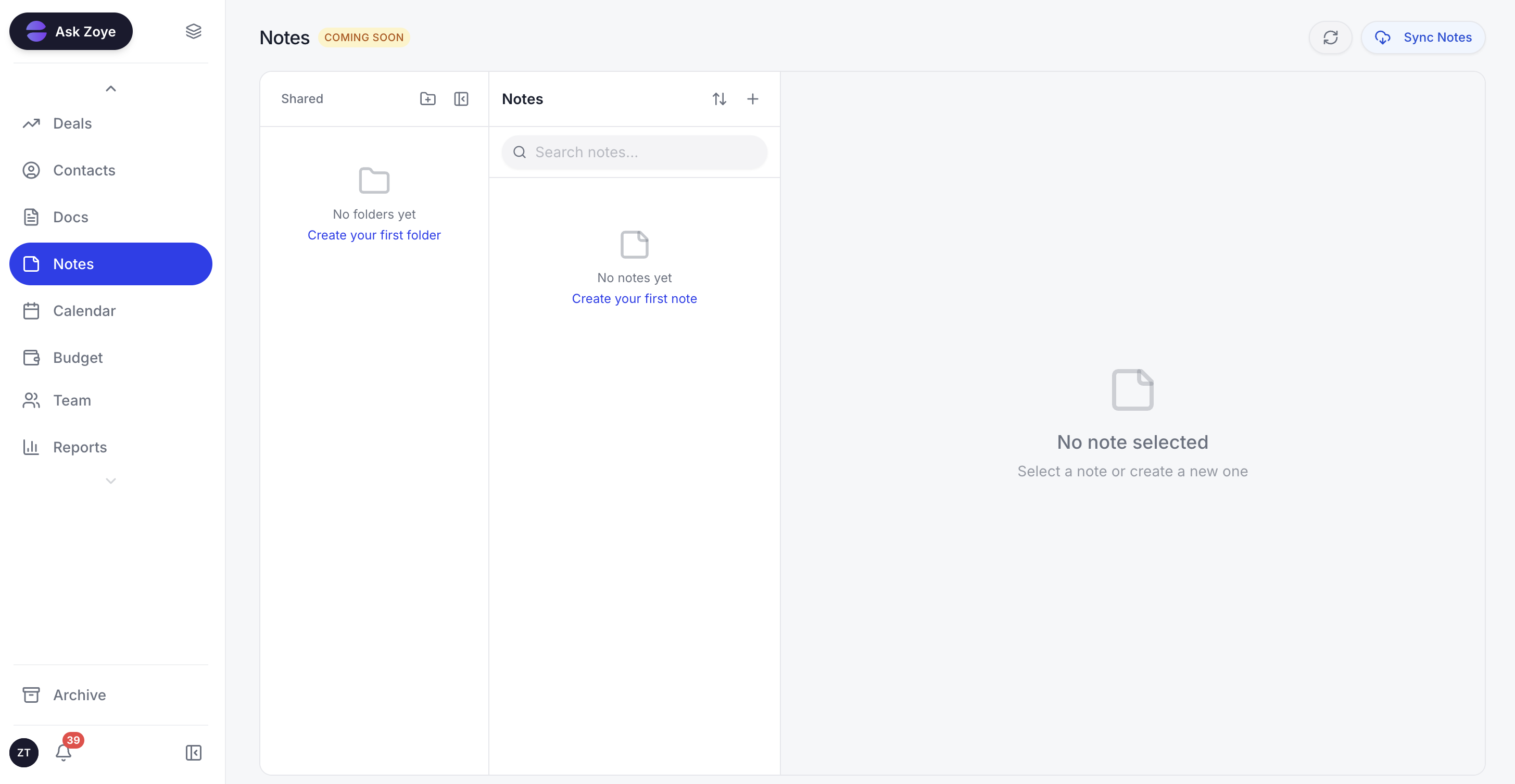
Notes gives a team shared folders for procedures like these SOPs; it is still rolling out, and Docs holds them on the right record today.
Pricing (as of October 2026): the entry plan, Almost Free, is $5 a month or $4 a month on a yearly bill, for one member and the core tools; automations are not part of it. Above it: Starter at $29 monthly or $23 yearly with room for 5 members, Growth at $59 or $47 with 10, Scale at $119 or $95 with 30, and Customize on a quote. See the pricing page for each plan's contents.
What should stay manual?
Keep a step manual when it needs judgment, empathy or a money decision made case by case: what to offer an unhappy customer, a refund, a price exception, a call to a client who is drifting, and anything said in public about a mistake. Automate the reminders and records around those steps, not the decision itself.
- Complaint outcomes (SOP 7): the acknowledgement and the log can be automatic; the fix and the apology belong to a person.
- The day-5 call (SOP 2): the reminder to call can be automatic, the conversation cannot.
- Late payments past 14 days (SOP 4): pausing work for a client is a relationship decision.
- Changing supplier (SOP 9): a low-stock reminder is mechanical; switching after a quality problem is not.
- A new hire's first week (SOP 10): accounts can be prepared automatically; the welcome comes from a human.
- Replies to negative reviews (SOP 5): draft with help if you like, but a person reads and sends.
One test covers most cases: if a wrong automatic action would need an apology, keep a human approval in that step.
Common SOP mistakes
The most common SOP mistakes are writing the ideal process instead of the real one, making it too long, naming people instead of roles, leaving out the trigger and never reviewing it. Each one makes the page quietly irrelevant, and the team goes back to asking whoever knows.
- The ideal, not the real. Write what happens today; improve it in version two.
- Thirty steps. Long procedures get skimmed. Split at the hand-off point.
- First names as owners. The SOP breaks the day that person is away.
- No trigger. "Follow up with clients" never happens. "Two days after a quote is sent" does.
- Never reviewed. A review date with an owner keeps the page honest.
- Automating too early. A process that changes weekly makes a rule that breaks weekly.
Ready to hand off the busywork?
Zoye brings AI-powered CRM, task management, and automation into one workspace.
Get StartedHow to roll out SOPs in a small team
Start with three SOPs this week, not twelve: lead intake, invoicing and payment chasing, and the job that caused the most trouble last month. Run each for two weeks, fix the lines that raised questions, then add the next three. At that pace a small team has all twelve running in about two months.
- Week 1: write SOPs 1, 4 and your worst job with the 30-minute method.
- Weeks 2-3: run them for real and list every question asked.
- Week 3: fix the confusing lines and set review dates.
- Weeks 4-8: add three SOPs every two weeks, ordered by the money or customers they protect.
- After two stable months: turn the steps marked "Yes" in the table into automations you approve one at a time.
If your procedures already live in a spreadsheet or on a board, book a Zoye demo and bring one SOP with you: you will see the rule Zoye builds from it before anything runs.