At some point, every growing business realises that the tools holding things together are now the things holding things back. A task board here. A shared calendar there. A CRM in one tab and a budget tracker in another. Everyone is busy, but nobody has a clear picture of what is actually happening.
Project management apps were supposed to solve that. And the right one does. But the market has evolved dramatically - the question in 2026 is not just "does this tool track tasks?" but "does this tool think, act, and connect everything together so my team doesn't have to?" (Coming from legacy desktop tooling like Microsoft Project? We cover the best Microsoft Project alternatives separately.)
This guide covers 12 project management platforms worth considering this year. We look at what each one genuinely does well, what it costs, and who it is actually built for - starting with Zoye, the platform that goes further than project management and becomes a personal AI assistant running your entire business.
Why the right project management app changes everything
The tools a team uses shape how that team thinks. A platform that requires manual updates produces a team that is always catching up. A platform with live data, proactive alerts, and AI that flags problems before they happen produces a team that stays ahead.
The operational cost of using the wrong tool - or too many tools at once - is higher than most teams realise:
- Context switching: When work is spread across many separate apps, every switch carries a refocusing cost - you lose your place, reload context, and slow back down before you are productive again. Across a day, those small interruptions add up to real lost focus time.
- Data silos: When your tasks live in one tool, your deals in another, and your calendar in a third, no single view of your business is complete or current.
- Manual overhead: Updating statuses, logging activity, and assigning follow-up tasks are not value-creating activities. They are administrative overhead that AI can eliminate.
- Compounding subscription costs: Three separate tools at $10-$15/user/month each means $30-$45/user/month just in tooling. For a 20-person team, that is up to $10,800/year before you add a CRM or budget tracker. Replacing that stack with one tool that covers your whole team is a direct way to cut that cost.
The platforms that solve this most completely are not just better task managers - they are connected workspaces where AI ties everything together. That is the standard we used to evaluate every tool on this list.
Quick comparison: 12 best project management apps in 2026
| Tool | Best for | Standout capability | Starting price | Pricing model |
|---|---|---|---|---|
| Zoye | All sizes | Personal AI assistant across entire workspace + WhatsApp | $5/mo Almost Free ($29/mo Starter, $59/mo Growth) | Flat rate, change anytime |
| Asana | Cross-functional teams | Work Graph links tasks to company goals | $10.99/user/mo | Per seat |
| ClickUp | Tool consolidators | 15+ views, docs, chat in one platform | $9/user/mo | Per seat |
| Trello | Small/visual teams | Zero-friction drag-and-drop Kanban | $5/user/mo | Per seat |
| Notion | Knowledge teams | Flexible wiki-database hybrid | $10/user/mo | Per seat |
| Wrike | Enterprise PMOs | Advanced approvals and capacity management | $10/user/mo | Per seat |
| Jira | Dev/engineering | Sprint planning and agile backlog management | $8.48/user/mo | Per seat |
| Basecamp | Remote-first teams | Flat-fee pricing, Hill Charts | $29/mo | Flat |
| Smartsheet | Spreadsheet users | Grid-based PM with automation layer | $9/user/mo | Per seat |
| Hive | Creative agencies | Native proofing and built-in email | $5/user/mo | Per seat |
| Nifty | Client-facing teams | Auto-updating milestone roadmaps | $10/user/mo | Per seat or flat |
| Zoho Projects | Zoho suite users | Deep Zoho ecosystem integration | Free for up to 5 users | Per seat |
1. Zoye - The AI-native workspace that manages your whole business, not just your tasks
Most project management tools are built around a single idea: organise work into tasks, assign them to people, and track their completion. That is useful. But it is also incomplete, because work does not live only in tasks. It lives in deals, contacts, budgets, documents, meetings, and the conversations between all of those things.
Zoye is built on a different premise: that a growing business needs one intelligent workspace that covers all of those dimensions - and one AI assistant that understands all of them and can act across all of them. Not a project management tool with a CRM tacked on, and not a CRM with a task manager added later. A genuinely unified platform where every module connects to every other, and where Zoye Assistant - your personal AI - is the thread that runs through all of it.
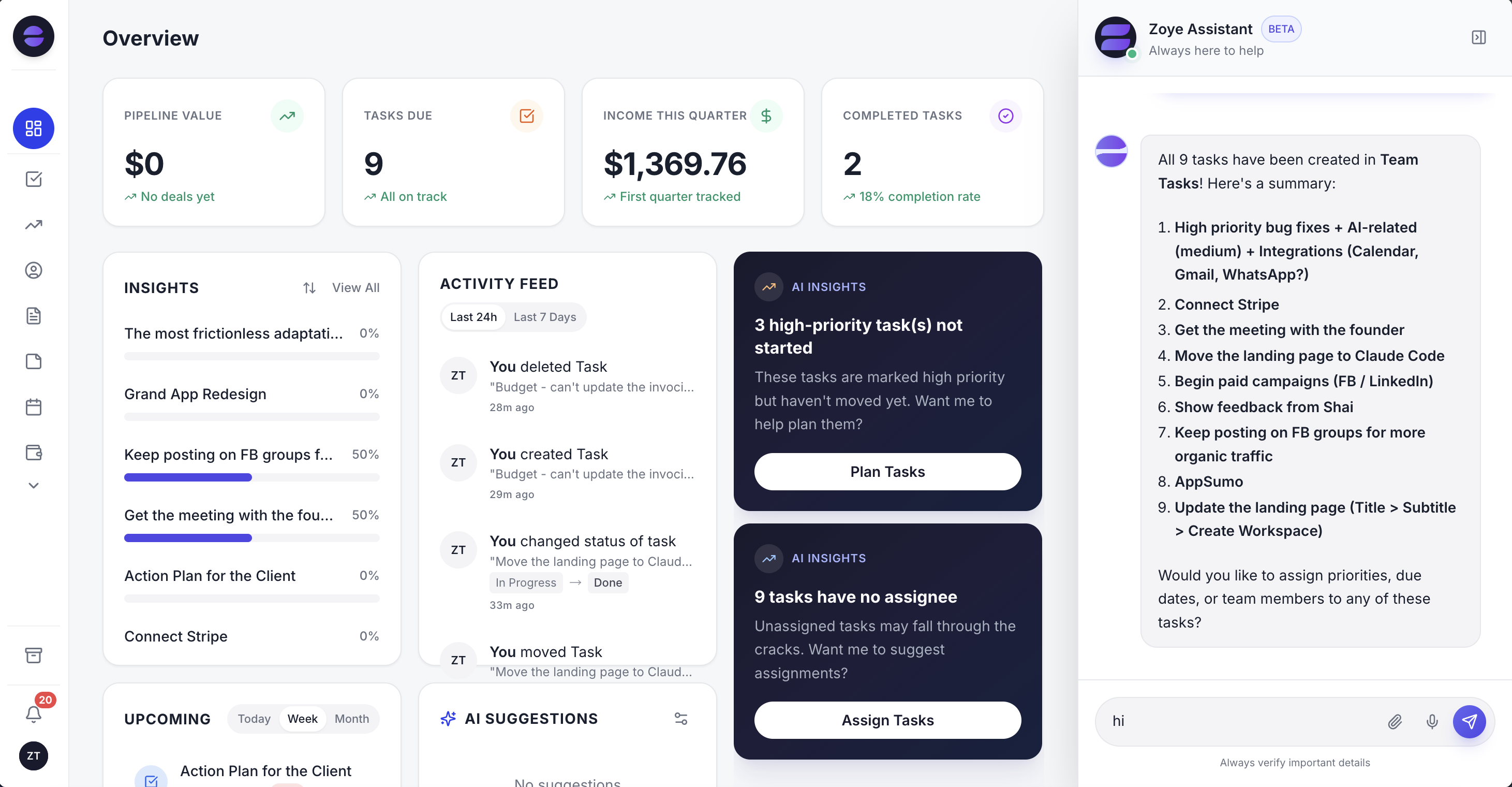 The Zoye workspace: every metric that matters in one view, with AI Insights surfacing risks automatically and Zoye Assistant always ready on the right
A personal AI assistant that acts, not just advises
What defines Zoye is not a single feature - it is an architectural decision. Zoye Assistant is connected to every module: your tasks, deals, contacts, inbox, calendar, budget, and reports. It can read all of it and act on all of it.
Here is what that looks like in practice:
Example: "Design review with Dana at Northwind Studios went great - they want to move ahead on the rebrand, about a $22K project. Set it up, put our strongest brand designer on it, and have them book a kickoff call for early next week."
From that message - sent by text or voice, from your desk or from WhatsApp - Zoye carries out five actions:
- Creates a new Deal named Northwind Studios with a value of $22K
- Creates a new Contact named Dana and links her to the deal
- Creates a Task: "Book rebrand kickoff call with Dana at Northwind Studios" due early next week
- Picks the brand designer with the right skills and available capacity, and assigns the task once you confirm
- Adds a description note: "Rebrand project approved, confirm scope on the kickoff call"
Several tools on this list now offer AI agents of their own. Zoye carries out real actions across deals, contacts, tasks and your team when you simply ask for them.
Manage everything from WhatsApp
Zoye connects natively to WhatsApp through the official WhatsApp Business Platform from Meta - this is live, not a coming-soon feature. Every action available inside the platform is available from WhatsApp by text or voice message. Your entire business is accessible from the app already on your phone. The same Zoye Assistant also works in Slack and, on the Scale plan, in Claude, so your team can update a project from wherever they already talk.
On the Growth plan and above, setting things up works the same way. Instead of clicking through settings, just ask: "Every Monday morning, send me the tasks that are overdue and who owns them." Zoye sets up the scheduled job and sends the list each week. For client-facing work, the same assistant can also run WhatsApp automations such as an instant first reply to every new lead.
Ready to hand off the busywork?
Zoye brings AI-powered CRM, task management, and automation into one workspace.
Get StartedAll the tools your business needs - in one place
Open the Zoye sidebar and you see the full scope of what the platform covers:
- Overview: live dashboard with pipeline value, tasks due, income, completion rates, AI Insights, and activity feed
- Tasks: Kanban board with priority labels, assignees, and stage management
- Deals: sales pipeline with deal values, stages, and linked contacts
- Contacts: CRM contact management linked to deals and tasks
- Inbox: connected email via Gmail integration
- Docs: document creation and management
- Notes: shared team notes and knowledge
- Calendar: schedules, reminders, and events - events sync live with Google Calendar
- Budget: expense tracking and invoice management
- Team: team member management, with each person's workload shown in Reports
- Reports: live charts across finance, tasks, deals, and performance
That is not a wishlist - every item above is a built-in module available today. Covering these functions with separate apps means several subscriptions; in Zoye, they are all connected through one AI assistant and accessible from one login.
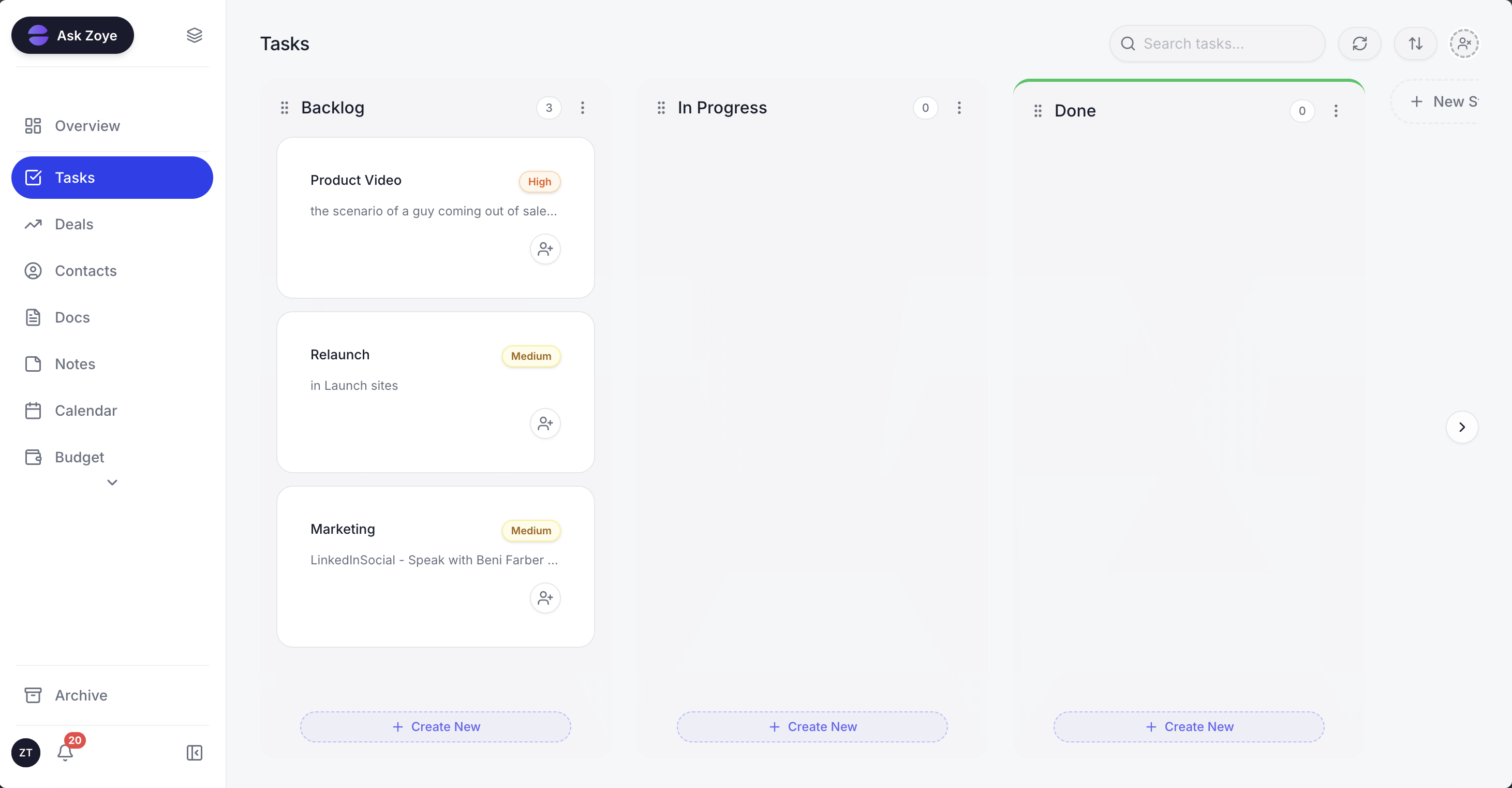 Zoye task board: clean Kanban with priority labels - tasks created by Zoye Assistant appear here instantly with the right assignee and priority
Calendar and scheduling
Zoye's calendar module gives the whole team a shared view of what is due and when, across month, week, and day modes. Google Calendar syncs live - events created in Google appear in Zoye and vice versa.
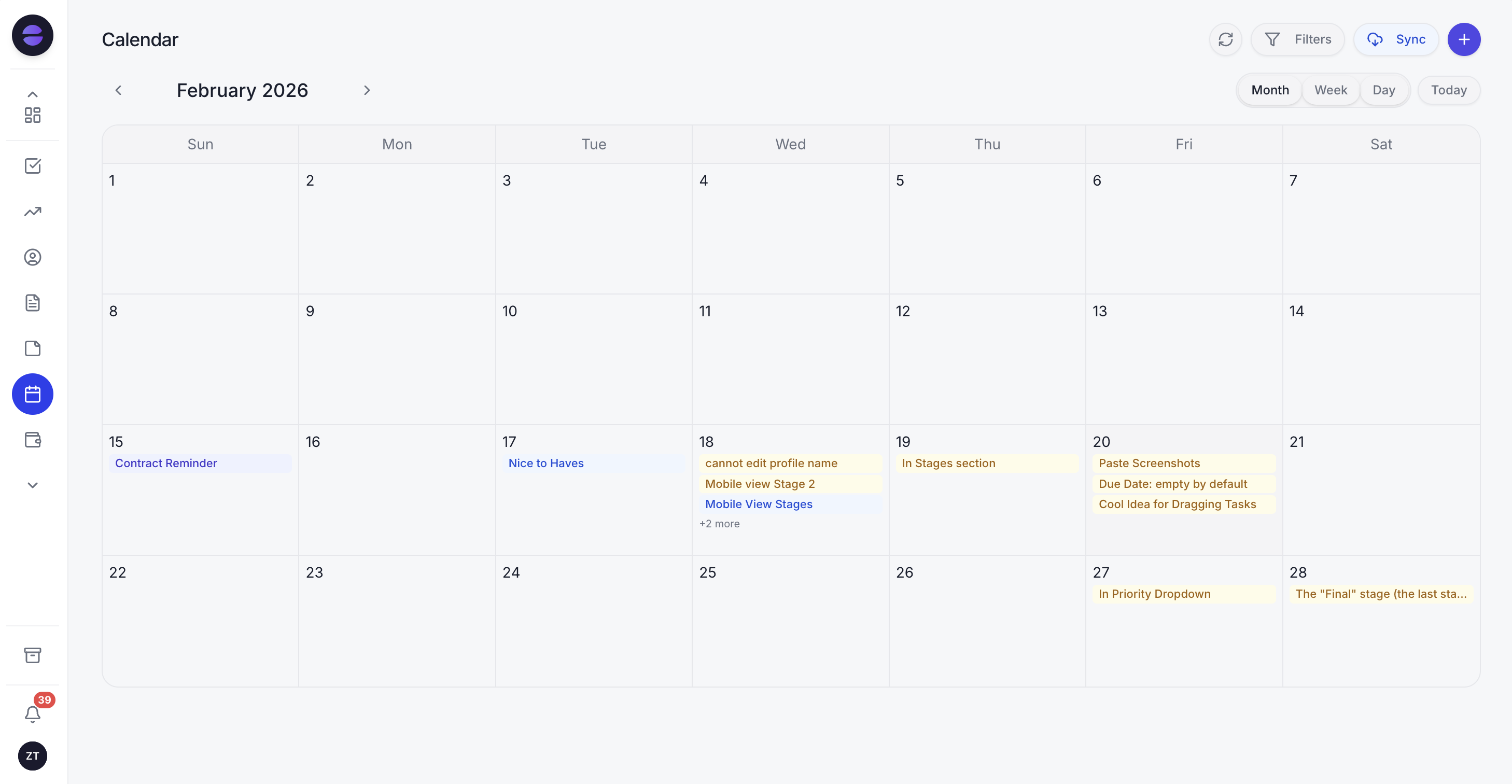 Zoye calendar: team tasks and deadlines in one shared view, with events synced live with Google Calendar
Reports that cover your whole business
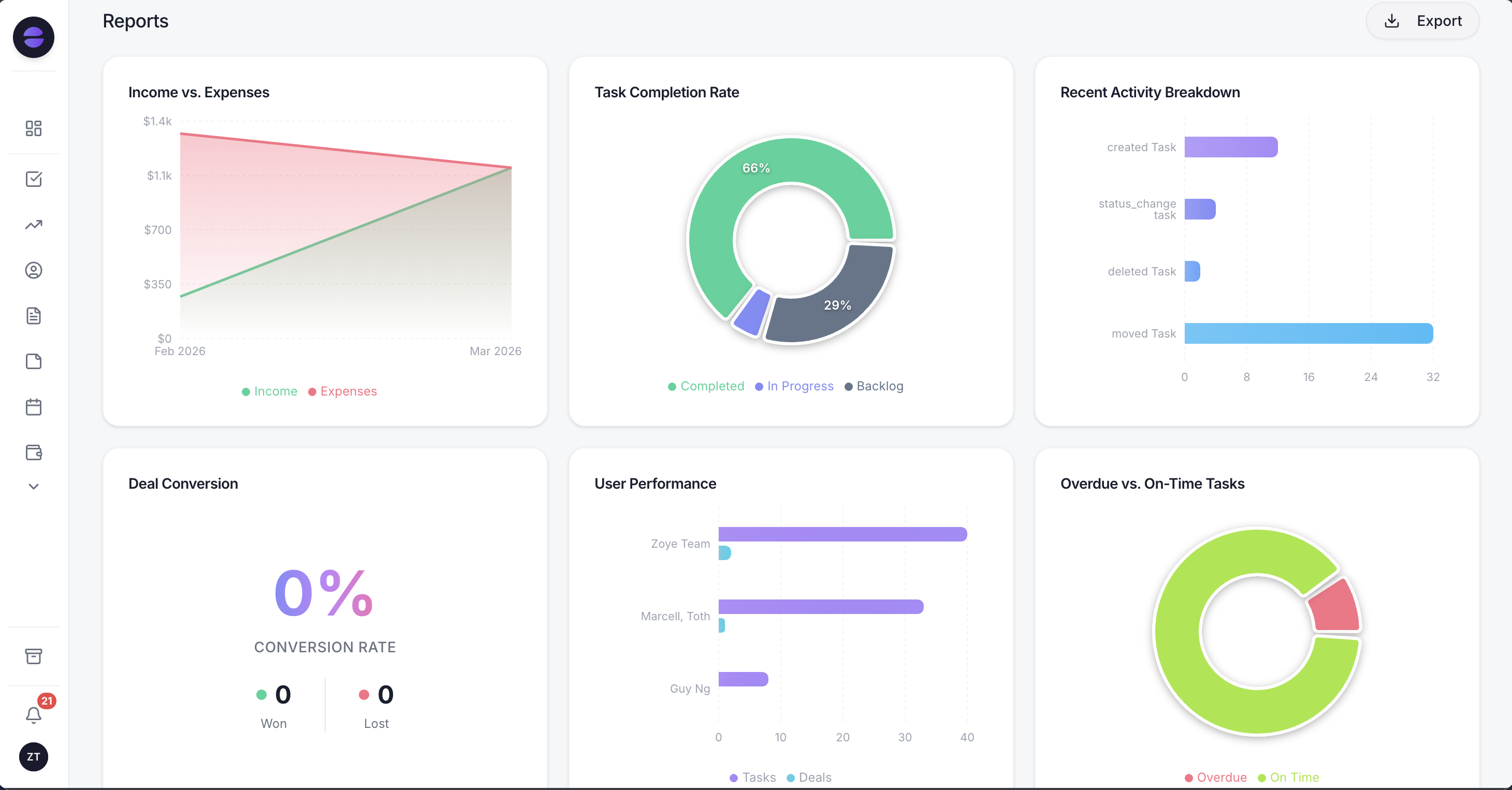 Zoye Reports: project, financial, and team performance data in a single exportable dashboard
Pricing
Pricing reflects published rates as of November 2026; check each vendor's pricing page for current figures.
- Almost Free: $5/mo - 1 member, 1GB storage, core tools
- Starter: $29/mo - 5 members, 5GB
- Growth: $59/mo - 10 members, 10GB, dedicated support and account manager (most popular)
- Scale: $119/mo - 30 members, 25GB
- Customize: Custom pricing - custom limits, dedicated support and account manager
- Add-ons (Starter and up): in-plan AI prompt slider, Notetaker Plus (from $5/mo), Messages Plus (from $19/mo), E-signatures Plus (from $12/mo)
- Change plan or add-ons anytime - just ask Zoye.
For a 20-person team, replacing a CRM, a project management tool and a docs platform at example prices of $12, $10 and $8 per user per month - that's $7,200/year - with Zoye Scale ($119/mo = $1,428/year) saves over $5,700 annually. And the AI assistant is included in every Zoye plan.
See what Zoye can do for you
CRM, deals, tasks and your Instagram, Facebook and WhatsApp automations in one workspace. Just ask Zoye and it sets any of it up for you.
Explore Features2. Asana - Connecting every task to a company-level goal
Asana is built around a specific belief: that the biggest problem in team productivity is not lack of effort but lack of direction. Its Work Graph data model creates a visible chain from individual task to project to portfolio to company goal. For organisations where strategic alignment is a genuine operational challenge, Asana gives that alignment a clear structure.
Where it excels
- Work Graph: connects every task upward to a project, every project to a portfolio, and every portfolio to a strategic company goal - making the link between daily work and business outcomes visible to everyone
- AI Studio: lets teams build no-code AI automations that handle intake, routing, approvals and more
- Enterprise security: SOC 2 Type 2 and SOC 3 reports, ISO/IEC 27001:2022, and opt-in HIPAA compliance
Pricing
- Personal: Free (1-2 users)
- Starter: $10.99/user/month (billed annually)
- Advanced: $24.99/user/month (billed annually)
- Enterprise and Enterprise+: Custom pricing
Worth knowing: Asana AI comes with the paid plans but is capped: Starter and Advanced include 5 AI Teammates and Asana Dash requests per user per month, up to 50 per account. For a full breakdown of cheaper and AI-native options, see the best Asana alternatives.
3. ClickUp - Replacing your entire tool stack with one platform
ClickUp's central argument is that tool sprawl is the real productivity problem. With 15+ views and 100+ automation templates, it offers deep customisation. For teams willing to invest in a proper migration, ClickUp delivers real consolidation.
Where it excels
- 15+ project views: Gantt, Kanban, Timeline, Workload, Calendar, Mind Map - teams switch views without changing the underlying data
- Native docs and chat: document creation and team messaging built in, reducing the need for Google Docs and Slack
- Connected Search (Enterprise): finds information across ClickUp and external apps like Google Drive and Slack from one search bar
Pricing
- Free Forever: $0 (unlimited tasks, 60MB storage)
- Core: $9/user/month (billed annually, $12 monthly; ClickUp re-checked November 2026)
- Business: $17/user/month (billed annually, $25 monthly)
- Enterprise: Custom pricing
- Note: AI is included on paid plans only: Core includes 1,000 AI credits per user per month and Business adds unlimited Brain² standard models with 1,500 credits; Free Forever has no AI credits (November 2026)
Worth knowing: Without clear governance conventions, a ClickUp workspace can become as chaotic as the tool sprawl it was meant to replace. If that complexity is a concern, compare the best ClickUp alternatives.
Want to see it in action?
See Zoye catch a new lead, answer on WhatsApp and set up the follow-up, all from one message.
See How It Works4. Trello - Visual task management with near-zero learning curve
Trello is quick to set up and easy for new team members to start using without training. For small teams running straightforward projects, it remains one of the most practical options available.
Where it excels
- Instant onboarding: drag-and-drop Kanban boards that new team members understand without any training or documentation
- Built-in automation: no-code rules, buttons and commands handle repetitive board actions without technical setup
- Multiple views on Premium: Timeline, Calendar, Table, Dashboard, and Map alongside the standard board
Pricing
- Free: $0 (10 boards, 10 collaborators)
- Standard: $5/user/month (billed annually)
- Premium: $10/user/month (billed annually)
- Enterprise: $17.50/user/month (billed annually)
Worth knowing: Trello's free plan stops at 10 boards and 10 collaborators per Workspace, which growing teams reach quickly. As project complexity increases, the tool starts to feel underpowered.
5. Notion - The flexible workspace for knowledge-intensive teams
Notion blurs the line between a wiki, a database, and a project manager. For teams where documentation and knowledge sharing are as important as task tracking, it offers a depth that dedicated PM tools rarely match.
Where it excels
- Flexible page and database structure: almost any workflow can be built inside Notion without code - it adapts to how your team thinks
- Strong knowledge management: team wikis, SOPs, meeting notes, and project documentation all live in one searchable place
- Notion AI: assists with writing, summarising pages, generating content, and answering questions about workspace content
Pricing
- Free: Personal use (blocks limited for 2+ members)
- Plus: $10/user/month (billed annually)
- Business: $20/user/month (billed annually)
- Enterprise: Custom pricing
Worth knowing: on the Free and Plus plans Notion AI is only a trial; the Notion Agent that completes multi-step tasks comes with Business. If you would rather consolidate than stack tools, see the best Notion alternatives.
6. Wrike - For enterprises that need governance, not just organisation
Wrike is engineered for organisations where project management is a formal discipline with PMOs, compliance requirements, and complex multi-department programmes.
Where it excels
- Resource management: workload and capacity balancing across teams, with role management and time tracking on Pinnacle
- Enterprise security: SOC 2 Type II, ISO 27001, Wrike Lock (customer-managed encryption), and data residency options
- Full project lifecycle: intake forms, approval workflows, creative proofing, and analytics in one governance layer
Pricing
- Free: Basic task management
- Team: $10/user/month (2-15 users)
- Business: $25/user/month (5-200 users)
- Pinnacle and Apex: Custom pricing
- Paid plans are billed annually per user
Worth knowing: project budgeting and advanced resource and capacity planning start on Pinnacle, a custom-priced plan. For lighter options, review the best Wrike alternatives.
See what Zoye can do for you
CRM, deals, tasks and your Instagram, Facebook and WhatsApp automations in one workspace. Just ask Zoye and it sets any of it up for you.
Explore Features7. Jira - The engineering team standard for agile development
Jira was built for software development teams and that remains its greatest strength and its most significant limitation. For engineering organisations running agile or Scrum, it is purpose-built for Scrum and Kanban.
Where it excels
- Agile tooling: Scrum and Kanban boards, sprint planning, backlog views, and burndown and velocity reports purpose-built for software development
- Rovo AI agents: keep workflows moving by handling next steps, alongside Rovo Search and Chat on Standard and above
- Atlassian ecosystem: Jira, Confluence, Loom and Rovo are sold together as one collection
Pricing
- Free: Up to 10 users
- Standard: $8.48/user/month (billed monthly)
- Premium: $15.56/user/month (billed monthly)
- Enterprise: Custom pricing (billed annually)
Worth knowing: the Free plan stops at 10 users and 2 GB of storage. Non-engineering teams should weigh the best Jira alternatives.
8. Basecamp - Intentional simplicity for remote-first teams
Basecamp keeps its toolkit deliberately narrow and sells it in flat monthly packages with no per-user fees.
Where it excels
- Hill Charts: a progress visualisation exclusive to Basecamp, showing whether a project is moving forward or stalling
- Flat-fee pricing: packages from $29/month for up to 5 users to $199/month (billed annually) for unlimited users - no per-user fees
- Async-first design: message boards and Automatic Check-ins replace real-time interruptions
Pricing
- Free: 1 project, up to 3 users
- Freelancer: $29/month (3 active projects, up to 5 users)
- Pro: $79/month (8 active projects, up to 10 users)
- Pro Plus: $99/month (12 active projects, up to 15 users)
- Pro Unlimited: $199/month billed annually, or $329/month billed monthly (unlimited projects and users)
Worth knowing: every package below Pro Unlimited caps the number of active projects, so a growing team can outgrow a package before it outgrows the user limit.
9. Smartsheet - Grid-based project management for spreadsheet-native teams
Smartsheet speaks the language of teams that have always managed work in spreadsheets but need more structure than Excel can provide.
Where it excels
- Familiar grid interface: rows and columns that feel like a spreadsheet but with proper PM structure, dependencies, and automation underneath
- Automated workflows: form-based intake, alerts and notifications, and approval requests built on the grid data model
- Multiple views: Gantt, Board, and Calendar views alongside the default grid
Pricing
- Pro: $9/user/month (billed annually, 1-10 members)
- Business: $19/user/month (billed annually, 3+ members)
- Enterprise: Custom pricing
Worth knowing: Smartsheet manages work, not customers: client records stay in a separate CRM, which Smartsheet connects to (HubSpot, for example, on Enterprise). Compare the best Smartsheet alternatives that bundle more into one platform.
Ready to hand off the busywork?
Zoye brings AI-powered CRM, task management, and automation into one workspace.
Get Started10. Hive - Creative and marketing teams that need proofing built in
Hive's feature set speaks clearly to creative agencies and marketing teams that need to manage project delivery and creative review in the same place.
Where it excels
- Native proofing and approvals: proof, mock up and approve documents directly inside the platform without exporting to a separate proofing tool
- Email in Hive: email and native chat messaging sit inside the workspace, next to the projects
- AI credits on every plan: monthly AI credits for Hive's AI features (1,000 on Free, 3,000 on Starter, 5,000 on Teams)
Pricing
- Free: Up to 10 members
- Starter: $5/user/month
- Teams: $12/user/month
- Enterprise: Custom pricing
Worth knowing: Proofing and team resourcing are paid add-ons at $5 per user per month each, which raises the real cost. Teams that don't need creative proofing will find less value in the platform.
11. Nifty - Milestone-driven teams that need client-facing progress visibility
Nifty is built around the idea that the gap between planning and execution is a communication problem. Its milestone-based roadmaps update automatically as tasks are completed.
Where it excels
- Auto-updating roadmaps: milestone progress updates automatically as underlying tasks are completed - no manual status reporting required
- Contextual discussions: conversations are threaded directly inside project workspaces, keeping context attached to the relevant work
- Multiple views: Kanban, Timeline, Swimlane, Calendar, and List across projects and milestones
Pricing
- Free: $0 (2 projects)
- Pro: $10/member/month, or $79/month flat for 10 members
- Business: $16/member/month, or $124/month flat for 30 members
- Unlimited: $399/month flat for unlimited members
Worth knowing: the Free plan stops at 2 active projects and 100 MB of storage, and budget tracking starts on Pro.
12. Zoho Projects - Teams already operating inside the Zoho ecosystem
The case for Zoho Projects is almost entirely contextual: if your business already runs on Zoho CRM, Books, or Desk, adding Projects creates a genuinely integrated operation.
Where it excels
- Deep Zoho integration: native data flow between Zoho CRM, Books, Desk, and other Zoho products - no third-party connectors required
- Advanced planning tools: critical path analysis, project baselines, and earned value management
- Built-in time tracking and billing: timesheets in Projects, with Zoho Books & Invoice among the built-in Zoho integrations
Pricing
- Free: Up to 5 users
- Premium: per-user pricing, adds unlimited projects, project budgets and timesheets
- Enterprise: per-user pricing, adds a portfolio dashboard, custom profiles and roles, and critical path
- Ultimate: per-user pricing, adds 15GB of storage per user and 100 read-only users
Worth knowing: Outside the Zoho ecosystem, the integration advantage disappears.
How to choose the right project management app in 2026
- If you want AI that works for you, not just assists you: Zoye's personal AI assistant carries out tasks across your whole workspace, from deals and contacts to tasks and budget, when you ask.
- If strategic alignment between tasks and company goals matters: Asana's Work Graph is built around that connection.
- If tool consolidation is the priority: ClickUp brings tasks, docs, chat and 15+ views into one platform, but requires configuration investment.
- If simplicity and fast onboarding are non-negotiable: Trello for task tracking, Basecamp for remote team communication.
- If your team is engineers running agile: Jira is purpose-built for your workflow.
- If enterprise governance and compliance drive your requirements: Wrike brings approvals, resource management and enterprise security into one governance layer.
- If you work in a creative agency with approval-heavy workflows: Hive's native proofing makes it a strong fit.
- If you're already in the Zoho ecosystem: Zoho Projects integrates most naturally.
One question worth asking before you decide: five years from now, do you want to be adding tools as your business grows, or reducing them? Zoye is built for the second answer.
Want to see it in action?
See Zoye catch a new lead, answer on WhatsApp and set up the follow-up, all from one message.
See How It WorksFrequently asked questions
If your budget is strictly $0, ClickUp's Free Forever plan (unlimited tasks and members) and Trello's free plan (up to 10 boards and 10 collaborators per Workspace) are strong no-cost options in 2026. Zoye is not free, but its entry plan comes close: Almost Free at $5 per month covers 1 team member with the core tools: tasks, deals, contacts, calendar, documents, notes, budget, and reports. From there, Starter is $29/mo (5 members) and Growth is $59/mo (10 members). Change plan or add-ons anytime at app.zoye.io.
Our pick is Zoye. Zoye Assistant is not a writing aid or a summary generator - it is a personal AI assistant connected to every module of your workspace that takes real actions when you ask in your own words, such as creating a deal, a contact and a task and assigning it from one request in chat. Asana, ClickUp, Notion and Jira also offer AI agents now, each with monthly AI request or credit allowances set by plan.
Yes - with Zoye. Zoye connects natively to WhatsApp through the official WhatsApp Business Platform from Meta, allowing you to create tasks, deals, contacts, calendar events, and more from WhatsApp by text or voice message. The AI assistant interprets your message and executes the action inside your workspace immediately. This is a live feature, not a roadmap item.
A project management tool focuses on one dimension of business operations: organising and tracking tasks. An all-in-one workspace like Zoye covers tasks alongside CRM, deals, contacts, inbox, calendar, budget, documents, and reports - all connected through one AI assistant. The practical difference is that an all-in-one workspace can replace several separate subscriptions and gives every team member a single place where all context lives - one bill, one workspace.
For small businesses, Zoye stands out because one plan covers up to 30 members (no per-seat tax) and it replaces multiple tools with one workspace. Start on the Almost Free plan at $5 per month for 1 member, then upgrade to Starter ($29/mo) or Growth ($59/mo for 10 members) when you grow. Trello is a good starting point for teams that only need simple visual task tracking. Basecamp works well for small remote teams that prioritise structured communication. But for any small business that also needs CRM, budget management, or AI assistance, Zoye covers all three in one plan.
monday.com remains a capable project management platform with a polished interface and solid enterprise features. The main reasons teams look elsewhere in 2026 are its per-seat pricing model and the fact that CRM is a separate product, monday CRM, with its own per-seat pricing. Teams that need both end up paying for monday.com plus additional tools.
Final thoughts
Project management software in 2026 is not a solved problem - it is an evolving one. The tools that looked like obvious choices two years ago are now competing against platforms that do fundamentally more: connecting tasks to deals, budgets to reports, and AI assistants to every module of the workspace.
The practical question for any team is not "which tool tracks tasks best" but "which platform gives us the clearest, most complete picture of our business with the least amount of manual effort to maintain it."
Zoye is our answer to that question in 2026. One platform. One AI assistant that runs across all of it. One plan covers your whole team - and you can change plan or add-ons at any moment.