Marketing automation is a system that carries out marketing and follow-up steps for you according to fixed rules: a lead comes in and gets a reply within a minute, a customer who did not answer a quote gets a reminder two days later, and someone who finished a service is asked for a review. For a small business that mostly happens on three channels: WhatsApp, email, and messages from Facebook and Instagram. This guide explains what to automate first, what Meta and consent law allow, and compares 7 tools with prices as of October 2026.
Key takeaways (October 2026)
- Every marketing automation is built from three parts: a trigger, a condition and an action. A small business gets more from 3 rules that work than from 30 rules nobody checks.
- On WhatsApp, Meta bills per delivered message. Since 1 October 2026 every business number gets 1,000 free service messages a month, but marketing templates are always charged.
- In Israel, where this guide was first written, section 30A of the Communications Law lets a court award up to ILS 1,000 for every advertising message sent without consent, with no need to prove damage.
- Entry prices for well-known tools: Brevo from $9 a month, MailerLite from $12, ActiveCampaign from $15 billed yearly for 1,000 contacts, and HubSpot Marketing Hub Starter from $20 per seat.
- Zoye prices on team members, not on the size of your contact list: Growth, the plan that includes the WhatsApp and Meta automations, is $59 a month ($47 billed yearly) for up to 20 members.
Prices and rules reflect what vendor pages, Meta's documentation and the text of the law published as of October 2026. This is not legal advice. Check every price on the vendor's own page before you commit.
What marketing automation is, without the jargon
Marketing automation is a rule that tells a system: when something specific happens, for people who meet a specific condition, carry out a specific action. It is not a newsletter and it is not a mass mailing. A newsletter goes to the whole list at the same moment; an automation goes to one person at the moment they did something, with a message that matches what they did.
The customer feels the difference straight away. "End-of-season sale for all our customers" is a mailing. "Hi {name}, we saw you left your details about the basic package, when is a good time to talk?" is an automation. The first arrives when it suits you; the second arrives while the customer is still thinking about you.
Every automation, in every tool, has three parts:
- Trigger. The event that starts the rule: a new lead from a form or an ad, a comment on a post, a booked appointment, a quote that went out, a deal that closed, or time that passed with no reply.
- Condition. The filter that stops the wrong message reaching the wrong person: only leads from ads, only people who agreed to receive marketing, only those who did not answer, only customers who bought more than once.
- Action. What actually happens: a WhatsApp message, an email, a task for a team member, a deal moving to the next stage, a field updated on the customer record, or a contact added to an audience.
What separates good marketing automation from bad is not the tool but what happens after the message. If a lead replies "yes, interested" and nobody sees the reply until tomorrow, the automation worked and the marketing failed. That is why, in a small business, marketing automation and sales follow-up are really one process: the message goes out, the answer is saved on the customer record, and someone gets a task with a date.
One more distinction saves money and time. Marketing automation is different from workflow automation. Workflow automation moves tasks, documents and approvals inside the team, and no customer ever sees it. Marketing automation talks to customers, so consent rules, Meta's rules and the question of tone all apply. We cover the operational side on the Zoye workflow automations page; here we stay on the side that faces customers.
Marketing automation for small business: 6 processes to automate first
Six processes deliver most of the value of marketing automation for a small business: an instant reply to a new lead, qualifying questions, a follow-up after silence, a reminder before an appointment or meeting, a review and referral request, and winning back customers who drifted away. Each starts from something the customer actually did, so it feels less like advertising and more like service.
| Process | Trigger | Action | Best channel | What to measure |
|---|---|---|---|---|
| Reply to a new lead | Form, ad or comment on a post | Opening message and one question | WhatsApp, Instagram direct message | Time to first reply |
| Qualifying | The lead answered the opening message | 2 or 3 questions, answers into record fields | How many leads reached a call or meeting | |
| Follow-up after silence | No answer 48 hours after a quote | Short reminder and a task for the owner | WhatsApp template or email | How many quotes came back to life |
| Reminder before an appointment | Appointment or meeting in the calendar | Reminder the day before with an option to cancel | How many did not show up | |
| Review and referral | Service finished or deal closed | Review request a few days later | WhatsApp or email | New reviews per month |
| Win-back | No purchase or visit for 90 days | Personal offer, only to people who consented | Email or marketing template | How many came back to buy |
1. Reply to a new lead. This is the process that pays back fastest, because it fixes a problem every owner knows: a lead arrives in the middle of a meeting, in the evening or at the weekend, and gets an answer after already talking to three competitors. The opening message should be short, introduce the business and ask one question that is easy to answer. If the lead wrote to you first, a reply within 24 hours is a service conversation. If they left details on a form or in an ad, the first WhatsApp message goes out as an approved template.
2. Qualifying. Two or three questions you ask anyway: what they need, when, and roughly what budget. The benefit of automating this is not only speed but order: the answers are written into fields on the customer record, so you can filter and segment by them later. We explain how to build it in our WhatsApp lead qualification bot guide.
3. Follow-up after silence. Plenty of quotes that never close were not turned down; they were simply forgotten among dozens of other messages. A rule like "if there is no answer two days after a quote, send a short reminder and open a task for me" brings some of them back into the conversation. After two reminders with no reply, stop. A full sequence with ready wording is in our WhatsApp follow-up sequence guide.
4. Reminder before an appointment. In service businesses this is the least "marketing" automation and the most profitable one: a reminder the day before, with a one-tap way to confirm or cancel. A cancellation that arrives in the evening is a chance to offer the slot to someone who was waiting. Note that a reminder about an appointment the customer booked is usually a service message, but the moment you add a promotion to it, it becomes advertising, with everything that implies.
5. Review and referral. A few days after the service ends, a short message asking for a review, with a direct link. Customers who answered warmly can later get a referral request. Do not ask for both in the same message; one clear request gets more answers than two muddled ones.
6. Win-back. This is the most "marketing" automation, and so the most sensitive: a message to a customer who has not bought or visited for a long time. It needs consent, a clear advertising label where the law requires one, and a way to opt out. Send it to a small, precise audience, such as people who bought twice and then disappeared, rather than to the whole list.
What not to automate at the start: complex lead scoring, flowcharts with dozens of branches, and "happy birthday" messages to everyone. They look impressive in a demo, need a lot of upkeep and produce little in a business of a few people.
Want to see it in action?
See Zoye catch a new lead, answer on WhatsApp and set up the follow-up, all from one message.
See How It WorksMarketing automation on WhatsApp: the rules, the costs and templates in Hebrew
WhatsApp is the channel closest to the customer in markets like Israel, so marketing automation on WhatsApp runs on Meta's rules: a 24-hour service window, approved templates outside that window, payment per delivered message, and consent before any marketing outreach. Knowing these four rules saves money and protects your number's quality rating.
The service window. When a customer writes to you, a 24-hour window opens from their last message. Inside it you can reply freely. Outside it you can send only a template approved in advance. For marketing, that means a fast reply is not only good service; it is also cheaper and more flexible.
Pricing. Meta bills per delivered message, by category (marketing, utility, authentication and service) and by the recipient's country. Messages customers send to a business cost nothing. Since 1 October 2026 each business number gets 1,000 free service messages a month, and utility templates sent inside an open window are charged again. Marketing templates are always charged. Rates differ from country to country and Meta can change them only at the start of a quarter, so check Meta's rate card rather than a figure someone quoted. We go deeper in our WhatsApp Business API pricing guide.
The free entry point. A conversation that starts from a click-to-WhatsApp ad opened in the WhatsApp app on Android or iOS, and that you answer in time, opens a window of up to 7 days in which marketing, utility and authentication messages are free as well. A click from a desktop or the web does not open this window. For a business that advertises, that is a good reason to connect ads straight to a conversation and to an automation that replies fast.
Sending limits. In the WhatsApp Business app a broadcast list is capped at 256 contacts and reaches only people who saved your number. The Platform has no such cap, but it has a limit on unique recipients per 24 hours: 250, 2,000, 10,000, 100,000 and then unlimited, rising with sending quality and business verification. Mailing a cold list lowers the quality rating and stalls that rise.
AI policy. Since 15 January 2026 Meta has barred general-purpose chatbots from the Platform, meaning bots where the AI itself is the product. Business AI that answers your own customers, qualifies them and books meetings is allowed.
Your automations sit on top of all this. The Zoye WhatsApp automations page shows what that looks like in one system, and the wider picture of the channel is in our guide to WhatsApp automation for business.
Templates in Hebrew: five things worth knowing
A Hebrew marketing template goes through approval like any other, but Hebrew, like any right-to-left language, has a few traps you never see when you write in English:
- Direction. A sentence that starts with an English word, a number or a price can render garbled on some devices, with the full stop on the wrong side. Start every line with a Hebrew word, and put a price inside the sentence rather than at the start of a line.
- Links on a separate line. A link at the end of a Hebrew sentence sometimes drags the punctuation or brackets to the other side. Give it a separate line at the end of the message.
- Variables. Personal fields such as a name or a date go into a template as numbered variables ({{1}}, {{2}}). Check how the sentence looks when the name is written in English, and when the field is empty.
- Neutral address. Hebrew verbs and adjectives are gendered, so a neutral or plural form ("we wanted to let you know") works for everyone, and "Hi {{1}}, we have an update" beats guessing a gender when you do not know who you are writing to.
- The right category. A template that contains an offer is a marketing template, even if you called it an "update". Meta can reclassify it, and a template submitted in the wrong category may be rejected or charged differently from what you planned.
Ready wording for businesses, including templates that pass approval, is collected in our WhatsApp message templates guide.
Consent under section 30A: what a small business needs to know
Section 30A of Israel's Communications Law, known as the "spam law", requires clear prior consent before an advertising message is sent by email, SMS, fax or automatic dialing, and the safe assumption is that a marketing WhatsApp message is covered too. Marketing automation that is not built around consent is a financial risk that grows with every message. This is not legal advice; check with a lawyer how the law applies to you.
The essentials, in general terms:
- Prior consent. In writing, in an electronic message or in a recorded call, and before the first message. A box that is already ticked on a form is not consent worth relying on.
- Labelling. An advertising message has to be marked as advertising at its start (in an email, in the subject line) and include the advertiser's name and contact details.
- Refusal. Every message needs a simple way to say you want no more messages. After an opt-out request you stop, with no "just one more".
- An exception for existing customers. In some cases the law allows advertising to a customer who gave their details during a purchase or negotiation, was given a chance to refuse and did not, when the offer is for a similar product or service. The exception is narrow, and you should not build a whole campaign on it.
- Damages without proof of harm. A court may award up to ILS 1,000 for each message sent in breach of the section. In an automation that reaches hundreds of people, the total adds up very fast.
Outside Israel the details differ. EU rules generally require prior consent for marketing emails to individuals, while US email law is built around a working opt-out. Check the rules where your customers are.
What this means in practice when you build automation: a consent field on the customer record (yes or no, where and when), a "consented only" condition on every marketing rule, and an opt-out that applies to every channel, not only the one where the customer wrote "stop". The line between service and marketing matters here too: a reply to a customer who contacted you, an appointment confirmation and a meeting reminder are usually service. An offer, a sale and a coupon are advertising, even when an automatic rule sends them.
Marketing automation tools: 7 options for a small business (October 2026)
The seven tools we checked on their pricing pages in October 2026 fall into three families: email tools with automations (ActiveTrail, Brevo, MailerLite), marketing platforms with a CRM (ActiveCampaign, HubSpot), and systems that start from the customer and the sale (Fireberry, Zoye). The big difference is what you pay for: contacts, email volume or users.
| Tool | Published entry price (October 2026) | Billed on | CRM and sales | Best for | |
|---|---|---|---|---|---|
| Zoye | $5 (Almost Free) and Starter $29, no automations; Growth $59 ($47 yearly) for up to 20 members | Team members | Six automations on the official Platform; own number coming soon | Included | A business that wants marketing to carry on to the deal |
| ActiveTrail | By number of recipients, in a calculator on the site | Recipients and users | Separate package, on quote | No | Email marketing and automations in Hebrew |
| Fireberry | Sales Standard from ILS 4,320 a year (minimum 3 users) | Users | Sending from automation processes | Yes | A business already on Fireberry |
| Brevo | Starter from $9 | Email volume and plan tier | Campaigns only on Professional (from $499) and Enterprise | Sales Essentials $31 | High-volume email |
| MailerLite | Comfort from $12 for 500 subscribers | Subscribers | Not listed | No | A simple, low-cost newsletter |
| ActiveCampaign | Starter from $15 yearly for 1,000 contacts | Contacts, users and add-ons | Add-on | Pipelines add-on from $39 | Advanced email sequences |
| HubSpot | Marketing Hub Starter from $20 per seat | Seats and marketing contacts | On Professional and Enterprise | Included | A growing marketing team |
1. Zoye. An AI business operator in which marketing, conversations and sales sit on the same customer record. You describe what should happen, and Zoye builds the rule and waits for your approval. Pricing is per team member, whatever the size of your list. It is not a newsletter tool; the next section has the full picture.
2. ActiveTrail. An Israeli email marketing and automation platform with a Hebrew interface and support. Its pricing page, as of October 2026, lists three plans: Basic for one user, Plus for up to 10 users and Premium for unlimited users, all with automations. The price depends on the number of recipients, set in a calculator on the site, with 15% off for paying a year upfront. SMS and WhatsApp are sold as separate packages, and WhatsApp is on quote. A fit for a business whose main channel is email.
3. Fireberry. The Israeli CRM formerly called Powerlink. According to its Hebrew pricing page, Sales Standard starts at ILS 4,320 a year for a minimum of three users, which works out to ILS 120 per user a month before VAT. You can send WhatsApp messages from automation processes, with the history kept on the customer; the price of the WhatsApp connection itself is not on the page. A fit if you already run sales there and want to add follow-up.
4. Brevo. An email tool with a free plan of 300 emails a day, Starter from $9 a month and Standard from $18. WhatsApp campaigns are available only on Professional, which starts at $499 a month, and on Enterprise. The sales pipeline is a separate line: Sales Essentials at $31 a month. The full comparison is in our Brevo alternatives guide.
5. MailerLite. The low-cost route to a tidy newsletter: a free plan up to 250 subscribers, Comfort from $12 for 500 subscribers ($19 at 1,000 and $33 at 2,500), and Power from $25. Good email automations, no CRM and no WhatsApp. Mailchimp competes in the same slot with Essentials from $13, but according to its help center it also counts contacts who unsubscribed, so an uncleaned list costs more.
6. ActiveCampaign. The well-known tool for advanced email sequences. Starter is $15 a month billed yearly ($19 monthly) for 1,000 contacts, Plus is $49, and Pro is $79, climbing to $375 at 10,000 contacts. Its CRM, Pipelines, is an add-on from $39 a month on Plus. The details are in our ActiveCampaign alternatives guide.
7. HubSpot. Free tools for up to two users, Marketing Hub Starter from $20 per seat a month at list price, and Professional from $800 a month billed yearly with 3 core seats, plus a one-time $3,000 onboarding fee. Very capable, and best suited to a business where someone does marketing as their whole job.
How to choose. One question decides it: where does the automation end? If it ends with an opened email, an email tool is enough. If it has to carry on into a WhatsApp conversation, a meeting and a deal, it needs to live next to your customers and sales. In practice many small businesses keep two tools: an email tool for the monthly newsletter, and a system that handles leads and follow-up. For example, MailerLite Comfort at $19 for 1,000 subscribers plus Zoye Growth at $59 comes to $78 a month ($66 with Zoye billed yearly), with the newsletter on one side and leads, WhatsApp and tasks on the other.
See what Zoye can do for you
CRM, deals, tasks and your Instagram, Facebook and WhatsApp automations in one workspace. Just ask Zoye and it sets any of it up for you.
Explore FeaturesZoye: marketing automation that carries on to the deal
Zoye is an AI business operator: one workspace where contacts, deals, tasks, the calendar, reports and automations are already connected to each other, plus an AI that operates them for you. For marketing automation, that means the message, the customer's answer, the deal stage and the team member's task all sit in the same place, rather than in four tools trying to stay in sync.
How a rule gets built. You describe to Zoye what should happen, in the app, on WhatsApp or in Slack. For example: "every lead from our Instagram ads gets an opening message, and if they have not answered within two days, one reminder and a task for the owner". Zoye builds the rule, shows it to you in plain words and waits for your approval; nothing runs until you approve it. A visual builder exists, but you never have to open it. Triggers and actions reach across 8 tools in the workspace, and every run is logged with what fired it, what changed and what was sent, and it can be reversed.
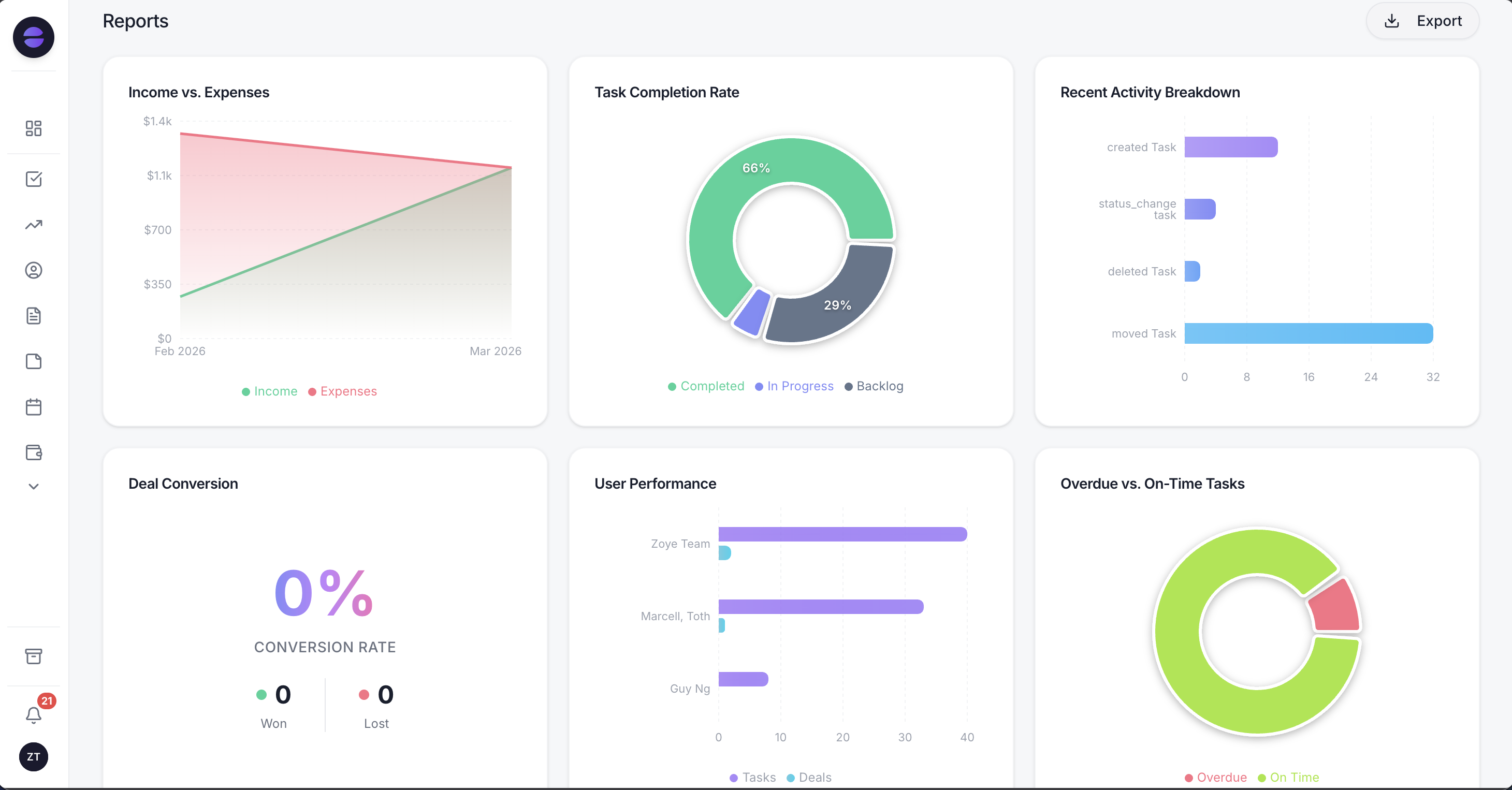 Reports draw on the same records the automations update, so you see what happened to leads after the first message, not only how many messages went out.
WhatsApp. Six automations on Meta's official Platform, all off by default and all asking for approval before anything is sent:
- An automatic message to every new lead, with a separate switch per source (ads, forms, website, API and manual entry), and only one message per person.
- A qualifying bot that writes the answers straight into fields on the customer record.
- Smart audiences that keep updating as records change, such as everyone who received a quote and has not answered.
- Scheduled broadcasts with personal fields for each recipient and controlled pacing.
- Template submission to Meta handled for you: Zoye categorizes, submits, tracks the status and resubmits after an edit.
- Click-to-chat capture, so anyone who taps the link becomes a contact with a source.
Facebook and Instagram. A comment on a post gets a public reply and a private message within seconds, firing on a keyword, one post or every comment, and direct messages and story replies are answered right away. Leads from Instant Form ads become contacts with the campaign and ad name saved. A Meta lead is an ordinary lead in Zoye, so the WhatsApp opening message, qualifying and tasks all fire on it too. More in our guide to Instagram comment-to-DM automation.
Consent and safety. Each automation asks you to confirm consent. A first message, and any message sent more than 24 hours after the customer's last reply, goes out automatically as an approved template. Every outbound message carries an opt-out, and STOP is honoured across the whole workspace, with no double messaging. If Meta rejects a send or a Page loses a permission, Zoye tells you what happened and never confirms a send that did not happen.
Payment in the chat. A payment link goes out in the conversation, the money lands in the business's own account (through Stripe, or Grow in Israel), and a lead who paid moves stage automatically.
What Zoye is not. It is not a newsletter tool for huge lists, it does not run ads and it does not message cold lists. Connecting your own business number to Zoye is coming soon (it is awaiting WhatsApp approval). Today Zoye holds WhatsApp conversations with your leads, and Chats brings them together with Instagram and Facebook messages and comments, with assignment, team notes and quick replies, and every chat saved on the customer record.
Pricing (as of October 2026): Almost Free is $5 a month ($4 billed yearly) for one team member, with the core tools, 15 AI prompts a month and the Google integrations, but no automations. Starter is $29 a month ($23 yearly) for up to 10 members and 5GB. Growth is $59 ($47) for up to 20 members and 10GB. Scale is $119 ($95) for up to 100 members and 25GB. Customize is quoted. The pricing page lists what each plan covers.
A 30-day plan: from zero to three automations that work
In 30 days you can go from nothing to three marketing automations that work: a reply to new leads, a follow-up after silence and a reminder before appointments. The order matters more than the tool. Consent and sources come first, then the messages, and measuring and improving last, so nothing reaches customers before you have tested it.
Week 1: sources and consent. List where leads come from today: the website form, ads, Instagram, WhatsApp, phone calls, referrals. For each source, add a clear consent line, such as "I agree to receive marketing messages on WhatsApp and by email, and I can opt out at any time". Make sure the customer record has a source field and a consent field. Without those two fields, every automation you build is guesswork.
Week 2: first reply and qualifying. Write an opening message of two or three lines and no more than three qualifying questions. Test it from your own phone with ten messages written the way real customers write: with typos, in another language, with two questions in one message. Switch it on only once everything looks right.
Week 3: follow-up and reminders. Add a follow-up rule for silence (one or two reminders, then stop and hand a task to a person) and a reminder the day before every appointment. This is the moment to decide who gets the task when a lead replies, and how quickly they should get back to them.
Week 4: measure and tidy up. Read twenty real conversations from the past weeks and fix the wording. Look at five numbers: time to first reply, how many leads reached a call or meeting, how many asked to opt out, your WhatsApp number's quality rating, and how many deals closed from each source. Only then add a fourth automation.
Ready to hand off the busywork?
Zoye brings AI-powered CRM, task management, and automation into one workspace.
Get StartedFive marketing automation mistakes small businesses make
Most marketing automations that fail in small businesses do not fail because of the tool. They fail because someone automated a process that did not work by hand either, sent to everyone, or left nobody waiting on the other side. These five mistakes come up again and again, and every one is easy to avoid.
Automating before there is a process. If you do not know what you say to a new lead when you answer it yourself, automation only sends the confusion out faster. Write your best answer first, then automate it.
A list instead of an audience. One message to every contact is a mailing, not an automation. It brings opt-outs, blocks and a low WhatsApp quality rating, and it hurts the messages people did want. Segment by what the customer did. For broadcasting done right, see our WhatsApp broadcast guide.
A sequence with no stopping point. A lead who replied "thanks, not relevant" and then gets two more reminders is a lead who will block you. Every sequence should stop the moment the customer replies, books or asks to opt out.
Nobody at the end. An automation that produces replies nobody reads until the end of the week is worse than no automation. Every positive reply should become a task with an owner and a date.
Opt-out in one channel only. A customer who opted out on WhatsApp and keeps getting offers by email will not think it was a technical slip. An opt-out should apply to every marketing channel.
The bottom line
Marketing automation for a small business does not start with a tool but with three questions: where your leads come from, what you want to happen to each of them in the first minute, and who picks them up when they answer. Once you have the answers, the tool is the easy part: an email tool if most of the value is in email, and a system that lives next to your customers if most of the value is in WhatsApp and follow-up.
This week, start with a consent line on every form and one good opening message. When you are ready for marketing that carries on to the deal without anyone retyping anything, Zoye starts at $5 a month, and the pricing page shows which plans include the automations.