
Quick answer: monday.com work management costs $9, $12 or $19 per seat a month on yearly billing (Basic, Standard, Pro), or $12, $14 and $24 billed monthly, as listed on monday.com's pricing page in November 2026. Paid plans start at 3 seats and are sold in fixed buckets, so the cheapest real paid bill is $27 a month on Basic, paid a year upfront, and a team of six pays for ten seats.
Key takeaways (November 2026)
- Work management: Basic $9, Standard $12, Pro $19 per seat a month billed yearly, or $12, $14 and $24 billed monthly. The free plan covers up to 2 seats and 3 boards.
- monday CRM: Basic $12, Standard $17, Pro $28 per seat billed yearly ($18, $25 and $41 monthly), capped at 1,000, 10,000 and 100,000 active contacts and deals.
- Seats come in buckets of 3, 5, 10, 15, 20, 25, 30 and 40, and teams over 40 users are sent to a quote. Six people buy ten seats.
- Standard includes 250 automation actions and 250 integration actions a month for the whole account, not per seat. Pro includes 25,000 of each, and outside Enterprise extra actions cannot be bought.
- Illustrative bills on yearly billing, with a CRM added: about $72 a month for 3 people, $111 for 5 and $275 for 10 (assumptions below).
monday.com is no longer one product with one price. Its pricing page lists four: monday work management (the boards most people mean by "monday"), monday CRM, monday service and monday dev, each with its own plans, seat selector and yearly discount. Under the seat price sit two meters that decide whether a plan fits: automation and integration actions, and AI credits.
This guide puts all of it in one place, works out what teams of 3, 5 and 10 really pay, and says who should pick which plan. If you have already ruled monday.com out, our monday.com alternatives guide compares ten other tools, so this article stays on the numbers.
Every monday.com figure below comes from monday.com's pricing pages and its help center article on automation and integration actions, opened in November 2026, in US dollars before tax. monday.com notes that the final price depends on your billing country and is shown at checkout, so confirm yours there. Rival prices come from each vendor's own pricing page, opened in the same month.
monday.com pricing at a glance: four products, one seat rule
monday.com sells four products, each priced per seat per month with a 3-seat floor on paid plans. As of November 2026, work management runs from $9 to $19 per seat on yearly billing, monday CRM from $12 to $28, monday dev from $9 to $20 and monday service from $31 to $45. Every top tier is priced by quote.
| Product | Plans with a listed price | Per seat, billed yearly | Per seat, billed monthly | Yearly saving the page shows | Free plan |
|---|---|---|---|---|---|
| monday work management | Basic, Standard, Pro | $9 / $12 / $19 | $12 / $14 / $24 | "Save 18%" | Yes, up to 2 seats |
| monday CRM | Basic, Standard, Pro | $12 / $17 / $28 | $18 / $25 / $41 | "Save 33%" | No |
| monday service | Standard, Pro | $31 / $45 | $34 / $52 | "Save 18%" | No |
| monday dev | Basic, Standard, Pro | $9 / $12 / $20 | $12 / $14.50 / $25 | "Save 18%" | No |
The top tier of each product (Enterprise, or Ultimate on monday CRM, which monday.com says is the new name for its Enterprise tier) has no public price. According to the pricing page FAQ, work management, monday CRM and monday dev each come with a 14-day trial of the Pro plan.
One detail confuses many buyers. Pick 10 seats on Standard and the card reads "Total of $120", with $140 struck through and a "special offer" of $20 off. The tooltip explains it: $12 x 10 seats = $120, plus 2,000 AI credits valued at $20, minus a $20 monthly discount. The struck price adds the value of the included AI credits, then removes it. You pay seats multiplied by the per-seat rate.
At 10 seats the "Most popular" badge sits on Pro. Treat it as a sales nudge; the sections below show when Pro is worth the extra $7 per seat.
How do monday.com seat buckets work?
You cannot buy any number of seats on monday.com. The seat selector offers 3, 5, 10, 15, 20, 25, 30 and 40 seats, then 50, 100 and 200+, and the pricing FAQ says teams of more than 40 users can request a quote. You pay for the whole bucket, so four people buy five seats and six people buy ten.
For a small business, the painful step is the one from 5 to 10. A five-person team that hires one more person does not add one seat, it adds five. Here is what that looks like on the Standard plan:
| People on the team | Bucket you buy | Seats paid but unused | Standard, billed yearly | Standard, billed monthly |
|---|---|---|---|---|
| 2 | 3 | 1 | $36 a month | $42 a month |
| 4 | 5 | 1 | $60 a month | $70 a month |
| 6 | 10 | 4 | $120 a month | $140 a month |
| 11 | 15 | 4 | $180 a month | $210 a month |
| 16 | 20 | 4 | $240 a month | $280 a month |
| 31 | 40 | 9 | $480 a month | $560 a month |
Take the six-person row. Six seats at $12 would be $72 a month, but the bucket makes it $120. That is $48 a month, or $576 a year, for four seats nobody sits in. On Pro, the same gap is $76 a month.
The other products follow the same pattern: on the combined pricing page, the selectors for monday CRM, monday service and monday dev all start at 3 seats, so a two-person sales team buying monday CRM pays for a third seat too.
Two honest ways to soften the bucket effect:
- Use viewers for people who only look. From Basic up, the pricing page lists "unlimited free viewers". A partner who checks progress weekly does not need a paid seat.
- Use guest access for clients. Standard adds guest access, so a client who comments on a board does not take one of your seats. The page states no cap, so check the guest rules in your account first.
When your team sits exactly at a bucket edge (5, 10, 15), price the next hire as the next bucket, not one seat.
Work management plans: what each tier adds
Basic buys unlimited items and free viewers. Standard adds automations, integrations, timeline, Gantt and calendar views and guest access. Pro adds private boards, time tracking and a hundred times more automation actions. For most small teams the real decision is Standard against Pro, and the number that decides it is actions.
| Free | Basic | Standard | Pro | Enterprise | |
|---|---|---|---|---|---|
| Per seat, billed yearly | $0 | $9 | $12 | $19 | Quote |
| Per seat, billed monthly | $0 | $12 | $14 | $24 | Quote |
| Seats | Up to 2 | From 3 | From 3 | From 3 | Quote |
| Boards and content | 3 boards, 3 Docs | Unlimited items | Unlimited items | Unlimited items | Unlimited items |
| Automation actions a month | None listed | None listed | 250 | 25,000 | Up to 250,000 |
| Integration actions a month | None listed | None listed | 250 | 25,000 | Up to 250,000 |
| AI credits a month | None | 1,000 | 2,000 | 3,000 | Custom |
| Workflows | None listed | None listed | 3 | 20 | 250 |
| API calls a day | None listed | None listed | 1,000 | 10,000 | 25,000 |
| What it adds | 8 column types, mobile apps | Unlimited free viewers | Timeline, Gantt and calendar views, guest access | Private boards and Docs, time tracking, advanced columns | Security, portfolio and resource management |
Free is a real plan, not a trial: two people, three boards, three Docs. The board cap ends it for most teams; one board for projects, one for clients and one for content, and you are full.
Basic is the cheapest paid tier at $9 per seat billed yearly. It adds unlimited items, free viewers and 1,000 AI credits, but lists no automation or integration actions. Even one rule such as "when a status changes to Done, notify the owner" means Standard.
Standard is the first tier with automations, and adds timeline, Gantt and calendar views, guest access, three workflows, 1,000 API calls a day and 250 automation plus 250 integration actions a month. Those actions are shared by the whole account, the trap explained further down.
Pro costs $19 per seat billed yearly ($24 monthly). It raises the meters to 25,000 automation and 25,000 integration actions a month, 20 workflows and 10,000 API calls a day, and adds private boards, time tracking and advanced columns. A team that runs on automations should treat Pro as the real starting price. Enterprise is quote only, with up to 250,000 automation and integration actions a month.
Want to see it in action?
See Zoye catch a new lead, answer on WhatsApp and set up the follow-up, all from one message.
See How It Worksmonday CRM pricing: seats plus a contacts cap
monday CRM costs $12, $17 or $28 per seat a month on yearly billing, or $18, $25 and $41 billed monthly, as of November 2026. Each tier also caps active contacts and deals at 1,000, 10,000 and 100,000, so a growing list can push you up a tier even when the team stays the same size.
| Basic | Standard | Pro | Ultimate | |
|---|---|---|---|---|
| Per seat, billed yearly | $12 | $17 | $28 | Quote |
| Per seat, billed monthly | $18 | $25 | $41 | Quote |
| Active contacts and deals | 1,000 | 10,000 | 100,000 | Unlimited |
| Workspaces | 1 | 3 | 15 | Unlimited |
| Custom dashboards | 1 | 5 | 50 | Unlimited |
| Columns per board | 5 | 15 | 75 | Unlimited |
| Quotes and invoices a month | 20 | 50 | 250 | Unlimited |
| Custom automations a month | None listed | 250 | 25,000 | Enterprise-scale |
| Also adds | Communications hub, mobile apps, AI agents | Mass emails, email sequences, AI workflow builder | Tailored onboarding, 24/7 priority support, HIPAA compliance |
Our customer database software guide sets monday CRM beside other CRMs for small teams. Three limits deserve a closer look:
The contacts and deals cap is combined. Basic allows 1,000 active contacts and deals together. A business with 800 contacts and 250 open deals is already over. The page describes the cap only as the maximum number of contact and deal records you can manage, so ask how closed records count before importing a long list.
Five columns per board on Basic is tight. Email, phone, stage, owner and deal value use the whole allowance. Track a source or a next step date and you are on Standard.
Automations start on Standard. Basic lists none; Standard includes 250 a month and Pro 25,000. "When a deal moves to Proposal, create a follow-up task in three days" is the kind of rule that makes a CRM worth having, so Standard is the practical floor.
monday CRM is its own product. If your team also wants project boards, work management has a separate seat selector, so this guide treats them as two subscriptions; any bundle would show at checkout.
monday service and monday dev in brief
monday service is the help desk product at $31 or $45 per seat a month on yearly billing ($34 or $52 monthly). monday dev is for software teams at $9, $12 or $20 ($12, $14.50 or $25 monthly). Both keep the 3-seat floor, and most small businesses comparing monday pricing need neither.
monday service Standard includes unlimited tickets, intake by email and forms, two-way Gmail and Outlook email, AI triage for one ticket board and a customer portal for up to 10 users. Pro adds dynamic auto-responses, triage for three boards and a portal for up to 100 users. Three Standard seats come to $93 a month billed yearly.
monday dev Basic covers Scrum planning, a wiki, capacity planning and daily stand-ups. Standard adds sprint management, roadmaps, a GitHub integration and 250 actions a month; Pro adds agile reporting, time tracking and 25,000 actions. If you are not shipping software or running a ticket queue, skip both: the small-business decision is work management against monday CRM.
Monthly or yearly: how much the switch saves
Yearly billing is cheaper on every plan, but the saving is uneven: 25% on work management Basic, about 14% on Standard, 21% on Pro and roughly a third on monday CRM. A yearly plan is paid in one upfront installment, so a 10-seat Pro team hands over $2,280 on day one.
| Plan | Per seat, monthly billing | Per seat, yearly billing | Real saving |
|---|---|---|---|
| Work management Basic | $12 | $9 | 25% |
| Work management Standard | $14 | $12 | 14% |
| Work management Pro | $24 | $19 | 21% |
| monday CRM Basic | $18 | $12 | 33% |
| monday CRM Standard | $25 | $17 | 32% |
| monday CRM Pro | $41 | $28 | 32% |
| monday service Standard | $34 | $31 | 9% |
| monday service Pro | $52 | $45 | 13% |
| monday dev Standard | $14.50 | $12 | 17% |
The toggle says "Save 18%", but the real saving depends on the plan: on Standard, the first plan with automations, it is closer to 14%. Two rules from monday.com's FAQ matter here:
- Yearly means upfront. A year is paid in one installment: $720 at once for 5 Standard seats, $2,280 for 10 Pro seats.
- Refunds are narrow. A yearly plan cancelled within 30 days gets a partial refund of the remaining balance; after that, downgrades are not refunded.
So start monthly while you test the boards with real work, and switch to yearly once your seat count has held steady for a couple of months. Paying $2 more per Standard seat for two months is cheap insurance against locking a 10-seat bucket into a year you may not need.
The costs outside the seat price
The seat price is not the whole bill. Automation and integration actions are capped per account, AI credits are metered, prices exclude tax, and a second product means a second seat count. The one that hurts small teams most is actions: on Standard, 250 a month are shared by everyone on the account.
Automation and integration actions
monday.com's help center article on automation and integration actions explains the meter, and it is stricter than most buyers expect.
One run is not always one action. Most templates use one action per run, but a rule that notifies board subscribers uses one per person notified, and a rule that creates an item uses one for the item plus one for each mapped status, people, tag or dropdown column. Condition steps in workflows count too, and a custom template mixing automation and integration blocks counts against the automation limit.
The limit is per account and refreshes monthly. Standard accounts get 250 actions a month, whatever their seat count.
At the limit. According to the same help center article, the first time you reach the limit you get an email, nothing is enforced and the overage rolls into the next cycle. After that, alerts arrive at 50% and 80%; at 100% there is a 72-hour grace period, then automations pause until you upgrade or the quota renews. With the month's actions used up you cannot edit or add automations, and an account can even eat next month's allowance and start at zero.
You cannot top up. Only Enterprise customers can buy extra actions, and nobody can pay to reactivate paused ones.
Over a 30-day month, 250 actions is about 8 a day for the whole team. One rule that notifies six subscribers whenever a task is marked Done uses six actions per run, so 42 finished tasks use 252 and push the account past its monthly limit. If you plan to automate, budget for Pro or count your rules first.
AI credits, tax and the second product
Paid work management plans include 1,000 AI credits a month on Basic, 2,000 on Standard and 3,000 on Pro. monday.com's FAQ says a typical 3-person team uses 800 to 1,200 credits a month and that 1,000 credits cover roughly 5 hours of meeting summaries. Extra credits can be bought, and the page's breakdown values 1,000 credits at $10.
Prices exclude tax and depend on your billing country, and qualified nonprofits can apply for discounted pricing. Finally, a business that wants projects and a sales pipeline is buying two products with two sets of buckets, the biggest reason small-team bills land well above the headline $9.
What do 3, 5 and 10 people really pay?
On yearly billing, an illustrative 3-person team pays about $72 a month for work management plus a CRM, a 5-person team about $111 and a 10-person team about $275. On monthly billing those become $96, $145 and $365. Drop the CRM and the work management line alone is $36, $60 and $190.
Assumptions. List prices from monday.com's pricing page in November 2026, US billing before tax, no nonprofit or negotiated discount, no extra AI credits bought. Everyone who edits boards takes a seat, people who only read are viewers, CRM seats go only to the people who sell, and each product is bought separately with its own bucket. These are planning figures, not quotes.
The three teams. The 3-person team is an owner and two staff sharing client projects and a short client list. The 5-person team has two people selling and three delivering. The 10-person team has four people selling, six delivering and a habit of automating everything it can.
| 3 people | 5 people | 10 people | |
|---|---|---|---|
| Work management | Standard, 3 seats: $36 | Standard, 5 seats: $60 | Pro, 10 seats: $190 |
| monday CRM | Basic, 3 seats: $36 | Standard, 3 seats: $51 | Standard, 5 seats: $85 |
| Monthly total, yearly billing | $72 | $111 | $275 |
| Paid upfront for the year | $864 | $1,332 | $3,300 |
| Monthly total, monthly billing | $96 | $145 | $365 |
| Per year on monthly billing | $1,152 | $1,740 | $4,380 |
| Automation actions a month | 250 (work management) | 250 + 250 | 25,000 + 250 |
What the table hides:
- The 3-person team chose CRM Basic because its list is under 1,000 contacts and deals. Pass 1,000, or want one follow-up rule, and the CRM line goes from $36 to $51.
- The 5-person team pays for a third CRM seat nobody uses. A sixth board user moves work management from 5 seats to 10 ($60 to $120), and the total from $111 to $171.
- The 10-person team chose Pro for the actions, not the features: 250 a month would last days. Its eleventh hire moves it to the 15-seat bucket, $285 a month, an extra $95.
Monthly billing hurts most at the top end: for the 10-person team it costs $1,080 a year more than yearly billing.
See what Zoye can do for you
CRM, deals, tasks and your Instagram, Facebook and WhatsApp automations in one workspace. Just ask Zoye and it sets any of it up for you.
Explore FeaturesIs monday.com worth it, and which plan fits?
monday.com is worth paying for when your team lives in boards all day and needs the views, permissions and automation depth to match. It is weaker value for teams of two to six people, where the seat buckets charge for empty seats, and for businesses whose real need is a CRM rather than project boards.
Pick by the shape of your team, not by the badge on the pricing card:
- One or two people, simple projects: the Free plan, until the three-board cap gets in the way.
- Three to five people sharing projects with a few rules: Standard, billed monthly first and yearly once the team is stable. Basic only if you are sure you will never automate.
- Teams that automate heavily or bill by the hour: Pro. The jump from 250 to 25,000 actions a month and the built-in time tracking are the reasons to pay $7 more per seat.
- A small team whose main job is selling: monday CRM Standard. Basic's 1,000 combined contacts and deals and its 5 columns per board fit only a very short list.
- A team already on monday.com that runs a support queue: monday service Standard, priced against your current help desk.
- More than 40 people, or a security review on the way: ask for an Enterprise quote and get the action allowance in writing.
Three signs you are overpaying: four or more empty seats after a hire crossed a bucket, automations that pause before most month ends, and two monday products running one small business. If two are true, price a different shape of tool.
Simpler options for small teams
If monday.com's seat buckets or a second subscription do not fit, four options are worth pricing: Zoye for running a whole small business in one workspace at a flat monthly price, Trello for simple boards, ClickUp for deep project management billed per user, and Pipedrive if what you really need is a sales pipeline.
Zoye: one workspace, one flat monthly price
Zoye is an AI Business Operator: one workspace where tasks, CRM and contacts, deals, calendar, documents, invoices and reports are already linked, plus an AI that operates them for you. Tasks and subtasks sit on a board or a list with owners, due dates and priorities. You can ask Zoye, in the app, on WhatsApp or in Slack, to create, reassign or update dozens of tasks at once, and everyone's board changes live. For rules, you describe what should happen and Zoye builds the rule and tells you what it does; a rule that messages other people starts switched off until you turn it on.
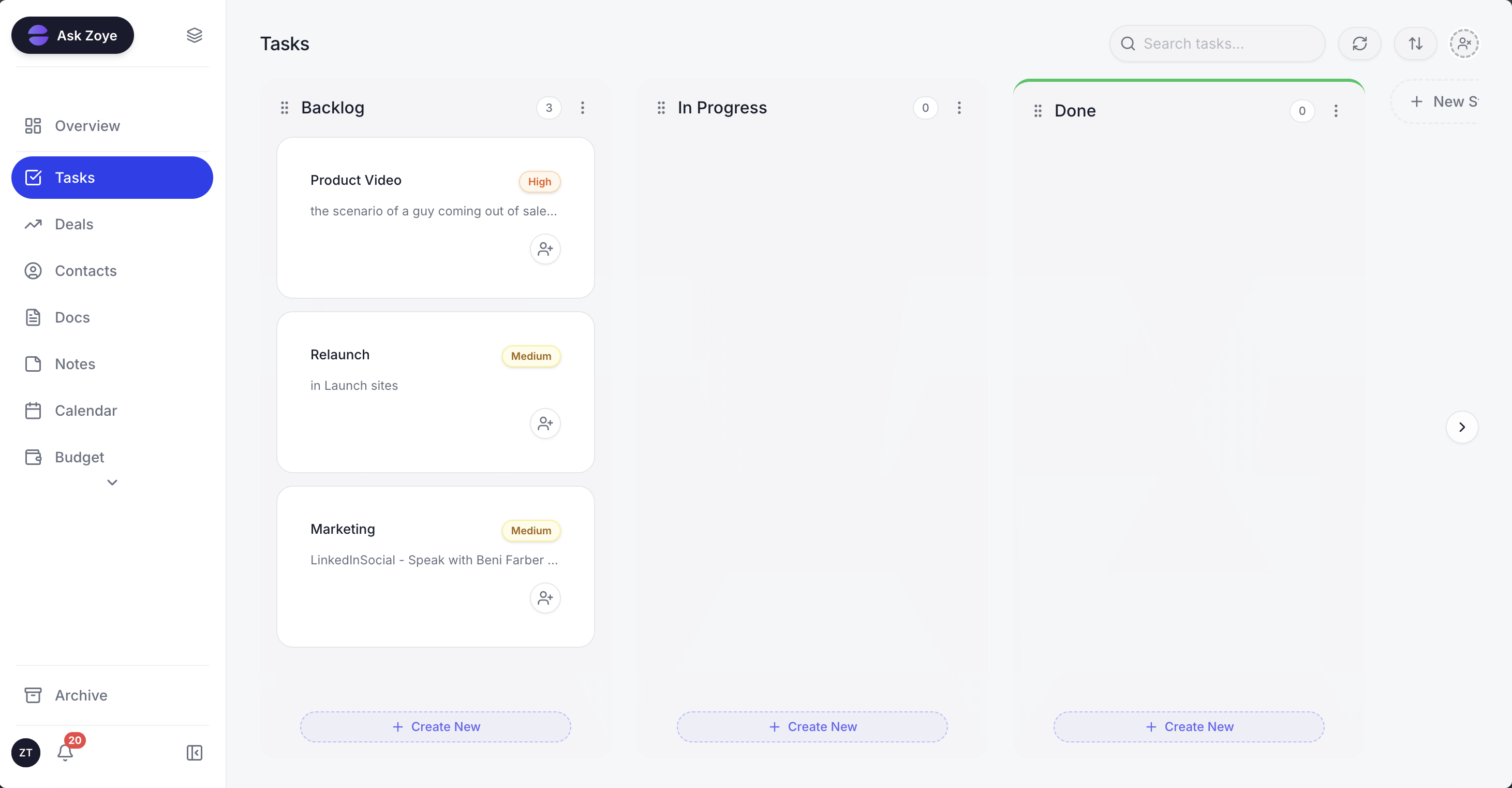 A task board opened from the chat: stages, owners and priorities on one screen, and a request to Zoye changes the board for the whole team.
The pricing difference is structural rather than a discount. Zoye charges per plan, not per seat, and each plan includes a set number of members. As listed on our pricing page in November 2026: Almost Free is $5 a month ($4 a month billed yearly) for 1 member with the core tools and no automations; Starter is $29 a month ($23 a month billed yearly) for up to 5 members, also without automations; Growth is $59 ($47 a month billed yearly) for up to 10 members, with the automations; and Scale is $119 ($95 a month billed yearly) for up to 30 members. A team of six and a team of ten pay the same Growth price, and the pricing page lists exactly what each plan includes.
Switching is practical today. Zoye imports Monday.com boards directly: items become tasks, board groups become task stages, and each board lands in its own workspace. Trello boards and spreadsheets import too, and Jira, Notion and ClickUp imports are coming soon.
Honest limits. Zoye is not a board builder with dozens of column types and portfolio views, and it is not a help desk ticketing suite with a customer portal. If your team runs large cross-department project portfolios, monday.com Pro or Enterprise is the deeper tool. Zoye fits the small business that wants its projects, clients, deals and follow-ups in one place without counting seats.
Trello
The simplest board tool here. As of November 2026, Trello's free plan covers up to 10 collaborators per Workspace and 10 boards. Standard is $5 per user a month billed annually ($6 monthly) with unlimited boards; Premium is $10 ($12.50 monthly) and adds calendar, timeline, table and dashboard views. Billing is per user, but there is no real CRM.
ClickUp
For teams that want deep project management and accept a busier interface. As of November 2026, ClickUp has a Free Forever plan; Core is $9 per user a month billed yearly ($12 monthly) with 1,000 automations a month, and Business is $17 ($25 monthly) with 10,000. See ClickUp vs monday.com for features.
Pipedrive
If your main board is a sales pipeline, a dedicated CRM can cost less than two monday products. As of November 2026, Pipedrive lists Lite at $168 per seat a year ($14 a month) and Growth at $468 ($39 a month). Projects and delivery need Pipedrive's Projects add-on or a second tool.
Ready to hand off the busywork?
Zoye brings AI-powered CRM, task management, and automation into one workspace.
Get StartedHow to keep a monday.com bill from creeping
Most monday.com bills grow through three doors: a hire that crosses a seat bucket, an automation cap reached mid-month, and a second product bought for a job the first one could not do. Check all three every quarter and the bill stays close to the number you planned.
- Count seats against buckets every quarter. Move read-only people to viewers and offboard leavers the week they go.
- Watch the action meter before month end. Usage sits in Administration under Usage stats and in the Autopilot hub. Rules that notify whole boards are the usual drain; make them notify one owner.
- Start monthly, switch to yearly later. Per the yearly table above, the saving runs from 9% to 33% per seat depending on the plan, but it is paid upfront.
- Price the second product against one workspace. Before adding monday CRM, compare the combined bill with one tool that covers both jobs.
- Put the contacts cap in your calendar. On CRM Basic, 1,000 combined contacts and deals arrives sooner than most teams expect.
If you are weighing monday.com against the other big names, the head-to-heads on Asana vs monday and Notion vs monday cover the feature side. And if your team is small and the seat buckets do not fit, book a Zoye demo and bring one of your monday.com boards to import.