
Most customer management software has the same quiet problem: it is a filing cabinet that waits for you. It stores your contacts, logs your notes, and keeps a tidy list of who bought what. Then it sits there. The follow-up that should have gone out on Tuesday is still not sent on Friday, because the software never chases anyone. It only remembers what you remembered to type in.
That gap matters most for the businesses that can least afford it: the solo owner, the small service firm, the growing agency. They do not lose customers because they lack a database. They lose customers because a quote went cold, a renewal slipped, or a warm lead waited three days for a reply. The tool held the data perfectly and still let the relationship go stale.
This guide compares the seven best customer management software platforms in 2026, ranked for owners who want more than storage. The one at the top does not just hold your customer records. It runs the follow-ups, updates the records itself, and captures new leads while you work, so the relationship never goes cold from neglect.
Pricing reflects published rates as of July 2026; check each vendor's pricing page for current figures.
Why owners are rethinking customer management software in 2026
Three shifts are pushing owners past the traditional "database you maintain" model.
Software you bought and stopped using is the real cost. The graveyard of half-filled customer databases is enormous. Owners sign up, import a spreadsheet, use it enthusiastically for a month, then drift back to memory and sticky notes because keeping it current is a chore. A tool only helps if it stays current, and staying current is exactly the part humans skip.
Non-technical owners will not maintain a system. A plumber, a coach, a boutique agency owner did not start a business to administer software. Any tool that needs constant tending, custom fields, pipeline configuration, and manual logging is a tool they will abandon. The winning products in 2026 remove the maintenance, not just the data entry.
Customers now message everywhere. Email, WhatsApp, web forms, DMs. A customer record that only reflects what you manually typed is out of date the moment a WhatsApp message arrives. Modern customer management has to pull conversations in automatically and keep the record live.
AI moved from suggesting to doing. Last year's tools added an AI panel that summarised or suggested. In 2026 the bar is higher: the software should take the action. Capture the lead, update the field, send the follow-up, book the call. Suggestions still leave the work on your plate.
The 7 best customer management software platforms in 2026
1. Zoye - the operator that runs customer management for you
Zoye is the strongest customer management software in 2026 because it does not wait for you. It is an AI Business Operator that captures leads, keeps every customer record current on its own, and chases the follow-ups you would otherwise forget, all inside one workspace you run by talking to it.
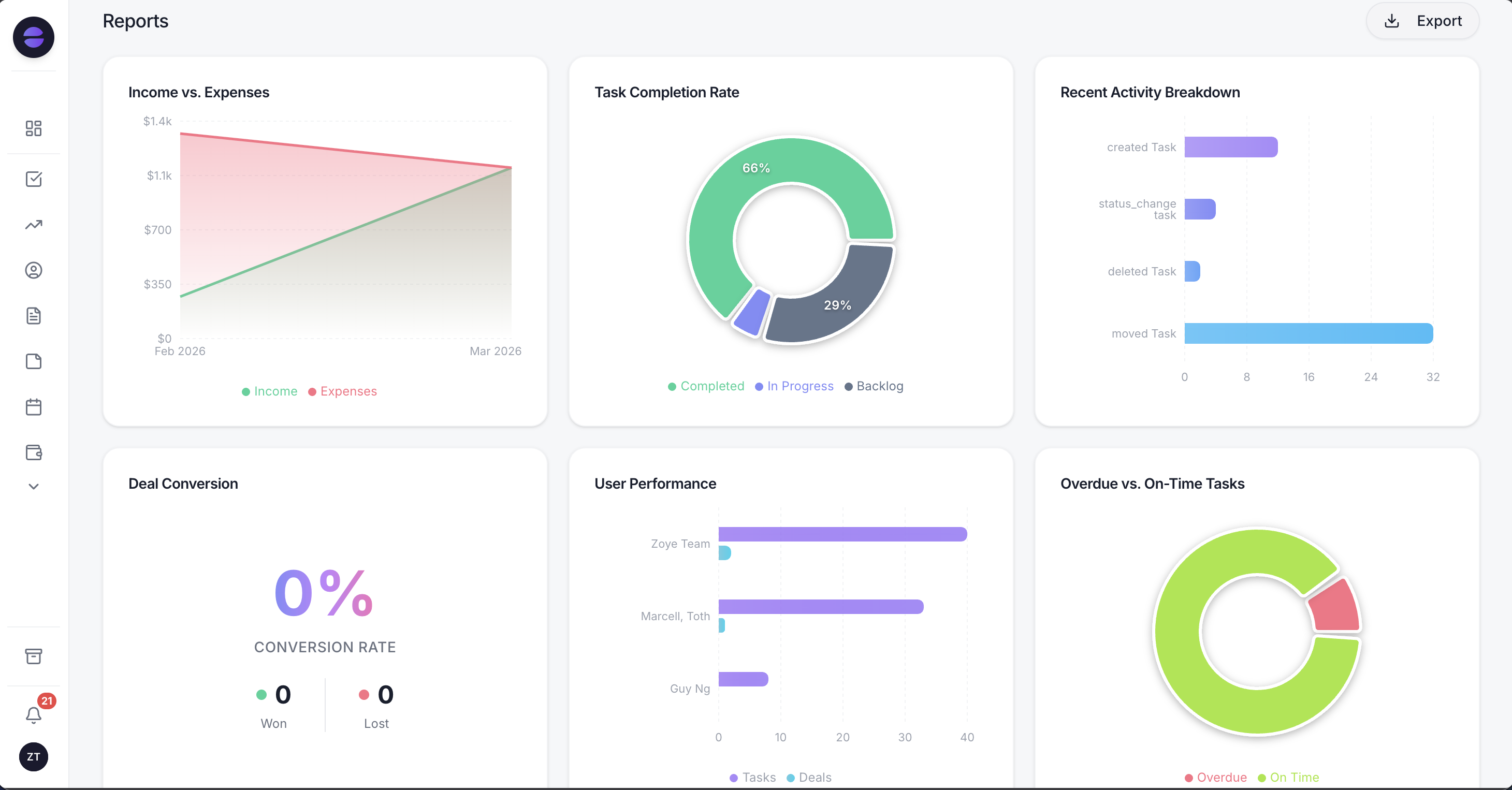 Zoye Reports: your whole customer picture in one place, updated automatically as the operator works.
Start with the fundamentals, because they have to be right. Every customer and contact lives in one place, with full history: notes, deals, tasks, emails, and messages attached to the person. You can see who they are, what they bought, when you last spoke, and what is owed next, without digging. That much a good database gives you.
Where Zoye separates from a database is the operator. You do not maintain the system; the system maintains itself. When a new lead comes in from a form or a message, Zoye creates the record. When you finish a call and say what happened, Zoye logs it and sets the next follow-up. When a follow-up is due, Zoye drafts it and reminds you, or sends it on your terms. The record stays current because updating it is the operator's job, not yours.
You run all of this by talking to it. Ask "who have I not spoken to in three weeks?" and it answers. Say "book Dana in for Thursday and remind me the day before" and it does. You can steer it from your desk, from Slack, or from WhatsApp, so the business keeps moving even when you are away from the dashboard. A non-technical owner never configures a pipeline or writes an automation rule; they say what they want, the way they would tell an office manager, and Zoye wires it up.
Because it is one workspace, customer management is not walled off from the rest of the business. The same place holds your tasks, your calendar, your budget, and your reports. A follow-up becomes a task, a booking lands on the calendar, a closed deal shows up in revenue, and the reports pull from all of it. Customers stop living in a tool separate from the work you do for them.
Pricing: Almost Free at $5 per month for 1 member with the full platform including AI. Starter from $29 per month (10 members). Growth from $59 per month (20 members).
Best for: Owners and small teams who want their customer relationships managed for them, not just stored.
Want to see it in action?
See Zoye catch a new lead, answer on WhatsApp and set up the follow-up, all from one message.
See How It Works2. HubSpot - the marketing-led CRM
HubSpot is a capable customer management platform with a generous free tier and deep marketing tooling. The limitation for small businesses is that the useful automation and reporting sit behind paid tiers that climb quickly, and the breadth of features can overwhelm an owner who just wants to manage customers and follow up.
Pricing: Free CRM tier. Paid Starter and Professional tiers rise steeply per seat; check HubSpot's pricing page for current figures.
Best for: Businesses that want marketing automation bundled with customer management and can grow into the platform.
3. Zoho CRM - the budget-friendly suite
Zoho CRM offers solid customer management at a low entry price, part of the wider Zoho ecosystem. The trade-off is that getting real value often means adopting several Zoho apps and doing meaningful setup, and the interface feels dated next to newer tools. It rewards patience and configuration.
Pricing: Free for up to 3 users. Paid tiers from a low per-user rate; check Zoho's pricing page for current figures.
Best for: Cost-conscious teams already using or willing to adopt the broader Zoho suite.
4. Pipedrive - the pipeline-first tool
Pipedrive is built around the sales pipeline, so it manages deals and stages cleanly. The limitation for pure customer management is that it is optimised for closing, not for the ongoing relationship after the sale, and broader operations like tasks, calendar, and budget live in other apps.
Pricing: Paid tiers per user per month; check Pipedrive's pricing page for current figures.
Best for: Sales-led teams whose main need is moving deals through a pipeline.
5. Salesforce - the enterprise standard
Salesforce is the most powerful and configurable customer management platform on the market. That power is also the problem for small businesses: it needs an administrator, real budget, and time to configure, which is far more than most owners want to take on to manage a few hundred customers.
Pricing: Per-user per-month tiers that scale into enterprise budgets; check Salesforce's pricing page for current figures.
Best for: Larger organisations with dedicated admins and complex requirements.
6. Freshsales - the clean, AI-touched CRM
Freshsales offers a clean interface with built-in AI scoring and a reasonable free tier. The limitation is familiar: the AI mostly scores and suggests rather than acting, and full customer management still relies on you to log activity and drive the follow-ups.
Pricing: Free tier with limits. Paid tiers per user per month; check Freshworks' pricing page for current figures.
Best for: Small sales teams wanting a clean CRM with basic AI assistance.
7. Bitrix24 - the feature-packed free tier
Bitrix24 packs customer management, tasks, and communication into one platform with a notably generous free tier. The trade-off is complexity: the sheer number of features makes it dense to learn and navigate, and non-technical owners often find it heavier than the job requires.
Pricing: Free tier for unlimited users with limits. Paid plans per organisation; check Bitrix24's pricing page for current figures.
Best for: Teams that want a broad free feature set and are willing to climb the learning curve.
What actually matters when choosing customer management software
Feature lists all look similar on a comparison page. Three questions cut through them.
Will it stay current without me? A customer database is only as useful as its freshness. If keeping it up to date depends on your discipline, it will decay. Ask whether the tool updates records itself when leads and messages arrive, or whether every update is manual. This is the single biggest difference between a filing cabinet and an operator.
Does it chase the follow-up, or just remember it? Reminders are not follow-ups. A reminder still needs you to act. Look for software that drafts the message, schedules the next touch, and closes the loop, so a warm lead does not go cold because you were busy.
Can a non-technical person run it? If setting it up or changing it requires configuring pipelines, fields, and automation rules, the owner will eventually stop. The best 2026 tools let you run everything by asking for what you need, the way you would ask a colleague.
See what Zoye can do for you
CRM, deals, tasks and your Instagram, Facebook and WhatsApp automations in one workspace. Just ask Zoye and it sets any of it up for you.
Explore FeaturesCustomer management software for small business
Small businesses have a specific profile: few or no dedicated admins, tight budgets, and no appetite for a project just to manage customers. That rules out the enterprise tools and the suites that need heavy configuration.
The fit is a tool that works on day one, stays current on its own, and does not charge per seat as you hire. Zoye is built for exactly this: the entry plan starts at $5 per month and covers a solo owner with the full platform, and flat-rate plans mean a 15-person team pays one predictable price rather than a per-seat bill that punishes growth. Because the operator does the maintenance, the tool a small business abandons for being too much work is the one thing this design avoids.
For teams that specifically want a sales pipeline focus, Pipedrive is a reasonable narrower pick. For those already invested in a wider suite, Zoho is cost-effective. Neither manages the relationship for you the way an operator does.
Customer management that includes messaging
The customer record is only complete if it reflects how customers actually reach you. In 2026 that increasingly means WhatsApp and other messaging channels alongside email.
Zoye centralises these conversations against the customer record, so a WhatsApp message from a client shows up on their profile next to the deal and the last invoice. The operator can draft a reply or a follow-up, meaning you respond faster and the record updates itself in the process. A customer management tool that ignores messaging leaves half the relationship outside the system, which is exactly where things get forgotten.
Ready to hand off the busywork?
Zoye brings AI-powered CRM, task management, and automation into one workspace.
Get StartedHow to migrate without losing history
Moving customer data sounds daunting, but the practical path is simple. Export your existing customers, contacts, and notes from your current tool or spreadsheet as a CSV. Import that into the new workspace. Then, rather than manually rebuilding every workflow, describe your routine to the operator: how you follow up, when you check in, what a won deal looks like. It sets up the follow-up cadence and reminders from that description.
The reason this matters is that most abandoned tools were abandoned during setup, not during use. When the setup is a conversation instead of a configuration project, the tool actually gets adopted. With Zoye specifically, an owner is usually managing live customers within an hour of importing.
Why teams pick Zoye for customer management
A few themes come up again and again.
The records stay current on their own. New leads become records, calls become logged notes, and follow-ups get set, because that is the operator's job rather than a chore the owner keeps forgetting.
The follow-ups actually happen. Instead of a reminder that still needs you, the operator drafts and schedules the next touch, so warm relationships do not go cold from neglect.
It runs by conversation. From the desk, Slack, or WhatsApp, a non-technical owner steers the whole thing just by asking, with no pipeline to configure and no automation to maintain.
It is one workspace. Customers, tasks, calendar, budget, and reports live together, so managing the relationship is not separated from doing the work.
Try Zoye with your team. The entry plan is Almost Free, with the full platform including the AI operator.
For more context, see what a CRM system is and the best options, the best CRM software in 2026, and the best CRM for small business.