Most dental software was built to chart teeth and file insurance claims, not to keep patients coming back. That is the gap solo and small practices feel every week. The clinical system knows a patient is due for a six-month recall, but nobody sends the message. A new enquiry lands on WhatsApp at 8pm and sits unanswered until morning, by which point the caller has booked with the practice down the road. A hygiene slot cancels at lunch and stays empty because there was no time to work the waitlist.
The tools most practices reach for do not close that gap. A practice management system (PMS) is excellent at charting and billing but treats patient communication as an afterthought. A general CRM is built for a sales team working deals, not a front desk juggling recalls, confirmations, and treatment-plan follow-ups by phone and message. So the recall list grows, no-shows pile up, and revenue quietly leaks out of the schedule.
This guide compares the seven best tools for running the patient relationship side of a dental practice in 2026, ranked for solo dentists and small practices that want fuller chairs and fewer empty slots without hiring more front-desk staff. The list leads with the option that does the chasing for you.
Pricing reflects published rates as of July 2026; check each vendor's pricing page for current figures.
Why dental practices are looking beyond legacy tools in 2026
Four shifts are pushing practices to rethink how they handle the patient relationship.
Patients live on their phones, not their inboxes. A recall postcard or a buried email gets ignored. A WhatsApp message gets read in minutes. Practices that moved reminders, confirmations, and recall nudges to messaging see dramatically higher response rates, but their PMS was never designed to run a two-way conversation at scale.
No-shows are a revenue problem, not an annoyance. Every empty chair is lost chair time that cannot be recovered. The practices that beat no-shows use a disciplined reminder cadence plus instant recovery: when someone cancels, the slot is offered to the next patient automatically. Doing that by hand across a full day is more work than a busy front desk can absorb.
The front desk is the bottleneck. Recall lists, unconfirmed appointments, treatment-plan follow-ups, and review requests all compete for the same few people at reception. Whatever does not get done that day slips. Solo practices without a dedicated coordinator feel this hardest, which is why AI that actually performs the follow-up, rather than just reminding staff to, is the real unlock.
Practices are tired of software they bought and stopped using. Many dental marketing and recall add-ons promised the world and became another login nobody opens. The bar in 2026 is simple: the tool has to do the work automatically and show its results, or it is not worth the subscription.
The 7 best CRMs for dentists in 2026
1. Zoye - the assistant that books, reminds, and follows up for you
Zoye is the strongest pick for solo and small dental practices because it is not a passive database you have to remember to use. It is an AI Business Operator that runs the patient relationship for you: it captures new enquiries, books and confirms appointments, chases overdue recalls, recovers no-shows, and requests reviews, mostly over WhatsApp and web chat, so the front desk is not doing it by hand.
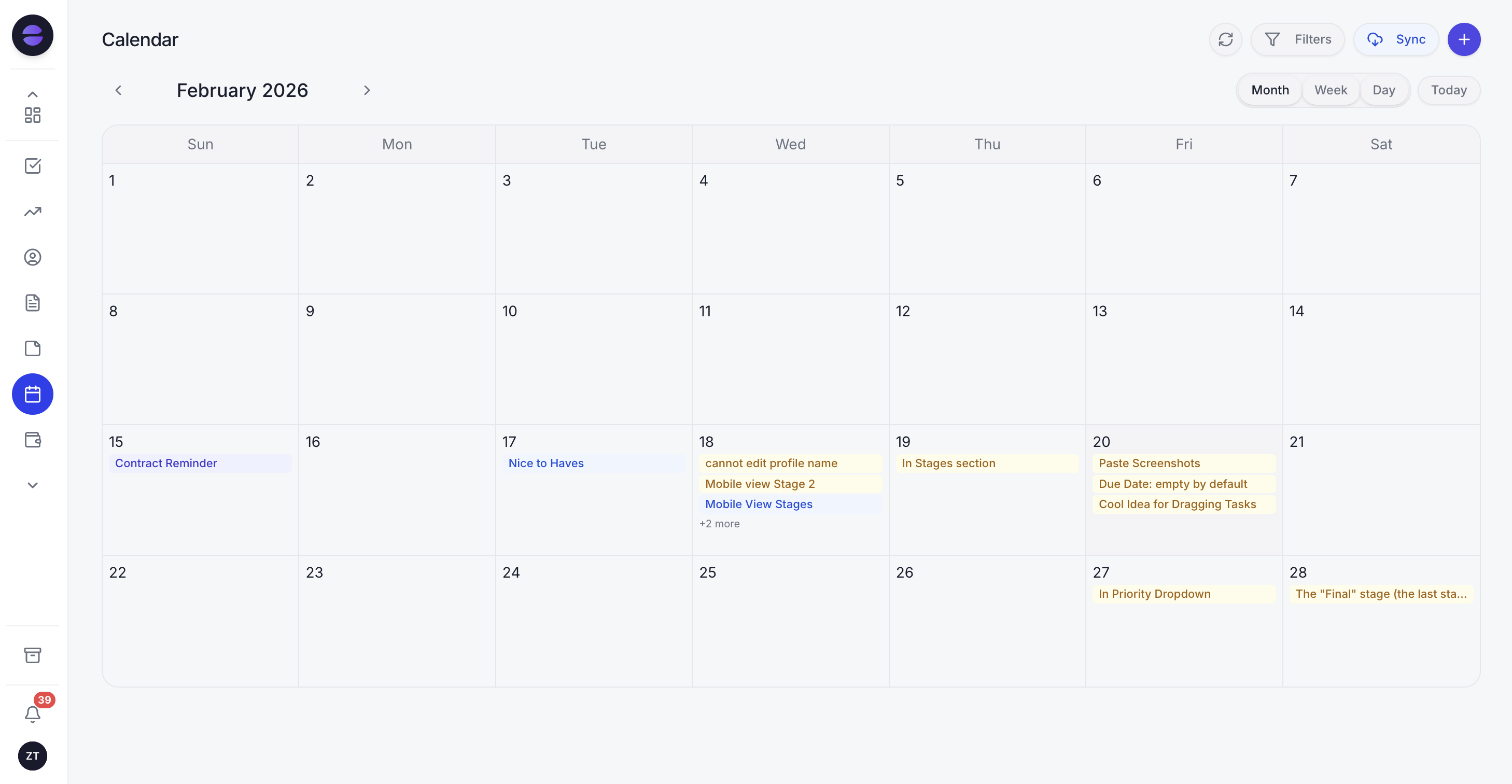 Zoye's calendar keeps every appointment, hygiene slot, and recall in one view, while the assistant books and confirms patients automatically
Start with the part that fills chairs. Reminders go out on a proven cadence, 24 hours and 2 hours before the visit, with a one-tap confirm or reschedule. When a patient replies to reschedule, the assistant reads the message, offers open slots, and rebooks them. When someone cancels, the freed slot is offered to the next patient waiting, so the day stays full without anyone working the phones.
Recall is where a practice quietly wins or loses. Zoye tracks who is due, who is overdue, and who has drifted away, then reaches out automatically with a friendly, personalised nudge to rebook. Treatment plans that were presented but not scheduled get their own follow-up sequence, so the crown or the whitening that a patient said yes to does not vanish into a forgotten note.
The Zoye Assistant is the difference from ordinary software. You can just tell it, "message every patient overdue for a cleaning by more than three months and offer them next week's open hygiene slots," and it does it. You can ask it to build an automation once, "whenever a patient does not confirm within two hours of the second reminder, add them to my morning call list," and it runs from then on. It drafts replies, handles the routine conversations, and only escalates the ones that genuinely need the dentist or the coordinator.
Around that assistant sits one workspace: a patient CRM, a shared calendar, tasks for the team, budget tracking for the practice, and reports that pull it all together. Instead of a PMS for charts plus a separate reminder app plus a spreadsheet for recall, the relationship side of the practice lives in one place, and the assistant works across all of it.
Pricing: Almost Free at $5 per month for 1 member with the core tools. Starter from $29 per month (10 members). Growth from $59 per month (20 members).
Best for: Solo dentists and small practices that want booking, reminders, recall, and follow-up handled automatically rather than added to the front desk's to-do list.
2. Dentrix - the established practice management system
Dentrix is a long-standing dental PMS, strong on clinical charting, scheduling, and insurance claims. For a practice that needs deep clinical records and billing tooling, this category of system is the backbone.
The trade-off is that patient communication and recall are secondary. Automated messaging, two-way WhatsApp, and hands-off follow-up are limited or need bolt-on add-ons, so the relationship and no-show side still depends on staff remembering to act.
Pricing: Custom, quoted per practice; check the vendor for current figures.
Best for: Practices that want a traditional all-in clinical and billing system and will handle patient outreach separately.
3. Curve Dental - the cloud practice management option
Curve Dental is a cloud-based PMS covering charting, scheduling, imaging, and billing from the browser. For practices that want to move off server-based software, the cloud model is appealing.
The limitation is the same category boundary: it is a clinical and operational system first. Proactive recall, conversational reminders, and automatic no-show recovery are not the core, so filling the schedule still leans on manual effort.
Pricing: Custom, quoted per practice; check the vendor for current figures.
Best for: Practices wanting cloud-based clinical management who will run outreach with another tool.
4. Fresha - the booking and payments platform
Fresha is a booking and payments platform popular with salons, spas, and some dental and aesthetic practices. Online booking, a calendar, and card payments are its strengths, and the entry cost is low.
The trade-off is depth on the relationship side. It handles the booking transaction well but is not built to run structured recall, chase treatment-plan follow-ups, or recover no-shows conversationally across channels the way a dedicated operator does.
Pricing: Free core booking; fees apply on payments, new-client bookings, and add-ons.
Best for: Practices that mainly want simple online booking plus card payments.
Want to see it in action?
See Zoye catch a new lead, answer on WhatsApp and set up the follow-up, all from one message.
See How It Works5. HubSpot - the general marketing CRM
HubSpot is a capable general CRM with strong marketing automation and a usable free tier. A practice comfortable configuring it can build contact records, email sequences, and pipelines.
The trade-off is that HubSpot is built for sales and marketing teams, not a dental front desk. There is no native concept of recall, hygiene scheduling, or chair time, and WhatsApp-first patient reminders need extra setup. You adapt a sales tool to a clinic rather than using something shaped for it.
Pricing: Free CRM tier. Paid Marketing and Sales tiers scale up quickly per seat.
Best for: Practices with marketing resource that want a general CRM and are willing to configure it.
6. Pipedrive - the simple sales pipeline
Pipedrive is a clean, affordable sales-pipeline CRM. If you think of new patients as deals moving through stages (enquiry, consult, treatment accepted), it can track that flow simply.
The limitation is that it is purely a sales pipeline. It has no dental-specific recall, no appointment reminder engine, and no follow-up that acts without you. It shows you what to do next; it does not do it for you.
Pricing: Paid tiers per user per month; check the vendor for current figures.
Best for: Practices that only want a lightweight pipeline to track new-patient enquiries.
7. Weave - the dental communications add-on
Weave focuses on patient communication for dental and medical practices: reminders, phone, texting, and reviews layered onto an existing PMS. It is closer to the relationship layer than a pure PMS.
The trade-off is that it is a communications add-on rather than an operator that runs the practice. It sends and routes messages, but it does not reason across your schedule, build automations when you ask, or manage tasks, budget, and reporting in the same workspace.
Pricing: Custom, quoted per practice; check the vendor for current figures.
Best for: Practices that want a communications layer bolted onto their existing PMS.
Best CRM for patient recall and no-show recovery
Recall and no-shows are where practices win or lose revenue, and they are exactly where passive software falls down. A PMS knows who is due but waits for staff to act. A communications add-on can send a reminder but does not work the waitlist when a slot opens.
Zoye is the clearest pick here because it closes the loop end to end. It surfaces the overdue recall list and reaches out automatically. It runs the 24-hour and 2-hour reminder cadence with confirm and reschedule built in. When a patient cancels, it offers the slot to the next waiting patient automatically. When someone no-shows, it starts a recovery sequence the same day. The front desk sees the results, not another list of things to chase.
Best AI-powered option for a dental practice
Every tool on this list has some automation, but there is a difference between a scheduled reminder and an assistant that actually runs the work. HubSpot and Pipedrive can automate emails once you configure them. Weave can fire reminders. None of them let you just say what you want and have it happen across booking, recall, and follow-up at once.
Zoye is the only genuine AI Business Operator on the list. You describe the outcome and it executes: it books, confirms, reschedules, reactivates lapsed patients, requests reviews after a visit, and builds reusable automations when you tell it what should happen, including over WhatsApp. It does the work and reports back, rather than nudging your team from a suggestion panel.
See what Zoye can do for you
CRM, deals, tasks and your Instagram, Facebook and WhatsApp automations in one workspace. Just ask Zoye and it sets any of it up for you.
Explore FeaturesHow to choose the right dental CRM for your practice
Three questions narrow the decision quickly.
1. Do you need clinical charting and claims, or the relationship layer? If your priority is charting, imaging, and insurance billing, a dedicated PMS such as Dentrix or Curve is the backbone, and you pair it with an operator for outreach. If your pain is empty chairs, missed recalls, and slow enquiry response, that relationship layer is the priority, and Zoye is built for it.
2. Who is doing the following-up? If you have a full front-desk team with spare capacity, a reminder tool can supplement them. If you are a solo dentist or a lean practice, you want software that performs the follow-up itself rather than adding to a person's day. That is the case for an AI operator.
3. Where do your patients actually reply? If most patients respond on WhatsApp and web chat, choose a tool that runs those conversations natively and centralises them in one inbox. Retrofitting a sales CRM or an email-first system to WhatsApp is friction you do not need.
Migrating without disrupting the schedule
Practices worry that switching tools means downtime, and for a busy schedule that is a real fear. The pragmatic path is to keep the clinical PMS exactly where it is and layer the relationship operator alongside it, rather than ripping anything out.
Start narrow. Point the operator at one job first, usually the overdue recall list or appointment reminders, and let it run for a week. Import the active patient contacts, turn on the reminder cadence, and watch the confirmations and rebookings come back. Once the front desk trusts it on that one job, expand it to treatment-plan follow-ups, no-show recovery, and review requests. Because you set Zoye up just by telling it what you need, most practices have the first workflow live the same afternoon, with no charting data touched.
Why dental practices pick Zoye
A few themes come up again and again.
It fills chairs automatically. Reminders, recall, and no-show recovery run automatically, so the schedule stays full without the front desk chasing all day.
It meets patients where they are. WhatsApp and web conversations live in one inbox, and the assistant drafts and sends the routine messages, escalating only what needs a person.
It does the work, not just the reminding. Instead of another dashboard telling staff what to do, Zoye executes the follow-up itself and reports the results, and you can teach it new automations just by saying what should happen.
Try Zoye with your practice. The entry plan, Almost Free, is 5 dollars per month and covers 1 member with the core tools, so a single-chair practice can start filling more chairs today.
Ready to hand off the busywork?
Zoye brings AI-powered CRM, task management, and automation into one workspace.
Get StartedFor more context, see the best CRM for small business, how to run a WhatsApp CRM for clinics, and the guide to med spa software.


