
ClickUp and Asana often sit side by side on a project management shortlist in 2026, and they pull in opposite directions. ClickUp wants to be the one tool that swallows every other tool. Asana wants to be the tool that keeps a team's daily work visibly tied to its goals. Each does its thing well, and each asks you to give something up to get it.
This comparison covers what each actually does well, where each one breaks down, and a third option that solves the problem both share - per-seat pricing, AI capped by plan, and budget tracking you build yourself or buy as an add-on. If the two of them feel like a coin toss, that is usually a sign the real answer is a different tool entirely.
ClickUp vs Asana at a glance
| Dimension | Zoye | ClickUp | Asana |
|---|---|---|---|
| AI assistant | Built in, executes across workspace | ClickUp Brain² - included on Business ($17/user/mo), trial on Core, none on Free | Asana AI - included from Starter ($10.99/user/mo), with request limits |
| CRM / Deals | Built in, all plans | ClickUp CRM, deals tracked with the work | Not included (connects to Salesforce on Advanced) |
| Task management | Streamlined, deal-linked | 15+ views, deep hierarchy | Clean, goal-aligned, Work Graph |
| Budget / finance | Built in | Build your own in Table view | Timesheets and Budgets add-on |
| Reports / analytics | Cross-tool live reports | Dashboards included from Business | Portfolios + workload views (Advanced) |
| WhatsApp integration | Live | Notifications through Zapier | Notifications through Zapier |
| Pricing model | Tier-based, not per seat | Per seat | Per seat |
| Free plan | No free plan - entry from $5/mo | Unlimited members, 60 MB storage | Personal, 2 users, list, board and calendar views |
| Paid entry price | $4/mo billed yearly (Almost Free, 1 member) | $9/user/mo annual | $10.99/user/mo annual |
| Setup time | Same day | Longer, more to configure | Quicker, fewer views to set up |
| Mobile / voice | WhatsApp by text or voice | Apps, Talk-to-Text from Core | iOS and Android apps |
Pricing: ClickUp vs Asana
ClickUp wins on raw per-seat price. Asana wins on what is bundled at each tier. The question is total cost of ownership for what you actually need.
ClickUp pricing:
- Free Forever: $0 (unlimited members, 60 MB storage, no AI)
- Core: $9/user/month annual ($12 monthly)
- Business: $17/user/month annual ($25 monthly), ClickUp Brain² AI included
- Enterprise: Custom (the top Max plan is $100/user/month annual)
- ClickUp Brain (AI): unlimited standard models on Business and above; a trial plus 1,000 pooled AI credits per user a month on Core; extra credits are $10 per 10K
Asana pricing:
- Personal: Free (up to 2 users, basic)
- Starter: $10.99/user/month annual (includes Asana AI)
- Advanced: $24.99/user/month annual (adds AI Meetings, goals and portfolios)
- Enterprise / Enterprise+: Custom
Pricing reflects published rates as of November 2026; check each vendor's pricing page for current figures.
The 15-person team math:
- ClickUp Business (Brain² AI included): 15 x $17/mo = $255/month ($3,060/year)
- Asana Advanced (AI included): 15 x $24.99/mo = about $375/month (about $4,500/year)
- Zoye Scale (30 members, AI included, CRM + budget included): $119/month ($1,428/year)
For the same headcount, Zoye saves roughly $1,630 a year versus ClickUp with AI and roughly $3,070 versus Asana Advanced - while also including a CRM and budget tracking in the same workspace.
Verdict: ClickUp is cheaper than Asana per seat. But for a whole team with AI, CRM and budget tracking, the per-seat model costs more than a tier-based platform that includes them.
See what Zoye can do for you
CRM, deals, tasks and your Instagram, Facebook and WhatsApp automations in one workspace. Just ask Zoye and it sets any of it up for you.
Explore FeaturesFeatures and views: depth versus discipline
ClickUp offers 15+ views (Gantt, Kanban, Timeline, Workload, Calendar, Mind Map, List, Board, and more), subtasks, custom statuses, custom fields, and 1,000+ integrations. For technical teams that need to model complex work in granular detail, that depth is the main reason to pick it.
Asana offers fewer views by design (List, Board, Calendar, plus Timeline and Gantt from Starter). Its Work Graph data model connects each team's work to the company's larger goals, and Goals on Advanced tie daily tasks to higher-level objectives - creating a visible chain from daily work to company strategy. If goal-to-task alignment is a real operational need, that is what Asana is built around.
Verdict: ClickUp for teams that need maximum flexibility and feature density. Asana for teams where strategic clarity and ease matter more than configuration depth.
AI capabilities: who actually has it
This is where the hidden cost shows up.
Asana AI includes AI Studio for no-code workflow automations, AI Teammates as ready-to-go AI agents, and Asana Dash, which summarizes your meetings, emails, and tasks. It is included from Starter ($10.99/user/month), with 5 AI Teammates and Asana Dash requests per user a month, up to 50 per account, on Starter and Advanced; Advanced ($24.99/user/month) adds AI Meetings.
ClickUp Brain writes copy, drafts emails, and answers questions by checking your workspace, connected apps, and the web. As of November 2026, Business ($17/user/month) includes Brain² with unlimited standard models, Core gets a trial plus 1,000 pooled AI credits per user a month, Free Forever has no AI, and extra credits cost $10 per 10K.
Both now offer AI agents as well, ClickUp's Super Agents and Asana's AI Teammates, metered by monthly credits or requests. Where an AI-native workspace differs is carrying one request through across a CRM, calendar, and tasks in the same place.
Verdict: Asana bundles AI from Starter but caps requests per account. ClickUp gives unlimited standard AI from Business up. For an AI that takes real action across CRM, tasks, calendar, and budget when you simply tell it what you need, see the third option below.
Ease of use and setup
This is the dimension where ClickUp and Asana diverge most sharply.
Asana keeps the choices narrow. Personal comes with list, board, and calendar views, Starter adds timeline and Gantt, and custom templates help every new project start the same way. iOS and Android apps cover work on the go.
ClickUp packs more into the same UI: List, Board, Calendar and a dozen more views, custom fields, custom statuses, and automations to set up. The configuration that makes ClickUp powerful is the same configuration that makes it heavy, and it takes time to get right.
Verdict: Asana for teams that need productivity now. ClickUp for teams willing to invest in setup for long-term flexibility.
Ready to hand off the busywork?
Zoye brings AI-powered CRM, task management, and automation into one workspace.
Get StartedClickUp vs Asana for small business
For teams under 25 people choosing between just these two:
- Pure budget priority: ClickUp Core at $9/user/month includes time tracking, unlimited storage, and 1,000 automation actions a month
- Speed of adoption priority: Asana Starter at $10.99/user/month gives a non-technical team fewer views to learn and unlimited automations
- OKR / goal alignment priority: Asana Advanced's Goals and Work Graph tie daily tasks to higher-level objectives
- All-in-one tool consolidation: ClickUp builds docs and chat in alongside tasks
Both include AI on paid plans with usage limits, but budget tracking means building a table in ClickUp or paying for Asana's Timesheets and Budgets add-on, and Asana connects to an outside CRM rather than including one. For small businesses that need those things, the honest answer is that ClickUp and Asana solve part of the problem and leave the rest for extra setup or additional subscriptions.
The third option: Zoye
Both ClickUp and Asana leave the same two gaps: every seat adds to the bill, with AI capped by plan, and budget tracking is something you build yourself in ClickUp or buy as an add-on in Asana. Zoye is an AI-native workspace that closes both - tasks, deals, contacts, calendar, budget, docs, and reports in one place, with a personal AI assistant that takes real action across all of them when you ask by text or voice.
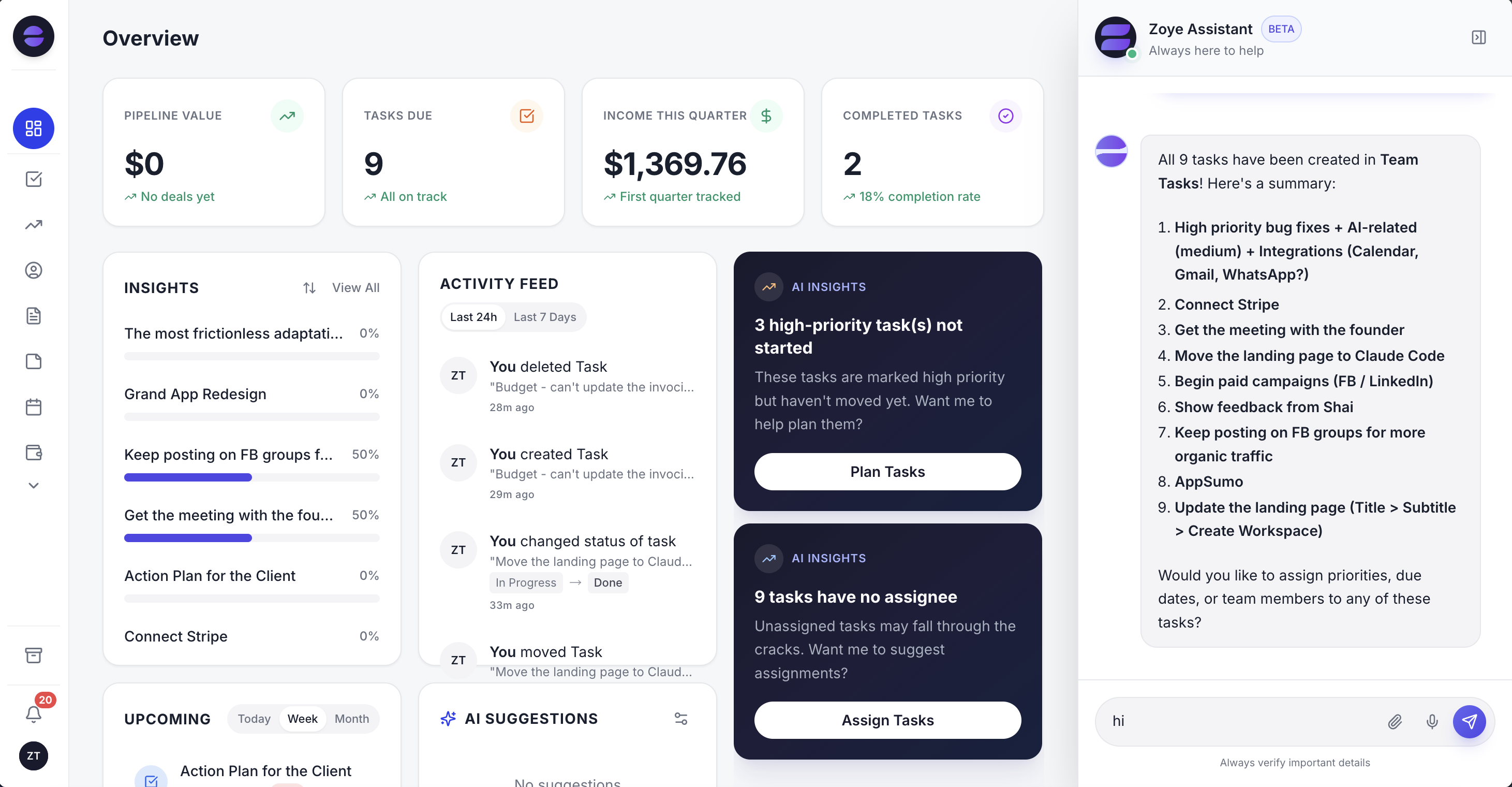 Zoye: tasks alongside CRM, budget, and live AI Insights in one connected workspace
In short, Zoye includes built-in AI, a real Deals-and-Contacts CRM connected to tasks, native budget tracking, live WhatsApp management by text or voice, flat tier-based pricing, and same-day setup. A 10-member Growth plan with all of that is $59/month.
Example: A business owner finishes a coffee with a client and sends Zoye a voice note from her phone: "The client wants three mid-level ops hires, retainer about $42K, kickoff in two weeks." Zoye opens the client deal, files the contact, books a kickoff event on the calendar, and drafts the three role tasks against the retainer - work that in ClickUp or Asana would be a handful of separate screens, and in Asana the client and the retainer would live in a separate CRM.
Want to see it in action?
See Zoye catch a new lead, answer on WhatsApp and set up the follow-up, all from one message.
See How It WorksHow to choose
Choose ClickUp if:
- You need maximum feature depth and customisation at a lower per-seat price than Asana
- Your team has the patience for setup and ongoing configuration
- You are happy to build your own budget tables and pay for Business to get unlimited standard AI
- Your primary need is sophisticated task hierarchy and view flexibility
Choose Asana if:
- Goal-to-task strategic alignment is a real operational priority
- You want a tool with fewer views and choices for your team to learn
- You can absorb the cost of Advanced ($24.99/user/month) for goals, portfolios, and AI Meetings
- You do not need CRM or budget management included
Choose Zoye if:
- You want AI built in without paying for it per seat
- You need CRM, tasks, calendar, and budget in one connected workspace
- You prefer flat-rate pricing over per-seat charges
- You want to manage your business from WhatsApp by text or voice
- You want to be operational the same day with no configuration project
Ready to hand off the busywork?
Zoye brings AI-powered CRM, task management, and automation into one workspace.
Get StartedFrequently asked questions
Yes. As of November 2026, ClickUp's paid tier starts at $9/user/month annual (Core) versus Asana's Starter at $10.99/user/month. At the mid-tier the gap widens further: ClickUp Business is $17/user/month against Asana Advanced at $24.99/user/month. Both still charge per seat and both include AI on paid plans with usage limits, so total cost depends on team size and AI usage.
Asana has less to learn. Its free Personal plan comes with list, board and calendar views, and Starter adds timeline and Gantt, so there are fewer choices to make up front. ClickUp offers List, Board, Calendar and a dozen more views, plus custom fields and custom statuses, which means more to configure before a team settles in. ClickUp's depth is its strength and its onboarding tax.
On paid plans. As of November 2026, ClickUp Core includes a Brain² trial plus 1,000 pooled AI credits per user a month, and Business ($17/user/month annual) adds unlimited standard AI models with 1,500 credits; Free Forever has no AI, and extra credits cost $10 per 10K. Asana AI (AI Teammates, Asana Dash and AI Studio) is included from Starter ($10.99/user/month), with 5 AI requests per user a month, up to 50 per account, on Starter and Advanced. On both, the entry paid plan gets fewer AI features or credits than the higher tiers. (Pricing as of November 2026 - check each vendor's pricing page.)
For small businesses on tight budgets, ClickUp packs native time tracking, 15+ views, and 1,000+ integrations into plans starting at $9/user/month. For small teams that want fewer views to learn and unlimited automations, Asana Starter at $10.99/user/month keeps things simpler. Both charge per seat, and neither bundles budget tracking: in ClickUp you build budgets in Table view, and in Asana they come with the paid Timesheets and Budgets add-on.
Yes - Zoye is built for teams that want what neither covers: a personal AI assistant, CRM and budget tracking native to the same workspace as tasks, and tier-based pricing instead of per-seat charges. A 15-person team pays $119/month on Zoye Scale with AI included, versus about $255/month on ClickUp Business or about $375/month on Asana Advanced - and Zoye also replaces the CRM and budget tools you would buy separately.
Yes. Asana Personal is free for up to 2 users with unlimited tasks and projects plus list, board and calendar views. ClickUp's Free Forever plan is more generous - unlimited members, unlimited tasks, more view types including Table, and 100 automation actions a month - though it has no AI and caps storage at 60 MB. If you want CRM included for a small fixed price, Zoye's entry plan Almost Free starts at just $5/month (or $4/month billed yearly, about the price of a cup of coffee), covering 1 member with the core tools - cancel or upgrade anytime.
ClickUp offers an Asana importer that brings over tasks, projects, and attachments in a few clicks. ClickUp says the import itself takes minutes; the real work is rebuilding your views, custom statuses, and automations to match ClickUp's model, so give your team time to settle in regardless of which tool you switch from.
The bottom line
ClickUp and Asana are both capable platforms doing very different things well. ClickUp is the feature-maximalist consolidator at the lower per-seat price - if you have time to configure it and are happy to build your own budget tracking. Asana is the disciplined, goal-aligned platform with the simpler set of views - if you can absorb the Advanced tier cost for goals and portfolios.
The real question for most teams in 2026 is whether either of them is built for how your business actually runs. If you need an AI assistant that takes action across your whole workspace, a CRM and budget tracking that integrate with project work, and a pricing model that does not grow every time you hire, all at one flat price - the honest answer is neither. Zoye is built for that team, with all of it in one workspace and operational the same day you sign up; see pricing for what each plan includes.
For more context, see the best ClickUp alternatives, the best Asana alternatives, Asana vs Monday.com, ClickUp vs Trello, and the rest of the Zoye blog.