
ClickUp vs Microsoft Project 2026: Flexible vs Heavyweight (and a Better Third Option)
For teams choosing a project tool in 2026, ClickUp and Microsoft Project sit at opposite ends of the spectrum. ClickUp is a flexible, modern, all-in-one work platform that almost anyone can use, priced for small and growing teams. Microsoft Project is the traditional heavyweight built for professional schedule management: deep Gantt charts, resource leveling, critical path, and baselines, all tightly bound to the Microsoft ecosystem. One is easy and affordable; the other is powerful and expensive, with a steep learning curve to match.
This comparison covers the real cost, where each one genuinely excels, and a third option that solves a problem both share: no built-in CRM, no budget tracking, and AI that mostly suggests rather than acts. If you came here to settle ClickUp vs Microsoft Project, the right answer usually depends on whether you need flexible everyday project tracking or industrial-strength scheduling.
ClickUp vs Microsoft Project at a glance
| Dimension | Zoye | ClickUp | Microsoft Project |
|---|---|---|---|
| Ease of use | Plain language, same-day start | Modern, standard PM vocabulary | Steep, built for trained schedulers |
| AI assistant | Included on every plan, executes across workspace | ClickUp Brain - paid add-on (~$9/user/mo) | Copilot - separate Microsoft 365 add-on |
| Gantt & scheduling | Timeline + dependencies | Solid Gantt with critical path | Industry-leading scheduling engine |
| Resource leveling | Workload view | Workload management | Best-in-class, automated leveling |
| Views & flexibility | Tasks, calendar, board, reports | 15+ views, deepest flexibility | Gantt-first, grid, board, timeline |
| CRM / Deals | Built in, all plans | CRM module - newer | Not included |
| Budget / finance | Built in | Not included | Cost fields in schedule only |
| Native docs | Built in | Built in | Not included |
| WhatsApp integration | Live | Not available | Not available |
| Pricing model | Tier-based, not per seat | Per seat | Per seat / per license |
| Entry plan | Almost Free, $5/mo, 1 member, full platform + AI | Unlimited members, no AI | No free plan |
| Paid entry price | $5/mo ($4/mo annual, 1 member) | $7/user/mo annual | ~$10/user/mo (Plan 1) |
| Best for | Mixed teams, small business, AI-first | Mixed teams, all-in-one, flexibility | Complex schedules, resource-heavy projects |
Ease of use and onboarding
The gap here is enormous, and it is the first thing most teams notice.
ClickUp uses standard project vocabulary (tasks, subtasks, lists, spaces, folders) inside a modern web interface. A marketing manager, operations lead, or delivery coordinator can be productive within a day. The interface is dense, with a lot packed onto the screen, but the concepts are familiar and the learning curve is gentle.
Microsoft Project is built for trained project managers. It assumes you already understand critical path, task dependencies, baselines, resource calendars, and leveling. The classic desktop version in particular feels like professional engineering software, because that is what it is. Onboarding a non-specialist to Microsoft Project is a real project of its own, and many organizations rely on a dedicated scheduler or PMO to run it.
For everyday teams without a formal project-management function, ClickUp wins decisively on this dimension. The trade-off is that Microsoft Project's complexity buys real scheduling power, which matters once your plans get large.
Verdict: ClickUp for teams without a trained scheduler who need to be productive fast. Microsoft Project when you have the expertise and the schedule complexity to justify the learning curve.
See what Zoye can do for you
From CRM and deal tracking to AI-powered task management - explore everything Zoye offers in one workspace.
Explore FeaturesProject planning, Gantt, and scheduling
This is where Microsoft Project earns its reputation.
Microsoft Project has the most mature scheduling engine in the category. Automatic critical path calculation, complex dependency types (finish-to-start, start-to-start, lead and lag), baselines for tracking plan-versus-actual, what-if analysis, and resource leveling are all best-in-class. For a construction firm planning a multi-hundred-task build, an engineering team coordinating interdependent work packages, or a government program with strict reporting, Microsoft Project's depth is genuinely hard to replace. It was built for professional schedule management as a discipline.
ClickUp includes interactive Gantt charts on paid plans with dependencies, drag-to-reschedule, and a critical path view. For the planning needs of most teams, this is more than enough: you can lay out a timeline, link dependent tasks, and see what slips when something moves. What ClickUp does not match is the deep, automated scheduling logic of Microsoft Project at large scale. Reschedule a hundred interdependent tasks with resource constraints and Microsoft Project's engine still leads.
The honest read: most teams overestimate how much scheduling depth they actually need. ClickUp's Gantt covers the vast majority of real-world project planning. Microsoft Project's extra depth matters only when professional scheduling is a core part of how you work.
Verdict: Microsoft Project for heavy-duty, large-scale scheduling and resource-constrained planning. ClickUp for everyday Gantt planning and timelines that most teams will find sufficient.
Views and flexibility
ClickUp is one of the most flexible tools on the market. It offers 15+ views (list, board, Gantt, calendar, timeline, workload, mind map, whiteboard, table, and more), custom fields, and a hierarchy of spaces, folders, lists, and tasks that you can shape to almost any workflow. This flexibility is a strength for teams that want to model their own process, and occasionally a weakness for teams that want something simpler out of the box.
Microsoft Project is Gantt-first by design. It offers grid, board, and timeline views, and the modern cloud version (Project for the web) is more flexible than the classic desktop app, but the tool revolves around the schedule. It is not built to be reshaped into a marketing calendar or a sales pipeline. That focus is intentional: Microsoft Project is a scheduling tool, not a general work platform.
Verdict: ClickUp for teams that want to model many kinds of work in one flexible tool. Microsoft Project when the schedule is the work and you do not need other views.
Collaboration and team work
ClickUp is built for collaboration. Comments, assigned comments, real-time editing, built-in docs, chat, proofing, and shared dashboards keep a team working in one place. Non-technical stakeholders can be invited to view boards and timelines without a steep ramp.
Microsoft Project collaborates best inside the Microsoft ecosystem. It connects to Microsoft 365, Teams, and SharePoint, so organizations already living in that world get a coherent experience. Outside it, collaboration is thinner, and sharing a plan with an external stakeholder who does not use Microsoft Project is awkward. Project for the web improved this with browser access, but it still assumes a Microsoft-centric organization.
Verdict: ClickUp for mixed, cross-functional, and external collaboration. Microsoft Project for organizations standardized on Microsoft 365 and Teams.
Ready to streamline your business?
Zoye brings AI-powered CRM, task management, and automation into one workspace.
Get StartedAutomation and AI
ClickUp includes a no-code automation builder on paid plans for routine workflows (status changes, assignments, recurring tasks). Its AI, ClickUp Brain, is a paid add-on at around $9/user/month on top of any plan, not bundled into Business or Enterprise. It assists with writing, summaries, and Q&A across your workspace.
Microsoft Project has lighter native automation than ClickUp, leaning on Power Automate from the broader Microsoft Power Platform for workflow building. AI comes via Microsoft Copilot, a separate Microsoft 365 add-on rather than something native to Project itself.
Both AIs primarily assist. They draft, summarize, and answer questions. Neither executes cross-module actions from a single instruction the way an AI-native workspace does, and in both cases the AI costs extra on top of the base tool.
Verdict: ClickUp for stronger built-in no-code automation. Both gate AI behind paid add-ons. For an AI that takes real action across tasks, CRM, calendar, and budget from one message, see the third option below.
Pricing and value
The pricing structures are very different.
ClickUp pricing:
- Free Forever: $0 (unlimited members, limited storage, no AI)
- Unlimited: around $7/user/month annual
- Business: around $12/user/month annual
- Enterprise: Custom
- ClickUp Brain (AI): a paid add-on (around $9/user/month), not included in any plan
Microsoft Project pricing:
- Project Plan 1 (cloud): around $10/user/month
- Project Plan 3 (cloud): around $30/user/month
- Project Plan 5 (cloud): around $55/user/month
- Project Standard / Professional (desktop): expensive one-time licenses (hundreds of dollars per seat)
- No free plan
Pricing reflects published rates as of June 2026; check each vendor's pricing page for current figures.
The 10-person team math:
- ClickUp Business (no AI): 10 x $12/mo = $120/month
- ClickUp Business + Brain add-on: 10 x about $21/mo = about $210/month
- Microsoft Project Plan 3: 10 x $30/mo = $300/month
- Microsoft Project Plan 5: 10 x $55/mo = $550/month
- Zoye Growth (20 members, AI + CRM + budget + docs included): $59/month
The gap is stark. Microsoft Project's cloud plans climb fast, and Plan 3 or Plan 5 (where the real scheduling power lives) costs several times what ClickUp Business does, before you add AI to either. The desktop licenses are a large upfront spend per seat. For raw value per dollar on everyday project work, ClickUp wins comfortably, and a flat-rate platform sidesteps per-seat math entirely.
Verdict: ClickUp wins decisively on price for most teams. Microsoft Project's cost is justified only when you genuinely use its scheduling depth. Tier-based pricing avoids the per-seat climb.
Want to see it in action?
Watch how Zoye automates your daily workflow - from lead management to team collaboration.
See How It WorksIntegrations and ecosystem
ClickUp integrates broadly across the modern SaaS landscape: Slack, Google Workspace, GitHub, Figma, Zoom, HubSpot, Zapier, and hundreds more. It is built to sit in a mixed tool stack.
Microsoft Project integrates deeply with the Microsoft ecosystem (Microsoft 365, Teams, SharePoint, Power BI, Power Automate). If your organization is standardized on Microsoft, that tight coupling is a genuine advantage. Outside it, the integration story is narrower than ClickUp's.
Verdict: ClickUp for broad, cross-vendor integrations. Microsoft Project for organizations already committed to the Microsoft 365 ecosystem.
Where Zoye fits: the AI-native alternative
The ClickUp vs Microsoft Project debate is really a debate about flexibility versus scheduling depth. Both share a deeper limitation: they track project work but not the business around it. Neither carries a real CRM, neither tracks budget and income natively, and in both the AI is a paid add-on that suggests rather than acts. Zoye is built for the team that wants project work and the business around it in one place.
Zoye is an AI-native workspace covering Overview, Tasks, Deals, Contacts, Inbox, Docs, Notes, Calendar, Budget, Team, Reports, and Archive, with a personal AI assistant included on every plan that takes real action across all of them from a single text or voice instruction.
 Zoye: tasks alongside CRM, budget, and live AI Insights in one connected workspace
What Zoye gives you that ClickUp and Microsoft Project do not:
- AI included on every plan, not a per-seat add-on
- Project work and business work in one place: the build plan and the client deal funding it side by side
- Real CRM built in: Deals pipeline and Contacts connected to tasks, calendar, and reports
- Budget tracking native: income versus expenses, invoicing, and financial reporting alongside project work
- Docs, notes, calendar, and reports all included on every plan, no separate subscriptions
- WhatsApp integration live: manage your entire workspace by text or voice from WhatsApp
 Zoye tasks linked to deals and contacts, created by Zoye Assistant from a single instruction
Plans appear on the workspace calendar automatically, so the schedule and the work are the same picture, and cross-workspace Reports pull tasks, deals, budget, and team activity into one exportable dashboard.
 The Zoye calendar shows tasks and deadlines automatically alongside meetings
 Zoye Reports brings tasks, deals, budget, and team activity into one live dashboard
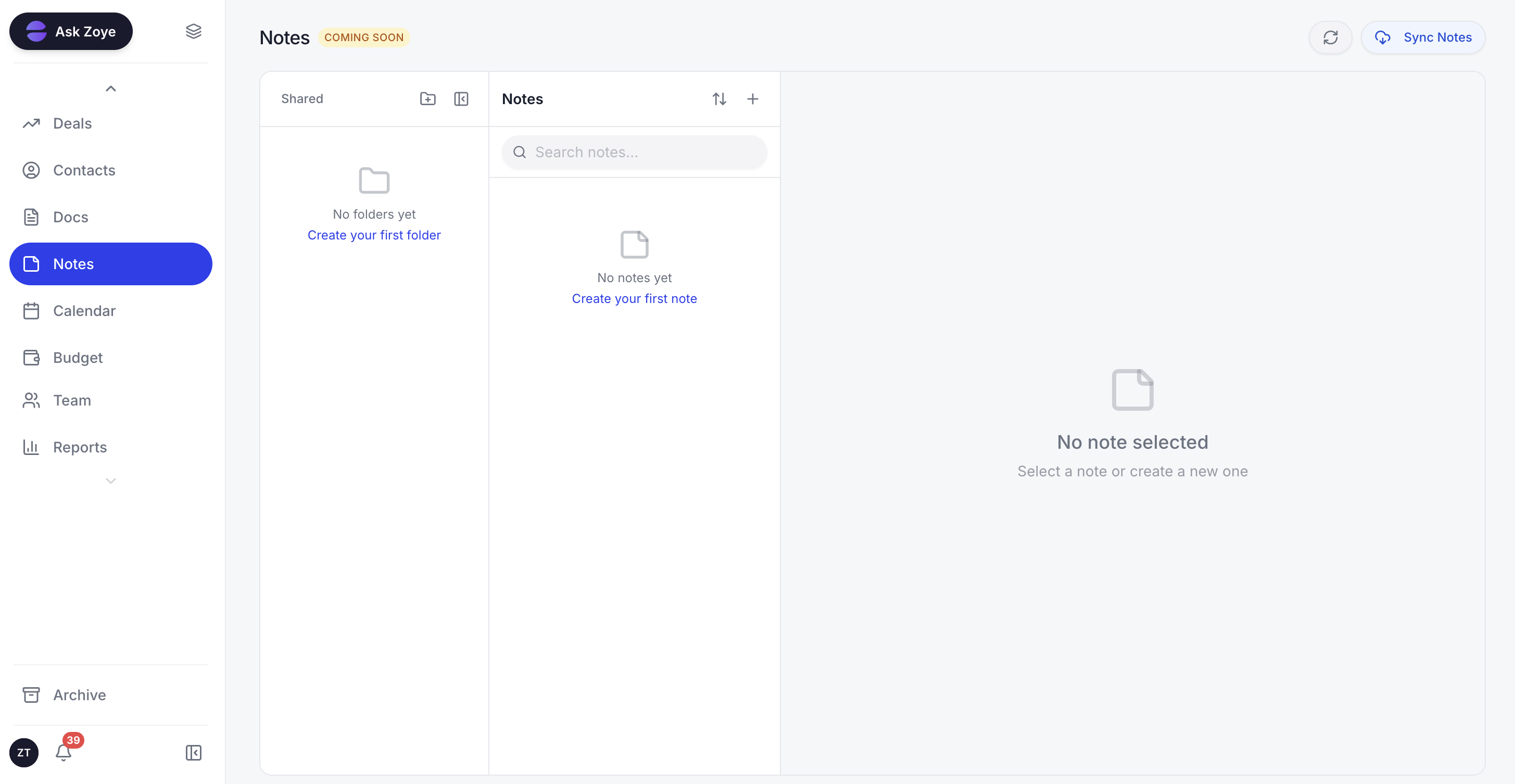 Zoye Notes keeps project context in the same workspace as the tasks and deals
Real example: An agency lead wraps a scoping call and types one line into Zoye: "New website build for FutureNow, fixed bid roughly $40K, kickoff next Monday." Zoye opens the client deal at $40K, files the contact, books the kickoff on the calendar, and creates the project tasks linked to that deal. The delivery team picks up the plan while the deal and revenue stay attached to it, a connection neither ClickUp nor Microsoft Project can make, because neither carries the client or the contract value at all.
Zoye uses flat-rate pricing, not per seat.
See what Zoye can do for you
From CRM and deal tracking to AI-powered task management - explore everything Zoye offers in one workspace.
Explore FeaturesWhen to choose each
Choose ClickUp if:
- Your team is mixed and has no dedicated project scheduler
- You want all-in-one (tasks, docs, dashboards, Gantt) at the lowest per-seat price
- You value flexibility and many views over depth in any one area
- Everyday Gantt planning and dependencies cover your scheduling needs
- You want a tool people can adopt in a day
Choose Microsoft Project if:
- You run complex, large-scale schedules with hundreds of interdependent tasks
- Resource leveling, baselines, critical path, and what-if analysis are core to your work
- Your organization is standardized on Microsoft 365, Teams, and SharePoint
- You have trained schedulers or a PMO to run the tool
- Professional schedule management is a discipline, not a side activity
Choose Zoye if:
- You want AI included on every plan, not gated behind a paid add-on
- You need CRM, tasks, projects, calendar, and budget in one connected workspace
- You prefer flat-rate pricing over per-seat charges
- You want to manage your business from WhatsApp by text or voice
- You want to be operational the same day with no configuration project
Ready to streamline your business?
Zoye brings AI-powered CRM, task management, and automation into one workspace.
Get StartedFrequently asked questions
Yes, for most teams ClickUp is significantly cheaper. ClickUp Unlimited is around $7/user/month annual and Business is around $12/user/month. Microsoft Project Plan 1 starts around $10/user/month, Plan 3 around $30/user/month, and Plan 5 around $55/user/month. Microsoft Project's cloud plans climb fast for the scheduling depth most teams never fully use, and the desktop editions are sold as expensive one-time licenses. For a small or mixed team, ClickUp delivers more day-to-day project tooling per dollar.
Yes, by a wide margin for non-specialists. ClickUp uses standard project vocabulary and a modern web interface that marketing, operations, and delivery teams pick up in a day. Microsoft Project is built for trained project managers who understand critical path, baselines, and resource leveling, and its learning curve is steep. If your team has no dedicated scheduler, ClickUp is far easier to adopt.
Yes. ClickUp includes interactive Gantt charts with dependencies, drag-to-reschedule, and a critical path view on paid plans. They cover the planning needs of most teams well. They are not as deep as Microsoft Project's scheduling engine for complex multi-hundred-task plans with resource leveling and baselines, but for typical project work ClickUp's Gantt is more than enough.
Yes, for heavy-duty scheduling Microsoft Project is the stronger tool. Its scheduling engine handles complex dependencies, automatic critical path calculation, resource leveling, baselines, and what-if analysis at a depth ClickUp does not match. For construction, engineering, government, and large capital projects with hundreds of interdependent tasks, Microsoft Project remains the industry standard.
ClickUp is the better fit for most small businesses. It is cheaper, easier to use, and covers tasks, docs, dashboards, and Gantt in one tool without a trained project manager. Microsoft Project is overkill for a small team unless you run genuinely complex schedules. For a small business that wants project tracking plus CRM and budget in one place, Zoye covers more at flat-rate pricing.
For most non-specialist teams, yes. ClickUp's Gantt, dependencies, and timelines cover everyday project planning, and it adds docs, dashboards, and automation Microsoft Project lacks. For teams running formal scheduling with resource leveling, baselines, and critical path analysis on large capital projects, Microsoft Project's depth is hard to replace. The honest test: if you plan and track work, ClickUp covers it; if you do professional schedule management as a discipline, stay on Microsoft Project.
Yes, Zoye is built for teams that want what neither covers: a personal AI assistant included on every plan that takes real action across the workspace, CRM and budget tracking native to the same place as tasks and projects, and flat-rate pricing instead of per-seat charges. A 20-member team pays $59/month on Zoye Growth with AI, CRM, docs, calendar, and budget included. For deep professional scheduling, Microsoft Project still wins; for flexibility, ease, and running the whole business in one workspace, Zoye covers more for less.
The bottom line
ClickUp and Microsoft Project represent two real choices. Microsoft Project is the heavyweight standard for professional schedule management: if you run large, complex, resource-constrained plans and have the expertise to drive the tool, its scheduling engine, resource leveling, and baselines remain hard to beat, and its tight Microsoft 365 integration is a real advantage for Microsoft-centric organizations.
ClickUp wins almost every other dimension for everyday teams. It is far cheaper, far easier to adopt, more flexible, and all-in-one, with Gantt charts that cover the planning needs of most teams without a trained scheduler. For mixed, cross-functional, and growing teams, ClickUp delivers more day-to-day value per dollar, and you can be running real projects the same week you sign up.
The real question for most teams in 2026 is whether either is built for how your business actually operates beyond project tracking. If you need an AI assistant that takes action across your whole workspace, a real CRM connected to tasks, budget tracking that integrates with project work, and a pricing model that does not grow with seat count or require add-ons, the honest answer is neither. Zoye is built for that team, with all of it included at every tier at no extra cost and operational the same day you sign up.
For more context, see the best ClickUp alternatives, the best Microsoft Project alternatives, the best project management software, and the best Gantt chart software.