AI Meeting Notes: How to Run a Meeting So the Notes Are Worth Having
Meeting notes fail quietly. Nobody stands up and announces that the document from three weeks ago was never opened again. What happens instead is that the same question gets asked twice, the thing everyone agreed to never happened, and two people remember the budget differently. Somewhere there is a file containing the correct answer, and nobody reads it, because reading it was never anybody's job.
AI has changed the mechanics of this problem without changing the problem itself. Capture is close to solved. You can now walk out of a call with a clean transcript, speaker labels and a competent summary without anyone typing a word. That is a genuine improvement and it removes real drudgery. What it does not do on its own is make the notes matter, because the failure was never in the writing down. It was in what happened next.
This guide is about the parts AI cannot do for you: deciding what is worth recording, running the meeting so those things exist to be recorded, getting them out of the document and into the places work actually happens, and checking the output before you trust it. There is a template you can copy, and a section on the specific ways AI gets things confidently wrong, which is the part most guides skip because it is uncomfortable.
The four things worth capturing
Most notes are too long and contain almost nothing. The reason is that people write down what was said rather than what changed. Sixty minutes of conversation typically changes four kinds of thing, and those four kinds are your notes.
Decisions. Something was undecided at the start and is decided now. Write the decision, not the debate. "We are going with the phased rollout, starting with the two smallest accounts" is a decision. "We discussed rollout options" is a description of a meeting having occurred. If a decision came with a condition attached, the condition is part of the decision and belongs on the same line.
Owners. Every piece of work that came out of the room now belongs to exactly one named person. Not a team, not a department, not "we". A task owned by three people is a task owned by nobody, and it is the single most common reason nothing happens between meetings. If you cannot name the owner, the item is not an action, it is an open question, and it goes in a different section.
Dates. An action without a date is a wish. The date does not have to be ambitious and it does not have to be right. It has to exist, because a date is what allows the item to appear in front of someone at a moment when they can do something about it. "Next week" is not a date. Friday is a date.
Changed facts. This is the category almost everyone drops, and it is the one that decays fastest if you drop it. During the call somebody corrected their email address. The budget moved from one number to another. The launch slipped by two weeks. A new person joined who is not in any of your records yet. These are not action items and they do not fit in a decisions list, so they end up buried in a paragraph and never reach the system where the fact is stored. Three months later your records are wrong and nobody can say when they stopped being right.
What to deliberately leave out
The transcript. Not because it is worthless, but because it is not notes. A full transcript is an archive: excellent when you need to settle a dispute about what was actually said, useless as a working document, because nobody rereads an hour of speech to find out what they owe.
Also leave out the reasoning behind decisions, unless the reasoning will be re-litigated. Leave out ideas that went nowhere. Leave out the status updates that could have been a message. If your notes reliably run to two pages after a thirty minute call, you are transcribing rather than deciding, and the length is what guarantees nobody will read them.
The useful test is whether a line would change anyone's behaviour if they read it on Monday morning. Decisions change behaviour. Owners and dates change behaviour. A corrected phone number changes behaviour the next time somebody dials it. A paragraph summarising a discussion changes nothing.
Set the meeting up so there is something to capture
Notes are downstream of the meeting. A conversation that ends without conclusions cannot be summarised into conclusions, and no AI will invent good ones for you, although it may invent bad ones, which is worse. Three habits do most of the work here.
Write the agenda as questions. "Q3 planning" produces a discussion. "Which two features ship before the end of September, and who owns each one?" produces an answer. An agenda phrased as questions makes the absence of a decision visible in the room, while there is still time to reach one.
Name the notetaker out loud, before you start. Even when a tool is capturing everything, someone owns the output: confirming the summary, fixing what the AI misheard, and pushing the actions where they need to go. If that is nobody's stated job it becomes the job of whoever feels most guilty, and that person contributes less to the meeting than everyone else.
Spend the last five minutes reading the actions back. Out loud, one by one, with the owner's name and the date. It feels slightly bureaucratic the first two times and then it becomes the most valuable five minutes of the hour. People correct their own items in real time. Someone says "that is not what I agreed to", which is exactly the sentence you want spoken in the meeting rather than discovered a fortnight later. This one habit also dramatically improves what an AI notetaker produces, because a clean verbal recap at the end gives the model an unambiguous, well structured passage to summarise from.
If you want the wider context on how these habits fit into a working week, the small business productivity guide covers the surrounding routine. And if you are still deciding which tool should be doing the capture, the honest comparison lives in our guide to the best AI meeting assistants, while the AI Notetaker page covers how capture works when the notes and your records are in the same place.
Want to see it in action?
Watch how Zoye automates your daily workflow - from lead management to team collaboration.
See How It WorksThe handoff problem
Here is the failure mode that survives every improvement in note taking quality.
A meeting produces a summary. The summary is accurate, well structured and genuinely good. It lands in a document, a notes app or an email thread. Everything in it that requires someone to do something now depends on a human being reading that document, deciding what it implies for them personally, and then going into a different piece of software to create the task, update the record, move the deal or block the time.
That transfer step is invisible in a demo and expensive in real life, because it recurs after every single meeting forever. It also has a predictable completion rate, which is not one hundred percent. The urgent items get transferred because someone remembers them anyway. The important but non-urgent ones do not. Corrected facts almost never get transferred, because typing a fixed email address into a customer record is nobody's idea of a satisfying afternoon.
The result is a specific and recognisable pattern. Your notes archive is comprehensive and your records are stale. You have a written trail proving that everyone knew the phone number was wrong, and a customer record that still has the wrong phone number.
There are only two real fixes. The first is process: one named person, immediately after the call, does the transfer, and the meeting is not considered finished until they have. This works and it costs a person twenty minutes a day. The second is structural: the notes are produced in the same system where the tasks and records live, so that approving a commitment creates the task and confirming a corrected fact updates the record. No transfer step, because there is nowhere to transfer from.
What does not work is deciding to be more disciplined about reopening documents. That has been tried, universally, by everyone.
A meeting notes template you can copy
This template is deliberately hostile to narrative. It is short, the sections are in priority order, and the discussion notes are at the bottom where they belong. Adapt the wording, keep the shape.
Meeting: [what this call was for, one line] Date: [date] Attendees: [names, and note anyone who joined late or left early] Purpose: [the question this meeting existed to answer]
Decisions
- [Decision, stated as a completed choice. Include the condition if there is one.]
- [Decision.]
Actions
| What | Owner | Due | Notes |
|---|---|---|---|
| [Specific, verb first, small enough to finish] | [One name] | [A real date] | [Only if the action is ambiguous without it] |
Changed facts
- [Anything that updates a record: corrected contact details, a new budget figure, a moved timeline, a new person and their role, a changed requirement.]
Open questions
- [Question. Who will answer it, and by when. This is where items with no owner go, so they stop pretending to be actions.]
Discussion notes (optional)
- [Context worth keeping only if a decision will be revisited. Delete this section when it is empty rather than filling it.]
Two rules make the template work. Every row in the actions table has all three of what, who and when filled in before the meeting ends, with no blanks left to be tidied up later, because they will not be. And anything you cannot honestly put an owner on goes into open questions rather than being softened into an action nobody owns.
See what Zoye can do for you
From CRM and deal tracking to AI-powered task management - explore everything Zoye offers in one workspace.
Explore FeaturesWhere AI genuinely helps
It is worth being precise about this, because the honest case for AI notes is strong and does not need exaggerating.
AI removes the participation tax. The best contributor in the room is no longer disqualified from contributing because they are typing. That alone changes the quality of meetings more than any template.
It captures what you did not know you needed. A number mentioned in passing forty minutes in, a name you did not catch, the exact wording of a commitment. Human notes capture what the notetaker judged important at the time, which is a lossy filter applied under pressure.
It gives you a searchable record. "When did we agree to the extra scope?" becomes a query rather than an argument, and having a specific answer defuses most of the disagreements that meeting notes exist to prevent.
It drafts the recap. The follow-up email that summarises what was agreed is a fifteen minute chore that turns into a thirty second edit, and follow-up emails that take fifteen minutes frequently do not get sent.
And it never gets bored. The fourteenth call of the week is captured exactly as carefully as the first, which is not true of any human notetaker including the conscientious one.
Where AI produces confident nonsense, and how to check it
Now the uncomfortable part. Every AI notetaker on the market will sometimes produce something fluent, well formatted and wrong. The specific failure modes are consistent across tools, which is good news, because it means you can check for them systematically rather than reading everything with vague suspicion.
Proper nouns. Company names, product names, surnames and anything invented in-house get replaced with whatever the model considered most probable. A supplier called Kalvex becomes Calvex or Kelvix. This is the highest frequency error and usually the most harmless, unless the wrong name ends up in a customer facing recap, where it reads as carelessness.
Numbers and dates. Prices, percentages, quantities and deadlines spoken quickly are frequently transcribed as a plausible neighbour. Fifteen and fifty are the classic pair. Thirteen thousand and thirty thousand are worse. A wrong number does not look wrong, which is exactly why it travels: it gets copied into a proposal, then into a forecast, and by the time anyone questions it there are three documents agreeing with each other.
Crosstalk. When two people speak over each other, speaker attribution degrades sharply, and it degrades at precisely the moments the conversation is most interesting, because the overlap is usually a disagreement or an enthusiastic agreement. The transcript may attribute half a sentence to the wrong person, and a summary built on that will confidently report that the wrong person said it.
Accents and language switching. Accuracy varies more by accent than most vendors admit, and mid sentence switching between languages, which is completely normal in a lot of businesses, produces the worst output of any condition. Test this on your own team's voices before you rely on it. A benchmark run on clear studio English tells you nothing about your Tuesday standup.
Who committed to what. This is the most dangerous failure and it is not a transcription error at all. It is an inference error. Someone says "I suppose we could take that on if nothing else lands this week." That is a hedge with two conditions in it. Summarisers routinely flatten this into "Marcus will take on the migration", which is a sentence nobody said. The model is not lying. It is compressing, and compression removes hedges before it removes anything else, because hedges look like filler and commitments look like signal.
The invented action item. Related, and more common in meetings that ended without conclusions. If a call was genuinely inconclusive, a summariser asked to produce action items will produce action items, because that is what it was asked for. The result is a tidy list of tasks that were never agreed to, and it is only obvious to someone who was in the room.
The check that takes two minutes
Do this before you send a recap or approve anything into a system of record. It is short enough that you will actually do it, which is the only property that matters.
- Scan every proper noun. Names of people, companies and products. Fix them against a source you trust, not against the transcript, because the transcript is where the error came from.
- Verify every number and date by finding the moment it was spoken. Search the transcript for the figure and read the surrounding sentence. This is the single highest value check on the list, and it takes seconds per number. If a figure cannot be located in the transcript, it did not come from the meeting.
- Read each action item and ask who agreed to it. Not who was mentioned near it. Who said yes. If you cannot recall a clear acceptance, move the item to open questions and confirm it with the person directly. Sending someone a task they never accepted is a worse outcome than having no notes at all, because it costs you trust in addition to time.
- Check the decisions against what was undecided at the start. If the summary reports a decision on something you remember leaving open, that is the invented-conclusion failure and it is worth catching before it becomes institutional memory.
- Read anything customer facing twice. Internal notes can absorb an error. A recap email sent to a client cannot, and the errors that land in front of customers are the ones that cost something.
None of this requires distrusting the tool. It requires treating the summary as a draft written by a fast, tireless assistant who was not paying attention to context, which is an accurate description of what produced it. The teams that get the most out of AI notes are the ones who check hardest, because they can act on the output confidently once they have.
Ready to streamline your business?
Zoye brings AI-powered CRM, task management, and automation into one workspace.
Get StartedThe twenty four hours after the meeting
The window that decides whether a meeting mattered is short. Three things should happen in it.
The actions become real work, in the place where the person doing them will see it. Not in the notes document. On the board, in the list, in the calendar, wherever their attention already goes.
The changed facts reach the records. The corrected email address goes onto the contact. The new figure goes onto the deal. The moved date goes onto the timeline. This takes minutes and it is the difference between records you can rely on and records people quietly work around.
The recap goes out, and it is short. Decisions, actions with owners and dates, open questions. Anyone who needs the full picture can ask for the transcript. A recap that is longer than a screen will be skimmed, and skimming defeats the purpose of having written it.
After that, the meeting is done. If nothing in those three categories existed, the honest conclusion is that the meeting could have been a message, and the notes have done you the useful service of proving it.
Where the notes and the records live in the same place
Zoye is an AI Business Operator. Thirteen tools sit in one workspace, already linked to each other, with an AI that operates them on your behalf. The AI Notetaker is one of the thirteen, and that is what changes about the handoff described above.
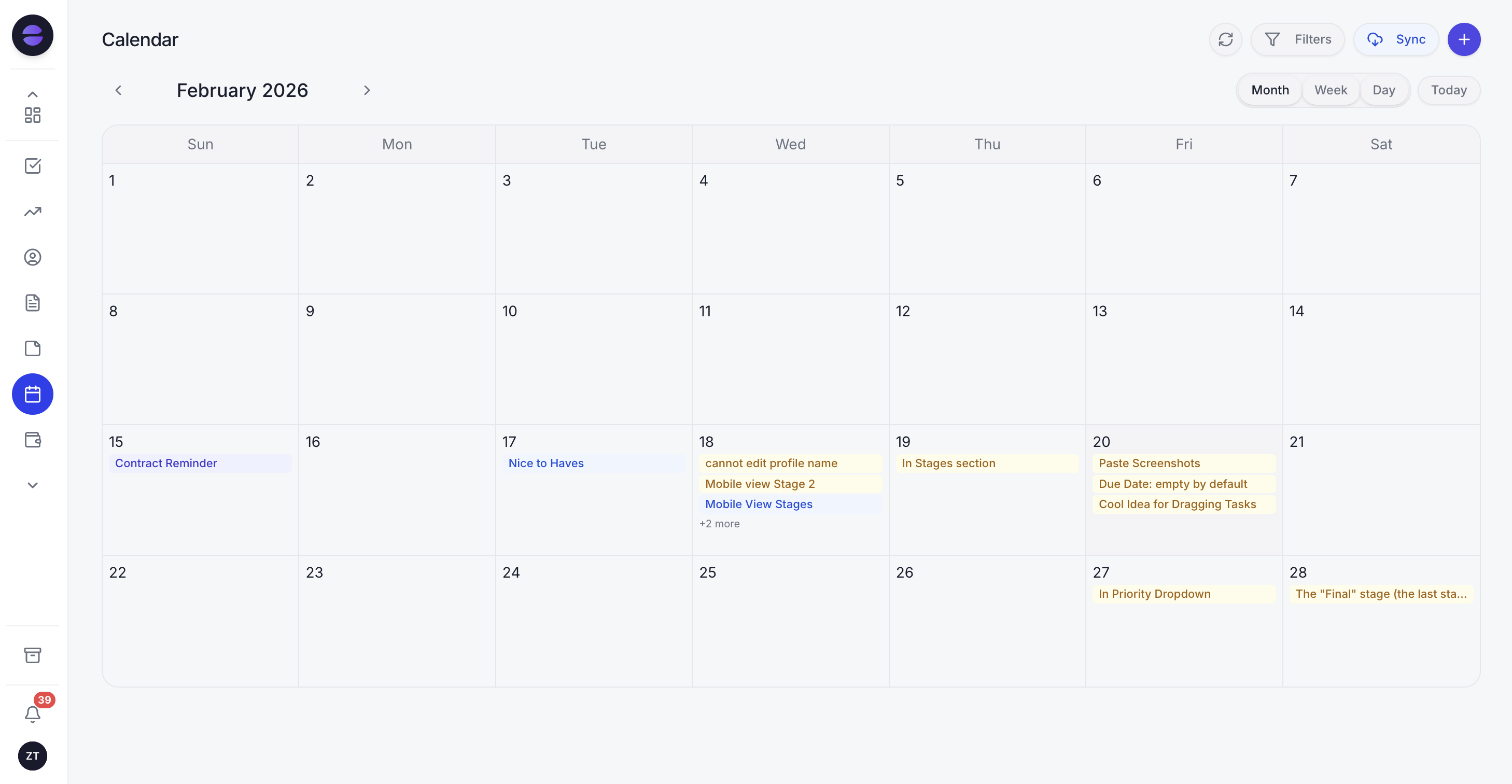
Meetings and the work that came out of them sit on the same calendar, so a commitment made on Tuesday shows up where the week is planned.
The capture side is unremarkable in the good sense. The notetaker joins Zoom, Google Meet and Microsoft Teams, either from a link you paste in or by joining everything on your calendar that has one. It shows up as a visible participant, so nobody is recorded without seeing it in the attendee list, and it transcribes live with speaker labels.
The part that matters for this article is what the finished meeting produces: a short summary, the decisions, action items with owners and dates, a searchable transcript, a drafted follow-up recap, and a set of proposed record updates. That last one is the changed facts category from earlier in this guide, treated as first class output rather than as a paragraph. A new contact who joined the call, an email address the conversation showed was wrong, a budget figure spoken out loud, a timeline that shifted: these are proposed against the right contact, company or deal.
Nothing is written silently. Commitments become tasks on one tap of approval, and you can edit them first if the AI misheard, which given the failure modes above you sometimes will. That approval step is where the two minute check belongs, and it exists precisely because confident nonsense is a real property of this technology rather than an edge case.
Because the notetaker sits inside the same workspace as the CRM, the tasks, the calendar and the reports, the task it creates is the task on your board and the deal it updates is the deal your reporting reads from. You reach the same assistant, with the same tools and permissions, from the web app, from WhatsApp, from a voice note, from Slack, and from Claude via the connector. Asking what a meeting decided should not require being at a desk.
Honest limits, in the spirit of the rest of this guide. Zoye is not a conversation intelligence platform for large sales floors: there is no call scoring against a playbook and no rep coaching analytics. The Notes module is collaborative docs and is still rolling out. And no tool, including this one, removes the need to check the numbers.
The short version
Capture four things and skip the rest. Decisions, owners, dates, changed facts. Run the meeting so those four things exist by the end, and read the actions back out loud before anyone leaves. Get the commitments out of the document and into the systems where work happens within a day, because a document is where obligations go to be forgotten. Use AI for the capture, because it is genuinely better at it than you are while also participating in the conversation. Then check the proper nouns, check the numbers against the transcript, and check that every action item was actually accepted by the person whose name is on it.
Do that and the notes stop being a record of a meeting having happened, and start being the reason something changed.
See how the AI Notetaker turns your next call into tasks and record updates instead of another document.
For more context, see the best AI meeting assistants in 2026 and the small business productivity guide.


