
Quick answer: accounting practice management software runs the recurring work inside a firm: client jobs, checklists, due dates, document requests and billing. Karbon, Financial Cents and Jetpack Workflow are strongest on internal workflow, TaxDome and Canopy on the client portal. If your small firm loses most of its time to chasing clients, answering them and winning new ones, Zoye is the better first tool.
Key takeaways (October 2026)
- Per-user prices on vendor pages run from $19 a month (Financial Cents Solo, one user) to $149 per user per month (Canopy Premium, billed annually).
- A 5-person firm pays $245 to $445 a month for Karbon, Financial Cents or Canopy at list prices, billed annually, before add-ons.
- Automatic client reminders are a higher-tier feature on two tools: Karbon Business at $89 per user and Financial Cents Scale at $69 per user.
- TaxDome's pricing page refused our check and Ignition's prices did not load as readable text, so 2 of the 7 prices could not be verified in October 2026.
- Zoye prices the workspace, not the seat: $29 a month for up to 10 members on Starter, or $23 a month billed yearly.
What accounting practice management software does, and what it does not
Accounting practice management software organises a firm's recurring client work: who does which job for which client, by what date, with which documents still missing. It usually adds time tracking, billing and a client portal. It does not prepare tax returns or keep ledgers; those stay in your tax and bookkeeping software.
Think of a small firm as three layers. At the bottom sit the production tools: the ledger or bookkeeping software, the tax preparation program, the payroll system. In the middle sits practice management, which turns "every client needs a monthly close and a quarterly return" into hundreds of dated jobs with checklists and owners. On top sits the client relationship: the emails, calls, WhatsApp messages, new enquiries, proposals and the follow-up you promised last Tuesday.
Practice management tools grew out of the middle layer. Karbon is known for team workflow and an email triage inbox. Jetpack Workflow is almost pure job scheduling. Financial Cents pairs a workflow core with client tasks and a portal. TaxDome and Canopy go wide and put a portal, e-signature and billing around the workflow.
The top layer is where many small firms actually bleed time, and it is the layer practice tools treat as a side feature. That is the gap this guide keeps coming back to.
Where a small firm really loses its hours
In a 2 to 10 person firm, time rarely disappears into the accounting itself. It disappears into waiting and chasing: missing statements, unsigned engagement letters, clients who answer a different question than the one asked, and enquiries that sat unanswered over a busy week. Practice software can show what is late; it rarely makes the client respond.
Here is an illustrative month for a typical 4-person bookkeeping and tax firm with about 120 recurring clients. The numbers are a worked example, not survey data.
- Monthly close. Around 80 clients need bank and card statements, receipts and a few answers before the books can close. If a third of them are late, that is about 27 clients to chase, most more than once.
- Quarterly returns. Every quarter, sales tax or VAT filings for a few dozen clients land in the same week, each with a hard deadline and a document checklist.
- Year-end and annual filings. One peak season where the same chasing happens for every client at once, with personal returns layered on top.
- Onboarding. Each new client needs an engagement letter, prior-year files, access to their bank feeds and a kickoff call. Two or three new clients a month means two or three of these half-finished at any time.
- New enquiries. Prospects write by email, web form, phone and WhatsApp. In peak season a reply can slip a week, and a prospect who waits a week usually hires someone else.
- Advisory and scope creep. A client asks a quick question on WhatsApp that is really an hour of work. Unless someone logs it, it never reaches a proposal or an invoice.
Put those together and the pattern is clear. The work that leaks is not the work with a checklist. It is the work that depends on another person replying.
Practice management or client communication: find your bottleneck first
Before comparing tools, decide which problem costs your firm more: organising internal work or getting clients to respond and buy. Firms with a workflow problem miss internal steps and overload staff. Firms with a communication problem have tidy checklists and still wait days for documents and replies. The right software differs for each.
A simple test takes ten minutes. Look at the last 20 jobs that finished late and write one reason next to each.
- "We forgot a step" or "nobody knew it was theirs": an internal workflow problem. A practice management tool with recurring jobs, checklists and capacity views is the fix.
- "Waiting on the client": a communication problem. You need follow-ups that go out on time, in the channel the client actually reads, with every reply landing on that client's record.
- "We said yes to more work than we had people for": a capacity problem. Practice tools with capacity planning (Jetpack Workflow Premium, Canopy Plus) help most.
If more than half the reasons are "waiting on the client", a heavier practice tool will mostly give you a better-organised list of overdue items. Put the effort into the communication layer first. Our guide to CRM for accountants covers that side of the stack in more depth.
What to look for in accounting practice management software
Judge every option on ten points: recurring jobs, deadline tracking, document requests, client follow-up, the channels clients use, onboarding, new-client pipeline, pricing model, setup effort and honest fit for your firm size. A tool that is excellent on three of these and absent on the rest can still be right, if those three are your bottleneck.
- Recurring jobs. Monthly, quarterly and yearly work created on schedule, with checklists you can edit.
- Deadlines. Due dates per client and per job, visible on one calendar or board, with owners.
- Document requests. A way to ask for specific files and see what is still missing.
- Follow-up. Reminders that go out automatically, and which tier of the plan includes them.
- Client channels. Email, portal, text, WhatsApp. Clients answer where they already are.
- Onboarding. Engagement letters, intake details and a kickoff, repeatable for every new client.
- New-client pipeline. Enquiries tracked from first message to signed engagement, with the follow-up owned by someone.
- Pricing model. Per user, per active client, per credit or per workspace. Model your firm at today's size and at double.
- Setup effort. Templates and automations take hours to build. Ask who builds them and who keeps them current.
- Fit. A solo bookkeeper and a 40-person firm should not buy the same tool.
The 7 best options for small accounting firms in 2026
These seven cover the realistic choices for a 2 to 10 person firm: one client-communication workspace and six practice management tools. Zoye ranks first for firms whose bottleneck is the client conversation; the practice tools rank by how well they serve a small team. Each entry starts with the limitation, then October 2026 pricing and fit.
1. Zoye - for the firm whose bottleneck is client communication
Zoye is the pick when your checklists are fine but clients are slow, enquiries wait and follow-ups depend on someone remembering. The limitation comes first: Zoye is not a tax, bookkeeping or ledger tool. It does not prepare or file returns, track return status or host a branded upload portal with e-signature. Firms that rely on those keep a practice tool next to it.
What Zoye is: an AI Business Operator, one workspace where the CRM, tasks, deals, calendar, documents, team, budget, reports, workflow automations, WhatsApp automations, Facebook and Instagram, email tracking and the AI Notetaker already link to each other, plus an AI that operates them for you. For a small firm, five parts matter most.
- Every client conversation on one record. Each client is a contact (and company) with their emails, chats, files, open tasks and notes in one place. Zoye reads, drafts and sends through Gmail, connects to Outlook, and email tracking shows when a client opened your request, so you know whether "I never got it" is true.
- Deadlines as tasks with owners. Filing dates, close dates and "waiting on client" items become tasks with a due date and an owner on a board, and they show on the calendar, which syncs both ways with Google, Outlook and Apple. A parent task can close automatically when all its subtasks are done.
- Follow-ups that go out on time. Describe what should happen, for example "every Monday, remind clients whose statements are still missing and create a task for whoever owns them", and Zoye builds the rule, shows it to you and waits for your approval before anything runs. Every run is logged with what fired and what changed, and can be reversed.
- WhatsApp and the new-client pipeline. Zoye runs WhatsApp conversations with your leads on the official WhatsApp Business Platform: a first reply to new enquiries, a qualifying bot that writes answers into the contact's fields, and scheduled messages with each client's name and details filled in. Prospects move through a deal pipeline from enquiry to signed engagement. Connecting your firm's own WhatsApp number is coming soon.
- Meetings that leave tasks behind. The AI Notetaker joins Zoom, Google Meet and Teams calls, writes the summary and decisions, and turns each promise ("send the payroll report by Friday") into a task once you approve it.
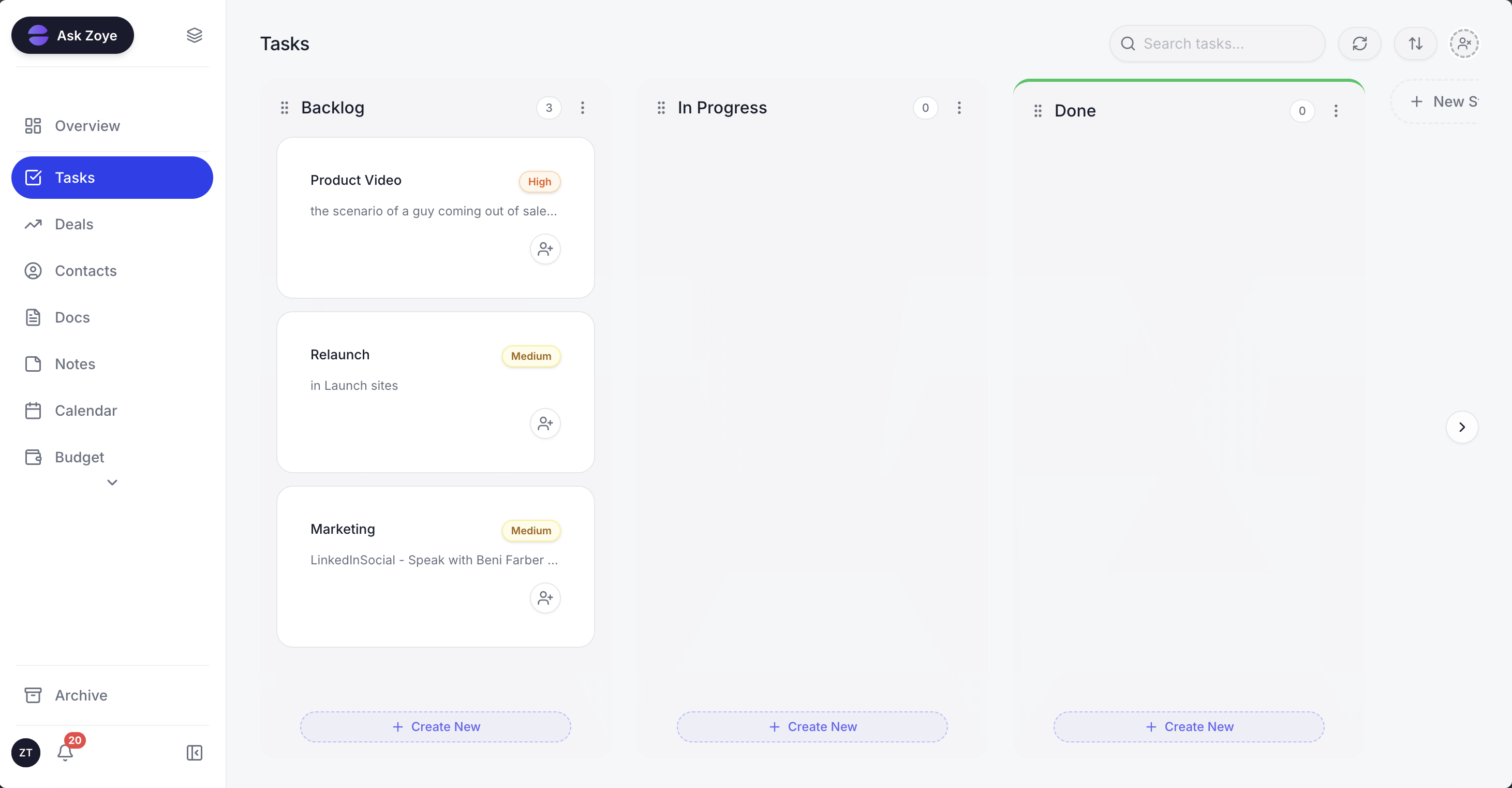
Client deadlines and document requests on one board, each with an owner and a due date.
The assistant works in the app, on WhatsApp, by voice note, in Slack and in Claude. A partner between client meetings can ask "which clients still owe us bank statements for September?" and get the answer from live data, or forward a PDF and have the details added to the right client. Bulk changes and deletions ask for confirmation first.
Pricing (as of October 2026): Zoye's price follows team size, not seats. Up to 10 people: Starter at $29 a month, or $23 a month on a yearly bill, with 5GB of storage. Up to 20: Growth at $59 ($47 yearly) with 10GB. Up to 100: Scale at $119 ($95 yearly) with 25GB. Bigger setups get a Customize quote. A one-person practice can start on Almost Free at $5 a month ($4 yearly): 1 member, the core tools, 15 AI prompts each month and the Google Calendar, Gmail and Google Drive integrations, with no automations on that plan. Details sit on the pricing page, and the full tool list is under Zoye features.
Best for: firms of 2 to 10 people whose late work is mostly "waiting on the client", who want follow-ups, deadlines and new-client enquiries in one place, next to the tax and bookkeeping software they already use.
2. Karbon - team workflow with an email triage inbox
Karbon is a collaboration-first practice tool: recurring work, checklists, a shared view of client email and team capacity. The limitation for a small firm is price and tiering. Automatic client reminders and task automation sit on the Business plan, so the feature that does the chasing costs $89 per user per month billed annually.
Karbon's strength is turning client email into work. Messages land in a triage view, become tasks or notes on the client, and everyone sees the history. Its Team plan covers workflow, collaboration, time tracking, billing, payments and engagements.
Pricing (as of October 2026, Karbon's pricing page): Team $59 per user per month billed annually or $79 monthly; Business $89 billed annually or $99 monthly; Enterprise custom.
Best for: firms of 5 to 30 people who run on shared email and want strong team workflow, and who will pay for Business to get automatic reminders.
3. TaxDome - the portal-centred all-in-one for tax firms
TaxDome puts a branded client portal, document management, e-signature, workflow pipelines and billing in one platform built for tax and accounting firms. The limitation is that it expects clients to log in to its portal and staff to build pipelines and templates before it runs well, which takes real setup time for a small firm.
TaxDome suits firms that want clients to upload, sign and pay in one place and have the patience to design their pipelines once. Clients who never open a portal still need chasing somewhere else.
Pricing (as of October 2026): TaxDome sells per-user annual plans, but its pricing page blocked our check in October 2026, so we could not verify current figures. Ask TaxDome for a quote for your seat count.
Best for: tax-heavy firms of 3 to 50 people that want a full client portal and will invest in setup.
4. Canopy - modular practice management with tax add-ons
Canopy combines CRM and client management, document management with e-signature, a client portal with secure messaging, recurring task workflows and invoicing in its Standard plan. The limitation is total cost: the base seat is the highest here, and tax workflow automation is a separate add-on priced per client.
Plus adds user roles, capacity planning and custom reporting. Premium, listed as coming soon, adds advanced workflows and billing. Canopy also lists an AI meeting notetaker in beta with monthly hours per user.
Pricing (as of October 2026, Canopy's pricing page): Standard $74 per user per month, Plus $109, Premium $149, all billed annually; Enterprise custom. The page says annual billing saves 20% but shows no monthly rates. Tax Workflow Automation starts at $34 per client credit, Close Automation is $10 per connected client per month, Tax Resolution is $50 per user per month, and card payments cost 3.30% plus $0.20.
Best for: tax firms of 5 or more that want CRM, portal and workflow from one vendor and will add tax modules as needed.
5. Financial Cents - the lightest practice tool for small teams
Financial Cents keeps recurring client work, client tasks and requests, a portal, billing and proposals in a simple interface aimed at small bookkeeping and accounting firms. The limitation is tiering: auto-follow-ups for client tasks, a branded portal and the shared email inbox start on Scale, not on the cheaper plans.
It is the easiest tool here to adopt in a week. The Solo plan gives a one-person practice the same structure larger firms use.
Pricing (as of October 2026, Financial Cents' pricing page): Solo $19 a month for 1 user, billed annually. Team $49 per user per month billed annually or $69 monthly. Scale $69 billed annually or $89 monthly. Enterprise custom. A 14-day trial is offered on every plan.
Best for: bookkeeping firms of 1 to 10 people that want simple recurring work and client requests without weeks of setup.
6. Jetpack Workflow - recurring jobs and deadlines, nothing more
Jetpack Workflow is a focused scheduler for recurring accounting work: unlimited clients and projects, and templates with customizable automation. The limitation is scope. Its pricing page lists no client portal or client messaging, so document requests and reminders still go out from email or another tool.
Premium adds time tracking, budget versus actual reports and capacity management, which matters once a firm passes five or six people.
Pricing (as of October 2026, Jetpack Workflow's pricing page): Starter $49 and Premium $59 per user per month, with lower annual rates of $40 and $50 listed in the page data; Enterprise custom. Document storage is $5 per 100GB, and an optional setup and training package costs $1,500 once.
Best for: firms that only need deadlines and recurring jobs organised and already handle client communication elsewhere.
7. Ignition - proposals, engagement letters and payments
Ignition is not a full practice management tool. It handles the front of the relationship: proposals, engagement letters, automatic invoicing and payment collection, with a deals pipeline and online forms as add-ons. The limitation is that it does not run monthly jobs or document chasing, so it pairs with one of the tools above.
Ignition says more than 8,500 businesses use it. For firms that lose money on unbilled scope, its strength is that the signed proposal drives the invoices.
Pricing (as of October 2026): plans are priced by number of active clients and users, but the figures load dynamically and could not be read from Ignition's pricing page. A 14-day trial is offered, and the FAQ says up to $10,000 in payments can be collected without fees during the trial.
Best for: firms whose biggest leak is scope creep and late payment, and who will pair it with a workflow tool.
Want to see it in action?
See Zoye catch a new lead, answer on WhatsApp and set up the follow-up, all from one message.
See How It WorksAccounting practice management software compared
The table puts the seven options side by side on what decides daily use and the monthly bill for a small firm. Prices are as of October 2026, from each vendor's own pricing page, billed annually unless stated. Where a vendor's page blocked our check or hid figures, the table says so rather than guessing.
| Tool | Main job | Entry price | Bill grows with | Automatic client reminders | Client channels | Client portal |
|---|---|---|---|---|---|---|
| Zoye | Client communication, follow-ups, deadlines as tasks, new-client pipeline | $59/mo Growth, up to 20 members | Plan and team size | Rules you describe and approve | Email, WhatsApp lead chats (own number coming soon), Instagram, Facebook | Not a portal |
| Karbon | Team workflow and email triage | $59/user (Team) | Users | Business plan, $89/user | Email, portal | Yes |
| TaxDome | Portal-centred practice platform | Not verified | Users per year | Configured in pipelines | Portal, email | Yes, branded |
| Canopy | CRM, portal and tax modules | $74/user (Standard) | Users, per-client modules | Workflow automation, tax module extra | Portal, secure messaging, email | Yes |
| Financial Cents | Simple recurring work and requests | $19/mo (Solo, 1 user) | Users | Scale plan, $69/user | Email, portal | Yes, branded on Scale |
| Jetpack Workflow | Recurring jobs and deadlines | $49/user (monthly) | Users | Not listed on pricing page | Not listed | Not listed |
| Ignition | Proposals, engagement letters, payments | Not readable on page | Active clients and users | Not its focus | Proposal pages |
What a 5-person firm pays: a worked example
Seat prices look small on a pricing card and add up fast on an invoice. Take an illustrative 5-person firm, list prices billed annually as of October 2026, before taxes, payment fees and add-ons. The point is not the cheapest line; it is what each price buys for the bottleneck you have.
- Karbon Team: 5 x $59 = $295 a month. With automatic client reminders on Business: 5 x $89 = $445.
- Financial Cents Team: 5 x $49 = $245 a month. With auto-follow-ups and the shared inbox on Scale: 5 x $69 = $345.
- Canopy Standard: 5 x $74 = $370 a month, plus Tax Workflow Automation from $34 per client credit if you use it.
- Jetpack Workflow Starter: 5 x $40 = $200 a month at the annual rate in the page data, or 5 x $49 = $245 monthly, plus $1,500 once if you buy the setup package.
- TaxDome and Ignition: ask for a quote; neither page gave us readable figures.
- Zoye Starter: $23 a month billed yearly ($29 monthly) for up to 10 members, with the CRM, tasks, calendar, deals and email tracking in the same plan.
Two honest readings. A firm whose problem is internal workflow should not buy Zoye to save $200 a month; it will miss recurring job templates and capacity views. A firm whose problem is client response may pay $345 to $445 a month for reminder features and still find that clients ignore portal notifications. One sensible setup at this size is a light practice tool for the jobs and Zoye for the conversations, and that pair can cost less than the top tier of one practice tool.
See what Zoye can do for you
CRM, deals, tasks and your Instagram, Facebook and WhatsApp automations in one workspace. Just ask Zoye and it sets any of it up for you.
Explore FeaturesAn illustrative close week in a 4-person firm
A worked week shows how the two layers split the work. This is an example of how a typical small firm could run month-end with a practice tool for jobs and Zoye for clients, not a description of any real firm. Notice that the practice tool owns the checklist and Zoye owns every message to a client.
Monday. The practice tool creates September close jobs for 80 clients. In Zoye, the approved Monday rule sends the statement request by email to every client tagged "monthly close" and creates a "waiting on client" task for each, owned by that client's bookkeeper. Email tracking shows 52 requests opened by noon.
Tuesday. Twenty clients reply with files. Each reply lands on the client's contact, and the bookkeeper moves the task to done. Two new enquiries arrive through the website form; Zoye adds them to the pipeline as leads and the welcome message goes out on WhatsApp while the team is in a client meeting.
Wednesday. The partner asks Zoye on WhatsApp, by voice note, "who still owes September statements and who owns them?" and gets a list of 28 clients grouped by bookkeeper. She asks Zoye to send a second reminder to the 28 and to book a call with the two prospects next week.
Thursday. A client meeting on Google Meet ends with three promises. The AI Notetaker turns them into tasks with owners and dates, and the drafted recap goes to the client after a quick edit.
Friday. Seven clients are still missing documents. Their tasks are overdue on the board, so the owner calls them, which is the right moment for a human. Everything else is in the books, and the practice tool marks the close jobs complete.
The practice tool knew which jobs existed. Zoye made sure the people behind those jobs answered.
How to switch without losing a deadline
Switch outside your busiest season and in layers: move client records first, then deadlines, then follow-up rules, and keep the old process running for one full cycle. A small firm can do the client side in one to two weeks. Never cancel the old tool until every recurring deadline exists in the new one.
- List every recurring deadline per client: monthly closes, quarterly filings, annual returns, payroll dates. This list is your safety net.
- Export clients from your current tool or spreadsheet. Clean duplicates and fix emails and phone numbers before import; 300 clean records beat 900 messy ones.
- Import into Zoye from a spreadsheet, or from Trello or Monday.com. Jira, Notion and ClickUp imports are coming soon. You can also send the assistant a CSV, a PDF or a screenshot, and it extracts the records for you to approve.
- Rebuild deadlines as tasks with owners and due dates. Ask Zoye to create the set for you, check the list it shows and approve it.
- Recreate three follow-up rules, not thirty: missing documents, upcoming deadline, new enquiry with no reply. Add more once those run cleanly.
- Run both for one cycle. Compare what each caught, then retire whatever the firm stopped opening.
On WhatsApp, Meta's rules apply to every tool: outside the 24-hour window after a client's last message, only an approved template can restart the chat, and since 1 October 2026 each business number gets 1,000 free service messages a month, per Meta's developer documentation. Our guide to automating follow-ups covers timing and wording.
Ready to hand off the busywork?
Zoye brings AI-powered CRM, task management, and automation into one workspace.
Get StartedWhich accounting practice management software should you choose?
Choose by your bottleneck, not by the longest feature list. If late work is mostly internal, pick Financial Cents for simplicity, Karbon for email-heavy teams, Jetpack Workflow for pure scheduling, or TaxDome and Canopy for a full portal. If late work is mostly "waiting on the client", start with Zoye and add a light practice tool only if you need it.
Some typical shapes:
- A solo bookkeeper with 40 clients and no staff: Financial Cents Solo for the jobs, or Zoye Almost Free at $5 a month to keep every client, conversation and deadline in one place (that plan does not include automations).
- A 3-person firm where clients write on WhatsApp and enquiries go unanswered in peak season: Zoye, with recurring deadlines as tasks and the follow-up rules you approve; check the pricing page for the plan that fits.
- A 6-person tax practice that wants clients to upload and sign in a branded portal: TaxDome or Canopy, with Zoye alongside if new-client follow-up keeps slipping.
- A 12-person firm on shared email with capacity problems: Karbon Business.
- Any firm losing money on unbilled scope: add Ignition for proposals and engagement letters.
Whatever you shortlist, run one real month through it. Count how many documents arrived without a human chasing them and how many new enquiries got a reply the same day. Those two numbers tell you more than any demo.
If your firm's late work is mostly waiting on clients, book a Zoye demo and bring a list of last month's overdue items: we will show you which follow-ups would have gone out, when, and to whom.