
ClickUp is built on a specific promise: replace every tool with one platform. It delivers on that promise for task management. Where it struggles is delivering that consolidation without drowning teams in configuration. And it still charges extra for AI.
Zoye takes a different path: fewer views, more intelligence. One AI assistant that connects every module and executes across your business, rather than a feature-rich platform that requires a dedicated admin to realise its potential.
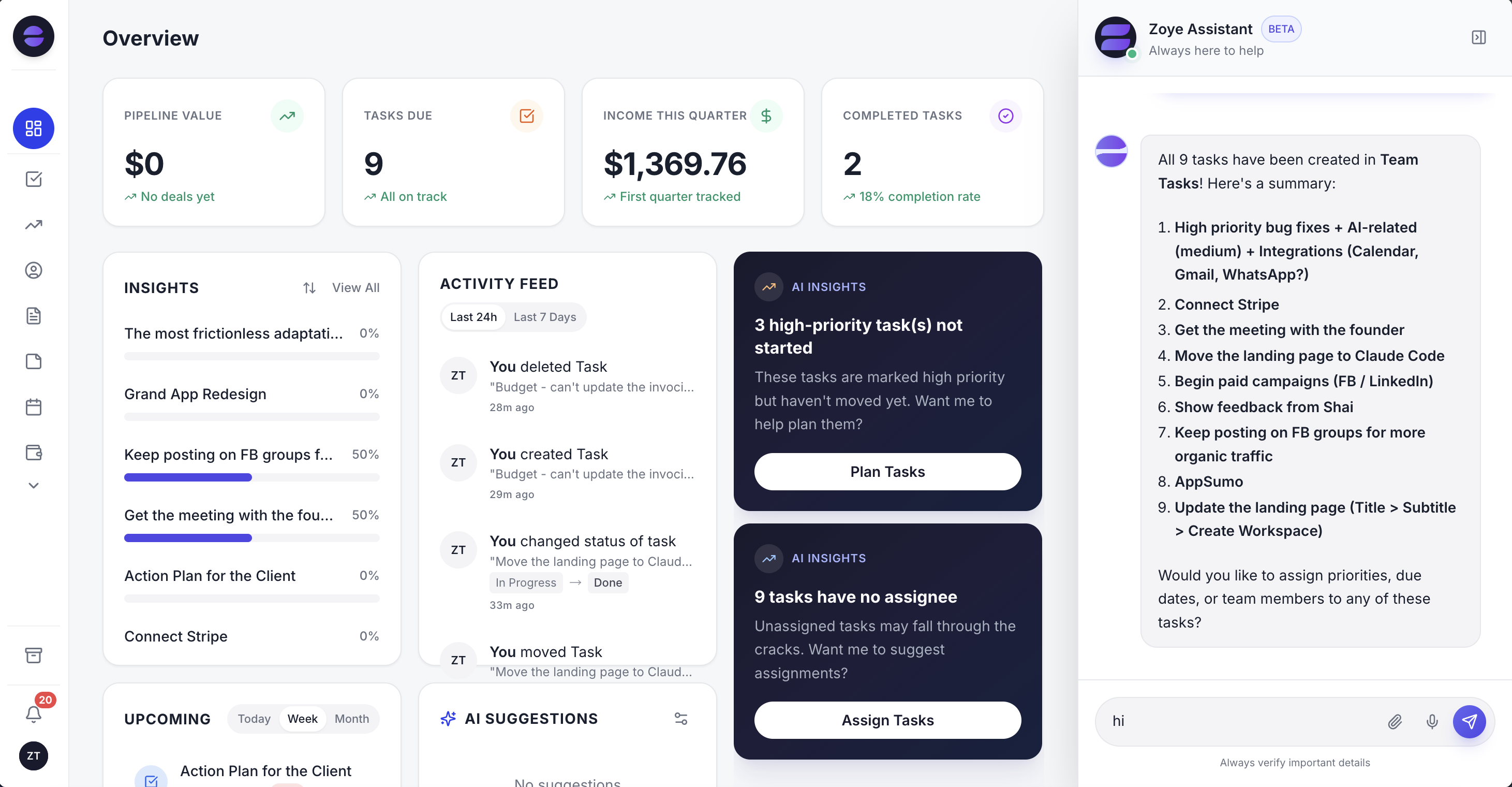 Zoye: CRM, budget, tasks, and an AI assistant in one workspace, with no add-ons
At a glance: Zoye vs ClickUp
| Feature | Zoye | ClickUp |
|---|---|---|
| AI assistant | Native - executes across entire workspace | ClickUp Brain² - included on Business ($17/user/mo), trial on lower plans |
| CRM / deals | Built in - all plans | CRM module - newer, less mature |
| Task management | Built in - all plans | Core strength - 15+ views |
| Inbox / email | Gmail integration - live | Email add-on available |
| Calendar | Google Calendar - live | Calendar view - limited external sync |
| Budget / finance | Built in | Not included |
| Reports / analytics | Cross-workspace live reports | Dashboards - highly customisable |
| WhatsApp integration | Live | Not available |
| Pricing model | Tier-based - not per seat | Per-seat pricing |
| Entry plan | Almost Free - $5/mo, 1 member, core tools | Free - unlimited tasks, storage limits |
| AI included | Yes, built in | From Business ($17/user/mo); trial or ~$9/user/mo add-on below |
| Setup time | Same day | Days - high configuration overhead |
AI: paid add-on vs built-in brain
ClickUp Brain comes included as Brain² from the Business plan ($17 per user per month billed yearly) as of October 2026; Free Forever and Core get only a trial, and a Brain AI add-on runs around $9 per user per month. It answers questions about your workspace, generates text, and creates tasks from natural language. The work it does is genuinely useful, but it sits in an assistive lane: you ask, it responds, and you still do the navigating and the cross-module wiring yourself. For teams already paying per seat, getting full AI through the Business tier or the add-on also meaningfully increases the total bill - it scales with every head you add.
In Zoye, the AI assistant is part of the workspace, and it is built to act rather than only advise. It is connected to every module in the workspace - deals, contacts, tasks, calendar, budget, inbox, and reports - so whatever you ask can move several of them at once.
Real example: A consultancy partner steps out of a kickoff and sends Zoye a voice note: "Signed the Halverson engagement - retainer about $18K a month for six months, set up the project and put Dana on it." Zoye opens the deal at the full engagement value, files the client contact, creates the project tasks, assigns them to Dana, books the recurring check-in on the calendar, and logs the retainer against the budget. Six connected actions, and the partner never opened the app. In ClickUp, each of those is a separate screen, and the retainer and the client record have nowhere to live because ClickUp's CRM and finance coverage do not reach that far.
The deeper difference is proactivity. Zoye's Insights panel surfaces stalled deals, unstarted priorities, and unassigned work before you go looking. ClickUp Brain responds when prompted; Zoye raises the things that need attention automatically.
Verdict: ClickUp charges extra for AI that primarily assists. Zoye's AI is included and executes. For teams where AI is a daily tool, this difference compounds significantly - in capability and in cost.
See what Zoye can do for you
CRM, deals, tasks and your Instagram, Facebook and WhatsApp automations in one workspace. Just ask Zoye and it sets any of it up for you.
Explore FeaturesTask management: depth vs connectivity
ClickUp genuinely excels at task management. Multiple views, nested subtasks, custom statuses, and resource management give technical teams more granularity than Zoye's task board currently offers. If your primary need is sophisticated task hierarchy, ClickUp has the depth.
Zoye's task management is streamlined by design. Every task is connected to deals, contacts, budget, and calendar in the same workspace. ClickUp's tasks exist largely in isolation from CRM and finance data unless you configure complex integrations.
Verdict: ClickUp for teams that need deep task hierarchy and multiple views. Zoye for teams that need tasks connected to CRM, budget, and AI in one place.
The configuration cost nobody talks about
ClickUp's power comes with a tax: someone has to build and maintain your setup. Custom statuses, dashboard widgets, automation templates, space and folder hierarchies, permission schemes - all of it requires configuration before the platform delivers on its promise. In practice, larger ClickUp rollouts often appoint an internal owner, sometimes an outside consultant, to design the workspace and keep it coherent as teams add their own variations. That ongoing maintenance is a real, recurring cost that rarely shows up in a pricing comparison.
Zoye is operational from the moment you sign up. All modules are pre-connected, so deals already relate to tasks, tasks already relate to the calendar, and the budget already reflects the deals you close. The AI assistant handles a lot of the setup through conversation rather than configuration menus - you describe what you want and it builds the record.
Verdict: ClickUp rewards teams that invest in configuration with deep flexibility. Zoye rewards teams that want to skip the configuration project and be productive the same day.
Finance and CRM: the gap ClickUp cannot close
This is the structural difference that decides the comparison for a lot of teams. ClickUp is a project and task platform first. It has added a CRM module, but it is newer and less integrated than its task-management core, and it has no budget tracking, no income vs. expenses reporting, and no native invoicing at all. If you run a business where the work you track is tied to revenue you bring in and money you spend, ClickUp covers only one half of that picture.
Zoye covers both natively. The Deals pipeline and Contacts live in the same workspace as tasks and calendar, and the Budget module tracks income against expenses with invoice management alongside. Because they share one workspace, a closed deal can flow into revenue in the budget, the tasks to deliver it sit against the same deal, and the reports pull from all of it at once. That connection is something ClickUp can only approximate by wiring together separate tools through integrations - and integrations break, lag, and add their own subscription cost.
For a freelancer, agency, or small business, the result is that ClickUp typically becomes one tool in a stack: ClickUp for tasks, a CRM for deals, a finance tool for money, and something to glue them together. Zoye is built to be the single workspace that holds all of it.
Verdict: ClickUp for teams whose need is genuinely task management in isolation. Zoye for teams that need tasks connected to the deals funding them and the budget they affect.
Ready to hand off the busywork?
Zoye brings AI-powered CRM, task management, and automation into one workspace.
Get StartedWhere ClickUp genuinely wins
It is worth being clear about what ClickUp does better, because for some teams it is the right call. ClickUp's task engine is one of the deepest on the market: nested subtasks several levels down, custom statuses per list, formula fields, dependencies, multiple assignees, and more than fifteen ways to view the same data (List, Board, Gantt, Timeline, Workload, Calendar, Mind Map, and others). It also ships native docs and team chat, so a team that wants its documentation and conversation inside the same tool as its tasks gets that out of the box.
If your core requirement is modelling complex project structures in fine detail - and you have someone willing to build and maintain that structure - ClickUp gives you more raw configurability than Zoye's streamlined task board currently does. Zoye deliberately trades some of that depth for connectivity and speed: fewer knobs, but every task already tied to a deal, a contact, the calendar, and the budget.
Verdict: Choose ClickUp when deep, highly customised task hierarchy is the point. Choose Zoye when connected operations and same-day productivity matter more than configuration depth.
Pricing comparison
| Plan | Monthly | Annual | Includes |
|---|---|---|---|
| Zoye Almost Free | $5/mo | $4/mo | 1 member, 1GB - core tools |
| Zoye Starter | $29/mo | $23/mo | 5 members, 5GB - all tools + connectors included |
| Zoye Growth | $59/mo | $47/mo | 10 members, 10GB, priority support |
| Zoye Scale | $119/mo | $95/mo | 30 members, 25GB |
| ClickUp Free | Free | Free | Unlimited tasks, limited storage, AI trial only |
| ClickUp Core | $12/user | $9/user | Unlimited storage, Gantt charts, 1,000 automations/mo |
| ClickUp Business | $25/user | $17/user | Brain² AI, advanced dashboards, 10,000 automations/mo |
| ClickUp Brain (AI) | add-on | ~$9/user | Optional add-on; Brain² is included from Business |
| ClickUp Enterprise | Custom | Custom | Advanced permissions and SSO |
Pricing reflects published rates as of June 2026 (ClickUp re-checked October 2026); check each vendor's pricing page for current figures.
ClickUp Business for 15 people: about $255/month billed yearly, with Brain² AI included. Zoye Scale for 15 people: $119/month - AI included, CRM included, budget tracking included, all connectors at no extra cost. Annual saving: roughly $1,630. And that comparison still understates it, because the ClickUp figure does not yet include the separate CRM and budget tools you would buy to match what Zoye covers in one place.
Want to see it in action?
See Zoye catch a new lead, answer on WhatsApp and set up the follow-up, all from one message.
See How It WorksWhen to choose Zoye vs ClickUp
Choose Zoye if:
- You need CRM, tasks, budget, and AI in one connected workspace
- You want AI included - not as a paid add-on
- You want to be operational the same day without a configuration project
- You close deals through relationships and need tasks linked to your pipeline
- You want to manage your business from WhatsApp by text or voice
Choose ClickUp if:
- Deep task hierarchy with 15+ views is your primary requirement
- You need native docs and team chat alongside task management
- You have a dedicated person to build and maintain workspace configuration
- Your team is primarily developers or project managers who need advanced task tooling
Ready to hand off the busywork?
Zoye brings AI-powered CRM, task management, and automation into one workspace.
Get StartedFrequently asked questions
For teams that need CRM, budget management, and AI execution alongside task management, Zoye is a more complete and cost-effective choice. ClickUp is stronger for teams that specifically need deep task hierarchy and multiple views. The key factor is whether you need tasks connected to your business operations or tasks as a standalone system.
Only from Business up. As of October 2026, ClickUp Business ($17/user/month billed yearly) includes ClickUp Brain² AI, while Free Forever and Core get only a trial and a Brain AI add-on runs around $9/user/month. Zoye, the assistant, is built into the workspace rather than sold as an add-on. (Pricing as of June 2026, ClickUp re-checked October 2026 - check each vendor's pricing page.)
As of October 2026, ClickUp's AI comes with Business at $17/user/month billed yearly. For a 15-person team that is about $255/month. Zoye Growth covers 10 members at $59/month with AI included, CRM included, and all connectors at no extra cost.
The Zoye entry plan, Almost Free, starts at just $5/month (or $4/month billed annually) - about the price of a cup of coffee, and you can cancel or upgrade anytime. It includes the core tools (CRM, tasks, calendar, docs, notes, budget, and reports) with 1 team member and 1GB of storage. The plan also includes 15 AI prompts a month and the Google Calendar, Gmail and Google Drive integrations.
Yes - Zoye connects natively to WhatsApp and you can manage your entire workspace by text or voice message. Create deals, add contacts, assign tasks, check pipeline, log expenses, and set reminders - all from WhatsApp. ClickUp has no WhatsApp integration.
ClickUp added a CRM module that is newer and less mature than its task management core, and has no native budget tracking, income vs expense reporting, or invoicing. Zoye includes both CRM and budget tracking natively, connected to tasks, calendar, and reports in the same workspace.
The bottom line
ClickUp delivers on its task-management promises, and for teams whose single requirement is deep, flexible task tracking it remains a strong choice. But it leaves two significant gaps: AI comes only with the Business tier or a paid add-on rather than with every plan, and there is no real coverage of CRM or business finance. For teams that need all three - tasks, an AI assistant that acts, and a connected CRM and budget - the true cost of ClickUp is the Business plan for its AI, plus the separate CRM and finance tools you still have to buy and integrate.
Zoye was built for that team. Everything lives in one workspace, the AI assistant is included from day one and executes across every module, and you are operational the same day you sign up - no configuration project, no add-on math, no stack of tools to glue together. ClickUp asks you to build the system; Zoye hands you one that is already connected.
Related reading
For more context, see best ClickUp alternatives, Zoye vs HubSpot, best business management software, best CRM software, best project management software, and the Zoye blog.