Quick answer: a lead generation chatbot pays off when it does three things well: it asks only the questions that change what happens next, it appears where buying intent is already high, and it hands qualified people to a human fast, with the whole conversation attached. The tool matters less than those three choices, but the tool decides which channels you can cover and what each lead costs.
Key takeaways (October 2026)
- In a 2011 Harvard Business Review study of 2,241 US companies, only 37% answered a web lead within an hour and 23% never answered; firms that made contact within an hour were nearly 7 times as likely to qualify the lead.
- On Instagram and Messenger, Meta allows bot replies within 24 hours of a person's message, or up to 7 days after a message that follows a click-to-Instagram or click-to-Messenger ad.
- WhatsApp Business Platform messages have been billed per delivery since 1 July 2025; from 1 October 2026, Meta includes 1,000 service messages a month at no charge for every business number.
- Entry AI pricing varies widely: Tidio's Lyro from $32.50 a month for 50 AI conversations, Intercom's Fin at $0.99 per outcome, Landbot's Starter at EUR 32 a month billed annually for 500 chats.
- Three to five qualifying questions is the working range; every question past that costs completed conversations.
What is a lead generation chatbot?
A lead generation chatbot is a conversation that turns an anonymous visitor or an inbound message into a named, qualified lead with a next step. It opens or answers the chat, asks a short set of qualifying questions, writes the answers onto a contact, and either books a meeting or routes the lead to the right salesperson.
The difference from a customer service bot is the scoreboard. A service bot is judged on questions resolved and tickets avoided. A lead generation chatbot is judged on how many conversations end with a qualified contact and a booked or assigned next step. The two often share software, but they are built differently: a service bot tries to end the chat, a lead bot tries to move it forward.
In 2026 a lead generation chatbot rarely lives in one place. Buyers start conversations from a website widget, a WhatsApp button, an Instagram comment or story reply, and a Facebook Page or Messenger ad. Each of those front doors gives you different information for free, follows different platform rules and suits different questions. That is why the most useful way to design one is channel by channel, which is what the rest of this guide does.
There are three broad kinds you can buy. Rule-based bots follow buttons you draw. AI chatbots write answers from your content. AI agents also act: they update the contact, create the follow-up task and book the time, within rules you approve. Our AI agent vs chatbot comparison covers the trade-offs; for lead generation, the deciding question is whether the qualified answers end up somewhere a salesperson will act on them.
Why response speed decides whether a chatbot lead converts
Speed is the main reason a lead generation chatbot exists. The best-known evidence is Harvard Business Review's 2011 article "The Short Life of Online Sales Leads", which found that most companies answer web leads far too slowly, and that the ones who reply within an hour qualify far more of them.
The authors, James Oldroyd, Kristina McElheran and David Elkington, sent web enquiries to 2,241 US companies and timed the replies. Only 37% responded within an hour, and 23% never responded at all. Among the firms that did reply within 30 days, the average response took 42 hours. In a separate analysis of 1.25 million sales leads received by 29 B2C and 13 B2B companies in the US, they found that firms which tried to contact a lead within an hour were nearly seven times as likely to qualify it as firms that waited even one hour longer.
The data is old and came from web forms, not chat, so treat it as direction rather than a forecast. The direction is still useful. A chatbot answers in seconds at any hour, which closes the gap that the study measured. What it cannot do is make a salesperson call faster once the lead is qualified. That is why the handoff, covered below, matters as much as the bot.
Meta builds the same expectation into its own platform. Its Messenger Platform policy says bots must respond within 30 seconds, and that a bot should say it is automated where the law requires, ideally at the start of the conversation.
The qualifying questions that convert, by channel
The questions that convert are the ones whose answers change what you do next: what the person needs, how soon, roughly how big the job is, and how they want to be contacted. Ask three to five, never ask for what the channel already tells you, and put the easiest question first so the first reply costs a tap, not a paragraph.
Before writing any question, run each one through two tests. First, would a different answer send this lead to a different person, a different offer or a different speed? If not, cut it. Second, is the answer already known? A WhatsApp chat arrives with a phone number; a Messenger chat arrives with a name; an ad lead often arrives with the campaign it came from. Asking again signals you were not paying attention.
Our WhatsApp lead qualification bot guide goes deep on question order and the half-finished answer set. Here the focus is on how the same intent changes shape on each channel.
| Channel | What you usually already know | Ask first | Ask before the handoff | Platform rule to design around |
|---|---|---|---|---|
| Website chat | Page they are on, referral source, sometimes company from a form | What they are trying to solve, as 3 or 4 buttons | Work email and a time to talk | Your privacy notice and consent text |
| Phone number, profile name, the pre-filled text they sent | What they need, as quick options | Timing and a preferred contact window | Free-form replies within 24 hours; templates outside it | |
| Handle, the post, story or ad they came from | Which offer they want, tied to the post | Phone or email, with consent to follow up | Reply within 24 hours, or up to 7 days after a click-to-Instagram ad | |
| Messenger | Name, the Page, sometimes the ad | What they need, as quick replies | Contact detail and timing | Same 24-hour and 7-day rules; bot disclosure; reply within 30 seconds |
Website chat. Website visitors are the least known and the most varied, so the first question should sort them. Offer three or four buttons that match what you sell, plus "something else". For B2B sales, a work email does more than a company name because it identifies the company and gives you a contact route in one answer. Ask for it after you have given something useful, such as a price range or a short answer, not as a gate in front of the conversation.
WhatsApp. The phone number arrives with the message, so the bot never needs to ask for it. The strongest WhatsApp opening uses the pre-filled text: if the button on your pricing page sends "Hi, I'd like a quote", the bot can skip "how can I help?" and go straight to a choice of services. WhatsApp buyers expect short messages and tappable options. Free-form replies are allowed within 24 hours of the customer's last message; after that, only an approved template can restart the chat, so qualification should finish while the window is open.
Instagram. An Instagram lead usually starts from a specific post, reel, story or ad, so the bot should know which one and ask about that offer rather than your whole catalogue. Instagram gives you a handle, not a phone number or email, so the question that matters most is the contact detail, asked with a clear reason ("so we can send the quote") and permission to follow up. A comment can receive one private reply within 7 days of the comment, which is often the first message of the qualification.
Messenger. Messenger supplies the person's name and the Page, and Facebook ad leads often arrive with the campaign. Quick-reply buttons work well here. The same windows apply as on Instagram: 24 hours after the person's message, up to 7 days after a message that follows a click-to-Messenger ad. Meta's Human Agent tag lets a human, not a bot, reply within a longer 7-day period and needs Meta's App Review approval; it is not a way to extend automation.
Three question patterns that lift completion on every channel.
- State the length. "Three quick questions, then I'll get you the right person" gives the conversation an end point.
- Offer ranges, not blanks. "Under 10, 10 to 50, over 50" is answered in a tap; "how many?" invites a pause and a drop.
- Give before you ask. Answer the visitor's question, then ask yours. A bot that demands an email before saying anything useful reads as a form with a face.
Where to place a lead generation chatbot and what should trigger it
Place the chatbot where intent is already high and trigger it on behaviour, not on arrival. On a website that means pricing, product and contact pages with time-on-page, scroll or exit triggers; on WhatsApp a click-to-chat button with a distinct message per placement; on Instagram and Facebook, comment keywords, story replies and click-to-message ads.
Placement is the cheapest lever you have. The same bot greeting every visitor on the homepage within two seconds mostly interrupts people who are still reading. The same bot opening on the pricing page after 30 seconds talks to people who are already comparing.
Website placements and triggers.
- Pricing page: open after a reader has spent some time or scrolled past the plans, with a question about which plan or package fits.
- Product or service pages: a quiet bubble with a page-specific opener ("Questions about this package?") rather than a generic hello.
- Contact page: offer the chat as the faster alternative to the form, with the form still visible.
- Exit intent on high-intent pages: one gentle offer, such as a price range or a callback, never a second pop-up.
- Returning visitors: a different opener for someone on their third visit, if your tool can tell.
Avoid triggering on blog posts and help articles unless the article is about buying. Those readers came to learn, and a sales prompt there costs trust.
WhatsApp entry points. A click-to-chat link or QR code can carry a pre-filled message. Give every placement its own text ("Hi, I saw your pricing page", "Hi, I'm at the shop counter") so the bot knows where the lead came from without asking. Click-to-WhatsApp ads add a pricing advantage: a conversation started from such an ad opened in the Android or iOS app, answered within the window, opens a period of up to 7 days in which messages are free under Meta's rules. Our WhatsApp lead generation guide covers the nine lead sources in detail.
Instagram and Facebook triggers.
- Comment keywords: a post invites people to comment a word; each matching comment gets a public reply and one private DM.
- Story replies and DM keywords: a reply to a story or a DM containing a keyword starts the qualification.
- Click-to-Instagram and click-to-Messenger ads: the first message opens the longer 7-day window.
- Instant Form lead ads: the form collects the basics inside Facebook or Instagram; the chatbot or a WhatsApp follow-up asks the rest, with consent.
Whatever the trigger, Meta does not allow cold outreach: you may only message people who messaged you or engaged first, such as by commenting, replying to a story or clicking an ad. Instagram automation also needs a Business or Creator account linked to a Facebook Page through an approved Meta app. Unofficial bots that drive the Instagram app risk action blocks.
Handoff to a human: when the chatbot should step aside
A lead generation chatbot should hand over when the lead asks for a person, when the answers show a qualified buyer, when a question needs a quote or judgement, and when the tone turns frustrated. The person taking over must see the whole chat and every answer, and the lead should hear honestly how long the wait will be.
Most chatbot lead programmes lose their best leads at this step, not in the questions. The bot qualifies someone at 9pm, the notification lands in a shared inbox, and the lead is called two days later, which is the exact gap the Harvard study measured. Design the handoff before you design the greeting.
Five handoff triggers worth setting on day one.
- The person asks. "Talk to a person" should be one tap away from the first message, and honoured every time.
- A qualification threshold. For example, timing "this month" plus a size above your minimum routes straight to a salesperson.
- A question outside the bot's knowledge. Custom quotes, contract terms, edge cases. The bot should say it does not know rather than guess.
- Negative tone. Repeated questions, complaints or short angry replies.
- High value. Any lead above a size you set goes to a senior person, even if the answers are incomplete.
What a good handoff contains. The salesperson needs the full transcript, the answers as fields (not buried in chat text), the source (page, post, ad or link), the owner, and a task with a due time. On the lead's side, the bot should say who will reply and roughly when, in plain words: "Dana from our team will message you here within the hour." If nobody is available, the bot should offer a time slot rather than promise an instant reply it cannot keep.
Routing rules. Decide in advance which leads go to which person: by service, by region, by size or round robin. The rule should assign an owner automatically, because a lead that belongs to everyone in a shared inbox tends to belong to nobody.
Want to see it in action?
See Zoye catch a new lead, answer on WhatsApp and set up the follow-up, all from one message.
See How It WorksThe 7 best lead generation chatbots in 2026
These seven cover the realistic routes: a messaging-first AI operator, an AI support agent with lead workflows, a website widget with an AI meter, a CRM with a free bot builder, a no-code conversational form builder, an Instagram flow builder and an enterprise AI SDR. Prices come from each vendor's own page, checked in October 2026.
A note on Drift, which many lead generation guides still list first: as of October 2026, drift.com redirects to a Salesloft page, and Clari + Salesloft announced the gradual sunset of Drift in March 2026, naming 1mind as the successor. Our best Drift alternatives review covers that move in detail.
1. Zoye: for teams whose leads arrive on WhatsApp, Instagram and Facebook
Zoye is not a website chat widget and not an enterprise website SDR. If you need a bubble on your website that answers from help articles, Tidio or Intercom below is closer; if you run a large B2B website programme on Salesforce, look at Qualified.
Zoye is an AI Business Operator. Its thirteen tools, from contacts, deals and tasks to the calendar, invoices, reports, WhatsApp automations and the Facebook and Instagram connection, share one set of linked records, and an AI works across all of them. For lead generation, that means the chatbot is not a separate tool feeding a CRM through an integration. The qualifying answers, the owner, the booking and the follow-up task land on the same contact the moment the conversation happens.
WhatsApp lead conversations run through the official WhatsApp Business Platform inside Zoye today, and linking your own business WhatsApp number is coming soon. A new-lead message can fire per source (ads, forms, website, API or manual entry), a qualifying bot writes each answer into a contact field, and a click-to-chat button and QR code bring website visitors into WhatsApp with the source recorded. Zoye can offer times from one Booking list with automatic reminders, and send a payment link in the chat. Every WhatsApp automation is off by default and asks for confirmation before anything sends.
A single Facebook Page connection brings in Instagram as well. When a lead sends a DM or replies to a story, Zoye responds within seconds using tappable buttons, a file or a message written in your brand's tone. It also posts a public reply plus a private DM when someone comments a keyword, and turns lead-ad Instant Form submissions into contacts with the campaign and ad name saved. Repeat commenters are matched to their existing contact rather than duplicated. Chats is one inbox for Instagram and Facebook messages and comments plus the WhatsApp conversations with your leads, with assignment and team notes; anything Zoye should not answer goes to a person with the whole chat on the lead's card.
There is no flowchart to draw. Tell Zoye, in the app, on WhatsApp or in Slack, which leads should get which questions and who should own them; Zoye drafts the rule, shows it in plain words, and nothing goes live until you approve. Each run leaves a log entry, and when Meta refuses a message you see the reason instead of a misleading "sent".
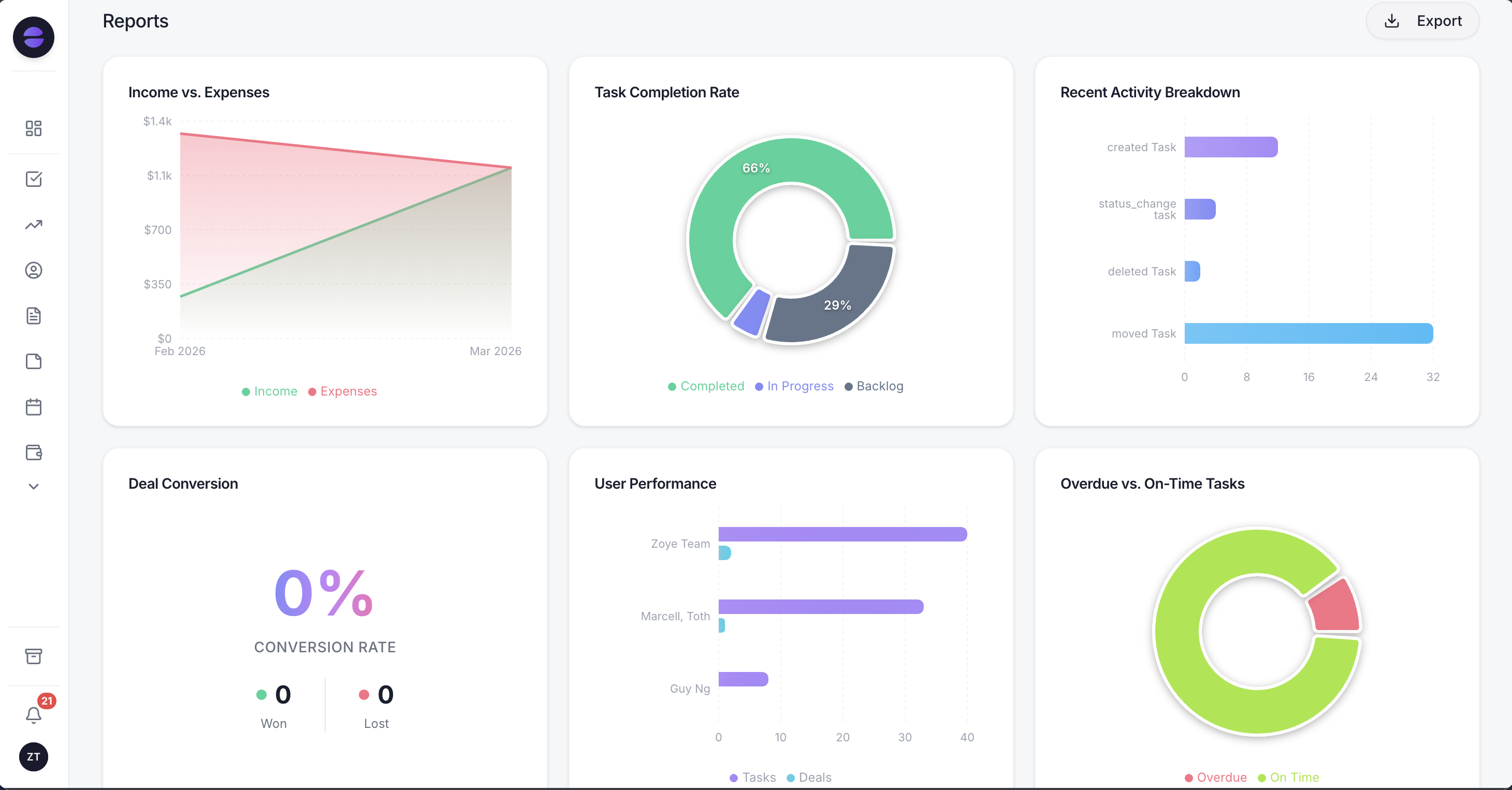
Because every chatbot lead keeps its source, Reports can compare a pricing-page button, an Instagram keyword and a lead ad on deals won, not on chats started.
Limits: Zoye has no chat bubble for your website (visitors reach Zoye through the click-to-chat button and WhatsApp), it is not a help-centre deflection tool, and it does not buy or manage ads; the leads your ads bring in are what it captures and follows up.
Pricing (as of October 2026): the $5 Almost Free plan ($4 a month on yearly billing) is for a single person and covers the core tools, the Google integrations and 15 AI prompts a month. It has no automations, so none of the lead chatbot features described here come with it. Team plans: Starter at $29 a month or $23 yearly for a team of up to 10, Growth at $59 or $47 for up to 20, Scale at $119 or $95 for up to 100, and a quoted Customize plan. There is no per-conversation or per-outcome AI charge. See the pricing page for what each plan contains.
Best for: small and mid-sized teams whose buyers message on WhatsApp, Instagram and Facebook, and who want each lead to arrive with an owner, a deal and a task.
2. Intercom Fin: an AI agent priced per outcome
Intercom's Fin answers from your help content, and Intercom's Workflows can ask questions and route a conversation to a team, which some teams use to qualify prospects before sales. Its strength is answer quality on complex products. The trade-off is two meters: seats for the people who answer and outcomes for Fin.
Pricing (as of October 2026): Essential at $29 per seat a month, shown at $19 for new customers; Advanced $85 and Expert $132 per seat a month. Fin costs $0.99 per outcome on every plan and can also run without seats. Copilot is $29 per agent a month billed yearly or $35 monthly. WhatsApp is charged per conversation, and Instagram is not mentioned on the pricing page.
Best for: B2B software teams with a strong help centre who want the same AI to support customers and qualify prospects.
3. Tidio: a website widget with a separate AI meter
Tidio is a common first chatbot for online stores and small sites, with a visual Flows builder for rule-based lead capture and the Lyro AI Agent for open questions. The trade-off is three meters on one bill: human conversations, Lyro conversations and Flows visitors reached.
Pricing (as of October 2026): Free with 50 billable conversations; Starter $24.17 a month for 100; Growth from $49.17 for 250 or more; Plus from $300 a month plus usage; Premium on request. Lyro starts at $32.50 a month for 50 AI conversations, and Flows from $24.17 a month for 2,000 visitors reached. Our best Tidio alternatives review covers who outgrows it.
Best for: stores and service sites whose leads mostly start on the website.
4. HubSpot: a bot builder inside a CRM
HubSpot's conversational bots can ask qualifying questions, save answers to contact properties and book meetings on a rep's calendar, and the chats log to HubSpot's CRM. Live chat and bots start on the free tier. The trade-off is the step up in cost when you need the advanced bot features and AI.
Pricing (as of October 2026): Service Hub Free with HubSpot branding, for up to 2 users; bots with limited features on Free and Starter. Starter is shown at $7 or $20 per seat a month depending on billing, with 500 HubSpot credits. Professional is $90 or $100 per seat a month plus a $1,500 onboarding fee and 3,000 credits, and Enterprise starts at $150 per seat with a $3,500 onboarding fee. The Customer Agent's credit cost per conversation is not listed on the pricing page.
Best for: teams already running their pipeline in HubSpot.
5. Landbot: conversational forms without code
Landbot builds chatbots that feel like a friendly form, on a website, as a landing page or on WhatsApp, with a no-code builder and AI chats on paid plans. It suits marketers who want to replace a static form with a guided conversation. The trade-off is that WhatsApp with your own number sits on higher plans or an add-on.
Pricing (as of October 2026, in euros): Free with 100 chats a month and a WhatsApp test number. Starter is EUR 32 a month billed annually (EUR 40 monthly) for 500 chats and 2 seats, with 100 AI chats. Professional is EUR 80 a month billed annually (EUR 100 monthly) for 2,500 chats and 3 seats, with 300 AI chats; WhatsApp is a EUR 100 a month add-on, or a Professional WA plan at EUR 160 a month with one number. Extra chats are EUR 0.05 and extra AI chats EUR 0.10 each. Business is custom, shown from EUR 400 a month. Prices exclude tax.
Best for: marketing teams replacing web forms with a conversational version.
6. ManyChat: Instagram and Messenger flows at volume
ManyChat is the flow builder most marketers think of first for Instagram keyword comments, story replies and Messenger sequences, which makes it a strong top-of-funnel lead tool. Two things to weigh: the plan price follows your active contacts, so a campaign that takes off lifts the invoice, and each lead is stored as a subscriber with tags inside ManyChat, so qualified people still need to reach your CRM through an integration.
Pricing (as of October 2026): ManyChat's pricing page lists the same figures as our October 2026 roundup of Instagram automation tools. The free plan allows 25 active contacts. Paid tiers start at $14 a month billed yearly ($17 month to month) for 250 contacts (Essential), $29 ($39) for 2,500 (Pro), $69 ($99) for 7,500 (Business) and $139 ($199) for 25,000 (Advanced), and going over the allowance adds a charge per contact. AI is included from Pro. Check ManyChat's own page before you commit.
Best for: creators and marketers running Instagram campaigns that generate many small leads.
7. Qualified: an AI SDR for enterprise B2B websites
Qualified builds an AI SDR agent, Piper, for B2B websites, connected tightly to Salesforce. It talks to website visitors, qualifies them and books meetings, and the higher plans add handoff from the agent to a rep. The trade-off is scale and price: it is built for revenue teams with significant web traffic, and prices are not published.
Pricing (as of October 2026): not published. The pricing page lists Premier, Enterprise and Ultimate plans with one SDR agent profile and from 250,000 monthly web sessions, each ending in "Contact us".
Best for: enterprise B2B teams on Salesforce whose leads start on the website.
Lead generation chatbots side by side
The table compares the seven on what decides fit for lead generation: the channels each one is built around, the entry paid price, how AI is billed and where the qualified lead ends up. All prices are from the vendors' own pages as of October 2026, except ManyChat, noted above.
| Tool | Built around | Entry paid price | AI billed by | Where the lead lands | ||
|---|---|---|---|---|---|---|
| Zoye | Messaging leads that should end in a deal or booking | $59/mo Growth, up to 20 members | Plan allowance, not per conversation | Contact, deal and task in the same workspace | Official Platform (own number coming soon) | Yes, DMs, story replies and comments |
| Intercom Fin | AI support and qualification | $29/seat Essential | $0.99 per Fin outcome | Intercom, plus CRM integrations | Per conversation | Not listed |
| Tidio | Website widget | $24.17/mo Starter | Lyro from $32.50/mo for 50 conversations | Tidio contacts, plus integrations | Listed | Listed |
| HubSpot | CRM with chat and bots | $7 to $20/seat Starter | HubSpot credits | HubSpot CRM | Higher tiers | Not listed |
| Landbot | Conversational forms | EUR 32/mo yearly Starter | AI chats per plan, then EUR 0.10 | Integrations and exports | Add-on or Professional WA | Not core |
| ManyChat | Instagram and Messenger flows | From $14/mo billed yearly ($17 monthly) for 250 contacts | Included from Pro, no add-on | Subscribers with tags | Second channel | Core channel |
| Qualified | Enterprise B2B website SDR | Not published | Not published | Salesforce | Not core | Not core |
See what Zoye can do for you
CRM, deals, tasks and your Instagram, Facebook and WhatsApp automations in one workspace. Just ask Zoye and it sets any of it up for you.
Explore FeaturesWhat a lead generation chatbot costs in a real month
For a small team, a lead generation chatbot usually costs between nothing and about $250 a month in software, plus Meta's message charges on WhatsApp. The bigger cost variable is the meter: seats, AI conversations, outcomes or active contacts can each turn a cheap entry price into a large bill once a campaign works.
Here is an illustrative month for a 2-person team handling 300 lead conversations, 200 of them handled by AI, at list prices as of October 2026. The figures are estimates, because each vendor counts a conversation or an outcome differently.
- Tidio: Starter at $24.17 covers 100 human conversations. At the Lyro entry rate of $32.50 for 50, 200 AI conversations come to about $130, a little less on higher steps, so roughly $155 in total before Flows.
- Intercom Essential: 2 seats at $29 is $58, plus up to 200 Fin outcomes at $0.99, up to $198. Up to about $256.
- Landbot Starter: EUR 32 a month on yearly billing covers 500 chats and 100 AI chats; another 100 AI chats at EUR 0.10 add EUR 10. WhatsApp with your own number adds the EUR 100 add-on on Professional.
- ManyChat Pro: from $29 billed yearly ($39 month to month) for up to 2,500 active contacts, AI included, more if a campaign pushes you past it.
- Zoye Growth: $59 a month ($47 billed yearly) for up to 20 members, the plan that includes the WhatsApp and Meta automations, with contacts, deals, tasks and bookings in the same plan; WhatsApp messages carry Meta's charges as with any Platform tool.
On WhatsApp, every tool passes on Meta's per-message charges by category and country. Since 1 October 2026, each business number gets 1,000 free service messages a month, which covers many replies inside the 24-hour window, while utility templates sent inside an open window are charged again. Meta's rate card lists prices per country; check it for your market. Since 15 January 2026, Meta's terms bar general-purpose AI assistants from the WhatsApp Business Platform, while a business-specific bot that qualifies your own leads is allowed.
How to measure whether your chatbot generates leads
Measure a lead generation chatbot on outcomes, not on chats. The five numbers that matter are conversation starts per entry point, the share that finishes qualification, the share that qualifies, the time from qualification to a human reply, and meetings or deals created per entry point.
- Starts per entry point. How many people begin a chat from each page, button, keyword or ad. A low number means placement or the opener is wrong.
- Completion rate. The share of starts that answer every qualifying question. A sharp drop at one question tells you which question to cut or rephrase.
- Qualified rate. The share of completed chats that meet your threshold. If it is very high, your threshold is too loose; if very low, the entry point attracts the wrong people.
- Time to human. Minutes from qualification to a person's first reply. This is the number the Harvard study points at.
- Outcomes per source. Meetings booked, deals created and deals won, per entry point. This is the only number that says whether a placement is worth keeping.
Read 20 transcripts a week for the first month. Look for questions the bot answered wrongly, points where people stopped and handoffs that waited too long. Each one is a small, specific fix.
Lead generation chatbot mistakes that cost qualified leads
Most chatbot lead programmes fail on setup rather than software: they ask too much too early, greet everyone everywhere, hide the human, let AI guess at prices, and leave qualified answers in a chat log that nobody reads. Each of these is avoidable with a rule set before launch.
- Asking for an email before helping. Give an answer or a price range first; ask for contact details when there is a reason to share them.
- The same greeting on every page. A generic pop-up on blog posts and help articles trains visitors to close it.
- Re-asking what the channel already knows. Never ask a WhatsApp lead for their phone number or a Messenger lead for their name.
- No visible way to reach a person. Put the option in the first message and honour it.
- AI that invents prices or promises. Give the bot your real ranges and a line for "I don't know, a person will confirm".
- Breaking Meta's rules. Messaging people outside the 24-hour window without a template, cold-messaging people who never engaged, or using unofficial Instagram or WhatsApp automation can restrict the account or number.
- Answers that never reach a field. If the budget range sits only in the transcript, no report, routing rule or follow-up can use it.
Ready to hand off the busywork?
Zoye brings AI-powered CRM, task management, and automation into one workspace.
Get StartedWhich lead generation chatbot should you choose?
Choose by where your buyers start the conversation and where the qualified lead has to end up. Website-led B2B teams pick between Qualified, Intercom and HubSpot by size; website stores start with Tidio; form replacers look at Landbot; Instagram campaigns fit ManyChat; and teams whose leads arrive on WhatsApp, Instagram and Facebook fit Zoye.
- Enterprise B2B, website traffic, Salesforce: Qualified, priced by quote.
- Software company with a strong help centre: Intercom Fin, budgeted per outcome.
- Already on HubSpot: its bots first, the Customer Agent if the credits make sense.
- Online store or service site with steady traffic: Tidio, watching the Lyro meter.
- Marketing team replacing forms: Landbot.
- Instagram campaigns at volume: ManyChat, sized by active contacts.
- Leads on WhatsApp, Instagram and Facebook, and a small team that needs each one owned and followed up: Zoye Growth at $59 a month ($47 billed yearly) for up to 20 members, the plan that includes the WhatsApp and Meta automations.
Whatever you choose, launch on one entry point, set the handoff and the owner rule first, and judge the result after two weeks on meetings booked and deals created, not on conversations started. If your leads already write to you on WhatsApp and Instagram, book a Zoye demo and bring a week of real enquiries to test against.