Instagram lead ads are Meta ads that open a short Instant Form inside Instagram, so a person can send you their name, email or phone number without leaving the app. You build them in Meta Ads Manager with the Leads objective and Instant forms as the conversion location. What decides the result is not the form but the next ten minutes: who answers, on which channel, and with what permission.
Key takeaways (October 2026)
- Instant Forms run only under Meta's Leads objective, allow up to 15 questions, and need a privacy policy link, according to Meta's Business Help Center.
- Meta keeps lead data downloadable for 90 days from submission. After that you lose the details, so connect a CRM before the first lead arrives.
- LocaliQ's Facebook advertising benchmarks (updated September 2026) put the average cost per lead for lead campaigns at $27.39, from $12.30 to $61.56 depending on industry. Metadata's 2026 B2B benchmark reports $138 per lead on Instagram for B2B advertisers.
- According to a 2011 Harvard Business Review study of 2,241 US companies, only 37% answered a web lead within an hour and 23% never answered at all. Speed is still where most lead budgets leak.
- A form submission is not WhatsApp opt-in and does not open an Instagram DM window. Ask for WhatsApp permission on the form, or let the person start the chat.
Instagram is where a lot of small businesses already get attention, and lead ads look like the shortest path from attention to a list of names. They are, as long as you plan the part Meta does not handle. This guide walks through the setup as Meta's own help pages describe it in October 2026, the form options worth changing on Instagram, what the published cost-per-lead numbers actually say, and how to follow up quickly on DM or WhatsApp without breaking Meta's consent rules. It sits under our Facebook and Instagram automations page, which covers what happens to those leads once they arrive. For the deeper mechanics of field mapping and attribution, we wrote a separate piece on Facebook lead ads to CRM, and nothing here repeats it.
What an Instagram lead ad is, and what it is not
An Instagram lead ad is an ordinary Meta ad shown in Instagram placements whose button opens an Instant Form instead of a website. Contact fields are prefilled from the person's account, they confirm and submit, and the lead is stored against your Facebook Page. It is a data collection format, not a conversation.
That last point causes most of the confusion. Meta's developer documentation says leads belong to the Facebook Page, and that running lead ads on Instagram uses an Instagram account linked to that Page. So there is no separate "Instagram lead form" product. You build one Meta campaign, choose where it shows, and Instagram is one of the surfaces.
It also helps to separate lead ads from the two formats people often mix them up with. A click-to-Instagram-Direct ad opens a DM thread. A click-to-WhatsApp ad opens a WhatsApp chat. Both of those start a conversation the person chose to begin. A lead ad starts nothing: it hands you details and leaves the first move to you. That difference shapes everything about follow-up, consent and cost, and we compare the three formats side by side further down.
What you need before you build anything
You need five things in place: a Facebook Page, an Instagram professional account linked to that Page, an ad account in Meta Ads Manager, a privacy policy page on your website, and a plan for who answers each lead and how fast. The first four take an afternoon. The fifth is the one most businesses skip.
A Page and a linked Instagram account. Leads are owned by the Page. If your Instagram account is not linked, the ad can still appear on Instagram, but it shows under the Page's name rather than your Instagram handle, which looks odd to people who follow you there.
Ad account access. Whoever builds the campaign needs permission to advertise for the Page. If an agency runs your ads, make sure the business, not the person, owns the Page and the ad account.
A privacy policy URL. Meta's help pages state that a privacy policy is required to run lead ads on Facebook or Instagram, and that the link cannot point straight to a PDF, an image file or a download. A normal web page on your domain is what works.
An offer worth two taps. A form asks for very little effort, so the offer has to be specific: a quote, a price list, a callback, a slot. "Contact us" is not an offer.
A follow-up owner. Decide before launch who receives each lead, on which channel, within how many minutes, and what happens on weekends. If nobody can answer during the hours the ad runs, schedule the ad around the people, not the other way round.
How to set up an Instagram lead ad in 9 steps (as of October 2026)
The build happens in Meta Ads Manager in nine steps: link accounts, choose the Leads objective, pick Instant forms as the conversion location, set audience and budget, choose Instagram placements, set Identity, add creative, build the form, then test and publish. Meta adjusts labels often, so treat the wording below as current for October 2026.
1. Link Instagram to the Page. In your Page settings or Meta Business Suite, connect the Instagram professional account. Do this first, because the Instagram identity is not selectable until the link exists.
2. Create a campaign with the Leads objective. Meta's help pages are clear that Instant Forms can only be used with the Leads objective. Other objectives will not offer the form.
3. Choose Instant forms as the conversion location. At the ad set level, Ads Manager asks where you want to capture leads. Pick Instant forms and select your Facebook Page. Meta also offers messaging destinations here, which turn the ad into a conversation instead of a form.
4. Set audience, budget and schedule. Keep the first test simple: one audience, one budget, a run of at least a couple of weeks. If you can only answer leads during working hours, a schedule that matches those hours is worth more than any targeting tweak.
5. Choose placements. You can let Meta pick placements automatically or select them by hand. If you want the campaign on Instagram only, switch to manual placements and keep the Instagram ones. The list of eligible placements changes, so check what Ads Manager shows for your account rather than relying on a fixed list in an article.
6. Set Identity. At the ad level, choose your Facebook Page and then your Instagram account under Identity, so the ad appears under your Instagram handle.
7. Add creative and the button. Image, video and carousel all work with Instant Forms. Meta's documentation lists call-to-action buttons such as Sign up, Get quote, Apply now, Learn more, Subscribe and Download. Pick the one that matches the offer; "Get quote" sets a different expectation from "Learn more".
8. Build the Instant Form. Choose the form type, write a short intro, add the questions, paste the privacy policy link, add a custom disclaimer if you need consent text, and write the completion screen. The next section covers each choice.
9. Test, connect and publish. Before you publish, submit a test lead with Meta's Lead Ads Testing Tool on the developer site and confirm it lands where your team will see it. Then publish. The ad goes through Meta's review before it delivers.
One rule to know before step 8: Meta says a published Instant Form cannot be edited. To change it, duplicate the form, edit the copy and attach it to the ad. Plan your questions before you press publish.
The Instant Form choices that change lead quality
Four choices decide whether an Instagram lead form brings buyers or browsers: the form type, how many questions you ask and of what kind, whether you add a consent disclaimer, and what the completion screen tells people to do next. Meta's defaults favour volume, so each of these is a deliberate trade between more submissions and better ones.
Form type. Meta's help pages describe three types. More volume is built to be filled in quickly on a phone. Higher intent adds a review step where the person confirms their details before submitting; Meta's availability table lists it for Instagram as well as the Facebook apps. Rich creative lets you add images and more detail about the offer. If your follow-up is a sales call, higher intent usually earns its lower submission count.
Questions. Meta allows up to 15 questions on a form. You will rarely want more than five. Prefilled fields (name, email, phone) cost the person nothing. Multiple-choice questions cost one tap and give you something to route on, such as service, budget band or timing. Short-answer questions cost typing, which on Instagram means fewer completions. Ask only what changes who calls, when, or what they say.
Conditional answers. Meta's conditional answers feature changes the options in a later question based on an earlier answer, while the question order stays the same for everyone. It is useful when one form covers several services, and Meta lists it as available on Instagram.
Custom disclaimer. This is where consent lives. Meta lets you add your own disclaimer with checkboxes to the Privacy section, and people must agree before they can submit. If you plan to message leads on WhatsApp, this or a clear multiple-choice question is the place to ask, and we cover the wording below. Meta notes you cannot add a disclaimer to a form that is already running, so you would duplicate the form.
Completion screen. Most advertisers leave it at "Thanks, we'll be in touch". Use it instead to set the timing ("We reply within 15 minutes between 9 and 6") and to offer one next step. A clear promise on this screen makes the first follow-up message expected rather than surprising.
Want to see it in action?
See Zoye catch a new lead, answer on WhatsApp and set up the follow-up, all from one message.
See How It WorksInstant Form, DM ad or WhatsApp ad: which to run
An Instant Form collects details and leaves the first message to you. A click-to-Instagram-Direct ad and a click-to-WhatsApp ad start a conversation the person opens. Forms produce more names for the money and colder ones; chat ads produce fewer, warmer leads that need an answer within minutes. The table compares them as of October 2026.
| Format | What you get | Who writes first | Messaging window after the click | Best for | Main risk |
|---|---|---|---|---|---|
| Instagram Instant Form lead ad | Name, email, phone and form answers | You | None opens from the form itself | Quotes, callbacks, downloads, waitlists at volume | Lukewarm leads if follow-up is slow |
| Click-to-Instagram-Direct ad | A DM thread with a real account | The person | Up to 7 days after their first message, per Meta's messaging policy | Offers that need a question answered first | Unanswered DMs waste the click |
| Click-to-WhatsApp ad | A WhatsApp chat with a real phone number | The person | A free entry point window of up to 7 days when you reply in time, opened in the Android or iOS app | Markets where WhatsApp is the default chat app | Needs someone, or software, answering in minutes |
| Website landing page | Whatever your form asks | You | None | Considered purchases where people want to read first | Slower to fill, fewer completions |
Meta itself pushes advertisers to test forms against messaging. Its lead ads with messaging page says advertisers who combined Instant Forms with Messenger destinations saw on average 8% lower cost per lead and 48% more reach than with Instant Forms alone. That is Meta's own figure about Messenger, not an independent Instagram study, but it is a reasonable reason to run an A/B test. We cover the WhatsApp side in click-to-WhatsApp ads, and the organic routes in how to get leads from Instagram.
What Instagram lead ads cost per lead: the named benchmarks
No public source publishes a reliable Instagram-only cost per lead for small businesses. The two named datasets worth knowing are LocaliQ's Facebook advertising benchmarks ($27.39 average for lead campaigns, updated September 2026, no placement split) and Metadata's 2026 B2B benchmark ($138 per lead on Instagram for B2B advertisers, from 2025 spend). Use them as a range check, not a target.
LocaliQ (WordStream's sister brand), September 2026. The benchmarks page reports, for lead campaigns across all industries: a 2.70% click-through rate, a $1.80 cost per click, an 8.54% conversion rate and a $27.39 cost per lead, slightly down from $27.66 the year before. The cheapest industries listed are career and employment at $12.30, real estate at $13.74, and arts and entertainment at $14.59. The most expensive are dentists and dental services at $61.56, beauty and personal care at $50.91, and home and home improvement at $42.95. The page does not state its sample or separate Instagram from Facebook placements, so read it as a Meta-wide average.
Metadata, 2026 B2B benchmark. Metadata, which sells B2B advertising software, analysed 2025 spend from 153 advertisers totalling $57.6 million. It reports $138 per lead on Instagram with 4.0% of clicks becoming leads, against $145 on Facebook, $202 on LinkedIn and $524 on Google Ads. The report itself warns that a cheaper lead does not mean a cheaper customer.
Two things follow. First, the gap between $27 and $138 is the gap between consumer offers and B2B ones, so pick the benchmark that matches what you sell. Second, cost per lead is the wrong finish line. A form that costs $15 per lead and closes one in fifty is more expensive than one that costs $40 and closes one in eight. The only way to know is to keep the campaign and ad name on every contact and look at revenue, which is the attribution work covered in our Facebook lead ads to CRM guide.
Meta can also optimise for leads that convert rather than for the cheapest submission, if you send outcomes back. Its developer documentation describes using the Conversions API to share CRM results, and a quality-lead optimisation goal for lead campaigns. That is worth setting up once you have a month of outcomes to send.
Follow-up speed: the first ten minutes decide the lead
Answer an Instagram lead ad within minutes, with a short message that confirms what they asked for and says what happens next. People submit Instant Forms in a couple of taps while scrolling, so their memory of your ad fades fast. The longer the gap, the more your first message reads as a stranger.
The most quoted evidence is old but still instructive. In 2011, Harvard Business Review published "The Short Life of Online Sales Leads" by James Oldroyd, Kristina McElheran and David Elkington. Their audit of 2,241 US companies found that 37% responded to a web lead within an hour, 16% within one to 24 hours, 24% took longer than a day, and 23% never responded. Among those that did answer within 30 days, the average response time was 42 hours. The same article reported that firms contacting leads within an hour were nearly seven times as likely to have a meaningful conversation with a decision maker as those waiting longer.
That research predates Instagram lead ads, so treat the multiples as direction, not as a promise. The mechanism, though, fits Instant Forms even better than web forms. The person never visited your site. They saw one ad, tapped twice, and went back to their feed. The same ad, or a competitor's, is still running in front of other people. An answer at minute three lands while they still remember you; an answer at hour six has to reintroduce you.
A practical split helps. The acknowledgement should go out in seconds and needs no human: thank them, confirm the request, give a time for the real answer, ask one easy question. The real answer, a quote or a call, can then take the time it takes. If you want a cadence for the days after, our WhatsApp follow-up sequence guide sets one out, and how to stop losing leads covers the habits around it.
DM or WhatsApp follow-up: what the consent rules allow
Email and phone follow-up rely on the details the person submitted and your form's stated purpose. WhatsApp follow-up needs explicit opt-in that names your business, which a form submission does not give unless you asked. Instagram DMs need the person to message first. So decide the channel when you write the form, not after the lead arrives.
Email and calls. Meta's lead ads requirements ask advertisers to explain why they collect contact details and to keep their messages to that purpose. If the form says "we'll send your quote by email", sending the quote by email is fine. Adding the person to a weekly newsletter they never asked for is not.
WhatsApp. Meta's WhatsApp Business rules require opt-in that clearly states your business name and that the person agrees to receive WhatsApp messages from you. A phone number on a lead form is not that. Add it to the form in one of two ways: a multiple-choice question such as "Can we send your quote on WhatsApp? Yes / No, email me instead", or a custom disclaimer whose consent text names your business and WhatsApp. Store the answer on the contact, so you can show later what the person agreed to.
Because your business writes first and the person has not messaged you, the first WhatsApp message must be an approved template, and Meta bills it per delivered message by category and country. As of October 2026, Meta also gives each business number 1,000 free service messages a month, which covers replies once the person answers and the 24-hour window opens. The free entry point window of up to 7 days only comes from click-to-WhatsApp ads opened in the Android or iOS app, not from lead forms. Our WhatsApp Business API pricing guide explains the categories, and WhatsApp lead generation covers the form-to-WhatsApp route among eight others.
Instagram DMs. Meta's messaging policy only lets a business message people who messaged it or engaged first, through comments, story replies or ad clicks, and the standard window is 24 hours after their last message. Submitting an Instant Form does not open that window. If DMs are where you want the conversation, put the invitation on the completion screen ("Questions now? Send us a DM on Instagram"), or test a click-to-Instagram-Direct ad, where the person starts the thread and the window can last up to 7 days.
See what Zoye can do for you
CRM, deals, tasks and your Instagram, Facebook and WhatsApp automations in one workspace. Just ask Zoye and it sets any of it up for you.
Explore FeaturesGetting every lead into your contacts with its campaign and ad name
Each Instagram lead should become a contact within seconds, with form answers in real fields, the campaign and ad name saved, an owner assigned and a first task due. Meta stores leads for 90 days and only as identifiers and answers, so anything left in Ads Manager is temporary and unattributed. Connect a CRM before the first submission, not after the first hundred.
Meta's help pages list three ways to get leads out: download a CSV from Ads Manager, Business Suite or the Leads Center, connect one of the CRM partners Meta lists, or build a custom integration on Meta's API and webhooks. Downloads are a safety net, not a process, because Meta says leads become undownloadable 90 days after submission while still counting in your results.
The rest is the same work as on Facebook, because it is the same form system: map each question to a field, keep campaign and ad names on the record, match repeat submitters to the existing contact, and watch for silent breaks when someone duplicates a form or renames a question. Rather than repeat that here, read Facebook lead ads to CRM, which covers each step and applies to Instagram placements without changes.
Seven mistakes that waste an Instagram lead ad budget
Most failed Instagram lead campaigns fail after the click, not before it: slow answers, forms that ask for nothing useful, consent never collected, and leads with no source attached. The ad gets blamed because Ads Manager is the only report anyone looks at. These seven are the ones to check first.
1. Judging the campaign on cost per lead. Cheap submissions from the wrong people look like success for weeks. Judge on booked calls, quotes accepted or sales per ad.
2. Running ads when nobody answers. A form submitted at 22:30 and answered the next afternoon has gone cold. Match the ad schedule to the hours someone, or an automated first reply, can respond.
3. Asking zero qualifying questions. A form with only prefilled fields gives you names and nothing to route on. One or two multiple-choice questions cost a tap each and tell you who to call first.
4. Treating a phone number as WhatsApp permission. It is not, and messaging without opt-in invites blocks and reports that hurt your number's quality rating. Ask on the form.
5. Leaving leads in the Leads Center. Downloads expire after 90 days, and nobody gets notified there. Connect the form to your contacts before launch.
6. Editing by duplication without reconnecting. Because published forms cannot be edited, teams duplicate them, and the new form is often not connected to anything. Check the connection every time a form changes.
7. Using a generic completion screen. "Thanks for your interest" sets no expectation. Say when you will reply and on which channel, so the first message is expected.
Ready to hand off the busywork?
Zoye brings AI-powered CRM, task management, and automation into one workspace.
Get StartedHow Zoye works the leads your Instagram ads bring in
Zoye is an AI Business Operator: one workspace whose tools already link to each other, plus an assistant that operates them for you. For Instagram lead ads, its job starts the moment a form is submitted: the person becomes a contact with their source, gets a fast and permitted first reply, and lands in someone's list with a next step.
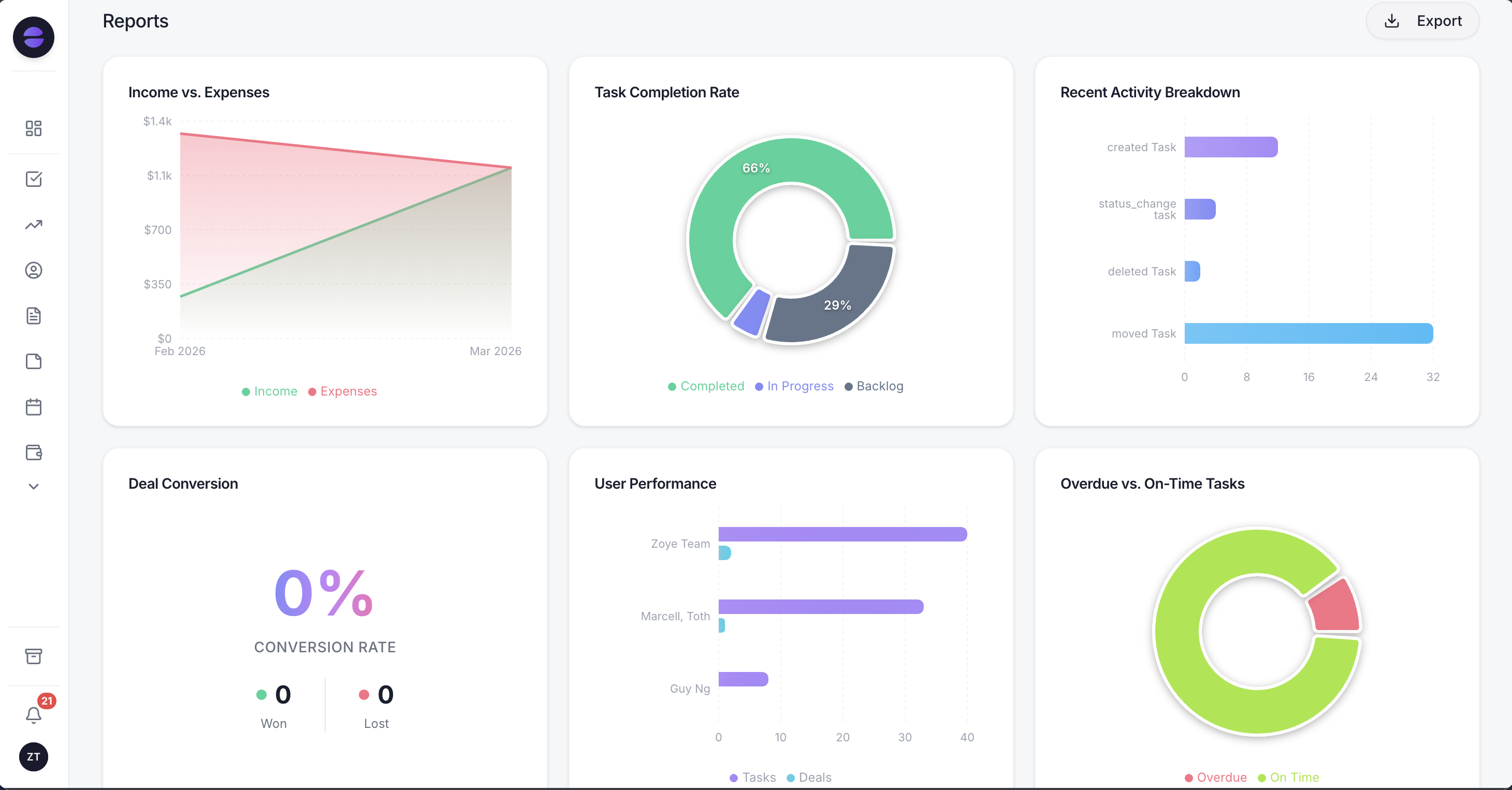
With the campaign and ad name saved on every contact, Reports can show which Instagram ads produced paying customers, not just form submissions.
One Page connection covers Facebook and Instagram. Instant Form submissions arrive as contacts in real time, with answers mapped onto fields and the campaign and ad name saved on the record. Someone already in your contacts is matched to that record instead of becoming a duplicate. Per-Page routing sends each Page's leads to the right workspace, and a lead form can be tied to an event so submissions become RSVPs.
From there an Instagram lead is an ordinary Zoye lead. The new-lead WhatsApp message has its own switch for ad leads and sends one message per person, and every WhatsApp automation is off by default and confirms consent before it sends. First messages use an approved template automatically. The qualifying bot writes answers into fields, an owner is assigned, follow-up tasks get due times, and Instagram and Facebook messages and comments sit in Chats next to your WhatsApp conversations. Connecting your own business number is coming soon. If Meta rejects a send or a Page loses a permission, you are told why.
To change any of it, tell the assistant what should happen, in the app, on WhatsApp or in Slack. For example: "when a lead comes in from the spring quote form, send the WhatsApp welcome if they said yes to WhatsApp, and give me a call task due in 30 minutes." Zoye builds the rule, shows it to you, and waits for your approval before anything runs.
Two honest limits. Zoye does not run ads or write creative, so targeting and budget stay in Ads Manager. And it cannot make a lukewarm lead hot; it makes sure that lead is answered quickly, attributed to the ad that paid for it, and still on file when they are ready.
Pricing: Almost Free is $5 a month or $4 billed annually for 1 team member, 1GB, the core tools, 15 AI prompts a month and Google integrations; it does not include automations, so lead-ad capture and the follow-up automations above are not part of it. For bigger teams, Scale costs $119 a month or $95 billed annually with 100 team members and 25GB, Growth is $59 or $47 with 20 members and 10GB, Starter is $29 or $23 with 10 members and 5GB, and Customize is priced on a quote. The pricing page shows what each plan includes.
A 30-day plan for your first Instagram lead ad
Run one offer, one form and one follow-up path for 30 days, then judge it on outcomes rather than cost per lead. A small, controlled test tells you more than five overlapping campaigns, and it keeps the follow-up load at a level your team can actually answer.
Week 1: build the form with higher intent, three to five questions, a WhatsApp consent question if you plan to use WhatsApp, and a completion screen that promises a reply time. Send a test lead and confirm it lands as a contact with the ad name.
Weeks 2 and 3: run the ad during hours you can answer. Send the acknowledgement within minutes and log every outcome on the contact: reached, qualified, quoted, won or lost.
Week 4: compare ads on cost per qualified lead and cost per sale, not cost per submission. Keep the winner, cut the rest, and only then test a click-to-Instagram-Direct or click-to-WhatsApp version against it.
See how Instagram and Facebook leads are captured and worked on our Facebook and Instagram automations page.
Related reading
For more context, see Facebook lead ads to CRM, how to get leads from Instagram, click-to-WhatsApp ads, and Instagram comment to DM automation.