
Quick answer: pick Calendly if you mostly book meetings with other professionals (sales calls, demos, interviews, partner calls) and want round robin and lead routing between teammates. Pick Acuity Scheduling if clients book paid appointments with you and you need intake forms, packages, memberships and a booking page that sits on a Squarespace site. If the booking should land on the customer's record next to the chat, the deal and the follow-up, there is a third option at the end.
Key takeaways (November 2026)
- Calendly charges per hosting seat: Standard $10 and Teams $16 a seat a month billed yearly, $12 and $20 billed monthly. The free plan keeps 1 event type and 1 calendar connection.
- Acuity charges per plan and number of calendars: Starter $16 (1 calendar), Standard $27 (up to 6), Premium $55 (up to 36) a month billed yearly, or $20, $34 and $69 monthly. There is no free plan, only a 7-day trial.
- For one person, Calendly is cheaper. For three to six people, Acuity Standard at $27 undercuts Calendly Standard at $30 and Teams at $48.
- Text reminders: Calendly on paid plans with a 180-character cap and opt-in; Acuity from Standard up, not on Starter.
- Neither pricing page mentions WhatsApp. Both store the booking in the scheduler, so the conversation and the follow-up still live somewhere else.
Calendly vs Acuity at a glance
Calendly is a meeting scheduler priced per person who hosts; Acuity is an appointment system priced per plan and calendar. The table below lines them up on the points that decide a purchase, using each vendor's own pricing page as of November 2026 and yearly billing unless marked otherwise.
| Calendly | Acuity Scheduling | |
|---|---|---|
| Built for | Meetings between professionals: sales, recruiting, customer success | Client appointments: sessions, treatments, lessons, consultations |
| Free option | Free plan: 1 event type, 1 calendar connection | No free plan; 7-day trial, no card needed |
| Trial | 14 days, then back to Free | 7 days on any plan |
| Entry paid price | Standard $10/seat/mo yearly, $12 monthly | Starter $16/mo yearly, $20 monthly (1 calendar) |
| Team price | Teams $16/seat/mo yearly, $20 monthly | Standard $27/mo yearly (6 calendars), Premium $55 (36) |
| How the bill grows | With every host seat | With calendars (staff or locations) |
| Email reminders | Paid plans (workflows) | Every plan |
| Text reminders | Paid plans, 180 characters, invitee opt-in | Standard and Premium |
| Intake forms | Screening and routing forms on Teams | Custom client forms on every plan |
| Payments at booking | Stripe, PayPal (Standard and up) | Stripe, Square, PayPal, Venmo (every plan) |
| Packages and memberships | Prepaid meeting packages (paid plans) | Packages, memberships, gift certificates (Standard and up) |
| Round robin and routing | Teams | Not a headline feature; staff calendars instead |
| Calendar sync | Google, Outlook, Office 365 | Google, iCloud, Outlook |
| Website tie-in | Embeds on any site | Squarespace, or any other site |
| Learning curve | Low for a single link, higher for routing | Moderate: many settings for services, forms and staff |
| Support | 24/7 email; chat on paid plans | Customer support on every plan |
Two cautions on reading it. Calendly's "seat" and Acuity's "calendar" are not the same unit: a calendar in Acuity is per employee or per location, so one person working in two locations can use two. And plans change, so open the pricing pages before you buy.
Who is Calendly built for, and who is Acuity built for?
Calendly is built for the person who sends a link to someone else's inbox: a salesperson booking a demo, a recruiter booking an interview, an account manager booking a check-in. Acuity is built for the business whose customers book a service: a session, a treatment, a lesson or a consultation, often paid in advance and often repeated.
You can see the difference in what each company puts first. Calendly's top tiers are about distributing meetings fairly across a team, qualifying leads with forms, routing them by HubSpot or Salesforce ownership and sending the result into a CRM. Its AI add-ons, a notetaker and an email scheduling assistant called Callie, live in "Plus" versions of its plans (Standard Plus at $18 and Teams Plus at $24 a seat a month billed yearly, as of November 2026). Everything points at meetings that happen between two professionals over video.
Acuity, owned by Squarespace, puts the client first. Its navigation lists solutions for beauty, wellness, fitness, education and business services, and its plans grow around the things an appointment business sells: intake forms with terms and conditions, packages with payment plans, memberships, subscriptions, gift certificates and a waitlist for full times. Its Premium plan adds an AI booking assistant for clients and a signed business associate agreement for HIPAA compliance.
The limitation of each, first. Calendly treats the person who books as an invitee, not a client: its packages and payment links are recent additions, and anything resembling client history sits in its contact profiles. Acuity treats the business as a set of calendars and services, which suits a studio and feels heavy for a sales team that only needs a link and fair distribution.
A quick test: if the person booking you would call it "a meeting", start with Calendly. If they would call it "an appointment" or "a session", start with Acuity.
How much do Calendly and Acuity cost in October 2026?
Calendly costs $10 a seat a month on Standard and $16 on Teams, billed yearly, or $12 and $20 monthly; Enterprise starts at $15,000 a year with 50 seats. Acuity costs $16, $27 or $55 a month billed yearly (or $20, $34 and $69 monthly) for 1, up to 6 or up to 36 calendars. Calendly wins for one person; Acuity usually wins for a team.
All figures below come from calendly.com/pricing and acuityscheduling.com's pricing page, checked in November 2026, in US dollars before tax.
Calendly (per seat a month):
- Free: one event type, one calendar connection, one-on-one scheduling, a customizable booking page.
- Standard: $10 yearly or $12 monthly (marked as a 17% saving). Unlimited event types, 6 calendar connections, reminders and automations, group and collective meeting types, HubSpot and Mailchimp, Stripe and PayPal.
- Teams: $16 yearly or $20 monthly (a 20% saving). Round robin, lead qualification and routing, admin-managed event types, Salesforce and Marketo.
- Enterprise: from $15,000 a year with a 50-seat minimum, adding SSO, Salesforce lookup routing and dedicated support.
Seats are only for people who connect a calendar or host meetings; the people booking you never need one.
Acuity (per account a month):
- Starter: $16 yearly or $20 monthly. 1 calendar, payments through Stripe, Square, PayPal or Venmo, email reminders, custom client forms.
- Standard: $27 yearly or $34 monthly. Up to 6 calendars, plus text reminders, a waitlist, packages, memberships and gift certificates.
- Premium: $55 yearly or $69 monthly. Up to 36 calendars, plus the AI booking assistant, a HIPAA agreement, the Acuity logo removed, staff in several time zones and custom API and CSS.
- Enterprise: unlimited calendars on request.
According to Acuity's pricing page, there are no setup, cancellation or support fees, and yearly billing saves 20%.
What three team sizes really pay
The illustrative bills below assume yearly billing, US prices before tax, one Calendly seat per person who takes bookings, and one Acuity calendar per person. They cover the scheduler only.
| Team | Calendly Standard | Calendly Teams (round robin) | Acuity |
|---|---|---|---|
| 1 person | $10/mo ($120/yr) | $16/mo ($192/yr) | Starter $16/mo, or Standard $27 for texts and packages |
| 3 people | $30/mo ($360/yr) | $48/mo ($576/yr) | Standard $27/mo ($324/yr) |
| 8 people | $80/mo ($960/yr) | $128/mo ($1,536/yr) | Premium $55/mo ($660/yr) |
What the table shows: Calendly's bill climbs in a straight line with every person. Acuity's bill climbs in jumps: the seventh calendar moves you from $27 to $55. On monthly billing the same pattern holds at higher numbers ($36 against $34 for three people).
Two hidden costs to budget for. On Calendly, sharing incoming calls between two people sits on Teams, not Standard. On Acuity, texts, packages and the waitlist sit on Standard, not Starter, so the realistic entry price for a solo practice that needs them is $27, not $16.
Which one sends better reminders by email and text?
Both send email reminders, and both send text reminders on paid tiers, but with different rules. Calendly's texts go out through workflows on paid plans, capped at 180 characters, from numbers it assigns, and only to invitees who opt in. Acuity lists email reminders on every plan and text reminders from Standard up. Neither offers WhatsApp reminders on its pricing page.
Calendly's help centre, updated September 2026, spells out the text rules:
- Texts are available on paid plans, but not during the trial.
- Each message holds up to 180 characters.
- Messages come from a number Calendly assigns automatically; you cannot choose or change it.
- Replies are not delivered or monitored, so a client who texts back "can we move to 4?" is talking to nobody.
- Invitees must choose to receive texts, so the phone field cannot be forced.
- Texts work for group events of up to 100 invitees, and the page lists countries where delivery is not supported.
Acuity's pricing page lists "Confirmation, reminder, and follow-up emails" on every plan and "Text message reminders" on Standard and Premium, with a link to check which countries texts reach. Acuity's help centre says texts reach more than 180 countries, with a list of places they cannot be sent to, so check that list for your clients' countries before you rely on texts.
In practice, Acuity's reminder setup suits the appointment rhythm better: a confirmation at booking, a reminder before, a follow-up after, all on the base plan by email. Calendly's workflows are more flexible for sequences around a sales meeting, such as a reminder plus a prep email to the host.
What neither covers is the channel many clients actually read. If your clients live in WhatsApp, a text from an unknown number or an email they skim is the weaker reminder. Our appointment reminder text templates cover wording and timing for SMS and WhatsApp, whichever tool sends them.
Want to see it in action?
See Zoye catch a new lead, answer on WhatsApp and set up the follow-up, all from one message.
See How It WorksPayments, packages and intake forms: where Acuity leads
Acuity leads on the money and paperwork side of an appointment. Every plan takes payment through Stripe, Square, PayPal or Venmo and includes custom intake forms, and Standard adds packages, memberships, subscriptions and gift certificates. Calendly now lists Stripe and PayPal payments, payment links and prepaid meeting packages on paid plans, but its forms are built for screening leads.
Intake. Acuity's client forms collect details, terms and conditions and whatever a practitioner needs before the first session, and they sit on every plan, Starter included. The forms Calendly promotes on its pricing page sit on Teams: "Create forms, screen invitees, and route leads based on responses". That is a sales tool, not a medical history form.
Payments. Both take money at booking. Acuity supports four providers on every plan and also captures the client's card when they schedule. Calendly supports Stripe and PayPal from Standard and, as of November 2026, lists custom payment links for deposits and one-off fees, invoices for project work, and coupon codes and custom payment terms.
Packages and memberships. This is Acuity's home ground. A client buys a pack of sessions to book over several appointments, or a monthly membership with automatic payments; payment plans for packages are listed too. Calendly's pricing page lists "Meeting packages for prepaid sessions" on paid plans, which is welcome, but it is a feature added in 2026 to a product whose roots are in sales meetings.
HIPAA. If you handle health information in the US, Acuity Premium includes a signed business associate agreement. Calendly's pricing page does not list one on its self-serve plans; ask its sales team if you need it.
The limitation-first summary: Acuity's money features are deep but split across tiers (no packages on Starter). Calendly's are now broad, but if packages and memberships are your business model, test them hard during the trial before you commit.
Team scheduling: round robin and routing vs staff calendars
Calendly is the stronger team tool for meetings: Teams adds round robin, lead routing from forms or HubSpot, admin-managed event types and Salesforce sync. Acuity organizes a team as calendars, one per staff member or location, each with its own availability. Pick Calendly for sharing leads, Acuity for running a staff rota.
How each handles three common team jobs:
- Share incoming meetings fairly. Calendly Teams distributes meetings across teammates by its routing setup; Standard already allows group and collective meeting types for shared meetings. Acuity's pricing page does not list round robin; its team model is a calendar per staff member.
- Send the right lead to the right person. Calendly Teams routes by form answers or by HubSpot ownership, and Enterprise adds Salesforce lookup routing. Acuity does not compete here.
- Run several practitioners or locations. Acuity's calendars are designed for it: separate availability per person or place, and on Premium different time zones per staff member or location. Calendly can do it with one seat per host, at a higher bill.
Admin control follows the same split. Calendly Teams adds centrally managed event types and groups with their own admins, and Enterprise adds SSO, audit logs and domain control. Acuity's Enterprise offer adds unlimited calendars, unlimited scheduling instances, VIP account management and a central dashboard, aimed at businesses with many sites.
Integrations, calendar sync and your website
Calendly integrates more deeply with sales and marketing tools (HubSpot, Salesforce, Marketo, Mailchimp, Zapier), while Acuity integrates with the tools an appointment business runs on: Squarespace, QuickBooks, FreshBooks, Reserve with Google and booking from Facebook and Instagram. Both sync with Google and Outlook calendars, and both connect to Zoom and Google Meet.
Calendly (as listed on its pricing page, November 2026):
- Calendars: Google, Outlook and Office 365; one connection on Free, six on paid plans.
- Video: Zoom, Google Meet, Microsoft Teams.
- Standard: HubSpot, Mailchimp, Zapier, Google Analytics and Meta Pixel, Gmail and Outlook for workflows.
- Teams: Salesforce record updates, Marketo, routing by HubSpot assignment.
- Enterprise: routing by Salesforce assignment, Microsoft Dynamics 365 and Power Automate.
Acuity (as listed on its integrations page, November 2026):
- Calendars: Google, iCloud and Outlook.
- Website: Squarespace, so clients book and reschedule on your own site, plus Squarespace Email Campaigns.
- Discovery: Reserve with Google, and booking from a Facebook Business or Instagram page.
- Accounting: QuickBooks and FreshBooks.
- CRM: Zoho CRM natively; Salesforce, Google Contacts and others through Zapier, which Acuity says connects it to 500+ apps.
- Video: Zoom, Google Meet, GoToMeeting.
If your site runs on Squarespace, Acuity is the natural pick: the scheduler is part of the same company. If your team runs its pipeline in HubSpot or Salesforce, Calendly is the natural pick: the booking lands where the reps work.
Notice what both lists have in common. The booking starts in the scheduler and is then pushed somewhere else: a CRM, an email list, an accounting tool. Someone still has to connect the dots between the person who asked a question in a chat, the booking they made, the payment and the follow-up.
The third option: a booking that lands on the contact card
Both Calendly and Acuity are schedulers that hand the booking to other tools. Zoye works the other way round: bookings are one tool inside an AI Business Operator that also holds your contacts, deals, tasks, calendar and chats, so a booking is saved on the customer's card next to the conversation that led to it, and the follow-up runs from the same place.
Here is what that looks like, described the way our online booking page describes it:
- Every session has its own booking link. A consultation, a class, a workshop, a webinar or a meeting: you give it a name, a date and time, the number of spots and a price if there is one. Share the link in a message, a post or your bio.
- Spots and a waitlist. When the last spot goes, the waitlist takes over, and you can move someone in when a place opens.
- Payment when they book. Put a price on a session and, on Growth, the client pays online at booking through the Stripe account you linked, straight to your business; on any plan you can record a cash payment. Sessions without a price simply have no payment step.
- Passes and packages. Sell a bundle of sessions or a pass for a week, a month or a year from the client's card. Each session is counted off when you mark it attended.
- On the contact card. Bookings, passes and payments sit with the person's chats, tasks and deals, so "who has not booked this month?" is a question you ask Zoye, not a spreadsheet you build.
- Reminders and rebooking. A confirmation goes out when someone books and a reminder before each session, and on Growth you can add a rule that sends a rebooking nudge after a missed session.
- Google Calendar, two ways. Zoye syncs with Google Calendar both ways, so sessions appear in the calendar you already check.
You can set all of this up by hand, or ask Zoye in the app or on WhatsApp: "open a Thursday session with 8 spots at $40", "add this client to Friday's class", "show me her package balance". On Growth, for a new automatic rule, such as a nudge to anyone who has not rebooked in a month, describe what should happen; Zoye builds the rule, shows it to you, and nothing runs until you approve it.
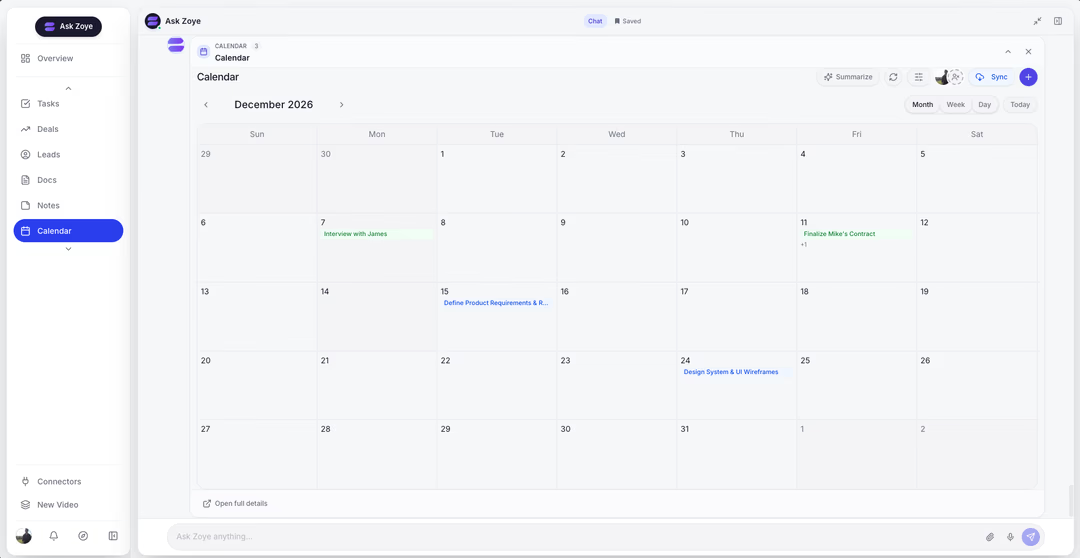
In Zoye, a booked session sits on the calendar and on the client's card, with the chat, the payment and the reminder in one place.
The honest limits. Zoye is not a sales-routing scheduler: there is no round robin across reps and no routing by HubSpot or Salesforce ownership, so a sales team that needs those should stay on Calendly. Zoye's bookings are built around sessions with a time and a number of spots, not around custom intake questionnaires or a HIPAA agreement, which is where Acuity is the specialist. The calendar sync covered here is Google Calendar. Zoye does not have a Zapier-scale integration catalog. One more: linking your own business WhatsApp number to Zoye is coming soon. For now, Zoye talks with your leads on WhatsApp through the official WhatsApp Business Platform, and those chats share one inbox, Chats, with your Instagram and Facebook messages.
Pricing (as of November 2026, from our pricing page): Zoye is priced per plan, not per host, with a set number of team members on each. Almost Free is $5 a month ($4 a month billed yearly) for one member with the core tools, and it has no automations. Starter is $29 ($23 a month billed yearly) for up to 5 members. Growth is $59 ($47 a month billed yearly) for up to 10 members and lists workflow automations and WhatsApp automations with 250 messages a month. Scale is $119 ($95 a month billed yearly) for up to 30 members with 500. Customize is quoted.
For a team of eight, Growth at $47 a month billed yearly compares with $80 on Calendly Standard or $55 on Acuity Premium for the scheduler alone, and it also includes the CRM and the WhatsApp automations. For the bigger picture of how AI handles the whole booking loop, see AI appointment scheduling; for a wider field than these two, our Calendly alternatives guide compares eight tools.
See what Zoye can do for you
CRM, deals, tasks and your Instagram, Facebook and WhatsApp automations in one workspace. Just ask Zoye and it sets any of it up for you.
Explore FeaturesCalendly or Acuity for a small business: how to decide
Decide by who books you and what happens after the booking. Book professionals and share leads across a team: Calendly. Book clients who fill in forms, pay up front and come back on a package: Acuity. Want the booking, the chat, the payment and the follow-up on one customer record: a CRM-native option such as Zoye.
Typical shapes, with November 2026 prices on yearly billing:
- A solo consultant booking intro calls from email. Calendly Free, or Standard at $10 once you need more than one event type. Acuity is overkill here.
- A solo practitioner with intake forms and session packs. Acuity Standard at $27: Starter lacks texts and packages.
- A 3-person sales team splitting demos. Calendly Teams at $48 for the round robin and the HubSpot or Salesforce sync.
- A studio with five instructors and memberships. Acuity Standard at $27 covers up to 6 calendars, packages, memberships and a waitlist.
- A service team of four whose enquiries arrive on WhatsApp and Instagram. Zoye Growth at $59 a month ($47 a month billed yearly), the first plan that includes the WhatsApp and Meta automations, because the enquiry, the booking and the follow-up are one record.
- A Squarespace site that needs booking. Acuity, since it is part of the same company.
Ask three questions before you buy. Who needs a seat or a calendar, really? Which tier holds the feature you need on day one (round robin on Calendly, texts and packages on Acuity)? And where will you look for this customer next month, when they have not rebooked? The third answer is the one that decides whether a scheduler is enough.
Ready to hand off the busywork?
Zoye brings AI-powered CRM, task management, and automation into one workspace.
Get StartedHow to test Calendly and Acuity before you commit
Use the trials on real bookings, not demos. Calendly gives 14 days of paid features before dropping back to its free plan; Acuity gives 7 days on any plan with no card. In that time, run your actual week through each tool and measure how many enquiries became booked, paid and reminded appointments.
A one-week test plan:
- Recreate your real services. Every event type or service, with durations, buffers, minimum notice, prices and the questions you ask today.
- Send ten real people the link. Use the channels your clients already use: email signature, website button, Instagram bio, a message in WhatsApp.
- Check every reminder from the client's side. Book yourself from a second phone. Did the text arrive, from which number, and what happens if you reply?
- Take one payment and one refund. Through the provider you already use, so you see the real flow.
- Hand one booking to a colleague. Round robin on Calendly Teams, or a second staff calendar on Acuity.
- Look for the client a week later. Can you see who booked, who paid, who did not show and who has not come back, without exporting anything?
Write down the time each step took. The cheaper tool on the invoice is not always the cheaper tool in hours. If step six is the painful one for you, book a Zoye demo and bring the booking flow you run today.
Related reading
- Best Calendly alternatives: 8 booking tools compared
- Appointment reminder text templates for SMS and WhatsApp
- AI appointment scheduling: the whole booking loop
- WhatsApp appointment reminders