Quick answer: a working appointment reminder text names the business, the day and the time, and asks for one reply: confirm or change. Send a confirmation when the booking is made, a reminder a day or two before, and a short nudge on the day. Below are 25 copy-ready texts for every moment, from the first confirmation to the review request after the visit, plus the timing and channel rules that decide whether they arrive at all.
Key takeaways (November 2026)
- Missed appointments are common: according to a 2018 review of 105 studies in Health Policy, the average no-show rate in healthcare is about 23%, from 13.2% in Oceania to 43.0% in Africa.
- Reminders help: according to a 2016 BMJ Open meta-analysis of 21 studies, people who got text notifications were 25% less likely to no-show (15% vs 21%), and multiple notifications beat a single one.
- According to the 2013 Cochrane review, attendance was 78.6% with text reminders, 80.3% with phone calls and 67.8% with no reminder at all.
- On WhatsApp, since 1 October 2026, utility templates sent inside an open chat are charged again and each business number gets 1,000 free service messages a month; marketing templates are not delivered to US phone numbers. On Zoye, your messages go out from Zoye's WhatsApp Business number, so these free service messages do not apply to your account. Connecting your own number is coming soon.
- One SMS holds 160 characters in the standard GSM-7 alphabet, but only 70 once an emoji or any other character outside GSM-7 appears.
What does the research say about reminder texts and no-shows?
Peer-reviewed studies, almost all from healthcare, agree on two points: missed appointments are common (about 23% on average across 105 studies), and a text reminder lifts attendance by a clear margin. The size of the lift varies by setting, and no study tested a small service business directly, so treat the figures as a direction, not a promise.
Every number below comes from the published review it is credited to. Here is what each one measured and found.
| Study | Population and year | What was compared | Main finding |
|---|---|---|---|
| Dantas et al., Health Policy | 105 studies of healthcare appointments, published 2018 | No-show rates across medical specialties and regions | Average no-show rate about 23%; highest in Africa (43.0%), lowest in Oceania (13.2%); long lead time and a past no-show were the most common predictors |
| Robotham et al., BMJ Open | 21 studies, 8,345 patients notified vs 7,731 not, published 2016 | Text-based notifications vs no notification | 23% more likely to attend (67% vs 54%); 25% less likely to no-show (15% vs 21%); multiple notifications beat a single one |
| Gurol-Urganci et al., Cochrane review | 8 randomised trials, 6,615 participants, published 2013 | Text reminders vs none, vs phone calls, vs post | Attendance 67.8% with no reminder, 78.6% with text, 80.3% with phone calls; in two studies a text cost less per attendance than a call |
| Guy et al., Health Services Research | 18 reports (8 randomised trials), published 2012 | SMS reminders vs none | Pooled effect from the trials 1.48 (95% CI 1.23 to 1.72); no significant difference between reminders sent 24, 48 or 72+ hours ahead |
Three practical lessons come out of these papers. First, lead time matters: Dantas and colleagues found that the longer the gap between booking and appointment, the more often people miss it, which is why a booking made three weeks out needs more than one touch. Second, one message is not enough: the BMJ Open analysis found that several notifications improved attendance more than one. Third, the exact hour matters less than people think: the 2012 analysis found no significant difference between 24, 48 and 72-hour timing, so choose the time that gives you room to refill a cancelled slot.
There is also a cost argument. The Cochrane authors note that texts and phone calls produced similar attendance, while texts cost less per kept appointment. For a small team, that means the receptionist's time is better spent on the replies than on dialling every client the day before.
When should you send each appointment reminder text?
Send four kinds of message per booking at most: a confirmation straight after booking, a reminder 48 or 24 hours before, a short nudge on the day, and one follow-up afterwards (a review request or, if they missed it, a rebooking offer). Fewer than that leaves gaps; more starts to feel like pressure.
| Moment | When to send | Main job | Reply you want | WhatsApp: template needed? |
|---|---|---|---|---|
| Booking confirmation | Within 5 minutes of the booking | Prove the details are right | None, or a correction | Usually no, if they just wrote to you |
| Early reminder | 48 hours before (bookings made 7+ days ahead) | Surface clashes while the slot can be refilled | Confirm or change | Yes, if their last message is older than 24 hours |
| Main reminder | 24 hours before | Get an explicit yes | Confirm or change | Yes, usually |
| Same-day nudge | 1 to 2 hours before | Cover the person who confirmed and then got busy | None needed | Yes, unless they replied to the main reminder |
| Running late | As soon as you know the delay | Keep trust when the schedule slips | Optional | Depends on the open window |
| No-show follow-up | 15 to 60 minutes after the start time | Rebook instead of losing the client | A new time | Yes, usually |
| Review request | 2 to 24 hours after the visit | Collect feedback while the visit is fresh | A rating or a link click | Yes, and keep it free of offers |
A few timing rules sit on top of the table:
- Respect quiet hours. Do not send reminders late at night or very early in the morning in the client's time zone. A 7:00 reminder for a 9:00 appointment is better sent the evening before at a sensible hour.
- Skip what is not needed. If the booking was made yesterday for tomorrow, the confirmation and the 24-hour reminder are the same message. Send one.
- Stop the sequence when someone confirms a change. A person who moved the appointment should get a fresh confirmation, never the reminder for the old time.
- Cap the follow-ups. One rebooking message after a no-show, and one gentle second try a few days later at most. Then stop.
SMS or WhatsApp: which rules apply to each?
Both channels carry reminders well, but they follow different rules. SMS reaches every mobile number and needs consent plus, in the US, carrier registration. WhatsApp needs an approved template for most reminders, is billed per message by Meta, and feels more like a conversation, which helps when the client wants to change the time.
| SMS | WhatsApp Business Platform | |
|---|---|---|
| Reach | Any mobile number | People who use WhatsApp |
| Permission | Consent before automated texts; clear opt-out | Opt-in required by Meta before you message |
| Approval of wording | No message approval; US senders on 10-digit numbers register under A2P 10DLC | Messages outside the 24-hour window must use a Meta-approved template |
| Category for reminders | Not applicable | Usually utility; promotional wording makes it marketing |
| Cost model | Per segment, set by your SMS provider | Per delivered message by category and country (Meta's rate card) |
| Length | 160 characters in one message (GSM-7), 70 with emoji or other characters outside GSM-7 | Up to 1,024 characters in a template body; keep reminders short anyway |
| Buttons | No; ask for a reply word | Quick-reply buttons such as Confirm and Change time |
| US specifics | TCPA rules and 10DLC registration | Marketing templates not delivered to US phone numbers |
WhatsApp rules, as of November 2026, from Meta's developer documentation. When a customer messages you, a 24-hour customer service window opens and resets each time they write again. Inside it you can reply freely. Outside it, which is when most reminders go out, you can only send a template Meta has approved. Reminders and confirmations are normally approved as utility templates, the category for non-promotional messages about something the customer booked or asked for. Add a discount or a "book your next visit and save" line and the template becomes marketing. Since 1 July 2025 Meta bills per delivered message; since 1 October 2026 utility templates sent inside an open window are charged again, and each business phone number gets 1,000 free service messages a month. Rates differ by country, so check Meta's rate card instead of a figure from a blog. Meta's documentation also states that WhatsApp does not currently deliver marketing templates to users with US phone numbers, which is one more reason to keep reminders strictly about the booking. Our WhatsApp Business API pricing guide explains the categories in depth.
SMS rules, in general terms. Most countries expect consent before a business sends automated texts, and every message should tell people how to stop them. In the US, the Telephone Consumer Protection Act governs automated texts, and carriers require businesses texting from an ordinary 10-digit number to register under A2P 10DLC before their messages are delivered reliably. Rules differ by country and change, so check with your SMS provider and, if you are unsure, a lawyer. This section is general information, not legal advice.
Opt-in and opt-out wording that works on both channels. At booking: "We will send you a confirmation and reminders about this appointment by text or WhatsApp. Reply STOP at any time to stop them." In the first SMS of a series: add "Reply STOP to opt out." Keep promotional messages out of this permission; it covers the booking only.
If you are still deciding between the two channels for your whole business, our comparison of WhatsApp vs SMS for business goes beyond reminders.
Want to see it in action?
See Zoye catch a new lead, answer on WhatsApp and set up the follow-up, all from one message.
See How It WorksHow do you write a reminder text people act on?
A reminder people act on has five parts in this order: who it is from, what and when, where or how, one action, and a way to stop. Everything else is optional. On SMS, aim for one 160-character segment; on WhatsApp, use buttons for the action so the reply takes one tap.
- Who. The business name in the first few words. That way people know at once who is writing.
- What and when. The day of the week, the date and the time. "Thursday 14 May at 10:30" is harder to misread than "tomorrow" alone.
- Where or how. An address, a parking note, or the video link. Put the link last so the text still reads well if the preview cuts it off.
- One action. Reply C to confirm, R to change. Two choices, not five.
- The way out. On SMS, "Reply STOP to opt out" in the first message of a series. On WhatsApp, an opt-out option in the template or a line saying how to stop.
Character budget. The standard SMS alphabet (GSM-7) fits 160 characters in one message and 153 per segment once a message is split, according to Twilio's documentation. A single emoji or a letter outside that alphabet switches the whole text to UCS-2, where one message holds 70 characters and each split segment 67. That is why the SMS templates below avoid emoji.
Merge fields. The templates use placeholders such as {name}, {business}, {day}, {date}, {time}, {address} and {link}. Your booking system fills them in. On WhatsApp, Meta templates use numbered variables by default, so {name} becomes the first variable, {day} the second, and so on.
25 appointment reminder and confirmation texts you can copy
These 25 texts are grouped by the moment they are sent. Each one says whether it suits SMS, WhatsApp or both, and the WhatsApp versions note where buttons belong. Replace the placeholders, keep the wording short, and read each one aloud once: if it sounds like a form letter, cut a sentence.
Booking confirmation texts (1 to 4)
1. Standard confirmation (SMS and WhatsApp)
{business}: you're booked for {day} {date} at {time}. To change it, reply here or call {phone}. Reply STOP to opt out.
2. Confirmation with address and parking (WhatsApp)
Hi {name}, this is {business}. Your appointment is set for {day} {date} at {time}. Address: {address} Parking: {parking_note} Something wrong in these details? Just reply and we'll fix it.
3. Confirmation for an online session (SMS and WhatsApp)
Hi {name}, your online session with {business} is confirmed for {day} at {time} ({timezone}). Join here: {link}. Reply to change the time.
4. Confirmation when a booking needs an answer back (WhatsApp, buttons: Yes, that's right / I need a change)
Hi {name}, we've reserved {day} {date} at {time} for you at {business}. Can you confirm the details are right?
48-hour reminder texts (5 to 7)
5. Early reminder with room to move (SMS)
{business}: reminder of your appointment on {day} at {time}. Can't make it? Reply R and we'll offer other times. Reply C to confirm.
6. Early reminder for bookings made weeks ago (WhatsApp, buttons: I'll be there / Change time)
Hi {name}, it's been a while since you booked, so here's a quick note: your appointment at {business} is on {day} {date} at {time}. Still good for you?
7. Early reminder with a waitlist mention (SMS and WhatsApp)
Hi {name}, you're booked with {business} on {day} at {time}. If your plans changed, a quick reply lets us give the time to someone on our waitlist.
24-hour reminder texts (8 to 10)
8. Classic day-before reminder (SMS)
{business}: see you tomorrow, {day}, at {time}. Reply C to confirm or R to reschedule.
9. Day-before reminder with buttons (WhatsApp, buttons: Confirm / Change time / Cancel)
Hi {name}, your appointment at {business} is tomorrow at {time}. Please tap one of the options below so we can plan the day.
10. Day-before reminder with what to bring (SMS and WhatsApp)
Hi {name}, quick reminder from {business}: tomorrow at {time}. Please bring {items}. Need another time? Reply here.
Same-day reminder texts (11 and 12)
11. Two-hour nudge (SMS)
{business}: we're ready for you today at {time}. Running behind? Reply and let us know.
12. One-hour nudge for an online session (WhatsApp)
Hi {name}, the session starts in one hour, at {time}. Here's your link again: {link}. See you soon.
Reschedule texts (13 to 15)
13. Offering new times after a change request (SMS and WhatsApp)
No problem, {name}. We can do {option_1}, {option_2} or {option_3}. Reply 1, 2 or 3 and we'll move your appointment.
14. Confirming the new time (SMS and WhatsApp)
Done, {name}. Your appointment with {business} is now {new_day} at {new_time}. The old time is released, so nothing else to do.
15. When the business has to move the appointment (WhatsApp, buttons: New time works / Show other times)
Hi {name}, we're sorry: we need to move your appointment on {day} at {time}. The closest free time is {new_day} at {new_time}. Does that work for you?
Running-late texts (16 to 18)
16. The business is running late (SMS and WhatsApp)
Hi {name}, {business} here. We're running about {minutes} minutes behind today. Your appointment will start around {new_time}. Sorry for the wait.
17. The client says they are late (reply, SMS and WhatsApp)
Thanks for telling us, {name}. We can still see you if you arrive by {latest_time}. After that we'll need to find you a new time.
18. Late arrival that needs a new slot (SMS and WhatsApp)
Hi {name}, we couldn't fit today's appointment after the delay. Here are two new times: {option_1} or {option_2}. Reply 1 or 2 to book.
No-show follow-up texts (19 to 21)
19. Same-day check-in (SMS and WhatsApp)
Hi {name}, we had you down for {time} today at {business}. Is everything all right? If you'd like another time, reply and we'll set it up.
20. Rebooking offer the next day (WhatsApp, buttons: Book a new time / Not right now)
Hi {name}, we kept yesterday's slot open for you. Would you like to pick a new appointment time?
21. No-show note when you have a cancellation policy (SMS and WhatsApp)
Hi {name}, we missed you at {time} today. As mentioned when you booked, missed appointments are charged {fee}. Reply if something urgent came up and we'll talk it through.
Deposit and preparation texts (22 and 23)
22. Deposit request to hold the booking (SMS and WhatsApp)
Hi {name}, to hold your appointment on {day} at {time}, please pay the {amount} deposit here: {link}. It counts toward the total. Unpaid bookings are released after {hours} hours.
23. Preparation instructions (WhatsApp)
Hi {name}, a few things before your appointment on {day} at {time}:
- {instruction_1}
- {instruction_2}
- {instruction_3} Questions about any of this? Just reply.
Review request texts (24 and 25)
24. Short review request (SMS)
Thanks for coming in today, {name}. If you have a minute, a short review helps {business} a lot: {link}
25. Feedback first, then the review (WhatsApp, buttons: Great / Could be better)
Hi {name}, thanks for your visit to {business} today. How did it go?
For template 25, send the review link to everyone who answers, and when someone taps "Could be better", have a person on your team reply within the day as well. Some review platforms do not allow asking only satisfied customers for reviews, so never hold the link back from the unhappy ones.
For more WhatsApp wording beyond appointments, see our WhatsApp message templates collection, and for a WhatsApp-only reminder setup with buttons and compliance steps, read the guide to WhatsApp appointment reminders.
See what Zoye can do for you
CRM, deals, tasks and your Instagram, Facebook and WhatsApp automations in one workspace. Just ask Zoye and it sets any of it up for you.
Explore FeaturesHow do you automate appointment reminder texts?
Automating reminders takes five pieces: one calendar that is always right, merge fields pulled from it, approved WhatsApp templates or a registered SMS sender, a rule for each moment in the timing table, and someone (or something) that reads the replies. The last piece needs the most care.
Step 1: one source of truth. Every booking, change and cancellation must land in one calendar. If bookings arrive by phone, chat and a booking page, they all need to end up in the same place, or the reminder will quote the wrong time.
Step 2: fields pulled from the booking. Name, day, date, time, address and link come from the booking. Check that names are stored the way people want to be addressed, and that times are stored with the right time zone.
Step 3: approvals and registration. Submit the WhatsApp templates you need (usually the confirmation, the 24-hour reminder, the same-day nudge and the no-show follow-up) and wait for Meta to approve them. For SMS in the US, finish 10DLC registration through your provider before the first send.
Step 4: one rule per moment. "24 hours before each appointment, send template 9 unless the client already confirmed." Write each rule so it also says when not to send: after a cancellation, after a change, or when the booking was made less than a day ahead.
Step 5: handle the replies. A reminder invites a reply, and a reply left waiting for hours wastes the reminder. Decide who answers "can we do Friday instead?", and how fast. This is where an AI agent earns its place, because it can offer the free times and move the booking while you work. Our article on AI appointment scheduling covers the booking side of that loop.
Step 6: measure for a month. Track four numbers: no-show rate, confirmation rate (replies to the 24-hour reminder), reschedule rate, and how many no-shows rebooked after the follow-up. If the no-show rate does not move, look at lead time first: the research above points to long gaps between booking and appointment as a common cause.
How Zoye sends reminders and confirmations for you
Zoye is an AI Business Operator: one workspace with your contacts, calendar, bookings and chats, and an assistant that does the work in them. For reminders, that means the confirmation (by email) and the reminder for every booking made through a Booking list go out automatically, and WhatsApp replies come back to you. Once you mark a missed visit, a follow-up rule you approve (Growth) offers a new time.
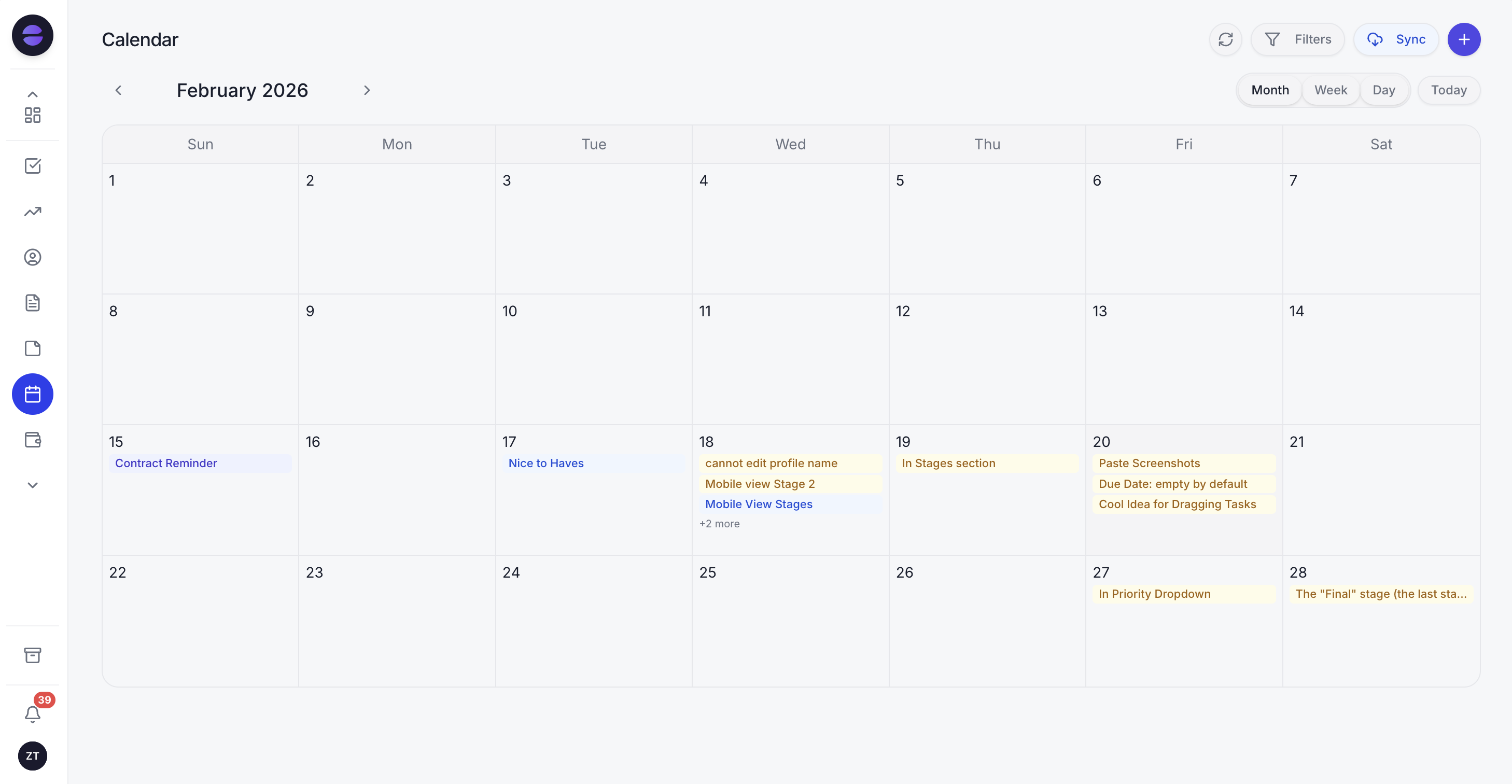
The Zoye calendar holds every booking in one place, so each reminder quotes the time that is actually booked.
Here is how the pieces fit, described the way the product works today.
- Bookings. Open any session people can book, such as a class, a workshop, a meeting or studio time. Set the date, the number of spots and the price, share one link, and Zoye keeps the attendee list and the waitlist, sends one reminder at the time you choose with a button that opens the client's booking page, and on Growth can take payment when someone books.
- Calendar. Meetings, events and reminders sit in one calendar that syncs both ways with Google Calendar, so a booking made in a chat lands in the calendar you already use.
- Ask, and it happens. Tell the assistant "remind tomorrow's clients about their appointment" and each client gets the reminder on WhatsApp, or by email when Zoye has no phone number for them. Replies to cancel or move come straight back to you.
- No-shows. When you mark someone as missed, a follow-up rule you approve (Growth) offers them a new time instead of letting the slot go empty.
- Rules you approve. For anything beyond the Booking list reminder, describe what should happen on Growth, for example "24 hours before every appointment, send a reminder with a link to keep or cancel the time". Zoye builds the rule, shows it to you, and waits for your approval before anything runs.
The WhatsApp side follows Meta's rules without you managing them. Each automation stays off until you confirm you have permission to message that audience. First messages, and anything sent more than 24 hours after a customer's last reply, use a WhatsApp-approved template automatically, and Zoye submits templates to Meta and tracks their approval for you. Each person gets one message rather than duplicates, and contacts you imported from a spreadsheet are never auto-messaged.
What Zoye does not do. Zoye does not send SMS; its reminders go out on WhatsApp or by email. Today Zoye sends them in the WhatsApp conversations it has with your leads and clients; connecting your own business WhatsApp number is coming soon.
Pricing (as of November 2026). Almost Free costs $5 monthly, or $4 per month billed yearly, for one member with the core tools and 15 AI prompts a month; on Almost Free reminders go by email, because it includes no WhatsApp messages to customers. Starter costs $29 monthly or $23 per month billed yearly, covers up to 5 members and includes 100 WhatsApp messages a month, so Booking list reminders work on WhatsApp from Starter. Custom reminder rules are automations, which start on Growth. Growth costs $59 monthly or $47 per month billed yearly for up to 10 members, Scale $119 monthly or $95 per month billed yearly for up to 30, and Customize is priced on request. See the pricing page for what each plan includes, and the WhatsApp automations page for every automation Zoye runs on WhatsApp.
Ready to hand off the busywork?
Zoye brings AI-powered CRM, task management, and automation into one workspace.
Get StartedWhich reminder mistakes cause the most no-shows?
A reminder setup can fail in five ways: the text quotes the wrong time, it arrives too late to rebook, it asks for nothing, nobody reads the reply, or it smuggles in a promotion. Each one is easy to spot in a month of data and easy to fix.
- Wrong details. A reminder pulled from a calendar that missed yesterday's change does more harm than silence. Fix the source of truth before the wording.
- Too late to act. A single reminder two hours before leaves no time to fill the slot. Keep at least one reminder a day or more ahead.
- No question asked. "See you tomorrow" gets read and forgotten. "Reply C to confirm" gets you a list of who is coming.
- Replies that wait. A client who writes "can we move it?" and hears nothing for hours may simply not come.
- Offers inside reminders. On WhatsApp this can turn a utility template into marketing, which is billed in a different category and, for US numbers, is not delivered at all. On SMS it stretches the consent you were given.
Pick your set and start this week
Start with four texts: one confirmation, one 24-hour reminder, one same-day nudge and one no-show follow-up. Run them for a month, count no-shows and reschedules, and add the 48-hour reminder for bookings made more than a week ahead if the numbers call for it. The research found that more than one reminder works better than one, and that the exact hour matters less than giving people time to tell you.
If most of your clients already talk to you on WhatsApp, book a Zoye demo and bring next week's appointments to set the reminders up live.