
Every service business runs on its calendar. The dentist, the personal trainer, the cleaning crew, the salon, the consultant: their revenue is a stack of booked slots, and every empty or missed slot is money that never arrives. So for years the fix was a booking link. Put a scheduler on your website, drop the link in your bio, and let customers pick a time themselves. It was a real step up from phone tag.
But a booking link only solves one small piece of the problem, and it solves it by handing all the work to the customer. The link assumes the customer will find it, click it, understand your availability, choose correctly, and then remember to show up. It does nothing when they message you on WhatsApp instead of visiting your site. It does nothing when they need to move the appointment. It does nothing when they simply forget. The booking link is a self-service form with a calendar attached, and a form cannot chase, confirm, remind, or recover anyone.
AI appointment scheduling is the shift from a form the customer operates to an assistant that operates the whole booking loop for you. This guide explains what AI appointment scheduling actually is, how the full loop works (book, confirm, remind, reschedule, recover), how it compares to traditional booking-link tools, and how to choose one that runs the loop itself instead of leaving the hard parts to you.
Pricing reflects published rates as of July 2026; check each vendor's pricing page for current figures.
What AI appointment scheduling actually is
A booking link is a static tool: it shows open times and records a choice. AI appointment scheduling is a conversational one. Instead of sending a customer to a form, an assistant reads what the customer wants in plain language and handles the booking as a conversation, the same way a great receptionist would.
The customer writes "any chance I can come in Thursday afternoon?" and the assistant checks the live calendar, replies with the two open slots that fit, books the one they pick, and confirms it. No link, no form, no back and forth about which times are free. The assistant works from your real availability, so it never double-books, and it works inside the channel the customer is already using, which for most small businesses today is WhatsApp.
The deeper difference is that AI scheduling does not stop at the booking. A form's job ends the moment the slot is chosen. An assistant's job is the whole relationship around that slot: confirming it, reminding about it, moving it when life happens, and following up when the customer goes quiet. That is the loop that actually protects your revenue, and it is the loop a booking link was never built to run.
Where booking-link tools fall short
Booking links are useful, and for a business with a steady flow of self-directed web visitors they can be enough. But most service businesses hit the same four walls.
They wait; they never reach out. A booking link is passive by design. It sits on a page and hopes someone visits. It cannot message the customer who enquired last week and never booked, cannot nudge the client whose package is up for renewal, and cannot re-engage a lapsed regular. Every one of those is a booking the link will never make because reaching out is not something a form does.
They live on the website, not in the chat. A growing share of enquiries now arrive by WhatsApp, Instagram DM, or text, not through a browser. Sending that customer a link means asking them to leave the conversation, open a page, and start over. Each of those steps loses people. The booking should happen where the conversation is.
They do not handle the reschedule. When a customer needs to move an appointment, a basic booking link either can't help or forces them back through the whole flow. So they message you instead, and now you are back to manual scheduling, checking your calendar, and typing replies. The one moment where automation matters most is the moment most booking links go quiet.
They forget nothing but remind no one. A link records the appointment and then stops. Confirmations, timed reminders, and no-show follow-ups are either a paid add-on, a separate tool, or a job that lands back on the owner. And a reminder that depends on a busy owner remembering to send it is a reminder that will not go out.
The common thread is effort direction. A booking link pushes effort onto the customer to book and back onto the owner for everything after. AI appointment scheduling reverses that: the assistant carries the effort at every stage.
Want to see it in action?
See Zoye catch a new lead, answer on WhatsApp and set up the follow-up, all from one message.
See How It WorksThe booking loop, end to end
Booking is not a single action, it is a loop with five stages. Booking-link tools handle one and a half of them. AI appointment scheduling handles all five.
1. Book. The assistant reads the request in plain language, checks live availability, offers times that fit, and writes the confirmed slot to the calendar. Because it understands intent, it copes with "sometime next week, mornings are better" the way a person would, not just with a rigid grid of buttons.
2. Confirm. The moment a slot is booked, the assistant sends a clear confirmation with the date, time, place, and anything the customer needs to bring or prepare. A confirmed appointment is a committed appointment, and confirmation is the cheapest no-show insurance there is.
3. Remind. The assistant sends timed reminders on your schedule, typically one the day before and one a couple of hours ahead. These go out on every booking automatically, so the reminder never depends on anyone remembering to send it.
4. Reschedule. When the customer replies "can we push to Friday?", the assistant reads it, offers new times, moves the appointment, and frees the old slot for someone else. Rescheduling becomes a quick reply in the chat instead of a phone-tag chore, which means people actually reschedule rather than silently vanish.
5. Recover no-shows. When someone misses an appointment or goes quiet after enquiring, the assistant follows up: a friendly nudge to rebook, an offer of the next open slot, a check-in that turns a lost slot back into a booked one. This is the stage booking links ignore entirely, and it is where a real chunk of recovered revenue lives.
Run all five stages automatically and the calendar fills itself, stays full, and heals when a gap appears. That is the whole promise of AI appointment scheduling, and it only works when one system owns the entire loop.
AI appointment scheduling vs traditional booking-link tools
Set the two side by side and the difference is not features, it is who does the work.
A booking-link tool is a place the customer goes. It is a URL, a form, and a calendar grid. It is good at one thing: letting a motivated visitor pick a time without messaging you. Everything outside that narrow moment (reaching out, messaging channels, reschedules, reminders, recovery) is either not there, sold separately, or handed back to you.
An AI appointment scheduler is an assistant that comes to the customer. It works in the channels people already use, understands plain-language requests, and carries the booking through confirmation, reminders, reschedules, and recovery without you touching a form. It is proactive where the link is passive, conversational where the link is a grid, and complete where the link is a single step.
There is a place for booking links. If your customers are web-native, self-directed, and rarely need to move appointments, a simple link does the job. But most small service businesses do not look like that. Their customers message, forget, run late, and reschedule, and those are exactly the situations a form cannot handle and an assistant can.
How Zoye handles the whole booking loop for you
Zoye is the strongest pick for AI appointment scheduling because it is not a booking widget bolted onto a website, it is an AI Business Operator that runs the entire booking loop as part of running your business. It books clients, confirms and reminds them, reschedules on request, and chases the no-shows itself, all on your instructions and all inside the channels your customers already use.
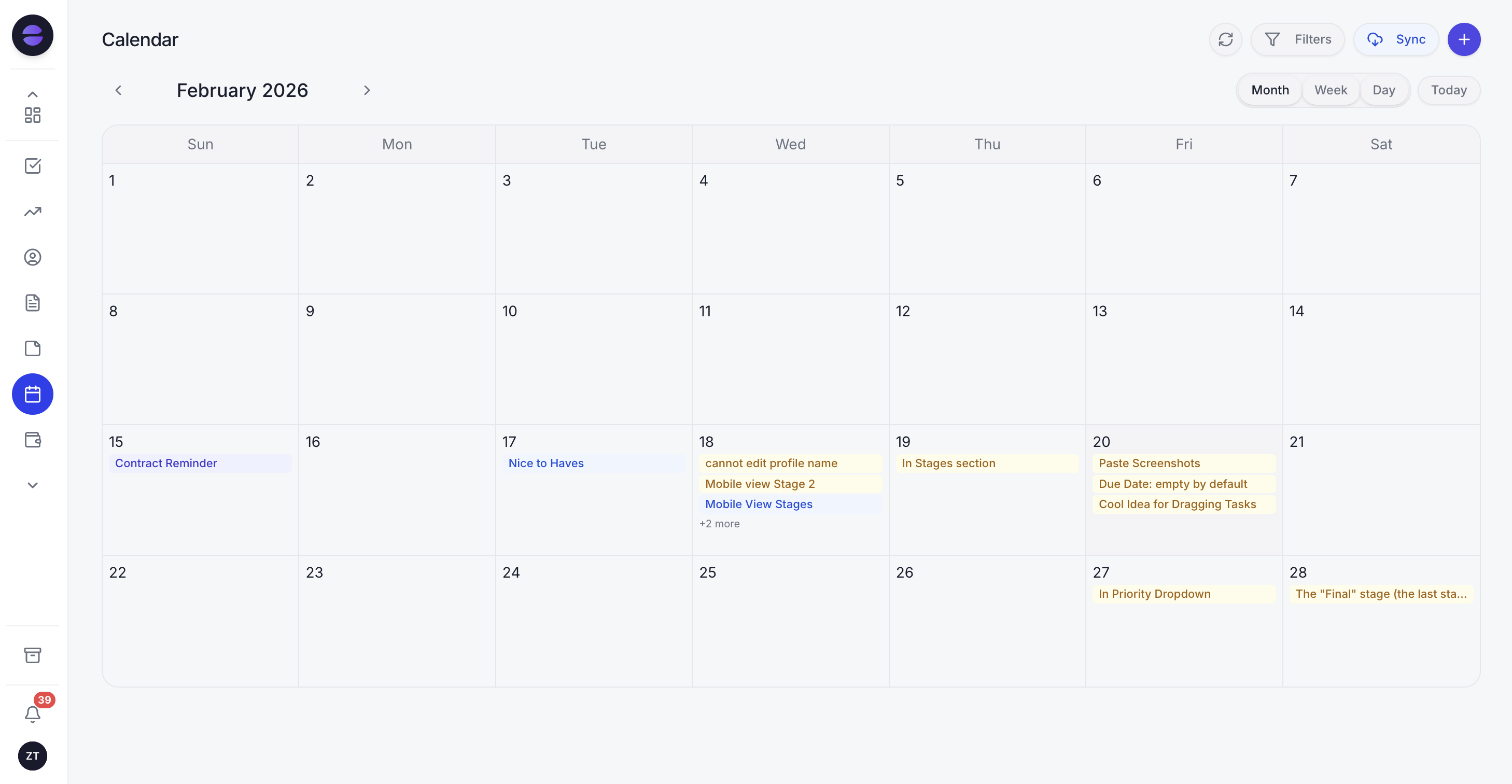 Zoye keeps every appointment on one shared calendar and runs the booking, confirming, reminding, and rescheduling for you.
You tell Zoye the rules once, the way you would explain them to a new receptionist: your working hours, how long each appointment type takes, when reminders should go out, how far ahead people can book. From then on Zoye handles bookings against your live calendar so nothing double-books. A customer messaging on WhatsApp asks for a time, and Zoye offers the open slots, books the one they choose, confirms it, and schedules the reminders, without you opening the app. When they need to move it, Zoye reads the request, proposes new times, updates the calendar, and reopens the old slot. When someone misses or goes quiet, Zoye follows up to rebook them.
Because Zoye is an operator and not just a scheduler, the calendar sits inside the whole business rather than off to the side. Each appointment is linked to the customer's record, so the booking, the conversation history, the deal, and the follow-up tasks all live together. Ask Zoye to "remind everyone booked for tomorrow and reconfirm" and it does it. Ask it to "build an automation so every new WhatsApp enquiry gets offered a booking within five minutes" and it wires that up from the sentence, no builder to learn. The scheduling assistant runs alongside tasks with list, board, calendar, and timeline views, centralised customer conversations, budget tracking, and reports, so the same operator that books the client also chases the invoice and keeps the record current.
Pricing: Almost Free at $5 per month for 1 member with the core tools. Starter from $29 per month (10 members). Growth from $59 per month (20 members). Scale from $119 per month (100 members).
Best for: Solo owners and small service teams (clinics, salons, trainers, cleaners, consultants) that want the whole booking loop run for them instead of managing a form and a pile of manual reminders.
See what Zoye can do for you
CRM, deals, tasks and your Instagram, Facebook and WhatsApp automations in one workspace. Just ask Zoye and it sets any of it up for you.
Explore FeaturesWhat to look for in AI appointment scheduling
If you are comparing options, five questions separate a real AI scheduler from a booking link with a chat skin.
1. Does it book inside messaging, or just on a web page? Your customers message. A scheduler that only lives on your website still loses everyone who reaches you on WhatsApp. Look for one that books inside the conversation the customer already started.
2. Does it handle reschedules automatically? Booking is the easy half. The value shows up when a customer needs to move an appointment and the assistant handles it right there in the chat instead of sending them back through a form or back to you.
3. Does it send confirmations and reminders automatically? Reminders are the single biggest lever on no-shows. They should go out on every booking without anyone remembering to trigger them, not as a separate paid tool.
4. Does it recover no-shows and lost enquiries? A form stops at the booking. An operator follows up with the person who missed, who went quiet, or who enquired and never booked. That recovery is where a lot of the return lives.
5. Does it connect to the rest of the business? A booking that lives in a silo means re-entering the customer somewhere else. A scheduler that writes to the same place your contacts, conversations, and follow-ups live saves you the double entry and keeps everything current.
Score any option against those five and the gap between a booking link and an AI appointment scheduler becomes obvious. The link answers one; the operator answers all five.
Why teams pick Zoye
A few themes come up consistently.
It runs the whole loop, not just the booking. Zoye books, confirms, reminds, reschedules, and recovers no-shows, so the calendar fills and stays full without the owner working a form and a reminder list by hand.
It books where the customer already is. Because Zoye centralises conversations and connects to WhatsApp and Slack, the booking happens inside the thread the customer started, not on a separate page they have to be sent to.
It is one operator for the whole business. The same assistant that books the client also chases the invoice, updates the record, and builds an automation when you describe what should happen, so scheduling is not one more disconnected tool but part of a system that runs itself.
Try Zoye with your team. The entry plan is Almost Free at $5 per month for 1 member, with the core tools.
For more context, see how to send WhatsApp appointment reminders, the AI receptionist for small business, and the best CRM for small business.