
Quick answer: pick HubSpot if selling is the main job and you want a deep contact record, built-in email and a no-cost starting point for two people. Pick monday CRM if your team already runs its work on monday.com boards and the sales pipeline is one more board among many. As of November 2026, monday CRM starts at $12 per seat billed yearly with a 3-seat minimum, while HubSpot's free CRM covers 2 users and 1,000 contacts.
Key takeaways (November 2026)
- HubSpot's free CRM covers 2 users and 1,000 contacts with branded marketing email sends; monday CRM has no free plan, only a 14-day trial of Pro.
- monday CRM costs $12, $17 or $28 per seat billed yearly ($18, $25 or $41 monthly) from 3 seats, and caps active contacts and deals at 1,000, 10,000 and 100,000.
- HubSpot Sales Hub Starter is listed at $20 per seat a month ($7 billed yearly or $10 monthly on the limited-time offer shown in November 2026); Professional is $90 yearly or $100 monthly per seat, plus a required onboarding fee.
- Automation: monday CRM Standard includes 250 custom automations a month and Pro 25,000; HubSpot Starter has simple automation, and Professional allows up to 2,000 workflows.
- Illustrative, 5 sellers billed yearly: about $85 a month on monday CRM Standard, $100 on HubSpot Starter at list price and $450 on HubSpot Professional before onboarding.
"Monday vs HubSpot" sounds like two CRMs going head to head, but the two companies started from different jobs. HubSpot started in 2006 with inbound marketing and grew into a customer platform where sales, marketing and service share one contact record. monday.com is a work management platform built on flexible boards, and monday CRM is its sales product built on those same boards. For a small team the useful question is less "which CRM has more features" and more "is our business mainly about selling, or mainly about delivering the work that selling brings in?"
This comparison is written for teams of roughly 2 to 15 people. It starts with the verdict, puts the limits that change the bill in one table, then works through the decisions that actually split small teams. If you only need monday.com's numbers, our monday pricing guide covers every product and seat bucket; if you have already decided against monday.com, the monday.com alternatives list is the better read.
Sourcing: monday.com figures come from monday.com's pricing page (CRM and work management tabs), its integrations page and its help center, opened in November 2026. HubSpot figures come from HubSpot's pricing page, its Sales Hub and CRM product pages, its onboarding page, its product catalog terms and its help center, opened the same month. Prices are in US dollars before tax. Both vendors change offers often, so confirm yours at checkout.
Quick verdict: who should pick monday CRM and who should pick HubSpot?
Choose HubSpot when the customer record is the center of your business: many contacts, email follow-up and a pipeline that marketing feeds. Choose monday CRM when your team already plans projects on monday.com and wants the sales pipeline to sit next to that work. Neither is the right buy for every small team, and each gets expensive in a different place.
Pick HubSpot if:
- You want to start at zero cost with two users and grow into paid seats later.
- Email is how you sell: templates, tracked sends, meeting links and a contact timeline that keeps every touch.
- You expect marketing (forms, landing pages, newsletters) to join the same database within a year.
- You can live with per-seat pricing that jumps sharply at Professional.
Pick monday CRM if:
- Your team already runs projects on monday.com boards and likes building its own columns.
- After a deal closes, the real work starts, and you want the handover to land on a board the delivery team already uses.
- Your contact list is modest: under 10,000 active contacts and deals fits Standard.
- You can buy at least 3 seats and plan hires around monday CRM's seat buckets.
Look at something else if you are one person, if sales and delivery are both small and you do not want two subscriptions, or if most customers reach you on WhatsApp and Instagram rather than email. That is where the third option further down comes in.
Monday vs HubSpot side by side (November 2026)
The table compares monday CRM, the sales product monday.com sells, with HubSpot's Smart CRM and Sales Hub, because those are the plans a small sales team actually buys. Every figure is a list price or limit from the vendor's own pricing pages and terms as of November 2026, and per-seat prices are per month.
| monday CRM | HubSpot (Smart CRM + Sales Hub) | |
|---|---|---|
| Entry price | Basic $12 per seat yearly, $18 monthly | Starter listed at $20 per seat, $7 yearly or $10 monthly on the November 2026 offer |
| Mid tier | Standard $17 yearly, $25 monthly | Professional $90 yearly, $100 monthly |
| Top tier with a public price | Pro $28 yearly, $41 monthly | Enterprise $175 per seat |
| Free tier | None; 14-day trial of Pro | Free CRM for up to 2 users |
| Seat minimum | 3 seats on every paid plan | None stated on the pricing page |
| Contact limits | 1,000 / 10,000 / 100,000 active contacts and deals (Basic, Standard, Pro) | Free: 1,000 contacts; paid: 25,000 records on Starter, 250,000 on Professional |
| Automation limits | Basic none listed; Standard 250 a month; Pro 25,000 a month | Starter: simple automation; Professional up to 2,000 workflows; workflow actions use HubSpot credits |
| Communications hub from Standard; mass emails and sequences on Pro | Free: monthly sends with HubSpot branding; paid bulk and automated sends use HubSpot credits | |
| Reporting | 1 / 5 / 50 custom dashboards | Free: reporting dashboard; Starter: 30 dashboards (50 reports each) |
| One-time fees | None listed | Required onboarding on Professional and Enterprise |
| Learning curve (our assessment) | Gentle if you know boards; you design your own columns | Gentle on Free and Starter; Professional adds a lot of surface |
| Integrations | 850+ integrations and apps | More than 2,000 apps in the HubSpot Marketplace |
Two notes on reading it. First, "contacts and deals" on monday CRM is one combined allowance, so a list of 900 contacts with 150 open deals already fills Basic. Second, HubSpot shows Starter at $7 per seat billed yearly and $10 billed monthly, both as limited-time discounts on a $20 price. We use $20 as the list price in every calculation below and show the offer in a separate row.
What is the real difference between monday CRM and HubSpot?
HubSpot is a CRM first: every feature hangs off a contact, company or deal record, and the product gets deeper the more you put into that record. monday CRM is a work management platform shaped into a CRM: contacts and deals are boards, and you get freedom in how you lay them out. Depth on one side, flexibility on the other.
On HubSpot, open a contact and you see one timeline: emails, meetings booked through a meeting link, notes, deals and, once marketing is connected, form submissions. That timeline is the product. Pipelines, workflows and reports all read from it. For a team that sells through conversations spread over weeks, one record that remembers everything is worth a lot, and it is the reason HubSpot is hard to leave once a few thousand contacts live there.
On monday CRM, a contact is an item on a board, with the columns you choose: email, phone, stage, owner, value, next step. Anyone who has used monday.com for projects feels at home, and the CRM can look exactly like your process. The flip side is that you design the depth. Basic allows 5 columns per board, Standard 15 and Pro 75, according to monday.com's CRM pricing in November 2026, so the richer the record you want, the higher the tier you pay for.
The difference shows most after the deal is won. On monday.com, the natural next step is a project board for delivery, with owners, timelines and dependencies. HubSpot includes projects for keeping work moving, but it is built around the customer rather than project delivery, so heavy client work may call for a dedicated project tool. If most of your effort happens after "won", monday.com's shape fits better. If most of it happens before, HubSpot's does.
Which free plan is actually useful: HubSpot Free or monday?
HubSpot's free CRM is the more useful free plan for selling: up to 2 users, 1,000 contacts, deal pipelines, a reporting dashboard and a monthly allowance of branded email sends, as of November 2026. monday CRM has no free plan at all. monday.com's free tier belongs to work management and stops at 2 seats and 3 boards, enough to test boards but not to run a pipeline.
HubSpot's free tier is a working CRM with the limits placed exactly where a growing team will meet them. The 1,000-contact cap comes first, and HubSpot's pricing terms add a second limit of 3,000 records across all object types in a free account, which includes deals and companies. Marketing emails sent on Free carry HubSpot branding, and automation starts on the paid Starter plan, so real follow-up means paying.
monday.com takes a trial approach instead. monday CRM comes with a 14-day trial of the Pro plan, and the work management free plan (2 seats, 3 boards, 3 Docs) can hold a hand-built pipeline board. That is a way to find out whether your team likes working in boards. It is not a CRM you can run for a year without paying.
The practical reading for a small team: if you are two people and want to leave a spreadsheet this week at no cost, HubSpot Free does that well. If you are three or more and already pay for monday.com, two weeks on the trial will tell you whether monday CRM fits, and the money question becomes one of seats rather than free against paid.
How do seat minimums and contact caps change the bill?
monday CRM charges for at least 3 seats on every paid plan and caps active contacts and deals by tier, so the bill can rise when you hire or when your list grows. HubSpot states no seat minimum for Starter, offers a view-only seat for people who only read data, and makes its big jump at Professional, where seats cost $90 to $100 each plus a required onboarding fee.
On monday CRM, two meters move the price. The first is seats: a two-person sales team still pays for three, and seats are sold in buckets of 3, 5, 10 and up, so the sixth seller means buying ten. The second is the contacts and deals cap: 1,000 on Basic, 10,000 on Standard and 100,000 on Pro. A small team with a long list of past customers can be pushed from Basic to Standard by the list alone, even when nobody joins.
On HubSpot, the meter is mostly seats and tier. Starter is priced per seat with no minimum stated, and HubSpot has a separate view-only seat type, so a manager who only reads reports does not need the same seat as a seller. The trap sits one tier up. Professional is where most teams want to be for automation, at $90 per seat on an annual commitment or $100 paid monthly, plus a required one-time onboarding fee, which HubSpot's onboarding page lists at €2,500 (£2,180) for Professional. Three seats on Professional cost more in the first year than ten seats on monday CRM Standard.
HubSpot also meters AI, email and automation through credits. Starter includes 5,000 HubSpot credits a month, Professional 10,000 and Enterprise 15,000, per HubSpot's pricing page in November 2026. Extra credits cost $0.010 each and unused ones do not roll over. Because bulk email sends and workflow actions draw on credits, a team that emails heavily should estimate its monthly sends before it chooses a tier.
Want to see it in action?
See Zoye catch a new lead, answer on WhatsApp and set up the follow-up, all from one message.
See How It WorksWhich one automates more for the money?
At small-team prices, monday CRM gives the larger raw automation allowance: 250 custom automations a month on Standard and 25,000 on Pro, as of November 2026. HubSpot counts differently: Starter offers simple automation, the workflow tool with up to 2,000 workflows starts at Professional, and every workflow action draws on HubSpot credits. Fully flexible automation on HubSpot effectively starts at Professional.
The two numbers are not the same unit. monday.com counts automation actions per month across the whole account, so every run of a rule uses allowance. 250 a month on Standard is roughly 8 actions a day for everyone together, which one "notify the owner when a deal changes stage" rule can use up in a busy month. Pro's 25,000 is a different league. Basic lists no custom automations, so on monday CRM, Standard is the realistic floor for any team that wants follow-ups created automatically.
HubSpot caps the workflows you can build and meters how often they run, because each workflow action uses credits from the monthly allowance. Starter's automation is the simple kind, built from your records or with the agent builder, which keeps it to simpler sales chores. Professional adds the workflow tool with up to 2,000 workflows, and that is where behavioral events, lead scoring and sequences triggered from workflows live. The price of that step is the $90 to $100 seat plus onboarding.
A fair summary for a small team: if you want many simple rules that fire often, monday CRM Pro gives you room at $28 a seat. If you want a few sophisticated, branching workflows tied to email and marketing, HubSpot Professional is stronger and priced to match. On either platform, write down the five rules you actually need before you pick a tier.
Email and reporting: which shows you more?
HubSpot is stronger on email and reporting at the low end: the free CRM includes branded marketing email sends and a reporting dashboard, and Starter allows 30 dashboards, as of November 2026. monday CRM puts emails, calls and meetings on one timeline from Standard, but mass emails and email sequences arrive only on Pro, and Basic has a single custom dashboard.
Email is where HubSpot's history as a marketing company shows. Email templates and a personal meeting link come with the free CRM, and emails are logged on the contact record. On paid tiers, bulk and automated sends draw on HubSpot credits, and Starter lets you connect and authenticate your own sending domain, a one-time setup step that is worth doing anyway for deliverability.
monday CRM's communications hub, from Standard up, gathers emails, calls, meetings and notes on one timeline per contact, which covers most day-to-day selling. Mass emails and sequences, the tools for reaching a list or running a timed follow-up series, are Pro features at $28 a seat yearly. If your sales motion depends on sequences, price monday CRM at Pro from the start rather than discovering it in month two.
On reporting, monday CRM scales custom dashboards by tier: 1 on Basic, 5 on Standard and 50 on Pro. monday.com's dashboards are good at combining boards, so a single view with deals won this month next to projects running late is something it does well once both live in monday.com. HubSpot's dashboards stay close to the customer record, and the reporting options widen as you move up its tiers.
Which is easier to learn for a small team?
Both are easier than enterprise CRMs. monday CRM is quicker for teams that already think in boards, because a pipeline is simply another board with columns they control. HubSpot is quick to start on Free and Starter, but its menus grow fast as tiers and hubs are added. In our assessment, the learning curve mostly follows the tool your team already knows.
monday.com's learning curve is mostly about design choices. Nothing stops anyone from adding a column, which is freeing for a team with a clear process and messy for one without. Small teams tend to do best when one person owns the board layout and everyone else simply uses it. Basic's 5-column limit forces that discipline early, which is not always a bad thing.
HubSpot's learning curve is mostly about scope. The free CRM is simple: contacts, companies, deals, tasks, email. Every upgrade adds settings, properties, workflow options and, if marketing joins, a whole second product to learn. Teams that buy Professional should plan for the onboarding time that the required fee pays for, not only for the money.
Integrations follow the same pattern. HubSpot's CRM page lists more than 2,000 apps in the HubSpot Marketplace, and monday.com's integrations page lists 850+ integrations and apps, both as of November 2026. For most small teams either number is more than enough. Check that your email, calendar, accounting tool and forms connect, and ignore the totals.
Do you need a second tool after the deal closes?
With HubSpot, often yes: it includes projects, but it is built around the customer record rather than project delivery, so teams that run larger client projects may add a separate project tool. With monday.com, the second tool is often monday work management, a separate product with its own seats. Either way, a team that sells and then delivers often ends up paying for two subscriptions.
This is the decision most comparisons skip. A five-person team that wins a client and then runs a six-week project needs somewhere for the tasks, owners, deadlines and files. On monday.com, that means adding work management at $9, $12 or $19 per seat billed yearly, from 3 seats, next to monday CRM. On HubSpot, it means its built-in projects or a separate project management app connected through the marketplace.
Neither route is wrong. monday.com's keeps everything with one vendor and one look; HubSpot's lets you choose a project tool you already like. But count both lines when you compare, because "monday CRM Standard at $17" and "HubSpot Starter at $20" are not the whole bill for a team that delivers what it sells. If all you need is a pipeline, our HubSpot vs Pipedrive comparison covers that case.
What do monday CRM and HubSpot cost for 3, 5 and 10 people?
For an illustrative small team billed yearly, monday CRM Standard comes to about $51 a month for 3 seats, $85 for 5 and $170 for 10. HubSpot Sales Hub Starter at its $20 list price comes to $60, $100 and $200, and Professional to $270, $450 and $900 a month before the required onboarding fee.
Assumptions. List prices from monday.com's and HubSpot's pricing pages as of November 2026, US dollars before tax, no negotiated or nonprofit discounts and no extra HubSpot credits. Everyone who works deals takes a paid seat, and people who only read reports are left out of the count. Team sizes sit exactly on monday CRM's 3, 5 and 10-seat buckets, so no empty seats are bought. HubSpot Starter is priced at $20 per seat, with the $7 yearly offer in a separate row. These are planning figures, not quotes.
| Per month, yearly billing unless noted | 3 seats | 5 seats | 10 seats |
|---|---|---|---|
| monday CRM Standard ($17) | $51 | $85 | $170 |
| monday CRM Pro ($28) | $84 | $140 | $280 |
| monday CRM Standard, monthly billing ($25) | $75 | $125 | $250 |
| HubSpot Sales Hub Starter ($20 list) | $60 | $100 | $200 |
| HubSpot Starter at the $7 offer | $21 | $35 | $70 |
| HubSpot Sales Hub Professional ($90, annual) | $270 | $450 | $900 |
| HubSpot Professional, first year before onboarding | $3,240 | $5,400 | $10,800 |
| Add monday work management Standard for delivery ($12) | +$36 | +$60 | +$120 |
What the numbers say:
- At entry level the two are close. monday CRM Standard and HubSpot Starter sit within $15 a month of each other at 3 and 5 seats. Fit decides, not price, unless HubSpot's $7 offer applies to you.
- HubSpot Professional is a different budget. The 3-person team pays $3,240 in its first year before onboarding, more than five years of monday CRM Standard for the same three people at list price.
- monday.com grows in steps. Six sellers on monday CRM pay for ten seats ($170 a month on Standard), while HubSpot Starter charges for six ($120).
- Delivery costs extra on both. On monday.com it is the work management line; on HubSpot it is a separate project tool if its built-in projects are not enough.
See what Zoye can do for you
CRM, deals, tasks and your Instagram, Facebook and WhatsApp automations in one workspace. Just ask Zoye and it sets any of it up for you.
Explore FeaturesThe third option: Zoye
If the honest answer to "monday or HubSpot?" is "a bit of both, without two subscriptions", Zoye is built for that team. Zoye is an AI Business Operator: one workspace where contacts, deals, tasks, calendar, documents, invoices and reports are already linked, plus an AI that works inside them alongside your team.
Here is the job it does. A lead arrives from a form, an ad or a chat and lands as a contact with its source recorded. You tell Zoye, in the app, on WhatsApp or in Slack: "when a deal is won, create the onboarding tasks for the delivery team and remind the owner to schedule a kickoff". Zoye builds that rule and tells you in plain words what starts it and what it does, so you can change any part in one sentence; a rule that messages other people starts switched off until you turn it on. From then on, every won deal turns into owned, dated tasks on the same board your team already works from, with no second product to buy.
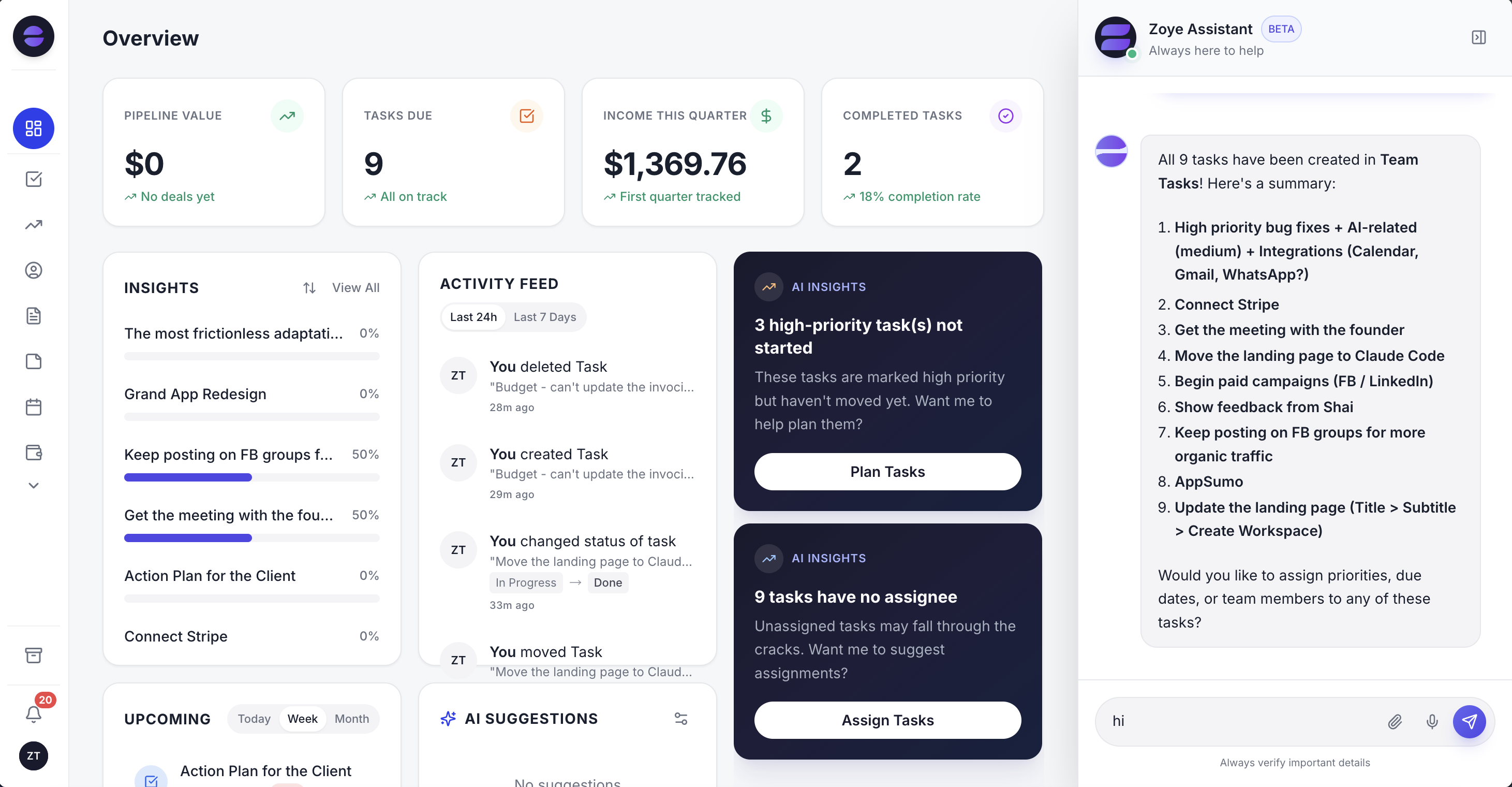 The Zoye overview: deals, tasks and the week ahead on one screen, so sales and delivery read from the same numbers.
Pricing is per plan, with a set number of members on each. Our pricing page lists four plans with a set price in November 2026. Starter costs $29 a month, or $23 a month on annual billing, for up to 5 members, which covers the 3 and 5 seat teams in the table above at one price. Growth is $59 ($47 a month billed yearly) for up to 10 members and Scale $119 ($95 a month billed yearly) for up to 30. Almost Free, at $5 ($4 a month billed yearly), is a single-member plan with the core tools and no automations, so it suits a solo owner, not a team. Automations and lead capture from forms and ads start on Growth; Starter covers the core tools.
Moving from monday.com is practical today. Zoye imports Monday.com boards directly, along with Trello boards and spreadsheets, and the assistant can pull records out of a CSV, PDF or screenshot you send it. Jira, Notion and ClickUp imports are coming soon. Coming from HubSpot, a contact export as CSV is the route.
Honest limits. Zoye is not HubSpot's marketing suite: if landing pages, lead scoring and multi-branch nurture campaigns drive your growth, HubSpot is the deeper tool. It is not a board builder with monday.com's column types and portfolio views either. Zoye holds WhatsApp conversations with your leads today; connecting your own business WhatsApp number is coming soon. For the CRM side in more depth, see our Zoye vs HubSpot comparison, and the features page lists every tool.
Ready to hand off the busywork?
Zoye brings AI-powered CRM, task management, and automation into one workspace.
Get StartedHow to choose between monday and HubSpot in one afternoon
Write down three numbers before you open either trial: how many people will work deals, how many contacts you expect in a year, and how many automations you truly need. Those three decide the tier on both platforms, and the tier decides the bill far more than the headline price does.
- Count sellers and readers separately. Readers can use view-only seats on HubSpot; on monday CRM, plan for at least 3 paid seats.
- Project your list a year ahead. On monday CRM, crossing 1,000 or 10,000 contacts and deals moves you up a tier.
- List your five rules. If they include email sequences or branching follow-up, price monday CRM Pro or HubSpot Professional, not the entry tier.
- Add the delivery line. If your team runs projects after the sale, put monday work management or a project tool into the budget.
- Run both trials on real data. Import a few hundred real contacts, sell for one actual week, and watch which tool your team opens without being reminded.
If step 4 makes the budget look heavy, book a Zoye demo and bring one of your monday.com boards or a HubSpot contact export to try against.