
Bitrix24 set out to be the everything app for running a business. In one suite it bundles CRM, tasks and projects, team chat, a website builder, telephony, HR, and document management. For a company that wanted to replace half a dozen tools with a single login at an aggressive price, that breadth has genuine appeal, and Bitrix24 has earned a large global user base because of it.
The catch is that all of that capability arrives on one screen. Bitrix24 is widely described as overwhelming: a cluttered interface, a steep learning curve, and a free tier whose real limits only become obvious once a team starts to rely on it. The all-in-one promise is real, but so is the complexity tax. In 2026, a new generation of platforms delivers the same consolidation with sensible defaults and a clean interface, so teams get the benefit of one workspace without the burden of configuring everything first. This guide ranks the seven best Bitrix24 alternatives in 2026.
Pricing reflects published rates as of June 2026; check each vendor's pricing page for current figures.
Bitrix24 alternatives at a glance
| Tool | Category | What you get instead | Best for | Pricing from |
|---|---|---|---|---|
| Zoye | AI Business Operator | One clean workspace where the AI does the work, not just stores it | Owners and small teams who want less admin, not more features | $5/mo (1 member), then $29/mo (10 members) |
| HubSpot | Inbound marketing CRM | Polished CRM with strong marketing tooling | Marketing-led sales teams | Free tier, paid from ~$20/user/mo |
| Zoho | Broad app suite | Bitrix24's breadth with better individual apps | Teams wanting many apps under one vendor | ~$14/user/mo |
| ClickUp | Configurable all-in-one PM | Deep project management with heavy customisation | Teams with someone to configure it | ~$9/user/mo |
| monday.com | Visual work platform | Colourful boards and approachable automations | Visual thinkers and cross-functional teams | ~$9/user/mo |
| Pipedrive | Focused sales CRM | A pipeline that does one thing properly | Sales teams that only need sales | ~$14/user/mo |
| Notion | Docs-first workspace | Flexible documents and lightweight databases | Documentation-heavy teams | Free tier, paid from ~$10/user/mo |
Pricing reflects published rates at the time of writing. Check each vendor's page for current figures.
What Bitrix24 alternatives actually cost
Bitrix24's pricing is genuinely one of its strengths, and any honest comparison has to say so. It sells flat-rate plans with a fixed user allowance rather than charging per seat, which is unusually good value at the sizes it targets. Most of the alternatives here charge per user, and that changes the math considerably as a team grows.
| Tool | 5 users | 10 users | 25 users |
|---|---|---|---|
| Zoye | $29/mo | $29/mo | $59/mo |
| Bitrix24 | Flat-rate tiers, roughly $49 to $199/mo by plan | Same tier structure | Same tier structure |
| ClickUp | ~$45/mo | ~$90/mo | ~$225/mo |
| monday.com | ~$45/mo | ~$90/mo | ~$225/mo |
| Notion | ~$50/mo | ~$100/mo | ~$250/mo |
| Zoho | ~$70/mo | ~$140/mo | ~$350/mo |
| Pipedrive | ~$70/mo | ~$140/mo | ~$350/mo |
| HubSpot | ~$100/mo | ~$200/mo | ~$500/mo |
Illustrative figures based on published rates; actual pricing varies by plan, features, and contract term.
The honest conclusion: if your only complaint about Bitrix24 is the price, you may not find a cheaper equivalent, because price is not where Bitrix24 is weak. The reason teams leave is almost always complexity rather than cost. Zoye is the exception in this table because it holds flat pricing while removing the complexity, which is the combination most Bitrix24 refugees are actually looking for.
What people actually complain about with Bitrix24
Bitrix24 packs an enormous amount into one product: CRM, tasks, projects, chat, telephony, HR, document management, a website builder, and more. That breadth is a real achievement and it is also the source of every complaint below.
The interface is dense. There is a lot on screen, menus nest deeply, and finding a setting often means remembering which of several modules owns it. Teams routinely report that new hires take weeks rather than days to become comfortable.
It needs an administrator. Permissions, workflows, automation rules, and module configuration all reward someone who knows the system well. Small teams without that person tend to use ten percent of what they are paying for.
Most of it goes unused. This is the pattern that matters. A company adopts Bitrix24 for CRM and tasks, never touches telephony, HR, or the site builder, and still carries the interface weight of all of it every day.
Customisation has limits at depth. For teams that do invest in configuring it, some workflows are harder to bend than the marketing suggests, and workarounds accumulate.
Support and localisation vary by region and plan tier. Experiences differ widely, which is common for products at this breadth.
None of this makes Bitrix24 a bad product. For a company that genuinely uses most of its modules and has an administrator, it is strong value. The mismatch is with small teams who wanted a workspace and received a platform.
Do you need an all-in-one at all?
This is worth asking before you shortlist, because a lot of Bitrix24 refugees replace one all-in-one with another and hit the same wall in six months.
All-in-one makes sense when your data genuinely connects: the deal relates to the tasks, which relate to the calendar, which relates to the invoice. Splitting those across tools means either paying for integrations or copying data by hand.
Best-of-breed makes sense when one function dominates your business and the rest are incidental. A pure sales team is often better served by Pipedrive plus a calendar than by any all-in-one.
The trap in the middle is buying an all-in-one for the breadth and then only using two modules. You pay for the whole platform in interface complexity every single day, whether you use it or not. That is exactly the Bitrix24 experience most people describe.
The useful question is not "how many features does it have" but "how many of them will be open on my screen next Tuesday". A workspace with CRM, tasks, calendar, budget, and reports covers what most small businesses actually touch daily, and everything beyond that is weight.
Why teams are looking beyond Bitrix24 in 2026
The pressure to leave Bitrix24 comes from four directions that have become harder to ignore as teams expect software to be simple out of the box.
The interface is overwhelming. Bitrix24's defining feature is also its defining problem. Cramming CRM, tasks, chat, sites, telephony, and HR into one product means the navigation is dense, the toolbar is crowded, and a new hire faces a wall of features on day one. Teams routinely report that adoption stalls because people cannot find what they need. Simplicity has become a competitive advantage, and Bitrix24 optimized for the opposite.
The learning curve is steep. Because every module is configurable and interconnected, getting Bitrix24 set up the way a team actually works takes real time, often weeks. The platform rewards organizations with a dedicated administrator and punishes small teams that just want to start running. The setup tax is paid before any value is delivered.
The free tier hides real limits. Bitrix24's free plan is generous on paper, which is part of its marketing appeal. In practice, the limits on storage, users, automation, and certain features surface quickly once a team leans on the platform, and the upgrade path can feel like a bait-and-switch. Teams want pricing they can understand before they commit, not after.
AI is a layer, not the foundation. Bitrix24 has added AI features (CoPilot and related tools), but they sit on top of a legacy suite rather than running through it. A modern AI-native alternative treats the assistant as the primary way to get work done across the whole workspace, not a helper docked inside one module.
The 7 best Bitrix24 alternatives in 2026
1. Zoye - the clean, AI-native all-in-one alternative
Zoye is the strongest Bitrix24 alternative for teams that want the all-in-one promise without the complexity. Where Bitrix24 piles every feature onto one dense screen, Zoye ships with sensible defaults, a clean interface, and a native AI assistant you can simply talk to. It is the only platform on this list that bundles CRM, projects and tasks, calendar, budget, and an acting AI into one workspace at flat-rate pricing.

The platform covers CRM (contacts, companies, deals, and pipeline stages), tasks and projects (list, board, calendar, and timeline views, with custom fields, dependencies, workload management, and time tracking), a built-in calendar, budget and finance tracking, and cross-workspace reports. The difference from Bitrix24 is not the feature list, it is the experience: one workspace, one login, one consistent design, and defaults that make the platform usable the moment you sign in.
Zoye Assistant - AI that acts, not just answers
Bitrix24's AI tooling sits inside its modules as a helper. Zoye lives across the entire workspace and takes action. Give it a brief and it drafts a task description. It surfaces overdue and blocked work proactively, reassigns workload by capacity, generates a weekly status report on demand, schedules meetings around deadlines, and creates tasks from incoming emails. Instead of learning where every feature hides in a crowded interface, you tell Zoye what you want and it does the work. For a tool whose biggest competitor is famously hard to navigate, that conversational layer is the whole point.
Tasks without the setup tax

Setting up tasks in Bitrix24 means working through a configurable but heavy project module. Zoye gives you a straightforward Kanban board with priority labels that is ready to use immediately, plus list, calendar, and timeline views on the same data. Dependencies, workload management, and time tracking are there when you need them, and absent from your way when you do not. Project templates let you spin up repeatable work without rebuilding it each time.
Calendar - tasks where they belong
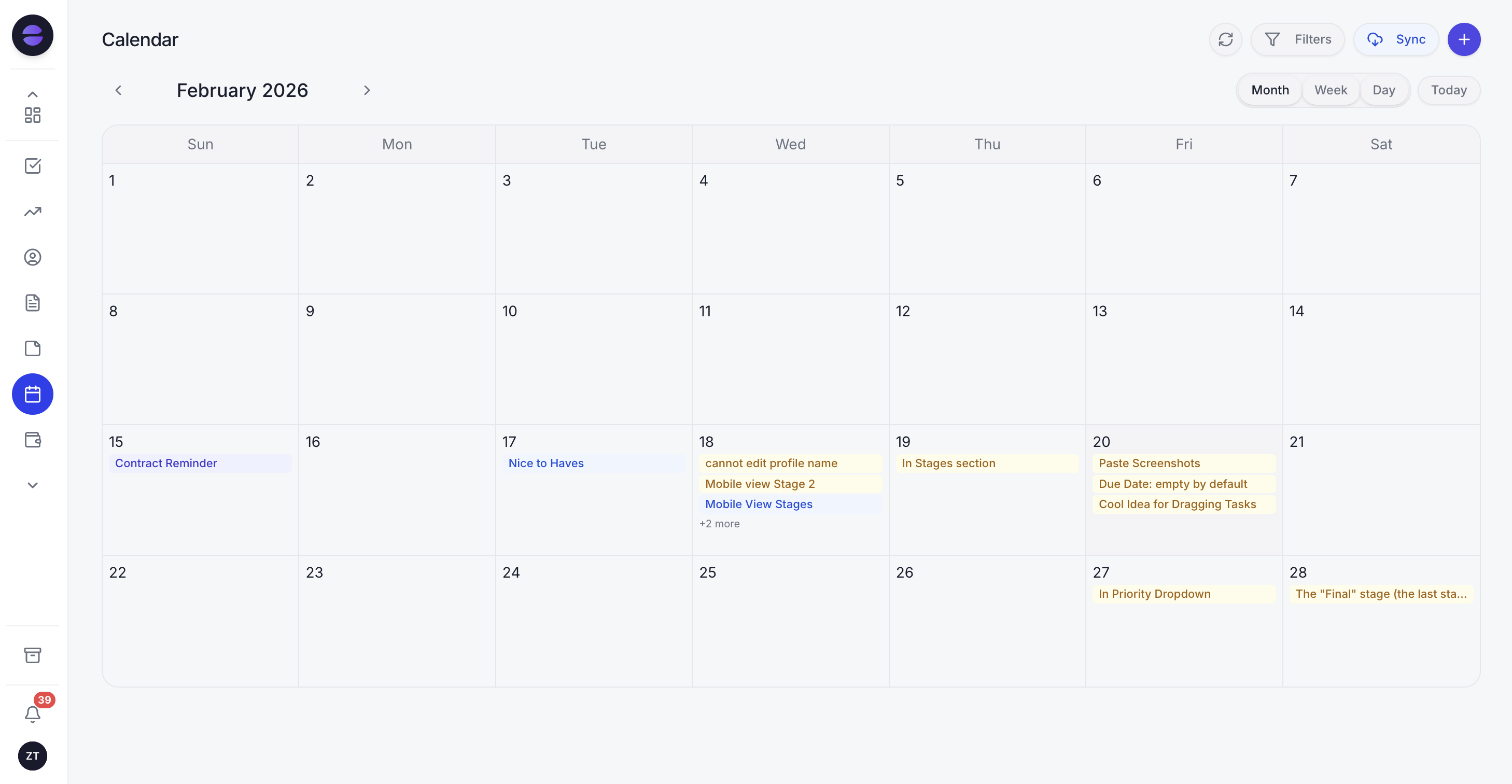
In Bitrix24 the calendar is one more module to configure and connect. In Zoye the calendar is part of the workspace: tasks appear on it automatically, with no sync setup and no integration to maintain. Meetings layer over deadlines so the team sees the real picture of the week in one place. Nothing breaks when a separate calendar app updates on a schedule of its own, because there is no separate app.
Reports that pull from the whole workspace
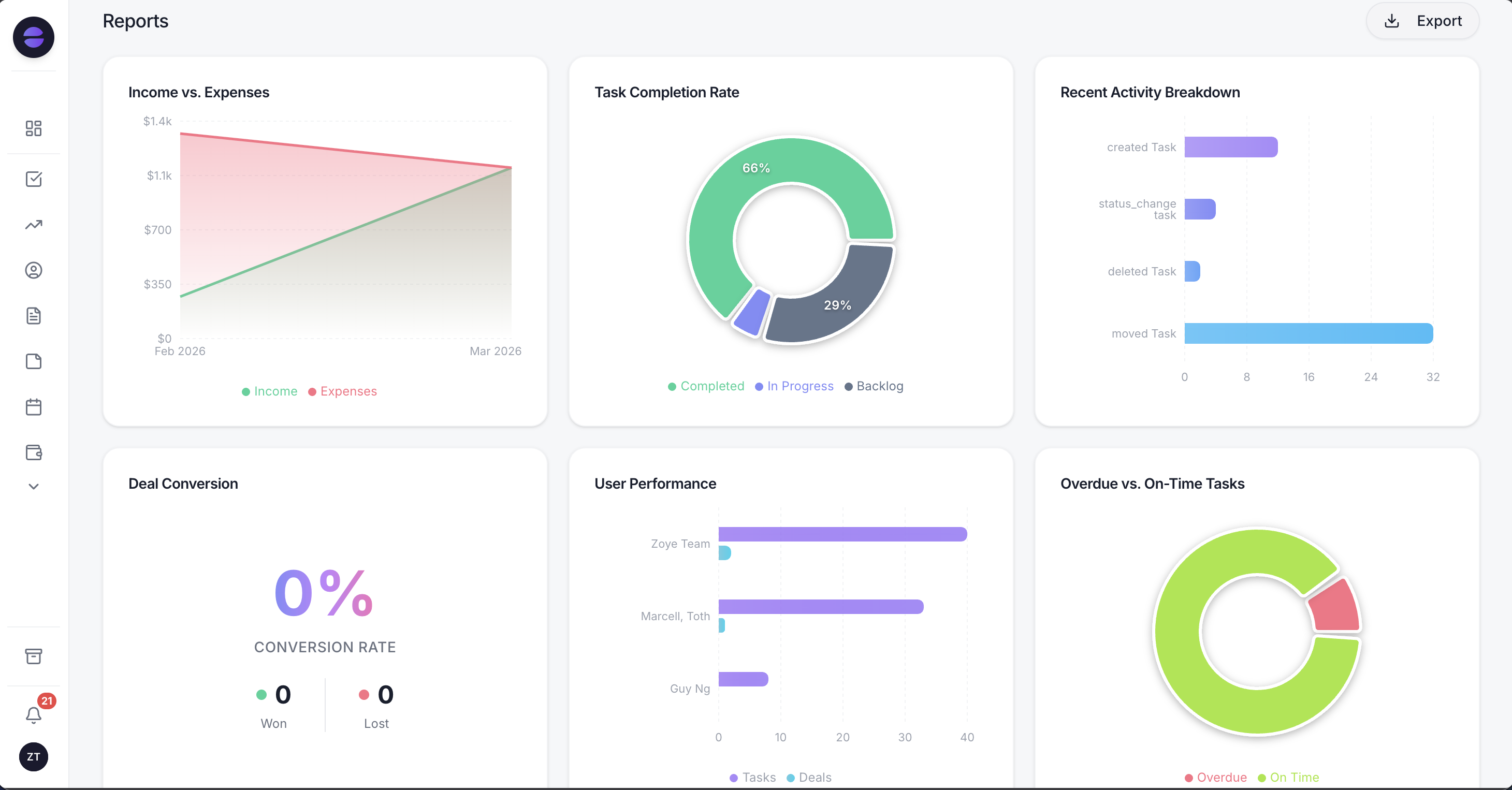
Getting a clear cross-functional view out of Bitrix24 often means stitching together separate dashboards. Zoye Reports brings financial, task, deal, and team data into one exportable dashboard out of the box. The weekly status report writes itself from real workspace activity, so leadership gets the picture without anyone spending an afternoon assembling it.
The pricing model is flat-rate, not per-seat. A 15-person team pays $59 per month on Zoye Growth, total, with no per-user math and no setup project standing between sign-up and a usable workspace. WhatsApp integration is live, and import connectors for Trello and Monday.com help teams bring existing work in. Note that Zoye uses "Workspace" for what others call a project or account, and "Stage" for what others call status. Jira, Notion and ClickUp imports are coming soon.
Pricing: Almost Free from $5 per month ($4 billed annually) for 1 member with the core tools, cancel or upgrade anytime. Starter from $29 per month (up to 10 members). Growth from $59 per month (up to 20 members).
Best for: Small to mid-size teams that want a clean all-in-one workspace with native AI, without the Bitrix24 learning curve.
2. HubSpot - the inbound marketing standard
HubSpot is the strongest pick for teams whose center of gravity is sales and marketing. The free CRM tier is genuinely useful, and the Marketing, Sales, and Service Hubs add real depth in tiered bundles. Compared to Bitrix24, HubSpot is far more polished and easier to learn, though it focuses on the customer-facing side rather than the full operations suite Bitrix24 attempts.
The trade-off is the pricing curve. HubSpot Starter is affordable, but Professional and Enterprise tiers climb quickly.
Pricing: Free CRM tier. Sales Hub Starter around $20 per seat per month. Professional around $100 per seat per month.
Best for: Teams that want marketing-led CRM with a polished experience.
3. Zoho - the broad app suite
Zoho is the closest like-for-like to Bitrix24's ambition: a vast bundle of business apps (CRM, Projects, Books, Desk, Mail, and dozens more) under one umbrella. For teams that genuinely want breadth and are willing to manage multiple apps, Zoho One is cost-effective. It is generally cleaner than Bitrix24 per app, though it shares the fragmentation problem of many products under one bill.
Pricing: as of October 2026, Zoho One costs $37 per employee per month billed annually on all-employee pricing, or $90 per user per month billed annually ($105 monthly) on flexible-user pricing. Individual apps priced separately.
Best for: Teams that want maximum app breadth and will manage a suite of products.
4. ClickUp - the configurable all-in-one PM
ClickUp covers tasks, docs, goals, and light CRM through custom fields, aiming to be the one app for work. It is more modern and flexible than Bitrix24's project module, and the free tier is capable. The trade-off is that ClickUp's flexibility can recreate some of the same complexity teams are fleeing: with so many views and settings, it takes discipline to keep it simple.
Pricing: Core around $9 per user per month. Business around $17 per user per month (billed yearly; ClickUp re-checked October 2026). Business includes Brain² AI; on Core the Brain AI add-on is priced separately.
Best for: PM-first teams that want deep configurability and will invest in setting it up.
5. monday.com - the visual-first work platform
monday.com offers project management, a sales CRM, and dashboards in a colorful, visual board format. It is far friendlier to learn than Bitrix24 and popular with teams that think visually. For organizations that want work management as the primary use case with light CRM alongside, monday is approachable, though deeper CRM and finance needs push you toward higher tiers or add-ons.
Pricing: Basic around $9 per seat per month. Standard around $12 per seat per month. Pro around $19 per seat per month.
Best for: Visual-first teams that want approachable work management with light CRM.
6. Pipedrive - the focused sales CRM
Pipedrive is the answer for teams that mainly need a sales pipeline done well, without the rest of the suite. It is simple, fast to learn, and built around moving deals through stages. Compared to Bitrix24, it does far less, which is precisely the point for sales teams that found Bitrix24's breadth a distraction. You will pair it with other tools for projects and finance.
Pricing: Essential around $14 per seat per month. Advanced around $29 per seat per month. Professional around $49 per seat per month.
Best for: Sales-led teams that want a focused, easy pipeline CRM.
7. Notion - the docs-first workspace
Notion is the pick for teams that want their tasks, lightweight CRM, and wiki to live alongside best-in-class documents. Its databases handle CRM-style and project records, and the docs layer is excellent. The trade-off is that Notion is docs-first, not operations-first: teams that need a real sales pipeline, telephony, or finance tracking will find it too shallow where Bitrix24 was too dense.
Pricing: Free for personal use. Plus around $10 per seat per month. Business around $15 per seat per month.
Best for: Content-heavy teams that want tasks and light CRM alongside strong docs.
Best Bitrix24 alternative for small business
For small businesses, Zoye is the clearest pick because the things that make Bitrix24 hard hurt small teams the most. A small team cannot spare weeks for setup or a dedicated administrator to tame a crowded interface. Zoye is usable the moment you sign in, with sensible defaults and a clean workspace covering CRM, tasks, calendar, budget, and reports. Instead of learning where every feature lives, the team talks to the AI assistant and gets work done.
The economics favor small teams too. Bitrix24's paid plans and Zoho-style per-user models climb as you grow. Zoye is flat-rate: a 15-person small business pays $59 per month total on Zoye Growth, and the entry plan, Almost Free, covers 1 member with the core tools for just $5 per month. There is no setup project and no per-seat surprise standing between sign-up and a working system.
Best AI-powered Bitrix24 alternative
Zoye is the only alternative on this list built AI-native from the ground up. Bitrix24 and most competitors have added AI as a feature inside an existing product: a helper you open within a module, useful but bounded. Zoye is the way you work across the whole workspace.
It sees the contact in the CRM, the deal attached to that contact, the tasks driving the deal, the budget impact in the ledger, and the meeting on the calendar, all at once, and it takes action across all of them when you ask. Draft the follow-up, create the tasks, schedule the meeting, update the stage, and write the weekly report: one assistant, one workspace, nothing to stitch together. For a category whose incumbent is defined by complexity, an assistant that removes the need to navigate that complexity is the strongest differentiator there is.
How to choose the right Bitrix24 alternative for your team
Three questions narrow the choice.
1. How much do you value simplicity over raw breadth? If you genuinely want telephony, a website builder, HR, and chat all in one suite and have someone to configure it, Bitrix24 or Zoho deliver that breadth. If you want the core all-in-one (CRM, tasks, calendar, budget, reports) without the clutter, Zoye is built for exactly that.
2. Is your primary need sales, work management, or true all-in-one? Sales-led teams lean toward HubSpot or Pipedrive. Work-management-led teams lean toward ClickUp or monday. Teams that want one workspace for everything, run by AI, lean toward Zoye.
3. What does AI mean for your team? If a helper inside one module is enough, every option here covers that. If you want an assistant that takes action across the whole workspace, Zoye is the only AI-native pick on the list.
Best Bitrix24 alternative by what you are escaping
Different complaints point to different replacements.
You want it simpler. This is the largest group by far. Zoye is the direct answer: one clean workspace where CRM, tasks, calendar, budget, and reports live together, and where the AI assistant does the updating rather than handing you more screens to maintain. Notion is the other simplicity answer if your work is genuinely documentation-shaped rather than pipeline-shaped.
You want better sales specifically. If the CRM was the only part you used and it felt clunky, Pipedrive or HubSpot will feel like an upgrade immediately. Accept that you are buying a sales tool and will need something else for the rest.
You want better project management. ClickUp and monday.com both beat Bitrix24 on project work. ClickUp is more configurable and demands more setup; monday.com is more approachable and less deep. Both charge per user.
You want the breadth but done better. Zoho is the closest like-for-like: a comparable range of applications with generally stronger individual products, at per-user pricing. If you liked the Bitrix24 concept and disliked the execution, this is the obvious move.
You want marketing automation. HubSpot is the category standard and priced accordingly. It is worth it if marketing is genuinely your growth engine, and expensive if it is not.
You want the admin work to stop. This is a different request from all of the above, and only one answer on this list addresses it. Every other tool here stores your work more attractively. An operator does the work: capturing the lead, chasing the follow-up, booking the client, updating the record, and building automations when you describe what should happen, rather than on a workflow canvas.
How to migrate off Bitrix24 without losing data
Bitrix24 holds a lot, which makes leaving feel heavier than it is. Four steps cover it.
1. Decide what you actually use first. Before exporting anything, list the modules your team opened in the last month. For most teams it is CRM, tasks, and calendar. Everything else is data you are keeping for comfort rather than use, and carrying it into a new system just recreates the clutter you are trying to escape.
2. Export in this order: contacts, deals, tasks, files. Bitrix24 supports CSV export for the CRM entities and file downloads for documents. Do contacts first and confirm they import cleanly before moving deals, because deals reference contacts and a broken contact import corrupts everything downstream.
3. Rebuild your pipeline stages by hand, deliberately. Do not replicate your Bitrix24 stages automatically. Most teams accumulate stages that no longer reflect how they sell. A migration is the cheapest opportunity you will ever get to simplify this, and stages are the part of a CRM people actually feel daily.
4. Run in parallel for two weeks, then cut. Keep Bitrix24 readable but stop writing to it. Two weeks is enough to surface anything you forgot. Anyone promising a same-day cutover on a platform this broad has not done one.
With Zoye specifically, the setup step is different in kind: you tell Zoye how your business works, the way you would brief a new manager, and Zoye proposes the pipeline stages, record structure, and automations to match, then keeps them running. There is no workflow canvas to rebuild and no administrator role to fill, which is usually the actual reason the last system stopped being used.
What to check before you commit
Does it need an administrator? If the answer is yes and nobody on your team has that time, you will end up in the same position you are in now, with a different logo.
How much of it will you have open on a normal Tuesday? Count the modules honestly. Features you do not use are not free; you pay for them in interface complexity every day.
What does it cost at your headcount in two years? Per-user pricing is fine at five people and painful at thirty. Bitrix24's flat-rate model is genuinely good on this axis, so make sure you are not trading a real advantage away for a nicer interface.
Who does the work after setup? Every tool in this list stores your work. Ask specifically which of them does any of it: chases the unanswered quote, books the client, updates the record. That distinction matters more than any feature comparison, because the most common fate of business software is not being replaced. It is being abandoned.
Migration from Bitrix24 to a simpler workspace
Migrating off Bitrix24 sounds daunting because so much lives in one place, but the practical approach is to consolidate by category rather than move module by module. Identify the CRM data (contacts, companies, deals, and history), the task and project data (open work, deadlines, assignees), the calendar data, and any financial records you track. Export each category to a common format and import it in a deliberate sequence: CRM first, then tasks and projects, then calendar, then budget.
For teams moving to Zoye specifically, the AI assistant handles each step interactively. Import connectors bring in work from Trello and Monday.com, and for the rest the assistant maps fields, deduplicates records, applies tags, and confirms the result before moving on. What feels like an intimidating exit from a dense suite becomes a guided sequence of small steps, and the team lands in a workspace that is usable on day one rather than after weeks of configuration. Jira, Notion and ClickUp imports are coming soon.
What changes after leaving Bitrix24
The post-migration experience surprises teams in three consistent ways.
First, the interface stops fighting them. The dense, crowded screen that made Bitrix24 hard to adopt is replaced by a clean workspace with sensible defaults. People find what they need, new hires get productive in hours instead of weeks, and adoption stops stalling.
Second, the AI does the navigating. Instead of hunting through modules and settings, the team tells Zoye what it wants. The assistant drafts, schedules, reassigns, and reports across the whole workspace, which removes the very complexity that pushed the team to leave in the first place.
Third, the pricing becomes predictable. Flat-rate billing replaces per-user licensing and the free-tier limits that surface at the worst moment. The cost stops climbing every time the team adds a seat, and there is no setup project to fund before the platform delivers value.
Why teams pick Zoye as their Bitrix24 replacement
A few patterns come up again and again. The workspace is clean and usable immediately, so the all-in-one promise finally arrives without the complexity tax. The AI assistant works across the whole workspace and takes action, so the team gets work done by talking instead of navigating. And the bill is flat-rate and predictable, so cost stops scaling with headcount.
Swap Bitrix24's sprawling module maze for a workspace your team can navigate on day one. Almost Free, the entry tier, is $5 per month (or $4 per month billed annually), and you can walk away or scale up at any time.
For more context, see the best Zoho alternatives, the best HubSpot AI CRM alternatives, the best ClickUp alternatives, and the best monday.com alternatives.