Click to WhatsApp Ads: How They Convert and the Mistake That Burns the Budget
There is a particular kind of disappointment that comes from a campaign that looks like it is working. The cost per result is low, the conversations counter goes up every hour, the dashboard is green. Then you look at the actual money three weeks later and almost none of it came back. Click-to-WhatsApp ads produce that pattern more reliably than almost any other ad format, and the reason has nothing to do with the ad.
The format itself is unusually good. It removes the landing page, the form, the typo in the email address, and the twenty-minute gap between someone being interested and someone being contactable. What it does not remove is the need for a person or a system on the other end that actually answers, and answers in a way that turns a chat into a record you can work.
This guide covers what these ads are and how they differ mechanically from a lead form, who they genuinely suit and who should not run them, how to set the campaign up, what the welcome message and your first reply should say, and the specific failure that turns a cheap cost per conversation into an expensive nothing.
Every Meta advertising and WhatsApp policy claim below was checked against Meta's own documentation as of August 2026. Meta changes these rules often, so verify anything you are about to build a budget on.
What a click-to-WhatsApp ad actually is
Mechanically it is unremarkable, which is part of the appeal. You build a normal Facebook or Instagram ad in Ads Manager, with the same creative, targeting and placements you would use for anything else. The only thing that changes is the destination. Instead of sending the click to a website, you send it to a WhatsApp conversation with your business.
The prerequisite is straightforward: Meta's Marketing API documentation states that the Facebook Page running the ad must have a WhatsApp number linked to it, either manually or through an API integration. No linked number, no ad.
When someone taps the button, WhatsApp opens on a chat with your business, with a message already written in the input box. That prefilled text is called the autofill message, and the default that Meta supplies is "Hello! Can I get more info on this?". The person can edit it, but most do not. They tap send, and now you have an inbound WhatsApp message from a real, working phone number.
The part that gets overlooked is what arrives with that message. Meta's webhook documentation shows that a message originating from an ad carries a referral object alongside it, containing the ad's identifier, the ad's headline, the ad's body text, the media type and image or video URL, the source URL, the welcome message text they saw, and a click identifier called ctwa_clid. In plain terms: your system can know exactly which ad and which creative produced this specific human, before you have asked them a single question. Whether you use that is the difference between an ad channel you can optimise and one you are guessing at.
That is the whole mechanism. An ad, a chat, and a packet of context riding along with the first message. Everything that follows in this article is about what you do with it, which is where campaigns are won and lost. Our WhatsApp automations page shows the automation layer that sits behind that first message, and this article is the marketing side of the same problem.
Why the conversation converts differently from a lead form
Put a Meta lead form and a click-to-WhatsApp ad side by side and the lead form usually wins on cost per lead. It will often win by a lot. Then the two channels behave completely differently once the leads exist, and the reason is worth understanding rather than memorising.
The phone number is real. On a lead form, the phone field is prefilled from the person's Meta profile or typed by someone who is half paying attention on a train. Numbers are old, mistyped, or deliberately fake because the person wants the price list and not the phone call. On a click-to-WhatsApp ad, the number is the number they are messaging you from. It is not a claim about how to reach them. It is the channel they are already standing in.
The first contact has already happened. This is the psychological half and it matters more than it sounds. With a form, you are a stranger interrupting: an unexpected call from a number they do not recognise, or an email in a promotions tab. With WhatsApp, the person opened the conversation. Your reply arrives inside a thread they started, in an app they check compulsively, with a notification they will actually see. You are not interrupting. You are answering.
The context is in the thread. The ad they responded to is visible right there in the conversation, along with the welcome message. Nobody has to reconstruct what the person was looking at when they got interested, which is half of what a discovery call normally spends its time doing.
The reply is not a cold call. A phone call from a form fill has a low answer rate and an awkward opening. A WhatsApp message has neither problem. It sits there until they are ready, and they answer it on their own schedule, which is usually within minutes.
Now the honest other side, because these ads are sold much too enthusiastically.
You will get fewer leads and messier ones. A form produces neat rows with fields. A chat produces "hi", "how much", a voice note, a photo of a competitor's price list, and someone asking whether you deliver to a town you have never heard of. Structured data is something you now have to extract rather than something you were handed.
Some of the volume is not a lead at all. Curiosity taps, people who wanted the discount code and nothing else, and the occasional person who thought the ad was something else entirely. This is normal, and it is why cost per conversation started is a vanity metric.
It consumes human attention. Every conversation is a small demand on someone's time. A hundred form fills can sit in a queue overnight without visibly rotting. A hundred unanswered WhatsApp messages are a hundred people watching a business ignore them.
Want to see it in action?
Watch how Zoye automates your daily workflow - from lead management to team collaboration.
See How It WorksWho these ads suit, and who should not run them
This is the section that gets skipped, and skipping it is expensive.
They suit you if your buyer has questions before they buy. Anything with a variable price, a fitting, a site visit, an availability check, a specification, or a comparison. Clinics, contractors, agencies, tutors, equipment sellers, event venues, B2B services with a quote. The conversation is not a nuisance in these businesses; it is how the sale actually happens, so moving it earlier is a straight gain.
They suit you if WhatsApp is the default messaging app in your market. In much of Latin America, the Middle East, Africa, South and Southeast Asia and southern Europe, sending a business a WhatsApp message is more natural than filling in a form. In markets where WhatsApp is a minority app, the same ad asks people to do something slightly unusual, and response rates reflect that.
They suit you if somebody can answer within minutes during the hours the ads run. Not "we usually reply the same day". Minutes, in the window when the budget is actually spending.
They suit you much less if you sell something cheap with a working checkout. If the natural action is "add to basket", a chat is a detour. Send the click to the product page.
They do not suit you if you cannot staff the replies. This is not a soft warning. A business that runs these ads without response capacity is paying Meta to generate proof that it does not answer. Fix the answering first, then buy the traffic. Every other order of operations wastes the budget.
One market-specific note that catches people planning follow-up sequences: Meta's documentation states that marketing template messages are not currently delivered to users with United States phone numbers. That does not stop a US recipient from starting a conversation through an ad, but it does change what your re-engagement plan can rely on afterwards.
Setting the campaign up
The build is short. Most of the work that determines the result happens before and after it.
1. Link the WhatsApp number to the Page. Do this first, because nothing else is selectable until it exists. One Page, one linked number.
2. Pick the objective. Meta's Marketing API documentation lists four objectives that support ads clicking to WhatsApp: engagement, leads, sales and traffic. Engagement optimised for conversations is the common starting point for a business that wants message volume. Leads and sales matter when you are able to send conversion signals back, which is the more advanced setup and the one that eventually produces better traffic, because the algorithm can learn what a good conversation looks like rather than just what a cheap one looks like. Note that ads featuring call prompts must use the engagement objective.
3. Choose placements deliberately. Feed, Stories and Reels on both Facebook and Instagram all support this destination. Stories and Reels tend to produce more taps and lower intent; feed placements tend to produce fewer and better. Start broad, then look at conversation quality per placement rather than cost per conversation.
4. Write creative that sets up a conversation. This is the piece most advertisers get wrong by copying their landing page ads. A click-to-WhatsApp ad is not asking for a purchase, it is asking for a message, so the creative should make the message feel easy and obviously worth sending. "Message us for a quote on your exact size" outperforms "Best prices in town" because it tells the person what to say. If your ad implies a price or an offer, honour it in the first reply, or you have bought a conversation that starts with a correction.
5. Set the autofill message. Replace Meta's default with something that identifies what they clicked. A prefilled "I would like a quote for a kitchen fit" tells you the product line before you have typed a word, and it saves the person from having to describe themselves.
6. Configure the welcome message and ice breakers. Meta's documentation describes the page_welcome_message field, which lets you customise the greeting rather than accepting the default, and supports ice breakers: tappable prompt options the person can pick instead of typing. Ice breakers are quietly one of the highest-leverage settings in the whole campaign, because a tap is easier than a sentence and each tap tells you what the person came for.
7. Budget for the answering, not just the ads. If you are spending an amount per day that produces thirty conversations, someone has to have time for thirty conversations. That is the real cost of the campaign and it does not appear in Ads Manager.
The welcome message, and why the first line decides everything
Meta's default greeting is "Hello! Can I get more info on this?". It is a reasonable neutral prompt and it is a wasted opportunity, because "this" is doing an enormous amount of work and telling you nothing.
Then comes the message that actually matters: your first reply. Whether it is typed by a person or fired by an automation, it decides the entire conversation, because it arrives at the exact moment the person's interest is at its peak and their patience is at its shortest.
A first reply that works does three things in roughly three lines.
It confirms a human is involved and the message landed. Not "Thank you for contacting us. Your message is important to us." That sentence has been used by every bad company the reader has ever dealt with, and it reads as a machine clearing its throat.
It references the specific thing they responded to. You know the ad. It came through in the referral data. Using it is the single cheapest trust signal available: "You clicked the ad about the autumn service check on your boiler" tells them instantly that this is not a call centre reading from a script.
It asks exactly one easy question. One. The question should be answerable in under five words, ideally as a tap. "Which of these is closest to what you need?" with three ice breaker options beats "Please provide your name, email, postcode and preferred appointment time" by an enormous margin, because the second one is a form wearing a chat costume, and people came here specifically to avoid a form.
What to avoid in the opening message, all of which are common and all of which cost real money:
- A menu with seven numbered options. This is an IVR phone tree, and people hate those in every medium.
- An apology for a delay in the very first message, which tells the person the delay is the norm.
- A block of terms, hours, policies and disclaimers before anything useful.
- Asking for an email address. They are on WhatsApp. You have their phone number. Asking for the channel they were avoiding is a strange way to start.
- Immediately quoting a price with no context, unless the price is genuinely fixed and simple, in which case say it plainly and stop.
The pattern that works, roughly: acknowledge, reference the ad, ask one thing, and make it obvious that a human is nearby. Then respond to what they actually say, rather than pushing them down a script.
If you want the qualifying questions that come after this opening, our guide on WhatsApp marketing for small business covers the campaign side of the channel in more depth.
See what Zoye can do for you
From CRM and deal tracking to AI-powered task management - explore everything Zoye offers in one workspace.
Explore FeaturesThe 72-hour window, and what it is actually worth
There is a genuine economic advantage buried in this ad format, and it is worth stating precisely rather than the way it gets repeated in marketing blogs.
Per Meta's WhatsApp Business Platform pricing documentation as of August 2026: when a WhatsApp user messages you through a click-to-WhatsApp ad or a Facebook Page call-to-action button, a 24-hour customer service window opens as normal. If you respond within those 24 hours with any type of message, that message is free and it opens a free entry point window. That window stays open for 72 hours, and all messages sent inside it are free, including template messages.
Two details matter more than the headline.
First, the free entry point window is independent of the 24-hour customer service window. If the customer service window closes while the free window is still open, you can still send, but you are restricted to template messages. Free and unrestricted are not the same thing.
Second, the window is triggered by your reply, not by their message. Nothing starts until you answer. A business that replies in four minutes gets three days of free messaging with that person. A business that replies in thirty hours gets none of it, and has to open with a pre-approved template instead of a normal sentence.
Meta is also changing what free means elsewhere: its pricing documentation states that from 1 October 2026, service messages will be charged per message, consistent with how template messages are charged, while the 72-hour free entry point window is unchanged for message delivery. The direction of travel is clear enough. Speed of response is not just good service on this channel, it is a line item.
The failure that wastes the whole budget
Almost every disappointing click-to-WhatsApp campaign fails in one of three places, and none of them are the ad.
Nobody answers
The most common and the most avoidable. The ads run at seven in the evening because that is when the audience is on their phone, and the only person who can reply stops working at five. Conversations pile up overnight. By morning they are stale, the free reply window is closing, and the friendly personal message you wanted to send now has to be a template.
The fix is not a bigger team. It is deciding, before launch, exactly who answers, in what hours, on what device, with what backup, and then scheduling the ads to those hours rather than to the whole day. A campaign that only runs when you can answer will outperform a campaign that runs constantly and gets ignored half the time, and it will do it on less spend.
The conversation dies after the first reply
Second most common, and subtler. Someone answers quickly, the exchange goes back and forth twice, the person says "let me think about it", and that is where it ends forever. No follow-up, because nobody is tracking that this conversation exists in a state that requires one.
Chat is uniquely bad at this. An email sits in an inbox looking unfinished. A WhatsApp thread scrolls up and disappears behind twenty newer ones, and the person who was going to follow up on Thursday genuinely forgets, without ever feeling like they dropped anything. The conversation feels resolved because it stopped, and stopping is what conversations do.
It never became a lead record
This is the one that quietly destroys the whole channel, and it is the reason the other two keep happening.
If a click-to-WhatsApp conversation lives only as a chat thread, then it has no owner, no stage, no next step, no reminder, and no value attached to it. You cannot report on it. You cannot tell which ad produced the customers rather than the chatter, because the ad identifier arrived in the referral data and nobody kept it. You cannot hand the person to a colleague when the first responder goes on holiday. You cannot tell, three months later, whether the campaign was profitable, so the decision to keep spending is made on cost per conversation, which measures nothing that matters.
The fix is structural and it is not complicated: every conversation started from an ad becomes a contact and a lead record at the moment the first message arrives, with the campaign and ad name saved on it, an owner assigned, and a next step attached. Then the chat is a view of the relationship rather than the entire memory of it.
That is exactly the same problem the other Meta ad formats have, incidentally. Our guide on Facebook lead ads to CRM covers the form version of the same failure, and the field-mapping and duplicate problems that come with it.
Measuring it honestly
Three metrics, in order of how much they should influence your decisions.
Cost per conversation started. The one Ads Manager gives you. Useful for spotting creative that nobody responds to, useless for deciding whether the channel works. Treat it the way you treat click-through rate.
Cost per qualified lead. A conversation where a real person told you a real requirement. This requires the qualification step and the record, which is why so few advertisers have this number. It is the first metric that tells you anything.
Cost per customer, attributed to the ad. The only one that decides your budget. It requires that the ad identifier from the referral data stayed attached to the record from the first message all the way through to the closed sale. If you keep source_id and the ad name on the contact, this is straightforward reporting. If you do not, it is impossible, and you will spend a year optimising towards cheap conversations with people who never buy.
One honest caveat on all three: attribution across a chat channel is fuzzier than a website funnel, because conversations restart, people message from a different number, and some of the best leads come from someone forwarding your reply to a colleague. Directional accuracy is achievable. Perfect accounting is not, and chasing it is a poor use of the time you should be spending answering people.
Where Zoye fits
Everything above splits neatly into two jobs: buying the traffic, which is Meta's side, and turning the resulting conversations into work that gets done, which is yours. Zoye does not run ads and does not pretend to. It handles the second job.
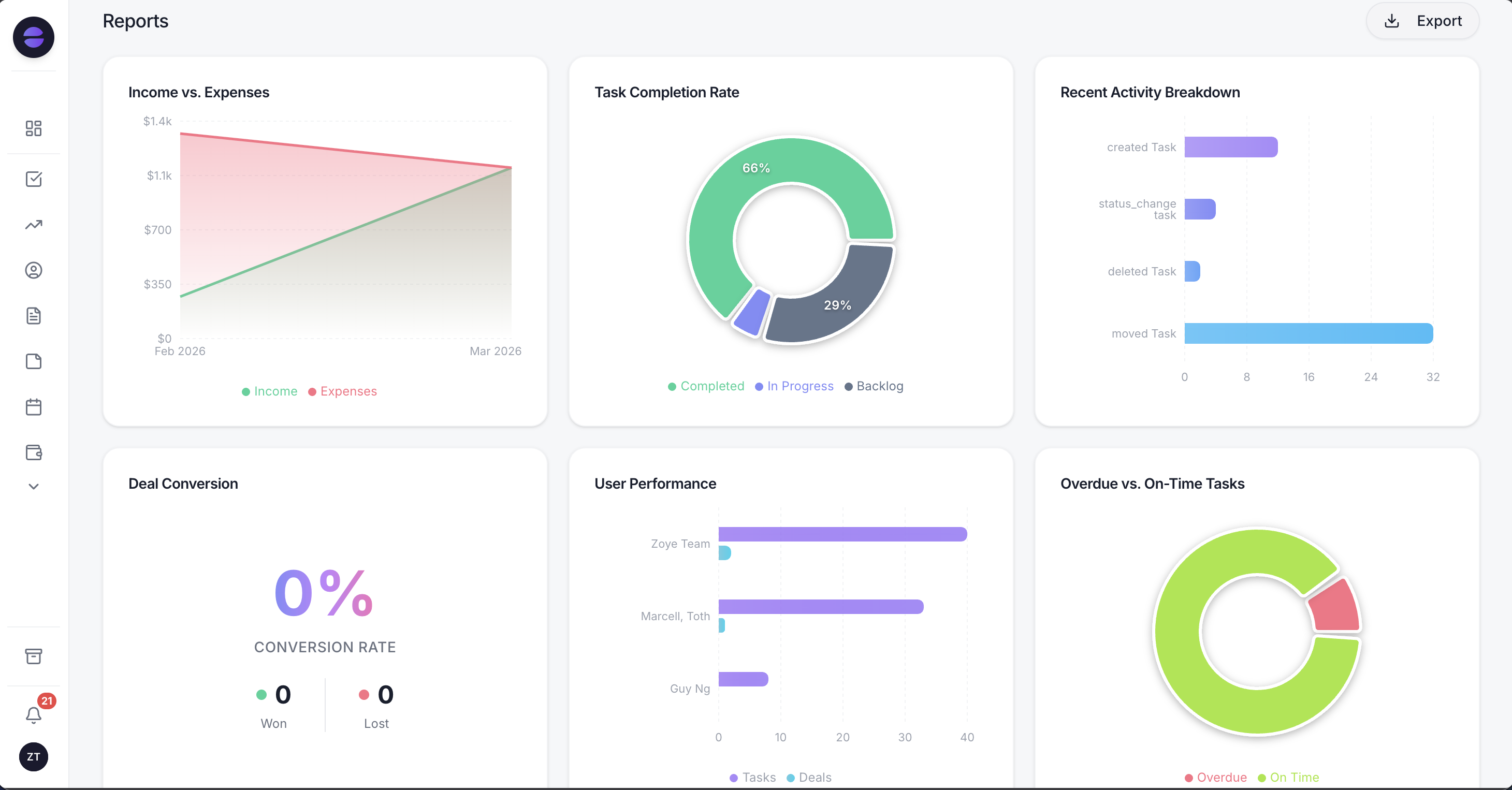 Zoye Reports, where a conversation that started from an ad is countable as a lead rather than a chat thread.
A message that arrives from a click-to-WhatsApp ad becomes a lead in the workspace with the campaign and ad name saved on the record, so the reporting question of which ad actually paid has an answer rather than an argument. If the same person messages again next month, they are matched to the contact that already exists instead of appearing as a stranger.
From there the WhatsApp automations do the work the format demands. The new-lead auto-message has per-source switches, so an ad conversation can be answered differently from a website enquiry, and one-message-per-person dedupe stops the same human getting greeted twice. The qualification bot writes answers straight into CRM fields rather than leaving them in a chat log. Owner assignment and follow-up tasks fire on the lead, so the conversation that stalls at "let me think about it" has a real reminder attached to it and a person responsible for it. Every automation is off by default and confirms before it sends, and all of it runs on the official Meta WhatsApp Business Platform.
The assistant is the same one in the web app, on WhatsApp and in Slack, with the same tools and the same permissions, which matters more than it sounds for this specific channel. The person answering ad conversations at nine in the evening is usually on a phone, and being able to ask for the pipeline, update the lead or set a follow-up from inside WhatsApp itself is the difference between the record staying current and the record being something you promise to update tomorrow.
Zoye is one workspace with thirteen tools that already link to each other, plus an assistant that operates them. It is not an ad platform, not a WhatsApp inbox product, and not a marketing suite. See /pricing for what it costs.
Ready to streamline your business?
Zoye brings AI-powered CRM, task management, and automation into one workspace.
Get StartedBefore you spend anything: a short checklist
- Is your WhatsApp number linked to the Facebook Page running the ad?
- Have you decided who answers, in which hours, on which device, and who covers them when they are away?
- Are the ads scheduled to those hours, rather than running all day into an empty room?
- Have you replaced the default autofill message with something that identifies what the person clicked?
- Does your welcome message include ice breakers, so the first response can be a tap rather than a sentence?
- Is your first reply written already, and does it acknowledge, reference the ad, and ask exactly one easy question?
- Does an incoming ad conversation create a contact and a lead record automatically, with the campaign and ad name on it?
- Does every conversation get an owner and a next step, so "let me think about it" produces a follow-up instead of silence?
- Do you know what your qualification questions are, and do their answers land on fields?
- Can you report cost per customer by ad, not just cost per conversation started?
If you cannot answer the second and third questions, do not launch. Everything else on this list is an optimisation. Those two are the campaign.
Click-to-WhatsApp ads are one of the few ad formats where the buying is the easy part. The creative matters less than usual, the targeting matters less than usual, and the thing that decides the outcome is whether a real business with real capacity is waiting at the other end of the tap. Build that first, and the ads become a very good way to fill it.
To keep going, see the WhatsApp automations page for what runs on an incoming lead, WhatsApp marketing for small business for the wider channel playbook, WhatsApp message templates for what you are allowed to send once the free window closes, and how to stop losing leads for the response-time problem underneath all of this.


