
The word "CRM" has baggage. It conjures images of complex enterprise software, months-long implementations, expensive consultants, and databases that sales teams update reluctantly and managers never fully trust.
That version of CRM still exists. But it is not the only option - and for most growing businesses it is not the right one. What most teams actually need is something more specific: a system that keeps track of every relationship, connects that context to the work being done around it, and makes sure nothing important gets dropped. If you would rather choose a ready-made platform than build one, compare the best AI CRM platforms of 2026.
In 2026, building that system does not require a custom software project or a six-figure budget. With Zoye, you can have a fully functional CRM - with AI automation, task integration, reporting, and WhatsApp access - running the same day you decide you need it.
Why most teams outgrow their first CRM
The pattern is consistent. A team starts tracking leads in a spreadsheet. Then someone misses a follow-up. Then the spreadsheet becomes a trust problem. They switch to a CRM - but the CRM tracks deals and contacts while tasks live in a project tool, emails live in a separate inbox, and budget lives in yet another spreadsheet. Four systems, none of which talk to each other.
This fragmentation is not a technology failure - it is a design failure. Most CRM tools were built to track relationships, not to run businesses.
The real question: A CRM that only stores contact data is a database. A CRM that connects your relationships to your tasks, budget, calendar, and AI assistant is a business operating system.
What your custom CRM actually needs to do
Layer 1 - Traditional CRM functions
- Pipeline management: a clear view of every deal, its stage, its value, and its next action
- Contact management: rich profiles for every person and company, with full interaction history
- Activity tracking: a log of every meeting, email, call, and touchpoint so no context is lost
- Reporting: conversion rates, deal velocity, revenue forecasting, and team performance
- Lead capture: a way to bring new contacts in without manual data entry
Layer 2 - Operational integration
- Task management: every deal should generate tasks with owners and due dates
- Calendar and scheduling: meetings and deadlines in the same system, not a separate integration
- Documents: proposals and contracts accessible from the relevant deal record
- Budget and finance: deal values and revenue feeding into financial reporting automatically
Layer 3 - AI automation
- Proactive insights: the system flags stalled deals, uncontacted leads, and overdue follow-ups
- Action execution: the AI creates contacts, assigns tasks, and logs deals when you ask
- Conversational interface: interact with your CRM the way you talk, not the way software is designed
- Anywhere access: available in the platform, on mobile, and via WhatsApp
See what Zoye can do for you
CRM, deals, tasks and your Instagram, Facebook and WhatsApp automations in one workspace. Just ask Zoye and it sets any of it up for you.
Explore FeaturesBuilding your CRM with Zoye - step by step
Step 1 - Set up your Deals pipeline
The Deals module in Zoye is your sales pipeline. Each deal has a name, a value, a stage, an owner, and a linked contact. Stages are customisable - create the pipeline that reflects how your business actually sells. From the moment a deal is created, it is connected to everything else in your workspace.
 Your Zoye dashboard: pipeline value, task status, and income tracking live - with AI Insights surfacing what needs attention
Step 2 - Build your Contacts database
The Contacts module stores every person and company you work with. Each contact has a profile with their role, company, contact details, and full interaction history. You can add contacts manually, import from CSV, or just ask Zoye to create them for you.
How Zoye Assistant handles contact creation: "Add a new contact - Sarah Chen, Head of Partnerships at Horizon Labs, sarah@horizonlabs.com." Zoye creates the contact, confirms every field, and asks if you would like to create a linked deal or schedule a follow-up.
Step 3 - Connect tasks to your pipeline
In Zoye, tasks are created inside the same workspace as your deals. When Zoye Assistant creates a task linked to a deal, it appears on your task board with the right priority, the right assignee, and the right due date - still connected to the deal that generated it.
 Zoye task board: every task linked to its deal or project, with priority labels and assignee fields visible
Ready to hand off the busywork?
Zoye brings AI-powered CRM, task management, and automation into one workspace.
Get StartedStep 4 - Use AI Insights to keep your pipeline honest
Zoye's Insights panel surfaces pipeline problems automatically - without you having to run a report. It flags deals with no recent activity, contacts with no owner, and tasks that are high priority but have not been started. Each flag includes a one-click action to resolve it.
Step 5 - Connect your inbox and calendar
Zoye connects to Gmail so your inbox lives inside the platform, with emails logged against the right deal. Google Calendar sync means meetings appear on your Zoye calendar automatically.
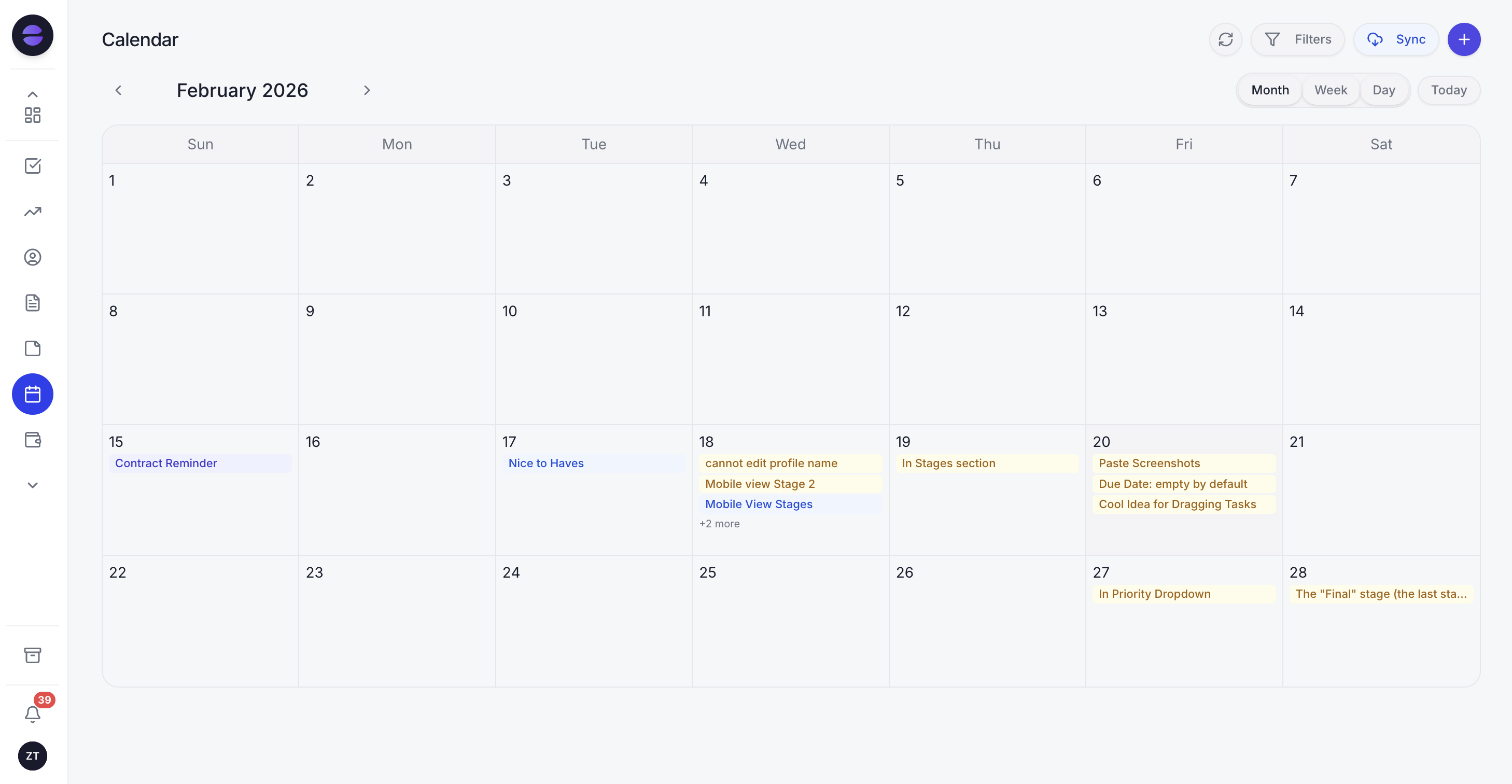 Zoye calendar: team tasks, deal milestones, and meetings in one shared view, synced live with Google Calendar
Step 6 - Run reports across your whole business
Zoye's Reports module shows income versus expenses, deal conversion rate, task completion, user performance, and overdue versus on-time delivery in one dashboard. Every number updates automatically as work moves through the system.
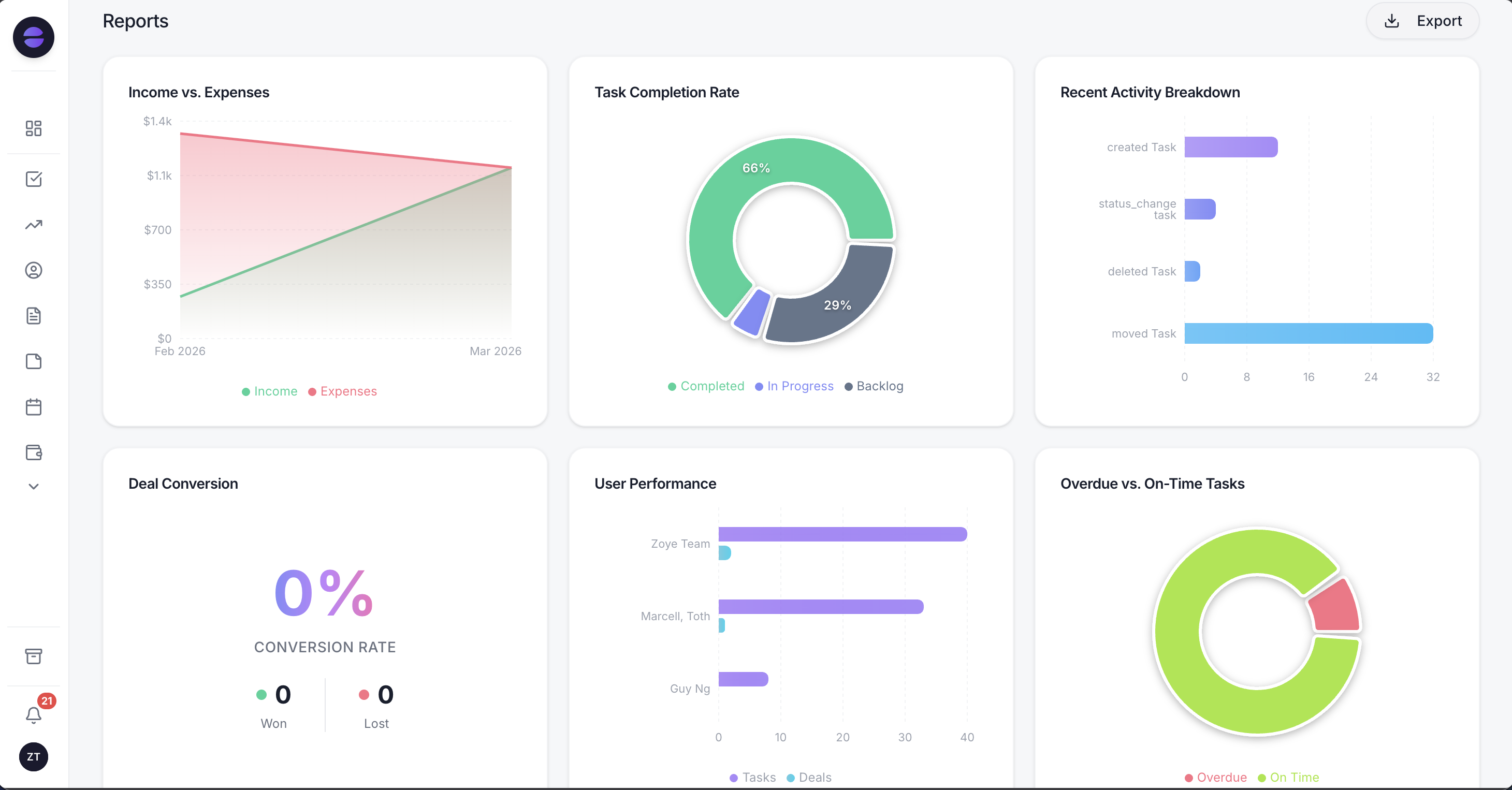 Zoye Reports: the full business picture in one dashboard - updated in real time
Step 7 - Manage everything from WhatsApp
Zoye connects natively to WhatsApp through the official WhatsApp Business Platform from Meta - live today. You can create deals, add contacts, assign tasks, check your pipeline, log activity, and set reminders from WhatsApp by text or voice message. For a founder coming out of a client meeting, the CRM updates the moment the conversation ends. The same assistant also works in Slack and in Claude.
WhatsApp, Instagram and Facebook can also feed the CRM you just built. With WhatsApp automations, every new lead gets an instant first message, and a Lead Bot can answer, qualify and book a slot. With Instagram and Facebook automations, comments and DMs get automatic answers, and lead ads arrive in Contacts in real time. You connect your accounts once, then just ask: "Send every new lead from our Facebook lead form a WhatsApp welcome message."
Want to see it in action?
See Zoye catch a new lead, answer on WhatsApp and set up the follow-up, all from one message.
See How It WorksZoye pricing - how it actually works
Zoye uses a subscription tier model, not per-seat pricing. You choose a plan based on capacity - AI prompts, storage, and team members bundled at each tier. Add-ons let you expand specific dimensions without upgrading your entire plan.
Subscription tiers
| Plan | Monthly | Annual (save 20%) | Includes |
|---|---|---|---|
| ALMOST FREE | $5/mo | $4/mo | 1 member / 1GB / Core AI workspace |
| STARTER | $29/mo | $23/mo | 10 members / 5GB / All core tools |
| GROWTH | $59/mo | $47/mo | 20 members / 10GB / Priority 24/7 support |
| SCALE | $119/mo | $95/mo | 100 members / 25GB / Dedicated AI architect |
| ENTERPRISE | Custom | Custom | Complex requirements, limitless scale |
All plans include the full Zoye platform - CRM, tasks, calendar, docs, notes, budget, reports, and Zoye Assistant.
Add-ons - expand what you need, when you need it
| Category | Add-on | What you get | Price |
|---|---|---|---|
| AI usage | Prompt slider (in-plan) | Raise your monthly AI prompts up to your plan's cap | Scales with your plan |
| Storage | Storage Plus | +10GB | $5/mo |
| Storage | Storage Pro | +25GB | $12/mo |
| Team | Team Plus | +2 seats | $7/mo |
| Team | Team Pro | +10 seats | $15/mo |
How to think about it: Most teams start on Almost Free at just $5/month, move to Starter or Growth when they need more AI prompts or team capacity, and use add-ons to extend specific dimensions. No per-seat fees at the plan level.
What makes Zoye different from traditional CRM platforms
The AI is not an add-on - it is the interface
In most platforms, AI is a feature you access from a menu. In Zoye, Zoye Assistant is how you interact with your CRM. You do not navigate to a contact creation form - you tell Zoye to create a contact. You do not run a pipeline report - you ask Zoye what is stalling in your pipeline.
Everything is already connected
Deals connect to contacts connect to tasks connect to calendar events connect to budget entries connect to reports. That connection is not something you configure - it is how the platform is built. When Zoye Assistant creates a deal, the task, the contact, and the calendar reminder can all be created in the same action.
The pricing model does not punish growth
Per-seat CRM pricing grows linearly with your team size. Zoye's tier-based model means you pay for capacity - prompts, storage, team size in packages. A growing team does not automatically mean a growing bill.
Ready to hand off the busywork?
Zoye brings AI-powered CRM, task management, and automation into one workspace.
Get StartedFrequently asked questions
Building a CRM with Zoye takes seven steps: set up your Deals pipeline with customised stages, populate your Contacts database, connect tasks to your deals, use AI Insights to keep your pipeline current, connect Gmail and Google Calendar through the integrations panel, set up your Reports dashboard, and connect WhatsApp so you can manage your CRM from anywhere by text or voice message. The entire setup can be done in a single session - no technical configuration required.
Yes. Zoye requires no coding, no configuration files, and no technical setup. The platform is operational from the moment you create an account. You can create deals, contacts, and tasks through the interface or by talking to Zoye Assistant - and all integrations connect through a simple authorisation flow.
Per-seat CRM pricing charges a fixed amount per user per month, meaning your cost grows directly with your team size. Zoye uses a tier-based model where each plan includes a bundle of AI prompts, storage, and team member capacity. If you need more of one specific dimension, you add an add-on for that dimension rather than upgrading your entire plan.
Yes. The entry plan, Almost Free, includes the full Zoye platform - Deals, Contacts, Tasks, Calendar, Budget, Reports, Docs, Notes, and Zoye Assistant - with 1 team member, and 1GB of storage. It starts at just $5/month, or $4/month billed annually - the price of a cup of coffee - and you can cancel or upgrade anytime.
Yes - this is a live feature available today, connected through the official WhatsApp Business Platform from Meta. From WhatsApp you can create deals, add contacts, assign tasks, check pipeline status, log expenses, and set reminders by text or voice message. Zoye Assistant interprets your message and executes the action inside your workspace immediately.
AI prompts power Zoye Assistant's actions. Every plan includes the full AI assistant, with monthly AI usage that scales as you move up plans. If you need more without changing plans, the in-plan prompt slider lets you raise your monthly AI prompts at any time. You will be notified before your monthly AI usage runs out.
The bottom line
Building your own CRM used to mean choosing between a rigid enterprise system, a sprawling no-code configuration project, or a spreadsheet that would eventually break. None of those options gave you what you actually wanted: a system that keeps your relationships organised, connects that context to the work around it, and uses AI to make sure nothing gets missed.
That is what Zoye delivers. A CRM already connected to your tasks, calendar, budget, and inbox - with an AI assistant that handles the operational layer by text or voice, including from WhatsApp - and a pricing model that lets you start for just $5/month and scale on the dimensions you actually need.