
Most CRMs were built to store information. You log a call. You update a deal status. You add a contact. The software records what happened - but it doesn't do anything about it.
That's changing fast. A new generation of AI-powered CRM platforms doesn't just store your data - it reads it, reasons about it, and acts on it. And leading that shift is the AI-native workspace, where an AI Business Operator doesn't sit alongside your CRM but runs through every part of it.
In this guide, we break down what an AI CRM actually is, what to look for when evaluating one, the real business benefits, and the eight platforms worth considering in 2026 - starting with Zoye, where an AI Business Operator can manage your contacts, deals, tasks, inbox, calendar, budget, documents, and more from a single conversation - or a WhatsApp message. If you are still mapping out requirements, our step-by-step guide on how to choose a CRM pairs well with this list.
What is an AI CRM, and how is it different from a traditional one?
A traditional CRM is a database with a user interface. You feed it information and it keeps it organised. That's useful - but it still requires your team to do the thinking, the planning, and the follow-through.
An AI CRM takes the data your team generates - contacts, deals, emails, calls, tasks, pipeline stages - and uses it to drive outcomes automatically. At the most basic level, that means automation: reminders, status updates, lead scoring. At the most advanced level - where Zoye sits - it means an AI agent that works in your business, understands its context and can take real actions on your behalf, without you opening a single menu.
The key distinction: A traditional CRM waits for you to act. An AI CRM acts with you - or for you. The best ones make the distinction invisible, because the work just gets done.
The shift from passive record-keeping to active business management is what separates the tools that are genuinely useful in 2026 from those that are merely well-designed databases.
Why AI CRM platforms are changing how businesses operate
The business case for AI in CRM isn't theoretical anymore. Here is what teams using AI-native platforms are actually experiencing.
Every admin task that happens automatically is time your team spends selling
Logging contact details, updating deal stages, writing follow-up emails, assigning tasks after a client call - these activities don't generate revenue but they consume hours every week. AI CRMs eliminate most of them. When Zoye Assistant creates a deal, links a contact, assigns a task, and adds a note to the description from a voice message, four separate manual steps disappear from your team's day.
That's not a marginal productivity gain - it's a structural change in how your team spends its time.
Your pipeline becomes a live, intelligent system - not a snapshot
Sales pipelines in traditional CRMs are only as accurate as the last time someone remembered to update them. AI-powered pipelines update continuously based on activity: emails sent, meetings logged, tasks completed. More importantly, an AI assistant can flag when deals are going stale, when high-priority contacts have gone uncontacted, or when a deal value changes and downstream tasks need reassigning.
The difference between a CRM that records your pipeline and one that manages it is the difference between a dashboard and a decision-support system.
Teams spend less on tools because one platform covers everything
One of the least visible costs in a growing business is tool sprawl: a CRM for contacts and deals, a project management tool for tasks, a calendar app for scheduling, a separate docs tool for knowledge management, a budget tracker for expenses, and often a standalone notes app. Each costs money. Each requires a login. Each creates a silo.
Zoye consolidates all of those into one workspace - CRM, task management, inbox, calendar, documents, notes, budget and expense tracking, and reports - with one AI assistant that works across all of them. The cost saving is real. So is the clarity.
See what Zoye can do for you
CRM, deals, tasks and your Instagram, Facebook and WhatsApp automations in one workspace. Just ask Zoye and it sets any of it up for you.
Explore FeaturesCustomer relationships improve when nothing falls through the cracks
A deal can go cold or a customer can churn without a bad product or a wrong price: a dropped follow-up, a missed commitment, or a contact that assumed someone else was handling it is enough. AI CRMs eliminate that category of failure by making sure every action gets tracked, every commitment generates a task, and every relationship has a clear owner.
Decisions get better because the data is always current
Sales forecasts based on stale pipeline data are worse than useless - they create false confidence. AI CRMs keep data fresh automatically, which means reports, forecasts, and dashboards reflect what's actually happening. Leaders can make resourcing and prioritisation decisions on real information rather than best guesses.
What makes Zoye the most advanced AI CRM available today
Most platforms on this list describe themselves as AI-powered. Zoye is something more specific: it is AI-native. The difference is not marketing language - it is architectural.
In an AI-powered CRM, AI is a feature layer. You use it for specific tasks - writing an email, generating a summary, scoring a lead. In an AI-native workspace, AI is the operating layer. It connects everything, understands everything, and can act across everything. That is what Zoye Assistant does.
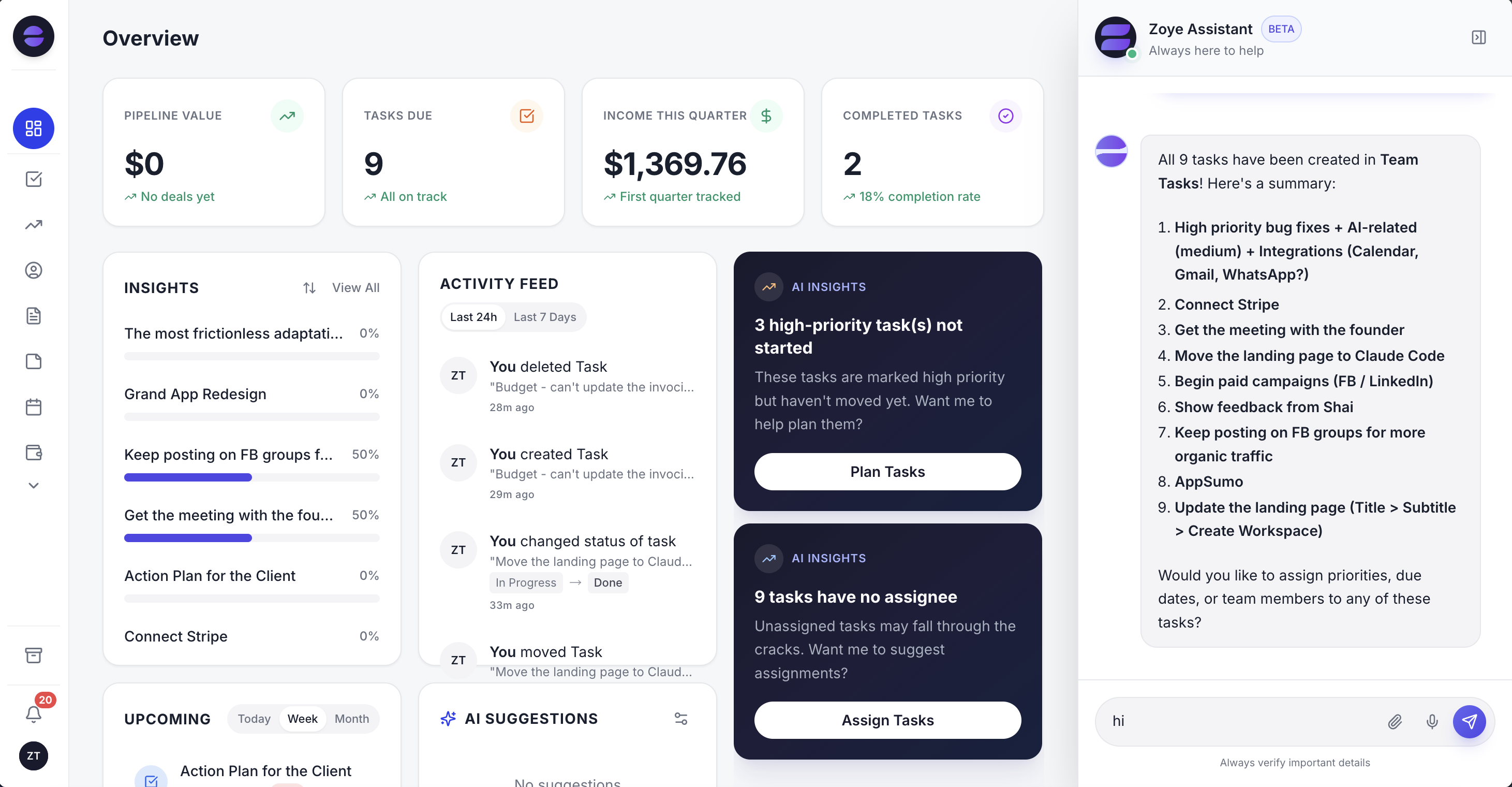 The Zoye workspace: live business metrics, proactive AI Insights, and Zoye Assistant always available - not as a popup, but as a permanent co-worker
One conversation replaces dozens of manual actions
Here is the scenario that best illustrates what Zoye actually does:
Example - Zoye in action: "Just wrapped a call with Priya, the ops director at Lumen Logistics. They want to pilot us across two warehouses, roughly a $40K annual contract. Open the opportunity, loop in whoever handles supply-chain accounts, and have them send Priya a scoping doc by Friday."
After that message - sent by text or voice, from your desk or from WhatsApp - Zoye executes the following automatically:
- Creates a new Deal named Lumen Logistics with a value of $40K and places it in your pipeline
- Creates a new Contact named Priya, tags her as Ops Director, and links her to the Lumen Logistics deal
- Creates a Task: "Send scoping document to Priya at Lumen Logistics" with a due date set to Friday
- Assigns the task to the team member with supply-chain account experience and the lightest current workload
- Adds a note to the task description: "Two-warehouse pilot, confirm scope before sending"
Five jobs done, and nobody filled in a form.
Doing this takes an AI assistant that is genuinely embedded in every module of the platform, not sitting on top of it.
Manage your entire business from WhatsApp - and Gmail, and Google Calendar
This is the capability that surprises people most - and the one that matters most for founders, sales leads, and anyone who runs their business on the move.
Zoye's WhatsApp is live today on the official WhatsApp Business Platform, through Zoye's shared number; connecting your own business number is coming soon. Any action you can take inside the platform, you can trigger from WhatsApp via text or voice message. Create a deal, update a contact, assign a task, check your pipeline value, log an expense, set a reminder. The AI assistant reads your message, interprets your intent, and executes immediately inside your workspace.
Gmail, Microsoft Outlook, Google Calendar, Apple Calendar and Slack are also live integrations: you send tracked email from Gmail or Outlook, your calendar syncs both ways with Google or Apple, and your team can message Zoye from Slack.
You do not need to be at a desk. You do not need to open an app. The business runs from wherever you are.
Instagram, Facebook and WhatsApp leads, answered automatically
Most AI CRMs wait for leads to arrive by form or email. Zoye also works the channels where small businesses actually get them. On Instagram and Facebook, it can answer comments with a public reply and a private DM, reply to DMs and story replies with buttons, a file or an AI answer in your brand's voice, and hand the chat to a person when needed. Facebook and Instagram lead ads sync into Zoye as contacts in real time, and people who comment can be added as contacts, each with the whole conversation on their card. On WhatsApp, every new lead gets an instant first message, and a Lead Bot answers, qualifies, books a slot and follows up when the chat goes quiet. You can also send broadcasts to the audiences you pick by stage, source or tag. These lead tools come with the Growth plan and above.
You set all of it up the same way you do everything else: just ask. "Reply to every comment that says PRICE with our price list in a DM" is enough to get started.
Ready to hand off the busywork?
Zoye brings AI-powered CRM, task management, and automation into one workspace.
Get StartedAll your tools in one place - at a fraction of the usual cost
Zoye replaces the full stack that most growing businesses pay for separately:
- CRM (contacts, deals pipeline): built in
- Task and project management: built in
- Inbox (email via Gmail integration): built in
- Calendar - schedules, reminders, events: built in (Google Calendar sync live)
- Documents and knowledge base: built in
- Notes: built in
- Budget and expense tracking, invoices: built in
- Reports and analytics: built in
- Integrations: WhatsApp (live), Slack (live), Gmail (live), Google Calendar (live), Outlook (live), Apple Calendar (live)
- AI Business Operator across all of the above: built in
Zoye covers all of it with one workspace, one bill: $5/mo to start (Almost Free), $29/mo for a small team (Starter), or $59/mo for a 10-person team (Growth); see pricing for what each plan includes. On Starter and up, scale AI prompts with the built-in slider and add more Notetaker hours, WhatsApp messages or e-signatures whenever you need - and change plan or add-ons at any moment.
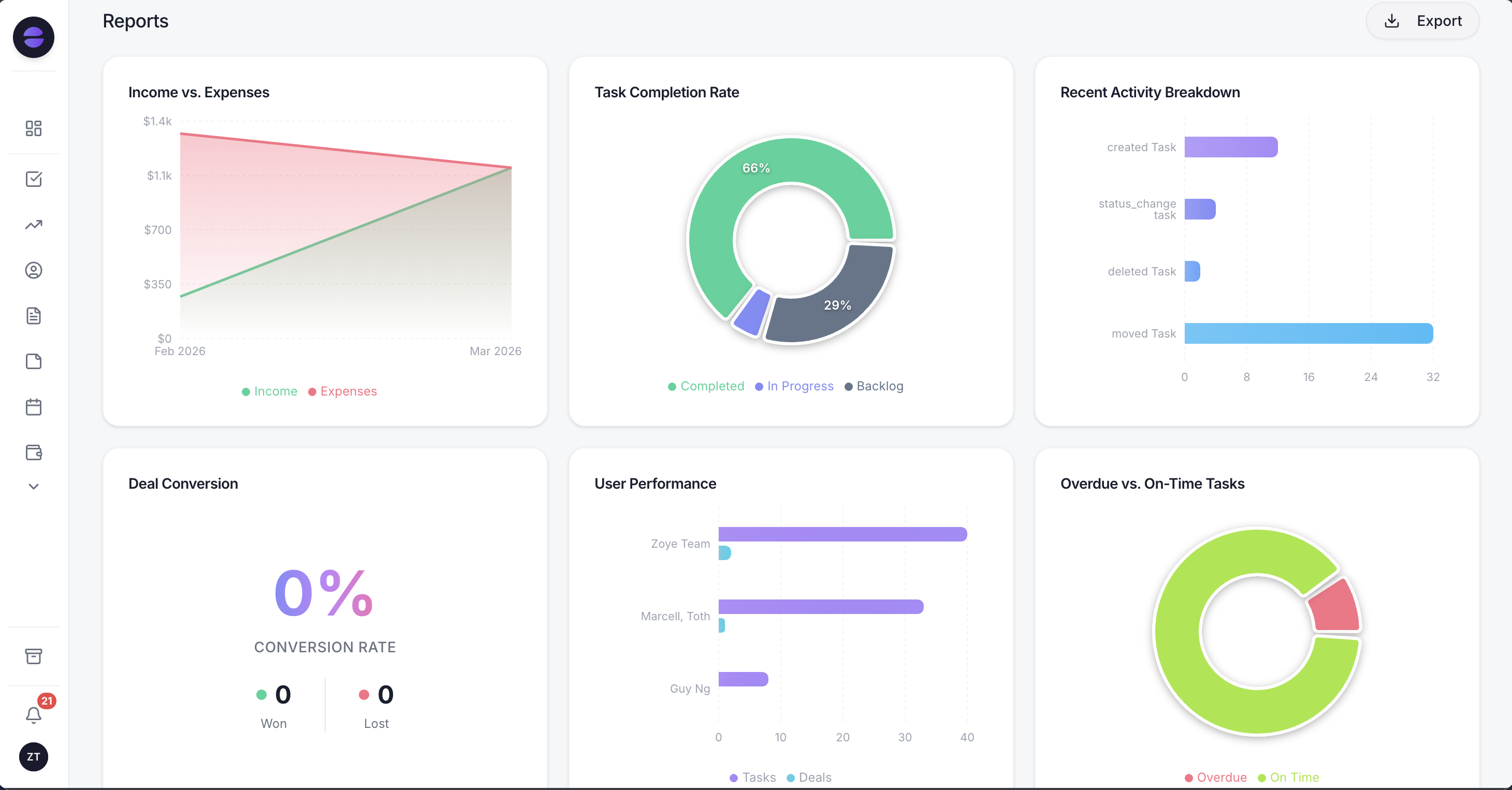 Zoye Reports pulls data from across your entire workspace into one real-time dashboard - finance, tasks, deals, and team performance in one view
Proactive AI Insights - not just reactive queries
Most AI tools respond when you ask them something. Zoye Assistant also reaches out to you. The AI Insights panel on your dashboard flags risks and opportunities automatically: high-priority tasks that have not been started, deals with no recent activity, contacts with no owner assigned, deadlines approaching without task completion.
This is the difference between a tool that helps you do your job and one that actively helps you not miss things. In a sales context, the second type is far more valuable.
An assistant that gets smarter the longer you use it
The Zoye Assistant remembers each person's preferences and the facts about your business, and your team can share what it knows once the owner approves. Tell it "from now on, tag every lead from the website as Inbound" and the rule applies to every new lead, from any source. Ask it to "tell me every Monday what I missed" and it does, on schedule. From Starter, a daily insights digest reaches you in the app, on WhatsApp or in Slack. If a change was not what you wanted, ask Zoye to undo it, and when you need outside context it runs deep web research and shows its sources.
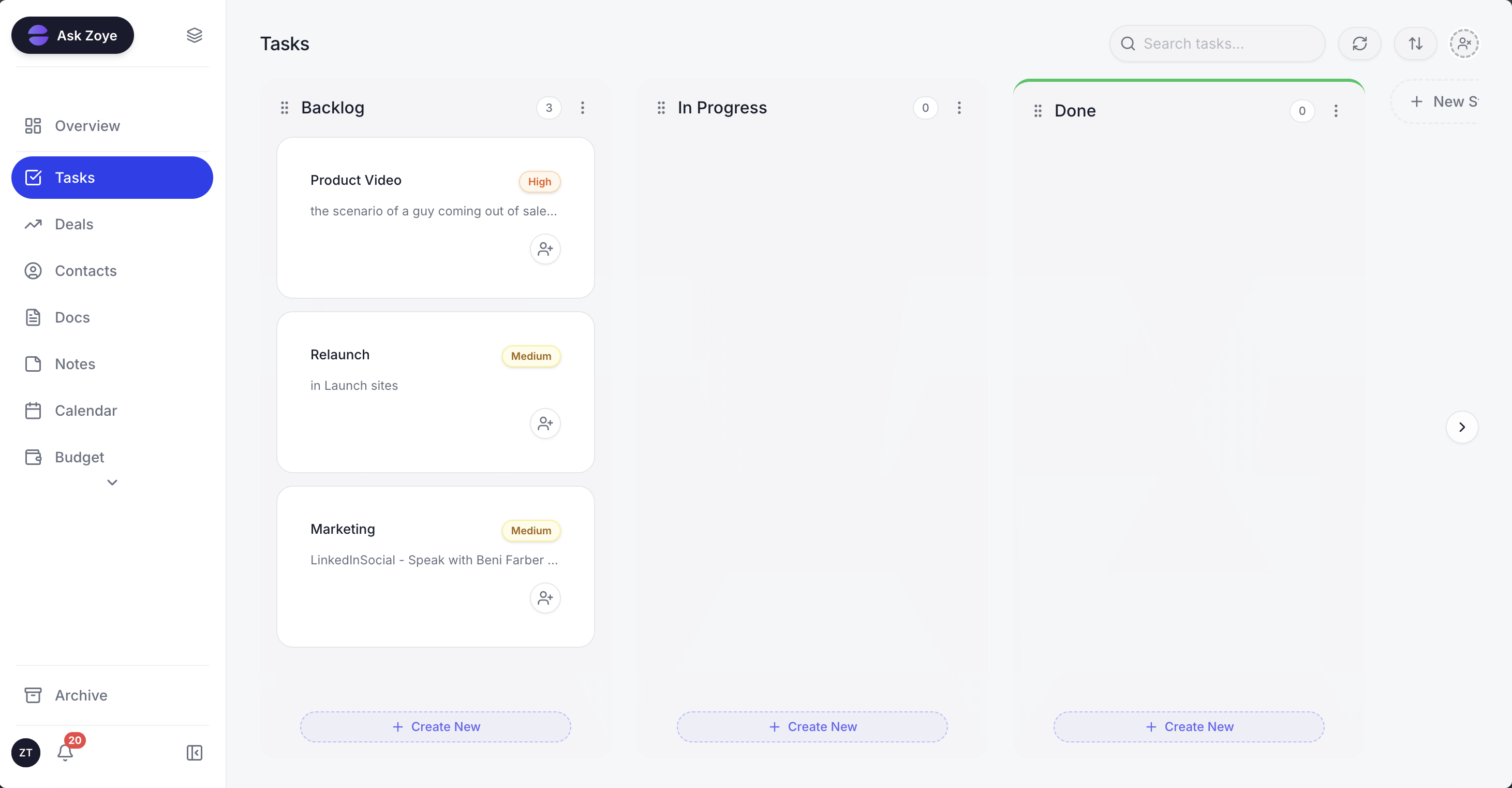 Tasks in Zoye link directly to deals and contacts - when Zoye Assistant creates a task from a conversation, it appears here immediately with the right priority and assignee
8 best AI CRM platforms in 2026 - compared
| Platform | AI strength | Starting price | Pricing model |
|---|---|---|---|
| Zoye | AI-native: assistant acts across CRM, tasks, calendar, budget, docs | Almost Free, $5/mo (Starter $29/mo, Growth $59/mo) | Plan + add-ons, no per-seat |
| Salesforce | Enterprise-scale AI predictions and autonomous Agentforce agents | $25/user/month | Per seat |
| HubSpot CRM | Marketing-first teams needing AI content and AI agents | $7/seat/month (limited-time offer) | Per seat |
| Zoho CRM | SMBs wanting affordable AI automation within the Zoho suite | $14/user/month | Per seat |
| Pipedrive | Sales teams focused on visual pipeline and deal conversion | $14/seat/month | Per seat |
| Freshsales | Companies needing AI lead tracking and conversation insights | $9/user/month | Per seat |
| Creatio | No-code builders who want flexible AI workflow customisation | $40/user/month | Per seat |
| ClickUp | Teams wanting AI CRM bundled with project management | $9/user/month | Per seat |
1. Zoye - The AI-native all-in-one business workspace
Best for: Businesses of any size that want one platform to replace their entire tool stack - CRM, tasks, inbox, calendar, docs, notes, budget, and reports - powered by an AI Business Operator that takes real action, not just advice.
Zoye is not a CRM that added AI features. It is an AI-native workspace built from the ground up around an AI agent that works in your business, understands all of it and can act across every part of it. That distinction reshapes what "using a CRM" actually feels like day to day.
Zoye Assistant does more than store your data and help you manage it: it actively manages it for you - flagging risks before you spot them, executing multi-step actions when you ask, and keeping your pipeline, tasks, and contacts in sync without anyone having to remember to update anything.
The Zoye workspace: live business metrics, proactive AI Insights, and your AI Business Operator always on - not a popup, a permanent co-worker
Key capabilities
- AI Business Operator: Understands your work context, provides proactive insights, takes real actions via text or voice - create deals, assign tasks, add contacts, set reminders, just by asking
- All-in-one workspace: Tasks, Deals, Contacts, Inbox, Docs, Notes, Calendar, Budget, Team, Reports - everything connected, nothing siloed
- WhatsApp integration (live, official WhatsApp Business Platform): Run your entire business from WhatsApp by text or voice message - the same AI assistant available in-app is available on WhatsApp
- Instagram and Facebook automations (live, Growth and up): Comment auto-replies with a private DM, automatic answers to DMs and story replies, and lead ads synced into Zoye as contacts in real time
- Live integrations: Gmail, Outlook, Google Calendar, Apple Calendar, WhatsApp and Slack connected now
- Proactive AI Insights: The dashboard flags unstarted high-priority tasks, stalled deals, and contacts with no owner automatically - you do not have to go looking for problems
- AI via voice: Send a voice note to Zoye Assistant and it transcribes, understands, and acts - no typing required
Pricing
Pricing reflects published rates as of November 2026; check each vendor's pricing page for current figures.
- Almost Free: Core tools, 1 team member, 1GB storage - $5/mo ($4/mo billed annually)
- Starter: $29/mo - 5 members, 5GB, all core tools
- Growth: $59/mo - 10 members, 10GB, dedicated support and account manager (most popular)
- Scale: $119/mo - 30 members, 25GB, dedicated support and account manager
- Customize: Custom pricing - custom limits, dedicated support and account manager
- Add-ons: Notetaker Plus (from $5/mo), Messages Plus (from $19/mo), E-signatures Plus (from $12/mo), in-plan AI prompt slider (Starter and up)
- Change plan or add-ons anytime - just ask Zoye. Upgrade, downgrade, or cancel whenever you need.
Why Zoye wins the comparison: Every other platform here charges per seat on its standard plans. Zoye's AI is the foundation, and one plan covers your whole team. For a 20-person team, Zoye's Scale plan ($119/mo = $1,428/yr) costs less than 20 seats of Salesforce Starter Suite alone ($25 x 20 x 12 = $6,000/yr), before you add a task tool, calendar or docs.
Ready to hand off the busywork?
Zoye brings AI-powered CRM, task management, and automation into one workspace.
Get Started2. Salesforce - The enterprise-grade AI powerhouse
Salesforce builds its AI into the CRM through Agentforce, its AI agent platform. It powers predictions, automated recommendations, and autonomous agents across sales, marketing, and customer service. For large enterprises with complex, multi-team sales processes, Salesforce offers an edition for every stage, from Starter Suite up to Max. The trade-off is cost and complexity - this is not a tool you configure in an afternoon.
Key capabilities
- Built-in AI covers lead and opportunity scoring, predictive forecasting, and deal insights, with some of it sold as an add-on on lower editions
- Agentforce (formerly Einstein Copilot) functions as a conversational assistant embedded in the CRM - teams can ask questions and trigger actions in natural language
- Autonomous Agentforce agents can answer product questions, handle objections, and book meetings for sales reps around the clock
Pricing
- Starter Suite: $25/user/month, billed monthly or annually
- Pro Suite: $100/user/month, billed annually
- Sales Cloud Core: $195/user/month, billed annually
- Sales Cloud Advanced: $395/user/month, billed annually (Max is $550; Salesforce re-checked November 2026)
Worth knowing: Salesforce's power comes with significant licensing costs: every edition above Starter Suite is billed annually, Salesforce says most of its products use annual contracts, and AI can be added to Core and above. For smaller teams, the total cost of ownership can be difficult to justify.
3. HubSpot CRM - Marketing-led teams needing AI from acquisition to close
HubSpot built its CRM around inbound marketing and that origin shapes everything: the AI features are strongest on the acquisition and nurturing side of the funnel. Breeze Assistant and HubSpot's AI agents bring generative AI into content creation, customer interaction, and workflow automation. The free tier works for very small teams (up to 2 users) and includes Breeze Assistant, though the AI agents need a paid plan.
Key capabilities
- Breeze Assistant acts as an embedded AI sidekick that helps reps generate content, summarise records, and prepare for meetings
- AI agents answer customer questions across channels (the customer agent comes with Professional) and run AI-powered outreach to prospects
- From Starter, AI records, transcribes, and stores your meetings
Pricing
- Free plan with limited features
- Starter: $7/seat/month billed annually, or $10 billed monthly, on a limited-time offer (as of November 2026)
- Professional: $90/user/month (billed annually)
- Enterprise: $175/seat/month (billed annually)
Worth knowing: The step up to Professional is a significant cost jump, and the platform's depth in marketing automation can feel like overkill for teams that primarily need CRM and sales pipeline management.
Want to see it in action?
See Zoye catch a new lead, answer on WhatsApp and set up the follow-up, all from one message.
See How It Works4. Zoho CRM - Budget-conscious teams inside the Zoho ecosystem
Zoho CRM competes primarily on price and integration depth within the Zoho product suite. Its AI assistant, Zia, brings predictive lead scoring, anomaly detection, and workflow suggestions to teams at a fraction of the price of Salesforce's or HubSpot's Professional tiers. For businesses already using Zoho Books, Zoho Desk, or Zoho Projects, the cross-suite integration is a genuine advantage.
Key capabilities
- Zia AI scores which prospects are most likely to convert and flags unusual events that deviate from expected trends
- Zia's generative AI retrieves any CRM data you ask for and can create modules, reports, and workflows in seconds
- Data enrichment fills in missing lead and customer details from the internet and from email signatures
Pricing
- Standard: $14/user/month (billed annually)
- Professional: $23/user/month (billed annually)
- Enterprise: $40/user/month (billed annually)
- Ultimate: $52/user/month (billed annually)
Worth knowing: Outside the Zoho ecosystem, the integration story weakens considerably. The AI features are also narrower in scope than Salesforce or Zoye - they enhance the CRM experience without extending into broader business management.
5. Pipedrive - Sales teams that live and breathe pipeline management
Pipedrive was designed by salespeople, for salespeople, and that focus shows. Its visual pipeline interface is clean and intuitive, and its AI additions enhance a core experience that was already excellent. For teams whose primary need is managing a sales pipeline without complexity, Pipedrive is hard to fault.
Key capabilities
- The AI Sales Assistant predicts each deal's win probability and recommends next best actions, so reps know which opportunities deserve attention
- Pipedrive Nova, the built-in meeting intelligence tool, gives a brief before every meeting, a transcript of every call, and ready-to-approve CRM updates afterward
- AI email tools on Premium write, summarise, and reply to emails, and LeadBooster routes captured leads to the right reps
Pricing
- Lite: $14/seat/month (billed annually)
- Growth: $39/seat/month (billed annually)
- Premium: $59/seat/month (billed annually)
- Ultimate: $79/seat/month (billed annually)
Worth knowing: Pipedrive is a CRM first. Project management and document management come as paid add-ons (Projects and Smart Docs), and budget tracking is not part of its plans. Teams that need more than pipeline oversight will pay for add-ons or keep other tools alongside it.
6. Freshsales - Customer engagement with AI built into every touchpoint
Freshsales uses Freddy AI to bring intelligent lead management and conversation analysis into the sales process. Its strength is in understanding and acting on customer engagement signals: which leads are actively interested, which deals need a nudge, and what message a prospect is most likely to respond to.
Key capabilities
- Freddy scores contacts by analysing data points and behavioural patterns, so reps see which prospects to work first
- Deal insights flag risk signals on specific deals and recommend next best actions, drawing on emails and historical data
- Freddy helps reps write personalised prospecting emails, from subject line to body text, in the tone they choose
Pricing
- Growth: $9/user/month (billed annually)
- Pro: $39/user/month (billed annually)
- Enterprise: $59/user/month (billed annually)
- Free 21-day trial available
Worth knowing: Freshsales covers the sales layer well - contacts, deals, communication. Branded documents are a $19/user/month add-on, and its plans do not list budget management or cross-functional task management, which Zoye handles natively.
See what Zoye can do for you
CRM, deals, tasks and your Instagram, Facebook and WhatsApp automations in one workspace. Just ask Zoye and it sets any of it up for you.
Explore Features7. Creatio - No-code teams that need flexible AI workflow design
Creatio occupies a specific niche: businesses that want to build custom AI-powered sales processes without writing code. Its Business Studio lets teams build applications with no-code visual designers and AI coding agents, and its sales product adds AI agents for lead scoring, forecasting, and quotes.
Key capabilities
- Business Studio builds applications with AI coding agents and no-code visual designers, so sales operations teams can shape their own processes
- Real-time AI recommendations guide each rep's next best action, and AI forecasting analyses deal signals and historical patterns
- Lead management uses AI to capture, score, and engage leads, with a dedicated Lead Scoring Agent
Pricing
- Growth: $40/user/month
- Enterprise: $75/user/month
- Unlimited: custom pricing
- Minimum purchase for new customers: $10,000 per year
Worth knowing: Creatio rewards technical sales ops teams more than generalist users. Teams that want an out-of-the-box AI CRM that works from day one may find the configuration investment steep.
8. ClickUp - Project-heavy teams that want CRM and task management in one place
ClickUp is a project management tool that extended into CRM territory rather than the other way around. ClickUp Brain², the platform's AI layer, organises workspace data into a self-updating knowledge graph that your team can ask questions of and put to work.
Key capabilities
- Brain² auto-clusters workspace data into a semantic knowledge graph and retrieves across your full history
- AI features such as AI Notetaker, AI Assign & Prioritize, and Super Agents run on the monthly AI credits that come with paid plans
- Artifacts: describe a deck, dashboard, or tracker and Brain² builds a working artifact you can share
Pricing
- Free Forever plan available
- Core: $9/user/month (billed annually, $12 monthly; ClickUp re-checked November 2026)
- Business: $17/user/month (billed annually, $25 monthly)
- Enterprise: Custom pricing
- Note: AI is included on paid plans: Core comes with 1,000 AI credits per user a month and a Brain² trial, Business adds Brain² premium models and unlimited standard models, and Free Forever has no AI credits (November 2026)
Worth knowing: ClickUp's CRM runs on its project management workspace, tracking the deal and the work together, which suits project-heavy teams more than pure sales teams. Brain² premium models also start on Business ($17/user/month billed annually), which raises the total price for larger teams that want the full AI.
How to choose the right AI CRM for your business
The right platform depends on three questions: what business functions does it need to cover, how deeply embedded is the AI, and what does it actually cost when you account for every seat and add-on.
- If you want one platform for your entire business: Zoye covers CRM, tasks, calendar, docs, notes, budget, and reports in a single AI-native workspace. Plans from $5/mo; see pricing for what each plan includes.
- If you run a large enterprise with complex compliance requirements: Salesforce's depth and certification stack is hard to match.
- If your go-to-market motion is primarily inbound marketing: HubSpot's funnel-wide AI features make it a natural fit.
- If you need pure sales pipeline management: Pipedrive delivers the cleanest experience for deal-focused teams.
- If budget is the primary constraint: Zoye ($5/mo entry plan), HubSpot (a free plan, then $7/seat on a limited-time Starter offer), and Freshsales ($9/user) are the most accessible starting points.
- If you need to build custom AI workflows without code: Creatio is built for exactly that use case.
The question most teams forget to ask: does the AI in this platform take action, or does it just give advice? That distinction separates tools that feel intelligent from tools that genuinely change how your business runs.
Ready to hand off the busywork?
Zoye brings AI-powered CRM, task management, and automation into one workspace.
Get StartedHow to get real value from an AI CRM - from day one
Start with your biggest manual time sink
Do not try to automate everything at once. Identify the one or two tasks that consume the most time and produce the least value - usually data entry, follow-up emails, or task assignment after client meetings - and build your first automations there. When your team sees those hours returned to them immediately, adoption takes care of itself.
Connect your AI CRM to where your team already works
The fastest path to full adoption is meeting your team where they already communicate. Zoye's WhatsApp integration is the clearest example of this principle: instead of asking salespeople to change their habits and log into a new system, Zoye lets them manage their entire pipeline from the messaging app they already use every day.
Use AI Insights proactively, not reactively
Most teams configure an AI CRM and then use it exactly like their old CRM - they check it when they want something. The real shift happens when you start relying on the AI's proactive flags. In Zoye, the AI Insights panel surfaces risks before you go looking for them. Build a morning habit of reviewing those flags and your pipeline will stay cleaner with less effort than you've ever experienced.
Measure what changes, not just what you do
Set a baseline before you migrate: how many deals slip through your pipeline each month, how long your average sales cycle runs, how many hours per week your team spends on admin. Measure the same metrics 60 days after implementing your AI CRM. The difference is your return on investment.
How to evaluate an AI CRM before you commit
Marketing pages all sound similar, so the practical question is how to tell genuine capability from a thin AI veneer during a trial. Use these four checks before you migrate a team onto any platform.
- Ask the AI to take an action, not write a sentence. A quick test: tell the assistant to create a deal, link a contact, and assign a follow-up task in one instruction. If it produces a draft email instead of actually creating those records, the AI is a writing layer, not an operations layer. Zoye Assistant performs the records change; many tools only generate text.
- Count the real seats, not the headline price. Multiply the per-seat figure by your actual team size, then add the AI tier or add-on if it is billed separately (ClickUp includes Brain² premium models only from Business, and Asana's AI Meetings start on Advanced). The number you should compare is total monthly cost for the whole team, not the lowest advertised seat price.
- Map the modules you still have to buy elsewhere. If a CRM does not cover tasks, calendar, documents, or budget, list the separate subscriptions you will keep paying for alongside it. That stack is the real cost of ownership, and it is where an all-in-one workspace like Zoye changes the maths.
- Check whether the AI is proactive or only reactive. Reactive AI answers when asked. Proactive AI surfaces a stalled deal or an unassigned high-priority task without prompting. The second kind is what actually reduces the things your team forgets, so look for a dashboard that flags risks automatically rather than a chat box that waits for a query.
Run those four checks during a trial and the difference between an AI-native workspace and an AI-flavoured CRM becomes obvious within an afternoon.
Want to see it in action?
See Zoye catch a new lead, answer on WhatsApp and set up the follow-up, all from one message.
See How It WorksFrequently asked questions
Zoye is the strongest choice for small businesses in 2026. Zoye puts CRM, deals pipeline, contacts, tasks, calendar, budget, documents, and reports in one workspace, plus an AI Business Operator, an AI agent that works across all of it. The entry Almost Free plan is $5/mo ($4/mo billed annually) for 1 member with the core tools. When you outgrow it, the Starter plan is just $29/mo, Growth is $59/mo for 10 team members. No per-seat tax. Change plan or add-ons anytime.
No - and it is not designed to. AI CRMs eliminate the administrative and repetitive parts of sales work so your human team can focus on what AI cannot do: building relationships, navigating complex negotiations, and reading the room in a live conversation. The best AI CRMs make individual salespeople more effective, not redundant.
AI-native means the AI is not a feature that was added to the platform - it is the foundation the platform was built on. In an AI-native workspace like Zoye, the assistant can access and act across every module: CRM, tasks, calendar, budget, documents, and more. In an AI-powered CRM, the AI operates within specific feature boundaries and cannot take action across the full workspace when you ask it to.
Yes - with Zoye, and it is live right now. Zoye connects to WhatsApp through the official WhatsApp Business Platform from Meta, allowing you to create deals, add contacts, assign tasks, check your pipeline, log expenses, set reminders, and more - all via text or voice message. The AI assistant interprets your message and executes the action inside your workspace immediately. Gmail, Google Calendar and Slack are also live integrations.
The primary differences are AI depth, platform breadth, and cost. Salesforce and HubSpot are CRMs first, built around sales, marketing and service. Zoye is a complete business workspace where the AI assistant operates across every function. On price, Zoye's Growth plan covers 10 team members with the full workspace and AI assistant for $59/mo - less than a single seat of Salesforce Pro Suite ($100/user/month) or HubSpot Professional ($90/seat/month billed annually). And you can change plan or add-ons anytime.
Most platforms charge per seat AND make you stack multiple subscriptions (CRM + task tool + calendar + docs + reports). Zoye replaces that whole stack with one workspace and one bill. The Growth plan ($59/mo, 10 members) costs less than one Salesforce Pro Suite seat ($100/user/month). Even Scale ($119/mo, 30 members) costs less than 10 Salesforce Starter Suite seats ($250 a month).
The bottom line on AI CRM in 2026
The question is no longer whether to use an AI CRM. The question is whether your AI CRM actually changes how your business operates - or just makes your existing way of working slightly more convenient.
Zoye is in a different category from every other platform on this list. It combines a full business workspace - CRM, tasks, inbox, calendar, budget, documents, notes, and reports - with live integrations (WhatsApp, Gmail, Google Calendar) and an AI Business Operator that works across all of it, takes real actions when you ask, and is accessible from wherever you are, and the full core platform starts at $5 per month.
If you are building a business and want a single platform that grows with you without per-seat pricing eating into your budget as you hire, the answer is clear.