
Notion and Asana keep landing on the same shortlist even though they are barely the same category. Notion is an empty, endlessly shapeable space where a team can build documentation, a wiki, a client tracker, and a task list out of the same building blocks. Asana is a task and project tracker with opinions, built to answer one question well: who is doing what by when.
The choice usually gets framed as flexibility versus structure, and that framing is fair as far as it goes. But it hides the thing that actually decides which tool survives in a small business: how much ongoing work the tool hands back to you. A blank canvas has to be architected and then kept tidy. A focused tracker has to be fed with tasks somebody remembers to write down. Both are surfaces. Neither does the work.
This comparison covers where each one genuinely wins, where each one quietly costs you, and what to do if the honest answer is that you do not want another thing to maintain.
Notion vs Asana at a glance
| Dimension | Notion | Asana | Zoye |
|---|---|---|---|
| Core idea | Blocks, pages, and databases you shape yourself | Opinionated task and project tracker | AI operator that runs the routine work |
| Time to useful | Days to weeks of design work | Same day for basics | Same day, you just tell Zoye what you need |
| Docs and wiki | Best in class | Basic descriptions and comments | Notes module, built in |
| Task views | Table, board, calendar, timeline, gallery | List, board, timeline, calendar, Gantt on higher tiers | List, board, calendar, timeline |
| Automation | Database automations and buttons, paid tiers | Rules builder, deeper on paid tiers | Zoye builds it from your description |
| Clients and deals | Build your own CRM database | Not included | Built in, connected to tasks |
| AI | Notion AI on paid plans, assistive | Asana AI from Advanced, assistive | Executes across the workspace |
| Customer messaging | Not included | Not included | WhatsApp and Slack, in the workspace |
| Pricing model | Per seat | Per seat | Flat tier, not per seat |
| Free plan | Yes, generous for individuals | Yes, Personal up to 10 users | No free plan, entry from $5/month |
| Who maintains it | You do, forever | You do, lightly | The operator keeps its own records |
Flexibility versus structure
Notion hands you a blank page and a box of parts. Databases with typed properties, relations between them, rollups, filtered views, templates, and pages that can nest as deep as you like. A capable person can model almost any business in it: a client database linked to a projects database linked to a task database, with a dashboard that pulls the whole thing together. When that build is good, it is genuinely impressive, and it fits the business exactly because the business designed it.
Asana hands you a shape and asks you to pour your work into it. Projects contain tasks, tasks have an assignee and a due date, sections group them, and portfolios group projects. You cannot bend it very far, and that is deliberate. Because the shape is fixed, a new hire opening Asana on day one already knows what they are looking at, and nobody has to be consulted about how the system works.
The trade is straightforward. Notion's ceiling is much higher and its floor is much lower, because an unbuilt Notion is worth nothing. Asana's ceiling is lower and its floor is immediate.
Verdict: Notion if you have someone who enjoys building the system and will keep owning it. Asana if you want the system to already exist.
Task and project management
This is Asana's home turf and it shows in the details rather than the headline features.
Asana gives every person a My Tasks view that aggregates everything assigned to them across every project, which sounds small and turns out to be the single most used screen in most deployments. Dependencies, subtasks, custom fields, approvals, milestones, recurring tasks, and workload views are all first-class. Timeline shows what slips when something else slips. Notifications and the inbox are tuned so that people actually notice when something lands on them.
Notion can represent all of that, and represents some of it well. A task database with a status property, an assignee relation, and a due date gives you a board and a calendar in seconds. What is harder is everything around the task: cross-project views need to be built and maintained, dependencies are a manual relation rather than a scheduling engine, and workload across people is a report you design yourself. Notion's reminders and notifications are also noticeably softer, which matters because a task nobody is reminded about is a task nobody does.
Verdict: Asana for running project delivery with more than a handful of people. Notion for a small team whose work is more documentation than deadlines.
Want to see it in action?
See Zoye catch a new lead, answer on WhatsApp and set up the follow-up, all from one message.
See How It WorksDocs and knowledge
Reverse the previous section and you have this one.
Notion is one of the best writing and knowledge tools available. Pages are pleasant to read and edit, structure emerges naturally, and the connection between a document and a database record is native rather than a link to some other product. Onboarding guides, standard operating procedures, meeting notes, and a client wiki all live comfortably in the same place as the work, and the search that spans them is good.
Asana treats documents as an afterthought, and honestly it is not trying to compete here. Project briefs, task descriptions, and comments cover the minimum. Anything longer than a paragraph tends to migrate to Google Docs or Notion, which is why so many teams end up paying for both tools and then paying again in the seam between them.
Verdict: Notion, decisively. If your institutional knowledge is a real asset, Asana alone will not hold it.
Automation
Asana has a rules builder that covers the patterns most teams need: when a task moves to this section, assign it to this person and set a due date; when a custom field changes, move the task; when a form is submitted, create a task in this project with these defaults. It is approachable, and the number of rules and the more advanced triggers scale with your plan tier.
Notion added database automations and buttons, which handle in-workspace changes like setting a property, adding a page to a database, or sending a Slack message when a row changes. They are useful and they are also clearly younger than Asana's rules. Anything more involved usually ends up in a third-party connector, which is another subscription and another thing to debug when it silently stops firing.
The deeper point is that both automate movements inside their own walls. A rule can move a card to Done. It cannot notice that a client has gone quiet for eleven days, write them a sensible message, send it on the channel they actually reply on, and book the call that comes out of it.
Verdict: Asana for in-tool workflow rules. Notion for light property automation. Neither for work that has to leave the tool.
AI: assistant or operator
Both companies shipped AI, and both shipped the same kind of AI.
Notion AI is strong at what Notion is strong at. It drafts and rewrites, summarises long pages, fills database properties from context, and answers questions across your workspace content. If your Notion holds a lot of knowledge, asking it questions is genuinely faster than searching.
Asana AI produces status summaries, suggests rules and custom fields, flags risk on projects, and offers assignable AI teammates on higher tiers. Useful for the manager who has to report upward, and honest about being assistive.
Both wait to be asked. They write, summarise, and suggest, and then a person still has to decide, act, and record what happened. For a team whose bottleneck is writing, that is a real gain. For a business whose bottleneck is follow-through, it changes very little, because the work that was not getting done was never the writing.
Verdict: Notion AI is the better writer, Asana AI is the better project reporter, and neither one executes.
See what Zoye can do for you
CRM, deals, tasks and your Instagram, Facebook and WhatsApp automations in one workspace. Just ask Zoye and it sets any of it up for you.
Explore FeaturesPricing: Notion vs Asana
Notion pricing:
- Free: $0, generous for individuals and very small groups, limited collaborative history
- Plus: around $10 per user per month billed annually
- Business: around $15 per user per month billed annually, with Notion AI included
- Enterprise: custom
Asana pricing:
- Personal: free, up to 10 users, core task management
- Starter: $10.99 per user per month billed annually
- Advanced: $24.99 per user per month billed annually, includes Asana AI
- Enterprise and Enterprise+: custom
Pricing reflects published rates as of August 2026; check each vendor's pricing page for current figures.
The 10-person team math:
- Notion Business: 10 x about $15 = about $150 per month
- Asana Advanced: 10 x $24.99 = about $250 per month
- Both, which is what a lot of teams actually run: about $400 per month
- Zoye Starter, 10 members, AI included: $29 per month
Notion is the cheaper seat and Asana is the more capable tracker, which is exactly why so many teams pay for both and then absorb the cost of keeping two systems agreeing with each other.
Verdict: Notion on price, Asana on delivery capability, and per-seat billing on both means every hire raises the bill.
The upkeep cost nobody prices in
Neither pricing page mentions the real expense, which is the human hours the tool consumes after it is paid for.
In Notion the cost is architecture and entropy. Someone designs the databases, someone documents how they work, and then over eighteen months people add a stray view, a duplicate status, a page outside the structure. The system does not break loudly. It just stops being trusted, and the moment a team stops trusting the workspace they go back to the group chat.
In Asana the cost is feeding. Asana is only as accurate as the tasks people remember to create. The client email that needs an answer next Tuesday, the quote that needs chasing, the deal that has gone quiet: none of that appears in Asana unless a human types it in. And the person most likely to be too busy to type it in is the one running the business.
This is why a tool can be excellent and still end up abandoned. Both of these products are good at what they do. Both of them assume a disciplined human on the other side.
Ready to hand off the busywork?
Zoye brings AI-powered CRM, task management, and automation into one workspace.
Get StartedThe third option: Zoye
Zoye starts from the opposite end. Instead of giving you a better surface to maintain, it acts as an operator that runs the routine work of the business and keeps its own records current as a side effect of doing so.
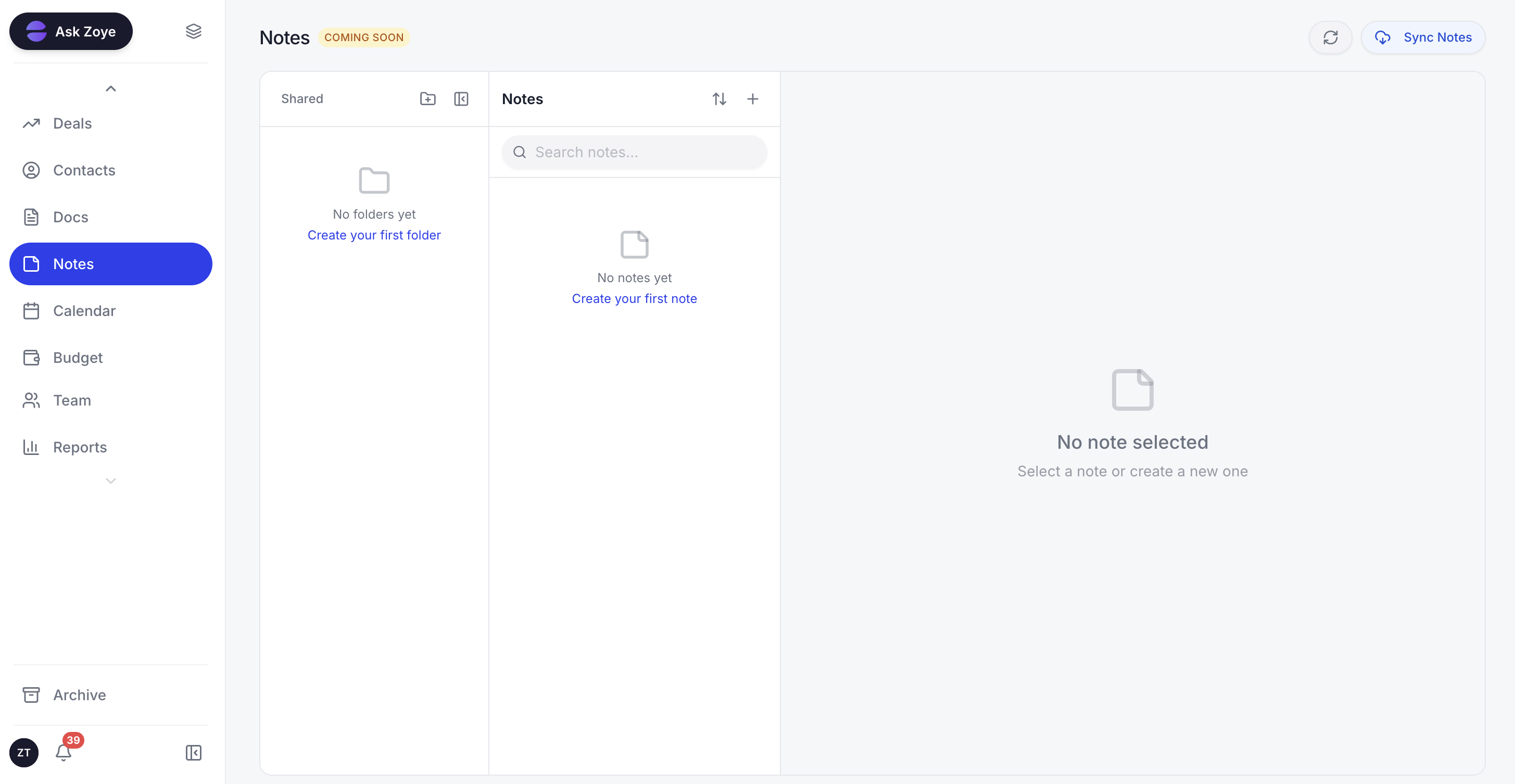 Zoye keeps the written context in the same workspace as the clients, tasks, and follow-ups it belongs to
In practice that means the lead that arrives on WhatsApp gets answered, qualified, and logged without anyone opening a form. The follow-up that would have gone quiet gets chased on a schedule that was never written down as a task. The consultation gets booked into the calendar, the record gets updated afterwards, and the report you would have assembled by hand gets generated on request. Tasks, clients and deals, calendar, budget, and reports live in one workspace, and the assistant works across all of them rather than inside one module.
Automations are built the way you would explain them to a new assistant. Type something like "when someone asks about pricing on WhatsApp, send them the rate card, tag them as a warm lead, and remind me in three days if they have not replied", and that becomes a running automation rather than a ticket for whoever owns the workspace.
Real example: A two-person consultancy finishes a discovery call and records a voice note to Zoye on the way to the car: "The logistics client wants a process review, budget around 18K, kickoff early next month." Zoye opens the deal, files the contact, drafts the recap email, books the kickoff, and sets the follow-up. In Notion that is four databases and a template someone built last year. In Asana it is a task, and the client, the budget, and the recap live somewhere else entirely.
Pricing: Almost Free at $5 per month for 1 member and 1GB of storage, with the core tools. Starter at $29 per month for 10 members and 5GB. Growth at $59 per month for 20 members, 10GB, and 24/7 support. Scale at $119 per month for 100 members and 25GB. A Customize tier covers larger limits and dedicated support.
Best for: owners and small teams whose problem is not that they lack a place to write work down, but that the writing down is the part that keeps not happening.
When to choose each
Choose Notion if:
- Documentation, wikis, and written knowledge are central to how you work
- You have someone who enjoys designing the system and will keep owning it
- You want one flexible space rather than several specialised tools
- Your work is more about capturing and organising than about hard deadlines
Choose Asana if:
- You are coordinating project delivery across several people and want it working today
- Dependencies, workload, and cross-project views are real operational needs
- You want a structure a new hire understands without a briefing
- You are comfortable keeping documents in a separate tool
Choose Zoye if:
- The work that hurts is customer-facing follow-through, not task formatting
- You want the CRM, the tasks, the calendar, and the reporting in one place
- You want automations you can describe to Zoye instead of build
- You want to run the business from WhatsApp or Slack rather than from a dashboard
- You would rather pay a flat plan price than a per-seat bill that grows with headcount
Frequently asked questions
For running projects, yes. Asana ships with an opinionated structure already in place: projects, tasks, assignees, due dates, sections, and a My Tasks list. Most teams are working in it the same day. Notion starts as an empty page, so somebody has to design the databases, properties, relations, and views before the team gets value. Notion is easier to write in; Asana is easier to run work in.
Notion is cheaper at almost every comparable tier. Notion Plus runs around $10 per user per month billed annually and Business around $15, while Asana Starter is $10.99 per user per month annually and Advanced is $24.99. Both charge per seat, so the gap widens with headcount. Pricing reflects published rates as of August 2026; check each vendor's pricing page for current figures.
Both include AI on paid plans, and both are assistive rather than operational. Notion AI writes, summarises, and answers questions about your workspace content on paid tiers. Asana AI adds smart summaries, rules suggestions, and AI teammates from the Advanced tier upward. Neither one goes out and runs a customer follow-up, books a client, or updates a record unprompted.
It can, if someone is willing to build and maintain the system. A well-designed Notion setup with a task database, relations to projects and clients, board and timeline views, and a few automations covers what most small teams need from Asana. The catch is that the setup is a real project, and it degrades quietly when the person who built it gets busy. Asana gives you a weaker canvas and a stronger default.
If your problem is that work does not move unless a human moves it, yes. Zoye is an AI business operator rather than another surface to maintain: it captures leads, chases follow-ups, books clients, keeps its own records current, and builds automations from what you tell it, including over WhatsApp and Slack. Plans start at $5 per month on Almost Free for 1 member, with Starter at $29 per month for 10 members. Automations are not part of Almost Free; see the pricing page.
Yes. Zoye brings customer conversations into the same workspace as the work they create, so a WhatsApp message can become a lead, a booking, or a follow-up task without anyone retyping it. The assistant drafts replies, chases the ones that went quiet, and updates the record afterwards. Neither Notion nor Asana handles customer messaging natively.
The bottom line
Notion and Asana are both good, and the comparison between them is mostly a question about your team rather than about the products. If your work is knowledge that needs shaping, Notion is the better home and Asana will feel thin. If your work is delivery that needs coordinating, Asana is the better home and Notion will feel like a building project you did not ask for. Teams that need both usually end up buying both, which works, at roughly double the cost and with a seam in the middle.
What neither of them changes is who does the work. Both are places to record what should happen. In a small business the gap is rarely a missing place to write things down; it is the follow-up that never got written down in the first place. That is the gap Zoye is built for: an operator that answers, chases, books, and records automatically, that you brief like a colleague, running where your customers already are.
For more context, see Notion vs monday.com, ClickUp vs Notion, Asana vs ClickUp, and the rest of the Zoye blog.