
A coaching practice rarely fails because the coaching is bad. It fails in the gaps between the sessions. Someone watches a reel, sends a message at eleven at night asking about prices, gets an answer two days later and has already booked a free call with somebody else. A client finishes an eight session package, says they will think about continuing, and nobody ever brings it up again. An invoice goes out and quietly sits unpaid because chasing money feels awkward when you also want to be the person's coach.
None of that is a marketing problem. It is an operating problem, and it lands entirely on you, because in a coaching or mentoring practice the person doing the delivery is also the person doing reception, scheduling, collections, and retention. The week you are fully booked is exactly the week nothing gets followed up, which is why so many practices swing between overloaded and empty.
The usual answers do not close the gap. A booking link fills a slot but never asks why someone did not show. A generic CRM gives you a clean pipeline and leaves every message for you to write. A spreadsheet plus WhatsApp is honest about being manual. This guide ranks the seven best options for coaches, mentors, and business therapists in 2026, and shows what it looks like when the follow up, the booking, and the renewal conversation are handled for you instead of by you.
Pricing reflects published rates as of August 2026; check each vendor's pricing page for current figures.
Why coaches are looking beyond booking apps and generic CRMs in 2026
Four shifts are pushing coaches away from tools that only store or only schedule.
The first reply decides whether the call happens. People who enquire about coaching are usually in a short window of motivation. They message three coaches from Instagram or a referral group in the same evening and book with whoever answers while the intent is still there. A tool that waits for you to finish a session and open your laptop is already too slow.
The conversation lives on WhatsApp. Enquiries arrive as a direct message and continue on WhatsApp, not in an inbox. A reminder or a follow up sent by email is often simply not read. If the tool's chasing happens where the client does not look, the chasing did not happen.
Manual upkeep is the reason practices abandon software. Coaches buy a CRM in January, fill it in for three weeks, and stop the first time a week gets heavy. Every tool that depends on you logging what happened will eventually be abandoned, because the person who must log it is the same person delivering the sessions.
Retention is worth more than new leads and gets the least attention. A renewed client costs nothing to acquire, yet the renewal conversation is the easiest one to postpone. When staying in touch between sessions depends on memory, a practice needs a constant flow of new enquiries just to stand still.
The 7 best CRMs for coaches and mentors in 2026
1. Zoye - the AI operator that runs your coaching practice
Zoye is the strongest pick for a solo coach or a small practice because it does not just hold your clients, it runs the work around them. It is an AI Business Operator: rather than another system for you to keep updated, it is an assistant you message exactly as you would message a very good practice manager, and it acts.
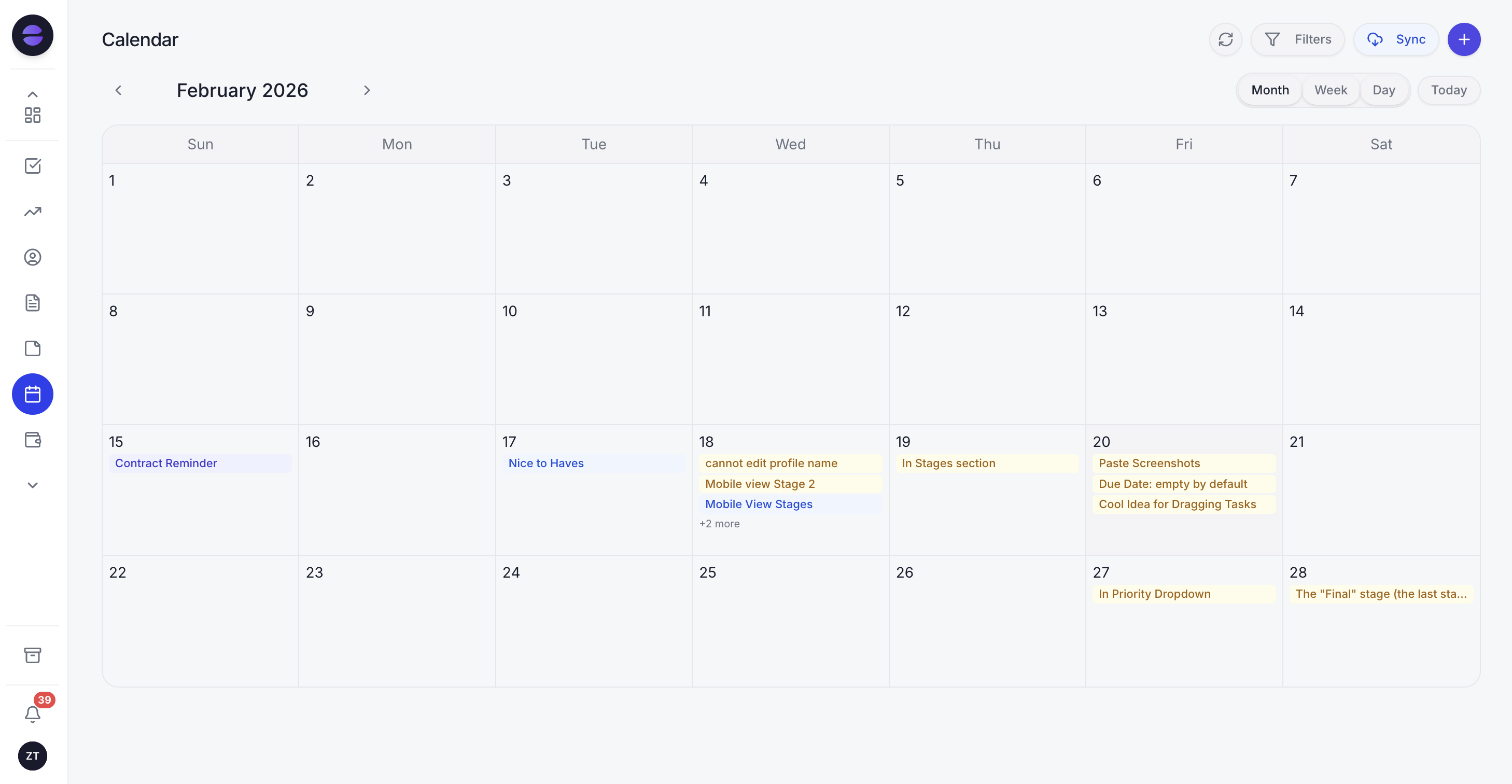 Sessions, discovery calls, and reminders in one calendar, with the assistant booking and confirming automatically.
In a coaching practice it looks like this. An enquiry arrives on WhatsApp late at night and the assistant answers immediately, captures the person as a lead with their source and what they asked about, and offers the open slots for a discovery call. The call gets booked into your real calendar, the confirmation goes out, and a reminder follows before the session. If the person does not show, the assistant follows up the same day to rebook instead of leaving an empty hole in the week.
It carries the client relationship after the sale too. Each client record holds their package, how many sessions are used, what was agreed at the last session, and when payment is due. You tell Zoye the rule, for example "when a client has two sessions left in their package, remind me and message them about continuing", and it builds the automation. There is no flowchart to draw, no separate messaging tool to connect, and nothing to maintain afterwards.
Because leads, sessions, packages, payments, and follow ups all sit in one workspace, you also get the view that actually runs a practice: who is waiting on an answer, who is due a renewal conversation, which discovery calls are booked this week, and what is unpaid. And because the assistant works over WhatsApp, you can run all of it from your phone in the ten minutes between two clients.
Pricing: Almost Free at 5 dollars per month for 1 member with the core tools and 1GB of storage. Starter 29 dollars per month (10 members, 5GB). Growth 59 dollars per month (20 members, 10GB, 24/7 support). Scale 119 dollars per month (100 members, 25GB), plus a Customize tier for larger limits and dedicated support.
Best for: Solo coaches and small practices that want the enquiries, bookings, reminders, and renewals handled for them on WhatsApp, not another database to keep current.
2. HubSpot - the polished generic CRM
HubSpot is a genuinely good general purpose CRM with a free tier, a clean interface, and deep customisation. Many coaches start here because it is familiar, well documented, and easy to shape into a simple enquiry pipeline.
The trade off is that it was built for sales teams, and more importantly it is a system you operate. It will show you a tidy pipeline of interested people and leave the messages, the booking, the reminders, and the renewal conversation entirely to you. For a coach whose real bottleneck is time between sessions, the result is a better organised list of the follow ups that still did not happen.
Pricing: Free CRM tier. Paid plans scale up per seat; check the current pricing page.
Best for: Coaches who want a familiar, flexible CRM and are willing to do the operating themselves.
3. monday.com - the flexible work platform
monday.com is a visual, highly configurable work platform that a coach can shape into a client board, a session tracker, and a simple pipeline. The boards are pleasant to use, automations exist, and it scales well if you later add associates.
The trade off is that everything good about it starts with you designing it. You choose the columns, build the board, wire the automations, and then keep feeding it. It is strong at showing you the state of the practice and weak at changing that state, because moving a client forward still means a person writing the message.
Pricing: Paid plans per seat with a minimum seat count; check the current pricing page.
Best for: Practices that enjoy building their own structure and want a visual board they control.
4. Zoho CRM and Zoho Bigin - the affordable configurable option
Zoho offers a budget friendly CRM family, with Bigin aimed squarely at very small businesses. With some setup you can build a coaching pipeline, track packages with custom fields, and connect messaging channels. The price is hard to argue with.
The trade off is the setup burden followed by the operating burden. Once it is configured it still expects a person to enter what happened, send the follow up, and chase the payment. For a solo coach, that daily upkeep is exactly the part that gets dropped in a busy month.
Pricing: Bigin has a low cost entry plan; Zoho CRM editions scale up per user. Check the current pricing page.
Best for: Coaches who want a low cost, configurable CRM and have time to set it up.
5. Local booking and appointment apps - the scheduling first category
Appointment apps built for local service businesses are excellent at one job: letting a client pick a slot without a phone call. Many also send reminders, take deposits, and handle recurring appointments, which alone removes a real chunk of admin from a coaching week.
The trade off is scope. A booking app owns the calendar, not the relationship. It does not know that the person who cancelled twice is drifting, that a package is nearly finished, or that an enquiry from last week never turned into a first call. Coaches who rely on one usually end up running a second, informal system for everything that happens outside a booked slot.
Pricing: Varies by vendor, typically a low monthly subscription per practitioner.
Best for: Coaches whose main pain is scheduling and who handle sales and retention themselves.
6. Calendly and scheduling links - the booking link
Calendly and similar scheduling tools do one thing very well: they remove the back and forth of finding a time. Send a link, the client picks a slot, it lands in your calendar with a reminder attached. For discovery calls it is close to frictionless.
The trade off is that a link is a door, not a practice. It cannot capture the enquiry that never reached the link, it cannot tell you who booked and never came back, and it cannot start the conversation that turns a free call into a paid package. It is a useful component, rarely a system.
Pricing: Free tier available; paid plans per seat. Check the current pricing page.
Best for: Coaches who want frictionless discovery call booking alongside another system.
7. Spreadsheets plus WhatsApp - the default stack
Most coaching practices actually run on a spreadsheet and a phone, and it deserves an honest entry, because it is free, infinitely flexible, and you already know how to use it. For the first handful of clients it is genuinely fine.
The trade off appears at scale. Nothing reminds you, nothing chases, nothing connects the message thread to the payment status, and the whole thing lives in one person's memory. Every enquiry that arrives during a session depends on you remembering it afterwards, which is precisely where the leaks are.
Pricing: Free.
Best for: A brand new practice with a handful of clients and no follow up problem yet.
Want to see it in action?
See Zoye catch a new lead, answer on WhatsApp and set up the follow-up, all from one message.
See How It WorksQuick comparison for a coaching practice
| Tool | Strongest at | What you still operate | Pricing |
|---|---|---|---|
| Zoye | Answering, booking, reminding, and chasing renewals automatically | Almost nothing operational; you coach | Almost Free 5 dollars per month, Starter 29, Growth 59, Scale 119 |
| HubSpot | Clean pipeline and reporting | Every message, booking, and follow up | Free tier, paid per seat |
| monday.com | Visual boards you design | Board upkeep and all client contact | Paid per seat, minimum seats |
| Zoho / Bigin | Low cost configurable CRM | Setup, data entry, and chasing | Low cost entry, scales per user |
| Booking apps | Slot booking and reminders | Sales, retention, and everything off calendar | Low monthly per practitioner |
| Calendly | Frictionless discovery call booking | Capture, qualification, follow up | Free tier, paid per seat |
| Spreadsheet plus WhatsApp | Zero cost and total flexibility | Literally all of it | Free |
Best CRM for a solo coach
For a solo coach the honest question is not which tool has the most features, it is which tool reduces the number of things waiting for you at the end of a session day. Measured that way, most of this list adds work before it removes any: a generic CRM needs feeding, a work platform needs building, a booking app covers one slice, and a spreadsheet needs you for everything.
Zoye is the clearest pick here because it is the only option that answers the first message, qualifies the person, books the discovery call, reminds them, and brings up the renewal without you starting any of it. A practice of one runs like a practice with a manager, because reception, scheduling, and chasing are handled while you are in the room with a client.
Best WhatsApp-native option for coaches
Most CRMs treat WhatsApp as an integration you bolt on. For a coach that is backwards, because WhatsApp is the channel where the enquiry starts, the reschedule is requested, and the reminder is actually read. A tool whose follow up lives in email is invisible to the person who answers messages in two minutes and opens their inbox once a week.
Zoye puts WhatsApp at the centre. The assistant replies the moment an enquiry lands, offers real slots from your calendar, confirms the session, sends the reminder, follows up on a no show, and raises the renewal when a package is nearly used up, all in the same thread the client is already in. You tell Zoye what you want to happen, and it takes it from there. That is the difference between a CRM that has a WhatsApp integration and an operator that works the WhatsApp conversation for you.
See what Zoye can do for you
CRM, deals, tasks and your Instagram, Facebook and WhatsApp automations in one workspace. Just ask Zoye and it sets any of it up for you.
Explore FeaturesHow to choose: four questions before you commit
1. After setup, who sends the follow up, the tool or you? Be honest about how much energy you have between sessions. If the answer is close to none, you need something that chases automatically, not something that reminds you to chase.
2. Does it work where your clients actually reply? If enquiries and reschedules arrive on WhatsApp and the tool follows up by email, the follow up will not land. Match the tool to the channel where the conversation already happens.
3. Can it protect the calendar? A confirmed session, a cancellation, and a no show are three different outcomes with three different responses. A tool that cannot confirm, remind, and rebook automatically will cost you paid hours every month.
4. Does it help you keep clients, not just find them? Renewals and package endings are where a coaching practice quietly leaks revenue. If nothing surfaces the client who is two sessions from the end, that conversation will keep being postponed.
Why coaches pick Zoye
A coaching practice does not usually collapse. It leaks: the enquiry answered a day late, the discovery call nobody rebooked, the package that ended without a conversation, the invoice nobody wanted to chase. Every one of those is small, and together they are the difference between a full month and a thin one.
The fix is not a bigger database or another booking link. It is an operator that captures every enquiry, answers and chases on WhatsApp immediately, keeps the calendar full, and raises the renewal on time, so the health of the practice stops depending on how much energy is left at nine in the evening.
That is what makes Zoye the strongest pick on this list for a solo coach or a small practice. Not the longest feature list, but the only one that does the operating for you.
Try Zoye with your coaching practice. The entry plan is Almost Free, with the core tools.
For more context, see the CRM for coaches, the CRM for real estate agents, WhatsApp automation for your business, and WhatsApp appointment reminders.


