
Quick answer: the best CRM for therapists runs the business side of a private practice, meaning enquiries, consultation calls, reminders, the waitlist and referral sources, while your EHR keeps every clinical record. Zoye ranks first for that business side, next to an EHR. SimplePractice, TherapyNotes, Jane, Practice Better and TheraNest are the practice systems that hold notes and claims, and HubSpot is the general sales CRM some group practices try.
Key takeaways (October 2026)
- In the APA's 2025 Practitioner Pulse Survey of 1,742 psychologists, 46 percent had no openings for new patients and 40 percent kept a waitlist, so the waitlist is a real working list for many practices.
- A 2013 Cochrane review of 8 trials found that appointment attendance was 78.6 percent with text reminders against 67.8 percent with none.
- Practice systems list $29 to $99 a month for one clinician (TheraNest Essentials to SimplePractice Plus); Jane prices in Canadian dollars, and group pricing for six or more clinicians at SimplePractice is quote-only.
- Zoye Starter is $29 a month, or $23 billed yearly, for up to 10 members. It is not an EHR and makes no health-data compliance claim, so clinical information stays out of it.
The business side of a private practice, and where it leaks
A private practice rarely loses clients in the therapy room. It loses them before the first session: the enquiry answered two days late, the consultation call that never got booked, the waitlist nobody looks at, the reminder that was not sent and the referral source nobody thanked. Those are business problems, and they need business tools.
The demand is not the issue. The US Bureau of Labor Statistics counts about 533,400 substance abuse, behavioral disorder and mental health counselor jobs in 2025, with a median wage of $59,350 in May 2025, and it projects 18 percent employment growth from 2025 to 2035 against 3 percent for all occupations, or about 50,500 openings a year. More clinicians are opening practices, and each one is competing for the same moment: when someone finally decides to ask for help.
The enquiry that waits
People often reach out to a therapist after weeks of hesitating, and many contact two or three practices at once. The first practice to reply warmly, with clear next steps, usually gets the consultation. Sales research makes the same point: in a 2011 Harvard Business Review analysis of 1.25 million leads, companies replying within an hour were nearly seven times as likely to qualify a lead as those replying an hour later. A therapy enquiry is not a sales lead, but a person waiting two days for any reply is a person who may stop waiting.
The hard part is that therapists are in session most of the day. A solo clinician seeing six clients cannot answer a contact form at 11 a.m., and by the evening there are four messages to answer and notes to write.
The consultation that never gets booked
Many practices offer a free 15-minute consultation call. It is a strong conversion step, and it is also where scheduling ping-pong eats days. "Does Tuesday work?" "Only after 5." "How about Thursday?" Every round trip is a chance for the person to give up.
The waitlist on a sticky note
The APA's 2025 survey found that 40 percent of psychologists keep a waitlist, and that among those without one, 22 percent said they did not have the capacity to manage it. That second number is the honest one. A waitlist only helps if someone checks it when a slot opens, contacts people in order and removes those who found help elsewhere. On paper or in a spreadsheet, it goes stale within weeks.
The no-show and the late cancel
A missed session is lost income and a slot another client could have used. The Cochrane review on mobile phone reminders found that attendance rose from 67.8 percent with no reminder to 78.6 percent with a text reminder, and phone call reminders reached 80.3 percent. A reminder that goes out every time, without anyone at the front desk remembering, is the cheapest fix most practices have.
The referral source nobody tracks
Practices grow through referrals from physicians, other therapists, schools, employee assistance programs and past clients who recommend you. Most practices cannot say which sources send people who are a good fit. Without that, a practice owner cannot decide where to spend time on relationships.
Illustrative example: a three-clinician group practice that gets 25 enquiries a week, replies to them in batches on Friday and keeps its waitlist in a shared document is not short of demand. It is short of a system that replies while everyone is in session and remembers who is waiting.
Where clinical records end and the CRM begins
This is the line that matters most. Clinical records, meaning intake assessments, progress notes, diagnoses, treatment plans, outcome measures and insurance claims, belong in an EHR or practice-management system built for health data. A CRM like Zoye is for the business side: who enquired, how they found you, what is booked and who needs a follow-up.
Zoye makes no claim of HIPAA compliance, GDPR health-data compliance or compliance with any other health-data rules, and we do not offer it as a place to store clinical information. In the US, HIPAA expects covered providers to have a business associate agreement with any vendor that handles protected health information for them. In the EU, data concerning health is a special category under Article 9 of the GDPR, with stricter conditions for processing. Your EHR vendor is the right place for that data and for those agreements.
In practice, the boundary looks like this:
| Belongs in your EHR or practice system | Fine for the business side in a CRM |
|---|---|
| Clinical intake forms and assessments | Name, contact details, preferred contact channel |
| Progress notes and session content | How they found you (referral source, directory, website) |
| Diagnoses, treatment plans, outcome scores | Consultation booked, waitlist date, preferred times |
| Insurance claims, superbills, eligibility checks | Private-pay invoices with generic wording ("session") |
| Anything a client tells you about their health | Reminders that say only the date, time and place |
Two habits keep the CRM side clean. First, write enquiry questions that never ask why someone wants therapy; the clinical intake happens later, in your EHR. Second, keep every outgoing message free of health details: "Your appointment is on Tuesday at 4 p.m." is fine; anything that hints at the reason for the visit is not.
Professional ethics shape growth work too. The APA Ethics Code, for example, bars uninvited in-person solicitation of potential therapy clients (Standard 5.06), and confidentiality means you cannot tell a referring physician that someone became your client without that client's consent. A good CRM setup respects both: it answers people who reached out, and it tracks referral sources without disclosing who came from where.
The private practice CRM checklist: 8 things it should handle
A CRM for a therapy practice should catch every enquiry, reply while you are in session, book consultations without back-and-forth, keep a waitlist that someone actually works, send reminders before every appointment, record referral sources, track private-pay invoices and stay clear of clinical content. Use these eight points to compare tools.
- Every enquiry in one list. Website form, directory profile link, Instagram or Facebook message, email and WhatsApp should all create the same kind of record, with the source saved.
- A first reply in minutes, during sessions too. Warm, short, with a link to book a consultation, and no clinical questions.
- Logistics-only intake questions. Availability, in-person or online, private pay or insurance, preferred language. Nothing about symptoms.
- Consultation booking from a link, landing in the calendar you already use.
- A waitlist with dates and preferred times, plus a reminder to check in with people who are waiting.
- Reminders before every session, worded without health details.
- Referral source tracking, so you can see which relationships send good fits, without sharing client identities.
- Exports and a clear boundary. You can take your data out as a file, and nothing clinical is ever required.
Points 1 to 7 are the front desk. The clinical file, telehealth sessions and insurance billing are a different layer, the EHR, and most solo and group practices need both.
Want to see it in action?
See Zoye catch a new lead, answer on WhatsApp and set up the follow-up, all from one message.
See How It WorksThe 7 best CRMs for therapists in 2026
This list mixes one business-side operator with five practice-management systems and one general sales CRM, because that is the real choice a private practice faces. Every price comes from the vendor's own pricing page as of October 2026, before payment processing, add-ons and promotions.
1. Zoye: the front desk for the business side of your practice
Zoye is an AI Business Operator: thirteen connected tools (contacts, deals, tasks, calendar, documents, invoices, reports, workflow automations, WhatsApp automations, Facebook and Instagram, email tracking, team and an AI Notetaker) in one workspace, with an AI that runs them for you. For a private practice, its job is everything around the therapy hour that does not belong in the clinical record.
Enquiries while you are in session. Someone fills in your website form, messages your Instagram account or taps a click-to-chat link. Zoye creates the contact with its source, and if the new-enquiry WhatsApp message is switched on for that source, a short reply goes out in seconds. The qualification bot asks only the logistics questions you set (preferred days, in-person or online, private pay or insurance) and writes each answer into a field. Anything it should not handle is handed to you, with the whole chat on the contact's card. Instagram and Facebook messages get the same quick answer, and they sit in Chats next to the WhatsApp conversations.
Consultations and reminders. Bookings lets you open a consultation slot or a regular session time people can book from one link, and every booking lands in the calendar that syncs both ways with Google, Outlook and Apple. Reminders go out automatically before each appointment, from one Booking list. The online booking page shows how sessions, spots and payment work.
A waitlist that someone works. Waitlist can be a stage on your pipeline with the date each person joined and their preferred times. Smart audiences stay live as records change, so "waiting more than 21 days, prefers evenings" is always current. You can ask the assistant on WhatsApp, "who is waiting for a Tuesday evening slot?", and get the answer from live data. For groups and workshops, Bookings has spots and a waitlist that takes over when the last spot goes.
Referral sources and follow-ups. Every contact keeps the source it came from, so the reports show which directories, colleagues and programs send people. You describe a follow-up, for example "if a consultation enquiry has had no reply after two days, send one gentle check-in, then create a task for me", and Zoye builds the trigger, conditions and actions, shows the finished rule in plain English and waits for your approval. Every run is logged and can be reversed.
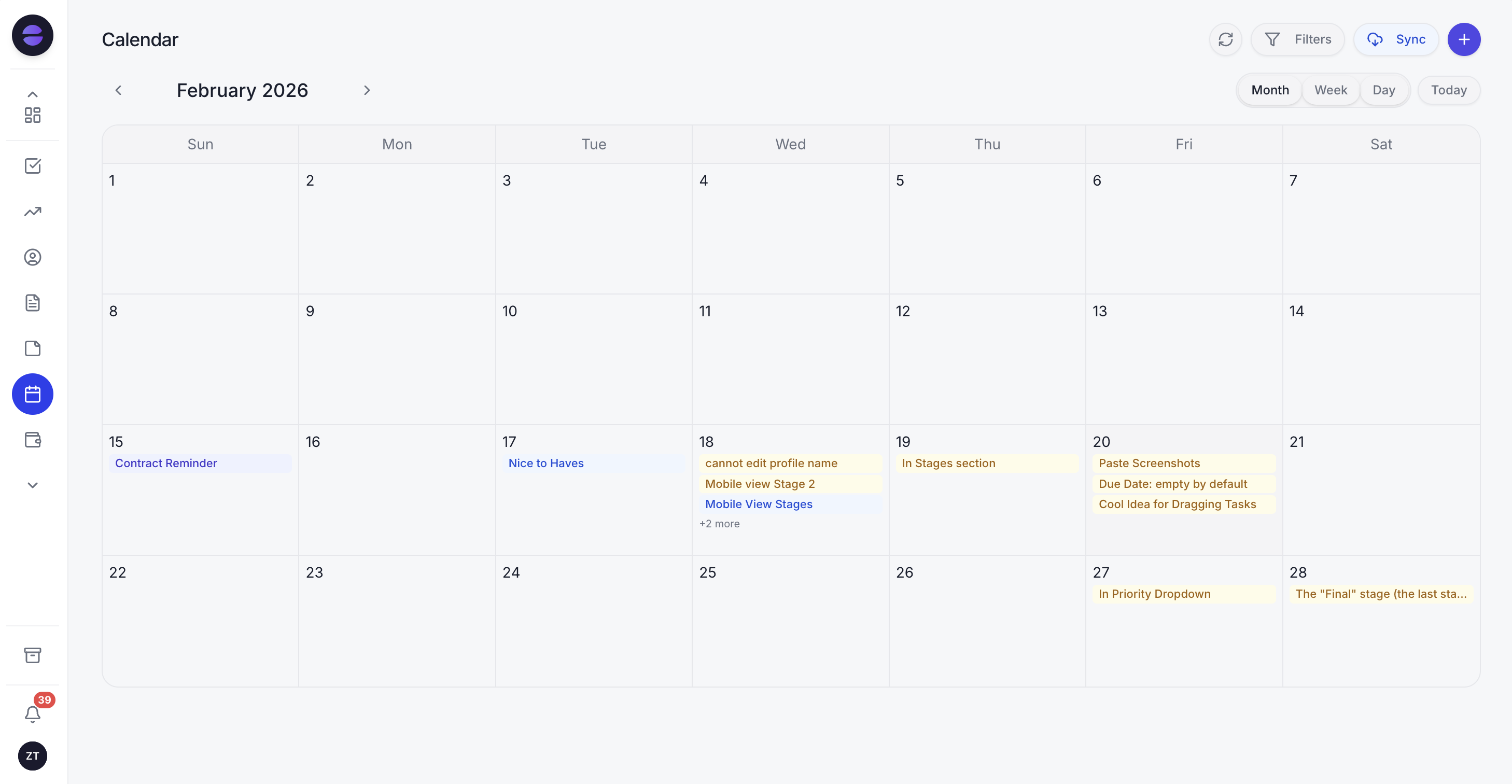
Zoye's calendar: consultation calls, booked sessions and waitlist check-ins in one week view, synced with the calendar you already use.
Payments for private-pay clients. A payment link can go in the chat (Stripe, or Grow in Israel), and invoices track what is owed. Keep the line items generic, such as "Session, 50 minutes".
The honest limits. Zoye is not an EHR or a practice-management system. It has no clinical notes, treatment plans, outcome measures, telehealth rooms, insurance claims or e-prescribing, and it makes no HIPAA or health-data compliance claim. Do not record therapy sessions with the AI Notetaker; use it, if at all, for business meetings such as a call with a referral partner. All six WhatsApp automations are off until you switch them on, they confirm before sending, and they run on the official WhatsApp Business Platform. Connecting your own business WhatsApp number is coming soon, pending WhatsApp approval.
Pricing (as of October 2026): the bill follows the people in your workspace, not the number of clients. Almost Free costs $5 a month ($4 billed yearly) for one member, with the core tools, Google Calendar, Gmail and Drive, and 15 AI prompts a month; automations are not part of it. Starter is $29 a month ($23 yearly) for up to 10 members and 5GB, Growth $59 ($47) for 20 members and 10GB, Scale $119 ($95) for 100 members and 25GB, and Customize is quoted. See the pricing page.
Best for: solo and group practices that already have an EHR and keep losing people between the first message and the first session.
2. SimplePractice: the best-known EHR for solo practices
SimplePractice is a practice-management system with scheduling, notes, a client portal, telehealth, paperless intake documents and online payments. Its limitation for growth work is that reminders are not in the entry plan, and its enquiry handling is built around appointment requests rather than following up with people who have not booked.
Pricing (as of October 2026): Starter $49 a month, Essential $79 and Plus $99, billed monthly; appointment reminders and secure client messaging start on Essential, and extra clinicians on Plus start at $74 each. Groups of six or more get custom pricing. Add-ons include Care Aide at $59 a month and Note Taker at $35, and the page was showing 50 percent off for three months for new accounts, plus a $20 annual fee per clinician for CPT codes.
Best for: solo clinicians who want one widely used EHR for notes, telehealth, intake paperwork and insurance.
3. TherapyNotes: per-clinician EHR with metered reminders
TherapyNotes is a behavioral health EHR with scheduling, notes, billing, a client portal and basic telehealth in every plan. Its catch for practice growth is that text and call reminders are billed per message and there is no tool for following up enquiries before someone becomes a client.
Pricing (as of October 2026): Solo $69 a month for one user; Group $89 a month for the first clinician plus $60 per additional clinician, with non-clinical staff free. Appointment reminders cost 14 cents per text or call, email reminders are free, Premium Telehealth is $15 per clinician and electronic claims are 25 cents each. There is a 30-day trial.
Best for: US practices that bill insurance and want clear per-clinician pricing.
4. Jane: booking-first practice software with a waitlist
Jane is a clinic and practice platform with online booking, charting, telehealth and payments, popular with multidisciplinary clinics. Its pricing page lists automated waitlist management on the Thrive plan, which is useful. The catches: prices are in Canadian dollars, the Balance plan is limited to 20 appointments a month, and there is no free trial.
Pricing (as of October 2026): Balance CAD $59 a month, Practice CAD $79 and Thrive CAD $99, each including one practitioner; extra practitioners are CAD $35 full-time or $17.50 part-time on Practice and $40 or $20 on Thrive. AI Scribe and Group Telehealth are CAD $15 a month per practitioner. Unlimited SMS reminders are listed on Practice, with availability varying by region.
Best for: multidisciplinary clinics and group practices that want online booking and a built-in waitlist.
5. Practice Better: for practices that sell programs
Practice Better combines scheduling, telehealth, a client portal, billing and programs, which suits practitioners who run structured courses next to one-to-one sessions. The limits: the entry plan caps you at 10 clients, SMS reminders start on Plus, and extra practitioners are only available on the Team plan.
Pricing (as of October 2026): Starter $35 a month (10 clients), Professional $69 (300 clients), Plus $99 (unlimited clients, 750 SMS reminders a month) and Team $155 (2 practitioners, extra practitioners at $50 each), billed monthly, with up to 10 percent off for annual billing according to the page. A Sprout plan for students is offered without charge. Trials run 14 days, or 30 days for Team.
Best for: practitioners who mix sessions with group programs and want them in one portal.
6. TheraNest: low entry price per therapist
TheraNest, from Ensora Health, is a mental health EHR with scheduling, a client portal, intake forms, notes and billing. Its entry plan is the cheapest on this list, but text and phone reminders and online booking start on Advanced, so the real comparison price is higher.
Pricing (as of October 2026): Essentials $29, Advanced $59 and Premier $89 per therapist a month, with unlimited clients. Advanced includes 50 text and 50 phone reminders a month, then 10 cents per reminder; Premier lists them as unlimited under a fair-use policy. Group pricing is by quote, and there is a 21-day trial of Premier.
Best for: budget-conscious solo therapists who bill insurance and want the lowest entry price.
7. HubSpot: a general CRM, not built for practices
HubSpot is a strong general sales and marketing CRM with forms, email and reporting. It knows nothing about sessions, waitlists or clinical boundaries, so a practice would build everything itself and must be very careful to keep health details out. It suits a larger group practice with an operations person and a marketing budget more than a solo clinician.
Pricing (as of October 2026): Sales Hub Starter from $20 per seat a month (about $7 on some offers), Sales Hub Professional $90 per seat billed yearly or $100 monthly, plus a $1,500 onboarding fee.
Best for: group practices with a dedicated marketing or operations lead who want deep email marketing.
See what Zoye can do for you
CRM, deals, tasks and your Instagram, Facebook and WhatsApp automations in one workspace. Just ask Zoye and it sets any of it up for you.
Explore FeaturesTherapy practice software compared side by side
The table puts the seven tools against the four business-side jobs and the bill. Prices are list prices from each vendor's page as of October 2026, before add-ons, processing fees and promotions; "not listed" means the pricing page does not say, not that the feature is missing.
| Tool | Clinical records (EHR) | Entry price (Oct 2026) | Reminders | Waitlist | Enquiry follow-up |
|---|---|---|---|---|---|
| Zoye | No, business side only | $29/mo Starter (10 members, no automations); $59/mo Growth, $47 yearly (20 members, with automations) | Automatic from the Booking list | Pipeline stage + live audience; spots and waitlist for groups | Rule you describe and approve |
| SimplePractice | Yes | $49/mo (Starter) | From Essential ($79) | Not listed | Appointment requests |
| TherapyNotes | Yes | $69/mo (Solo) | 14 cents per text or call, email free | Not listed | Not listed |
| Jane | Yes | CAD $59/mo (Balance, 20 appointments) | SMS on Practice, by region | Automated on Thrive | Not listed |
| Practice Better | Yes | $35/mo (Starter, 10 clients) | SMS from Plus (750/mo) | Not listed | Not listed |
| TheraNest | Yes | $29 per therapist/mo (Essentials) | From Advanced (50 included, then 10 cents) | Not listed | Not listed |
| HubSpot | No | $20/seat (Sales Hub Starter) | Not built in for appointments | No | Sequences on paid plans |
Read it as two columns of tools. The five practice systems answer "where do my clinical records live?" Zoye and HubSpot answer "who is following up with the people who have not booked yet?" Most practices need one of each, and Zoye's Almost Free and Starter plans have no automations, so for the follow-up rules here the realistic Zoye starting point is Growth at $59 a month ($47 billed yearly) for up to 20 members, the plan that includes the WhatsApp and workflow automations.
Four rules worth setting up, with health-free sample messages
A practice that sets up four rules gets most of the business-side value: a quick reply to every enquiry, a consultation booking link, a regular waitlist check-in and a reminder before every session. Every message below contains no health details by design. Rewrite them in your own voice.
Rule 1: the first reply. Trigger: a new enquiry from your website, a directory link, Instagram, Facebook or click-to-chat. Action: a WhatsApp message with the booking link.
"Thank you for reaching out. I am with clients during the day, so this is a quick note to say your message arrived. You can book a free 15-minute consultation call here, or reply with two times that suit you this week."
Then ask the logistics questions only: in-person or online, weekday or evening, private pay or insurance. If someone shares personal details in the chat, move the conversation to your EHR's secure channel and keep the CRM record to logistics.
Rule 2: the consultation nudge. Trigger: an enquiry with no booked consultation after two days. Action: one gentle check-in, then a task for you.
"Just checking you saw the link to book a consultation. No pressure at all, and if the timing is not right, you are welcome to come back whenever suits you."
One nudge is enough. People who are not ready should never feel chased.
Rule 3: the waitlist check-in. Trigger: a contact in the waitlist stage for 21 days. Action: a short message, and a task to review the list.
"A quick update from the practice: you are still on our waitlist, and we expect an opening in the next few weeks. Reply 'yes' to stay on the list, or let us know if your needs or availability have changed."
When a slot opens, the assistant can list who matches that time, in the order they joined. When the expected wait is too long for someone's needs, the ethical step is a referral elsewhere, and the record should show you offered it.
Rule 4: the session reminder. Trigger: a booked session tomorrow. Action: a reminder with the time and place only.
"A reminder of your appointment tomorrow at 4 p.m. If you need to reschedule, please reply here at least 24 hours ahead."
A note on WhatsApp rules: the customer service window is 24 hours from a person's last message, so a reminder sent the day before usually goes out as an approved template, which Zoye submits and tracks for you. Since 1 July 2025 Meta has billed the WhatsApp Business Platform per delivered message, by category and country, and since 1 October 2026 each business number gets 1,000 free service messages a month, according to Meta's developer documentation. Rates vary by country, so check Meta's rate card or our WhatsApp Business API pricing guide. Our guide to WhatsApp appointment reminders covers timing and templates in more depth.
A week in a three-clinician practice, illustrated
The week below is illustrative, not a client story. Picture a group practice with an owner who also sees clients, two associate therapists and a part-time admin, using an EHR for clinical work and Zoye for the business side with the four rules above switched on.
Monday, 10:20 a.m. Everyone is in session. Two enquiries arrive, one from the website form and one from an Instagram message. Both get the first reply in seconds with the consultation link. One person books a consultation for Wednesday evening before lunch.
Monday, 6 p.m. The owner asks the assistant on WhatsApp, "how many enquiries this week, and from where?" The answer comes from live data: five, two from a therapist directory, two from the website and one referred by a colleague.
Tuesday. A third enquiry has not booked after two days, so the consultation nudge goes out. The person replies with two times, and the admin books one.
Wednesday. The consultation call happens. The person is a good fit for one of the associates, so the admin creates the client in the EHR, where all clinical intake happens from now on, and moves the Zoye record to "Booked" with a link to nothing clinical.
Thursday. A regular Thursday client moves to a new schedule, which opens a slot. The admin asks Zoye who on the waitlist prefers Thursday afternoons; two names come back, and the first person who joined gets the offer and accepts it.
Friday. Reminders for Monday's sessions go out automatically. One client replies to reschedule, and the admin moves the booking.
Saturday and Sunday. Two more enquiries get their first reply anyway. On Monday morning they are already in the list, not buried in an inbox.
What changed is simple: nobody waited days for a first reply, the waitlist was used the moment a slot opened, and no reminder depended on someone's memory. No clinical detail ever entered the CRM.
Ready to hand off the busywork?
Zoye brings AI-powered CRM, task management, and automation into one workspace.
Get StartedHow to set up a CRM next to your EHR in two weeks
A careful setup takes one to two weeks. Decide the boundary first, import only business contacts, switch on one rule at a time and test each one by enquiring at your own practice. The order matters, because the first reply and the waitlist are where people are lost.
- Write your boundary down. One sentence per tool: "Clinical: EHR. Enquiries, consultations, waitlist, referral sources, reminders: CRM." Share it with everyone on the team.
- List your open enquiries and waitlist, with the date each person contacted you and their preferred times.
- Import contacts with business fields only. Zoye imports a spreadsheet, and the assistant can extract records from a CSV or a screenshot. Leave clinical columns out of the file before you upload it.
- Set up your consultation slots in Bookings and connect your calendar.
- Switch on the first reply, then test it by filling in your own website form.
- Add the consultation nudge, the waitlist check-in and the reminders, one per week, and read the run log after each.
- Review referral sources monthly. Thank colleagues in general terms, never by naming a client, unless that client has given written consent.
For a broader look at reminder tools, our Calendly alternatives guide compares booking-link tools, and how to stop losing leads covers the response-time side.
The bottom line
The best CRM for therapists is the one that answers people while you are in session, gets consultations booked, works the waitlist and sends every reminder, without ever holding clinical information. Keep your EHR (SimplePractice, TherapyNotes, Jane, Practice Better or TheraNest) for records, notes and claims. If the gap in your practice is between the first message and the first session, book a Zoye demo and bring last month's enquiries that never turned into a consultation.