
Best Zoho Projects Alternatives 2026: 7 Tools for Modern Teams
Zoho Projects has earned its place as a dependable project management tool. It covers tasks, milestones, Gantt charts, time tracking, and basic automation, and it sits inside the broader Zoho suite of more than fifty business apps. For teams already committed to Zoho CRM, Zoho Books, and the rest of that ecosystem, Zoho Projects is a logical, low-friction choice, and any fair comparison should start there.
In 2026, though, more teams are asking whether Zoho Projects is still the right home for their work. Three things keep coming up. The interface, while functional, feels dated next to newer tools, and onboarding a non-technical team takes more patience than it should. The product also shines mainly when you live in the wider Zoho ecosystem; used on its own, away from Zoho CRM and Books, a lot of its value is left on the table. And it has no native acting AI - it manages projects, but it does not run the business around them. This guide compares the seven best Zoho Projects alternatives in 2026, from lightweight boards to a full AI-native workspace.
Pricing reflects published rates as of June 2026; check each vendor's pricing page for current figures.
Why teams are looking beyond Zoho Projects in 2026
The pressure to look past Zoho Projects comes from four directions that have grown sharper as work has moved into fewer, smarter tools.
A dated user experience. Zoho Projects is capable, but its interface carries years of accumulated features and a layout that feels heavier than modern competitors. New team members, especially non-technical ones, take longer to find their way around. The everyday flow of creating a task, dragging it across a board, or pulling up a report involves more clicks and menus than teams now expect from a 2026 tool.
Best only inside the Zoho ecosystem. Zoho Projects is designed to be one app in a large suite. Its real strength shows when it is wired into Zoho CRM, Zoho Books, and the rest. For a team that does not want to adopt the whole Zoho world, the standalone project tool feels less complete, and the integrations that make it sing point back into Zoho rather than out to the tools the team already uses.
No native acting AI. Zoho has added AI features across its suite, but Zoho Projects is still fundamentally a project tracker, not an AI-native workspace. There is no assistant that reads the whole project, reassigns work, schedules around deadlines, and writes the status report on a single instruction. In 2026, teams increasingly expect AI that takes action, not a tool they have to drive manually all day.
Project-only, not full business operations. This is the biggest one. Zoho Projects manages projects. It does not, on its own, hold your customers, your deals, your budget, or a cross-business reporting layer. So teams run Zoho Projects plus a CRM plus a budget tracker plus separate AI, paying for and switching between several tools. A platform that bundles the operations layer natively removes that fragmentation entirely.
The 7 best Zoho Projects alternatives in 2026 at a glance
| Tool | Best for | Native acting AI | Pricing model |
|---|---|---|---|
| Zoye | Running the whole business, not just projects | Yes, acts across the workspace | Flat-rate, not per seat |
| ClickUp | Feature-rich all-in-one project work | Add-on | Per user |
| Asana | Polished task and workflow management | Add-on | Per user |
| Monday.com | Visual, customizable work boards | Add-on | Per user (3-seat minimum) |
| Wrike | Structured project and resource management | Add-on | Per user |
| Trello | Simple, lightweight Kanban boards | Limited add-on | Per user |
| Jira | Software and engineering project tracking | Add-on | Per user |
The 7 best Zoho Projects alternatives in 2026
1. Zoye - the AI-native business-operations alternative
Zoye is the strongest Zoho Projects alternative for teams whose real goal is to run the business, not just track projects. Where Zoho Projects gives you tasks and Gantt charts and leaves customers, budget, and AI to a separate stack, Zoye bundles the operations layer (customers, projects, budget, reporting) with a native acting AI in one workspace at flat-rate pricing.

It helps to be precise about the swap. Zoye does everything teams rely on Zoho Projects for, and then keeps going. The platform covers Tasks and projects with list, board, calendar, and timeline views, priority labels, dependencies, and workload management. On top of that it adds a full CRM (Contacts, Companies, and Deals with pipeline stages), an Inbox, collaborative Docs and Notes, a Calendar where tasks appear automatically, Budget and finance tracking, a Team module, cross-workspace Reports, and an Archive. Every one of these modules is built in and included, not a separate purchase. One workspace, one login, one bill.
Zoye Assistant - AI that works, not just talks
In Zoho Projects, AI is an assistive layer that helps inside individual screens. Zoye ships with a native assistant named Zoye that executes work across the entire workspace through text or voice. It drafts task descriptions from a short brief, surfaces overdue and blocked work proactively, reassigns workload by team capacity, generates a weekly status report on demand, schedules meetings around deadlines, creates tasks straight from incoming messages, and handles deduplication and tagging during a migration. It acts, it does not just suggest.
Tasks and projects, built for any view

Zoho Projects can feel heavy when all a team wants is to move work across a board. Zoye handles tasks and projects in one clean place, on the same data, with list, board, calendar, and timeline views. Priority labels, dependencies, and workload management work without configuration, so a team can start running real projects on day one instead of learning a dense menu structure first.
Calendar - tasks where they belong

In many project tools the schedule lives apart from the work, or behind a separate calendar integration. In Zoye, the calendar is the workspace calendar. Tasks appear on it automatically, meetings layer over deadlines, and there is no sync to configure. The schedule and the work are the same picture, which is exactly what a busy team needs at a glance.
Notes and Docs that stay with the work
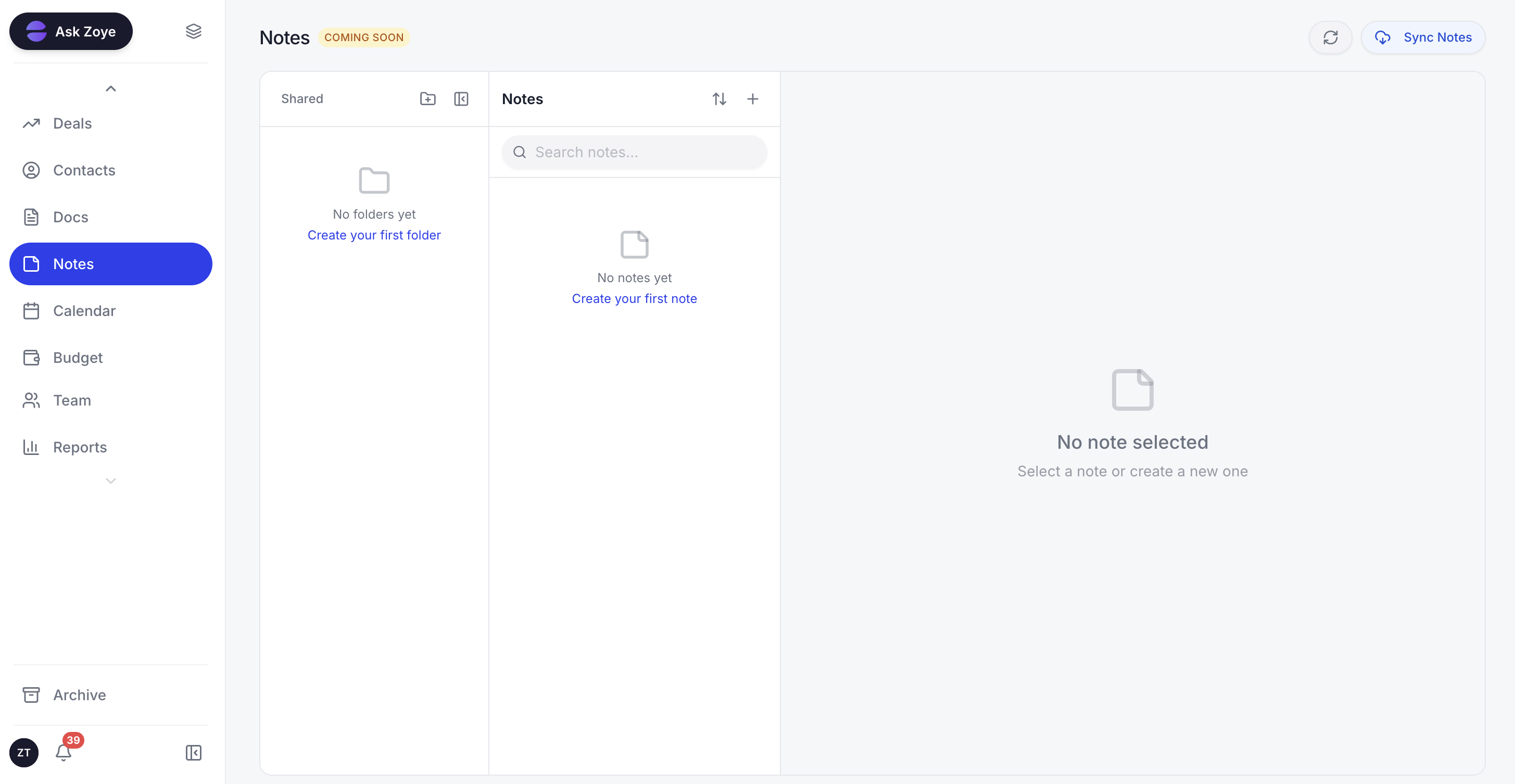
Project context tends to scatter across separate documents and chat threads. Zoye keeps collaborative Docs and Notes inside the same workspace as the tasks and customers they relate to, so a brief, a meeting note, or a decision lives next to the work it drives rather than in a different app entirely.
Reports that pull from the whole workspace

Getting a cross-business view out of a project-only tool usually means exporting to a spreadsheet and rebuilding it by hand. Zoye Reports brings tasks, deals, contacts, budget, and team activity into one exportable dashboard out of the box. The weekly status report writes itself from real workspace activity, so the numbers behind a decision are always one click away rather than a spreadsheet rebuild.
The pricing model is flat-rate, which is the sharpest contrast with the per-user pricing of Zoho Projects and most competitors. A 15-person team pays one monthly fee on Zoye, not 15 separate licenses, and that single fee already covers the project tool, the CRM, the budget tracker, the reporting layer, and the AI that would otherwise be several extra subscriptions. Migration is straightforward too: import connectors cover Trello and Monday.com, and WhatsApp integration is live today for customer conversations, with Gmail and Google Calendar connected as well. Jira, Notion and ClickUp imports are coming soon.
Pricing: Almost Free at $5 per month ($4 billed annually, 1GB) for 1 member with the full platform including AI. Starter $29 per month ($23 billed annually, up to 10 members, 5GB). Growth $59 per month ($47 annually, up to 20 members, 10GB). Scale $119 per month ($95 annually, up to 100 members, 25GB). Enterprise is custom. Flat-rate, not per seat. Cancel or upgrade anytime.
Best for: Small to mid-size teams that want to run customers, projects, and budget in one AI-native workspace instead of bolting a stack onto a standalone project tool.
Ready to streamline your business?
Zoye brings AI-powered CRM, task management, and automation into one workspace.
Get Started2. ClickUp - the feature-rich all-in-one
ClickUp is the alternative for teams that want a single tool packed with project features. It combines tasks, docs, goals, whiteboards, and dashboards, with deep customization and ClickUp AI available as an add-on. For teams that found Zoho Projects capable but dated, ClickUp offers a more modern, flexible take on the same project-management job.
Where it works best:
- Teams that want highly customizable views and workflows
- Power users who like configuring statuses, automations, and fields
- Groups consolidating several project tools into one
Pricing: Free tier available. Unlimited around $7 per user per month. Business around $12 per user per month. AI add-on priced separately.
Worth knowing: ClickUp's depth is its strength and its weakness. The sheer number of features and settings can overwhelm small or non-technical teams that just want to run projects without a setup project of their own. It also stays a project tool, so customers and budget still live elsewhere.
3. Asana - polished task and workflow management
Asana is the alternative for teams that prioritize a clean, intuitive experience for managing tasks and workflows. It is widely loved for its polished interface, strong timeline and board views, and dependable automation, making it an easy upgrade in usability from Zoho Projects' busier layout.
Where it works best:
- Teams that value a refined, easy-to-learn interface
- Cross-functional work that spans many small projects
- Managers who want clear timelines and workload views
Pricing: Free for small teams. Starter around $11 per user per month. Advanced around $25 per user per month. AI features in higher tiers.
Worth knowing: Asana is excellent at task and workflow management but is not a business platform. It has no CRM, no budget module, and no native acting AI that runs work across the company, so larger operations still need additional tools alongside it.
See what Zoye can do for you
From CRM and deal tracking to AI-powered task management - explore everything Zoye offers in one workspace.
Explore Features4. Monday.com - visual, customizable work boards
Monday.com is the alternative for teams that think visually and want colorful, highly customizable boards. Its building-block approach lets teams shape boards for projects, campaigns, or operations, and it has grown into a broader Work OS with CRM and dev products available separately.
Where it works best:
- Visual teams that like color-coded, at-a-glance boards
- Marketing and operations groups managing varied workflows
- Teams that want to customize without writing code
Pricing: Basic around $9 per seat per month. Standard around $12 per seat per month. Pro around $19 per seat per month. Three-seat minimum on paid plans.
Worth knowing: Monday.com's three-seat minimum and per-seat pricing add up quickly, and its separate CRM and other products are extra purchases rather than one bundled platform. The flexibility can also mean more setup before a board is genuinely useful.
5. Wrike - structured project and resource management
Wrike is the alternative for teams that need structure, resource management, and reporting at scale. It offers detailed project hierarchies, time tracking, workload balancing, and strong reporting, which makes it a solid match for agencies and larger teams that outgrew Zoho Projects' depth.
Where it works best:
- Agencies and services teams juggling many client projects
- Operations that need resource and capacity planning
- Teams that rely heavily on detailed reporting
Pricing: Free tier for basic use. Team around $10 per user per month. Business around $25 per user per month.
Worth knowing: Wrike's power comes with complexity, and smaller teams can find it as heavy as the tool they left. Like the others here, it focuses on project and work management, leaving CRM and finance to separate systems.
Want to see it in action?
Watch how Zoye automates your daily workflow - from lead management to team collaboration.
See How It Works6. Trello - simple, lightweight Kanban boards
Trello is the alternative for teams that want the opposite of a heavy suite: a fast, simple Kanban board anyone can pick up in minutes. Its card-and-list model is famously easy, and Power-Ups extend it when needed. For a team that found Zoho Projects too much, Trello is a refreshing reset.
Where it works best:
- Small teams and personal projects
- Simple, visual workflows that fit a Kanban board
- Anyone who wants to start in minutes with no training
Pricing: Free tier is generous. Standard around $5 per user per month. Premium around $10 per user per month.
Worth knowing: Trello's simplicity is its ceiling. It lacks the dependencies, timelines, reporting, and workload management that growing teams need, and it has no CRM, budget, or acting AI. Many teams outgrow it and look for a platform that scales with them.
7. Jira - software and engineering project tracking
Jira is the alternative for software and engineering teams that need issue tracking built for development. It excels at agile boards, sprints, backlogs, and developer workflows, with deep integrations into the engineering toolchain. For technical teams, it is purpose-built in a way general project tools are not.
Where it works best:
- Software development and engineering teams
- Agile and Scrum workflows with sprints and backlogs
- Teams that need tight integration with developer tools
Pricing: Free for up to 10 users. Standard around $8 per user per month. Premium around $16 per user per month.
Worth knowing: Jira is powerful for engineering but overkill and unintuitive for non-technical teams. It is built around software issues rather than general business projects, and it offers no CRM, budget, or business-operations layer beyond development work.
Best Zoho Projects alternative for small business
For a small business, the right alternative depends on how much ground you need one tool to cover. If you only need lightweight task tracking, Trello or Asana are simpler and quicker to adopt than Zoho Projects, and both have usable free tiers.
If the deeper problem is that Zoho Projects only manages projects while you pay separately for a CRM, a budget tracker, and AI on top, then Zoye is the clearest pick. Small teams feel the cost of a fragmented stack the most, and they cannot afford to context-switch between a project tool, a CRM, and a reporting spreadsheet all day. Zoye puts customers, projects, calendar, budget, and AI in one workspace at a flat monthly rate, so the bill stops climbing with every hire and the team works in one place.
Best AI-powered Zoho Projects alternative
Almost every option here now has some AI, but there is a meaningful difference between AI that drafts inside a single screen and AI that runs the workspace. ClickUp AI, Asana AI, and the AI layers across Monday.com, Wrike, and Zoho's own suite are mostly assistive: they help you write or summarize inside one tool, and several of them cost extra.
Zoye is the only option on this list built AI-native from day one, with an assistant that takes action across the entire workspace rather than inside one screen. It sees the customer in the CRM, the project the customer belongs to, the tasks assigned to your team, and the budget impact, all at once, and it acts on all of them from a single instruction: create the tasks, reassign the workload, schedule the meeting, generate the report. That is a different category from a per-tool AI add-on bolted onto a project tracker.
How to choose the right Zoho Projects alternative for your team
Three questions narrow the field quickly.
1. What are you actually replacing? If it is just task tracking, look at Trello, Asana, or ClickUp. If it is the broader business-operations stack you run alongside projects (CRM, budget, AI, reporting), look at Zoye. If your team is purely software engineering, Jira is purpose-built for that.
2. What matters most: simplicity, depth, or operations? Trello wins on simplicity. ClickUp and Wrike win on depth and customization. Zoye wins on bundled operations and flat-rate cost. Asana and Monday.com win on a polished, visual experience.
3. How important is AI that acts? If a drafting assistant inside your project tool is enough, every modern option covers that. If you want AI that executes work across customers, projects, and budget, Zoye is the only AI-native pick here.
Migration from Zoho Projects to a leaner workspace
Moving off Zoho Projects is usually easier than teams expect, because most of the data is project and task data that exports cleanly. The practical approach is to bring projects, tasks, and structure into the new tool first, then layer in the parts Zoho Projects never held, such as customers and budget.
If you are moving to Zoye, the import connectors cover Trello and Monday.com directly, and for spreadsheet exports the Zoye assistant handles the migration interactively, mapping fields, resolving conflicts, deduplicating records, and confirming each step before moving on. Because Zoye also holds the CRM, budget, and reporting that used to live in separate tools, the move is not just a swap of project trackers; it is a chance to collapse a fragmented stack into one connected workspace. Jira, Notion and ClickUp imports are coming soon.
What changes after leaving Zoho Projects
Teams that move off Zoho Projects to a unified workspace tend to notice three changes.
First, the daily experience gets simpler. A modern, focused interface replaces a dense, feature-heavy one, and non-technical team members find their way around without training. Less time goes to navigating the tool and more to the actual work.
Second, the stack shrinks. Instead of a project tool plus a separate CRM plus a budget tracker plus an AI add-on, the team runs one platform on one bill. Flat-rate pricing means the cost stops rising with every hire, which is a real difference from per-seat project tools.
Third, the AI finally works across the whole picture. Rather than an assistive feature inside one screen, the assistant sees customers, projects, tasks, and budget together and takes action across them. The quality of help changes because the context is unified, not siloed inside a standalone project tracker.
Try Zoye for your team - the Almost Free plan starts at just $5 per month, the price of a cup of coffee, cancel or upgrade anytime. Bring your projects over from Zoho Projects, and let Zoye run the customers, budget, and reporting that a standalone project tool was never built to handle.
For more context, see the best ClickUp alternatives, the best Asana alternatives, the best Wrike alternatives, and the best Zoho alternatives.