
Quick answer: for a business of 3 to 10 people, Zoho CRM is cheaper, can be paid monthly and is easier to run without a specialist, so it is the safer default. Salesforce is the right call when you are building a sales team that will grow well past 20 people, when you already live in Slack, or when you are ready to pay an admin or a partner to shape the system. If you are choosing between Bigin and Starter Suite, you probably need less CRM than either vendor wants to sell you.
Key takeaways (November 2026)
- Zoho CRM is free for up to 3 users, then $14, $23, $40 and $52 per user a month billed yearly (Standard to Ultimate), or $20 to $65 billed monthly.
- Salesforce Starter Suite is $25 per user a month, billed monthly or annually; Pro Suite is $100 per user a month, billed annually with a contract.
- Salesforce Free Suite covers 2 users and 100 emails a month; Zoho CRM Free covers 3 users and 5,000 records.
- Zoho's Zia sales assistant sits on Enterprise ($40) and Ultimate ($52); Salesforce says AI can be added from Core ($195), and Agentforce for Sales starts at $125 per user a month.
- At 10 users, Zoho Professional costs $230 a month billed yearly; Salesforce Pro Suite costs $1,000.
Sources: Salesforce's small-business pricing page, Sales Cloud pricing page and free CRM page; Zoho's CRM pricing page, edition comparison page and Bigin pricing page; all opened on 19 November 2026. Zoho shows prices in the visitor's local currency (on our check it showed Indian rupees), so the Zoho CRM figures here are Zoho's US-dollar list as verified this month. Zoho prices vary by region.
Zoho vs Salesforce at a glance
Zoho wins on price, billing flexibility and how much you get before you need help. Salesforce wins on ceiling: deeper customization, the AppExchange app marketplace and a clear path to enterprise AI, all at a higher price and with more commitment. The table compares the plans a small business actually shortlists.
| Zoho CRM (and Bigin) | Salesforce (Starter Suite, Pro Suite and up) | |
|---|---|---|
| Entry price, November 2026 | Bigin Express $7, Zoho CRM Standard $14 per user a month billed yearly | Starter Suite $25 per user a month |
| Monthly billing | Yes, on every paid edition ($20 to $65 for Zoho CRM) | Starter Suite yes; Pro Suite and up billed annually, Pro Suite with a contract |
| Free tier | Zoho CRM Free: 3 users, 5,000 records. Bigin Free: 1 user, 500 records | Free Suite: 2 users, 100 emails a month, no expiry if used every 60 days |
| Setup effort | Light for Bigin or Standard; grows once you build processes | Light for Starter Suite, which Salesforce sells as a turnkey CRM; grows on Pro Suite with custom objects and flows |
| Admin needs | Optional on Standard; a named owner from Professional | Optional on Starter; a trained admin or partner from Pro Suite up |
| Customization | Custom fields, layouts, Blueprint processes, Deluge functions; sandbox on Enterprise | Custom objects, flows, Apex code and AppExchange apps (listed from Pro Suite) |
| AI features and cost | Zia sales assistant on Enterprise and Ultimate; email intelligence on Professional | Assistive AI in Starter; AI added from Core ($195); Agentforce for Sales from $125 per user a month |
| Data limits | 5,000 records Free, 100,000 Standard, 10 GB (about 5 million records) Professional and up | 10 GB per org on Free, Starter and Pro Suite; Core adds 20 MB per user |
| Integrations | Zoho's 40-plus app suite, Zoho Marketplace, Gmail and Outlook from Standard | Slack workspace included, AppExchange, a $25 per user Web Services API add-on on Pro Suite |
| Support | Classic included with paid editions; Premium and Enterprise support paid | 24/7 AI chat support on Free Suite; Premier Support an add-on on Pro Suite |
Two cells deserve a second look. First, Salesforce's Sales Cloud page no longer lists an edition called Enterprise. Above Pro Suite it shows Core at $195, Advanced at $395 and Max at $550 per user a month, all billed annually. Salesforce says Core replaces Enterprise Edition, so an older comparison that quotes an Enterprise price is out of date. Second, Zoho's lowest prices only hold on yearly billing; the same Standard seat costs $20 billed monthly.
Does a small business need an admin for Salesforce or Zoho?
On the starter plans of either vendor, no. A team that uses Salesforce Starter Suite or Zoho CRM Standard as they come can get started quickly. You need a named owner, trained or hired, the moment you start shaping the system: custom objects, multi-step automation, approval rules or connected apps. That moment comes sooner on Salesforce because the tools that create it sit one plan up.
Salesforce builds Starter Suite for teams without a specialist. It ships with built-in sales flows, lead routing and email nurture campaigns, according to its small-business pricing page. The catch is that the features small teams ask for after a few months, such as quoting, forecasting, more automation and access to AppExchange, are listed on Pro Suite. At that point you are working in the same platform that large companies run, and the platform rewards people who know it.
That is where the "Salesforce admin" job comes from. In a 10-person company it does not have to be a full-time hire: it can be a sales manager who learns the platform on the side, or a consulting partner on a monthly retainer. Both cost something, and both are easy to leave out of the comparison.
Zoho's curve is gentler but has the same shape. Standard gives you email integration, multiple pipelines, web forms and calendar sync with few settings to manage. Professional adds Blueprint, Zoho's tool for forcing a deal through defined steps, plus inventory and quoting. Enterprise adds a developer sandbox, far more custom modules (200, against 25 on Professional) and the fuller Zia AI. Each step is useful, and each step adds things someone has to look after. Zoho's settings area is wide, so decide early who owns it.
A practical test: write down the three things your CRM must do in the next six months. If all three are "store contacts, move deals through stages, remind us to follow up", you do not need an admin on either platform. If one of them is "enforce our approval process" or "sync with our ERP", plan for an owner, whichever logo you pick.
What does each one really cost once setup is counted?
The licence is only one line in a small-business CRM budget. Total cost of ownership adds setup time, training, any implementation partner, paid add-ons and the hours someone spends keeping the system tidy. Salesforce's published licence and add-on prices are higher at every comparable step, and Zoho's advantage grows with each extra feature you need.
Here are the buckets to price before you sign, with what each vendor's own pages tell you in November 2026:
1. Licences. Covered in the table above and in the 3, 5 and 10 user section below. Note the billing basis: Salesforce Pro Suite and every edition above it are billed annually, so you pay a year up front or commit to a year of payments.
2. Add-ons. Salesforce lists Premier Support as an add-on on Pro Suite, a Web Services API add-on at $25 per user a month on Pro Suite, Sales Programs from $100 per user a month and Revenue Intelligence from $220. Zoho's main extras are storage, extra data backups and paid support tiers. Our Zoho CRM pricing guide breaks Zoho's add-ons down edition by edition.
3. Implementation. Both vendors sell setup help: Salesforce through its Professional Services and certified partners, Zoho through its own setup services. Quotes depend on how much you want built, so we will not invent a number. What we can say is structural: a Starter Suite or Zoho Standard rollout is the kind a small team can do in-house, while a Pro Suite or Zoho Enterprise rollout with custom objects, migrated history and integrations is the kind of project people hire for.
4. Time. Count it even when no invoice arrives. An illustrative assumption: if setup takes 40 hours and upkeep takes 3 hours a week, a year of ownership is about 196 hours. Multiply by what an hour of that person's time is worth to your business. On Salesforce Pro Suite there is more to configure, so budget more of those hours; on Zoho the hours grow once you adopt Blueprint and custom functions.
5. AI. Salesforce says AI can be added to Core and above, and lists Agentforce for Sales from $125 per user a month. Zoho places its Zia sales assistant, churn prediction and anomaly detection on Enterprise and Ultimate, so AI on Zoho mostly costs you an edition upgrade.
Add those five lines up for your own team before you compare sticker prices. A cheaper licence with a partner project on top can cost more than a dearer licence you can run yourself.
Want to see it in action?
See Zoye catch a new lead, answer on WhatsApp and set up the follow-up, all from one message.
See How It WorksHow hard is it to leave? Contracts, exports and lock-in
Your records are easy to take with you from either vendor; your setup is not. Both export contacts, accounts and deals to standard files. The lock-in sits in three other places: annual contracts, the automation and custom logic you build, and the apps you connect. Salesforce is stickier on all three.
Contracts. Salesforce's small-business pricing page marks Pro Suite as "Billed annually. Contract required." Core, Advanced and Max are billed annually too. Starter Suite can be billed monthly. Zoho offers monthly billing on every paid edition, at a higher per-user price, which lets a small team test a plan for a quarter and walk away if it does not fit. If flexibility matters more than the lowest price, that monthly option is worth paying for.
Custom logic. Everything you build that is not a record stays behind. On Salesforce that means flows, custom objects, validation rules and any Apex code. On Zoho it means Blueprint processes, workflow rules and Deluge functions. A team with 20 automations has 20 things to rebuild on the other side, and the rebuild is the part to budget for.
Connected apps. Salesforce's AppExchange is a strength until you leave and every AppExchange app goes with it. Zoho's lock-in is quieter but real: once your team also runs Zoho Books, Zoho Desk or the Zoho One bundle (more than 40 apps on a single bill, per Zoho's own page), the CRM is part of a suite, and moving it means rewiring the rest.
Backups and exports. Zoho's comparison page lists 2 data backups a month on Standard, Professional and Enterprise and 4 on Ultimate, while the Free edition allows 10 data exports a day. Salesforce has its own data export tools as well. Before you sign with either, run a test export in the trial and open the files: it is the cheapest insurance you will ever buy.
Where do the data and feature limits bite first?
On Zoho, the record cap on the cheaper editions is the first wall: 5,000 records on Free and 100,000 on Standard, with gigabytes of storage only from Professional. On Salesforce, the first wall is usually the plan line between Starter and Pro Suite, where quoting, forecasting and deeper automation start. Know which wall you will hit before you pick the edition.
Zoho's edition comparison page, opened in November 2026, sets these data caps for teams of up to 200 users:
- Free: 5,000 records (about 10 MB).
- Standard: 100,000 records (about 200 MB).
- Professional, Enterprise, Ultimate: 10 GB, which Zoho estimates at about 5 million records.
A record is any row: a lead, a contact, a deal, a task, a call log. A business that imports 8 years of email contacts, logs every call and keeps closed deals can pass 100,000 records sooner than it expects. Bigin has its own, tighter ladder: 500 records on Free, 50,000 on Express, 100,000 on Premier and 1 million on Bigin 360, with 1, 3, 5 and 15 team pipelines respectively, according to the Bigin pricing page.
Zoho also limits the number of things you can automate and connect by edition. The Free edition allows 5,000 API credits a day; on paid editions the allowance grows with your user count, up to 100,000 a day on Standard and 3 million on Professional. If you plan to sync your CRM with a form tool, an accounting app and a messaging channel, check these numbers first.
Salesforce's Sales Cloud pricing page lists data storage of 10 GB per org on Free Suite, Starter Suite and Pro Suite, and adds 20 MB per user on Core, so check how much space your records will take before a large import. Its sharper limits for a small business are about features and users. Free Suite stops at 2 users and 100 emails a month. Starter Suite, according to its FAQ, has no user maximum, which means team size alone is no reason to upgrade. The features small teams grow into, though, such as quoting, forecasting, more customization and AppExchange access, sit on Pro Suite at four times the Starter price.
Which one has the AI you would actually use, and what does it cost?
Both vendors include light AI in their entry plans and charge for the deeper kind. Salesforce Starter Suite includes what Salesforce calls assistive AI, and Free Suite can summarize customer details and draft emails. Zoho's Zia sales assistant sits on Enterprise and Ultimate. The real AI decision is whether you will pay for it at all.
Salesforce. The Sales Cloud pricing page says plainly that "AI can be added to Core and above." Core is $195 per user a month billed annually, and Agentforce for Sales is listed from $125 per user a month. Max, at $550, bundles Agentforce for Sales, Agentforce Coworker and 2.75 million Flex Credits per org per year. For a small business that means one of two paths: use the assistive AI that ships with Starter Suite and stop there, or accept an enterprise-sized bill. There is not much in between on the published pages.
Zoho. Zoho puts its AI on the edition ladder. The comparison page shows Zia churn prediction (2 per org on Enterprise, 20 on Ultimate) and anomaly detection on Enterprise and Ultimate, and marks some Zia features as needing more than 20 user licenses. The pricing page lists email intelligence on Professional. Zoho also promotes Zia Agents, a separate product for building and deploying AI agents, which its pricing page lists as free.
What both have in common: the AI works inside the CRM. It scores a lead, predicts a close date, drafts an email or summarizes a record. If what you mean by AI is one that books the meeting, creates the follow-up task and chases the quote across the rest of your business, look at the third option below.
See what Zoye can do for you
CRM, deals, tasks and your Instagram, Facebook and WhatsApp automations in one workspace. Just ask Zoye and it sets any of it up for you.
Explore FeaturesBigin or Starter Suite: what is the lightest choice from each vendor?
Bigin is Zoho's pipeline-first CRM for very small teams, from $7 per user a month billed yearly. Salesforce Starter Suite is the lightest paid Salesforce, at $25, and bundles sales, service and email marketing. If the pipeline is all you need, Bigin costs less than a third as much. If you want email campaigns and service cases in the same account, Starter Suite does more.
The two products answer different questions. Bigin asks "how do we stop losing deals in a spreadsheet?" and answers with team pipelines, contacts, follow-up reminders, at $7 (Express), $12 (Premier) or $18 (Bigin 360) per user billed yearly, or $9, $15 and $21 billed monthly. Starter Suite asks "how do we run sales, service and simple marketing in one place?" and answers with lead routing, email nurture campaigns and a connected Slack workspace.
A fair rule: choose Bigin if your team sells and nothing else in the CRM matters yet; choose Starter Suite if you already need to send campaigns and log service cases, and you like the idea of growing into Salesforce later. Choose Zoho CRM Standard if you want more than Bigin but not a bigger bill. Our HubSpot vs Salesforce comparison covers how Starter Suite stacks up against HubSpot's starter plans.
Zoho CRM vs Salesforce pricing at 3, 5 and 10 users
At every team size, Zoho CRM costs less than Salesforce on the comparable plan, and the gap widens as you move up the ladder. Ten users on Zoho Professional cost $230 a month billed yearly; ten users on Salesforce Pro Suite cost $1,000. The table shows monthly list cost before tax, add-ons and partner fees.
Assumptions: list prices from each vendor's pricing page in November 2026; Zoho figures from Zoho's US-dollar list; yearly-billed prices shown as a monthly equivalent; no discounts, taxes, add-ons or implementation; Zoye priced per plan, with a set number of members on each. These are illustrative bills, not quotes.
| Plan | 3 users | 5 users | 10 users |
|---|---|---|---|
| Zoho CRM Free | $0 | Not available (3-user cap) | Not available |
| Bigin Premier (yearly) | $36 | $60 | $120 |
| Zoho CRM Standard (yearly / monthly) | $42 / $60 | $70 / $100 | $140 / $200 |
| Zoho CRM Professional (yearly / monthly) | $69 / $105 | $115 / $175 | $230 / $350 |
| Zoho CRM Enterprise (yearly) | $120 | $200 | $400 |
| Salesforce Free Suite | Not available (2-user cap) | Not available | Not available |
| Salesforce Starter Suite | $75 | $125 | $250 |
| Salesforce Pro Suite (annual contract) | $300 | $500 | $1,000 |
| Salesforce Core (annual) | $585 | $975 | $1,950 |
| Zoye (Starter up to 5 members, Growth up to 10; monthly / yearly) | $29 / $23 | $29 / $23 | $59 / $47 |
Read across a row and the story is clear. A 5-person team on Zoho Professional pays $1,380 a year billed yearly; the same team on Salesforce Pro Suite signs up for $6,000. That $4,620 difference can pay for a lot of setup help, which is one reason some teams still choose Salesforce and hire a partner. Others decide the difference is better kept.
The like-for-like question matters too. Zoho Professional is the closest match to Salesforce Pro Suite on process automation, quoting and forecasting. Zoho Enterprise is the closest match on AI and sandboxes. Salesforce Core, which adds Premier Success and is where Salesforce says AI can be added, has no direct Zoho twin, because Zoho includes its Zia sales assistant in Enterprise. For a deeper look at every Salesforce tier and its rivals, see our best Salesforce alternatives guide.
The third option: describe the job and let Zoye do it
Some teams compare Zoho and Salesforce for weeks and then realize the problem is not which CRM. It is that nobody keeps the CRM up to date, and the follow-ups, meetings and quotes live somewhere else. For those teams, Zoye, an AI Business Operator that works inside your business, is worth a look before you sign either contract.
Zoye is one workspace where contacts (people or companies), deals, tasks, the calendar, documents, budget and reports already link to each other, plus an AI that operates them. You ask in the app, on WhatsApp, by voice note or in Slack: "move the three quotes we sent this week to negotiation and remind me on Thursday". Zoye does it, and anything that cannot be undone, spends money or messages many people at once waits for you to confirm.
For repeating work, you describe the job instead of building it. Say "when a deal has no activity for 7 days, create a task for its owner and message me", and Zoye builds the rule and tells you exactly what fires it and what it does; a rule that would message other people or spend money starts switched off until you turn it on. Every run is logged with what fired and what changed, and its record changes can be undone (a message that already went out cannot be recalled). The visual builder exists if you want it, but you never have to open it. Compare that with Salesforce flows or Zoho Blueprint, where the person who builds the rule is usually the admin you were trying not to hire.
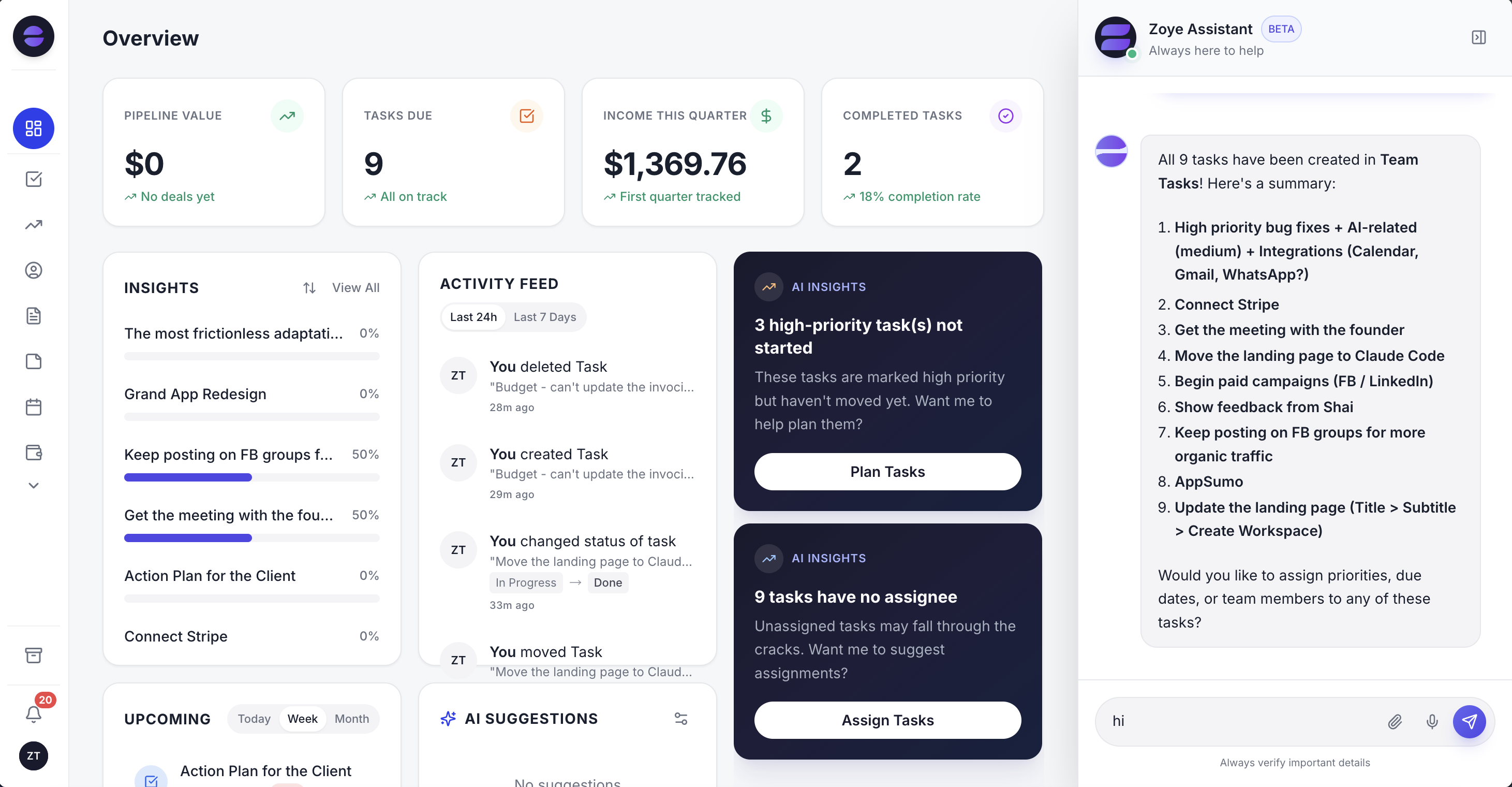
One screen for the deals, tasks and meetings that a CRM alone would split across three tools.
Customers who message on WhatsApp, Instagram or Facebook land in the same records. Zoye holds WhatsApp conversations with your leads on the official WhatsApp Business Platform, and Chats keeps those conversations and your Instagram and Facebook messages and comments in one inbox with assignment and team notes. Connecting your own business WhatsApp number is coming soon. Moving in is short: Zoye imports from Trello, Monday.com and spreadsheets today, and the assistant pulls records out of a CSV, PDF or screenshot you send it. Jira, Notion and ClickUp imports are coming soon.
Honest limits. Zoye is not a Salesforce-scale platform. It has no marketplace of thousands of apps, it is not a Zapier-scale integration catalog, and it is not a self-hosted builder you can extend with your own code. If your sales process needs territory management, CPQ pricing rules or developer sandboxes, Zoho CRM Enterprise or Salesforce are built for that. Zoye is built for small teams that want the work done more than they want a system to configure.
Pricing (as of November 2026, per plan, with a set number of members on each): Almost Free is $5 a month ($4 a month billed yearly) for 1 member with the core tools and 15 AI prompts a month, without automations. Starter is $29 a month ($23 a month billed yearly) for up to 5 members. Growth is $59 ($47 a month billed yearly) for up to 10 members and includes workflow automations and WhatsApp automations with 250 messages a month. Scale is $119 ($95 a month billed yearly) for up to 30 members, and Customize is quoted. See the pricing page for what each plan includes.
Ready to hand off the busywork?
Zoye brings AI-powered CRM, task management, and automation into one workspace.
Get StartedZoho or Salesforce: which should a small business pick?
Pick Zoho CRM if price, monthly billing and running the system yourself matter most. Pick Salesforce if you are building a sales organization that will outgrow small-business tools, already live in Slack, or have budget for an admin or partner. Pick neither if what you really want is the follow-up done.
- A 2 or 3 person team trying a CRM for the first time: Zoho CRM Free (3 users) or Bigin Free (1 user). Salesforce Free Suite works for 2 people.
- A small team that only needs a pipeline: Bigin Express or Premier.
- A 5 to 10 person team that wants a full CRM at a low price: Zoho CRM Standard, moving to Professional when you need processes and quoting.
- A team that wants sales, service and email campaigns in one account and expects to grow into Salesforce: Salesforce Starter Suite.
- A team ready to fund an admin or partner and wanting AppExchange apps: Salesforce Pro Suite, with an eye on Core if AI matters.
- A team that wants the CRM work done rather than configured: Zoye Starter at $29 a month for up to 5 members.
Whatever you choose, run the trial with your own data, not the sample records: import a real month of contacts, move ten real deals, export everything at the end and open the file. One week of that tells you more than any comparison table, this one included.
If you would rather see how a team of up to 10 runs deals, tasks and customer chats without configuring a CRM, book a Zoye demo and bring your current pipeline.