
Asana and Jira show up on almost every project management shortlist in 2026, yet they were built for opposite kinds of teams. Asana is clean, fast, and goal-aligned, the tool marketing, operations, and cross-functional teams reach for when they want their daily work visibly tied to company objectives. Jira is an issue tracker and agile engine, built for software teams that live in sprints, backlogs, and bug queues. Powerful, yes, but heavy and unapologetically developer-centric.
The reason this comparison is hard is that most teams are not purely one or the other. A product company has engineers who want Jira and a marketing team that would quietly revolt if forced into it. An agency wants Asana's polish but also needs to track clients, budgets, and deadlines that neither tool was designed to hold. If you are stuck between the two, that tension is usually a signal that the real answer is a different kind of tool entirely.
This guide breaks down how Asana and Jira compare on ease of use, boards and views, automation, breadth, AI, and pricing, with an honest verdict on each. Then it covers a third option that closes the gap both leave open: an AI assistant that actually executes, plus CRM and budget built into the same workspace as your tasks.
Pricing reflects published rates as of November 2026; check each vendor's pricing page for current figures.
Asana vs Jira at a glance
| Dimension | Zoye | Asana | Jira |
|---|---|---|---|
| Built for | Whole business, any team | Marketing, ops, cross-functional | Software and engineering |
| AI assistant | Built in, executes across workspace | Asana AI from Starter, capped requests | Atlassian Rovo from Standard, monthly credits |
| Task views | Board, list, grid, table | List, board, timeline, calendar | Backlog, board, list, timeline, calendar |
| Agile / sprints | Lightweight task flow | Limited | Deep - sprints, story points, epics |
| CRM / Deals | Built in, all plans | Not included (connects to Salesforce) | Not included |
| Budget / finance | Built in | Paid Timesheets & Budgets add-on | Not included |
| Reports / analytics | Cross-workspace live reports | Portfolios, workload | Burndown, velocity, dashboards |
| WhatsApp management | Live, by text or voice | Not built in | Not built in |
| Ease of adoption | Describe the setup by text or voice | Plain tasks and projects | Agile terms, admin-built rules |
| Pricing model | Flat tier, not per seat | Per seat | Per seat |
| Free plan | Not offered | Up to 2 users (Personal) | Up to 10 users |
| Paid entry price | Almost Free, $5/month (1 member, core tools) | $10.99 per user/month billed annually ($13.49 monthly) | $9.70 per user/month (monthly billing, up to 100 users) |
Ease of use: Asana for humans, Jira for engineers
This is the dimension where Asana and Jira separate most sharply, and it is the one that decides adoption.
Asana is designed to be obvious. A new user can open it, create a project, drop tasks into a list or board, and assign owners and due dates. The interface is uncluttered, the language is plain (tasks, projects), and you can flip between list, board and calendar views without losing context. For marketing teams, operations, agencies, and any group that is not engineering-led, that ease is the headline feature.
Jira is powerful in proportion to how much you are willing to configure it. It is organised around developer concepts: epics, stories, sprints, workflows, story points, and work items (what Jira used to call issues). For an engineering team that already thinks in those terms, this is exactly right. For everyone else, Jira feels like a cockpit, and only project or global admins can create its automation rules. The depth that makes Jira indispensable to a dev team is the same depth that makes it a poor fit for the rest of the company.
Verdict: Asana for any team that needs to be productive immediately. Jira only when an engineering team genuinely needs its agile machinery and has the patience to configure it.
Boards, views, and the agile workflow
Jira is an issue tracker first. Its boards are built for agile delivery: Scrum boards with sprints and burndown, Kanban boards with work-in-progress limits, a dedicated backlog, a timeline view for planning, and versions for releasing work. Story points, velocity reports, and release tracking are native. If your team runs formal sprints and wants code commits, branches, pull requests and deployment status beside the work, Jira is built for exactly that.
Asana offers list, board, and calendar views on every plan, adds timeline and Gantt views from Starter, and workload views on Advanced. Every view is clean and fast, and the underlying data model links tasks to projects, projects to portfolios, and portfolios to goals, so daily work stays visibly connected to strategy. Asana can run a lightweight sprint, but it does not pretend to be an agile issue tracker, and it should not be forced into that role.
Verdict: Jira for deep agile and engineering workflows. Asana for cross-functional planning where clarity and goal alignment matter more than sprint mechanics.
Automation and workflows
Jira automation is mature and granular. You can build no-code rules that auto-assign work, close a parent work item when its last sub-task closes, sync work across projects, and connect to tools like Bitbucket, GitHub and Slack. Every Jira Cloud plan includes it with monthly usage limits, but only project or global admins can create rules, so it benefits from an administrator who knows the system well.
Asana automation, branded as Rules, is friendlier and more visual. You set triggers and actions once to assign work, send alerts and keep statuses current, without writing logic. It covers the everyday automation that operations and marketing teams actually need, even if it does not reach Jira's depth on developer-specific triggers.
Verdict: Jira for sophisticated, engineering-grade automation. Asana for approachable, no-code workflow automation that a non-technical admin can own.
Breadth: where both tools stop
Here the two rivals converge on the same weakness. Both are project and task tools, and both end at the edge of that category.
Asana manages tasks and goals well. There is no CRM in its plans, so the clients and deals behind the work live in another system (Advanced connects to Salesforce). Project budgets come only with the paid Timesheets & Budgets add-on, so without it the money behind a project lives in a spreadsheet.
Jira is even narrower in scope by design. It tracks work items. Atlassian sells Confluence for docs and Jira Service Management for service teams as separate products, and the Atlassian Marketplace lists over 3,000 apps to extend Jira, so a Jira setup often grows into several products. There is no CRM and no budget tracking in the core product.
The result is the same for both: teams add other tools around their project tracker to cover the basics of running a business. Each new tool is another login, another bill, and another place data fails to sync.
Verdict: Neither Asana nor Jira includes a CRM, Jira has no budget tracking, and Asana sells budgets as an add-on. If you need those connected to your tasks, neither tool covers it natively.
AI: who actually has it, and what it does
This is where the plan you pick decides how much AI you get.
Asana includes Asana AI (AI Teammates, Asana Dash, and AI Studio for no-code workflows) on every paid plan from Starter ($10.99 per user per month billed annually), and Advanced ($24.99) adds AI Meetings. The catch is the cap: AI Teammates and Asana Dash include 5 requests per user per month, up to 50 per account on Starter and Advanced. The free Personal plan has no Asana AI.
Jira includes Atlassian Rovo (Search, Chat, and Agents) on every paid plan from Standard, with 25 Rovo credits per user per month on Standard, 70 on Premium and 150 on Enterprise. The Free plan does not include Rovo, so as with Asana, the AI comes with paying, not with the free tier.
The deeper limitation is what these AIs can reach. Both work inside project and task data. Neither has a CRM for the AI to update, and neither has a built-in budget for it to adjust (Asana budgets need the paid add-on).
Verdict: Asana and Jira both include AI on paid plans only, with monthly caps, and both keep it inside project work. For an AI that takes real action across tasks, CRM, calendar, and budget, see the third option below.
Pricing: Asana vs Jira
Both Asana and Jira charge per seat, so the bill grows every time you hire, and both give their pricier tiers more AI: Asana adds AI Meetings on Advanced, and Jira raises Rovo credits on Premium.
Asana pricing:
- Personal: Free for up to 2 users, with list, board and calendar views
- Starter: $10.99 per user per month billed annually ($13.49 billed monthly), with Asana AI included
- Advanced: $24.99 per user per month billed annually ($30.49 billed monthly), adding AI Meetings, portfolios, goals and workload
- Enterprise: Custom
Jira pricing:
- Free: Up to 10 users, 2 GB of storage, no Rovo
- Standard: $9.70 per user per month on monthly billing for teams of up to 100 users, with Rovo included
- Premium: $19.60 per user per month on monthly billing for teams of up to 100 users, for cross-team planning
- Enterprise: Custom, billed annually
Pricing reflects published rates as of November 2026; check each vendor's pricing page for current figures.
The 20-person team math. On Asana Advanced, a 20-person team pays about $500 per month billed annually (about $610 billed monthly) for task management, and still has no CRM, with budgets only as a paid add-on. On Jira Premium, the same headcount runs $392 per month on monthly billing for what is essentially work tracking, before adding Confluence for docs. A 10-member Zoye Growth plan is $59 per month flat, with the AI assistant, CRM, and budget all included, and the price only changes when you pass the plan's 10 members.
Verdict: Jira is cheaper per seat than Asana on monthly billing ($9.70 on Standard against $13.49 on Starter), but both use the per-seat model and both leave out the tools you would otherwise buy separately. A flat-rate platform that includes AI, CRM, and budget wins on total cost once you account for everything the project tracker does not cover.
See what Zoye can do for you
CRM, deals, tasks and your Instagram, Facebook and WhatsApp automations in one workspace. Just ask Zoye and it sets any of it up for you.
Explore FeaturesThe third option: Zoye
Asana and Jira leave the same gaps. AI comes only with paid seats and stays inside project work, there is no CRM, and budget tracking is missing or a paid add-on. Teams that find Jira too heavy and technical, or Asana too narrow once they grow, keep hitting the same wall. Zoye is built for exactly that team: an AI-native workspace that puts tasks, deals, contacts, calendar, budget, docs, and reports in one place, with a personal AI assistant that takes real action across all of them when you ask, by text or voice.
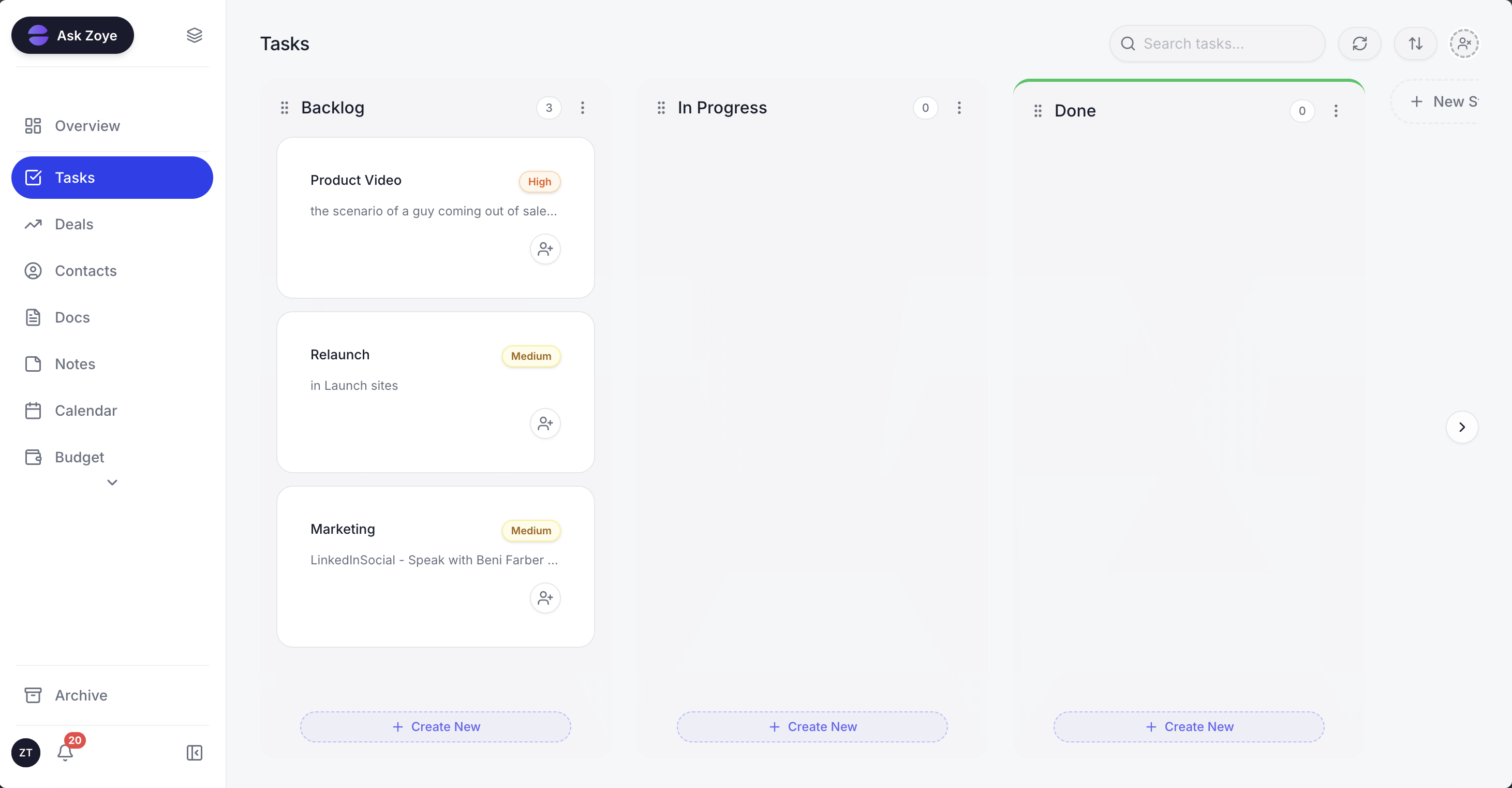 Zoye gives every project board, list, grid and table views in one workspace.
On the project side, Zoye gives every project board, list, grid and table views, so the marketing lead gets the clean Kanban they wanted from Asana while the work stays connected to the rest of the business. The difference from both rivals is the Zoye Assistant. It does not just summarise. Tell it to turn a client brief into tasks, prioritise this week by deadline and workload, draft the follow-ups, block deep-work time on the calendar, or surface everything overdue, and it executes the action rather than handing you a suggestion. Because Zoye sits on top of CRM, budget, and calendar as well as tasks, whatever you ask for can touch all of them at once.
The breadth is the other half of the story. Asana covers tasks; Jira covers issues; Zoye covers the business. A real Deals-and-Contacts CRM is connected to tasks, native budget tracking sits beside project work, live WhatsApp management runs by text or voice, and reports pull across the whole workspace in real time. That is the operational coverage both Asana and Jira ask you to buy elsewhere.
Example: Picture a 12-person product studio that splits its tools the usual way: engineers on Jira, the marketing and client side on Asana, deals in a spreadsheet, budgets in another. After a call, the founder sends Zoye a quick voice note: "The client signed the retainer, about $30K over three months, kickoff next week." Zoye opens the client deal, files the contact, books the kickoff on the calendar, and drafts the launch tasks against the retainer. In the old split, that is four tools and nothing connecting the work to the client or the money.
Pricing: Almost Free at $5 per month for 1 member with the core tools. Starter from $29 per month (5 members). Growth from $59 per month (10 members). Scale from $119 per month (30 members).
Best for: Teams that find Jira too heavy and dev-centric and Asana too narrow once they need CRM, budget, and an AI that actually does the work, all at flat-rate pricing.
Want to see it in action?
See Zoye catch a new lead, answer on WhatsApp and set up the follow-up, all from one message.
See How It WorksWhen to choose each
Choose Asana if:
- Your team is marketing, operations, or cross-functional rather than engineering-led
- You want a tool the whole team can adopt with no setup project
- Goal-to-task alignment and a clean, fast interface are priorities
- You are fine with capped AI requests on paid plans and do not need CRM or budget built in
Choose Jira if:
- You are an engineering team running formal agile - sprints, story points, backlogs, releases
- You need deep issue tracking, burndown and velocity reporting, and tight Git and CI integration
- You have the patience and an administrator to configure workflows and automation rules
- The rest of the company does not need to live in the same tool
Choose Zoye if:
- You want one workspace for tasks, CRM, calendar, budget, and reports instead of a stack of subscriptions
- You want an AI assistant that takes real action
- You prefer flat-rate pricing that does not climb every time you hire
- You want board, list, grid and table views without Jira's weight or Asana's missing operational tools
- You want to run the business from WhatsApp by text or voice
Ready to hand off the busywork?
Zoye brings AI-powered CRM, task management, and automation into one workspace.
Get StartedFrequently asked questions
It depends on who is using it. Jira is better for software and engineering teams that live in sprints, backlogs, story points, and bug tracking. Asana is better for marketing, operations, and cross-functional teams that want clean task management tied to goals without the agile overhead. Neither is universally better - Jira is built for developers, Asana for everyone else. Teams that also need a CRM and budget tracking beside their tasks will need more than either tool.
Yes. Asana is built around plain terms like tasks and projects, with simple list, board and calendar views. Jira is powerful but dense, built around developer concepts like epics, sprints, story points and workflows, and only admins can create its automation rules. If your team is not engineering-led, Asana is the easier fit.
Software teams that run formal agile processes - sprints, story points, backlog grooming, release tracking, tight Git and CI integration - are generally better served by Jira, which was purpose-built for that workflow. Asana can handle lightweight engineering work but lacks the deep agile and issue-tracking features developers expect. The trade-off is that Jira is heavy and dev-centric for the rest of the company.
Yes, on paid plans only. Asana AI (AI Teammates, Asana Dash and AI Studio) comes with every paid plan from Starter ($10.99 per user per month billed annually), capped at 5 requests per user per month and up to 50 per account; Advanced adds AI Meetings. Jira includes Atlassian Rovo (Search, Chat and Agents) on every paid plan from Standard, with 25 credits per user per month on Standard and 70 on Premium; the Free plan has no Rovo. Neither tool includes a CRM for that AI to work on. (Pricing reflects published rates as of November 2026 - check each vendor's pricing page.)
Yes - Zoye is built for teams that find Jira too heavy and technical and Asana missing the operational basics. It combines tasks with board, list, grid and table views, plus a real CRM, budget tracking, and a personal AI assistant that takes action across the whole workspace. A 10-member team pays $59 per month flat on Zoye Growth with the AI, CRM, budget and automations included, instead of paying per seat for task management alone.
The bottom line
Asana and Jira are both strong tools built for very different teams. Jira is the engineering team's home: deep agile, granular issue tracking, mature automation, and a lower per-seat price than Asana, as long as you have the patience to configure it and do not need anyone outside engineering to use it. Asana is the cross-functional team's home: clean, fast, and goal-aligned, as long as capped AI requests are enough and you do not need CRM or budget built in.
The real question for most teams in 2026 is whether either tool fits how the whole business runs. If you need board, list, grid and table views without Jira's weight, an AI assistant that takes action instead of just suggesting, a CRM and budget connected to your tasks, and flat pricing per plan with a set number of members, the honest answer is neither. Zoye is built for that team, with all of it in one workspace; see pricing for what each plan includes.
For a team choosing its next project tool, Zoye Growth costs $59 a month for up to 10 members, and automations, the Lead Bot and broadcasts start there. Almost Free gives one person the core tools for $5 a month.
For more context, see our guides to the best Asana alternatives in 2026, the best Jira alternatives, Asana vs Trello, and Trello vs Jira.