
Quick answer: an AI employee is software that owns a set of recurring jobs in your business (lead replies, follow-ups, booking, record keeping, reminders and reports) and does them inside your real tools, under rules you write and approvals you keep. It does not own judgment calls, relationships or regulated decisions. Treat it like a hire: give it a job description, a manager, a probation week and a log you actually read.
Key takeaways (October 2026)
- In June 2026, US employers paid an average of $49.46 per hour worked for civilian workers, of which $15.61 was benefits, according to the Bureau of Labor Statistics. That is the real price of an hour of human time, owner included.
- Named AI employee products run from about $15 to $97 a month before usage: HighLevel's AI Employee is $50 or $97 per sub-account a month on top of a $97 to $497 plan, and Lindy's Team plan starts at $29.99 a month for 3,000 credits.
- Microsoft's 2025 Work Trend Index, a survey of 31,000 workers in 31 markets, found 82% of leaders confident they will use digital labor to expand capacity within 12 to 18 months.
- From 2 August 2026, Article 50 of the EU AI Act requires that people be told when they are interacting with an AI system, unless it is obvious.
- A first job can be live in one working week; add the second only after two clean weeks.
What is an AI employee, and how is it different from a chatbot?
An AI employee is software given ownership of a job, not a single question. It replies, follows up, books, updates records and reports inside your actual tools, and it is measured on outcomes. A chatbot answers what it is asked and stops; an AI employee is expected to finish the work and leave a record of having done it.
The term is marketing shorthand, and vendors stretch it. Some sell a team of named characters with job titles. Some sell an agent builder and call each agent an employee. Some sell a single AI that sits across your customer records, calendar and messages. The search terms "AI worker", "digital employee" and "digital worker" usually point at the same idea: software that does recurring work with less supervision than a tool, but more supervision than a person.
The useful test is ownership. Ask of any product: which job does it own from start to finish, what does it need from me to do that job, and how will I know it was done? If the answer to the first question is "it drafts things for you to finish", you have a writing tool. If the answer is "it replies to every new enquiry within minutes, creates the contact, opens the deal and tells the owner who is waiting", you have something closer to an employee.
If you want the bigger picture of how one AI can sit across a whole business, our explainer on what an AI Business Operator is covers the category, and AI that runs your business walks through a typical day. This guide stays on the hiring question: which jobs to hand over, what it costs next to a person, who stays accountable, and how to get one working within a week.
The demand is real. Microsoft's 2025 Work Trend Index, based on a survey of 31,000 full-time employed or self-employed knowledge workers across 31 markets, reported that 82% of leaders were confident they would use digital labor to expand workforce capacity in the next 12 to 18 months. Large companies have teams to manage that shift. A five-person business has the owner, which is why the job description matters more than the product.
What jobs can an AI employee own?
Six jobs suit an AI employee in a small business: replying to new leads, following up, booking, keeping records, sending reminders and preparing reports. They share three traits. They repeat many times a week, the right action can be written down as a rule, and a wrong move is cheap to spot and reverse.
| Job | What the AI employee owns | What it needs from you | How you know it is done |
|---|---|---|---|
| Lead replies | First reply to every new enquiry, contact created, source recorded | Your answers to the top 20 questions, your tone, when to hand over | Every new lead has a reply and an owner within minutes |
| Follow-ups | Chasing quotes, quiet conversations and missed calls on a schedule | How many touches, how far apart, when to stop | No open quote older than your limit without a next step |
| Booking | Offering real open slots, booking, rebooking after a no-show | Calendar access, service lengths, buffer rules | Bookings made in chat, not by phone tag |
| Record keeping | Updating contacts, deals and tasks from chats, calls and files | Which fields matter and what counts as a stage change | Records you can trust without checking the inbox |
| Reminders | Payment, renewal, deadline and appointment reminders | Who gets which reminder, and in what words | Fewer late invoices and missed appointments |
| Reports | A weekly summary of pipeline, workload and overdue items | The five numbers you actually look at | A report you read on Monday instead of building it |
Lead replies. This is the job with the clearest return, because an enquiry that waits is often an enquiry lost to whoever answered first. The AI employee answers from the facts you gave it, asks the two or three questions that tell you whether the person is a real buyer, and passes the conversation to a person when it reaches the edge of what it knows. Our guide to stopping lead leakage covers where leads go missing.
Follow-ups. Most small businesses do not lose deals in the first conversation. They lose them in the silence after the quote. A written cadence (for example, a check-in after two days, a useful note after a week, a polite close after three weeks) is exactly the kind of rule software follows without getting tired or embarrassed.
Booking. Booking is a loop: offer a time, confirm, remind, and rebook if the person does not show. Each step is simple, and the cost is in remembering all of them for every client.
Record keeping. Records go stale because updating them is nobody's job. Give that job to the AI employee and the customer list, deals and tasks stay current from the conversations that already happen.
Reminders. Payment reminders are where owners most often hesitate, because chasing money feels awkward. A reminder that goes out on schedule, in words you approved, removes the hesitation and the awkwardness.
Reports. A weekly report is the AI employee's way of showing its work: what came in, what moved, what is overdue, and what needs you.
What should an AI employee never own?
Three kinds of work stay with people: judgment calls, relationships and anything regulated. An AI employee can prepare each of them, gather the context and draft the message, but a named person decides. The line is simple: if a wrong answer is expensive, personal or legally sensitive, a human signs it.
Judgment calls. Whether to give a discount, drop a difficult client, accept a rushed job or bend a policy depends on context the software does not fully have: the history, the margin, the mood. An AI employee should flag these moments and lay out the facts, not decide them.
Relationships. Your best clients are loyal to people. An apology after a real mistake, a thank-you to a long-standing customer, a conversation about raising prices: these carry weight because a person chose to send them. Automating them saves a minute and spends trust.
Anything regulated. Advice on health, law, money, insurance or tax, decisions about who gets hired or who gets credit, and anything a licence or a professional body covers belongs with a qualified person. Many legal systems put specific duties on automated decisions in these areas, and the duties fall on the business, not the software vendor.
Disclosure is part of the job. From 2 August 2026, Article 50 of the EU AI Act requires that AI systems meant to talk directly with people be designed so those people are told they are interacting with an AI system, unless that is obvious to a reasonably well-informed person. Meta's messaging policy for Messenger and Instagram expects bots to say they are automated where the law requires it and recommends doing so. On WhatsApp, Meta's terms have barred general-purpose AI chatbots from the Business Platform since 15 January 2026, while business-specific AI that serves your own customers, such as support, bookings, sales and qualification, is allowed. An AI employee that talks to your customers should introduce itself honestly.
Want to see it in action?
See Zoye catch a new lead, answer on WhatsApp and set up the follow-up, all from one message.
See How It WorksWhat does an AI employee cost compared with a hire?
On list price, an AI employee costs tens of dollars a month and a part-time hire costs thousands, but that comparison is misleading. The honest numbers add the time you spend supervising the AI and the work it cannot do. Below is an illustrative calculation with every assumption stated, so you can swap in your own figures.
The human side. The Bureau of Labor Statistics' Employer Costs for Employee Compensation release for June 2026 put the average cost for civilian workers at $49.46 per hour worked: $33.85 in wages and salaries and $15.61 in benefits. For private industry, it was $46.89 per hour, with wages at 70.0% of the cost and benefits at 30.0%. The BLS Occupational Outlook Handbook gives a 2025 median pay of $48,310 a year, or $23.23 an hour, for secretaries and administrative assistants.
Assumptions for the table below. A part-time admin hire works 20 hours a week for 52 weeks at the $23.23 median hourly pay. Benefits are added using the private industry split, so wages are 70% of the total cost. Recruiting, equipment and training time are left out, which makes the human column look cheaper than it is. On the AI side, the owner spends 30 minutes each working day reviewing and approving, 21 working days a month, valued at the $49.46 civilian average. Messaging charges vary by country and volume and are shown as a variable line.
| Monthly cost line (illustrative) | Part-time admin hire, 20 h a week | AI employee |
|---|---|---|
| Pay | $2,013 (1,040 h a year at $23.23, divided by 12) | Software subscription, about $15 to $119 for most small-business plans |
| Benefits and employer costs | $863 (so pay is 70% of the total) | None |
| Supervision | Some, usually lower once trained | About $519 (10.5 h of owner time at $49.46) |
| Usage charges | None | Credits, tasks or messaging charges, which vary |
| Approximate total | About $2,876 a month | About $534 to $638 a month plus usage |
| What it covers | Repetitive work plus judgment, phone calls, relationships | Repetitive, rule-based work only |
Two things stand out. First, the owner's review time is the largest cost of the AI employee, larger than the software itself, which is why governance (the next section) is a cost lever and not only a safety one: clearer rules mean fewer approvals. Second, the columns do not buy the same thing. The hire can answer the phone in a hard moment, notice a client is unhappy and decide a discount. The AI employee cannot.
So the useful question is not "AI or person?" but "which hours of a person's week are repetitive enough to hand over?" For many small businesses, an AI employee delays the first admin hire, or lets an existing person spend their hours on the human part of the work.
Which products are sold as an "AI employee" in 2026?
Several vendors use the label, and they mean different things: an add-on to a marketing platform, an agent builder priced in credits, a team of named AI characters, or an enterprise agent platform. Prices below were checked on each vendor's own site in October 2026 and exclude taxes and usage beyond the allowance.
| Product | What "AI employee" means there | Price shown, October 2026 |
|---|---|---|
| HighLevel AI Employee | An AI add-on for sub-accounts on HighLevel's agency and marketing platform | AI Employee Growth $50 or Unlimited $97 per sub-account a month, on top of Starter $97, Unlimited $297 or Agency Pro $497 a month |
| Lindy | Calls itself "the AI employee that plugs into your tools" | Free plan with starter credits; Team from $29.99 a month for 3,000 credits; top-ups at $10 per 1,000 credits; Enterprise custom |
| Sintra | Twelve AI "employees" with job titles, also called helpers | All 12 helpers and 250 credits a month on every plan; $15.60 a month on the 12-month plan, $48.50 on the 1-month plan, both shown as discounts at the time of checking |
| Relevance AI | An "AI Workforce" platform for building specialist agents | Enterprise plan only on the pricing page, through sales |
| Zoye | One AI Business Operator that works across your CRM, tasks, calendar, invoices and chats | Almost Free $5, Starter $29, Growth $59, Scale $119 a month, Customize quoted |
How to read this table. A per-credit product is cheap to try and hard to forecast, because each action spends credits. A per-sub-account add-on makes sense if you already run the platform underneath it. A team of named characters is easy to understand but each character is its own silo. An operator that sits on top of your records owns fewer "personalities" but can act across the whole customer history. Whichever you pick, run the onboarding week below on one job before you compare anything else.
How do you govern an AI employee: approvals, logs and accountability?
Govern an AI employee the way you would a new hire with access to your customers: one named manager per job, approval before anything risky, a log of every action, and a way to undo. The NIST AI Risk Management Framework, released on 26 January 2023 for voluntary use, groups this work under Govern, Map, Measure and Manage.
A small business does not need a framework document. It needs four habits.
1. Name a human owner for every job. The AI employee is never the accountable party; the business is. Write down who owns lead replies, who owns payment reminders, who owns reports. When something goes wrong, that person looks at the log and fixes the rule.
2. Set approval tiers. Not every action needs the same gate.
| Action | Default tier | Why |
|---|---|---|
| Updating a contact, deal or task from a conversation | Runs automatically, logged | Cheap to check and easy to reverse |
| A one-to-one reply inside rules you wrote | Draft for approval in the first week, then automatic | The tone and facts need checking before trust builds |
| A message to many people at once | Approval every time | One mistake reaches everyone |
| Anything that spends money or deletes records | Approval every time | Hard or impossible to undo |
| Discounts, refunds, complaints, regulated questions | Hand to a person | Judgment, relationship or legal duty |
3. Keep a log you actually read. Every action should record what triggered it, what changed and what was sent. In the first two weeks, read it daily. After that, a weekly skim is enough, plus a look whenever a customer says something odd. A log nobody reads is a liability with a timestamp.
4. Make every change reversible. Ask any vendor: can I undo an action the AI took, and can I pause a rule instantly? If the honest answer is no, keep that job on approval forever.
Add two more rules if the AI talks to customers: it introduces itself as automated, and it never invents a price, a policy or a promise it was not given. "I will check with the team" is always an acceptable answer.
See what Zoye can do for you
CRM, deals, tasks and your Instagram, Facebook and WhatsApp automations in one workspace. Just ask Zoye and it sets any of it up for you.
Explore FeaturesHow do you onboard an AI employee in one week?
Onboard one job at a time, in five working days: a job description, access, training on your facts, a shadow period, and a reviewed first live run. The goal of week one is not maximum automation; it is one job done reliably with a log you trust. Add a second job only after two clean weeks.
Day 1: write the job description. One page. The job's name, its trigger ("a new enquiry arrives from any channel"), the outcome ("a reply, a contact and an owner within 10 minutes"), the limits ("never quote a price above the list, never offer a discount, hand over complaints"), and the human owner. If you cannot write this page, the job is not ready to delegate.
Day 2: give it access, and only the access it needs. Connect the channels and calendar for this job. Bring your records in so the AI works from your real customer history: in Zoye that means importing from Trello, Monday.com or a spreadsheet, or sending a CSV, PDF or screenshot for the records to be extracted. Do not grant access to tools the first job does not touch.
Day 3: teach the facts and the house rules. Your 20 most common questions with your answers. Your service list, durations and the price ranges you are willing to state. Your tone, with two real messages you were proud of. Then the standing rules, written as "from now on" sentences: "from now on, every lead that asks for a quote gets a follow-up task for the next day".
Day 4: shadow mode. The AI employee drafts every action for the job, and a person approves or corrects each one. Count the corrections. Each correction should change a rule or a fact, not just that one reply.
Day 5: first live run with a scorecard. Let the routine part run with approval kept on anything to many people, money or deletion. At the end of the day, score it.
| Scorecard line | Target for a lead-reply job |
|---|---|
| New enquiries answered | Every one, including evenings |
| Median time to first reply | Under 10 minutes |
| Records complete (name, contact, source, owner) | Every new lead |
| Corrections needed today | Falling day by day |
| Handovers that reached a person in time | Every one |
Week two and three: earn the next job. If the scorecard holds for two weeks, move the next job (usually follow-ups or reminders) through the same five days. Most small businesses find that the job description written on Day 1 is the part they reuse most.
Zoye: an AI employee that works across the whole business
Zoye is an AI Business Operator: one AI that works in your business across the CRM, tasks, calendar, invoices, reports and chats, rather than a separate bot for each job. You give it work in the app, on WhatsApp, by voice note, in Slack or through Claude, with the same permissions on every channel.
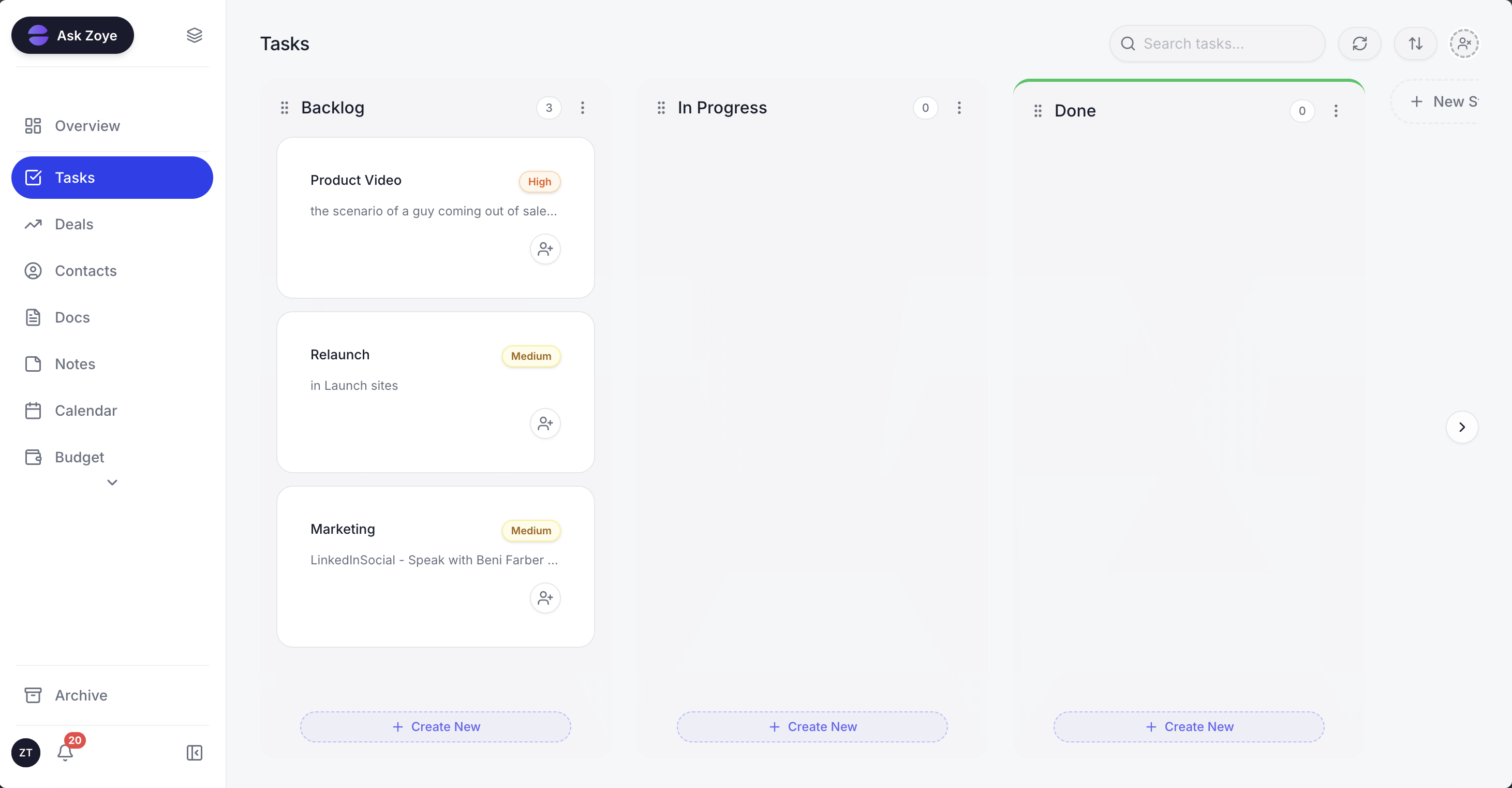
Each job the AI takes on shows up as tasks with an owner and a date, so the team can see what was done, what is waiting for approval and what is late.
The six jobs in Zoye. A new lead from a form, an ad, Instagram, Facebook or a WhatsApp conversation becomes a contact with its source, gets an owner straight away, and can receive a first message and qualifying questions whose answers land in the contact's fields. Follow-ups and reminders run as workflow automations: you describe what should happen, Zoye builds the rule, shows it in plain words and waits for your approval before anything runs. Bookings are offered from real open slots. Notes from Zoom, Google Meet and Teams calls turn into tasks and record updates you approve in one tap. A daily insights digest arrives in the app, by email, on WhatsApp or in Slack, and you can schedule a job such as "every Monday, tell me what I missed".
Governance built in. Every automation run is logged with what fired, what changed and what it sent, and any rule can be paused. Say "undo that" and Zoye reverts its last action, whether the assistant, a teammate or an automation made it. Zoye asks before deleting or making bulk changes and shows exactly what will change. Standing rules a teammate proposes for the whole team go live only after the owner approves them, and roles and permissions decide who can see and change what.
Honest limits. Zoye does not make judgment calls for you, does not run ads, is not a helpdesk ticketing suite and is not an accounting ledger. Connecting your own business WhatsApp number is coming soon; today, the WhatsApp conversations Zoye has with your leads appear in Chats and on each contact's card, next to Instagram and Facebook messages.
Pricing (as of October 2026): the plans are flat monthly prices, not per seat or per credit. Starter costs $29 a month and covers up to 5 members ($23 a month on a yearly bill); Growth is $59 for a team of up to 10 ($47 yearly); Scale is $119 for up to 30 people ($95 yearly); larger setups get a Customize quote. The entry plan, Almost Free at $5 ($4 yearly), is for 1 member with the core tools and 15 AI prompts a month and has no automations, so it cannot run the follow-up and reminder jobs described here. See pricing for each plan's contents.
Ready to hand off the busywork?
Zoye brings AI-powered CRM, task management, and automation into one workspace.
Get StartedShould you hire a person or an AI employee first?
Hire the AI employee first when the work you are drowning in is repetitive and rule-based: replies, follow-ups, bookings, record updates and reminders. Hire a person first when the bottleneck is judgment, phone calls, delivery or relationships. Many small businesses end up with both, and the AI employee makes the person's hours count for more.
A quick way to decide is to list last week's tasks and mark each one: "the same every time", "needs my judgment" or "needs a relationship". If more than half are "the same every time", start with an AI employee on the biggest of them and run the one-week onboarding. If most need judgment or a relationship, an AI employee will help around the edges, but the hire is the real answer.
Either way, write the job description first. It is the same document for a person and for software, and it is the cheapest management tool you will ever own.
If your leads arrive across WhatsApp, Instagram and your website and the follow-ups keep slipping, book a Zoye demo and bring one job description to set up together.